2018 SUBARU CROSSTREK change wheel
[x] Cancel search: change wheelPage 43 of 474
(44,1)
北米Model "A1320BE-C" EDITED: 2017/ 10/ 10
&Emergency Locking Retrac-
tor (ELR)The driver’s seatbelt has an Emergency
Locking Retractor (ELR).
The emergency locking retractor allows
normal body movement but the retractor
locks automatically during a sudden stop,
impact or if you pull the belt very quickly
out of the retractor.&Automatic Locking Retractor/
Emergency Locking Retrac-
tor (ALR/ELR)Each passenger’s seatbelt has an Auto-
matic Locking Retractor/Emergency Lock-
ing Retractor (ALR/ELR). The Automatic
Locking Retractor/Emergency Locking
Retractor normally functions as an Emer-
gency Locking Retractor (ELR). The ALR/
ELR has an additional locking mode
“Automatic Locking Retractor (ALR)
mode”intended to secure a child restraint
system. When the seatbelt is once drawn
out completely and is then retracted even
slightly, the retractor locks the seatbelt in
that position and the seatbelt cannot be
extended. As the belt is rewinding, clicks
will be heard which indicate the retractor
functions as an ALR. When the seatbelt is
retracted fully, the ALR mode is released.
When securing a child restraint system onthe rear seats by the use of the seatbelt,
the seatbelt must be changed over to the
Automatic Locking Retractor (ALR) mode.
When the child restraint system is re-
moved, make sure that the seatbelt re-
tracts fully and the retractor returned to the
Emergency Locking Retractor (ELR)
mode.
For instructions on how to convert the
retractor to the ALR mode and restore it to
the ELR mode, refer to“Installing child
restraint systems with ALR/ELR seatbelt”
F1-28.
&Seatbelt warning light
and chimeRefer to“Seatbelt warning light and chime”
F3-13.&Fastening the seatbelt!Front seatbelts
1. Adjust the seat position according to
the following procedure.
Driver’s seat:Adjust the seatback to the
upright position. Move the seat as far from
the steering wheel as practical while still
maintaining full vehicle control.
Front passenger’s seat:Adjust the seat-
back to the upright position. Move the seat
as far back as possible.2. Sit well back in the seat.
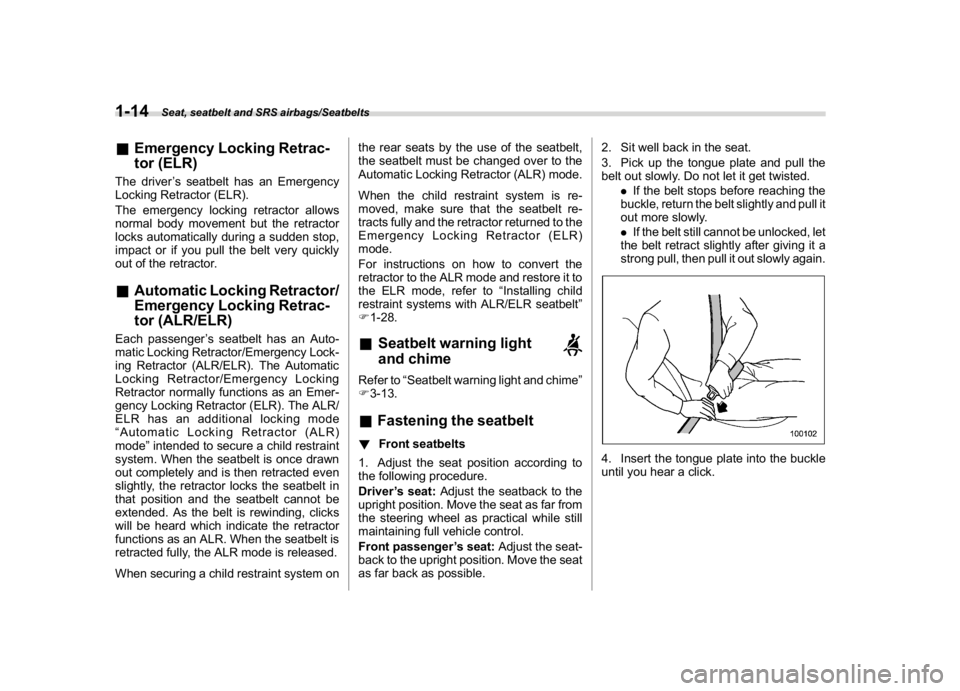
3. Pick up the tongue plate and pull the
belt out slowly. Do not let it get twisted.
.If the belt stops before reaching the
buckle, return the belt slightly and pull it
out more slowly.
.If the belt still cannot be unlocked, let
the belt retract slightly after giving it a
strong pull, then pull it out slowly again.
4. Insert the tongue plate into the buckle
until you hear a click.
Seat, seatbelt and SRS airbags/Seatbelts
1-14
Page 136 of 474

(141,1)
北米Model "A1320BE-C" EDITED: 2017/ 10/ 10
Turn signallever...................................................3-75
One-touch lane changer........................................3-76
Wiper and washer.................................................3-76
Windshield wiper and washer switches .................3-77
Rear window wiper and washer switch..................3-79
Mirrors...................................................................3-80
Inside mirror.........................................................3-80
Auto-dimming mirror/compass (if equipped)..........3-80Auto-dimming mirror/compass with HomeLink
®
(if equipped)......................................................3-81
Outside mirrors....................................................3-88
Defogger and deicer (ifequipped)......................3-89
Tilt/telescopic steeringwheel..............................3-90
Heated Steering Wheel system (if equipped).........3-91
Horn.......................................................................3-92
Instruments and controls
Page 153 of 474
(158,1)
北米Model "A1320BE-C" EDITED: 2017/ 10/ 10
the TPMS is unable to monitor all
four road wheels. Contact your
SUBARU dealer as soon as possible
for tire and sensor replacement and/
or system resetting.
If the light illuminates steadily after
blinking for approximately one min-
ute, promptly contact a SUBARU
dealer to have the system inspected.
CAUTION
The tire pressure monitoring system
is NOT a substitute for manually
checking tire pressure. The tire
pressure should be checked peri-
odically (at least monthly) using a
tire gauge. After any change to tire
pressure(s), the tire pressure mon-
itoring system will not re-check tire
inflation pressures until the vehicle
is first driven more than 20 mph (32
km/h). After adjusting the tire pres-
sures, increase the vehicle speed to
at least 20 mph (32 km/h) to start the
TPMS re-checking of the tire infla-
tion pressures. If the tire pressures
are now above the severe low pres-
sure threshold, the low tire pressure
warning light should turn off a few
minutes later. Therefore, be sure to
install the specified size for the frontand rear tires.
&ABS warning light
CAUTION
.If any of the following conditions
occur, we recommend that you
have the ABS repaired at the first
available opportunity by your
SUBARU dealer.
–The warning light does not
illuminate when the ignition
switch is turned to the“ON”
position.
–The warning light illuminates
when the ignition switch is
turned to the“ON”position,
but it does not turn off even
after the vehicle is started.
–The warning light illuminates
during driving.
.When the warning light is on (and
the brake system warning light is
off), the ABS function shuts
down. However, the conventional
brake system continues to oper-
ate normally.
The ABS warning light, Vehicle Dynamics
Control warning light, and brake systemwarning light illuminate simultaneously if
the EBD system malfunctions. For further
details of the EBD system malfunction
warning, refer to“Electronic Brake Force
Distribution (EBD) system warning”F3-
21.
NOTEIf the warning light behavior is as
described in the following conditions,
the ABS may be considered normal.
.The warning light illuminates when
the ignition switch is turned to the“ON”
position and turns off approximately 2
seconds after the engine has started.
.The warning light illuminates right
after the engine is started but turns off
immediately, remaining off.
.The warning light remains illumi-
nated after the engine has been started,
but it turns off while driving.
.The warning light illuminates during
driving, but it turns off immediately and
remains off.
When driving with an insufficient battery
voltage such as when the engine is jump
started, the ABS warning light may illumi-
nate. This is due to the low battery voltage
and does not indicate a malfunction. When
the battery becomes fully charged, the
light will turn off.
Instruments and controls/Warning and indicator
3-20
Page 169 of 474
(174,1)
北米Model "A1320BE-C" EDITED: 2017/ 10/ 10
Mark Name Page
Steering responsive fog
lights OFF indicator (if
equipped)3-31High beam assist warn-
ing indicator (yellow) (if
equipped)3-30Windshield washer fluid
warning indicator3-18Hill descent control in-
dicator (if equipped)3-32Icy road surface warn-
ing indicator3-32
&Basic screensBy operating the“
”or“
”switch on the
steering wheel, you can change the screen
that is always displayed.
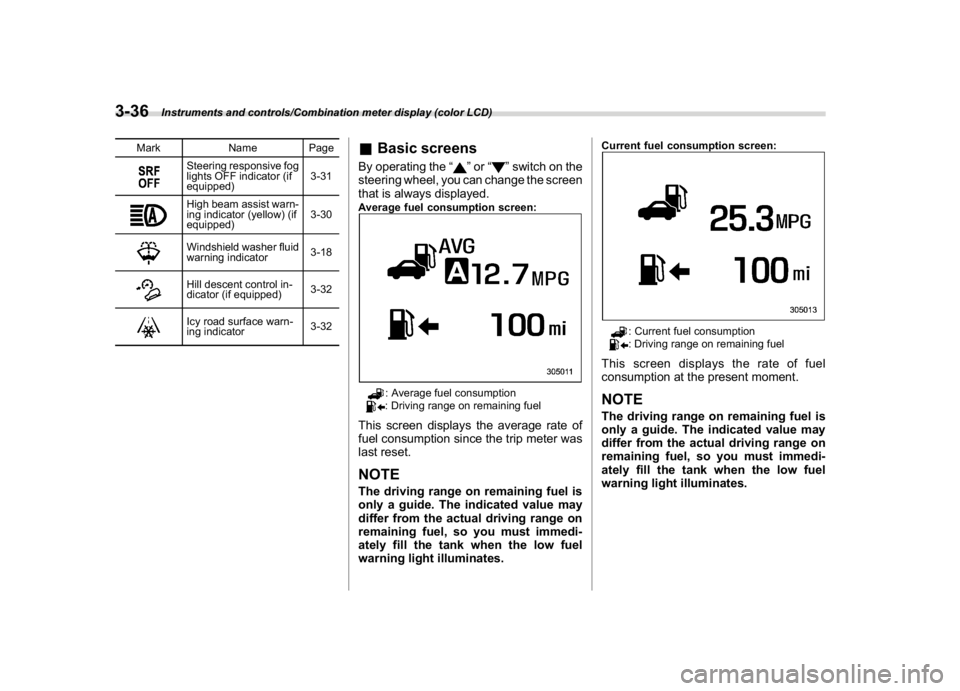
Average fuel consumption screen:
: Average fuel consumption: Driving range on remaining fuel
This screen displays the average rate of
fuel consumption since the trip meter was
last reset.NOTEThe driving range on remaining fuel is
only a guide. The indicated value may
differ from the actual driving range on
remaining fuel, so you must immedi-
ately fill the tank when the low fuel
warning light illuminates.
Current fuel consumption screen:
: Current fuel consumption: Driving range on remaining fuel
This screen displays the rate of fuel
consumption at the present moment.NOTEThe driving range on remaining fuel is
only a guide. The indicated value may
differ from the actual driving range on
remaining fuel, so you must immedi-
ately fill the tank when the low fuel
warning light illuminates.
Instruments and controls/Combination meter display (color LCD)
3-36
Page 174 of 474
(179,1)
北米Model "A1320BE-C" EDITED: 2017/ 10/ 10
By operating the“
”or“
”switch on the
steering wheel, you can select the menu.
Pull the“
/SET”switch to enter the
selected menu.
NOTEIf you enter the“Go Back”menu, the
system will return to the previous
screen.
!Screen Settings
After entering the“Screen Settings”menu,
select one of the following menus.
!Welcome Screen
The welcome screen can be activated or
deactivated.
!Good-bye Screen
The good-bye screen can be activated or
deactivated.
!Gauge Initial Movement
The movement of the meter needles and
gauge needles that occurs when the
ignition switch is turned to the“ON”
position can be activated or deactivated.
!Units
Changes the units displayed in the combi-
nation meter display (color LCD), the type
A multi-function display (black and white)
and the type B multi-function display (colorLCD).
!Tire Pressure Units (if equipped)
Changes the units displayed in the Tire
Pressure Monitoring system.
!Languages
Changes the language displayed in the
combination meter display (color LCD)
and the multi-function display (color LCD).
!Warning Volume (if equipped)
Sets the EyeSight warning volume, the
BSD/RCTA warning volume and the RAB
warning volume.
!EyeSight (models with EyeSight
system)
NOTEFor models with the EyeSight system,
refer to the Owner’s Manual supple-
ment for the EyeSight system.
!RAB (models with EyeSight system)
The Sonar Audible Alarm can be set to on
or off.NOTEFor models with Reverse Automatic
Braking system, refer to“Reverse
Automatic Braking System”F7-61.!Sonar Audible Alarm
When the Reverse Automatic Braking
system is in operation, the warning sound
to notify that an obstacle is detected in the
rear can be activated or deactivated.
!Vehicle Setting
After entering the“Vehicle Setting”menu,
select one of the following menus.
!Keyless Entry System
Sets the settings used when the keyless
access function was operated.
.Audible Signal (if equipped)
Sets the electronic chirp that sounds when
the door is locked or unlocked.
.Hazard Warning Flasher
Sets the operation of the hazard warning
flasher that blinks when the door is locked
or unlocked.
.Security Relocking (if equipped)
The automatic locking operation period
can be set or customized. Select the
preferred seconds to customize the opera-
tion period.
.Driver Door Unlock (if equipped)
Select only the driver’s door to unlock or all
doors to unlock simultaneously when the
driver’s door is unlocked.
.Rear Gate/Trunk Unlock (if equipped)
Select only the rear gate to unlock or all
–CONTINUED–
Instruments and controls/Combination meter display (color LCD)
3-41
3
Page 176 of 474
(181,1)
北米Model "A1320BE-C" EDITED: 2017/ 10/ 10
NOTEThe indicated values vary in accor-
dance with changes in the vehicle’s
running conditions. Also, the indicated
values may differ slightly from the
actual values and should thus be
treated only as a guide.&Driving information display
NOTEYou can set the units for both the multi-
function display (black and white) and
the combination meter at the same
time. For details about setting the
language and units, refer to“Type A
combination meter”F3-11 or“Menu
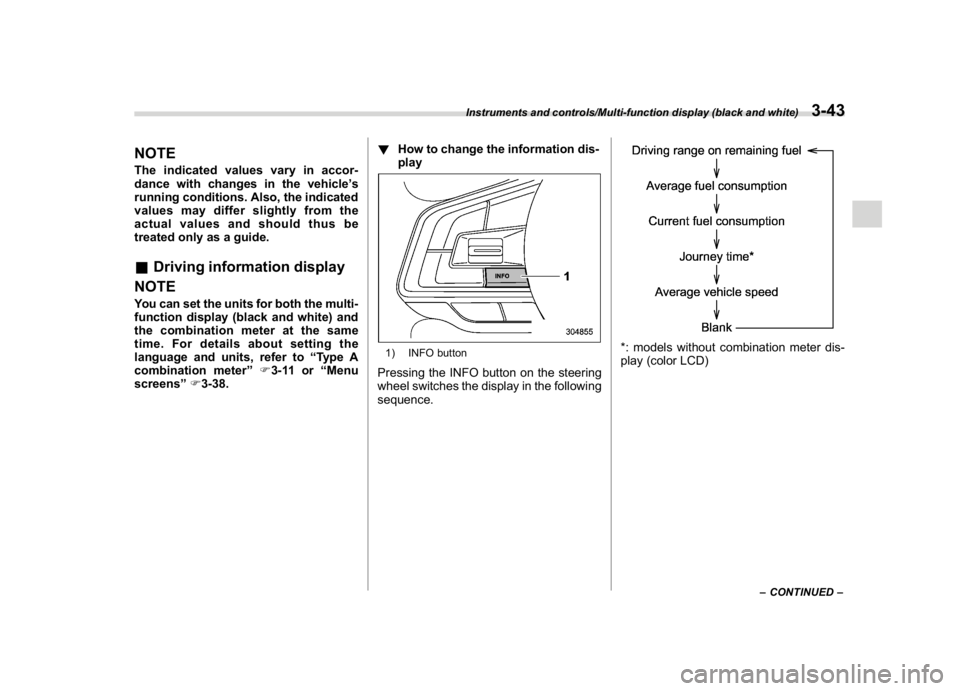
screens”F3-38.!How to change the information dis-
play
1) INFO buttonPressing the INFO button on the steering
wheel switches the display in the following
sequence.
*: models without combination meter dis-
play (color LCD)
–CONTINUED–
Instruments and controls/Multi-function display (black and white)
3-43
3
Page 182 of 474
(187,1)
北米Model "A1320BE-C" EDITED: 2017/ 10/ 10
item will change.
If there is a notification, the message will
be displayed. Take the appropriate actions
based on the message indicated.
After the self-check is completed, today’s
date, the stored birthday or the stored
anniversary is displayed.NOTE.After performing the maintenance,
change the setting of the correspond-
ing maintenance item. For details, refer
to“Maintenance settings”F3-61.
.The maintenance notification screen
will be displayed under either of the
following conditions.
–The period of time remaining until
the registered notification date is 15
days or less.
–The total driving distance remain-
ing until the registered notification
distance is approximately 311 miles
(500 km) or less.
.The maintenance notification screen
will be displayed until either of the
following conditions is satisfied.
–The period of time passed after
the registered notification date is 15
days or more.
–The total distance driven after the
registered notification distance is
approximately 311 miles (500 km) ormore.
&Interruption screenExampleUseful messages, such as reminder in-
formation, weather information (if
equipped) and traffic information (if
equipped) may interrupt the current screen
and appear on the display accompanied
by a beep. Take proper action according to
the message.
The interruption screen will return to the
original screen after a few seconds. Also,
you can press the INFO button to skip the
interruption screen.
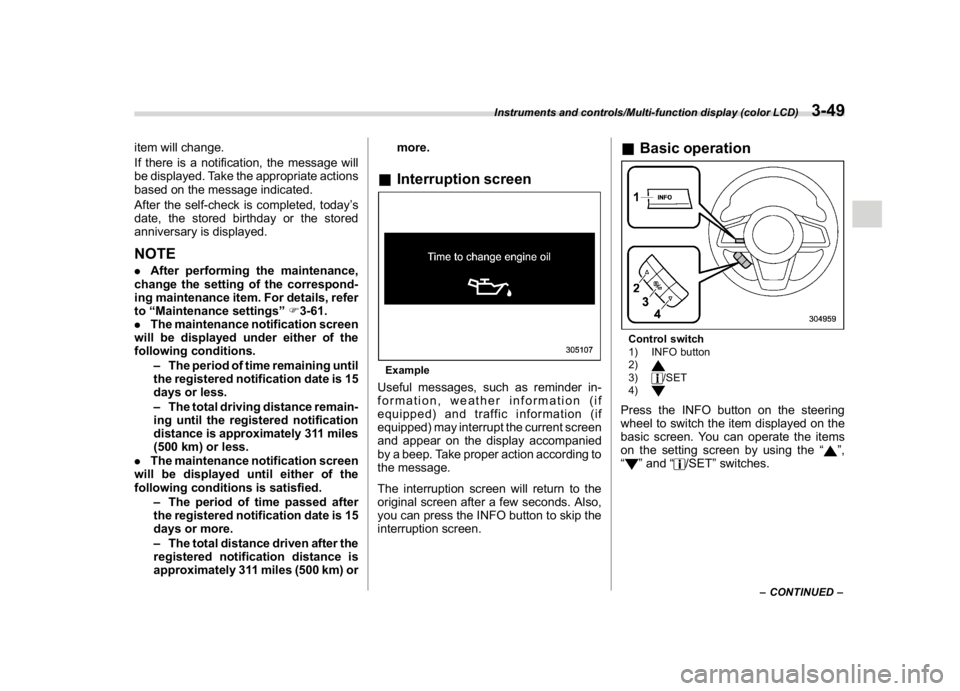
&Basic operationControl switch
1) INFO button
2)3)
/SET
4)
Press the INFO button on the steering
wheel to switch the item displayed on the
basic screen. You can operate the items
on the setting screen by using the“
”,
“
”and“
/SET”switches.
–CONTINUED–
Instruments and controls/Multi-function display (color LCD)
3-49
3
Page 197 of 474
(202,1)
北米Model "A1320BE-C" EDITED: 2017/ 10/ 10
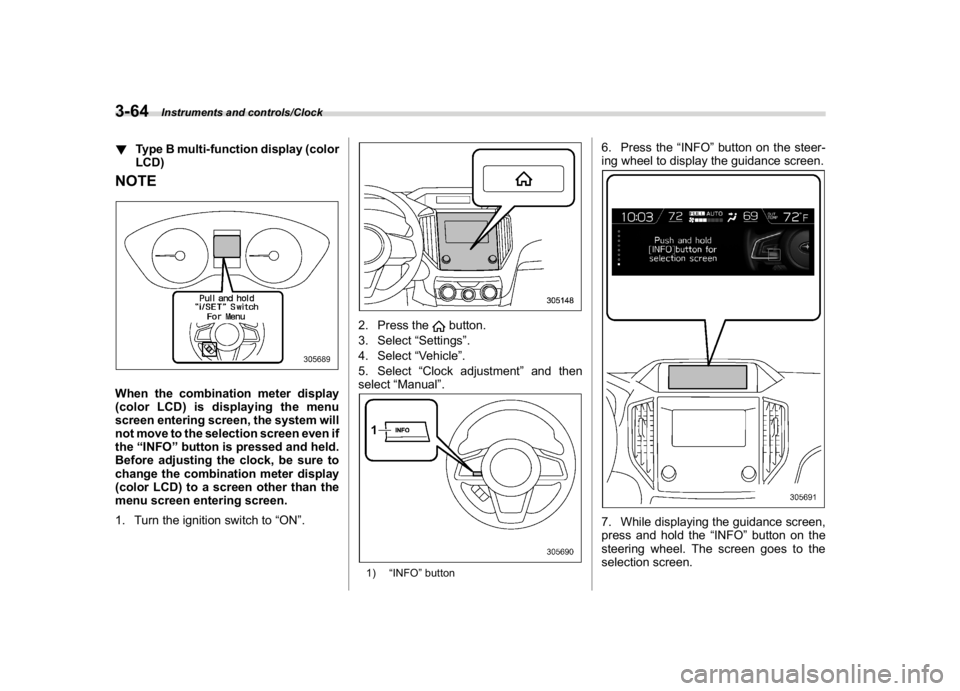
!Type B multi-function display (color
LCD)NOTEWhen the combination meter display
(color LCD) is displaying the menu
screen entering screen, the system will
not move to the selection screen even if
the“INFO”button is pressed and held.
Before adjusting the clock, be sure to
change the combination meter display
(color LCD) to a screen other than the
menu screen entering screen.
1. Turn the ignition switch to“ON”.
2. Press the
button.
3. Select“Settings”.
4. Select“Vehicle”.
5. Select“Clock adjustment”and then
select“Manual”.
1)“INFO”button
6. Press the“INFO”button on the steer-
ing wheel to display the guidance screen.7. While displaying the guidance screen,
press and hold the“INFO”button on the
steering wheel. The screen goes to the
selection screen.
Instruments and controls/Clock
3-64