Page 99 of 226

2.5
Only engage D or R when the vehi-
cle is stopped, with your foot on the
brake and the accelerator pedal re-
leased.
Driving
While driving, press the accelerator
pedal to achieve the desired speed.
The reversing lights will come on as
soon as reverse gear is selected (with
the ignition on).
GEAR CONTROL (1/2)
2
1
Operates similar to an automatic gear-
box.
Selector lever 1The display 3 on the instrument panel
indicates the gear lever position.
P: park
R: reverse
N: neutral
D: forward drive
OperationTo start the engine, please refer to the
information on “Starting/Stopping the
engine” in Section 2.
To move out of position P, you must de-
press the brake pedal before pressing
unlocking button 2.
With the foot on the brake pedal (warn-
ing light
c on the display 3 goes out),
move the lever out of position P.
The vehicle can only start of the
gear selector is in position P.
The vehicle can only be started if
the charging cord is unplugged from
the vehicle.
Obstructions to the driver
On the driver’s side, only
use mats suitable for the
vehicle, attached with the
pre-fitted components, and check
the fitting regularly. Do not lay one
mat on top of another. There is a
risk of wedging the pedals
Put the lever 1 to position D or R.
The vehicle moves forward once
you release the brake pedal (without
pressing on the accelerator pedal).
3
Page 100 of 226

2.6
Parking the vehicle
When the vehicle is at a standstill,
place the lever in position P: the drive
wheels are mechanically locked by the
transmission.
Apply the handbrake.
GEAR CONTROL (2/2)/HANDBRAKE
Operating fault
When setting off, if the lever is locked
in position P, even though you are de-
pressing the brake pedal and pressing
the unlocking button 2, the lever can still
be released manually. To do this, unclip
the cover 4 at the base of the lever.
Simultaneously press at the location 7
and the unlocking button 2 on the lever.
In the event of an impact to
the underside of the vehicle
(e.g.: striking a post, raised
kerb or other street furni-
ture), this may result in damage to
the vehicle (e.g.: twisted axle), the
electrical circuit or the traction bat-
tery.
Do not touch the circuit elements or
any fluids or liquids.
To prevent any risk of accident,
have your vehicle checked by an
authorised dealer.
Risk of serious injury or electric
shock and risk to life.
Handbrake
To release:
Pull the lever 6 up slightly, press
button 5 and then lower the lever to the
floor.
To apply:
Pull lever 6 upwards and make sure the
vehicle is immobilised.
When stationary and de-
pending on the slope and/or
vehicle load, it may be nec-
essary to pull up the hand-
brake at least two extra notches and
engage position P.
Make sure that the hand-
brake is properly released
when driving (red indicator
light off), otherwise over-
heating may occur.
6
7
5
4
2
Page 110 of 226

2.16
ABS (anti-lock braking
system)
Under heavy braking, the ABS prevents
the wheels from locking, allowing the
stopping distance to be managed and
keeping control of the vehicle.
Under these circumstances, the vehi-
cle can be steered to avoid an obstacle
whilst braking. In addition, this system
can increase stopping distances, par-
ticularly on roads with low surface grip
(wet ground etc.).
You will feel a pulsation through the
brake pedal each time the system is
activated. The ABS does not in any way
improve the vehicle’s physical perform-
ance relating to the road surface and
roadholding. It is still essential to follow
the rules of good driving practice (such
as driving at a safe distance from the
vehicle in front etc.).
These include:
– the ABS
(anti-lock braking
system);
– the electronic stability program
ESC with understeer control and
traction control;
– emergency braking assistance with (depending on the vehicle)
braking anticipation;
– regenerative braking system.
In an emergency, apply firm and
continuous pressure to the brake
pedal. There is no need to pump
it repeatedly. The ABS will modu-
late the force applied in the braking
system.
These functions are an ad-
ditional aid in the event of
critical driving conditions,
enabling the vehicle behav-
iour to be adapted to suit the driving
conditions.
However, the functions do not take
the place of the driver. They do
not increase the vehicle’s limits
and should not encourage you
to drive more quickly. Therefore,
they can under no circumstances
replace the vigilance or responsibil-
ity of the driver when manoeuvring
the vehicle (the driver must always
be ready for sudden incidents which
may occur when driving).
Your braking systems
are partially operational.
However, it is dangerous
to brake suddenly and
it is essential to stop immediately,
as soon as traffic conditions allow.
Contact an approved dealer.
Operating faults
–
© and x lit up on the in-
strument panel, (depending on the
vehicle) alongside messages “Check
ABS”, “Check braking system” and
“Check ESC”: ABS, ESC and emer-
gency brake assist are deactivated.
Braking is always enabled;
–
x, D, © and û lit
up on the instrument panel alongside
the message “Braking system fault”:
this indicates a fault in the braking
system.
In both cases, please consult an
Authorised Dealer.
DRIVER CORRECTION DEVICES, AIDS (1/5)
Page 138 of 226

3.12
AIR CONDITIONING: programming (1/4)
Adjusting the programming
With the vehicle connected to a power
source, this function enables:
– a comfortable temperature prior to using the vehicle;
– optimisation of the vehicle range.
The programmable air-conditioning
is triggered the hour before the pro-
grammed hour in order to reach a com-
fortable temperature.
1
Driver’s responsibility
when parking or stopping
the vehicle
Never leave an animal,
child or adult who is not self-suffi-
cient alone on your vehicle, even for
a short time.
In hot and/or sunny weather, please
remember that the temperature
inside the passenger compartment
increases very quickly.
RISK OF DEATH OR SERIOUS
INJURY.
Operating conditions
– the ignition must be switched off;
– the vehicle must be locked;
– the traction battery charge level must be greater than 25% or, depending
on the vehicle, 45% for the function
to be triggered;
– the vehicle has to be plugged into the mains;
– programming should be done at least 2 hours prior to departure;
and
– air-conditioning programming must be activated.
Depending on the vehicle, the pro- gramming is done from:
– the multimedia display;
or
– the vehicle settings customisation menu.
The integrated warning light in
button 1 and warning light
come on.
Page 139 of 226
3.13
AIR CONDITIONING: programming (2/4)
The two programmed times cannot
be activated simultaneously.
A
12
From the multimedia
display A
Setting the start time for the
function
You can set two different times.
– press button 1 for quick access to the
programming menu on display A;
– select “Change” on one of the two set times;
– adjust the hours then the minutes, then confirm. The function is triggered one hour prior
to the programmed time to reach a
comfortable temperature.
The warning lights integrated in the
button
1, the AUTO button 2 and the
warning light
on the instrument
panel are lit up.
“Programme” activation
– With the ignition switched on and the
air-conditioning operating (please
refer to the information on “Automatic
air-conditioning” in Section 3);
– select the programme to be acti- vated from menu “Comfort timer“;
– make sure one of the programmes is confirmed.
– switch off the engine;
– plug the vehicle into a power source;
– lock the vehicle.
Page 140 of 226
3.14
From the vehicle settings
customisation menu 3
Setting the start time for the
function
You can programme a single time.
– briefly press button B or C to access
the menu “PROGRAMMING”;
– press and hold button B or C to con-
firm; – briefly press button B or C to access
the menu “Warm up cabin for”;
– press and hold button B or C to con-
firm;
– briefly press button B or C to access the clock settings;
– hold down button B or C - the hours
flash;
– press buttons B and C to set the
hour;
– hold down button B or C to confirm
the hour setting;
– the minutes flash - press buttons B and C to set the minutes;
– hold down button B or C to confirm
the minutes setting. Your settings are
now saved.
3
B
C
AIR CONDITIONING: programming (3/4)
Page 148 of 226
3.22
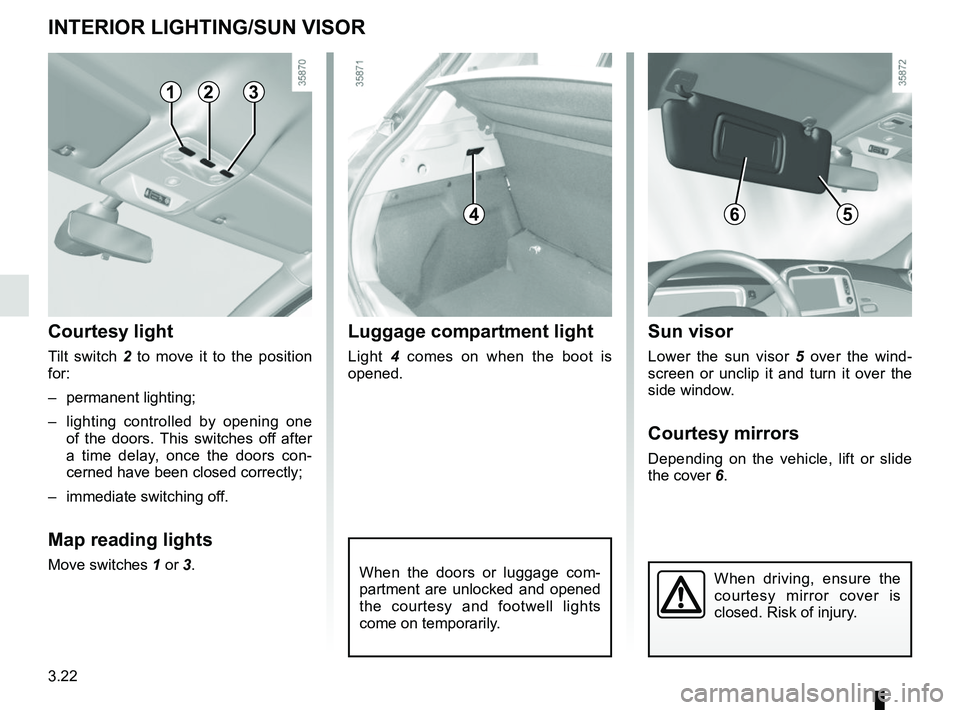
INTERIOR LIGHTING/SUN VISOR
When the doors or luggage com-
partment are unlocked and opened
the courtesy and footwell lights
come on temporarily.
123
Courtesy light
Tilt switch 2 to move it to the position
for:
– permanent lighting;
– lighting controlled by opening one of the doors. This switches off after
a time delay, once the doors con-
cerned have been closed correctly;
– immediate switching off.
Map reading lights
Move switches 1 or 3.
4
Luggage compartment light
Light 4 comes on when the boot is
opened.
6
Sun visor
Lower the sun visor 5 over the wind-
screen or unclip it and turn it over the
side window.
Courtesy mirrors
Depending on the vehicle, lift or slide
the cover 6.
5
When driving, ensure the
courtesy mirror cover is
closed. Risk of injury.
Page 153 of 226
3.27
REAR HEADRESTS
Position for use
Raise or lower the headrest while pull-
ing it towards the front of the vehicle.
To remove the headrest
Press the button A on the switch 1 and
remove the headrest.
To refit the headrest
Insert the headrest rods into the holes,
and lower the headrest to the first
notch. Check that it is correctly locked.
Storage position
Press the button A and lower the head-
rest completely.
When the headrest is set at the
lowest position (position B ), this is
for storage only: it should not be in
this position when a seat is occupied.
B
1
A
The headrest is a safety
component; check that it is
fitted and in the correct po-
sition. The top of the head-
rest should be as close as possible
to the top of the head.