Page 73 of 226
1.67
TRIP COMPUTER: general information (1/2)
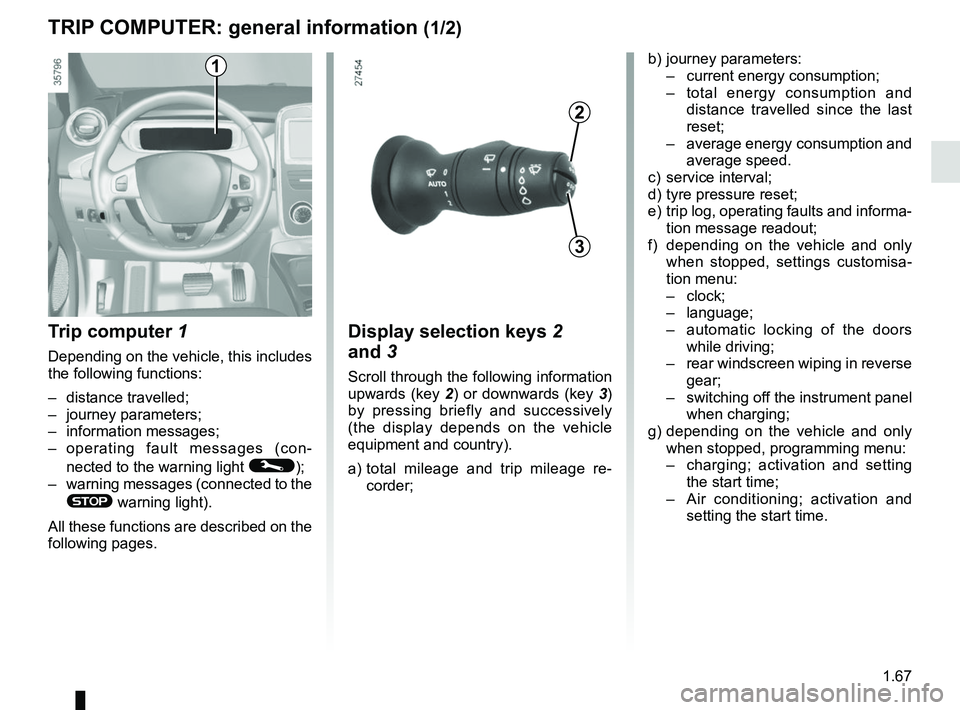
Trip computer 1
Depending on the vehicle, this includes
the following functions:
– distance travelled;
– journey parameters;
– information messages;
– operating fault messages (con-
nected to the warning light
©);
– warning messages (connected to the
® warning light).
All these functions are described on the
following pages.
Display selection keys 2
and 3
Scroll through the following information
upwards (key 2) or downwards (key 3)
by pressing briefly and successively
(the display depends on the vehicle
equipment and country).
a) total mileage and trip mileage re-
corder;
b) journey parameters:
– current energy consumption;
– total energy consumption and
distance travelled since the last
reset;
– average energy consumption and
average speed.
c) service interval;
d) tyre pressure reset;
e) trip log, operating faults and informa- tion message readout;
f) depending on the vehicle and only when stopped, settings customisa-
tion menu:
– clock;
– language;
– automatic locking of the doors
while driving;
– rear windscreen wiping in reverse
gear;
– switching off the instrument panel
when charging;
g) depending on the vehicle and only when stopped, programming menu:
– charging; activation and setting
the start time;
– Air conditioning; activation and
setting the start time.
3
2
1
Page 78 of 226

1.72
TRIP COMPUTER AND WARNING SYSTEM: information messages
Examples of messagesInterpreting the display selected
«Disconnect cable to start up» Indicates that the charging cord is still plugged into the vehicle.
«Please insert keycard» Indicates that the cardRENAULT is not in the reader.
«Steering wheel not locked» Indicates that the steering column has not been locked.
«Apply brakes» Follow these instructions: risk of damage to the motor.
«Check connections» Unplug, then plug in the vehicle.
If the message still shows, this may be caused by the external charging \
conditions
or by the home installation.
«Check charging post» Indicates a possible electrical fault or a defective charging cable: cha\
nge the charg-
ing terminal or location or have the cable checked.
«Power cut while charging» Indicates an electrical fault while charging. Restart charging.
If this does not work, have the electrical installation checked.
«Charging refused no contract» Charging prohibited by your battery rental organisation. Rectify the sit\
uation.
These can help in the vehicle starting phase, or give information about \
a selection or a driving status.
Examples of information messages are given in the following pages.
Page 81 of 226
1.75
CLOCK AND EXTERIOR TEMPERATURE (1/2)
– the minutes flash - press buttons 1 and 2 to set the minutes;
– hold down button 1 or 2 to confirm
the minutes setting. Your settings are
now saved.Resetting the clock A
To access the display 3 for setting the
time:
– press button 1 or 2 a few times to
obtain the menu “Time settings”.
Wait for a few seconds.
– hold down button 1 or 2 - the hours
flash;
– press buttons 1 and 2 to set the hour;
– hold down button 1 or 2 to confirm
the hour setting;
If the power supply is cut (battery
disconnected, supply wire cut, etc.),
the clock must be reset.
We recommend that you do not
adjust these settings while driving.
9°C 12:00
3
A
1
2
Page 82 of 226
1.76
External temperature
indicator
As ice formation is related
to climatic exposure, local
air humidity and temperature, the
external temperature alone is not
sufficient to detect ice.
External temperature
indicator
Special note:
When the outside temperature is – 3°C
to + 3°C, the °C characters flash (sig-
nalling a risk of ice on the road).B
End
Clock
Resetting the clock B
The time setting is done automatically.
You may, however, change this.
On the display
B, select “Menu”,
“System ” then “Time settings”.
Set the hours and minutes.
Then confirm your choice.
B
CLOCK AND EXTERIOR TEMPERATURE (2/2)
Page 83 of 226
1.77
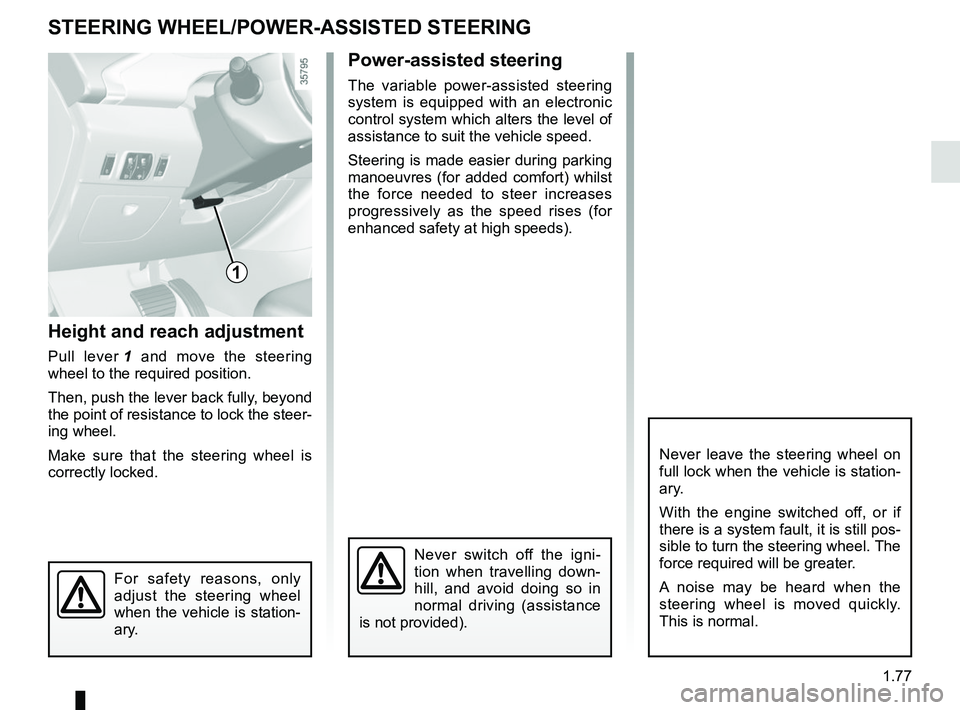
Height and reach adjustment
Pull lever 1 and move the steering
wheel to the required position.
Then, push the lever back fully, beyond
the point of resistance to lock the steer-
ing wheel.
Make sure that the steering wheel is
correctly locked.
Power-assisted steering
The variable power-assisted steering
system is equipped with an electronic
control system which alters the level of
assistance to suit the vehicle speed.
Steering is made easier during parking
manoeuvres (for added comfort) whilst
the force needed to steer increases
progressively as the speed rises (for
enhanced safety at high speeds).
STEERING WHEEL/POWER-ASSISTED STEERING
For safety reasons, only
adjust the steering wheel
when the vehicle is station-
ary.
1
Never switch off the igni-
tion when travelling down-
hill, and avoid doing so in
normal driving (assistance
is not provided).
Never leave the steering wheel on
full lock when the vehicle is station-
ary.
With the engine switched off, or if
there is a system fault, it is still pos-
sible to turn the steering wheel. The
force required will be greater.
A noise may be heard when the
steering wheel is moved quickly.
This is normal.
Page 88 of 226

1.82
EXTERIOR LIGHTING AND SIGNALS (2/3)
Switching off the lights
There are two possibilities:
– manually, move ring 2 to position 0;
– the lights will go out automatically when the engine is switched off, the
driver’s door is opened or the vehicle
is locked. In this case, the next time
the engine is started the lights will be
switched back on according to the
position of the ring 2.
NB: if the fog lights are lit, the lights are
not switched off automatically.
Lights-on reminder buzzer
A warning beep sounds when the driv-
er’s door is opened to warn you that the
lights are still on.
“See-me-home lighting”
function
Depending on the vehicle, this func-
tion allows you to briefly switch on the
dipped beam headlights (to provide
light when opening a gate, etc.).
With the engine and lights switched
off and the ring 2 in position 0, pull the
stalk 1 towards you: the dipped beam
headlights come on for approximately
thirty seconds. To increase this dura-
tion, you may pull the stalk up to four
times (total time restricted to approxi-
mately two minutes).
To switch off the lights before they go
out automatically, turn ring 2 to any po-
sition, then return it to position 0.12
áMain beam headlights
With the dipped beam head-
lights lit, pull stalk 1 towards you. This
indicator light on the instrument panel
comes on.
To return to the dipped headlight posi-
tion, pull stalk 1 towards you again.
Page 97 of 226
2.3
Driver’s responsibility
when parking or stopping
the vehicle
Never leave an animal,
child or adult who is not self-suffi-
cient alone in your vehicle, even for
a short time.
They may pose a risk to themselves
or to others by starting the engine,
activating equipment such as the
electric windows or locking the
doors, for example.
Also, in hot and/or sunny weather,
please remember that the tempera-
ture inside the passenger compart-
ment increases very quickly.
RISK OF DEATH OR SERIOUS
INJURY.
Operating faults
In certain cases, the hands-free
RENAULT card may not work:
– the card battery RENAULT is drai- ned, flat 12 V battery, etc.
– near to appliances operating on the same frequency as the card (moni-
tor, mobile phone, video game, etc.);
– vehicle located in a high electroma- gnetic radiation zone.
The message “Please insert keycard”
appears on the instrument panel.
Insert the RENAULT card fully into card
reader 2.
STARTING, STOPPING THE ENGINE (2/3)
Page 98 of 226

2.4
Conditions for stopping the
engine
The vehicle must be stationary, with the
lever positioned to N or P.
STARTING, STOPPING THE ENGINE (3/3)
Hands-free RENAULT card
With the card in the vehicle, press
button 1: the engine switches off and
the message READY goes out on the
instrument panel. The steering column
is locked when the driver’s door is
opened or the vehicle is locked.
If the card is no longer in the passenger
compartment when you try to switch
the engine off, the message “No key-
card Press and hold” appears on the
instrument panel: press the button 1 for
longer than two seconds.
With the engine switched off, any ac-
cessories being used (radio, etc.) will
continue to function for approximately
10 minutes.
When the driver’s door is opened, the
accessories stop working.
Remote control RENAULT card
With the card in reader 2 , press
button 1: the engine will stop. The mes-
sage READY goes out on the instru-
ment panel.
Removing the card from the reader
locks the steering column.
Special note
If the card is no longer in the reader
when you try to switch the engine off,
the message “No keycard Press and
hold” will appear on the instrument
panel: press the button 1 for longer
than two seconds.
1
2
Never switch off the igni-
tion before the vehicle has
stopped completely. Once
the engine has stopped, the
brake servo, power-assisted steer-
ing, etc. and the passive safety de-
vices such as air bags and preten-
sioners will no longer operate.
Driver’s responsibility
when parking or stopping
the vehicle
Never leave an animal,
child or adult who is not self-suffi-
cient alone in your vehicle, even for
a short time.
They may pose a risk to themselves
or to others by starting the engine,
activating equipment such as the
electric windows or locking the
doors, for example.
Also, in hot and/or sunny weather,
please remember that the tempera-
ture inside the passenger compart-
ment increases very quickly.
RISK OF DEATH OR SERIOUS
INJURY.


