2018 PEUGEOT 5008 display
[x] Cancel search: displayPage 94 of 364
92
"REAR " function.
Ventilation with the ignition on
When the ignition is switched on, you can
use the ventilation system to adjust the air
flow settings and the air distribution in the
passenger compartment depending on the
battery charge.
This function does not operate the air
conditioning.
System switch-off
F Press this button.
Its indicator lamp comes on and all
other indicator lamps for the system
go of f.
This action deactivates all functions
of the air conditioning system.
By reducing the air flow to a
minimum, you are Avoid driving for too long with the
ventilation off or the system deactivated –
Risk of misting and deterioration of the air
quality!
Pressing any button reactivates the
system with the settings that were
previously in use.
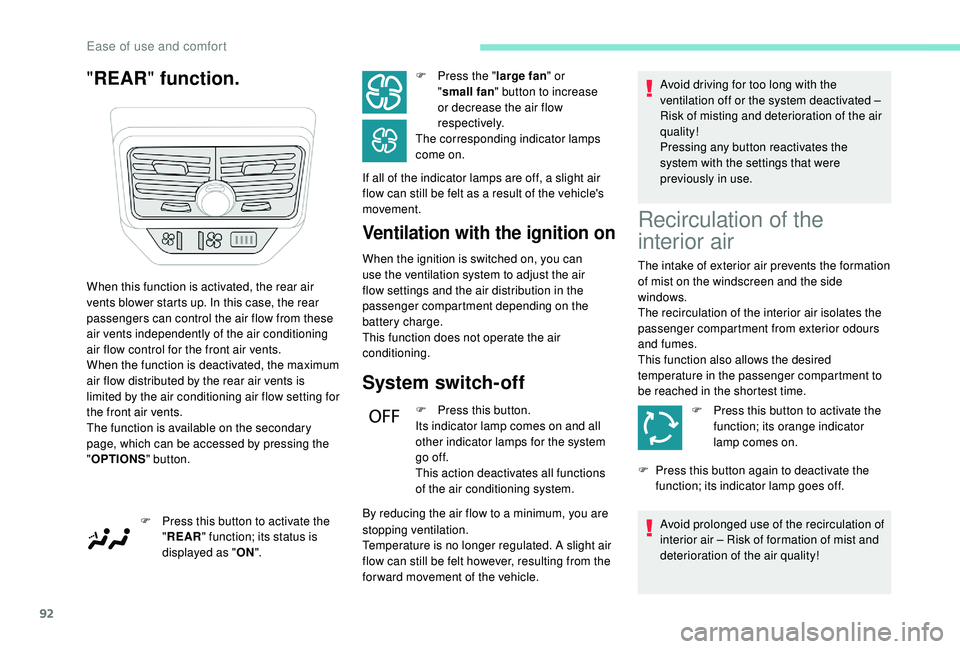
When this function is activated, the rear air
vents blower starts up. In this case, the rear
passengers can control the air flow from these
air vents independently of the air conditioning
air flow control for the front air vents.
When the function is deactivated, the maximum
air flow distributed by the rear air vents is
limited by the air conditioning air flow setting for
the front air vents.
The function is available on the secondary
page, which can be accessed by pressing the
" OPTIONS " button.
F
P
ress this button to activate the
" REAR " function; its status is
displayed as " ON". F
P
ress the "
large fan " or
" small fan " button to increase
or decrease the air flow
respectively.
The corresponding indicator lamps
come on.
If all of the indicator lamps are off, a slight air
flow can still be felt as a result of the vehicle's
movement.
stopping ventilation.
Temperature is no longer regulated. A slight air
flow can still be felt however, resulting from the
for ward movement of the vehicle.
Recirculation of the
interior air
The intake of exterior air prevents the formation
of mist on the windscreen and the side
windows.
The recirculation of the interior air isolates the
passenger compartment from exterior odours
and fumes.
This function also allows the desired
temperature in the passenger compartment to
be reached in the shortest time.
F
P
ress this button to activate the
function; its orange indicator
lamp comes on.
F
P
ress this button again to deactivate the
function; its indicator lamp goes off.
Avoid prolonged use of the recirculation of
interior air – Risk of formation of mist and
deterioration of the air quality!
Ease of use and comfort
Page 97 of 364
95
The volumetric alarm movement detector
may be disrupted by the programmable
heating air flows when it is operating.
To avoid any untimely triggering of the
alarm when using the programmable
heating, it is advisable that the volumetric
monitoring is deactivated.
Adapting the programmable heating
enables you to use it to preheat the
passenger compartment of your vehicle.
Contact a PEUGEOT dealer or a qualified
workshop.
Operating indicator lamp
Always switch off the programmable
heating when refuelling to avoid any risk of
fire or explosion.
The programmable heating is supplied by
the vehicle's fuel tank. Before use, ensure
that there is enough fuel left in the tank. If
the fuel in the tank is at the reser ve level,
we strongly recommend that you do not
programme the heating.
To avoid the risks of poisoning or
asphyxia, the programmable heating must
not be used, even for short periods, in
a
closed environment such as a garage or
workshop which are not equipped with an
exhaust gas extraction system.
Do not park the vehicle on a
flammable
sur face (dry grass, dead leaves, paper,
etc.) – Risk of fire!
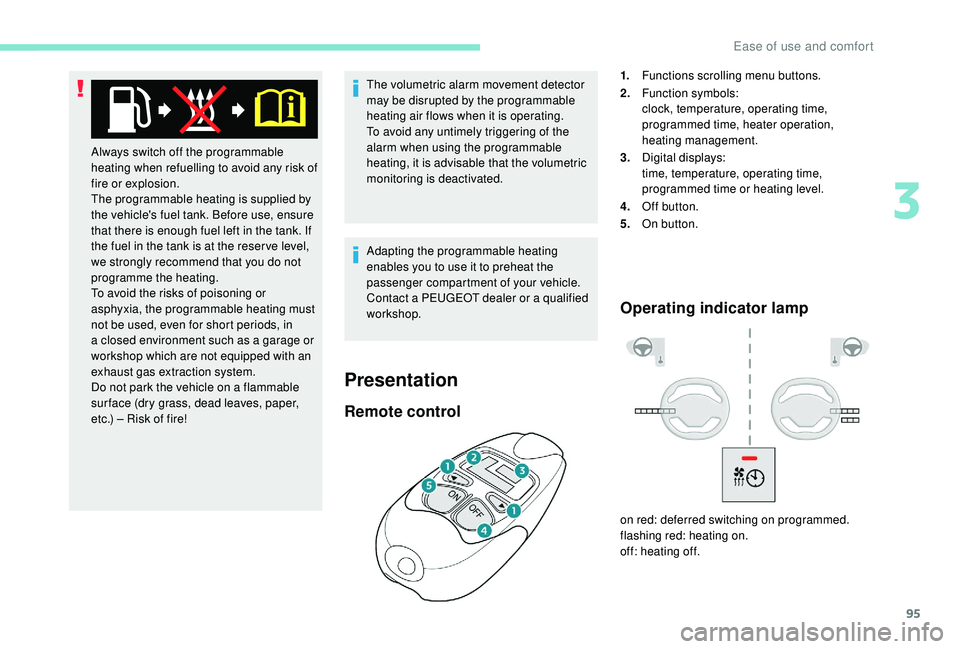
Remote control
1. Functions scrolling menu buttons.
2. Function symbols:
clock, temperature, operating time,
programmed time, heater operation,
heating management.
3. Digital displays:
time, temperature, operating time,
programmed time or heating level.
4. Off button.
5. On button.
on red: deferred switching on programmed.
flashing red: heating on.
off: heating off.
Presentation
3
Ease of use and comfort
Page 98 of 364
96
Function display
The passenger compartment temperature
information is only available when the
engine is off.
Setting the time
F Set the time with the buttons 1.
F P ress simultaneously on buttons 4 and 5 to
save it.
Immediate switching on
The heater starts and this symbol is
displayed.
This red indicator flashes during
heating.
F
T
o deactivate the function, press button
4
until the message " OK" is displayed.
F
P
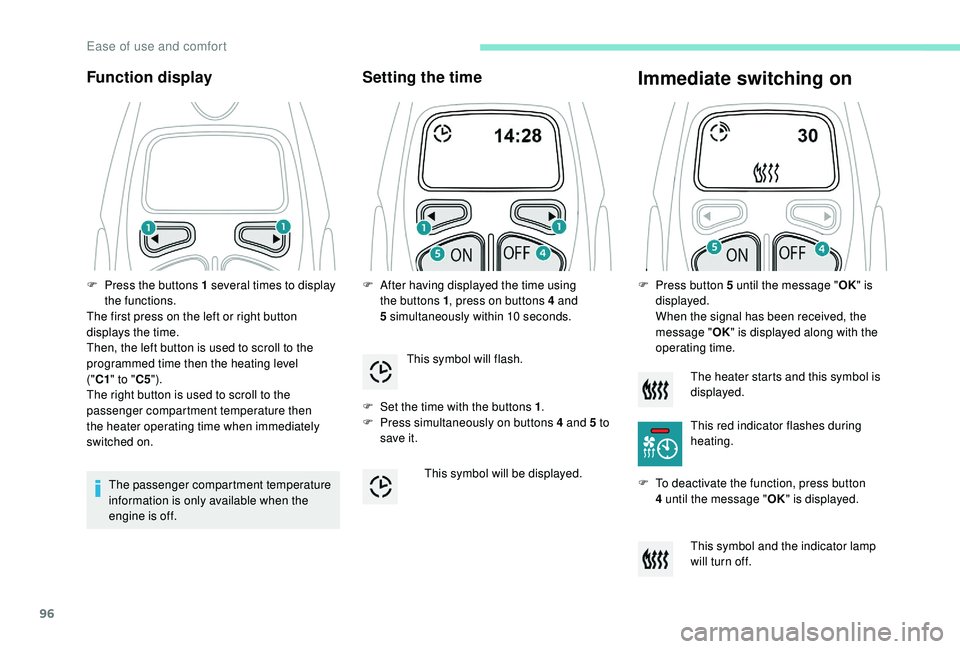
ress the buttons 1
several times to display
the functions.
The first press on the left or right button
displays the time.
Then, the left button is used to scroll to the
programmed time then the heating level
("C1 " to " C5").
The right button is used to scroll to the
passenger compartment temperature then
the heater operating time when immediately
switched on. F
A
fter having displayed the time using
the buttons 1 , press on buttons 4
and
5
simultaneously within 10
seconds.
This symbol will flash.
This symbol will be displayed. F
P
ress button 5 until the message "
OK" is
displayed.
When the signal has been received, the
message " OK" is displayed along with the
operating time.
This symbol and the indicator lamp
will turn off.
Ease of use and comfort
Page 99 of 364
97
During these operations, if the message
"FA I L " is displayed, it means that the
signal has not been received. Restart the
procedure after having changed position.
Adjusting the operating time
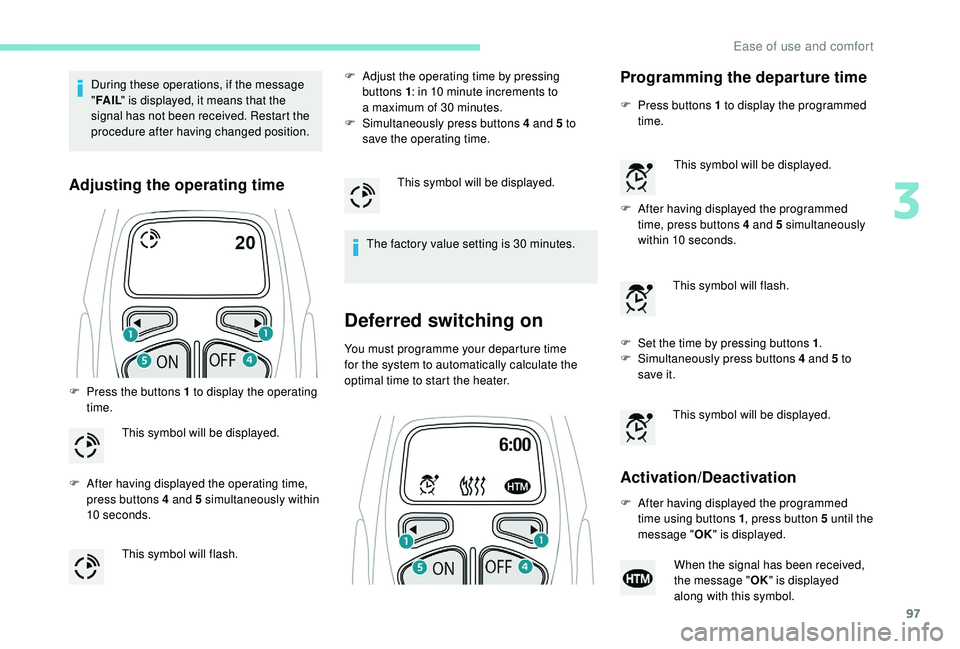
F Press the buttons 1 to display the operating
time.
F
A
fter having displayed the operating time,
press buttons 4
and 5 simultaneously within
10
seconds. F
A
djust the operating time by pressing
buttons 1 : in 10 minute increments to
a maximum of 30 minutes.
F
S
imultaneously press buttons 4 and 5 to
save the operating time.
The factory value setting is 30 minutes.
Deferred switching on
You must programme your departure time
for the system to automatically calculate the
optimal time to start the heater.
This symbol will be displayed.
This symbol will flash. This symbol will be displayed.
Programming the departure time
F Press buttons 1
to display the programmed
time.
F
A
fter having displayed the programmed
time, press buttons 4
and 5 simultaneously
within 10
seconds.
F
S
et the time by pressing buttons 1 .
F
S
imultaneously press buttons 4 and 5 to
save it.
Activation/Deactivation
This symbol will be displayed.
This symbol will flash.
This symbol will be displayed.
F
A
fter having displayed the programmed
time using buttons 1 , press button 5
until the
message " OK" is displayed.
When the signal has been received,
the message " OK" is displayed
along with this symbol.
3
Ease of use and comfort
Page 100 of 364
98
HTM: Heat Thermo Management
F
T
o deactivate the programming, press
button 4
until the message " OK" is
displayed.
During these operations, if the message
" FA I L " is displayed, it means that the
signal has not been received. Restart the
procedure after having changed position.
Stopping the heating
F Press button 5 .
Changing the heating level
The system has 5 heating levels: C1 ( lowest
level) to C5 (highest level).
F
A
fter having displayed the heating level
using buttons 1 , press simultaneously on
buttons 4
and 5.
The letter " C" will flash.
F
A
djust the heating level by pressing
buttons 1 .
F
S
imultaneously press buttons 4 and 5 to
save the selected level.
The letter " C" will be displayed.
The presets are replaced by the new
entries. The programmed times are
memorised until the next change.
When the start time is activated, it is not
possible to change the heating level. You
must first deactivate the start time.
Operating fault
In the event of a fault with the programmable
h eating, contact a PEUGEOT dealer or
a
qualified workshop.
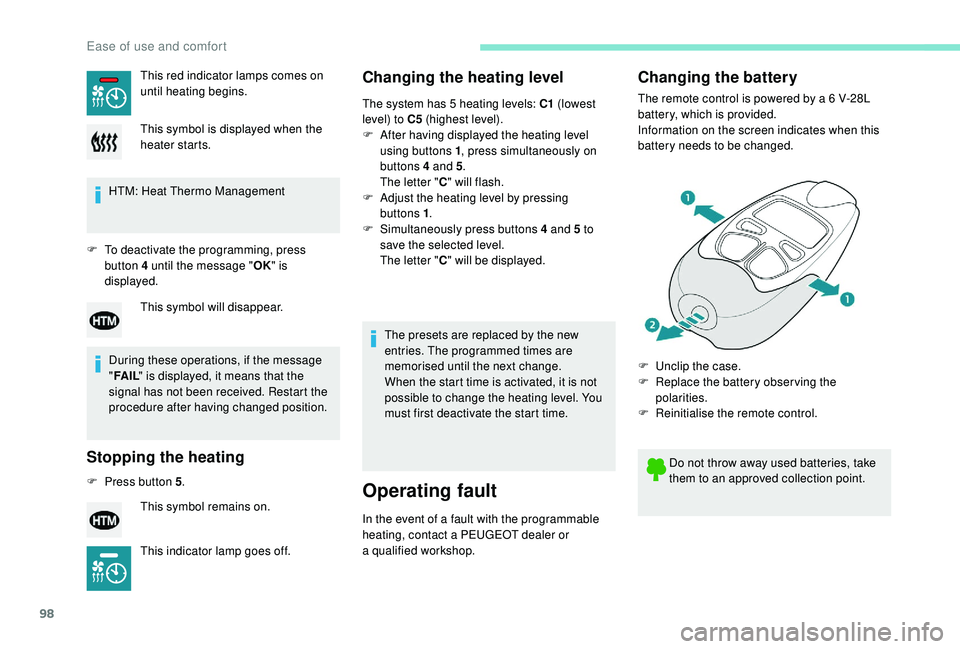
Changing the battery
The remote control is powered by a 6 V-28L
b attery, which is provided.
Information on the screen indicates when this
battery needs to be changed.
This red indicator lamps comes on
until heating begins.
This symbol is displayed when the
heater starts.
This symbol will disappear.
This symbol remains on.
This indicator lamp goes off. Do not throw away used batteries, take
them to an approved collection point.
F
U
nclip the case.
F
R
eplace the battery observing the
polarities.
F
R
einitialise the remote control.
Ease of use and comfort
Page 101 of 364
99
Reinitialising the remote control
If the battery is disconnected or when changing
the battery, the remote control must be
reinitialised.
F
A
fter turning on the power, within the next
5
seconds, press button 4 for 1 second.
If the operation is successful, the message
" OK " will be displayed on the remote
control's screen.
If there is a
fault, the message " FA I L" will
appear.
F
St
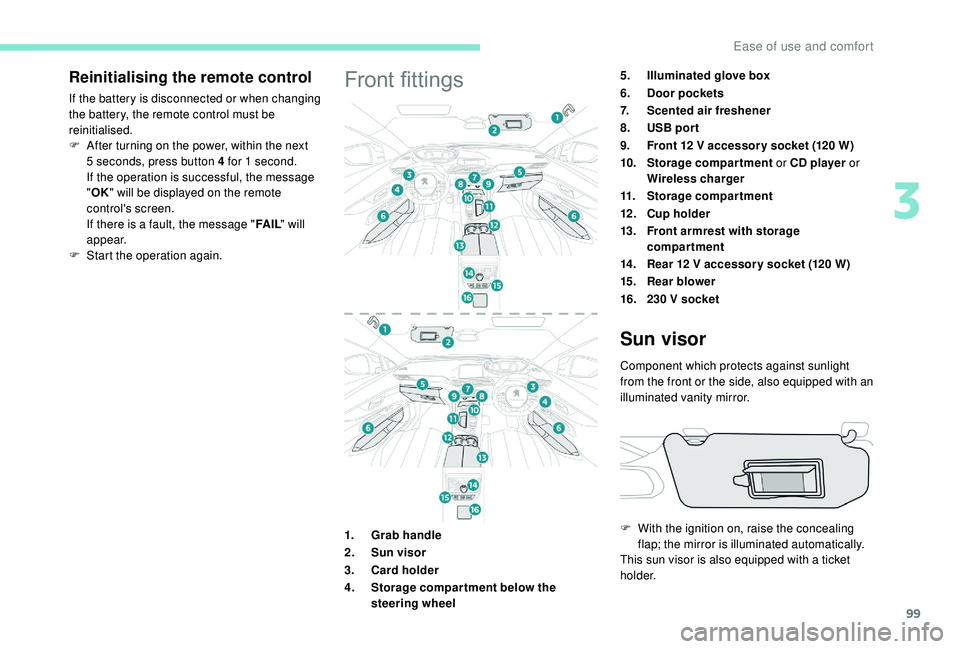
art the operation again.Front fittings5.Illuminated glove box
6. Door pockets
7. Scented air freshener
8. USB por t
9. Front 12
V accessor y socket (120 W)
10. Storage compartment or CD player or
Wireless charger
11. Storage compartment
12 . Cup holder
13. Front armrest with storage
compartment
14 . Rear 12
V accessor y socket (120 W)
15. Rear blower
16. 230
V socket
1. Grab handle
2. Sun visor
3. Card holder
4. Storage compar tment below the
steering wheel
Sun visor
Component which protects against sunlight
from the front or the side, also equipped with an
illuminated vanity mirror.
F
W
ith the ignition on, raise the concealing
flap; the mirror is illuminated automatically.
This sun visor is also equipped with a
ticket
h o l d e r.
3
Ease of use and comfort
Page 102 of 364

100
Glove box
F To open the glove box, raise the handle.
The glove box is lit when the lid is opened.
It houses the front passenger airbag
deactivation switch A .
It also gives access to the housing for scented
air freshener B cartridges.
Never drive with the glove box open when
a
passenger is at the front – it may cause
injury during sharp deceleration!
Cigarette lighter/12 V
a ccessory socket(s)
F To use the cigarette lighter, press it in
and wait a few seconds until it pops out
automatically.
F
T
o use a 12 V accessory (max power:
120
W), remove the cigarette lighter and
connect a
suitable adaptor.
You can use this socket to connect a
telephone
charger, a bottle warmer, etc.
After use, put the cigarette lighter back into
place straight away.
The connection of an electrical device
not approved by PEUGEOT, such as
a
USB charger, may adversely affect the
operation of vehicle electrical systems,
causing faults such as poor radio
reception or inter ference with displays in
the screens.
USB port
The USB port allows the connection of
a portable device, such as an iPod®-type digital
audio player, or a
USB memory stick.
The USB reader reads your audio files which
are then transferred to the audio system and
played via the vehicle's loudspeakers.
These files are managed via the steering wheel
controls or from the audio system.
When connected to the USB port,
the portable device can be charged
automatically.
While charging, a message is displayed
if the power consumption of the portable
device exceeds the amperage supplied by
the vehicle.
For more details on the Audio equipment and
telematics, and particularly the USB port,
consult the corresponding section.
Ease of use and comfort
Page 109 of 364
107
Connect only one device at a time to the
s ocket (no extension lead or multi-socket
connector).
Connect only devices with class II
insulation (shown on the device).
Do not use a
device with a metal case
(electric shaver, etc.).
12 V accessory socket
The connection of an electrical device
not approved by PEUGEOT, such as
a
USB charger, may adversely affect the
operation of vehicle electrical systems,
causing faults such as poor radio
reception or inter ference with displays in
the screens.
As a safety measure, when electrical
c onsumption is high and when required by
the vehicle's electrical system (particular
weather conditions, electrical overload,
etc.), the current supply to the socket will be
cut off; the green indicator lamp goes off.
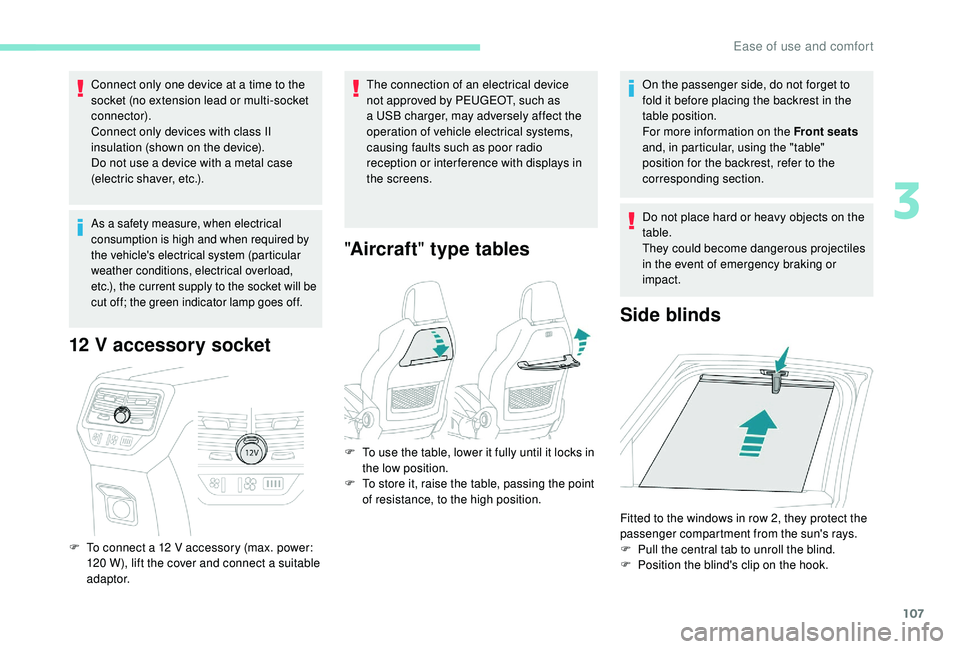
F To connect a 12 V accessory (max. power:
120 W), lift the cover and connect a suitable
adaptor.
" Aircraft " type tables
On the passenger side, do not forget to
fold it before placing the backrest in the
table position.
For more information on the Front seats
and, in particular, using the "table"
position for the backrest, refer to the
corresponding section.
Do not place hard or heavy objects on the
table.
They could become dangerous projectiles
in the event of emergency braking or
impact.
Side blinds
F To use the table, lower it fully until it locks in the low position.
F
T
o store it, raise the table, passing the point
of resistance, to the high position.
Fitted to the windows in row 2, they protect the
passenger compartment from the sun's rays.
F
P
ull the central tab to unroll the blind.
F
P
osition the blind's clip on the hook.
3
Ease of use and comfort