2018 Peugeot 308 ESP
[x] Cancel search: ESPPage 159 of 324
157
The sound emitted by the speaker (front or
rear) locates the obstacle in relation to the
vehicle, in front or behind.
Deactivation/activation of
the front and rear parking
sensors
The system is deactivated in the
Vehicle/Driving menu, then the
Driving functions tab of the touch
screen.
F
P
ress this button. The indicator
lamp in the button comes on.
Pressing this button again reactivates the function.
The indicator lamp in the button goes off.
The function will be automatically
deactivated when connecting a trailer or a
bicycle carrier on a towing device installed
in accordance with the manufacturer's
recommendations.
The parking sensors are deactivated while the
Park Assist system is measuring a space.
For more information on Park Assist , refer to
the corresponding section.
Operating limits
- Certain obstacles located in the sensors’ blind spots may not be detected or no
longer be detected during the manoeuvre.
-
S
ounds such as those emitted by noisy
vehicles and machinery (e.g. lorries,
pneumatic drills, etc.) may inter fere with the
vehicle's sensors.
-
C
ertain materials (fabrics) absorb sound
waves: pedestrians may not be detected.
-
A
ccumulated snow or dead leaves on the
road sur face can inter fere with the vehicle's
sensors.
-
A f
ront or rear impact to the vehicle can
distort the settings of the sensors, which is
not always detected by the system: distance
measurements may be incorrect.
-
T
he tilting of the vehicle if the boot is
very loaded can affect the distance
measurements.
-
T
he sensors may be affected by poor
weather conditions (heavy rain, thick fog,
snowfall, etc.).
Maintenance
recommendations
In bad or wintry weather, ensure that the
sensors are not covered with mud, ice or
snow. When reverse gear is engaged, an
audible signal (long beep) indicates that
the sensors may be dirty.
High pressure jet wash
When washing your vehicle, keep the
lance at least 12 inches (30
cm) away from
the sensors.
Operating fault
On engaging reverse gear:
This warning lamp comes on in the
instrument panel and/or a message
appears, accompanied by an audible
signal.
Contact a PEUGEOT dealer or a qualified
workshop.
6
Driving
Page 161 of 324
159
Different contextual views can be displayed in
the left-hand part:
-
s
tandard view,
-
1
80° view,
-
z
oom view.
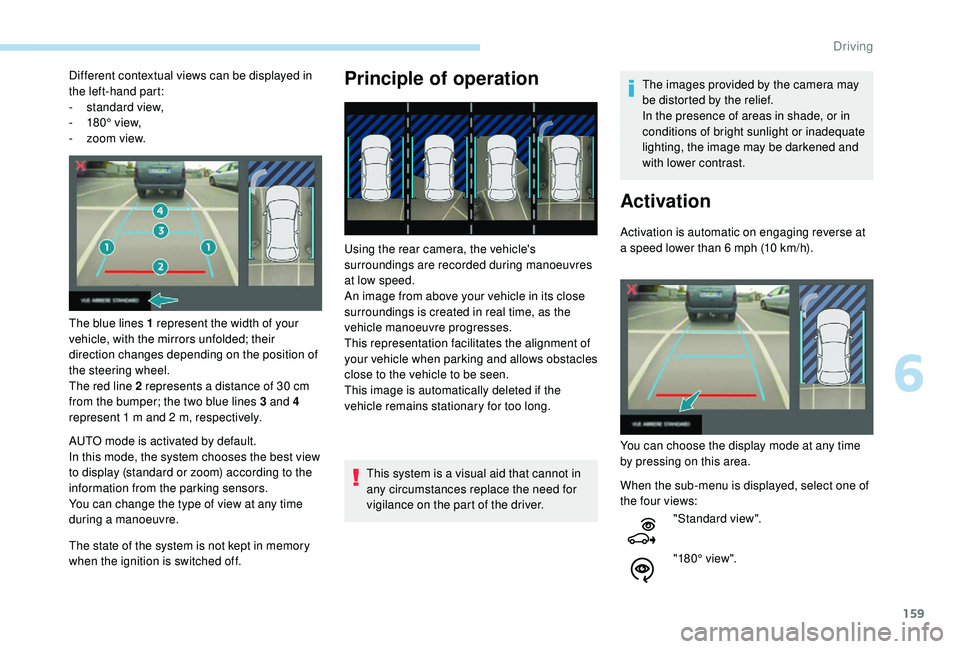
The blue lines 1 represent the width of your
vehicle, with the mirrors unfolded; their
direction changes depending on the position of
the steering wheel.
The red line 2 represents a distance of 30
cm
from the bumper; the two blue lines 3 and 4
represent 1
m and 2 m, respectively.
AUTO mode is activated by default.
In this mode, the system chooses the best view
to display (standard or zoom) according to the
information from the parking sensors.
You can change the type of view at any time
during a manoeuvre.
The state of the system is not kept in memory
when the ignition is switched off.Principle of operation
Using the rear camera, the vehicle's
surroundings are recorded during manoeuvres
at low speed.
An image from above your vehicle in its close
surroundings is created in real time, as the
vehicle manoeuvre progresses.
This representation facilitates the alignment of
your vehicle when parking and allows obstacles
close to the vehicle to be seen.
This image is automatically deleted if the
vehicle remains stationary for too long.
This system is a visual aid that cannot in
any circumstances replace the need for
vigilance on the part of the driver. The images provided by the camera may
be distorted by the relief.
In the presence of areas in shade, or in
conditions of bright sunlight or inadequate
lighting, the image may be darkened and
with lower contrast.
Activation
Activation is automatic on engaging reverse at
a speed lower than 6
mph (10 km/h).
You can choose the display mode at any time
by pressing on this area.
When the sub-menu is displayed, select one of
the four views: "Standard view".
"180° view".
6
Driving
Page 162 of 324

160
The function will be deactivated:
- I f a trailer is attached or a bicycle
carrier is fitted on a towbar (vehicle
fitted with a towbar installed in line with
the manufacturer's recommendations).
-
A
bove about 6 mph (10 km/h).
-
O
n opening the tailgate.
-
W
hen shifting out of reverse (the image
remains displayed for 7
seconds).
-
B
y pressing the red cross in the top
left-hand corner of the touch screen.
Check the cleanliness of the camera lens
regularly.
Clean the reversing camera regularly
using a soft, dry cloth.
AUTO mode
Standard view Zoom view"Zoom view".
"AUTO m o de".
This mode is activated by default.
Using sensors in the rear bumper, the
automatic view changes from a rear view
(standard) to a view from above (zoom), as an
obstacle is approached at the level of the red
line (less than 30
cm) during a manoeuvre.The blue lines 1 represent the width of your
vehicle, with the mirrors unfolded; the direction
changes depending on the position of the
steering wheel.
The red line 2 represents a distance of 30
cm
from the rear bumper; the two blue lines 3 and
4 represent 1
m and 2 m, respectively.
This view is available with AUTO mode or in the
view selection menu.
The area behind the vehicle is displayed on the
screen. The camera records the vehicle's surroundings
during the manoeuvre in order to create a
view from above the rear of the vehicle in its
near surroundings, allowing the vehicle to be
manoeuvred around obstacles nearby.
This view is available with AUTO mode or in the
view selection menu.
Driving
Page 168 of 324

166
During a bay parking manoeuvre, the Park
Assist system is automatically deactivated
once the rear of the vehicle is within 20
inches (50 cm) of an obstacle.
During parking and exit from parking
manoeuvres, the Reversing Camera
function may come into operation. It
facilitates monitoring of the surroundings
of the vehicle, by displaying additional
information in the instrument panel.
For more information on the Reversing
Camera , refer to the corresponding
section.
Deactivation
The system is deactivated by pressing the
control.
The system is deactivated automatically:
-
o
n switching off the ignition,
-
i
f the engine stalls,
-
i
f no manoeuvre is per formed within
5
minutes of selecting the type of
manoeuvre
-
a
fter a prolonged stop of the vehicle during
a manoeuvre,
-
i
f the wheel anti-slip regulation (ASR) is
triggered, This symbol is displayed on the touch
screen and a message appears,
accompanied by an audible signal.
The driver should then take back control of the
vehicle's steering.
If the system is deactivated during a
manoeuvre, the driver should reactivate it to
repeat the measurement.
Deactivation
The system is switched off automatically:
- w hen towing a trailer,
-
i
f the driver's door is opened,
-
i
f the speed of the vehicle is above 43 mph
(70
km/h).
To switch the system off for a prolonged period,
contact a PEUGEOT dealer or a qualified
workshop.
Operating faults
Depending on version:
This warning lamp comes on in the
instrument panel and a message appears,
accompanied by an audible signal.
In the event of a fault with the
power steering, this warning lamp
comes on in the instrument panel,
accompanied by a message.
If the lateral distance between your vehicle and the
space is too great, the system may not be able to
measure the space.
Anything projecting beyond the dimensions of the
vehicle (long or wide load) is not taken into account
by the Park Assist system during a manoeuvre.
In bad weather or in winter, ensure that
the sensors are not covered by road dirt,
ice or snow.
In the event of a fault, have the system
checked by a PEUGEOT dealer or a
qualified workshop.
Contact a PEUGEOT dealer or a qualified
workshop.
Tyre under-inflation
detection
This system automatically monitors the tyre
pressure while driving.
The system monitors the pressure in all four
tyres, once the vehicle is moving.
-
i
f the speed of the vehicle exceeds the
stated limit,
-
w
hen the driver interrupts movement of the
steering wheel,
-
a
fter 4
manoeuvre cycles,
-
o
n opening the driver's door,
-
i
f one of the front wheels encounters an
obstacle.
Driving
Page 169 of 324
167
The tyre under-inflation detection system
does not replace the need for vigilance on
the part of the driver.
This system still requires you to check
the tyre inflation pressures (including
the spare wheel) every month as well as
before a long journey.
Driving with under-inflated tyres impairs
handling, extends braking distances and
causes early tyre wear, particularly in
adverse conditions (heavy loads, high
speeds, long journeys).Driving with under-inflated tyres
increases fuel consumption. The tyre pressure specifications for your
vehicle can be found on the tyre pressure
label.
For more information on the
Identification markings
, refer to the
corresponding section.
Tyre pressures should be checked when
the tyres are "cold" (vehicle stopped for
1 hour or after a journey of less than
6 miles (10 km) at moderate speeds).
Other wise (when hot), add 0.3 bar to the
pressures shown on the label.
Snow chains
The system does not have to be
reinitialised after fitting or removing snow
chains.
Under-inflation alert
This warning is indicated by fixed
illumination of this warning lamp, an
audible signal and, depending on
the equipment installed, a message
displayed on the screen.
It compares the information given by the
wheel speed sensors with reference values,
which must be reinitialised after ever y tyre
pressure adjustment or wheel change
.
The system triggers an alert as soon as it
detects a drop in the pressure of one or more
tyres.
F
R
educe speed immediately, avoid excessive
steering movements and sudden braking.
F
S
top the vehicle as soon as it is safe to do
so. The loss of pressure detected does not
always cause visible bulging of the tyre.
Do not satisfy yourself with just a visual
check.
F
I
n the event of a puncture, use the
temporary puncture repair kit or the spare
wheel (depending on equipment),
or
F
i
f you have a compressor, such as the one
in the temporary puncture repair kit, check
the pressures of the four tyres when cold,
or
F
i
f it is not possible to carry out this check
immediately, drive carefully at reduced
speed.
The alert is kept active until the system is
reinitialised.
Reinitialisation
The system must be reinitialised after any
adjustment to the pressure of one or more
tyres, and after changing one or more wheels.
6
Driving
Page 174 of 324
172
Compatibility of fuels
Fuel used for petrol engines
The petrol engines are compatible with biofuels
that conform to current and future European
standards and which can be obtained from
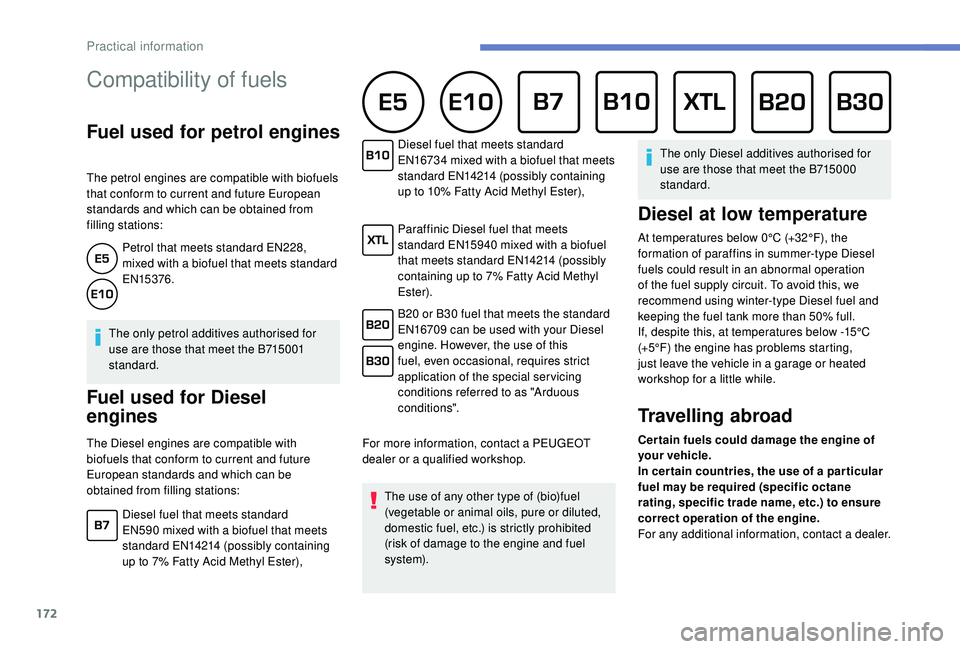
filling stations:Petrol that meets standard EN228,
mixed with a biofuel that meets standard
EN15376.
The only petrol additives authorised for
use are those that meet the B715001
standard.
Fuel used for Diesel
engines
The Diesel engines are compatible with
biofuels that conform to current and future
European standards and which can be
obtained from filling stations: For more information, contact a PEUGEOT
dealer or a qualified workshop.
The use of any other type of (bio)fuel
(vegetable or animal oils, pure or diluted,
domestic fuel, etc.) is strictly prohibited
(risk of damage to the engine and fuel
syste m). The only Diesel additives authorised for
use are those that meet the B715000
standard.
Diesel at low temperature
At temperatures below 0°C (+32°F), the
formation of paraffins in summer-type Diesel
fuels could result in an abnormal operation
of the fuel supply circuit. To avoid this, we
recommend using winter-type Diesel fuel and
keeping the fuel tank more than 50% full.
If, despite this, at temperatures below -15°C
(+5°F) the engine has problems starting,
just leave the vehicle in a garage or heated
workshop for a little while.
Travelling abroad
Cer tain fuels could damage the engine of
your vehicle.
In cer tain countries, the use of a par ticular
fuel may be required (specific octane
rating, specific trade name, etc.) to ensure
correct operation of the engine.
For any additional information, contact a dealer.
Diesel fuel that meets standard
EN590
mixed with a biofuel that meets
standard EN14214 (possibly containing
up to 7% Fatty Acid Methyl Ester), Diesel fuel that meets standard
EN16734
mixed with a biofuel that meets
standard EN14214 (possibly containing
up to 10% Fatty Acid Methyl Ester),
Paraffinic Diesel fuel that meets
standard EN15940
mixed with a biofuel
that meets standard EN14214 (possibly
containing up to 7% Fatty Acid Methyl
Ester).
B20 or B30 fuel that meets the standard
EN16709 can be used with your Diesel
engine. However, the use of this
fuel, even occasional, requires strict
application of the special ser vicing
conditions referred to as "Arduous
conditions".
Practical information
Page 177 of 324
175
During use
Never release the device with a trailer or
load carrier on the towball.
Never exceed the maximum authorised
weight for the vehicle – the Gross Train
Weight or GTW.
It is essential that the maximum
authorised load be complied with on the
towing device: if it is exceeded, this device
may detach from the vehicle, which is a
serious accident risk.
Check that the trailer lamps work
c o r r e c t l y.
Before setting off, check the adjustment of
the headlamp beam height.
For more information on Headlamp
adjustment, refer to the corresponding
section.
Following use
When travelling without a trailer or load
carrier, the towball must be removed and
the blanking plug inserted in the carrier.
This measure applies particularly where
the towball might obscure visibility of the
number plate or its lighting.Blanking plug
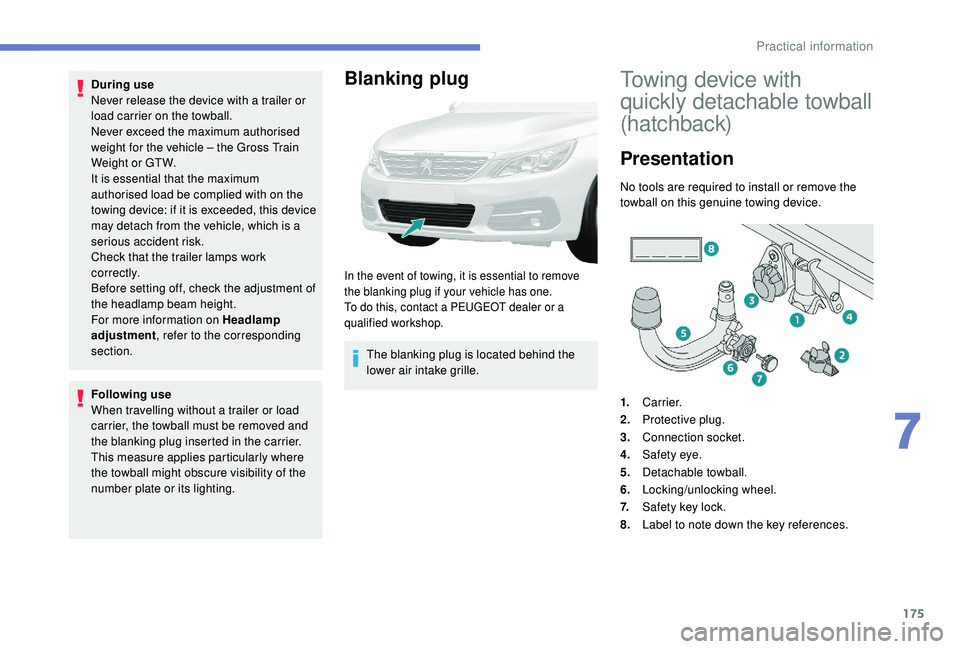
In the event of towing, it is essential to remove
the blanking plug if your vehicle has one.
To do this, contact a PEUGEOT dealer or a
qualified workshop.
The blanking plug is located behind the
lower air intake grille.
Towing device with
quickly detachable towball
(hatchback)
Presentation
No tools are required to install or remove the
towball on this genuine towing device.
1. Carrier.
2. Protective plug.
3. Connection socket.
4. Safety eye.
5. Detachable towball.
6. Locking/unlocking wheel.
7. Safety key lock.
8. Label to note down the key references.
7
Practical information
Page 178 of 324
176
Trailers with LED lamps are not
compatible with the wiring harness of this
device.
To know the Technical data , and, in
particular, the towable weights for your
vehicle, refer to the corresponding section.
To ensure complete safety while driving
with a To w b a r d e v i c e , refer to the
corresponding section.
Fitting the towball
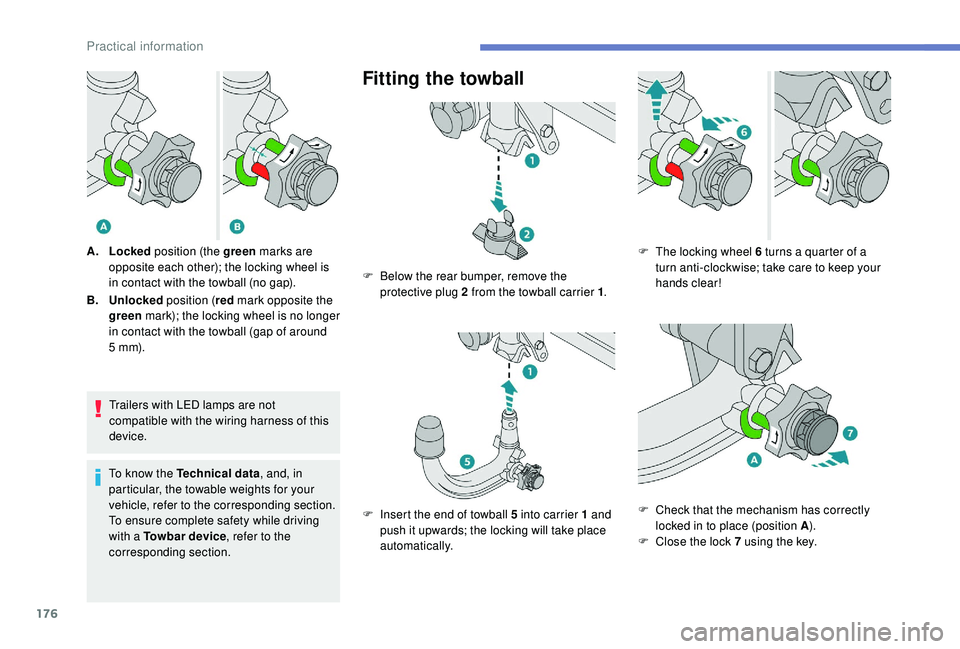
A. Locked position (the green marks are
opposite each other); the locking wheel is
in contact with the towball (no gap).
B. Unlocked position (red mark opposite the
green mark); the locking wheel is no longer
in contact with the towball (gap of around
5
m m). F
B
elow the rear bumper, remove the
protective plug 2 from the towball carrier 1 .
F
I
nsert the end of towball 5 into carrier 1 and
push it upwards; the locking will take place
automatically. F
T he locking wheel 6 turns a quarter of a
turn anti-clockwise; take care to keep your
hands clear!
F
C
heck that the mechanism has correctly
locked in to place (position A ).
F
C
lose the lock 7 using the key.
Practical information