2018 Peugeot 308 fuel consumption
[x] Cancel search: fuel consumptionPage 8 of 324

6
As a passenger, if you avoid connecting your
multimedia devices (film, music, video game,
etc.), you will contribute towards limiting the
consumption of electrical energy, and so of
fuel.
Disconnect your portable devices before
leaving the vehicle.
Eco- driving
Optimise the use of your
gearbox
With a manual gearbox, move off gently
and change up without waiting. When
accelerating, change up early.
With an automatic or electronic gearbox,
favour automatic mode and avoid pressing the
accelerator pedal heavily or suddenly.
The gear shift indicator invites you to engage
the most suitable gear: as soon as the
indication is displayed in the instrument panel,
follow it straight away.
For vehicles fitted with an electronic or
automatic gearbox, this indicator appears only
in manual mode.
Drive smoothly
Maintain a safe distance between vehicles,
use engine braking rather than the
brake pedal, and press the accelerator
progressively. These practices contribute
towards a reduction in fuel consumption and
CO
2 emissions and also help reduce the
background traffic noise.
If your vehicle has cruise control, make use of
the system at speeds above 25
mph (40 km/h)
when the traffic is flowing well.
Control the use of your electrical
equipment
Before moving off, if the passenger
compartment is too warm, ventilate it by opening
the windows and air vents before using the air
conditioning.
Above 31
mph (50 km/h), close the windows and
leave the air vents open.
Consider using equipment that can help keep
the temperature in the passenger compartment
down (sunroof blind, window blinds, etc.).
Switch off the headlamps and foglamps when
the ambient light level does not require their
use.
Avoid running the engine before moving off,
particularly in winter; your vehicle will warm up
much faster while driving.
Unless it has automatic regulation, switch off
the air conditioning as soon as the desired
temperature has been reached.
Switch off the demisting and defrosting controls
when not required, if they are not automatically
controlled.
Switch off the heated seat as soon as possible.
Eco-driving is a range of everyday practices that allow the motorist to optimise their fuel consumption and CO2 emissions.
Eco-driving
Page 9 of 324
7
Limit the causes of excess
consumption
Spread loads throughout the vehicle; place
the heaviest items in the bottom of the boot,
as close as possible to the rear seats.
Limit the loads carried in the vehicle and
reduce wind resistance (roof bars, roof rack,
bicycle carrier, trailer, etc.). Preferably, use a
roof box.
Remove roof bars and roof racks after use.
At the end of winter, remove snow tyres and
refit your summer tyres.
Observe the recommendations
on maintenance
Check the tyre pressures regularly, when cold,
referring to the label in the door aperture,
driver's side.
Carry out this check in particular:
-
b
efore a long journey,
-
a
t each change of season,
-
a
fter a long period out of use.
Do not forget the spare wheel and the tyres on
any trailer or caravan. Have your vehicle ser viced regularly (engine
oil, oil filter, air filter, cabin filter, etc.) and
obser ve the schedule of operations in the
manufacturer's service schedule.
When filling the tank, do not continue after the
3
rd cut-off of the nozzle to avoid over flow.
At the wheel of your new vehicle, it is only
after the first 1,900
miles (3,000 kilometres)
that you will see the fuel consumption settle
down to a consistent average. With a BlueHDi Diesel engine, if the SCR
system is faulty, your vehicle becomes
polluting. Visit a PEUGEOT dealer or a
qualified workshop as soon as possible to
bring your vehicle’s nitrogen oxides emissions
back in line with the regulations.
For vehicles fitted with it, avoid using the
Dynamic Pack for too long, in order to limit
your fuel consumption.
.
Eco-driving
Page 30 of 324

28
Total distance recorder
It measures the total distance travelled by the
vehicle since its first registration.
Trip distance recorder
It measures the distance travelled since it was
reset by the driver.
F
W
ith the ignition on, press the button until
zeroes appear.
Lighting dimmer
For the manual adjustment of the brightness of
the instrument panel and the touch screen.
Operates only when the vehicle's exterior
lighting is on.
Instrument panel
With the exterior lighting on, press this button
to adjust the brightness of the dashboard
lighting, the touch screen and the ambient
lighting. Release the button when the desired
level is reached.
Touch screen
F Press on the Vehicle/Driving menu.
F I n this menu, select the Vehicle settings
tab, then Comfort lighting .
F
A
djust the brightness (only for the touch
screen) by pressing on the " +" or " -" buttons.
Trip computer
Information displayed about the current journey
(range, current fuel consumption, average fuel
consumption, etc.).
Data displays
With display screen 1 and the audio system:
With display screen
2:
Instruments
Page 31 of 324

29
F Press this button, located on the end of the wiper control stalk , to display the different
tabs in turn.
-
T
he current information tab with:
•
t
he range,
•
t
he current fuel consumption,
•
t
he Stop & Start time counter.-
Trip 1 with:
•
t
he average speed,
•
t
he average fuel consumption,
•
t
he distance travelled,
for the first trip.
-
Trip 2 with:
•
t
he average speed,
•
t
he average fuel consumption,
•
t
he distance travelled,
for the second trip.
Reset trip
For example, trip 1 can be used for daily figures
and trip 2 for monthly figures.
F
W
hen the required trip is displayed, press
the button on the end of the wiper control
stalk for more than two seconds.
Tr i p s 1 and 2 are independent but their use is
identical. With display screen
1 and the touch screen:
Information is accessible from the " Vehicle/
Driving " menu.
Permanent display:
F
Sel
ect the " Vehicle/Driving " menu.
F
I
n this menu, select the " Driving functions"
tab.
The information of the trip computer is
displayed in the primary page of the menu.
F
P
ress one of the buttons to display the
desired tab.
Temporary display in a specific window:
F
P
ress the end of the wiper control stalk for
access to the information and to display the
different tabs. The current information tab with:
-
t he range,
-
t
he current fuel consumption,
-
t
he Stop & Start time counter.
The trip 1 tab with:
-
t
he distance travelled,
-
t
he average fuel consumption,
-
t
he average speed for the first
trip.
The trip 2 tab with:
-
t
he distance travelled,
-
t
he average fuel consumption,
-
t
he average speed for the
second trip.
Reset trip
F When the desired trip is displayed, press the reset button or the end of the wiper
control stalk.
1
Instruments
Page 32 of 324

30
Tr i p s 1 and 2 are independent but their use is
identical.
For example, trip 1 can be used for daily figures
and trip 2 for monthly figures.
Trip computer, some
definitions
Range
(miles or km)
The distance which can still be
travelled with the fuel remaining in
the tank (related to the average fuel
consumption over the last few miles
(kilometres) travelled).
This value may fluctuate if a change
of driving style or terrain results in a
significant change in the current fuel
consumption.
Dashes are displayed when the range falls
below 19
miles (30 km). After filling with at least
5
litres of fuel, the range is recalculated and is
displayed if it exceeds 62
miles (100 km).
If dashes are displayed continuously while
driving in place of the digits, contact a
PEUGEOT dealer or a qualified workshop.
Current fuel consumption
(mpg or km/l or l/100 km)
C alculated during the last few
seconds.
This function is only displayed from
19
mph (30 km/h).
Average fuel consumption
(mpg or km/l or l/100 km)
C alculated since the last time the
trip recorder was reset to zero.
Average speed
(mph or km/h)
Calculated since the last time the
trip recorder was reset to zero.
Distance travelled
(miles or km)
Calculated since the last time the
trip recorder was reset to zero.
Stop & Start time counter
(minutes/seconds or hours/
minutes)
A time counter calculates the time
spent in STOP mode during a
j o u r n ey.
It resets to zero every time the
ignition is switched on.
Monochrome screen C
Displays in the screen
This displays the following information:
- t he time,
-
t
he date,
-
t
he exterior temperature (this flashes if
there is a risk of ice),
-
par
king sensor information,
-
t
he audio source being listened to,
-
t
elephone or hands-free kit information,
-
t
he trip computer,
-
a
lert messages,
-
s
ettings menus for the screen and the
vehicle equipment.
Controls
From the control panel of your audio system,
you can press:
F
button A to chooses between the display
of audio information in full screen or the
shared display of audio and trip computer
information,
Instruments
Page 39 of 324
37
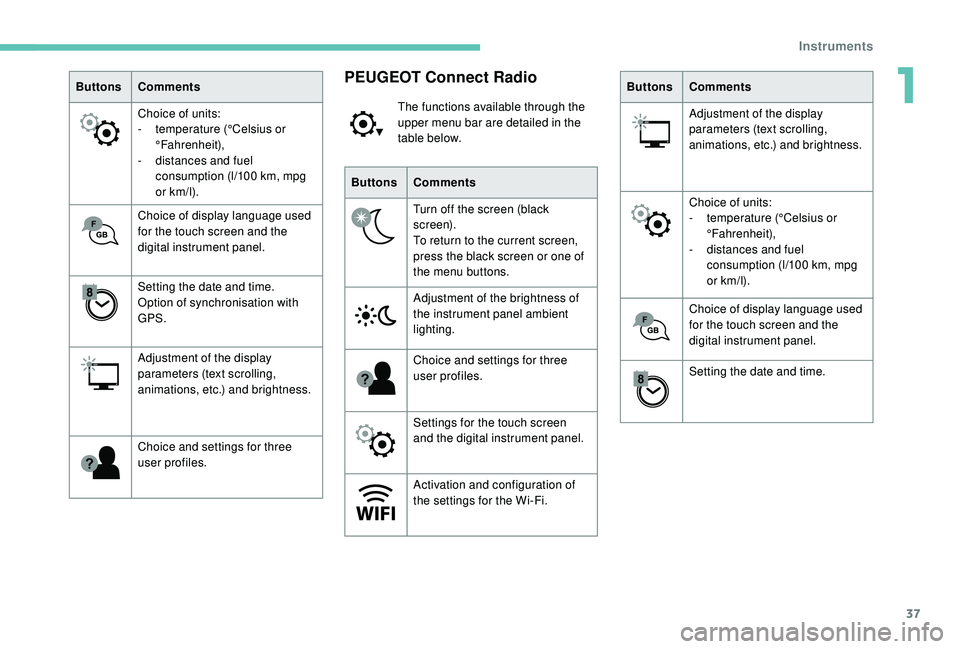
ButtonsComments
Choice of units:
-
t
emperature (°Celsius or
°Fahrenheit),
-
d
istances and fuel
consumption (l/100
km, mpg
or km/l).
Choice of display language used
for the touch screen and the
digital instrument panel.
Setting the date and time.
Option of synchronisation with
GPS.
Adjustment of the display
parameters (text scrolling,
animations, etc.) and brightness.
Choice and settings for three
user profiles.PEUGEOT Connect Radio
The functions available through the
upper menu bar are detailed in the
table below.
Buttons Comments
Turn off the screen (black
screen).
To return to the current screen,
press the black screen or one of
the menu buttons.
Adjustment of the brightness of
the instrument panel ambient
lighting.
Choice and settings for three
user profiles.
Settings for the touch screen
and the digital instrument panel.
Activation and configuration of
the settings for the Wi-Fi. Buttons
Comments
Adjustment of the display
parameters (text scrolling,
animations, etc.) and brightness.
Choice of units:
-
t
emperature (°Celsius or
°Fahrenheit),
-
d
istances and fuel
consumption (l/100
km, mpg
or km/l).
Choice of display language used
for the touch screen and the
digital instrument panel.
Setting the date and time.
1
Instruments
Page 55 of 324
53
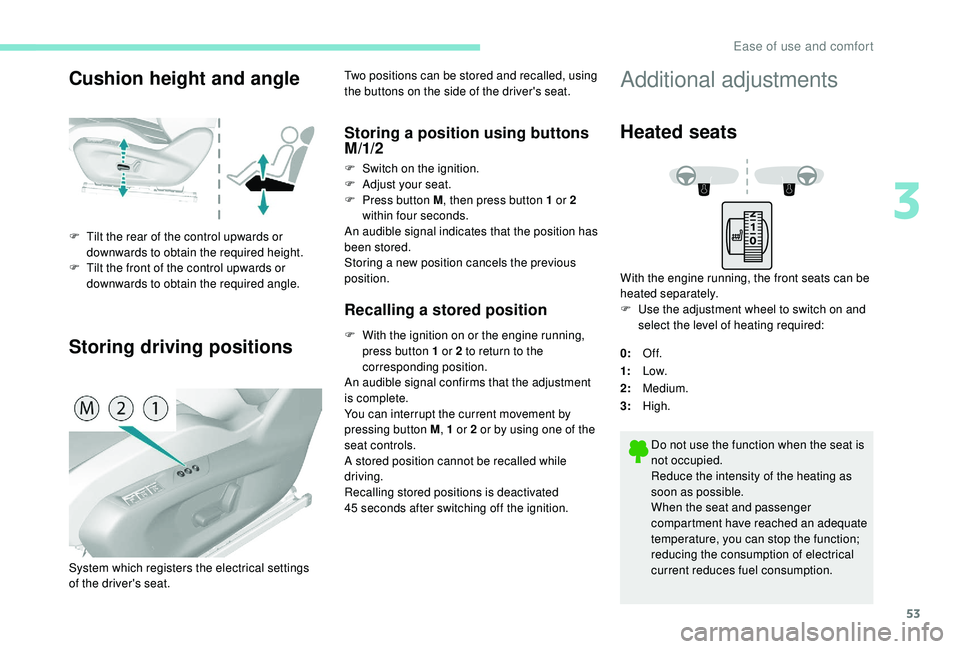
Cushion height and angle
Storing driving positions
F Tilt the rear of the control upwards or downwards to obtain the required height.
F
T
ilt the front of the control upwards or
downwards to obtain the required angle. Two positions can be stored and recalled, using
the buttons on the side of the driver's seat.
Storing a position using buttons
M/1/2
F Switch on the ignition.
F
Adj ust your seat.
F
P
ress button M , then press button 1 or 2
within four seconds.
An audible signal indicates that the position has
been stored.
Storing a new position cancels the previous
position.
Recalling a stored position
F With the ignition on or the engine running, press button 1 or 2 to return to the
corresponding position.
An audible signal confirms that the adjustment
is complete.
You can interrupt the current movement by
pressing button M , 1 or 2 or by using one of the
seat controls.
A stored position cannot be recalled while
driving.
Recalling stored positions is deactivated
45
seconds after switching off the ignition.
System which registers the electrical settings
of the driver's seat.
Additional adjustments
Heated seats
With the engine running, the front seats can be
heated separately.
F
U
se the adjustment wheel to switch on and
select the level of heating required:
0: Of f.
1: Low.
2: Medium.
3: High.
Do not use the function when the seat is
not occupied.
Reduce the intensity of the heating as
soon as possible.
When the seat and passenger
compartment have reached an adequate
temperature, you can stop the function;
reducing the consumption of electrical
current reduces fuel consumption.
3
Ease of use and comfort
Page 73 of 324
71
On/Off
F Press this button to demist /defrost the rear screen and, depending on version, the door
mirrors. The indicator lamp in the button
comes on.
Demisting/defrosting switches off automatically
to prevent excessive electrical consumption.
F
I
t is possible to stop the demisting/
defrosting operation before it is switched off
automatically by pressing this button again.
The indicator lamp in the button goes off.
Switch off the demisting/defrosting of
the rear screen and door mirrors as
soon as appropriate, as lower current
consumption results in reduced fuel
consumption.
Rear screen demisting – defrosting can
only be operated when the engine is
running.
Panoramic roof
Its electric blind improves thermal and acoustic
comfort.
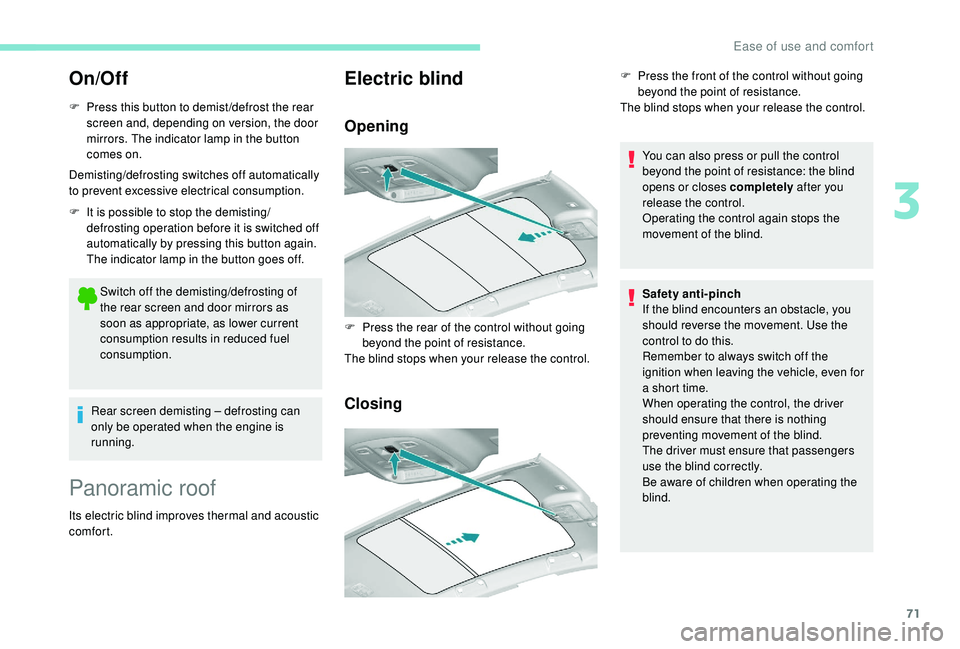
Electric blind
Opening
Closing
You can also press or pull the control
beyond the point of resistance: the blind
opens or closes completely after you
release the control.
Operating the control again stops the
movement of the blind.
F
P
ress the rear of the control without going
beyond the point of resistance.
The blind stops when your release the control. F
P
ress the front of the control without going
beyond the point of resistance.
The blind stops when your release the control.
Safety anti-pinch
If the blind encounters an obstacle, you
should reverse the movement. Use the
control to do this.
Remember to always switch off the
ignition when leaving the vehicle, even for
a short time.
When operating the control, the driver
should ensure that there is nothing
preventing movement of the blind.
The driver must ensure that passengers
use the blind correctly.
Be aware of children when operating the
blind.
3
Ease of use and comfort