2018 Peugeot 308 buttons
[x] Cancel search: buttonsPage 69 of 324
67
Temperature adjustment
F Press one of the buttons 1 to decrease or increase the value.
Air flow adjustment
F Press one of the buttons 2 to increase or decrease the speed of the air booster fan.
The symbol for air flow (a fan) fills progressively
according to the air flow setting made.
By reducing the air flow to a minimum, you are
stopping ventilation.
Avoid driving for too long with the
ventilation off (risk of misting and
deterioration of air quality).
Air distribution adjustment
These buttons are used to arrange
the distribution of air in the passenger
compartment by combining several air outlets. Windscreen.
Central and side air vents. Footwells.
The air distribution can be adapted by using
several buttons: illumination of the indicator
lamp confirms the presence of fan boosted air
in the direction indicated, the indicator lamp
being off indicates the absence of fan boosted
air in the direction indicated.
For a uniform distribution of air in the
passenger compartment, the three buttons can
be activated simultaneously.
Air conditioning on/off
The air conditioning is designed to operate
effectively in all seasons, with the windows
closed.
It enables you to:
-
l
ower the temperature, in summer,
-
i
ncrease the effectiveness of the demisting
in winter, above 3°C.
F
P
ress button 4 to activate/deactivate the air
conditioning system.
When the indicator lamp is on, the function is
activated.
The air conditioning does not operate
when the air flow adjustment is inhibited. Switching off the air conditioning may result in
some discomfort (humidity, condensation).
To obtain cool air sooner, you can use
recirculation of the interior air for a few
moments. Then return to the intake of exterior
a i r.
Dual-zone automatic
air conditioning (Touch
screen)
This air conditioning system operates with
the engine running, but the ventilation and its
controls are available with the ignition on.
Operation of the air conditioning and regulation
of temperature, air flow and air distribution in
the passenger compartment are automatic
according to the temperature in the passenger
compartment and the temperature setting.
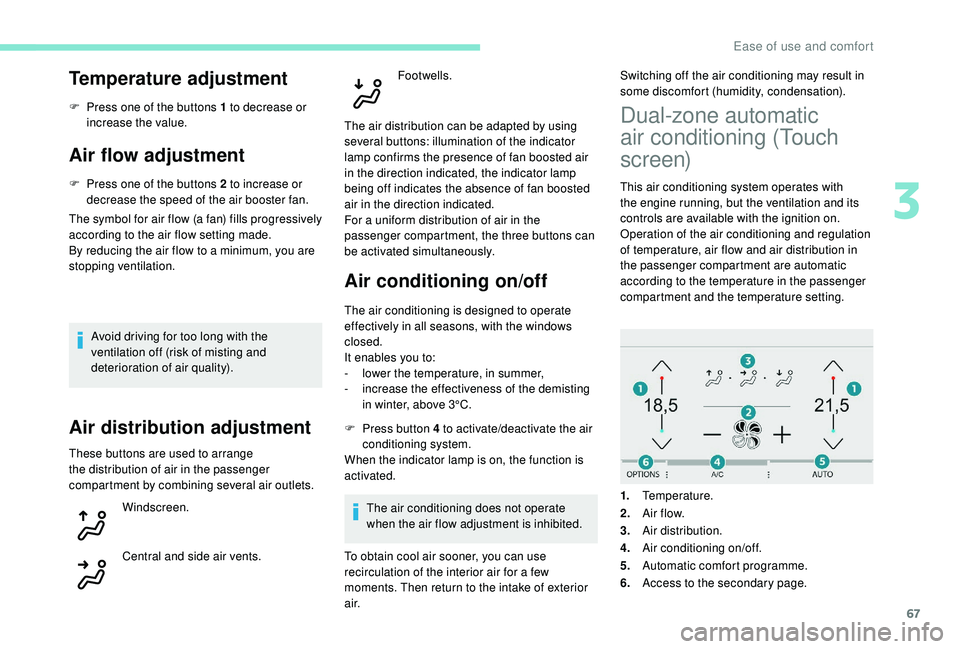
1. Temperature.
2. A ir f low.
3. Air distribution.
4. Air conditioning on/off.
5. Automatic comfort programme.
6. Access to the secondary page.
3
Ease of use and comfort
Page 70 of 324

68
Press the "Air conditioning " menu
button to display the controls for the
air conditioning system.
Temperature adjustment
The driver and front passenger can each set
the temperature.
F
P
ress one of the buttons 1 to increase or
decrease the air flow.
The value displayed corresponds to a level of
comfort and not to a precise temperature.
It is recommended that you avoid a
difference between the left and right setting
of more than 3.
Automatic comfort
programme
F Press the button 5 to activate/deactivate the automatic mode of the air conditioning
system.
When the indicator lamp in the button is on, the
air conditioning system operates automatically:
the system manages the temperature, air
flow and air distribution in the passenger
compartment in an optimum way depending on
the comfort level you have selected. It is possible to modulate the
intensity of the automatic comfort
programme by choosing one of
three mode settings offered in
a secondary page of the "
Air
conditioning " menu.
To change the current setting, shown by the
green indicator lamp, press the button for the
desired mode:
"Soft": provides soft and quiet
operation by limiting air flow.
"Normal": offers the best
compromise between a comfortable
temperature and quiet operation
(default setting).
"Fast": provides strong and effective
air f low. This setting is associated with AUTO mode
only. However, on deactivation of AUTO mode,
the indicator for the last setting remains on.
Changing the setting does not reactivate AUTO
mode if deactivated.
In cold conditions and when the engine is
cold, to limit distribution of cold air in the
passenger compartment, the air flow will
change gradually until the comfort setting
is reached.
On entering the vehicle, if the interior
temperature is much colder or warmer
than the comfort value setting, there is
no need to alter the value displayed in
order to reach more quickly the required
level of comfort. The system automatically
corrects the temperature difference.
Manual control
You can manually adjust one or more of these
settings, while retaining automatic control of
the other functions:
-
a
ir flow,
-
a
ir distribution.
As soon as you modify a setting, the indicator
lamp in the " AUTO" button goes off.
Ease of use and comfort
Page 71 of 324

69
F Press the AUTO button again to activate the automatic comfort
programme again.
Air flow adjustment
F Press one of the buttons 2 to increase or decrease the speed of the fan.
The air flow symbol (a fan) is filled in
progressively as the speed of the fan is
increased.
By reducing the air flow to minimum, you are
stopping ventilation.
" OFF " is displayed alongside the fan.
Avoid driving for too long with the
ventilation off (risk of misting and
deterioration of air quality).
Air distribution adjustment
You can modulate the distribution of air in the
passenger compartment using these three buttons.
Windscreen.
Central and side air vents.
Footwells. Each press on a button activates or deactivates
the function. The indicator lamp is on when the
button is activated. For a uniform distribution in
the passenger compartment, all three buttons
can be pressed simultaneously.
In AUTO mode, the indicator lamps in all three
buttons are off.
Air conditioning on/off
The air conditioning is designed to operate
effectively in all seasons, with the windows
closed.
It enables you to:
-
l
ower the temperature, in summer,
-
i
ncrease the effectiveness of the demisting
in winter, above 3°C.
F
P
ress button 4 to activate/deactivate the air
conditioning system.
When the indicator lamp under the button is on,
the air conditioning function is activated.
The air conditioning does not operate when the
air flow adjustment is set to off.
Ventilation function with the
ignition on
When the ignition is switched on, you can use
the ventilation system to adjust the air flow
and air distribution settings in the passenger
compartment for a duration that depends on
the battery charge. This function does not operate the air
conditioning.
"Mono" function
The comfort setting for the passenger's side
can be indexed to the driver's comfort setting
(mono-zone).
From the secondary page of the "
Air
conditioning " menu:
F
P
ress this button to activate/
deactivate the "Mono" function.
The indicator lamp in the button
is on when the function is
activated.
The function is deactivated automatically when
the passenger uses their temperature setting
buttons.
Recirculation of interior air
The intake of exterior air prevents the formation
of mist on the windscreen and side windows.
3
Ease of use and comfort
Page 88 of 324
86
Geolocation
If you purchased your vehicle outside the
PEUGEOT dealer network, we invite you
to have a dealer check the configuration of
these ser vices and, if desired, modify it to
suit your wishes. In a multilingual country,
configuration is possible in the official
national language of your choice.
For technical reasons and, in particular,
to improve the quality of PEUGEOT
CONNECT ser vices to customers, the
manufacturer reser ves the right to carry
out updates to the vehicle's on-board
telematic system.
To reactivate geolocation, simultaneously press
the "Peugeot Connect SOS" and "Peugeot
Connect Assistance" buttons again, followed
by a press on "Peugeot Connect Assistance"
to confirm. If you benefit from the Peugeot Connect
Packs offer with the SOS and assistance
pack included, there are additional
ser vices available to you in your personal
space, via the website for your country.
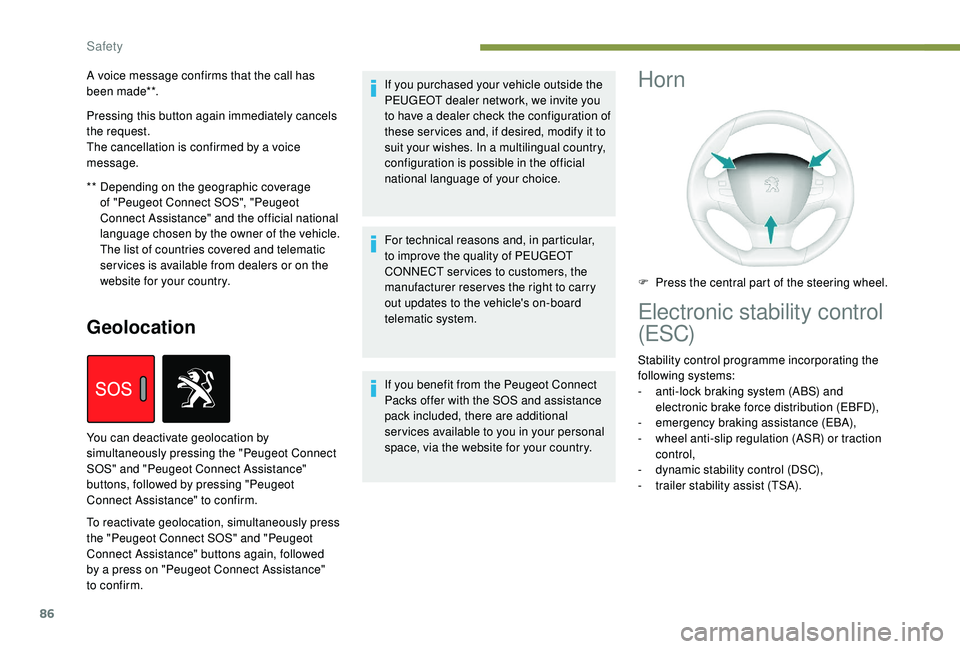
You can deactivate geolocation by
simultaneously pressing the "Peugeot Connect
SOS" and "Peugeot Connect Assistance"
buttons, followed by pressing "Peugeot
Connect Assistance" to confirm.Horn
F Press the central part of the steering wheel.
Electronic stability control
(ESC)
Stability control programme incorporating the
following systems:
-
a
nti-lock braking system (ABS) and
electronic brake force distribution (EBFD),
-
em
ergency braking assistance (EBA),
-
w
heel anti-slip regulation (ASR) or traction
control,
-
d
ynamic stability control (DSC),
-
t
railer stability assist (TSA).
**
D
epending on the geographic coverage
of "Peugeot Connect SOS", "Peugeot
Connect Assistance" and the official national
language chosen by the owner of the vehicle.
The list of countries covered and telematic
ser vices is available from dealers or on the
website for your country.
A voice message confirms that the call has
been made**.
Pressing this button again immediately cancels
the request.
The cancellation is confirmed by a voice
message.
Safety
Page 139 of 324
137
F press button 5 again to save the suggested speed.
The speed displays immediately in the
instrument panel as the new speed setting.
Temporarily exceeding the
programmed speed
If needed (for overtaking, etc.) it is possible to
exceed the programmed speed by pressing the
accelerator pedal.
The cruise control is temporarily overridden
and the programmed speed setting flashes.
To return to the programmed speed, simply
release the accelerator pedal.
Once the vehicle has returned to the
programmed speed, the cruise control takes
over again: the display of the programmed
speed setting becomes fixed again.
When descending a steep hill, the cruise
control system cannot prevent the vehicle
from exceeding the programmed speed.
You may have to brake to control the
speed of your vehicle. In this case, the
cruise control is automatically paused.
To activate the system again, with the
speed of the vehicle above 25
mph
(40
km/h), press button 4 .
Switching off
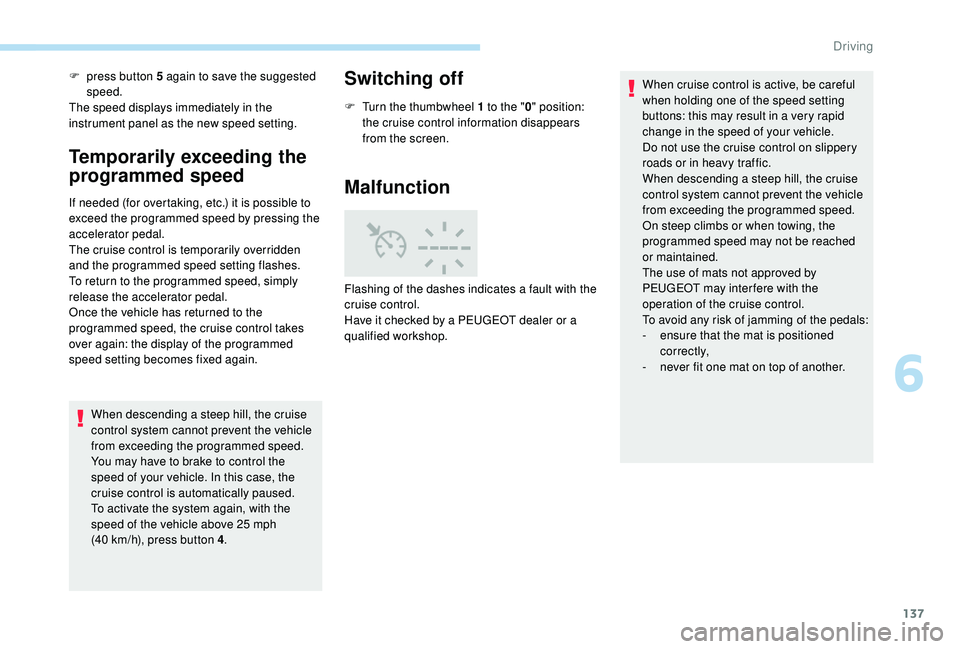
F Turn the thumbwheel 1 to the " 0" position:
the cruise control information disappears
from the screen.
Malfunction
Flashing of the dashes indicates a fault with the
cruise control.
Have it checked by a PEUGEOT dealer or a
qualified workshop. When cruise control is active, be careful
when holding one of the speed setting
buttons: this may result in a very rapid
change in the speed of your vehicle.
Do not use the cruise control on slippery
roads or in heavy traffic.
When descending a steep hill, the cruise
control system cannot prevent the vehicle
from exceeding the programmed speed.
On steep climbs or when towing, the
programmed speed may not be reached
or maintained.
The use of mats not approved by
PEUGEOT may inter fere with the
operation of the cruise control.
To avoid any risk of jamming of the pedals:
-
e
nsure that the mat is positioned
c o r r e c t l y,
-
n
ever fit one mat on top of another.
6
Driving
Page 141 of 324
139
For more information on the Speed Limit
recognition and recommendation, refer to
the corresponding section.
Displays in the instrument panel
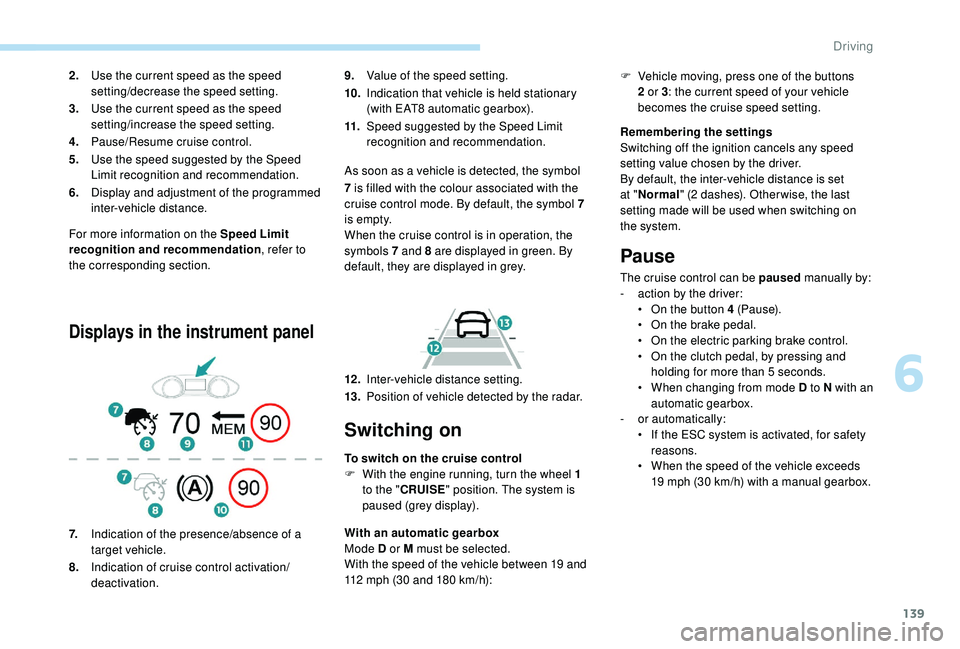
9. Value of the speed setting.
10. Indication that vehicle is held stationary
(with EAT8 automatic gearbox).
11. Speed suggested by the Speed Limit
recognition and recommendation.
As soon as a vehicle is detected, the symbol
2.
Use the current speed as the speed
setting/decrease the speed setting.
3. Use the current speed as the speed
setting/increase the speed setting.
4. Pause/Resume cruise control.
5. Use the speed suggested by the Speed
Limit recognition and recommendation.
6. Display and adjustment of the programmed
inter-vehicle distance.
7. Indication of the presence/absence of a
target vehicle.
8. Indication of cruise control activation/
deactivation. 7
is filled with the colour associated with the
cruise control mode. By default, the symbol 7
i s e m pt y.
When the cruise control is in operation, the
symbols 7 and 8 are displayed in green. By
default, they are displayed in grey.
12 . Inter-vehicle distance setting.
13. Position of vehicle detected by the radar.
Switching on
To switch on the cruise control
F
W ith the engine running, turn the wheel 1
to the " CRUISE " position. The system is
paused (grey display).
With an automatic gearbox
Mode D or M must be selected.
With the speed of the vehicle between 19 and
112
mph (30 and 180 km/h): Remembering the settings
Switching off the ignition cancels any speed
setting value chosen by the driver.
By default, the inter-vehicle distance is set
at "
Normal " (2 dashes). Other wise, the last
setting made will be used when switching on
the system.
Pause
The cruise control can be paused manually by:
- a ction by the driver:
•
O
n the button 4 (Pause).
•
O
n the brake pedal.
•
O
n the electric parking brake control.
•
O
n the clutch pedal, by pressing and
holding for more than 5
seconds.
•
W
hen changing from mode D to N with an
automatic gearbox.
-
o
r automatically:
•
I
f the ESC system is activated, for safety
reasons.
•
W
hen the speed of the vehicle exceeds
19
mph (30 km/h) with a manual gearbox.
F
V
ehicle moving, press one of the buttons
2 or 3 : the current speed of your vehicle
becomes the cruise speed setting.
6
Driving
Page 142 of 324
140
When the cruise control is paused, it
can only be reactivated when all of the
safety conditions are met. The "Activation
denied, conditions unsuitable" message is
displayed if reactivation is not possible.
Reactivating the function
With a manual gearbox
To reactivate the function, the driver must
accelerate to reach at least 19 mph (30 km/h),
then press one of the buttons 2 , 3 or 4.
With the EAT8 gearbox or with the BlueHDi
150 S&S EAT6 engine
Following braking of the vehicle bringing it to
a complete stop, the system holds the vehicle
stationary; the cruise control is paused.
The driver should press the accelerator pedal
to move off, then reactivate the system above
19
mph (30 km/h) by pressing button 2 , 3 or 4.
If the driver takes no action following this
immobilisation, the electric parking brake is
applied automatically after a while (approx. five
minutes).
As a safety measure, wait until the current
speed approaches the speed setting to
reactivate the function by pressing button 4 .
Modification of the speed
setting
With the engine running and cruise control on
(green), you can modify the speed setting.
Modification from the current
speed
F By successive short presses on button 2
or 3 , to lower or raise the setting in steps of
1
mph (km/h),
F
B
y a maintained press on button 2 or 3 , to
lower or raise the setting in steps of 5
mph
(km/h).
Take care: pressing and holding button 2
or 3
results in a rapid change in the speed
of your vehicle.
Modification from the speed Limit
recognition and recommendation
system
F The suggested speed is displayed in the instrument panel.
F
M
ake an initial press on button 5 ; a
message is displayed to confirm the
memorisation request.
F
P
ress button 5 again to save the suggested
speed.
The speed displays immediately in the
instrument panel as the new speed setting. For more information on the Speed Limit
recognition and recommendation
, refer to
the corresponding section.
As a precaution, it is recommended
that you select a cruise speed close to
the current speed of your vehicle, so
as to avoid any sudden acceleration or
deceleration of the vehicle.
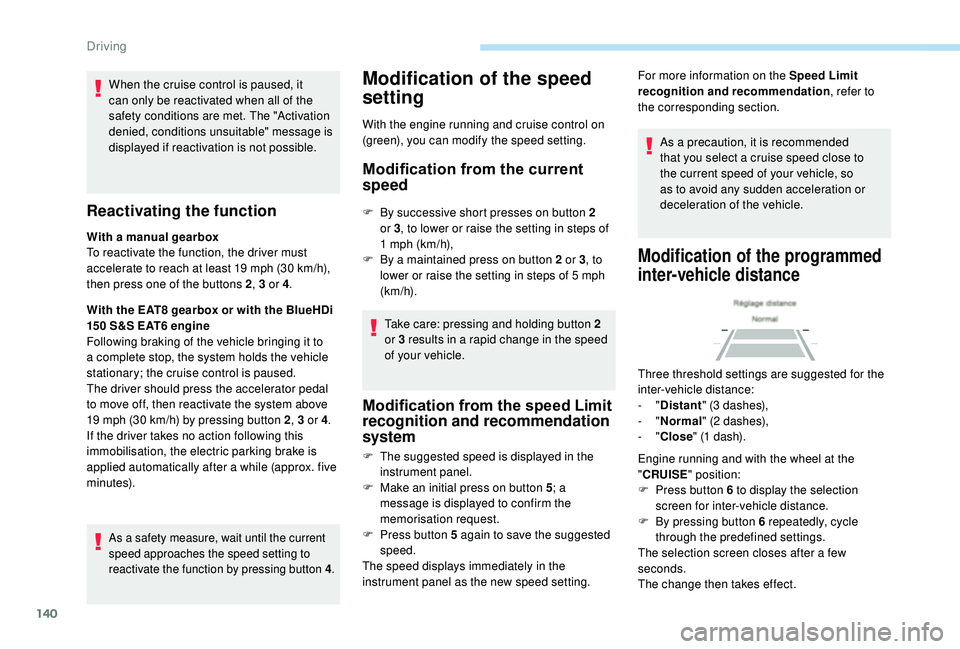
Modification of the programmed
inter-vehicle distance
Three threshold settings are suggested for the
inter-vehicle distance:
- "Distant " (3 dashes),
-
"Normal " (2 dashes),
-
"Close " (1 dash).
Engine running and with the wheel at the
" CRUISE " position:
F
P
ress button 6 to display the selection
screen for inter-vehicle distance.
F
B
y pressing button 6 repeatedly, cycle
through the predefined settings.
The selection screen closes after a few
seconds.
The change then takes effect.
Driving
Page 238 of 324

2
First steps
Press: On/Off.
Rotate: adjust volume.
Short press: change audio source
(radio; USB; AUX (if equipment
connected); streaming).
Long press: display the Telephone
menu (if a telephone is connected).
Adjust audio options:
Front/rear fader; left/right balance;
bass/treble; loudness; audio
ambience.
Activation/Deactivation of automatic
volume adjustment (linked to the
speed of the vehicle).
Radio:
Short press: display the list of radio
stations.
Long press: update the list.
Media:
Short press: display the list of
folders.
Long press: display the available
sorting options.Select the screen display mode,
between:
Date; Audio functions; Trip
computer; Telephone.
Confirm or display contextual menu.
Buttons 1 to 6.
Short press: select the preset radio
station.
Long press: preset a radio station.
Radio:
Automatic step by step search up/
down for radio stations.
Media:
Select previous/next USB,
streaming track.
Fast scroll in a list.
Radio:
Manual step by step search up/down
for radio stations.
Select previous/next MP3 folder.
Media:
Select previous/next folder/genre/
artist/playlist on the USB device.
Fast scroll in a list.Abandon the current operation.
Go up one level (menu or folder).
Access to the main menu.
Activate/Deactivate TA function
(traffic announcements).
Long press: select type of
announcement.
Selection of FM/DAB/AM
wavebands.
Steering mounted controls
Steering mounted controls
– Type 1
Radio:
Select the previous/next preset radio
station.
Select the previous/next item in a
menu or a list.
Media:
Select the previous/next track.
Select the previous/next item in a
menu or a list.
Bluetooth® audio system