2018 PEUGEOT 3008 ESP
[x] Cancel search: ESPPage 171 of 360
169
Deactivation / Reactivation
In certain circumstances, such as the need
to maintain the temperature in the passenger
compartment, it may be useful to deactivate
the Stop & Start system.
The system can be deactivated at any time,
once the ignition is switched on.
If the engine is in STOP mode, it restarts
immediately.
The Stop & Start system is reactivated
automatically every time the ignition is
switched on.
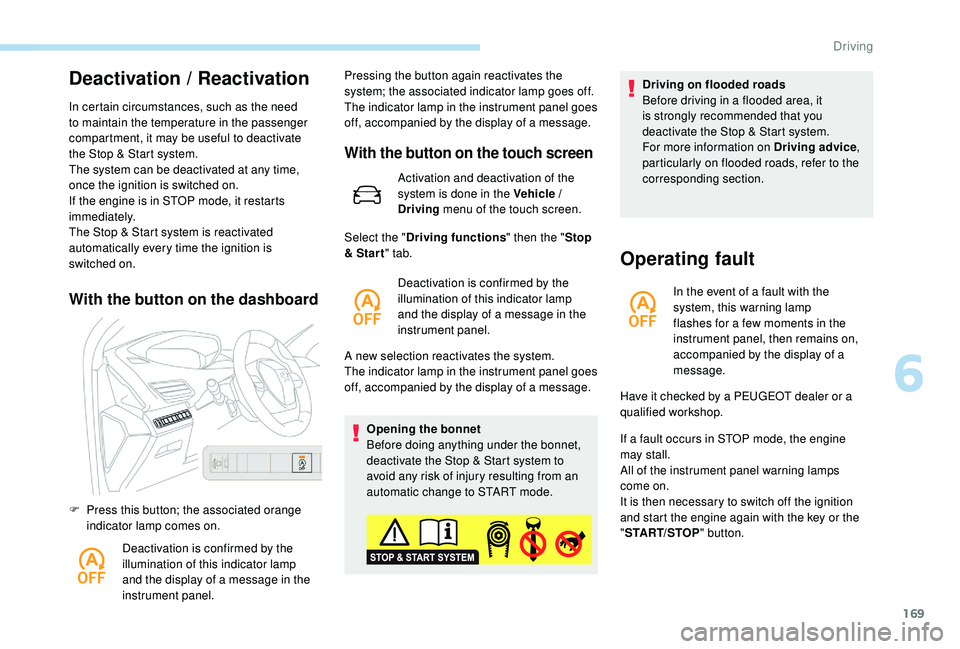
With the button on the dashboard
F Press this button; the associated orange indicator lamp comes on.
Deactivation is confirmed by the
illumination of this indicator lamp
and the display of a message in the
instrument panel. Pressing the button again reactivates the
system; the associated indicator lamp goes off.
The indicator lamp in the instrument panel goes
off, accompanied by the display of a message.
With the button on the touch screen
Activation and deactivation of the
system is done in the Vehicle /
Driving
menu of the touch screen.
A new selection reactivates the system.
The indicator lamp in the instrument panel goes
off, accompanied by the display of a message. Opening the bonnet
Before doing anything under the bonnet,
deactivate the Stop & Start system to
avoid any risk of injury resulting from an
automatic change to START mode.
Select the "
Driving functions " then the "Stop
& Star t " tab.
Deactivation is confirmed by the
illumination of this indicator lamp
and the display of a message in the
instrument panel. Driving on flooded roads
Before driving in a flooded area, it
is strongly recommended that you
deactivate the Stop & Start system.
For more information on Driving advice
,
particularly on flooded roads, refer to the
corresponding section.
Operating fault
In the event of a fault with the
system, this warning lamp
flashes for a few moments in the
instrument panel, then remains on,
accompanied by the display of a
message.
If a fault occurs in STOP mode, the engine
may stall.
All of the instrument panel warning lamps
come on.
It is then necessary to switch off the ignition
and start the engine again with the key or the
" START/STOP " button.
Have it checked by a PEUGEOT dealer or a
qualified workshop.
6
Driving
Page 172 of 360
170
The Stop & Start system requires a
12 V battery of specific technology and
specification.
All work on this type of battery must be
carried out only by a PEUGEOT dealer or
a qualified workshop.
For more information on the 12
V batter y,
refer to the corresponding section.
Under-inflation detection
System which automatically checks the
pressures of the tyres while driving.
The system monitors the pressures in the four
tyres, once the vehicle is moving.
It compares the information given by the wheel
speed sensors with reference values, which
must be reinitialised ever y time the tyre
pressures are adjusted or a wheel changed .
The system triggers an alert as soon as it
detects a drop in the inflation pressure of one
or more tyres. The under-inflation detection system does
not replace the need for vigilance on the
part of the driver.
This system does not avoid the need to
check the tyre pressures (including the
spare wheel) every month as well as
before a long journey.
Driving with under-inflated tyres worsens
road-holding, lengthens braking distances,
causes premature wear of the tyres,
particularly in adverse conditions (heavy
loads, high speeds, long journeys).
Driving with under-inflated tyres
increases fuel consumption.
The inflation pressures defined for your
vehicle can be found on the tyre pressure
label.
For more information on the
Identification markings , refer to the
corresponding section. Checking tyre pressures
This check should be done when the tyres
are "cold" (vehicle stopped for 1
hour or
after a journey of less than 6 miles (10 km)
at moderate speeds).
Other wise, add 0.3 bar to the pressures
shown on the label.
Snow chains
The system does not have to be
reinitialised after fitting or removing snow
chains.
Under-inflation alert
This warning is indicated by
continuous illumination of this lamp,
an audible signal and, depending on
the equipment installed, a message
displayed on the screen.
F
R
educe speed immediately, avoid excessive
steering movements and sudden braking.
F
S
top the vehicle as soon as it is safe to do
so.
The loss of pressure detected does not
always cause visible bulging of the tyre.
Do not satisfy yourself with just a visual
check.
Driving
Page 176 of 360
174
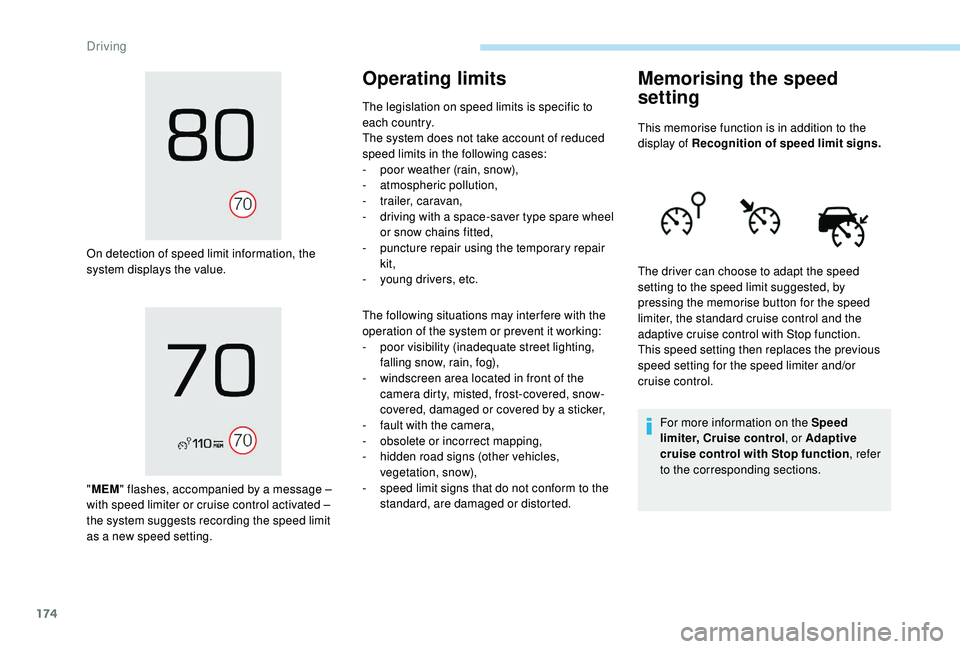
On detection of speed limit information, the
system displays the value.
"MEM " flashes, accompanied by a message
–
with speed limiter or cruise control activated
–
the system suggests recording the speed limit
as a new speed setting.
Operating limits
The legislation on speed limits is specific to
each country.
The system does not take account of reduced
speed limits in the following cases:
-
p
oor weather (rain, snow),
-
a
tmospheric pollution,
-
t
railer, caravan,
-
d
riving with a space-saver type spare wheel
or snow chains fitted,
-
p
uncture repair using the temporary repair
kit,
-
y
oung drivers, etc.
The following situations may inter fere with the
operation of the system or prevent it working:
-
p
oor visibility (inadequate street lighting,
falling snow, rain, fog),
-
w
indscreen area located in front of the
camera dirty, misted, frost-covered, snow-
covered, damaged or covered by a sticker,
-
f
ault with the camera,
-
o
bsolete or incorrect mapping,
-
h
idden road signs (other vehicles,
vegetation, snow),
-
s
peed limit signs that do not conform to the
standard, are damaged or distorted.
Memorising the speed
setting
This memorise function is in addition to the
display of Recognition of speed limit signs.
For more information on the Speed
limiter, Cruise control , or Adaptive
cruise control with Stop function , refer
to the corresponding sections.
The driver can choose to adapt the speed
setting to the speed limit suggested, by
pressing the memorise button for the speed
limiter, the standard cruise control and the
adaptive cruise control with Stop function.
This speed setting then replaces the previous
speed setting for the speed limiter and/or
cruise control.
Driving
Page 183 of 360
181
Principle of operation
The system automatically adapts the speed of
your vehicle to that of the vehicle in front, to
maintain a constant distance.
If the vehicle in front is driving more slowly, the
system slows, or even stops your vehicle, using
engine braking and the braking system (for
versions fitted with an automatic gearbox).The brake lamps illuminate as soon as
the braking system is activated with
deceleration of the vehicle.
Primarily designed for driving on main
roads and motor ways, this system only
works on moving vehicles
, driving in the
same direction as your vehicle. If the vehicle in front accelerates or changes
lane, the cruise control progressively
accelerates your vehicle to return to the
programmed speed.
If the driver operates a direction indicator to
overtake a slower vehicle, the cruise control
allows your vehicle to temporarily approach
the vehicle in front to assist the overtaking
manoeuvre, though never exceeding the
programmed speed.
The adaptive cruise control system
is a driving aid that cannot, in any
circumstances, replace the need to obser ve
speed limits and safety distances, nor the
need for vigilance on the part of the driver.
It is recommended that you always keep
your feet close to the pedals.
The driver must be ready to take back
control of their vehicle at any time,
using the brake or accelerator pedal as
appropriate.
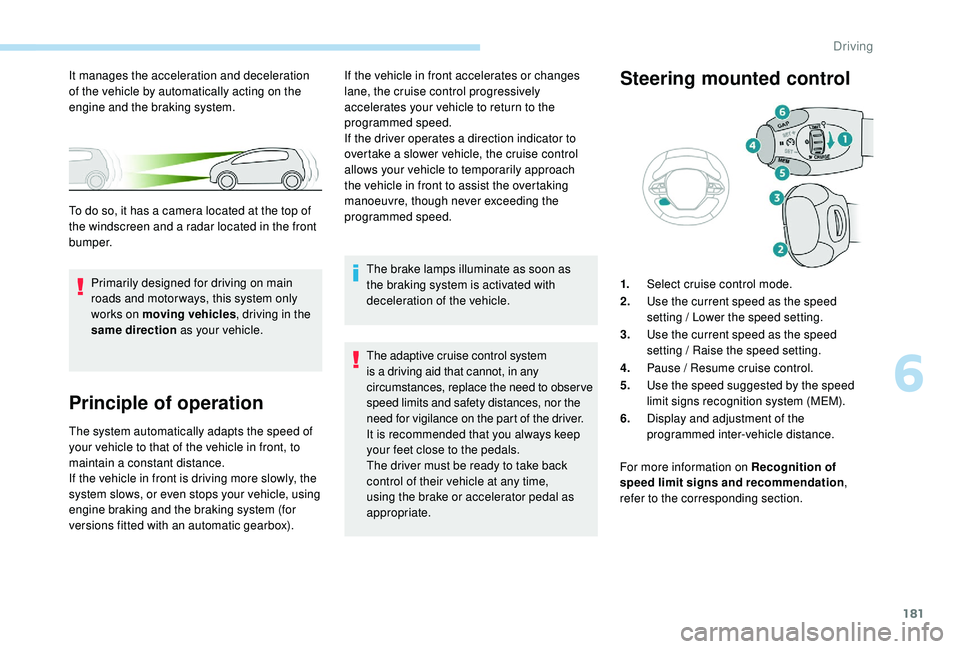
Steering mounted control
1.
Select cruise control mode.
2. Use the current speed as the speed
setting / Lower the speed setting.
3. Use the current speed as the speed
setting / Raise the speed setting.
4. Pause / Resume cruise control.
5. Use the speed suggested by the speed
limit signs recognition system (MEM).
6. Display and adjustment of the
programmed inter-vehicle distance.
For more information on Recognition of
speed limit signs and recommendation ,
refer to the corresponding section.
It manages the acceleration and deceleration
of the vehicle by automatically acting on the
engine and the braking system.
To do so, it has a camera located at the top of
the windscreen and a radar located in the front
b u m p e r.
6
Driving
Page 185 of 360
183
When the cruise control is paused, it
can only be reactivated when all of the
safety conditions are met. The message
"Activation not possible, conditions
unsuitable" is displayed while reactivation
is not possible.
To reactivate the function, the driver
must accelerate to reach at least 19 mph
(30
km/h), then press one of the buttons
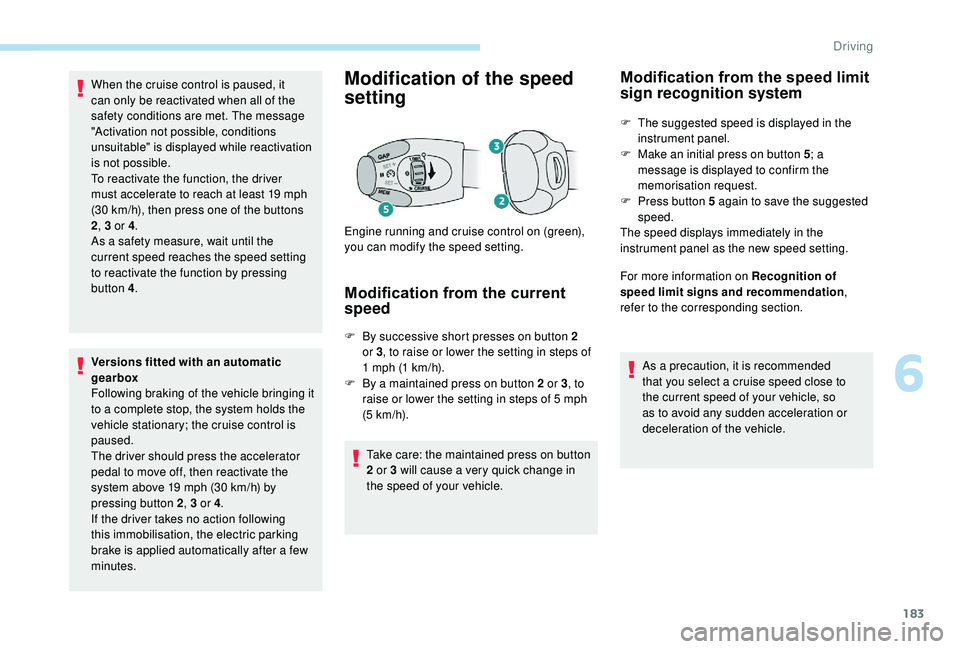
2 , 3 or 4 .
As a safety measure, wait until the
current speed reaches the speed setting
to reactivate the function by pressing
button
4.
Versions fitted with an automatic
gearbox
Following braking of the vehicle bringing it
to a complete stop, the system holds the
vehicle stationary; the cruise control is
paused.
The driver should press the accelerator
pedal to move off, then reactivate the
system above 19
mph (30 km/h) by
pressing button 2 , 3 or 4.
If the driver takes no action following
this immobilisation, the electric parking
brake is applied automatically after a few
minutes.Modification of the speed
setting
Modification from the current
speed
F By successive short presses on button 2 or 3 , to raise or lower the setting in steps of
1
mph (1 km/h).
F
B
y a maintained press on button 2 or 3 , to
raise or lower the setting in steps of 5
mph
(5
km/h).
Take care: the maintained press on button
2 or 3 will cause a very quick change in
the speed of your vehicle.
Engine running and cruise control on (green),
you can modify the speed setting.
Modification from the speed limit
sign recognition system
F The suggested speed is displayed in the
instrument panel.
F
M
ake an initial press on button 5 ; a
message is displayed to confirm the
memorisation request.
F
P
ress button 5 again to save the suggested
speed.
The speed displays immediately in the
instrument panel as the new speed setting.
For more information on Recognition of
speed limit signs and recommendation ,
refer to the corresponding section.
As a precaution, it is recommended
that you select a cruise speed close to
the current speed of your vehicle, so
as to avoid any sudden acceleration or
deceleration of the vehicle.
6
Driving
Page 191 of 360
189
Operating fault
In the event of a fault with the cruise
control, you are alerted by the
illumination of this warning lamp
and the display of a message in the
instrument panel, accompanied by
an audible signal.
Have the system checked by a PEUGEOT
dealer or a qualified workshop.
Distance alert and Active
Safety Brake
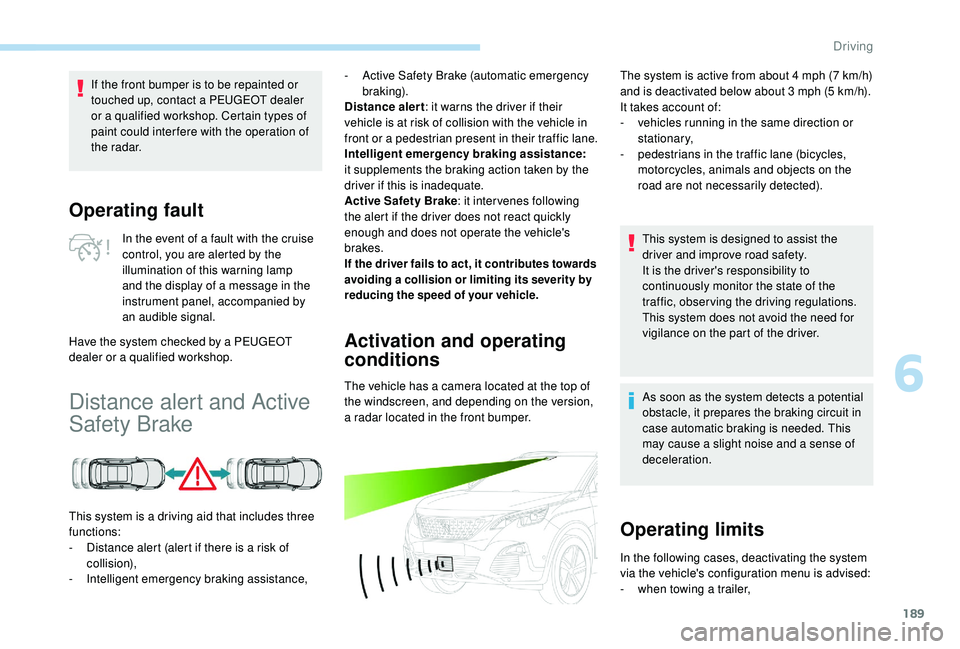
This system is a driving aid that includes three
functions:
-
D
istance alert (alert if there is a risk of
collision),
-
I
ntelligent emergency braking assistance,
Activation and operating
conditions
The vehicle has a camera located at the top of
the windscreen, and depending on the version,
a radar located in the front bumper.
If the front bumper is to be repainted or
touched up, contact a PEUGEOT dealer
or a qualified workshop. Certain types of
paint could inter fere with the operation of
the radar.
-
A
ctive Safety Brake (automatic emergency
b r ak ing).
Distance alert : it warns the driver if their
vehicle is at risk of collision with the vehicle in
front or a pedestrian present in their traffic lane.
Intelligent emergency braking assistance:
it supplements the braking action taken by the
driver if this is inadequate.
Active Safety Brake : it intervenes following
the alert if the driver does not react quickly
enough and does not operate the vehicle's
brakes.
If the driver fails to act, it contributes towards
avoiding a collision or limiting its severity by
reducing the speed of your vehicle.
The system is active from about 4 mph (7 km/h)
a nd is deactivated below about 3 mph (5 km/h).
It takes account of:
-
v
ehicles running in the same direction or
stationary,
-
p
edestrians in the traffic lane (bicycles,
motorcycles, animals and objects on the
road are not necessarily detected).
This system is designed to assist the
driver and improve road safety.
It is the driver's responsibility to
continuously monitor the state of the
traffic, observing the driving regulations.
This system does not avoid the need for
vigilance on the part of the driver.
As soon as the system detects a potential
obstacle, it prepares the braking circuit in
case automatic braking is needed. This
may cause a slight noise and a sense of
deceleration.
Operating limits
In the following cases, deactivating the system
via the vehicle's configuration menu is advised:
-
w
hen towing a trailer,
6
Driving
Page 194 of 360
192
Deactivation of the system is
signalled by the illumination of this
indicator lamp, accompanied by the
display of a message.
The camera may be disrupted or not
work in the following situations:
-
p
oor visibility (inadequate street
lighting, falling snow, heavy rain,
dense fog, etc.),
-
d
azzle (headlamps of an oncoming
vehicle, low sun, reflections on
a damp road, leaving a tunnel,
alternating shade and light, etc.),
-
c
amera or radar obstructed (mud,
frost, snow, condensation, etc.).
On versions with camera alone, this
message indicates to you that the
camera is obstructed: " Driving aids
camera: visibility limited, see user
guide ".
In these situations, detection
performance may be reduced. Clean the windscreen regularly,
particularly the area in front of the
camera.
The internal sur face of the windscreen
can also become misted around the
camera. In humid and cold weather,
demist the windscreen regularly.
Do not allow snow to accumulate on
the bonnet or roof of the vehicle as this
could conceal the detection camera.
Clean the front bumper, especially
around the radar, removing mud, snow,
etc.
If the front bumper is to be repainted or
touched up, contact a PEUGEOT dealer
or a qualified workshop. Certain types of
paint could inter fere with the operation of
the radar.
The system is automatically deactivated
after the use of the "space-saver" type
spare wheel is detected, or if a fault with
the side brake lamps is detected.Malfunction
In the event of a fault with the
system, you are alerted by the
illumination of this warning lamp,
accompanied by the display of a
message and an audible signal.
Contact a PEUGEOT dealer or a qualified
workshop to have the system checked.
Fatigue detection system
It is recommended that you take a break as
soon as you feel tired or at least every two
hours.
Depending on version, the function either
has the "Driving time warning" only, or this
combined with the "Driver inattention alert".
The system cannot in any circumstances
replace the need for vigilance on the part
of the driver.
Do not take the wheel if you are tired.
Activation / Deactivation
The system is activated or deactivated via the
vehicle configuration menu.
For more information on the menu, refer
to the section covering your screen in the
"Instruments" section.
Driving
Page 198 of 360
196
If the system detects that the driver is not
holding the wheel firmly enough during
an automatic correction of trajectory,
it interrupts the correction. An alert is
triggered to encourage the driver to take
back control of the vehicle.
Driving situations and
associated alerts
To benefit from all necessary information on
the instrument panel, you must previously
select the "DRIVING" display mode. While the direction indicators are on and for
a few seconds after switching them off, the
system considers that any change of trajectory
is voluntary and no correction is triggered
during this period.
However, with the "Blind Spot Monitoring
System" activated, if the driver starts changing
lane and another vehicle is detected in the
vehicle's blind spot, the system will correct
the trajectory of the vehicle even though the
direction indicators are on.
For more information on the Blind
Spot Monitoring System, refer to the
corresponding section. The table below describes the alerts and
messages displayed depending on the driving
situation.
The display of these alerts is not sequential.
Driving