2018 PEUGEOT 108 display
[x] Cancel search: displayPage 45 of 180

43
12 V accessory socket
Do not exceed the maximum power rating
of the socket (risk of damage to your
device).
The connection of an electrical device
not approved by PEUGEOT, such as
a
USB charger, may adversely affect the
operation of vehicle electrical systems,
causing faults such as poor radio
reception or inter ference with displays in
the screens.
USB port
To connect portable devices such as an iPod®
type digital audio player or USB memory stick.
It reads the audio files which are sent to your
audio system, to be listened to through the
vehicle's speakers.
You can manage these files using the steering
mounted controls or those on the front of the
audio system.
Connected to the USB port during
use, the portable device may recharge
automatically.
For more information on Audio
equipment and telematics and in
particular the use of this equipment, refer
to the corresponding section.
Auxiliary socket (JACK)
To connect a portable device so that you
c an listen to your music files via the vehicle's
speakers.
The management of the files is done using your
portable device.
For more information on Audio
equipment and telematics and in
particular the use of this equipment, refer
to the corresponding section.
The USB port and jack socket also allow
a smartphone to be connected:
-
e
ither as a MirrorLink
TM connection,
using just the USB port,
-
o
r as a
iPhone
® connection, by using
the USB port and the jack socket at the
same time.
These connections allow certain telephone
applications to be used on the touch screen.
F To connect a 12 V accessory (maximum
power: 120 Watts), lift the cover and
connect a
suitable adaptor.
3
Ease of use and comfort
Page 49 of 180

47
In the lighting off and sidelamps modes, the
driver can switch on the main beam headlamps
temporarily ("headlamp flash"), for as long as
the stalk is kept pulled.
Displays
Illumination of the corresponding indicator
lamp in the instrument panel confirms that the
lighting selected is switched on.
Selection ring for the
foglamps
Front foglamps and rear
foglamp
With the dipped beams on, push the control
for wards to switch on the main beams. Pull the
control towards you to return to dipped beams.
The foglamps operate when the dipped or main
beams are on. Turn and release the ring:
F
f
or wards once to switch on the rear
foglamp,
F
f
or wards a
second time to switch on the
front foglamps,
F
b
ackwards once to switch off the front
foglamps,
F
b
ackwards a
second time to switch off the
rear foglamp.
If the lighting is switched off automatically
(version with AUTO lighting) or the dipped
beams are switched off manually, the foglamps
and sidelamps remain on.
F
T
urn the ring backwards and release it to
turn off all the lamps. In good or rainy weather, both day and
night, using the front foglamps and the
rear foglamp is prohibited. In these
situations, the power of their beams may
dazzle other drivers. They should only be
used in fog or falling snow.
In these weather conditions, it is your
responsibility to switch on the foglamps
and dipped headlamps manually as the
sunshine sensor may detect sufficient
light.
Do not forget to turn off the front foglamps
and the rear foglamp as soon as they are
no longer necessary.
Switching off the lamps when the
ignition is switched off
When switching off the ignition, all of the
lamps turn off immediately, except for
dipped beam if guide-me-home lighting is
activated.
Switching on the lighting after the
ignition is switched off
To reactivate the lighting control, rotate
the ring to the 0
position – lamps off, then
to the desired position.
On opening the driver's door a
temporary
audible signal warns the driver that the
lighting is on.
4
Lighting and visibility
Page 57 of 180
55
Release
F Press the red button on the buckle.
F G uide the seat belt as it reels in.
Seat belt(s) not fastened/
unfastened warning lamp(s)
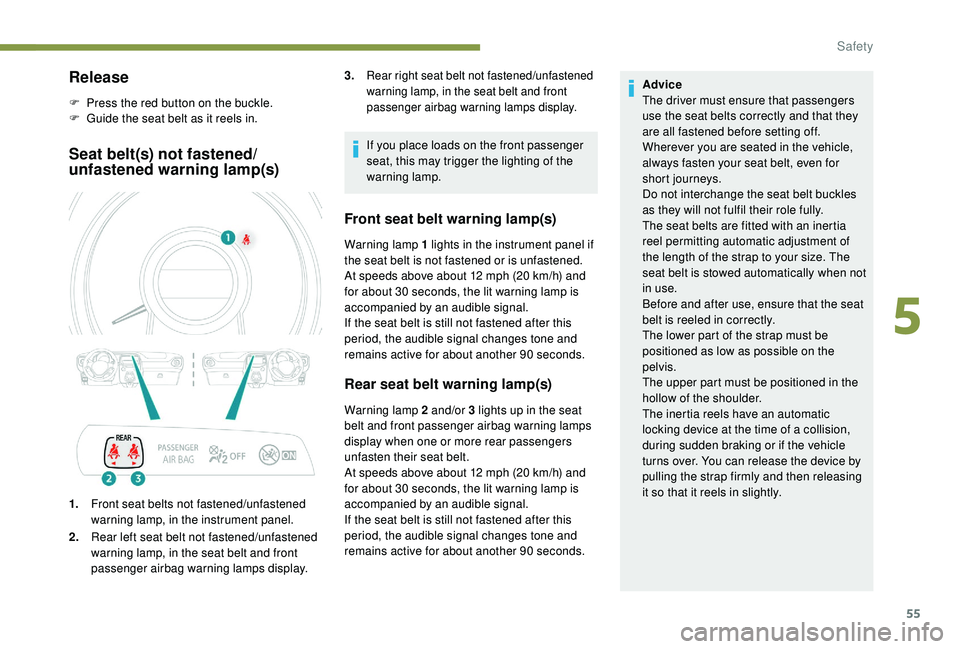
1.Front seat belts not fastened/unfastened
warning lamp, in the instrument panel.
2. Rear left seat belt not fastened/unfastened
warning lamp, in the seat belt and front
passenger airbag warning lamps display. If you place loads on the front passenger
seat, this may trigger the lighting of the
warning lamp.
Front seat belt warning lamp(s)
Warning lamp 1 lights in the instrument panel if
t he seat belt is not fastened or is unfastened.
At speeds above about 12
mph (20 km/h) and
for about 30
seconds, the lit warning lamp is
accompanied by an audible signal.
If the seat belt is still not fastened after this
period, the audible signal changes tone and
remains active for about another 90
seconds.
Rear seat belt warning lamp(s)
Warning lamp 2 and/or 3 lights up in the seat
b elt and front passenger airbag warning lamps
display when one or more rear passengers
unfasten their seat belt.
At speeds above about 12
mph (20 km/h) and
for about 30
seconds, the lit warning lamp is
accompanied by an audible signal.
If the seat belt is still not fastened after this
period, the audible signal changes tone and
remains active for about another 90
seconds.Advice
The driver must ensure that passengers
use the seat belts correctly and that they
are all fastened before setting off.
Wherever you are seated in the vehicle,
always fasten your seat belt, even for
short journeys.
Do not interchange the seat belt buckles
as they will not fulfil their role fully.
The seat belts are fitted with an inertia
reel permitting automatic adjustment of
the length of the strap to your size. The
seat belt is stowed automatically when not
in use.
Before and after use, ensure that the seat
belt is reeled in correctly.
The lower part of the strap must be
positioned as low as possible on the
pelvis.
The upper part must be positioned in the
hollow of the shoulder.
The inertia reels have an automatic
locking device at the time of a
collision,
during sudden braking or if the vehicle
turns over. You can release the device by
pulling the strap firmly and then releasing
it so that it reels in slightly.
3.
Rear right seat belt not fastened/unfastened
warning lamp, in the seat belt and front
passenger airbag warning lamps display.
5
Safety
Page 63 of 180
61
Deactivating the
passenger's front airbag
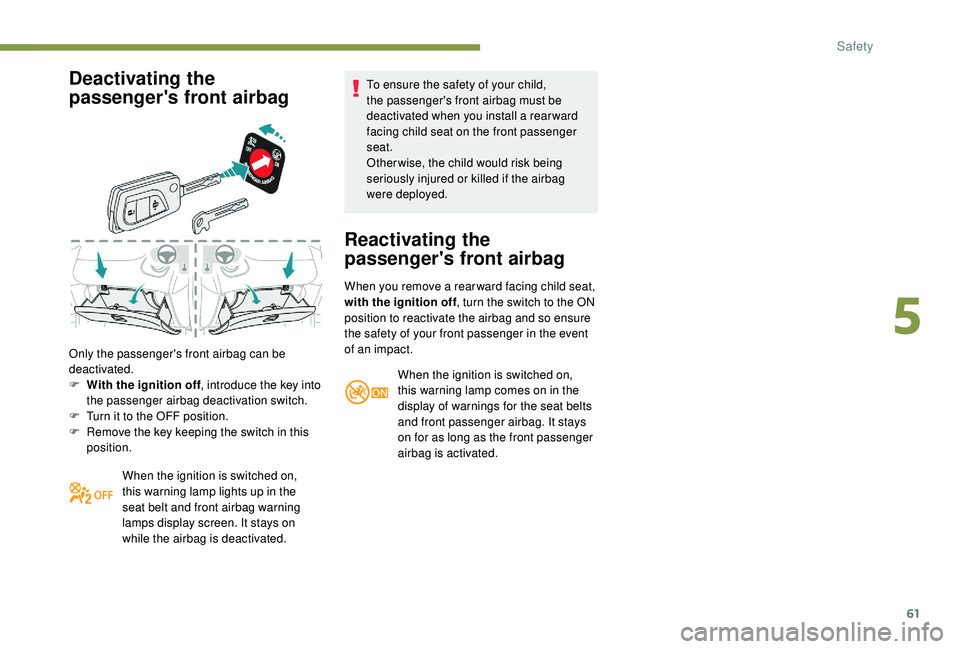
Only the passenger's front airbag can be
deactivated.
F
W
ith the ignition off , introduce the key into
the passenger airbag deactivation switch.
F
T
urn it to the OFF position.
F
R
emove the key keeping the switch in this
position.
When the ignition is switched on,
this warning lamp lights up in the
seat belt and front airbag warning
lamps display screen. It stays on
while the airbag is deactivated. To ensure the safety of your child,
the passenger's front airbag must be
deactivated when you install a
rear ward
facing child seat on the front passenger
seat.
Otherwise, the child would risk being
seriously injured or killed if the airbag
were deployed.
Reactivating the
passenger's front airbag
When you remove a rear ward facing child seat,
w ith the ignition off , turn the switch to the ON
position to reactivate the airbag and so ensure
the safety of your front passenger in the event
of an impact.
When the ignition is switched on,
this warning lamp comes on in the
display of warnings for the seat belts
and front passenger airbag. It stays
on for as long as the front passenger
airbag is activated.
5
Safety
Page 79 of 180
77
M.Manual mode with sequential changing of
the gears: move the selector backwards
and then to the left to select this mode.
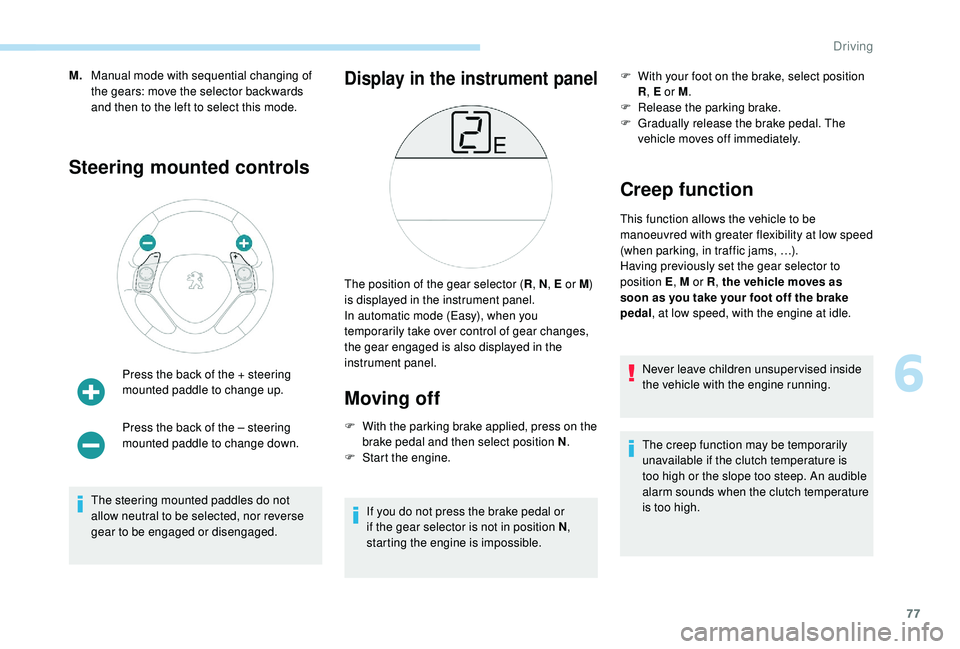
Steering mounted controls
Press the back of the + steering
mounted paddle to change up.
Press the back of the – steering
mounted paddle to change down.
The steering mounted paddles do not
allow neutral to be selected, nor reverse
gear to be engaged or disengaged.
Display in the instrument panel
Moving off
F With the parking brake applied, press on the brake pedal and then select position N .
F
S
tart the engine.
If you do not press the brake pedal or
if the gear selector is not in position N ,
starting the engine is impossible. F
W
ith your foot on the brake, select position
R , E or M .
F
R
elease the parking brake.
F
G
radually release the brake pedal. The
vehicle moves off immediately.
Creep function
This function allows the vehicle to be
manoeuvred with greater flexibility at low speed
(when parking, in traffic jams, …).
Having previously set the gear selector to
position E , M or R, the vehicle moves as
soon as you take your foot off the brake
pedal , at low speed, with the engine at idle.
Never leave children unsuper vised inside
the vehicle with the engine running.
The creep function may be temporarily
unavailable if the clutch temperature is
too high or the slope too steep. An audible
alarm sounds when the clutch temperature
is too high.
The position of the gear selector (
R, N , E or M)
is displayed in the instrument panel.
In automatic mode (Easy), when you
temporarily take over control of gear changes,
the gear engaged is also displayed in the
instrument panel.
6
Driving
Page 80 of 180
78
F Select position E with the gear selector.
The gearbox then operates in auto-adaptive
mode, without any action needed from the
driver.
It continuously selects the gear best adapted to
the following parameters:
-
f
uel consumption optimisation,
-
s
tyle of driving,
-
r
oad conditions,
-
v
ehicle load.
To obtain the best acceleration, for instance
when overtaking another vehicle, press hard on
the accelerator pedal and go through the point
of resistance.
At any time, you can change the mode by
moving the gear selector from position E to
position M and vice versa.
Never select neutral (position N ) when the
vehicle is moving.
Temporary control of gear
changing
You can temporarily take control of gear
changes using the steering mounted control
paddles + and -.
Manual mode
During braking or deceleration, the gearbox
changes down automatically to be in the
correct gear for the vehicle to accelerate again.
Under strong acceleration, the gearbox will not
change up without action by the driver at the
gear selector or the controls under the steering
wheel (unless the engine speed is close to its
maximum speed).Automatic mode (EASY)The gear change requests are acted upon only
if the engine speed allows. If they are rejected,
an audible signal sounds.
The gear engaged is displayed in the
instrument panel.
This function allows you to anticipate certain
situations, such as overtaking another vehicle
or approaching a
bend in the road.
After a
few moments with no action on the
control paddles, the gearbox returns to
automatic operation.
F
M
ove the gear selector to position M .
F
C
hange gears using:
-
t
he gear selector, by moving it:
-
b
ackwards, + to change up a gear,
-
f
or wards, - to change down a gear,
-
o
r the steering mounted control paddles +
or -.
The gear engaged is displayed.
The gear change requests are acted upon only
if the engine speed allows.
It is not necessary to release the accelerator
when changing gear. If a
change is rejected, an
audible signal sounds. You can change mode at any time by moving
the gear selector from position M to position E
and vice versa.
Never select neutral (position N ) when the
vehicle is moving.
Reverse gear
To engage reverse gear, the vehicle must be
stationary with your foot on the brake pedal.
F
Sel
ect position R .
An audible signal indicates that reverse gear
has been engaged.
Stopping the vehicle
The vehicle can be stopped regardless of the
position of the gear selector ( N, E or R ).
However, if the driver's door is opened when
the gear selector is not in position N , an audible
signal will sound.
Driving
Page 83 of 180
81
Operation
Going into engine STOP mode
This indicator lamp comes on in the
instrument panel and the engine
goes into standby automatically:
-
w
hen the vehicle is stationary, you put the
gearbox into neutral and release the clutch
pedal.
Stop & Starttime counters
A partial time counter counts the periods in
STOP mode during a journey. For your convenience during parking
manoeuvres, STOP mode is not available
for a
few seconds after coming out of
reverse gear.
Stop & Start does not change features
of the vehicle such as braking, power
steering…
Never refuel with the engine in STOP
mode; you must switch off the ignition.
Special cases: STOP mode not
available
Stop & Start
The Stop & Start system puts the engine
temporarily into standby – STOP mode – during
traffic stops (red lights, traffic jams, etc.). The
engine restarts automatically – START mode
– as soon as you want to move off. Restarting
occurs instantly, quickly and silently.
Per fect for urban use, the Stop & Start system
reduces fuel consumption and exhaust
emissions as well as the noise level when
stationary. -
t
he engine is needed to maintain
a comfortable temperature in the passenger
compartment,
-
d
emisting is active,
-
s
ome special conditions (battery charge,
engine temperature, braking assistance,
vehicle stopped on a
steep slope, high
altitude…) where the engine is needed to
assure control of a
system.
Going into engine START mode
This indicator lamp goes off and the
engine restarts automatically:
-
w
hen you fully depress the clutch pedal.
Special case: START invoked
automatically
START mode is invoked automatically if:
- y
ou open the driver's door,
-
y
ou open the bonnet,
-
y
ou unfasten the driver's seat belt,
-
s
ome temporary conditions apply (battery
charge, engine temperature, braking
assistance, vehicle on a
steep slope,
adjustment of the air conditioning, …) where
it is necessary for control of a
system or of
the vehicle.
It is displayed in the trip computer as soon as
the Stop & Start acts.
Press one of the "
DISP" buttons to return to the
previous display.
A global time counter counts the periods in
STOP mode since the last reset to zero.
When it is displayed, press for more than two
seconds on one of the " DISP" buttons to reset
to zero.
STOP mode does not activate, mainly when:
-
t
he driver's door is open,
-
t
he driver's seat belt is not fastened,
6
Driving
Page 84 of 180
82
Operating fault
In the event of a fault with the
s ystem, this warning lamp flashes in
the instrument panel.
Have it checked by a
PEUGEOT dealer or
a
qualified workshop.
Maintenance
Before doing anything under the bonnet,
deactivate the Stop & Start system to
avoid any risk of injury resulting from an
automatic change to START mode.
The Stop & Start system requires a
12 V
battery of specific technology and
specification.
All work on this type of battery must be
carried out only by a
PEUGEOT dealer or
a
qualified workshop.
For more information on the 12
V batter y,
refer to the corresponding section. Driving on flooded roads
Before driving in a
flooded area, it is
strongly recommended that you deactivate
the Stop & Start system.
For more information on Driving advice ,
particularly on flooded roads, refer to the
corresponding section.
Deactivation/Manual
reactivation
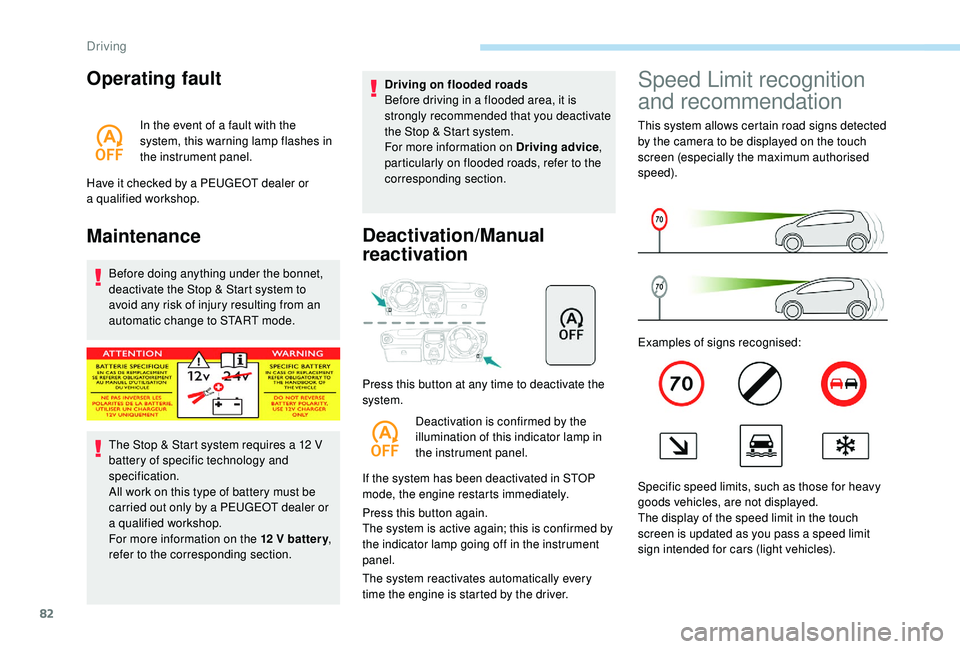
Press this button at any time to deactivate the
system.
Deactivation is confirmed by the
illumination of this indicator lamp in
the instrument panel.
If the system has been deactivated in STOP
mode, the engine restarts immediately.
Press this button again.
The system is active again; this is confirmed by
the indicator lamp going off in the instrument
panel.
The system reactivates automatically every
time the engine is started by the driver.
Speed Limit recognition
and recommendation
This system allows certain road signs detected
by the camera to be displayed on the touch
screen (especially the maximum authorised
speed).
Examples of signs recognised:
Specific speed limits, such as those for heavy
goods vehicles, are not displayed.
The display of the speed limit in the touch
screen is updated as you pass a
speed limit
sign intended for cars (light vehicles).
Driving