2018 MITSUBISHI OUTLANDER III back light
[x] Cancel search: back lightPage 333 of 441

Vehicle preparation before driving6-4 Driving safety
6
N00629001709
For a safer and more enjoyable trip, alwayscheck for the following:Before starting the vehicle, make certainthat you and all passengers are seated andwearing their seat
belts properly (with
children in the rear seat, in appropriaterestraints), and that all the doors and theliftgate are locked.
Move the driver’s seat as far backward aspossible, while keeping good visibility,and good control of the steering wheel,brakes, accelerator, and controls. Checkthe instrument panel indicators and multi-information display
for any possible prob-
lem.Similarly, the front
passenger seat should
also be moved as fa
r back as possible.
Make sure that infants and small childrenare properly restrained in accordance withall laws and
regulations.
Check these by selecting the defroster mode,and set the blower swit
ch on high. You should
be able to feel the air blowing against thewindshield. Refer to “Defrosti
ng or defogging (wind-
shield, door windows)” on page 7-12Check all the tires for heavy tread wear oruneven wear patterns. Look for stones, nails,glass, or other objects
stuck in the tread. Look
for any tread cuts or
sidewall cracks. Check
the wheel nuts for tightness, and the tires(including spare tire) for proper pressure.
Replace your tires before they are heavilyworn out.As your vehicle is equi
pped with a tire pres-
sure monitoring system, there is a risk ofdamage to the tire inflation pressure sensorswhen the tire is replaced on the rim. Tirereplacement should, onl
y, be performed by an
authorized Mitsubishi Motors dealer.Have someone watch wh
ile you turn all the
exterior lights on and off. Also check the turnsignal indicators and hi
gh-beam indicators on
the instrument panel.Check the ground under the vehicle afterparking overnight, for
fuel, water, oil, or
other leaks. Make sure
all the fluid levels are
correct. Also, if you
can smell fuel, you need
to find out why imme
diately and have it
fixed.
N00629201134
Even this vehicle’s sa
fety equipment, and
your safest driving, ca
nnot guarantee that you
can avoid an accident or injury. However, if
Vehicle preparation before driving Seat belts and seats
Defrosters Tires
Lights Fluid leaks Safe driving techniques
BK0249100US.book 4 ページ 2017年5月10日 水曜日 午前8時49分
Page 354 of 441
Dual-zone automatic climat
e control air conditionerComfort controls 7-9
7
N00737201378
Normally, use the outside
air position to keep
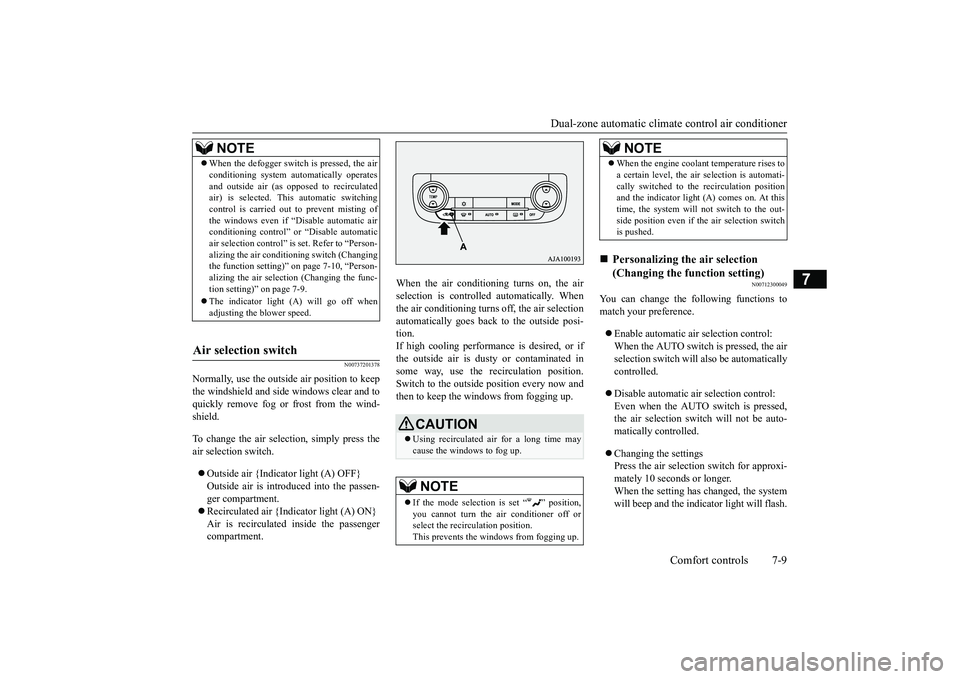
the windshield and side windows clear and toquickly remove fog or frost from the wind-shield.To change the air selection, simply press theair selection switch.Outside air {Indicator light (A) OFF}Outside air is introduced into the passen-ger compartment.Recirculated air {Indicator light (A) ON}Air is recirculated
inside the passenger
compartment.
When the air conditioning turns on, the airselection is controlled automatically. Whenthe air conditioning turns
off, the air selection
automatically goes back to the outside posi-tion.If high cooling performanc
e is desired, or if
the outside air is dusty or contaminated insome way, use the
recirculat
ion position.
Switch to the outside position every now andthen to keep the windows from fogging up.
N00712300049
You can change the following functions tomatch your preference.Enable automatic air selection control:When the AUTO switch is pressed, the airselection switch will also be automaticallycontrolled.Disable automatic air selection control:Even when the AUTO switch is pressed,the air selection switch
will not be auto-
matically controlled.Changing the settingsPress the air selection switch for approxi-mately 10 seconds or longer.When the setting has changed, the systemwill beep and the indi
cator light will flash.
NOTE
When the defogger switch
is pressed, the air
conditioning system au
tomatically operates
and outside air (as opposed to recirculatedair) is selected. This automatic switchingcontrol is carried out to prevent misting ofthe windows even if “Dconditioning control” or
“Disable
automatic
air selection control” is
set. Refer to “Person-
alizing the air conditi
oning switch (Changing
the function setting)
Page 355 of 441

Dual-zone automatic climate
control air conditioner
7-10 Comfort controls
7
• When the setting has changed fromenabled to disabled,
the system will beep
three times and the indicator light willflash three times.• When the setting has changed from dis-abled to enabled, the system will beeptwo times and the i
ndicator light will
flash three times.On vehicles equipped with the Smart-phone Link Display Audi
o, screen opera-
tions can also be used to change thesetting. Refer to th
e separate owner’s
manual for details.
N00737301467
Push the switch, and the air conditioningcompressor will turn on. The “ ” indicatorwill be shown in the display (A).
Push the switch again and the air condition-ing compressor will st
op and the indicator
goes off.
N00712200048
You can change the following functions tomatch your preference.Enable automatic air conditioning control:When the AUTO switch is pressed, orwhen the temperature control switch hasbeen set to the minimum temperature, theair conditioning switch is automaticallycontrolled.Disable automatic air conditioning con-trol:The air conditioning switch is not auto-matically controlled,
unless the air condi-
tioning switch is used.Changing the settingsPress the air conditioning switch forapproximately 10
seconds or longer.
When the setting has changed, the systemwill beep and the indi
cator light will flash.
• When the setting has changed fromenabled to disabled, the system will beepthree times and the indicator light willflash three times.• When the setting has changed from dis-abled to enabled, the system will beeptwo times and the i
ndicator light will
flash three times.
NOTE
The factory setting is “Enable automatic airselection control”.When the defogger switch is pressed, the airselection will automatically change to theoutside air position, even if the system is setto “Disable automatic air selection control”,in order to prevent windows from foggingup.
Air conditioning switch
NOTE
If a problem is detect
ed in the air condition-
ing compressor, the “ ” indicator blinks.Press the air conditioni
ng switch once to turn
it off, then once more to turn it back on. Ifthe“ ” indicator does not blink, there is noproblem. If it does blink,
have it checked at
an authorized Mitsubish
i Motors dealer or a
repair facility of your choice.For example, sometimes after using a high-pressure car wash, the
condenser can get wet,
and the “ ” indicator blinks temporarily.Wait for a while, pres
s the air conditioning
switch once to turn the system off, then oncemore to turn it back on. Once the water evap-orates, the blinking will stop.
Personalizing the air conditioning switch (Changing the function set-ting)
BK0249100US.book 10 ページ 2017年5月10日 水曜日 午前8時49分
Page 371 of 441
How to change a tire8-10 For emergencies
8
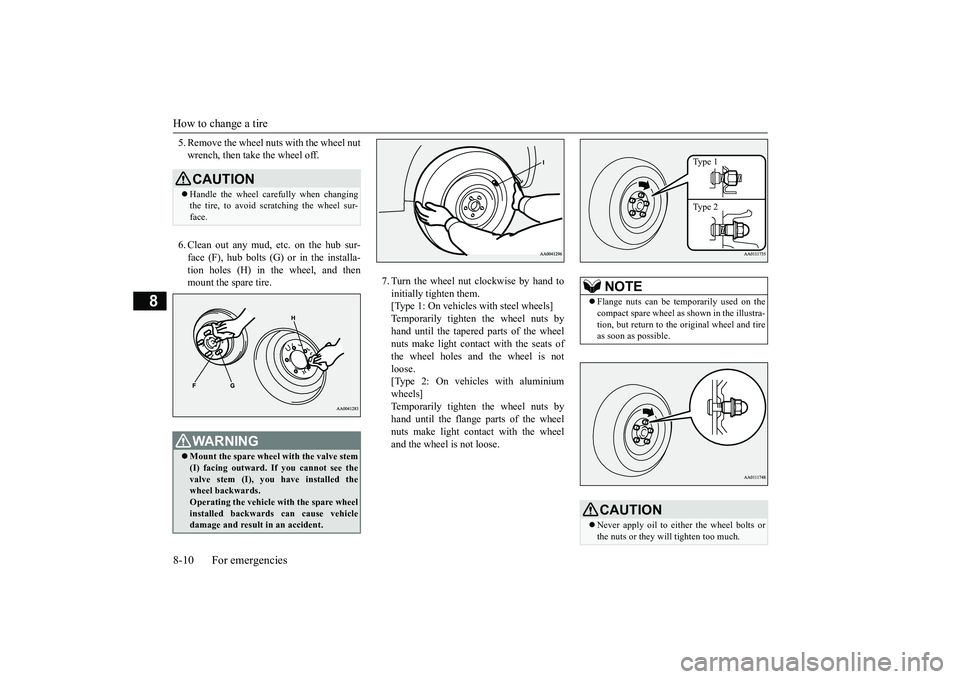
5. Remove the wheel nuts with the wheel nutwrench, then take the wheel off.6. Clean out any mud, etc. on the hub sur-face (F), hub bolts (G)
or in the installa-
tion holes (H) in the wheel, and thenmount the spare tire.
7. Turn the wheel nut clockwise by hand toinitially tighten them.[Type 1: On vehicles
with steel wheels]
Temporarily tighten the wheel nuts byhand until the tapered parts of the wheelnuts make light contac
t with the seats of
the wheel holes and the wheel is notloose.[Type 2: On vehicles with aluminiumwheels]Temporarily tighten the wheel nuts byhand until the flange parts of the wheelnuts make light cont
act with the wheel
and the wheel is not loose.
CAUTIONHandle the wheel carefully when changingthe tire, to avoid scratching the wheel sur-face.WA R N I N GMount the spare wheel with the valve stem(I) facing outward. If
you cannot see the
valve stem (I), you
have installed the
wheel backwards.Operating the vehicle with the spare wheelinstalled backwards can cause vehicledamage and result
in an ac
cident.
NOTE
Flange nuts can be te
mporarily used on the
compact spare wheel as shown in the illustra-tion, but return to the original wheel and tireas soon as possible.CAUTIONNever apply oil to either the wheel bolts orthe nuts or they will tighten too much.
Type 1Type 2
BK0249100US.book 10 ページ 2017年5月10日 水曜日 午前8時49分
Page 381 of 441
Engine hood9-4 Vehicle care and maintenance
9
Release the lever and
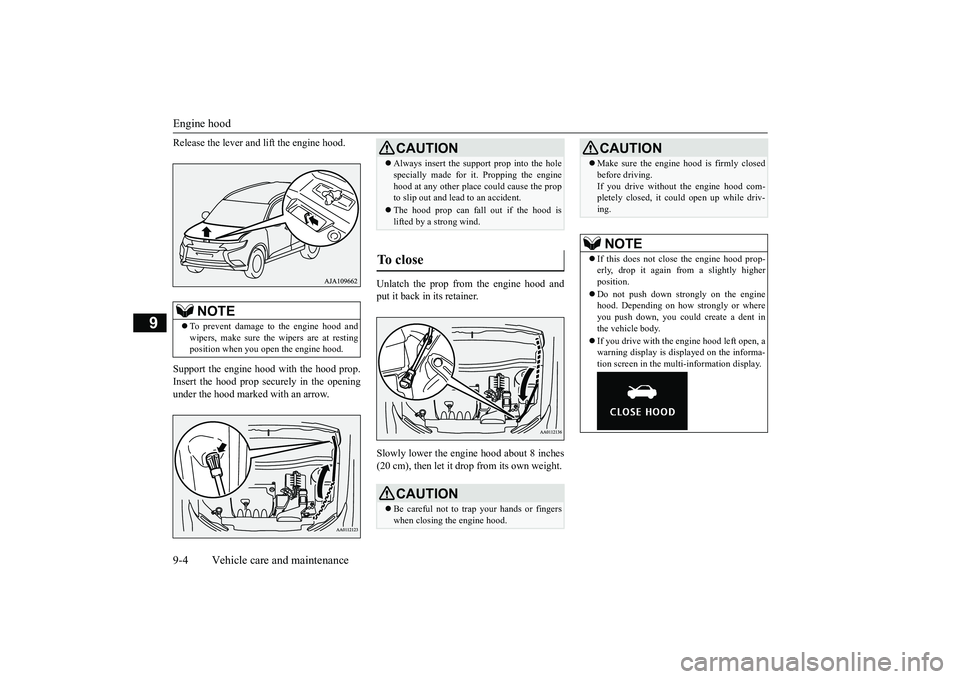
lift the engine hood.
Support the engine hood with the hood prop.Insert the hood prop securely in the openingunder the hood marked with an arrow.
Unlatch the prop from the engine hood andput it back in its retainer.Slowly lower the engine hood about 8 inches(20 cm), then let it drop from its own weight.
NOTE
To prevent damage to the engine hood andwipers, make sure the
wipers are at resting
position when you open the engine hood.
CAUTIONAlways insert the support prop into the holespecially made for it. Propping the enginehood at any other place
could cause the prop
to slip out and lead
to an accident.
The hood prop can fall out if the hood islifted by a strong wind.
To close
CAUTIONBe careful not to trap your hands or fingerswhen closing the engine hood.
Make sure the engine hood is firmly closedbefore driving.If you drive without the engine hood com-pletely closed, it c
ould open up while driv-
ing.NOTE
If this does not clos
e the engine hood prop-
erly, drop it again from a slightly higherposition.Do not push down strongly on the enginehood. Depending on how strongly or whereyou push down, you could create a dent inthe vehicle body.If you drive with the e
ngine hood left open, a
warning display is displayed on the informa-tion screen in the multi-information display.CAUTION
BK0249100US.book 4 ページ 2017年5月10日 水曜日 午前8時49分
Page 405 of 441

Fuses9-28 Vehicle care and maintenance
9
*: Fusible linkSome fuses may not be installed on yourvehicle, depending on
the vehicle model
or specifications.The table above show
s the main equip-
ment corresponding to each fuse.
7 12 V power outlet 15 A8 Rear window wiper 15 A9 Sunroof 20 A10 Ignition switch 10 A11 Option 10 A12
Hazard warning
flasher
15 A
13 4-wheel drive system 10 A14
Stop lights (Brake lights)
15 A
15 Gauges 10 A16 SRS airbag 7.5 A17 Radio 15 A18 Control unit relay 7.5 A19
Interior lights(Room lights)
15 A
20 Back-up lights 7.5 A21
Heated outside rearview mirrors
7.5 A
22
Outside rearview
mirrors
10 A
No.
Sym-bol
Electrical system
Capacity
23
Cigarette lighter/12 V power outlet
15 A
24
Charge 7.5 A
Heated steering
wheel
15 A
25
Power seat(Driver seat)
30 A*
26 Heated seats 30 A27
Power seat(Passenger seat)
No.
Sym-bol
Electrical system
Capacity
Engine compartment fuse location table No.
Sym-bol
Electrical sys-
tem
Capacity
SBF1
Air condition-ing condenser fan motor
30 A*
VLC 40 A*
Behind the fuse block coverMain fuse block
BK0249100US.book 28 ページ 2017年5月10日 水曜日 午前8時49分
Page 410 of 441
Replacement of light bulbs
Vehicle care and maintenance 9-33
9
N00950401731
• Headlight, low be
am (LED type)
• Parking light• Daytime running light• Front fog light (LED type)• Side turn signal light
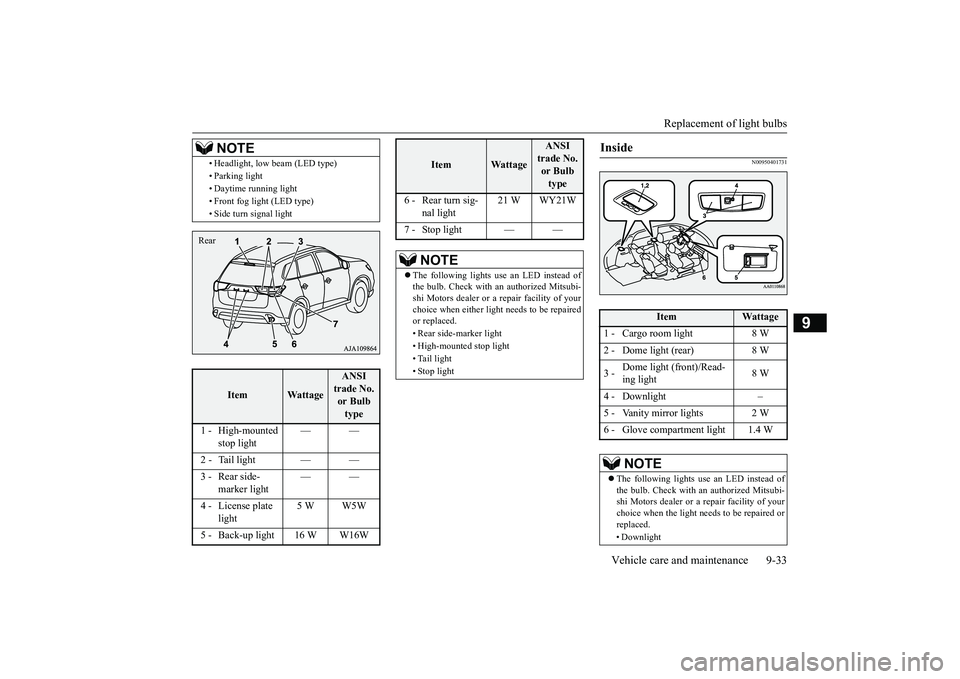
Item
Wattage
ANSI trade No. or Bulb type
1 - High-mounted
stop light
——
2 - Tail light — —
marker light
——
4 - License plate
light
5 W W5W
5 - Back-up light 16 W W16W
NOTE
Rear
6 - Rear turn sig-
nal light
21 W WY21W
7 - Stop light — —The following lights use an LED instead ofthe bulb. Check with an authorized Mitsubi-shi Motors dealer or a
repair facility of your
choice when either light
needs to be repaired
or replaced.• Rear side-marker light• High-mounted stop light• Tail light• Stop light
Item
Wattage
ANSI trade No. or Bulb type
Inside
Item
Wattage
1 - Cargo room light 8 W2 - Dome light (rear) 8 W3 -
Dome light (front)/Read-ing light
8 W
4 - Downlight –6 - Glove compartment light 1.4 W
NOTE
The following lights us
e an LED instead of
the bulb. Check with an authorized Mitsubi-shi Motors dealer or a repair facility of yourchoice when the light needs to be repaired orreplaced.• Downlight
BK0249100US.book 33 ページ 2017年5月10日 水曜日 午前8時49分
Page 415 of 441
Replacement of light bulbs9-38 Vehicle care and maintenance
9
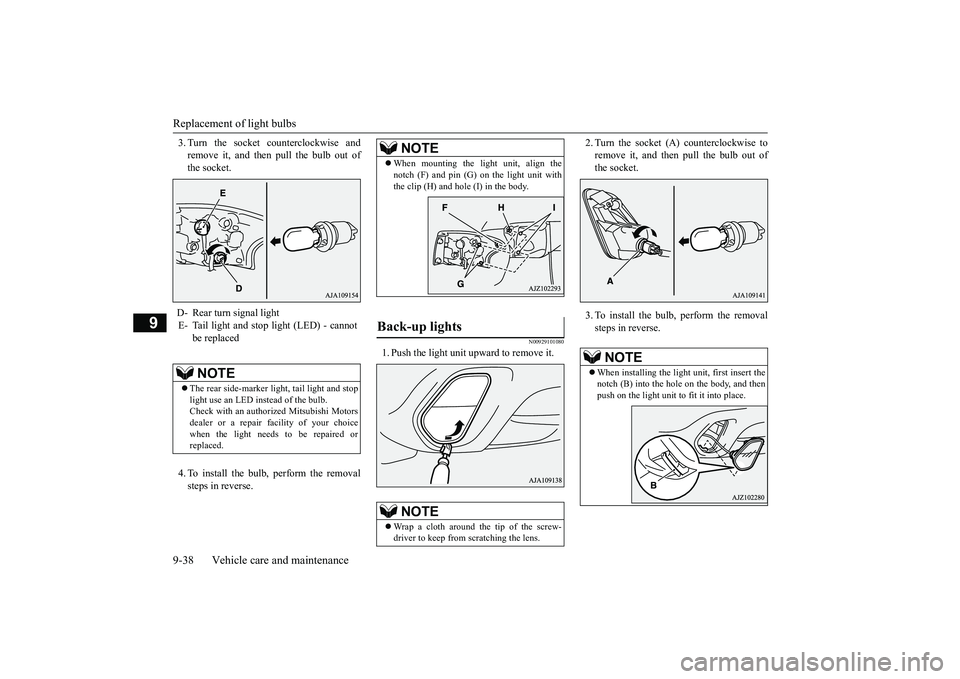
3. Turn the socket counterclockwise andremove it, and then pull the bulb out ofthe socket.4. To install the bulb, perform the removalsteps in reverse.
N00929101080
1. Push the light unit upward to remove it.
2. Turn the socket (A) counterclockwise toremove it, and then pull the bulb out ofthe socket.3. To install the bulb, perform the removalsteps in reverse.
D- Rear turn signal lightE- Tail light and stop light (LED) - cannot
be replacedNOTE
The rear side-marker li
ght, tail light and stop
light use an LED instead of the bulb.Check with an authorized Mitsubishi Motorsdealer or a repair fa
cility of your choice
when the light needs to be repaired orreplaced.
NOTE
When mounting the light unit, align thenotch (F) and pin (G) on the light unit withthe clip (H) and hole (I) in the body.
Back-up lights
NOTE
Wrap a cloth around the tip of the screw-driver to keep from scratching the lens.
NOTE
When installing the light unit, first insert thenotch (B) into the hole on the body, and thenpush on the light unit to fit it into place.
BK0249100US.book 38 ページ 2017年5月10日 水曜日 午前8時49分