2018 MITSUBISHI OUTLANDER III back light
[x] Cancel search: back lightPage 213 of 441

Rear Cross Traffic Alert
(RCTA) (if so equipped)
5-132 Features and controls
5
The detection area is
shown as illustrated.
Never rely solely on the RCTA when back-ing up. The RCTA is an aid system. It isnot a substitute for your safe and carefuldriving. Always check
visually behind and
all around your vehicl
e for other vehicles,
persons, animals
or obstructions.
The performance of the RCTA may varydepending on driving,
traffic and/or sur-
rounding conditions.NOTE
The Blind Spot Warning lights in the outsiderearview mirrors on bot
h sides will blink,
even when only one vehicle is approachingfrom one side.WA R N I N G
Detection areas
CAUTIONIn certain situations, the RCTA may notdetect a vehicle in the detection areas. Someof these situations include;• When the reversing sp
eed of your vehicle is
approximately 5 mph (18 km/h) or higher.
• When an approaching vehicle speed isapproximately 4 mph (7 km/h) or less.• If the sensor detectio
n area is blocked by a
nearby object, such as
wall or parked vehi-
cle.• When a vehicle is approaching fromstraight behind your vehicle.• When your vehicle is exiting from anangled parking spot.• Immediately after the RCTA has beenturned on.• Immediately after th
e operation mode has
been put in ON.• When the bumper surface around the sensoris covered with dirt
, snow and ice, etc.
• When the sensor becomes extremely hot orcold, such as after the vehicle has beenparked for a prolonged time under the blaz-ing sun or in cold weather.
If the bumper has experienced an impact, thesensor may have be
en damaged and the
RCTA may not function properly. Have thevehicle inspected at an
authorized Mitsubishi
Motors dealer.CAUTION
BK0249100US.book 132 ページ 2017年5月10日 水曜日 午前8時49分
Page 292 of 441

Combination headlights and dimmer switch
Features and controls 5-211
5
light in the instrument
cluster i
ndicates when
the headlights are on high beam.
N00550001209
You can flash the high beams by pulling thelever gently toward you (2). The lights willgo back to normal when you let go. While thehigh beam is on, you will see a blue light onthe instrument panel.
N00591300028
The automatic high beam
system turns the
high beam light on or
off automatically
according to surrounding light conditions.The sensor (A) detects lights, such as thelights of an oncoming
vehicle, a vehicle
ahead or street lights.
N00593600038
1. Rotate the light switch to “ ” positionor “AUTO” position when the engine isrunning.2. Press the automatic high beam systemswitch.The automatic high beam system is acti-vated and the indicator is illuminated.If the automatic high beam system switchis pressed again, the automatic high beamsystem will be deac
tivated and automatic
high beam system indicator will go off.
Headlight flasher
NOTE
You can flash the high beams by pulling thelever toward you, even if the light switch isoff.
If you turn the lights off with the head lightsset to high-beam illumin
ation, the headlights
are automatically returned to their low-beamsetting when the light
switch is next turned
to the “ ” position.
Automatic high beam system
(if
so equipped)
NOTE
WA R N I N GDo not rely solely on the Automatic HighBeam. Always observe surrounding trafficand light conditions. If necessary, manu-ally turn the high beams on or off.Refer to “Dimmer (high/low beamchange)” on page 5-210.
How to use the automatic high beam system
NOTE
If the headlights are on when the light switchis in the “AUTO” position, the automatichigh beam system works.
BK0249100US.book 211 ページ 2017年5月10日 水曜日 午前8時49分
Page 295 of 441

Combination headlights and dimmer switch5-214 Features and controls
5
N00593800027
If a problem occurs with the system, the fol-lowing warning display will appear to thetype of the problem.If a failure is detected in the system, the fol-lowing warning display
will appear and the
automatic high beam system will automati-cally be turned off.If the warning display remains even after theignition switch is turned to the “OFF” or“LOCK” position or the operation mode isput in OFF and then turned back to ON,please contact an au
thorized Mitsubishi
Motors dealer.[When the automatic high beam system ismalfunctioning]
[When the sensor is malfunctioning]
If the system becomes temporarily unavail-able due to the high or low temperature of thesensor, the following warning display willappear.After the temperature of
the sensor has been
in range, the system will automatically returnto operation.If the warning display does not disappearafter waiting for a while, there is a possibilitythat the automatic high beam system has amalfunction. Contact an
authorized Mitsubi-
shi Motors dealer for inspection of the sys-tem.
System problem warning
The automatic high beam system deactivation due to fault
NOTE
If the sensor or its surrounding area becomesextremely high temperature when parkingthe vehicle under a blazing sun, the “AHBSERVICE REQUIRED” warning displaymay appear.If the message remains even after the tem-perature of the sensor or its surrounding areahas been in range, plea
se contact an autho-
rized Mitsubishi Motors dealer.
Sensor is too hot or cold
BK0249100US.book 214 ページ 2017年5月10日 水曜日 午前8時49分
Page 300 of 441

Wiper and washer switch
Features and controls 5-219
5
N00523001777
The windshield wiper
and washer can be
operated with the ignition switch or the oper-ation mode is in ON or ACC.If the blades are frozen to the windshield, donot operate the wipers
until the ice has melted
and the blades are free
d, otherwise the wiper
motor may be damaged.
NOTE
If the headlights are sw
itched to high beam,
the front fog lights will go out; they will illu-minate again when the headlights areswitched back to low beam.If the light switch is rotated to the “OFF” or“ ” position while the
front fog lights are
illuminated, they will automatically turn off.They can be turned back on again by rotatingthe combination headlights and dimmerswitch back to “ ” position, and turningthe knob in the direction of the “ON” posi-tion.Do not use fog lights ex
cept in conditions of
fog, otherwise excessive light glare maytemporarily blind oncoming vehicle drivers.
Wiper and washer switch
CAUTIONIf the washer is used
in cold weather, the
washer fluid sprayed against the glass mayfreeze, which may hinder visibility. Warmthe glass with the defroster before using thewasher.
Windshield wipers
NOTE
To ensure a clear rearward view, the rearwindow wiper will au
tomatically perform
several continuous opera
tions if the selector
lever is put in the “R” position while thewindshield wipers are operating.Refer to “Rear window wiper and washer”on page 5-223.
Except for vehicle with rain sensor MIST- Misting function
The wipers will operate once.
OFF- OffINT- Intermittent (Speed sensitive)HI- Fast
BK0249100US.book 219 ページ 2017年5月10日 水曜日 午前8時49分
Page 310 of 441
Sun visors
Features and controls 5-229
5
N00524601363
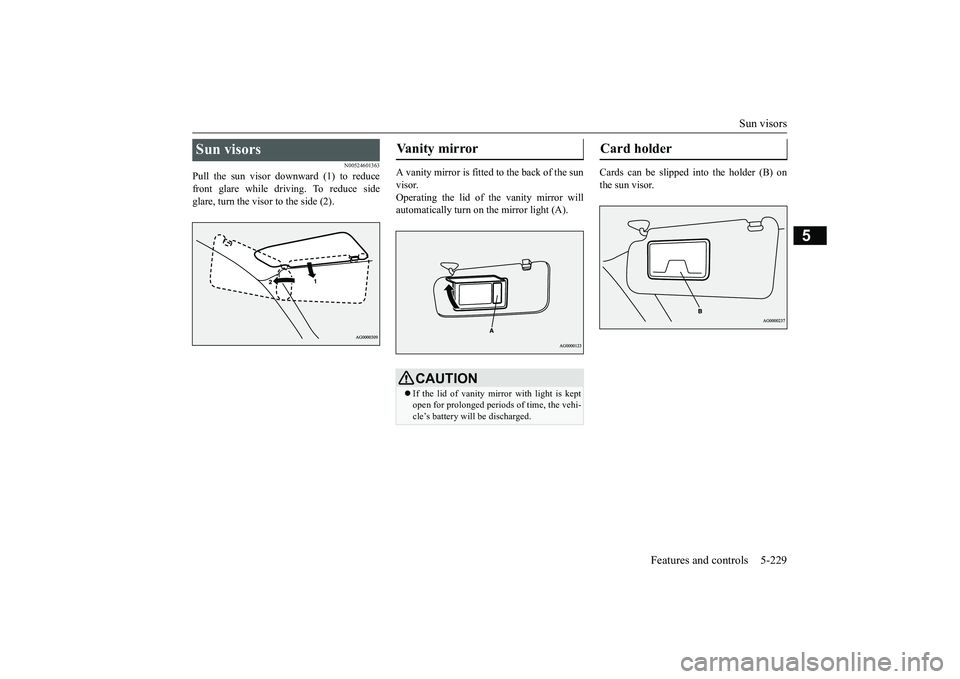
Pull the sun visor downward (1) to reducefront glare while driving. To reduce sideglare, turn the visor to the side (2).
A vanity mirror is fitted to the back of the sunvisor.Operating the lid of the vanity mirror willautomatically turn on the mirror light (A).
Cards can be slipped into the holder (B) onthe sun visor.
Sun visors
Vanity mirror
CAUTIONIf the lid of vanity mirror with light is keptopen for prolonged periods
of time, the vehi-
cle’s battery will be discharged.
Card holder
BK0249100US.book 229 ページ 2017年5月10日 水曜日 午前8時49分
Page 314 of 441
HomeLink® Wireless Control System (if so equipped)
Features and controls 5-233
5
• If the device does not operate, continuewith “Programming a new HomeLink
®”
steps 5 to 7 to complete the program-ming of a rolling code equipped device.
5. At the garage door opener receiver(motor-head unit) in the garage, locate the“Learn” or “Smart” but
ton. This can usu-
ally be found where the hanging antennawire is attached to the motor-head unit(see the garage
door opener manual to
identify the “Learn” button.)6. Firmly press and release the “Learn” or“Smart” button. (The name and color ofthe button may vary by manufacturer.)
seconds to initiate
step 7.7. Return to the vehi
cle and firmly press,
hold for 2 seconds and release the pro-grammed HomeLink
® button. Repeat the
“press/hold/release”
sequence a second
time, and, depending on the brand of thegarage door opener (or other rolling codeequipped device), repe
at this sequence a
third time to complete the programmingprocess.HomeLink
® should now activate your
rolling code equipped device.
N00584800021
Canadian radio-frequenc
y laws require trans-
mitter signals to “time-out” (or quit) afterseveral seconds of tr
ansmission - which may
not be long enough for HomeLink
® to pick
up the signal during programming. Similar tothis Canadian law, some U.S. gate operatorsare designed to “time-
out” in the same man-
ner.The indicator LED on the hand-held transmit-ter will go off when the device times out indi-cating that it has fi
nished transmitting.
If you live in Canada or you are having diffi-culties programming a gate operator orgarage door opener by using the “Program-ming” procedures, re
place “Programming a
new HomeLink
®” step 3 with the following:
3. Press and release - every 2 seconds(“cycle”) your hand-held transmitter until theHomeLink
® indicator light changes from
slowly flashing orange to either rapidly flash-ing green (rolling code
) or continuously lit
green (fixed code). Now you may release thehand-held transmitter button.Proceed with “Programming a new Home-Link
®” step 4 to complete.
N00584900022
The HomeLink
® has the capab
ility of receiv-
ing garage door status from compatiblegarage door opener systems. Check yourgarage door opener manual for the availablefeature and HomeLink
® compatibility. Also
for a listing of compatible systems contactHomeLink
® at: www.homelink.com
NOTE
In the event that there are still programmingdifficulties or questi
ons, additional Home-
Link
® information and programming videos
can be found online at www.homelink.com,www.youtube.com/HomeLinkGentex, or bycalling the HomeLink
® Hotline.
Gate operator/Canadian pro-gramming
NOTE
If programming a garage door opener or gateoperator, it is advise
d to unplug the device
during the “cycling” pr
ocess to prevent pos-
sible overheating.
Additional steps for program-ming a door system with feed-back
BK0249100US.book 233 ページ 2017年5月10日 水曜日 午前8時49分
Page 315 of 441
HomeLink® Wireless Control System (if so equipped)5-234 Features and controls
5
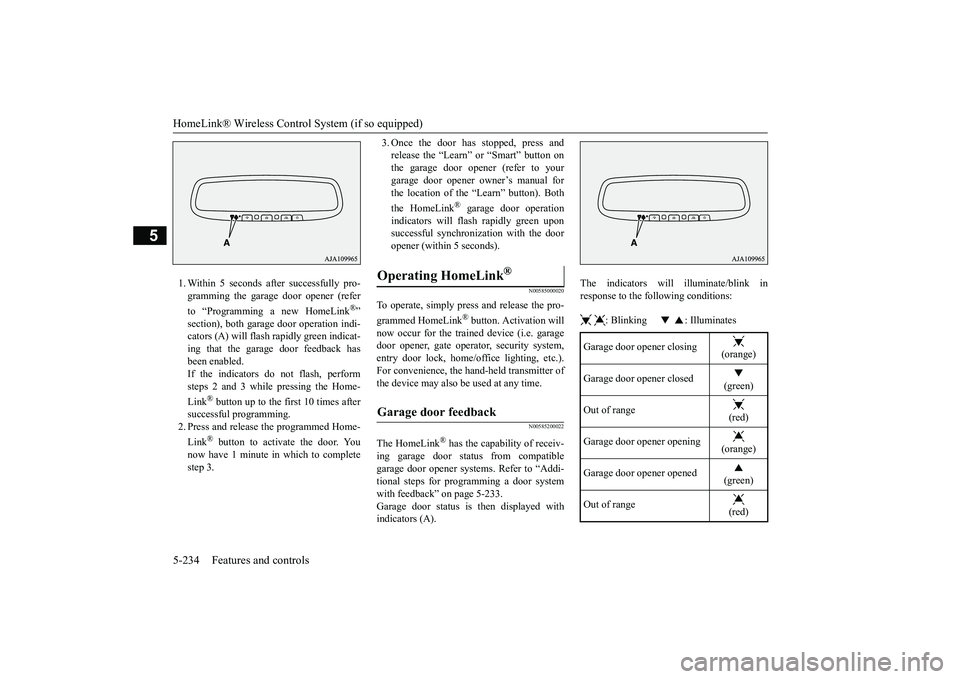
1. Within 5 seconds after successfully pro-gramming the garage door opener (referto “Programming a new HomeLink
®”
section), both garage
door operation indi-
cators (A) will flash
rapidly green indicat-
ing that the garage door feedback hasbeen enabled.If the indicators do not flash, performsteps 2 and 3 while pressing the Home-Link
® button up to the first 10 times after
successful programming.2. Press and release
the programmed Home-
Link
® button to activate the door. You
now have 1 minute in which to completestep 3.
3. Once the door has stopped, press andrelease the “Learn” or “Smart” button onthe garage door opener (refer to yourgarage door opener owner’s manual forthe location of the “Learn” button). Boththe HomeLink
® garage door operation
indicators will fl
ash rapidly green upon
successful synchronization with the dooropener (within 5 seconds).
N00585000020
To operate, simply press and release the pro-grammed HomeLink
® button. Activation will
now occur for the trained device (i.e. garagedoor opener, gate opera
tor, security system,
entry door lock, home/office lighting, etc.).For convenience, the ha
nd-held transmitter of
the device may also be
used at any time.
N00585200022
The HomeLink
® has the capability of receiv-
ing garage door status from compatiblegarage door opener systems. Refer to “Addi-tional steps for programming a door systemwith feedback” on page 5-233.Garage door status is
then displayed with
indicators (A).
The indicators will illuminate/blink inresponse to the following conditions: : Blinking : Illuminates
Operating HomeLink
®
Garage door feedback
Garage door opener closing
(orange)
Garage door opener closed
(green)
Out of range
(red)
Garage door opener opening
(orange)
Garage door opener opened
(green)
Out of range
(red)
BK0249100US.book 234 ページ 2017年5月10日 水曜日 午前8時49分
Page 316 of 441
HomeLink® Wireless Control System (if so equipped)
Features and controls 5-235
5
The HomeLink
® has the capability of listen-
ing to these messages at a range up to 820.2feet (250 m) (open line
of sight), but range
may be reduced by obstacles such as housesor trees. You may have to slow your vehiclespeed to receive the CLOSED or OPENEDmessage feedback from the garage dooropener. If the unit is out of range beforereceiving either the UP or DOWN messagefrom the door opener, both the UP andDOWN indicators will fl
ash red followed by
a continuous lit orange
indicator in the direc-
tion the door was last moving.Recall of the door stat
e after initial feedback
is possible by simultane
ously pressing either
HomeLink
® buttons 1 and 2 or buttons 2 and
3 for 2 seconds. The la
st recorded message
will be displayed for 3
seconds, again follow-
ing the garage door st
atus indication of the
figure above.
N00585300023
To erase programming from the 3 buttons(individual buttons cannot
be erased but can
be “reprogrammed” as
outlined below), fol-
low the steps noted:
1. Press and hold the 2 outer HomeLink
®
buttons for at least
10 seconds. The indi-
cator will change
from continuous yellow
to rapidly flashing green.2. Release both buttons.3. HomeLink
® is now in the train (or learn-
ing) mode and can be programmed at anytime beginning with “Programming a newHomeLink
®” step 1.
N00585400024
To reprogram a HomeLink
® button, complete
the following.1. Press and hold the desired HomeLink
®
button. Do not release the button.2. The indicator light will begin to slowlyflash orange after 20
seconds. The Home-
Link
® button can be released at this point.
Proceed with “P
rogramming a new
HomeLink
®” step 2.
N00585600026
Your HomeLink
® system operates on a radio
frequency subject to
Federal Communica-
tions Commission (FCC)
Rules (For vehicles
sold in U.S.A.) and Industry Canada Rules(For vehicles sold in Canada). This devicecomplies with Part 15 of the FCC Rules andRSS- 210 of the Industry Canada Rules.Operation is subject to the following two con-ditions.This device may not
cause harmful inter-
ference.This device must ac
cept any interference
that may be received, including interfer-ence that may cause undesired operation.
Clearing the programmed information
NOTE
Do not hold for longer than 20 seconds.
Reprogramming a single HomeLink
® button
NOTE
If you do not complete the programming of anew device to the button,
it will revert to the
previously stored programming.For questions or
comments, visit
www.homelink.com,www.youtube.com/HomeLinkGentex, or bycalling the HomeLink
® Hotline.
General information
BK0249100US.book 235 ページ 2017年5月10日 水曜日 午前8時49分