2018 MITSUBISHI OUTLANDER III parking brake
[x] Cancel search: parking brakePage 180 of 441

Electric power steering system (EPS)
Features and controls 5-99
5
The anti-lock braking system and brake forcedistribution function ma
y not work, so hard
braking could make the vehicle unstable.Avoid hard braking and high-speed driving.Stop the vehicle in a safe place and contact anauthorized Mitsubishi Mo
tors dealer or repair
facility of your choice.
N00529201090
After driving on snow or icy roads, removeany snow and ice which may have be leftaround the wheels. On vehicles that have ananti-lock braking syst
em, be careful not to
damage the wheel spee
d sensors (A) or the
cables located at each wheel.
N00568401084
The power steering system operates while theengine is running. It helps reduce the effortneeded to turn the steering wheel.The power steering sy
stem has mechanical
steering capability in case the power assist islost. If the power assist is lost for some rea-son, you will still be able to steer your vehi-cle, but you will notice it takes much moreeffort to steer. If this happens, have your vehi-cle inspected at an authorized MitsubishiMotors dealer or a repair facility of yourchoice.
Warning lamp
NOTE
The anti-lock braking
system warning light
and brake warning light illuminate at thesame time and the wa
rning displays appear
alternately on the information screen in themulti-information display.
After driving on icy roads
Electric power steering sys-tem (EPS) Front Rear
WA R N I N GDo not stop the engine while the vehicle ismoving. Stopping the engine would makethe steering wheel extremely hard to turn,possibly resulting
in an accident.
NOTE
During repeated full-lock turning of thesteering wheel (for example, while you aremanoeuvring the vehicle into a parkingspace), a protection f
unction may be acti-
vated to prevent overheating of the powersteering system. This f
unction will make the
steering wheel graduall
y harder to turn. In
this event, limit your turning of the steeringwheel for a while. When the system hascooled down, the steering effort will returnto normal.If you turn the steering wheel while the vehi-cle is stationary with the headlights on, theheadlights may become
dim. This behavior
is not abnormal. The he
adlights will return to
their original brightness after a short while.
Electric power steering system warning display
BK0249100US.book 99 ページ 2017年5月10日 水曜日 午前8時49分
Page 197 of 441

Adaptive Cruise Control System (ACC) (if so equipped)5-116 Features and controls
5
In any of the situations listed below, the ACCcontrol is automatica
lly canceled, a buzzer
sounds and a message is shown in the multi-information display.When your vehicle stops.When the ASC is turned off.While ABS, ASC or TCL is activated.When the selector lever is in a positionother than “D” (DRIVE) and “Ds”(DOWNSHIFT & SPORTY DRIVING).When the parking brake is applied.
When the ACC system determines that itsperformance has been degraded, a buzzer willsound and a message will be displayed in themulti information display.This can occur whenForeign objects, such as dirt, snow or ice,adhere to the surface
of the radar sensor.
In adverse weather conditions, such asrain, snow or sand storms, etc.A front vehicle or an oncoming vehicle issplashing water, snow or dirt.Driving on a nonbusy road with a fewvehicles and obsta
cles in front.
The brake system is
overheating due to
continuous brake control on long down-hill slope.
If the display keeps showing the message,there is a possibility that the ACC has a mal-function. Contact your authorized MitsubishiMotors dealer.When the ACC system
detects an abnormal-
ity in the system, the ACC system will beturned off, a buzzer will sound and a messagewill be displayed in the multi information dis-play. If the message remains after the opera-tion mode has been tu
rned to the “OFF”
position, contact your au
thorized Mitsubishi
Motors dealer.
N00581800059
After the ACC control has been canceled withthe ACC turned on, the ACC control can beresumed by pushing up
and releasing the
“RES +” switch.To resume the control
BK0249100US.book 116 ページ 2017年5月10日 水曜日 午前8時49分
Page 248 of 441
![MITSUBISHI OUTLANDER III 2018 Owners Manual Multi Information display - Type 1
Features and controls 5-167
5
[When the ignition switch is turned to the“OFF” or “LOCK” position or the operationmode is put in OFF]The display shows the ove](/manual-img/19/58144/w960_58144-247.png "MITSUBISHI OUTLANDER III 2018 Owners Manual Multi Information display - Type 1
Features and controls 5-167
5
[When the ignition switch is turned to the“OFF” or “LOCK” position or the operationmode is put in OFF]The display shows the ove")
Multi Information display - Type 1
Features and controls 5-167
5
[When the ignition switch is turned to the“OFF” or “LOCK” position or the operationmode is put in OFF]The display shows the overall ECO score thefunction has counted from the time when theignition switch is turn
ed to the “ON” position
to the time when it is turned to the “OFF” or“LOCK” or “ACC” position, or from the timewhen the operation mode is set to “ON” tothe time when it is set to “OFF”.
N00556801270
1. Park your vehicle in a safe place.Firmly apply the parking brake and movethe selector lever into the “P” (PARK)position.
2. When you lightly press the multi informa-tion meter switch, the information screenswitches to the function setting screen.Refer to “Information screen” on page5-159.3. Press and hold the multi information dis-play switch (for about 2 seconds or more)to switch from the setting mode screen tothe menu screen.
4. Select the item to change on the menuscreen and change to
the desired setting.
For further details on the operation meth-ods, refer to the following sections.Refer to “Changing the reset mode foraverage fuel consumption and averagespeed” on page 5-168.Refer to “Changing the fuel consumptiondisplay unit” on page 5-169.Refer to “Changing the temperature unit”on page 5-170.Refer to “Changing the display language”on page 5-170.Refer to “Changing the language on othersystem to match the multi informationdisplay” on page 5-171.Refer to “Operation
sound setting” on
page 5-171.
Changing the function settings
ECO drive level
Low High
CAUTIONFor safety, stop the vehicle before operating.While driving, even if you operate the multiinformation display switch, the function set-ting screen is not displayed.
NOTE
To return the menu screen to the function set-ting screen, press and hold the multi infor-mation display switch
(for about 2 seconds
or more).If no operations are made within about 30seconds of the menu screen being displayed,the display returns to the function settingscreen.
BK0249100US.book 167 ページ 2017年5月10日 水曜日 午前8時49分
Page 262 of 441
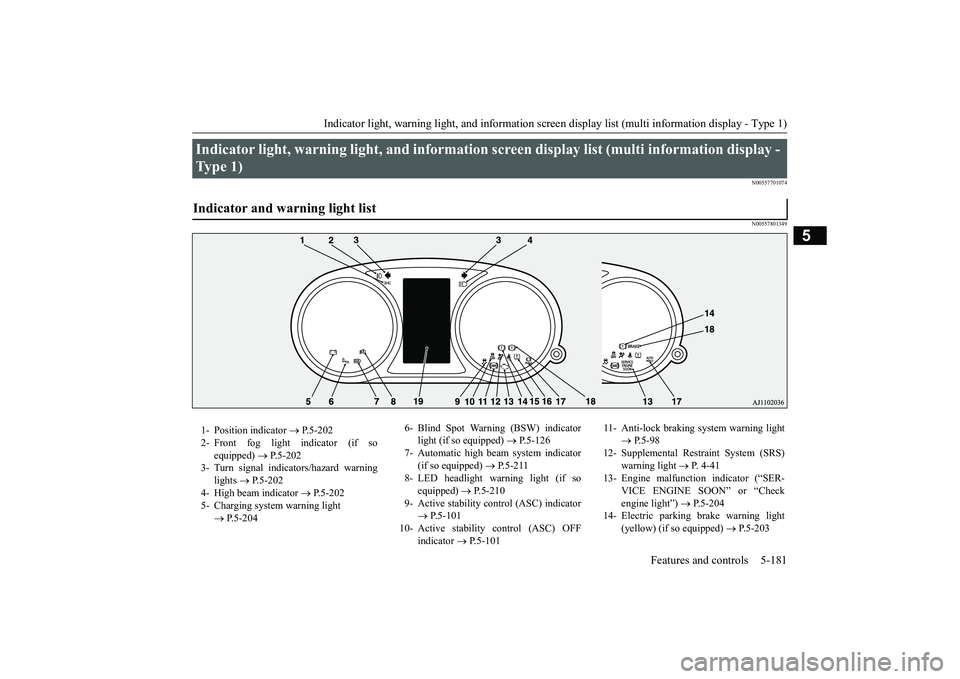
Indicator light, warning light, and information screen display list (multi information display - Type 1)
Features and controls 5-181
5
N00557701074N00557801349
Indicator light, warning light, and information
screen display list (multi information display -
Type 1) Indicator and warning light list 1- Position indicator
P.5-202
2- Front fog light indicator (if so
equipped)
P.5-202
3- Turn signal indicators/hazard warning
lights
P.5-202
4- High beam indicator
P.5-202
5- Charging system warning light
P.5-204
6- Blind Spot Warning (BSW) indicator
light (if so equipped)
P.5-126
7- Automatic high beam system indicator
(if so equipped)
P.5-211
8- LED headlight warning light (if so
equipped)
P.5-210
9- Active stability control (ASC) indicator
P.5-101
10- Active stability
control (ASC) OFF
indicator
P.5-101
11- Anti-lock braking
system warning light
P.5-98
12- Supplemental Restra
int System (SRS)
warning light
P. 4 - 4 1
13- Engine malfuncti
on indicator (“SER-
VICE ENGINE SOON” or “Checkengine light”)
P.5-204
14- Electric parking
brake warning light
(yellow) (if so equipped)
P.5-203
BK0249100US.book 181 ページ 2017年5月10日 水曜日 午前8時49分
Page 269 of 441
Indicator light, warning light, and information screen display list (multi information display - Type 1)
5
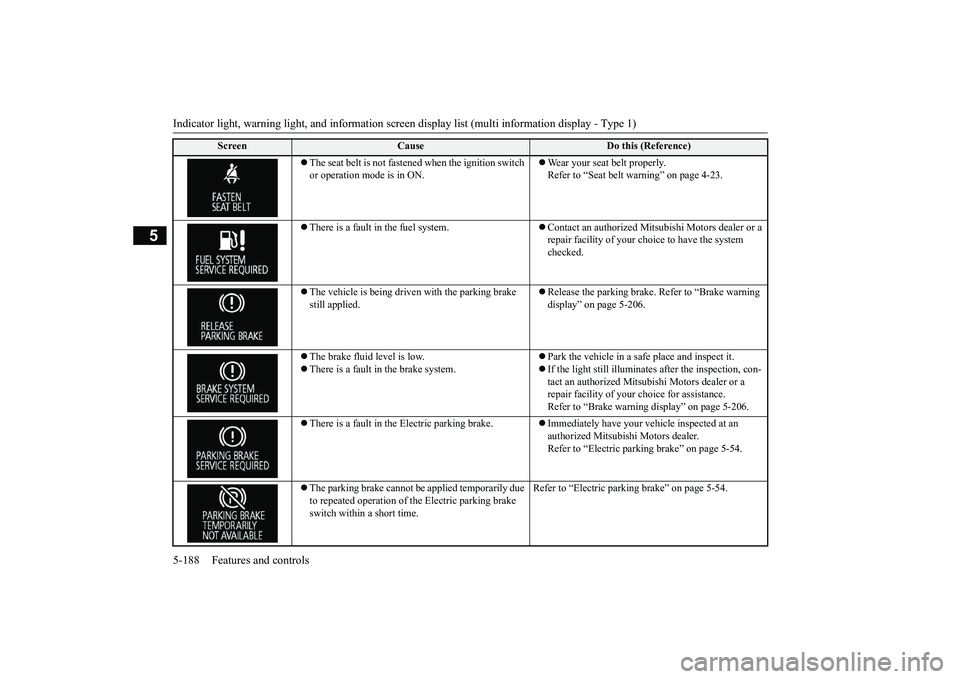
The seat belt is not fasten
ed when the ignition switch
or operation mode is in ON.
Wear your seat belt properly. Refer to “Seat belt
warning” on page 4-23.
There is a fault in the fuel system.
Contact an authorized Mits
ubishi Motors dealer or a
repair facility of your c
hoice to have the system
checked.
The vehicle is being driven with the parking brake still applied.
Release the parking brake. Refer to “Brake warning display” on page 5-206.
The brake fluid level is low.There is a fault in the brake system.
Park the vehicle in a safe place and inspect it.If the light still illuminates after the inspection, con-tact an authorized Mitsub
ishi Motors dealer or a
repair facility of your
choice for assistance.
Refer to “Brake warning
display” on page 5-206.
There is a fault in the Electric parking brake.
Immediately have your ve
hicle inspected at an
authorized Mitsubishi Motors dealer.Refer to “Electric parking brake” on page 5-54.
The parking brake cannot be
applied temporarily due
to repeated operation of the Electric parking brake switch within a short time.
Refer to “Electric parkin
g brake” on page 5-54.
Screen
Cause
Do this (Reference)
BK0249100US.book 188 ページ 2017年5月10日 水曜日 午前8時49分
Page 270 of 441
Indicator light, warning light, and information screen display list (multi information display - Type 1)
Features and controls 5-189
5
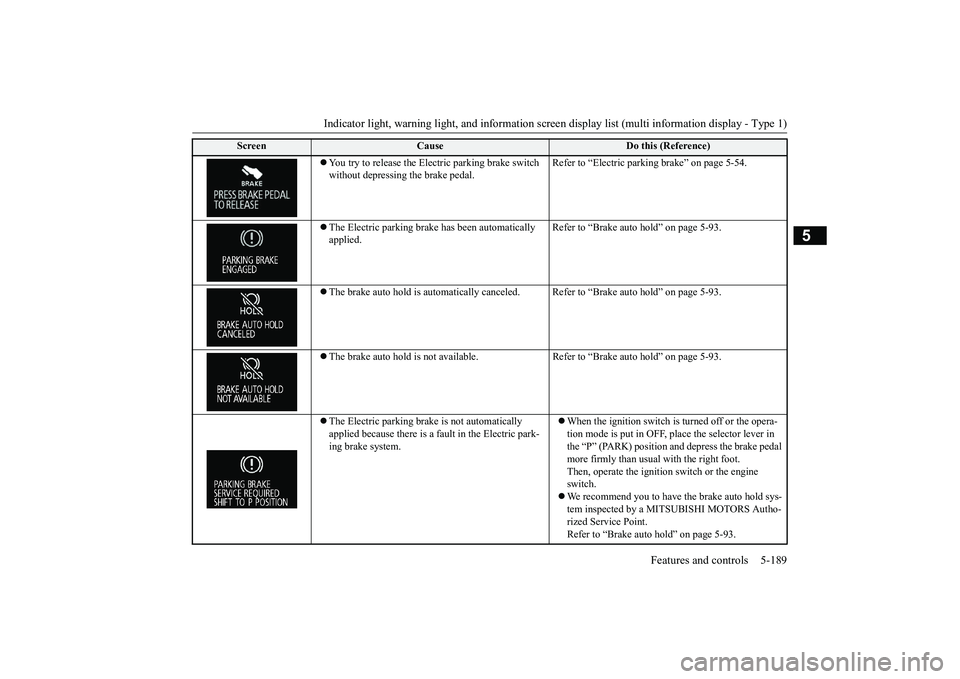
You try to release the Elec
tric parking brake switch
without depressing the brake pedal.
Refer to “Electric parki
ng brake” on page 5-54.
The Electric parking brak
e has been automatically
applied.
Refer to “Brake auto hold” on page 5-93.
The brake auto hold is automatically canceled
. Refer to “Brake auto hold” on page 5-93.
The brake auto hold is not available. Re
fer to “Brake auto hold” on page 5-93.
The Electric parking brake is not automatically applied because there is a fault in the Electric park-ing brake system.
When the ignition switch is
turned off or the opera-
tion mode is put in OFF, pl
ace the selector lever in
the “P” (PARK) position and depress the brake pedal more firmly than usual with the right foot.Then, operate the ignition switch or the engine switch.We recommend you to have the brake auto hold sys-tem inspected by a MITSUBISHI MOTORS Autho-rized Service Point.Refer to “Brake auto hold” on page 5-93.
Screen
Cause
Do this (Reference)
BK0249100US.book 189 ページ 2017年5月10日 水曜日 午前8時49分
Page 273 of 441
Indicator light, warning light, and information screen display list (multi information display - Type 1)
5
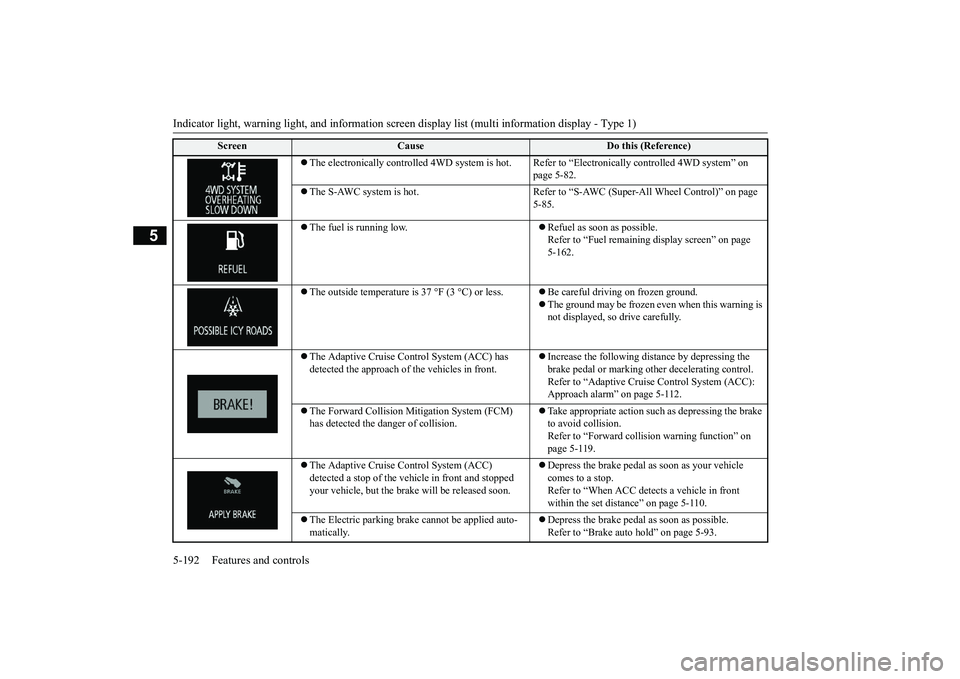
The electronically controlled 4WD
system is hot. Refer to “Electr
onically controlled
4WD system” on
page 5-82.
The S-AWC system is hot. Refer to “S-A
WC (Super-All Wheel Control)” on page
5-85.
The fuel is running low.
Refuel as soon as possible. Refer to “Fuel remaining
display screen” on page
5-162.
The outside temperature is
37 °F (3 °C) or less.
Be careful driving on frozen ground.The ground may be frozen even when this warning is not displayed, so drive carefully.
The Adaptive Cruise Control System (ACC) has detected the approach of
the vehicles in front.
Increase the following di
stance by depressing the
brake pedal or marking ot
her decelerating control.
Refer to “Adaptive Cruise
Control System (ACC):
Approach alarm” on page 5-112.
The Forward Collision Mitigation System (FCM) has detected the da
nger of collision.
Take appropriate action such
as depressing the brake
to avoid collision.Refer to “Forward colli
sion warning function” on
page 5-119.
The Adaptive Cruise Control System (ACC) detected a stop of the vehi
cle in front and stopped
your vehicle, but the brake
will be released soon.
Depress the brake pedal as soon as your vehicle comes to a stop.Refer to “When ACC dete
cts a vehicle in front
within the set distance” on page 5-110.
The Electric parking brake
cannot be applied auto-
matically.
Depress the brake pedal as soon as possible.Refer to “Brake auto hold” on page 5-93.
Screen
Cause
Do this (Reference)
BK0249100US.book 192 ページ 2017年5月10日 水曜日 午前8時49分
Page 283 of 441

Indicators5-202 Features and controls
5
N00519900127N00520000216
The arrows will flash in time with the corre-sponding exterior turn signals when the turnsignal lever is used.Both arrows will flash
when the hazard warn-
ing flasher swit
ch is pressed.
N00520100086
A blue light comes on when the headlightsare on high beam.
N00520200175
This indicator comes on while the front foglights are on.
N00551301078
This indicator light illuminates while theparking lights are on.
N00575601020
This indicator comes on in blue while thecoolant temperature is low.
N00579200030
This function displays
how fuel-efficiently
you are driving under different driving condi-tions.The ECO drive assist di
splay will change as
follows if you do fuel-efficient driving usingthe accelerator in a way well matched withthe vehicle speed.
24- Engine malfuncti
on indicator (“SER-
VICE ENGINE SOON” or “Checkengine light”)
P. 5-204
25- Seat belt remi
nder/warning light
P. 4-23
26- Tire pressure moni
toring system warn-
ing light
P. 5-138
27- Brake warning light (red)
P. 5-203
28- Multi information display
P. 5-173
Indicators Turn signal indicators/Hazard warning lights
NOTE
If the indicator flashes faster than usual or ifthe indicator stays on wi
thout flashing, check
for a malfunctioning turn signal light bulb orturn signal connection.
High beam indicator Front fog light indicator
(if so
equipped)Position indicator Low coolant temperature indi-cator - blue (Vehicle equipped with the multi information dis-play - Type 2)
NOTE
When the indicator go
es out, this should be
used as a rough indication of when the heat-ing starts working.
ECO Drive Assist (Vehicle equipped with the multi infor-mation display - Type 2)
ECO drive levelLow High
BK0249100US.book 202 ページ 2017年5月10日 水曜日 午前8時49分