2018 MERCEDES-BENZ E-CLASS WAGON warning
[x] Cancel search: warningPage 159 of 506
*NO
TEDama getothe fuel sy stem caused
by ove rfilled fuel tanks.
#Only fill th e fuel tank until the pump
nozzle switches off.
* NO
TEFuel may spr ayout when you
re mo vethe fuel pump nozzle.
#Only fill th e fuel tank until the pump
nozzle switches off.
Re quirement:RThe vehicle must be unloc ked.
% Do not get into theve hicle again during the
re fueling process. Otherwise, electros tatic
ch arge could build up again.
Obser vethe no tes on operating fluids
(
→page 394).
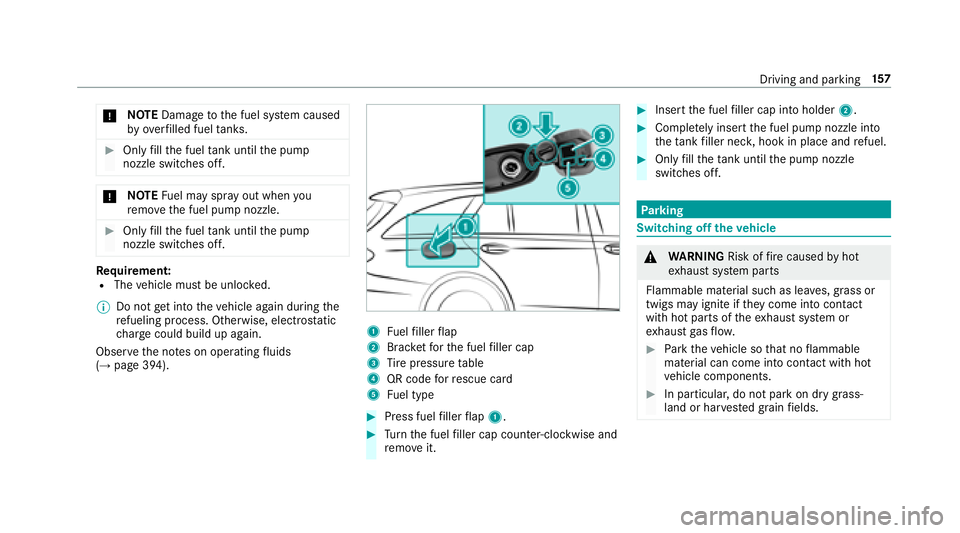
1Fu elfiller flap
2Brac ketfo rth e fuel filler cap
3Ti re pressure table
4QR code forre scue card
5Fu el type
#Press fuel filler flap 1.
#Turn the fuel filler cap coun ter-clockwise and
re mo veit.
#Insert the fuel filler cap into holder 2.
#Completely inse rtthe fuel pump nozzle into
th eta nk filler nec k,hook in place and refuel.
#Only fill th eta nk until the pump nozzle
switches off.
Pa rking
Switching off theve hicle
&
WARNING Risk offire caused byhot
ex haust sy stem parts
Flammable material such as lea ves, grass or
twigs may ignite if they come into contact
wi th hot parts of theex haust sy stem or
ex haust gasflow .
#Park theve hicle so that no flammable
material can come into con tact wi thhot
ve hicle components.
#In particular, do not park on dry grass‐
land or har vested grain fields.
Driving and parking 15
7
Page 160 of 506
&WARNING Risk of accident and injury
due tochildren left unatte nded inthe
ve hicle
If yo u lea vechildren unaccompanied in the
ve hicle, they may be able toset theve hicle in
motion, forex ample by:
RRe leasing the parking brake.
RShifting the transmission out of park
position j.
RStarting the engine.
In addition, they may operate vehicle equip‐
ment.
#Ne ver lea vechildren and animals unat‐
te nded in theve hicle.
#When leaving theve hicle, alw aysta ke
th e SmartK eywith you and lock the
ve hicle.
* NO
TEDama getotheve hicle or the driv‐
et ra in caused bytheve hicle rolling away
#Alw ays proper lysecure theve hicle
against rolling away.
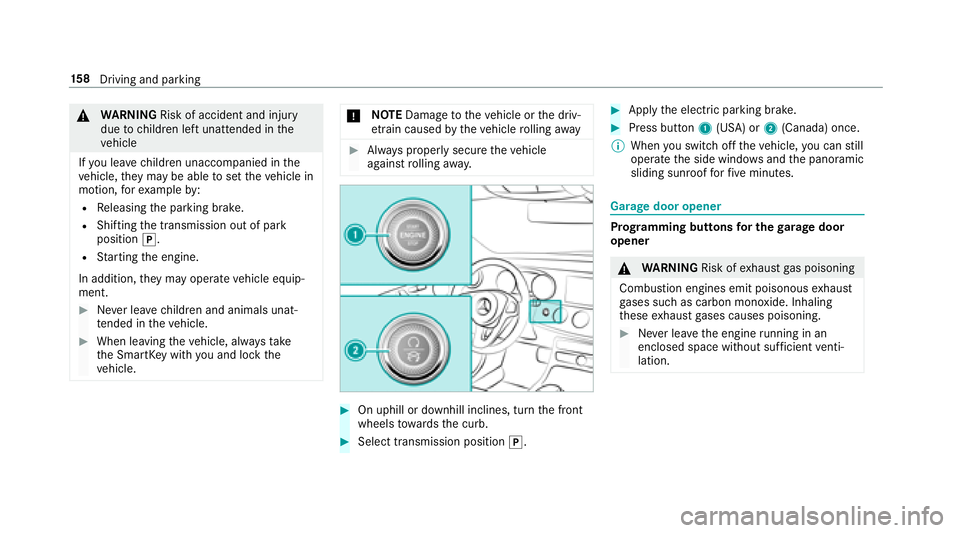
#On uphill or downhill inclines, turn the front
wheels towa rdsth e curb.
#Select transmission position j.
#Applythe electric parking brake.
#Press button 1(USA) or 2(Canada) once.
% When you switch offtheve hicle, you can still
opera tethe side windo wsand the panoramic
sliding sunroof forfive minutes.
Garage door opener
Prog ramming buttons for the garage door
opener
& WARNING Risk ofexhaust gas poisoning
Combustion engines emit poisonous exhaust
ga ses such as carbon monoxide. Inhaling
th ese exhaust gases causes poisoning.
#Ne ver lea vethe engine running in an
enclosed space wi thout suf ficient venti‐
lation.
15 8
Driving and pa rking
Page 161 of 506

&WARNING Risk of injury and entrapment
when opening thega rage door using the
ga rage door opener
When you operate or program thega rage
door with the integrated garage door opener,
persons in thera nge of mo vement of the
ga rage door can become trapped or stru ck
by thega rage door.
#When using the integrated garage door
opener, alw ays make sure that nobody
is within the sweep of thega rage door.
Only operate thega rage door opener on thefo l‐
lowing garage doors:
RGarage doors with a saf etyst op and reve rs‐
ing feature.
RGarage doors which con form tothe cur rent
U. S. safe tystandards.
Prior toprogramming a garage door opener, park
th eve hicle outside thega rage and switch offthe
engine.
#Check if the transmit ter frequency of the
re mo tecontrol has the frequency range of
280 to868 MHz.
Ra dio equipment appr oval number:
RNZLMUA HL5 (USA)
R4112 A-MUAHL5 (Canada)
#Press and hold button 1,2or3 that you
wish toprog ram.
Indicator lamp 4flashes yello w.
% It can take up to20 seconds before the indi‐
cator lamp flashes yello w.
#Re lease the pr eviously pressed button.
Indicator lamp 4continues toflash yello w.
#Po int remo tecontrol 5at a dist ance of 1 in
(1 cm) to3 in (8 cm) towa rds buttons 1,2
or 3.
#Press and hold button 6ofremo tecontrol
5 until:
RIndicator la mp4lights up greencontin‐
uousl y.Programming is comple te.
RIndicator lamp 4flashes green. Pro‐
gr amming was successful. Additionally,
synchronization of thero lling code with
th ega rage door sy stem must also take
place.
#If indicator lamp 4does not light up or flash
green: repeat the procedure.
#Re lease all of the buttons.
Driving and parking 15
9
Page 165 of 506
Brazil
Este equipamento opera em caráter secundário,
is to é, não tem direito à pr oteção contra inter fer‐
ência prejudicial, mesmo de es tações do mesmo
tipo, e não pode causar inter ferê ncia a sist emas
operando em caráter primário.
Pa ra maio res informações acessar
www.anatel.go v.br
Fu rther information on the declaration of con‐
fo rm ity for wireless vehicle components
(
→page 23).
Electric parking brake
Au tomatically applying the electric parking
brake
& WARNING Risk of accident and injury
due tochildren left unatte nded inthe
ve hicle
If yo u lea vechildren unaccompanied in the
ve hicle, they may be able toset theve hicle in
motion, forex ample by:
RRe leasing the parking brake.
RShifting the transmission out of park
position j.
RStarting the engine.
In addition, they may operate vehicle equip‐
ment.
#Ne ver lea vechildren and animals unat‐
te nded in theve hicle.
#When leaving theve hicle, alw aysta ke
th e SmartK eywith you and lock the
ve hicle.
The electric parking brake is applied if the trans‐
mission is in position jand one of thefo llow‐
ing conditions is fulfilled:
RThe engine is switched off.
RThe seat belt tongue is not inser ted in the
seat belt buckle of the driver's seat and the
driver's door is opened.
% Toprev ent application: pull the handle of the
electric parking brake.
In thefo llowing situations, the electric parking
brake is also engaged:
RThe Active Dis tance Assist ant DISTRO NIC
brings theve hicle toast andstill.
RThe HOLD function is keeping theve hicle sta‐
tionar y.
RActive Parking Assist is keeping theve hicle
st ationar y.
This is only the case if one of thefo llowing con‐
ditions is also fulfilled:
RThe engine is switched off.
Driving and parking 16
3
Page 169 of 506

RVehicle steerability while braking is ensured.
If ABS inter venes when braking, youwill feel a
pulsing in the brake pedal. The pulsating brake
pedal can be an indication of hazardous road
conditions and can ser veas a reminder totake
ex tra care while driving.
Sy stem limitations
RABS is active from speeds of appr ox. 5 mph
(8 km/h).
RABS may be impaired or may not function if a
malfunction has occur red and theye l‐
low ! ABSwarning lamp lights up contin‐
uously in the instrument clus ter af terth e
engine is star ted.
Fu nction of BAS (Brake Assist Sy stem)
&
WARNING Risk of an accident caused by
a malfunction in BAS (Brake Assist Sys‐
te m)
If BA S is malfunctioning, the braking dis tance
in an emergency braking situation is
increased.
#Depre ssthe brake pedal with full forc e
in emer gency braking situations. ABS
pr eve nts the wheels from locking.
BA S suppo rts yo ur eme rgency braking situation
with additional brake forc e.
If yo u depress the brake pedal quickl y,BA S is
acti vated:
RBA S au tomatical lyboosts the brake pres‐
sure.
RBA S can short enthe braking dis tance.
RABS pr events the wheels from locking.
The brakes will function as usual once you
re lease the brake pedal. BAS is deactivated.
Functions of ESP®(Electronic Stability Pro‐
gr am)
&
WARNING Risk of skidding if ESP®is
malfunctioning
If ESP
®is malfunctioning, ESP®cannot car ry
out vehicle stabilization. In addition, other
driving saf etysy stems are switched off.
#Drive on carefull y.
#Have ESP®checked at a qualified spe‐
cialist workshop.
&
WARNING Risk of skidding if ESP®is
deactivated
If yo u deactivate ESP
®, ESP®cannot car ry
out vehicle stabilization.
#ESP®should only be deactivated in the
fo llowing situations.
ESP®monitors and impr oves driving stability and
traction, particular ly inthefo llowing situations:
RWhen pulling away on wet or slippe ryroads.
Driving and parking 16
7
Page 170 of 506
RWhen braking.
RInstro ng sidewinds when you are driving
fast erthan 50 mph(8 0 km/h).
ESP
®can stabilize theve hicle byinter vening in
th efo llowing ways:
ROne or more wheels are braked.
RThe engine output is adap ted according to
th e situation.
ESP
®is deactivated if the ESP®OFF å warn‐
ing lamp lights up continuously in the instrument
clus ter:
RDriving stability will no longe r be improved.
RCrosswind Assist is no longer active.
RThe drive wheels could spin.
RETS/4ETS traction control is still active.
% Even when ESP
®is deactivated, you are still
assis tedby ESP®when braking.
ESP
®is inter vening if the ESP®÷ warning
lamp flashes in the instrument clus ter:
RDo not deacti vate ESP®.
ROnly depress the accelera tor pedal as far as
is necessar y.
RAdapt your drivin gst yle to suit the cur rent
ro ad and weather conditions.
Deactivate ESP
®in thefo llowing situations to
impr ovetraction:
Rwhen using snow chains
Rin deep snow
Ron sand or gr avel
% Spinning the wheels results in a cutting
action which pr ovides better grip.
ESP
®is deactivated if theå ESP®OFFwarn‐
ing lamp lights up continuously in the instrument
clus ter.
If th e ESP
®÷ warning lamp lights up continu‐
ousl y,ESP®is not available due toa malfunction.
Observ e any information which may be displa yed
in the instrument clus ter:
RWa rning and indicator lamps (→page 449)
RDispl aymessage s (→page 402) ETS/4ETS (Electronic
Traction Sy stem)
ETS/4ETS traction control is pa rtof ESP
®.
ETS/4ETS can impr ovetheve hicle's traction by
inter vening in thefo llowing ways:
RThe drive wheels are braked individually if
they spin.
RMore drive torque is transferred tothe wheel
or wheels with traction.
Influence of drive prog rams on ESP
®
The drive programs enable ESP®to adapt todif‐
fe re nt we ather and road conditions as well as
th e driver's prefer red driving style. You can
select the drive programs using theDY NA MIC
SELECT switch.
16 8
Driving and pa rking
Page 172 of 506

Activating/deactivating ESP®(Electronic Sta‐
bility Prog ram)
Multimedia sy stem:
,9HKLFOH.k $VVLVWDQFH.(63
Mercedes‑AMG vehicles: always obser vethe
no tes in the Supplement. Otherwise, you may
not recognize dangers.
#Ac tivate Oor deacti vate ª the function.
ESP
®is deactivated if theå ESP®OFFwarn‐
ing lamp lights up continuously in the instrument
clus ter.
Obser vethe information on warning lamps and
display messages which may be shown in the
instrument clus ter.
Fu nctions of ESP®Crosswind Assist
ESP®Crosswind Assist de tects sudden gust s of
side wind and helps the driver tokeep theve hi‐
cle in the lane:
RESP®Crosswind Assist is active at vehicle
speeds between 50 mph (80 km/h) and 12
5mp h (200 km/h) when driving stra ight
ahead or cornering slightly.
RThe vehicle is stabilized bymeans of individ‐
ual brake application on one side.
Fu nction of EBD (electronic brake forc e dis‐
tribution)
EBD is characterized bythefo llowing:
RMonitoring and regulating the brake pressure
on there ar wheels.
RImpr oved driving stability when braking,
especially on bends.
Fu nction of STEER CONT ROL
STEER CONTRO L helpsyouby transmitting a
noticeable steering forc eto thesteering wheel in
th e direction requiredforve hicle stabilization.
This steering recommendation is given part icu‐
lar lyin thefo llowing situations:
RBo th right wheels or bo thleft wheels are on
a we t or slippe ryroad sur face when you
brake.
RThe vehicle starts toskid.
Sy stem limitations
ST EER CONTROL may be impaired or may not
function in thefo llowing situations:
RESP®is deactivated.
RESP®is malfunctioning.
RThe steering is malfunctioning.
If ESP
®is malfunctioning, youwill be assis ted
fur ther by the electric po werst eering.
Fu nction of Active Brake Assi st
Active Brake Assi stconsist s of:
RDistance warning function
RAu tonomous braking function
RSituation-dependent braking assist ance
RVehicles with Driving Assistance Pack‐
age: Evasi veSteering Assist
Ac tive Brake Assi stcan help youto minimize the
ri sk of a collision with vehicles or pedestrians or
to reduce the ef fects of such a collision.
170
Driving and pa rking
Page 173 of 506
IfAc tive Brake Assi sthas de tected a risk of colli‐
sion, youwill be warned visually and acousti‐
cally.
If yo udo not react tothe visual or acoustic warn‐
ing, autonomous braking can be initiated in criti‐
cal situations.
In especially critical situations, Active Brake
Assi stcan initiate autonomous braking direct ly.
In this case, the visual and acoustic warning
occurs simultaneously with the braking applica‐
tion.
If yo uappl yth e brake yourself ina critical situa‐
tion or applyth e brake during autonomous brak‐
ing, situation-dependent braking assis tance
occurs . If necessary ,th is inc reases the brake
pressure up tofull brake application.
If th e autonomous braking function or the situa‐
tion-dependent braking assis tance is trig gered,
additional pr eventive measure sfo r occupant
pr otection (PRE-SAFE
®) may also be initiated, if
th eve hicle is equipped with these.
&
WARNING Risk of an accident caused by
limited de tection per form ance of Active
Brake Assi st
Ac tive Brake Assi stcannot al ways clear ly
identify objects and complex traf fic situa‐
tions.
In such cases,Active Brake Assi stmight:
RGive a warning or brake without reason
RNo t give a warning or not brake
#Alw ays pay careful attention tothe traf‐
fi c situation; do not rely on Active Brake
Assi stalone. Active Brake Assi stis only
an aid. The driver is responsible for
maintaining a sui table dis tance tothe
ve hicle in front, vehicle speed and for
braking in good time.
#Be prepared tobrake or swer veif nec‐
essar y.
Also obser vethe sy stem limitations of Active
Brake Assi st.
The individual subfunctions are available in
th efo llowing speed ranges:
Distance warning function
The dis tance warning function issues a warning
at speeds:
RFr om appr oximately 4 mph (7 km/h), if your
ve hicle is critically close toave hicle or
pedestrian. An intermittent warning tone
sounds and the· distance warning lamp
lights up in the instrument clus ter.
Brake immediately or take evasive action, pr ovi‐
ded it is safe todo so and the traf fic situation
allo wsthis.
Driving and parking 17
1