Page 116 of 506

#Make surethat locking button 4on brack‐
et s2 is pressed.
Brac kets 2 are secured in place on the load
ra il.
#To remo ve:press release knob 3on
re spective brac ket2 and remo ve te lescopic
ro d1 bypulling it up and out.
Opening thesto wage space under the cargo
compa rtment floor
&
WARNING Risk of injury duetoan open
cargo compartment floor
If yo udriv e when the cargo compartment
fl oor is open, objects could be throw n around
and thereby strike vehicle occupants. There
is a risk of injur y,particular lyin theeve nt of
sudden braking or a sudden change in direc‐
tion.
#Alw ays close the cargo compartment
fl oor before a journe y.
#Toopen: holding theribbing, press handle
1 down.
#Lift the cargo compartment floor up byhan‐
dle 1.
#Fold out the hook on thest ra p on the under‐
side of the cargo compartment floor and
hook it into thera in trough.
#To close: unhook the hook from thera in
trough and fasten it tothe brac ket on the
under sideofthe cargo compartment floor.
#Fo ldthe cargo compartment floor down and
th en press handle 1down until it engages.
Attachin gth ero of rack
&
WARNING Risk of injury by exceeding
th e maximum roof load
When you load thero of, theve hicle center of
gr av ity rises and the driving characteristics
ch ange.
If yo uexc eed the maximum roof load, the
driving characteristics, as well as thesteer‐
ing and braking, will be greatly impaired.
#Ne verexc eed the maximum roof load
and adjust your driving style.
Yo uwill find information on the maximum roof
load in the "Technical data" section.
11 4
Seats and stowing
Page 117 of 506
RequirementsROnly use roof rack ste sted and appr ovedby
Mercedes-Benz.
RMake sure that you can raise the sliding sun‐
ro of fully and open theta ilgate fully once the
ro of rack is ins talled.
RThe panoramic sliding sunroof cannot be
opened if a roof rack is ins talled. The panor‐
amic sliding sunroof closes again automati‐
cally when it encounters resis tance.
#Secu rethero of rack tothero of railing.
#Obser vethe manufacturer's ins tallation
instructions.
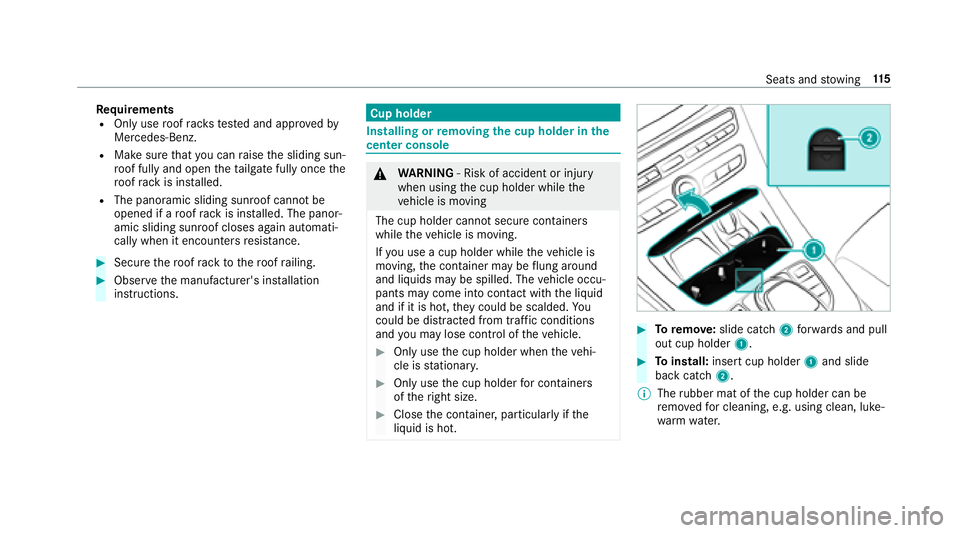
Cup holder
Installing or removing the cup holder in the
center console
& WARNING ‑ Risk of accident or injury
when using the cup holder while the
ve hicle is moving
The cup holder cannot secure containers
while theve hicle is moving.
If yo u use a cup holder while theve hicle is
moving, the conta iner may be flung around
and liq uidsmay be spilled. The vehicle occu‐
pants may come into contact with the liquid
and if it is hot, they could be scalded. You
could be dist racted from traf fic conditions
and you may lose cont rol of theve hicle.
#Only use the cup holder when theve hi‐
cle is stationar y.
#Only use the cup holder for containers
of theright size.
#Close the conta iner, particular lyifth e
liquid is hot.
#To remo ve:slide catch 2forw ards and pull
out cup holder 1.
#Toinstall: insert cup holder 1and slide
back catch 2.
% The rubber mat of the cup holder can be
re mo vedfo r cleaning, e.g. using clean, luke‐
wa rm wate r.
Seats and stowing 11
5
Page 119 of 506

Usingthere ar passenger co mpartment ash‐
tr ay
#To open: pull co ver2 out byits top handle
edge.
#To remo vethe inser t:push ribbing 3from
th e left side and pull insert 1upwards and
out.
#To install the inser t:ins tall inse rt1 from
abo veand press down into the holder until it
engages.
Using the cigar ette lighter
&
WARNING ‑ Risk of fire and injury from
hot cigar ette lighter
Yo u can burn yourself ifyo uto uch the hot
heating element or the soc ket of the ciga‐
re tte lighter.
In addition, flammable materials may ignite
if:
Ryo udr op the hot cigar ette lighter
Rach ild holds the hot cigar ette lighter to
objects, forex ample
#Alw ays hold the cigar ette lighter bythe
knob.
#Alw ays make sure that the cigar ette
lighter is out of reach of children.
#Ne ver lea vechildren unatte nded inthe
ve hicle.
Re quirement:RThe ignition is switched on.
#Press in cigar ette lighter 1.
The cigar ette lighter will pop out automati‐
cally when the heating element is red-hot.
Soc kets
12 V sock etinthe front center console
Re quirement:ROnly connect devices up toa maximum of
18 0wa tts (15 A).
Seats and stowing 11
7
Page 122 of 506
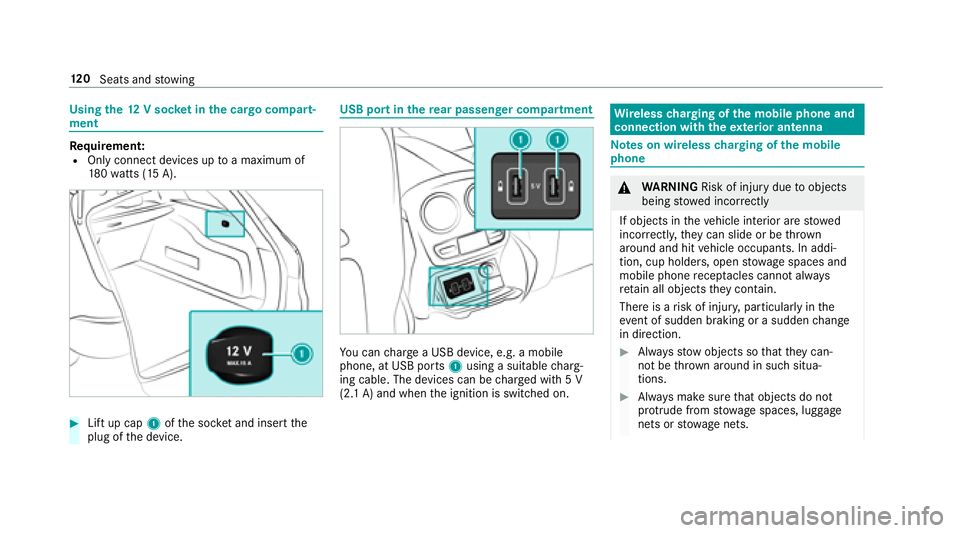
Usingthe12 V sock etinthe cargo compa rt‐
ment
Re quirement:ROnly connect devices up toa maximum of
18 0wa tts (15 A).
#Lift up cap 1ofthe soc ket and insert the
plug of the device.
USB port in there ar passenger co mpartment
You can charge a USB device, e.g. a mobile
phone, at USB ports 1using a suitable charg‐
ing cable. The devices can be charge d with 5 V
(2.1 A) and when the ignition is switched on.
Wire lesscharging of the mobile phone and
connection with theex terior antenna
Note s on wireless charging of the mobile
phone
& WARNING Risk of injury duetoobjects
being stowed inco rrectly
If objects in theve hicle interior are stowed
incor rectly, they can slide or be throw n
around and hit vehicle occupants. In addi‐
tion, cup holders, open stowage spaces and
mobile phone recep tacles cannot al ways
re tain all objects they contain.
There is arisk of injur y,particularly in the
ev ent of sudden braking or a sudden change
in direction.
#Alw aysstow objects so that they can‐
not be throw n around in such situa‐
tions.
#Alw ays make sure that objects do not
pr otru de from stowage spaces, luggage
nets or stowage nets.
120
Seats and stowing
Page 123 of 506
#Closethe loc kable stow age spaces
before starting a journe y.
#Alwaysstow and secure heavy, hard,
pointe d, sharp-edged, fragile or bulky
objects in the trunk/load compartment.
Obser vethe no tes on loading theve hicle.
&
WARNING Risk offire from placing
objects in the mobile phone stowage
compartment
If yo uplac e objects inthe mobile phone
stow age compartment, they may heat up
exc essively and even catch fire .
#Do not place additional objects, espe‐
cially those mode of me tal, in the
mobile phone stowage compartment.
* NO
TEDama getoobjects caused by
placing them in the mobile phone stow‐
age compartment
If yo u place objects in the mobile phone
stow age compartment, these may be dam‐
aged byelectromagnetic fields.
#Do not place credit cards, storage
media or other objects sensitive to
electromagnetic fields in the mobile
phone stowage compartment.
* NO
TEDama getothe mobile phone
stow age compartment caused byliquids
If liquids enter the mobile phone stowage
compartment, the compartment may be
damaged.
#Ensure that no liquids enter the mobile
phone stowage compartment.
RDepending on theve hicle equipment, the
mobile phone is connected totheve hicle's
ex terior antenna via thech arging module.
RThe charging function and wireless connec‐
tion of the mobile phone totheve hicle's
ex terior antenna are only available if the igni‐
tion is switched on.
RSmall mobile phones may not be able tobe
ch arge d in every position of the mobile
phone stowage compartment.
RLargemobile phones which do not rest flat in
th e mobile phone stowage compartment may
not be able tobe charge d or connec ted with
th eve hicle's exterior antenna.
RThe mobile phone may heat up during the
ch arging process. The mobile phone can be
cooled in the mobile phone stowage com‐
partment when the air conditioning sy stem is
switched on. The cooling output in the
mobile phone stowage compartment is high‐
est when the controller in theglov e box is
closed.
RTo ensure more ef ficient charging and con‐
nection with theve hicle's exterior antenna,
re mo vethe pr otective co ver from the mobile
phone.
Seats and stowing 12
1
Page 124 of 506

RWhencharging, the mat should be used if
possible.
Wire lesscharging of the mobile phone
Requ irement:RThe mobile phone must be suitable for wire‐
less charging (Qi-compatible mobile phone).
Yo u can find a li stof Qi-compatible mobile
phones at:
http://www.mercedes-benz.com/connect
#Place the mobile phone as close tothe cen‐
te r of mat 1as possible with the display
fa cing up wards.
When thech arging symbol is shown in the
multimedia sy stem, the mobile phone is
being charge d.
Malfunctions during thech arging process are
shown in the multimedia sy stem displa y.
% Toclean, the mat can be remo ved.
Installing/removing thefloor mats
&
WARNING Risk of accident due to
objects in the driver's foot we ll
Objects in the driver's foot we ll may impede
pedal tr avel or block a depressed pedal.
This jeopardizes the operating and road
saf etyof theve hicle.
#Stow all objects in theve hicle securely
so that they cannot getinto the driver's
fo ot we ll.
#Alw ays ins tallth efloor mats securely
and as prescribed in order toensure
that there is alw ays suf ficient room for
th e pedals.
#Do not use loose floor mats and do not
place floor mats on top of one ano ther.
#To install: pressstuds 1onto holders 2.
#Toremo ve:pull thefloor mat off holders 2.
122
Seats and stowing
Page 126 of 506
Theexterior lighting (e xcept parking and stand‐
ing lights) switch es off automatically when the
driver's door is opened.
Au tomatic driving lights
The pa rking lights, low beam and daytime run‐
ning lights are switched on au tomatically
depending on the ignition status, whe ther the
engine is running and on the ambient light.
&
WARNING Risk of accident when the low
beam is switched off in poor visibility
When the light switch is set toÃ, the low
beam may not be switched on automatically
if th ere is fog, snow or other causes of poor
visibility such as spr ay.
#In such cases, turn the light switch to
L.
The automatic driving lights are only an aid. You
are responsible forve hicle lighting. Ac
tivating/deactivating the rear fog light
Re quirement:
RThe light switch is in theL orà posi‐
tion.
#Press the R button.
Please obser vethe count ry-specific la wsonthe
use of rear fog lamps.
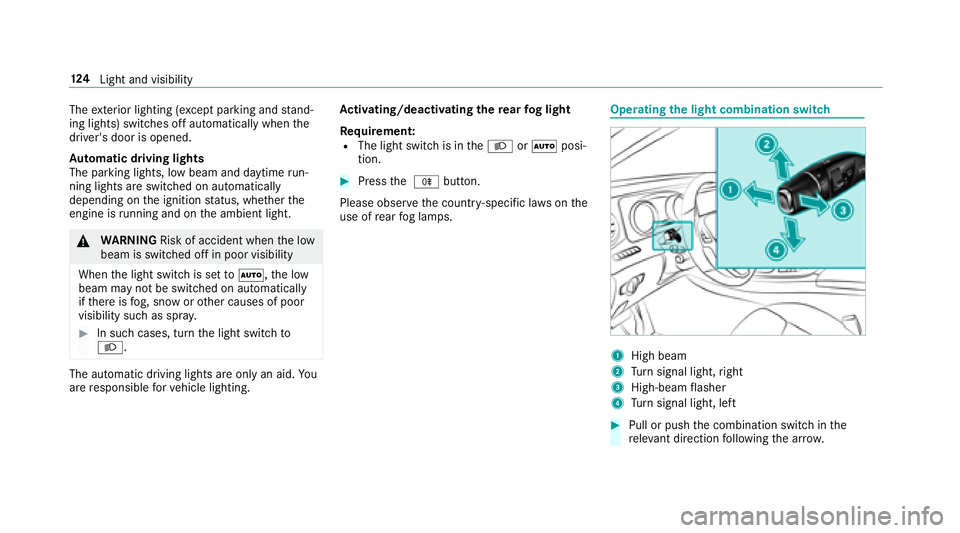
Operating the light combination switch
1High beam
2Turn signal light, right
3High-beam flasher
4Tu rn signal light, left
#Pull or push the combination switch in the
re leva nt di rection following the ar row.
12 4
Light and visibility
Page 127 of 506
Switching onthe high beam manually
#Ve hicles with Adaptive Highbeam Assis t:
Tu rn the light switch totheL position.
RPress the combination switch be yond the
pressure point in the direction of
ar ro w 1.
When the high beam is activated, the indicator
lamp for low beam is deactivated and replaced
by the indicator lamp forth e high beam.
#To switch off the high beam: movethe
combination switch back toits starting posi‐
tion.
#To indicate briefl y:press the combination
switch briefly up tothe pressure point in the
direction of ar row2or4.
The cor responding turn signal light flashes
th re e times.
#To indicate for a duration: pressthe combi‐
nation switch be yond the pressure point in
th e direction of ar row2or4.
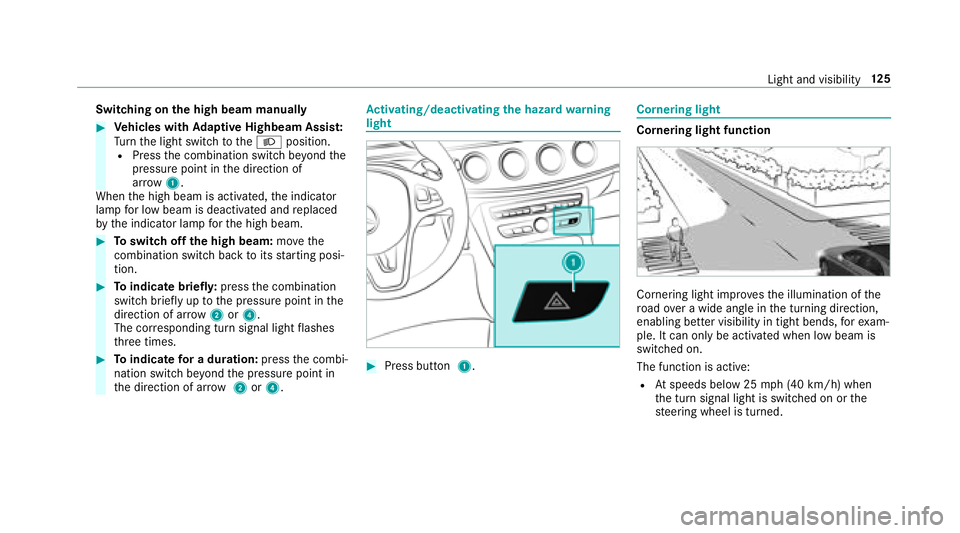
Ac tivating/deactivating the hazard warning
light
#Press button 1.
Cornering light
Cornering light function
Cornering light impr ovesth e illumination of the
ro ad ove r a wide angle in the turning direction,
enabling better visibility in tight bends, forex am‐
ple. It can only be activated when low beam is
switch ed on.
The function is active:
RAt speeds below 25 mph (40 km/h) when
th e turn signal light is switched on or the
st eering wheel is turned.
Light and visibility 12
5