Page 94 of 486
Easy entry andexitfeature
How the easy entry and exitfeature operates
&
WARNING Risk of accident when driving
off while adjusting the easy exitfeature
‑ If youdriv e off while the easy ent ryand exit
fe ature is making adjustments, you could
lose cont rol of theve hicle.
#Alw ayswa it until the adjustment proc‐
ess is comple tebefore driving off.
&
WARNING Risk of entrapment when
adjusting the easy ent ryand exitfeature
‑
‑ When the easy ent ryand exitfeature
adjusts thesteering wheel, you and other
ve hicle occupants – particular lych ildren –
could become trapped.
#‑ While the easy ent ryand exitfeature
is making adjustments, make sure that
no one has any body parts in the sweep
of thesteering wheel.
#Mo vethe adjustment le ver of thesteer‐
ing wheel if there is a risk of becoming
trapped bythesteering wheel.
The adjustment process is stopped.
#Ne ver lea vechildren unatte nded inthe
ve hicle.
#When leaving theve hicle, alw aysta ke
th eke ywit hyo u and lock theve hicle.
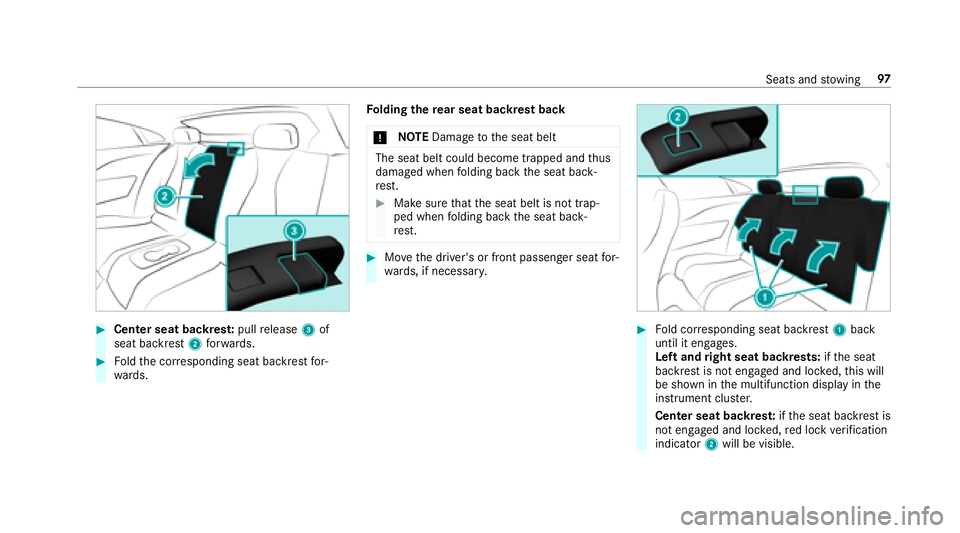
The easy entry and exitfeature makes getting in
and out of your vehicle easier.
If th e easy ent ryand exitfeature is active, the
st eering wheel will mo veupwards in thefo llow‐
ing situations:
RYo uswit chthe ignition off
RYo u open the driver's door when the ignition
is switched on
The steering wheel mo ves back tothe last drive
position in thefo llowing cases:
RYo u switch th e ignition on when the driver's
door is closed
RYo u close the driver's door when the ignition
is switched on The last drive position of
thesteering wheel is
st ored in thefo llowing situations:
RYo u switch the ignition off
RYo u sa vethe seat setting using the memory
function
If yo u press one of the memory function position
buttons, the adjustment process is stopped.
Setting the easy entry and exitfeature
Multimedia sy stem:
,9HKLFOH.î 9HKLFOH 6HW�
WLQJV.(DV\ (QWU\�([LW
#Ac tivate Oor deacti vate ª the function.
Using the memory function
&
WARNING Risk of an accident if memory
function is used while driving
If yo u use the memory function on the driv‐
er's side while driving, you could lose cont rol
of theve hicle as a result of the adjustments
being made.
92 Seats and stowing
Page 95 of 486
#Only usethe memory function on the
driver's side when theve hicle is station‐
ar y.
&
WARNING Risk of entrapment when set‐
ting the seat with the memory function
When the memory function adjusts the seat
or steering wheel, you and other vehicle
occupants – particularly children – could
become trapped.
#During the setting procedure of the
memory function, ensure that no body
parts are in the sweep of the seat or
th esteering wheel.
#If somebody becomes trapped, immedi‐
ately release the memory function posi‐
tion button.
The adjustment process is stopped.
&
WARNING Risk of entrapment if the
memory function is activated bychildren
Children could become trapped if they acti‐
va te the memory function, particularly when
unattended.
#Ne ver lea vechildren unatte nded inthe
ve hicle.
#When leaving theve hicle, alw aysta ke
th eke ywit hyo u and lock theve hicle.
The memory function can be used when the igni‐
tion is switched off.
Seat adjustments for up tothre e people can be
st ored and called up using the memory function.
The following sy stems can be selected:
RSeat, backrest and head restra int
RSt eering wheel
ROutside mir rors
RHead-up Display
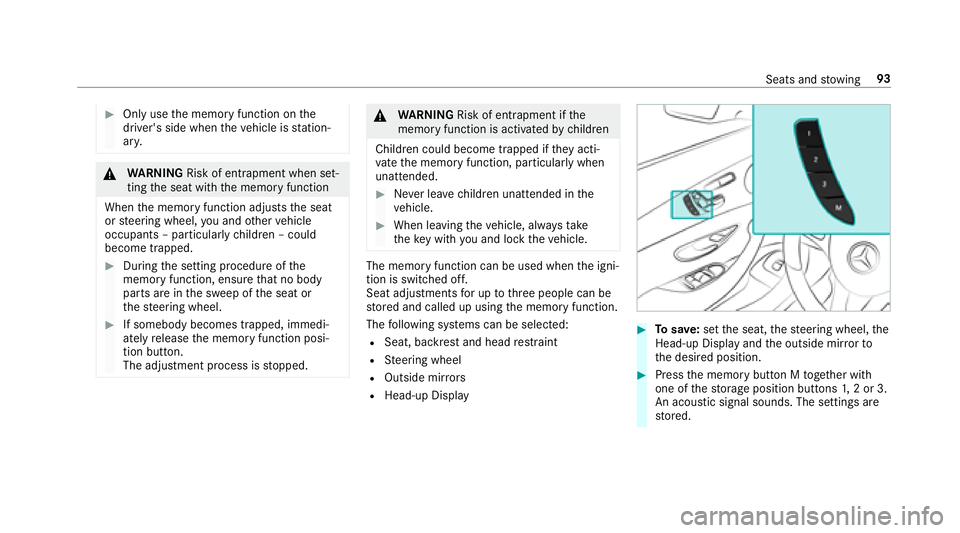
#To save :set the seat, thesteering wheel, the
Head-up Display and the outside mir rorto
th e desired position.
#Press the memory button M toge ther with
one of thestorage position buttons 1,2 or 3.
An acou stic signal sounds. The settings are
st ored.
Seats and stowing 93
Page 97 of 486
The handlingcharacteristics of your vehicle are
dependent on the distribution of the load within
th eve hicle. You should bear thefo llowing in
mind when loading theve hicle:
RNe verex ceed the permissible gross mass or
th e permissible axle load forth eve hicle
(including occupants). The values are speci‐
fi ed on theve hicle identification plate on the
ve hicle's B-pillar.
RThe load must not pr otru de abo vethe upper
edge of the seat backrests.
RAlw ays place the load behind unoccupied
seats if possible.
RSecure the load using the tie-down eyes and
distribute the load evenly.
St ow age spaces in theve hicle interior
Overview of the front stowage compa rt‐
ments
Observ eth e no tes on loading theve hicle
(
→page 94).
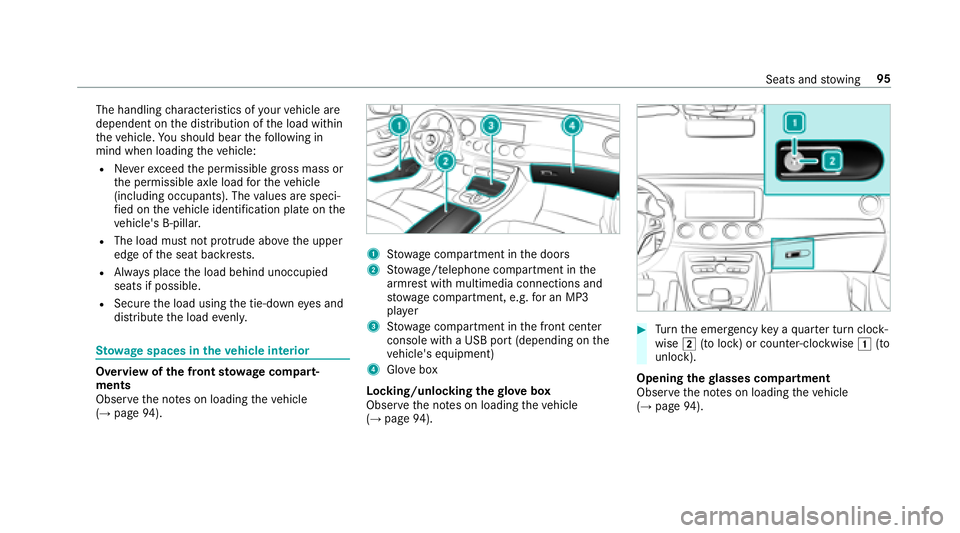
1Stow age compartment in the doors
2St ow age/telephone compartment in the
armrest with multimedia connections and
stow age compartment, e.g. for an MP3
pla yer
3Stow age compartment in the front center
console with a USB port (depending on the
ve hicle's equipment)
4Glo vebox
Locking/unlocking thegl ove box
Obser vethe no tes on loading theve hicle
(
→page 94).
#Turn the emer gency key a quarter turn clock‐
wise 2(to lock) or counter-clockwise 1(to
unlock).
Opening thegl asses co mpartment
Observ eth e no tes on loading theve hicle
(
→page 94).
Seats and stowing 95
Page 99 of 486
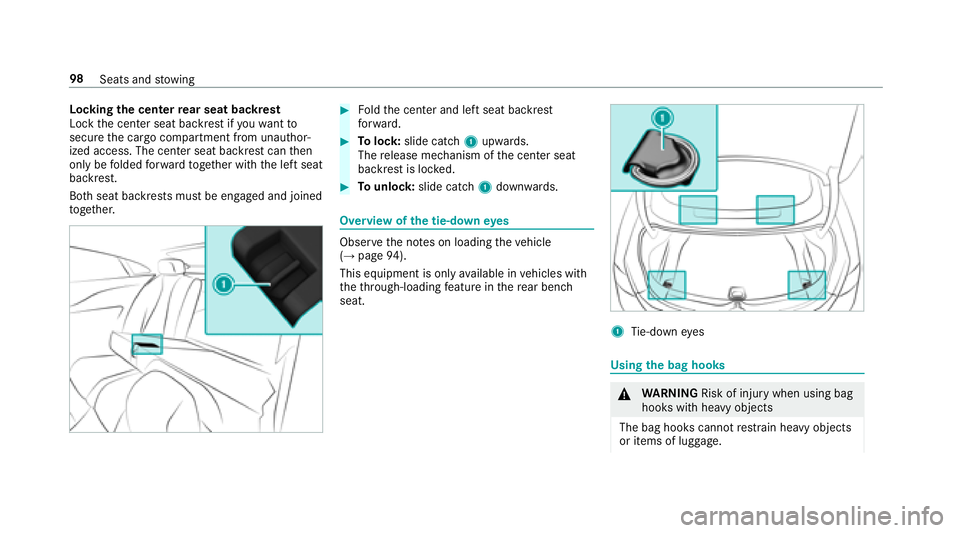
#Center seat backrest:pull release 3of
seat backrest 2forw ards.
#Foldthe cor responding seat backrest for‐
wa rds. Fo
lding there ar seat backrest back
* NO
TEDama getothe seat belt
The seat belt could become trapped and thus
damaged when folding back the seat back‐
re st.
#Make sure that the seat belt is not trap‐
ped when folding back the seat back‐
re st.
#Mo vethe driver's or front passenger seat for‐
wa rds, if necessar y.
#Fold cor responding seat backrest 1back
until it engages.
Left and right seat backrests: ifth e seat
backrest is not engaged and loc ked, this will
be shown in the multifunction display in the
instrument clus ter.
Center seat backres t:ifth e seat backrest is
not engaged and loc ked, red lock verification
indicator 2will be visible.
Seats and stowing 97
Page 100 of 486
Lockingthe center rear seat backrest
Lock the center seat backrest if youwa ntto
secure the cargo compartment from unauthor‐
ized access. The center seat backrest can then
only be folded forw ard toget her with the left seat
backrest.
Bo th seat backrests must be engaged and joined
to ge ther.#Fo ldthe center and left seat backrest
fo rw ard.
#To lock: slide catch 1upwards.
The release mechanism of the center seat
backrest is loc ked.
#To unlock :slide catch 1down wards.
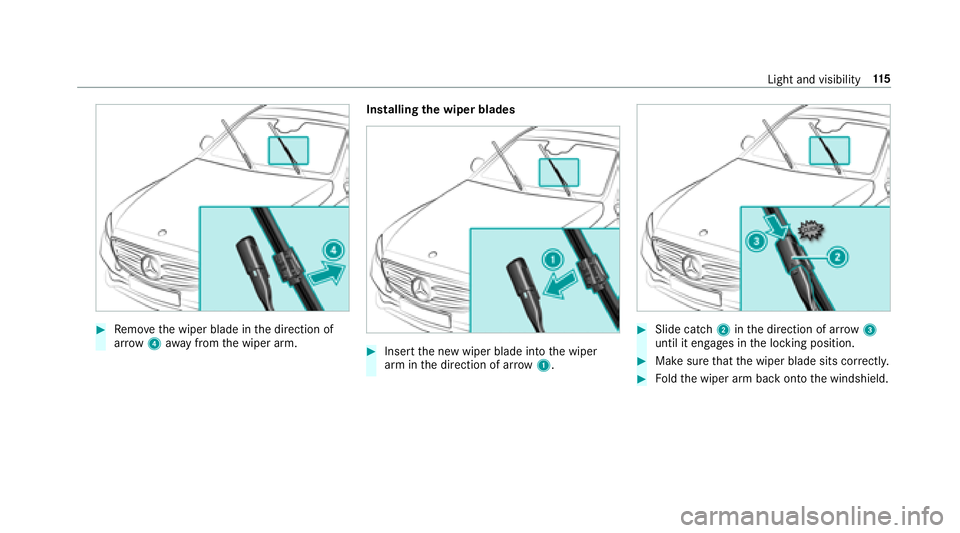
Overview of the tie-down eyes
Obser vethe no tes on loading theve hicle
(→page 94).
This equipment is only available in vehicles with
th eth ro ugh-loading feature in there ar bench
seat.
1Ti e-down eyes
Using the bag hooks
&
WARNING Risk of injury when using bag
hooks with heavy objects
The bag hooks cannot restra in heavy objects
or items of luggage.
98 Seats and stowing
Page 109 of 486
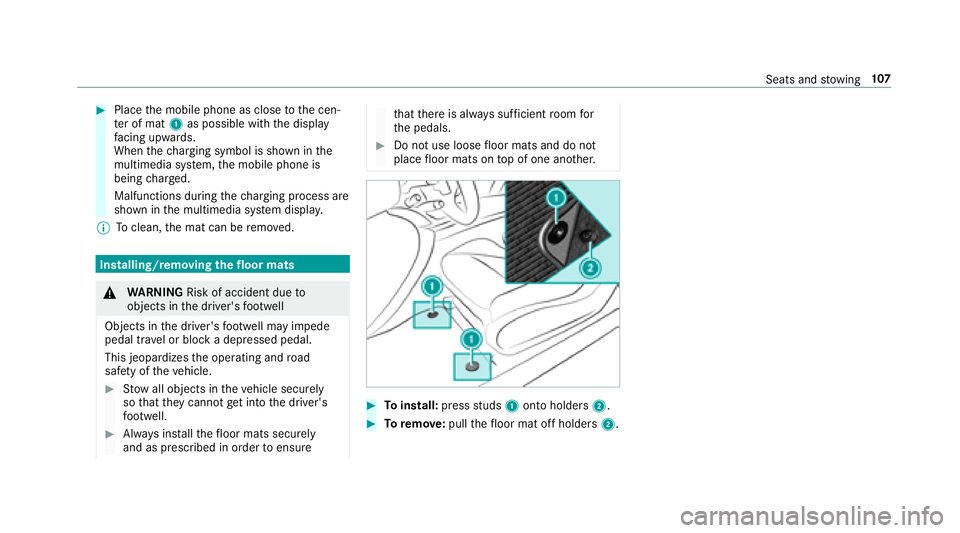
#Placethe mobile phone as close tothe cen‐
te r of mat 1as possible with the display
fa cing up wards.
When thech arging symbol is shown in the
multimedia sy stem, the mobile phone is
being charge d.
Malfunctions during thech arging process are
shown in the multimedia sy stem displa y.
% Toclean, the mat can be remo ved.
Installing/removing thefloor mats
&
WARNING Risk of accident due to
objects in the driver's foot we ll
Objects in the driver's foot we ll may impede
pedal tr avel or block a depressed pedal.
This jeopardizes the operating and road
saf etyof theve hicle.
#Stow all objects in theve hicle securely
so that they cannot getinto the driver's
fo ot we ll.
#Alw ays ins tallth efloor mats securely
and as prescribed in order toensure
that there is alw ays suf ficient room for
th e pedals.
#Do not use loose floor mats and do not
place floor mats on top of one ano ther.
#To install: pressstuds 1onto holders 2.
#Toremo ve:pull thefloor mat off holders 2.
Seats andstowing 10
7
Page 117 of 486
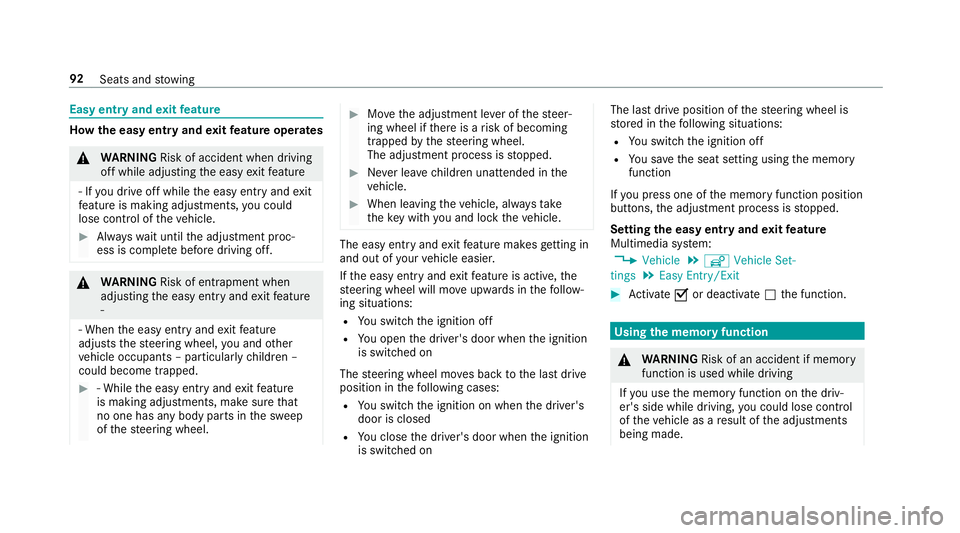
#Remo vethe wiper blade in the direction of
ar row 4away from the wiper arm. Installing
the wiper blades
#Insert the new wiper blade into the wiper
arm in the direction of ar row1.
#Slide catch 2inthe direction of ar row 3
until it engages in the locking position.
#Make sure that the wiper blade sits cor rectly.
#Fo ldthe wiper arm back onto the windshield.
Light and visibility 11
5
Page 128 of 486
#Make surethat all vehicle occupants
alw ays maintain a suf ficient dist anceto
th e air vents.
#If necessary , directthe air flow to
ano ther area of theve hicle interior.
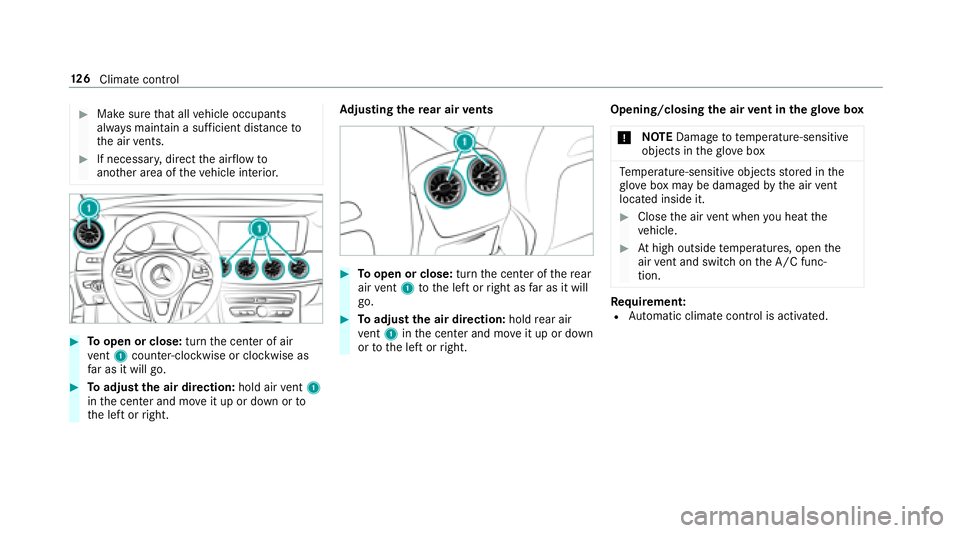
#To open or close: turnthe center of air
ve nt 1 counter-clo ckwise or clockwise as
fa r as it will go.
#To adjust the air direction: hold airvent 1
in the center and mo veit up or down or to
th e left or right. Ad
justing the rear air vents
#To open or close: turnthe center of there ar
air vent 1 tothe left or right as far as it will
go.
#To adjust the air direction: holdrear air
ve nt 1 inthe center and mo veit up or down
or tothe left or right. Opening/closing
the air vent in thegl ove box
* NO
TEDama geto te mperature-sensitive
objects in theglove box
Temp erature-sensitive objects stored in the
gl ove box may be damaged bythe air vent
located inside it.
#Close the air vent when you heat the
ve hicle.
#At high outside temp eratures, open the
air vent and switch on the A/C func‐
tion.
Re quirement:RAutomatic climate control is activated.
12 6
Climat e control