Page 60 of 486
Requirement:RYourequ ire a CR 2032 3 V cell batter y.
Mercedes-Benz recommends that you ha vethe
battery replaced at a qualified specialist work‐
shop.
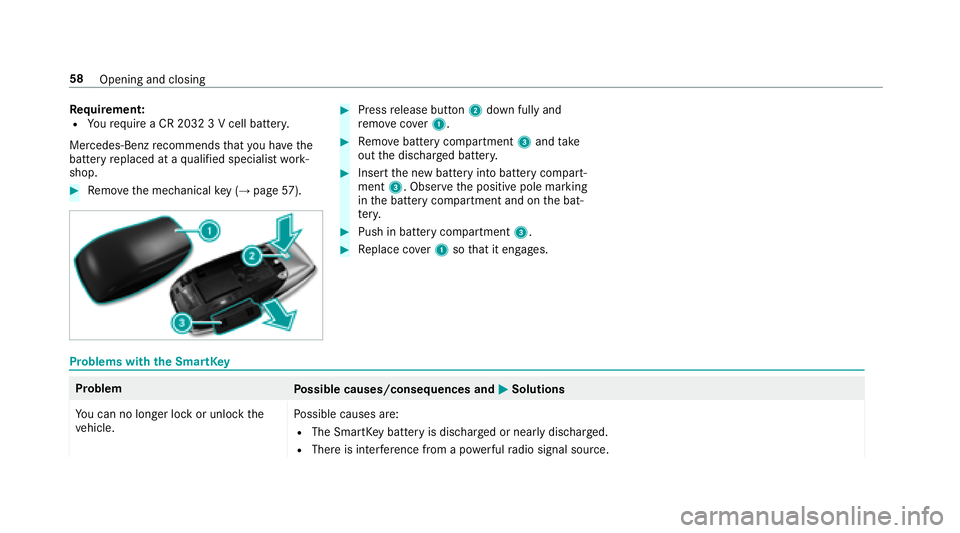
#Re mo vethe mechanical key (→pag e57 ).
#Press release button 2down fully and
re mo vecover1.
#Re mo vebattery compartment 3and take
out the dischar ged batter y.
#Insertthe new battery into battery compart‐
ment 3. Obser vethe positive pole marking
in the battery compartment and on the bat‐
te ry.
#Push in battery compartment 3.
#Replace co ver1 sothat it engages.
Problems with the SmartK ey
Problem
Possible causes/consequences and MSolutions
Yo u can no longe r lock or unlock the
ve hicle. Po
ssible causes are:
RThe SmartK eybattery is dischar ged or nearly dischar ged.
RThere is inter fere nce from a po werful radio signal source.
58
Opening and closing
Page 61 of 486
ProblemPossible causes/consequences and MSolutions
RThe SmartKeyisfaulty.
#Check the battery using the battery check lamp and replace if necessary .
#Use the emer gency keyto lock or unlock theve hicle .
#Ha ve the SmartK eychecked at a qualified specialist workshop.
Yo u ha velost a SmartK ey.
#Ha ve the SmartK eydeactivated at a qualified specialist workshop.
#If necessar y,ha ve the mechanical locking mechanism changed as well.
Doors
Un locking and opening doors from the inside
Un ited Kingdom onl y:obser vethe no tes on the
additional door lock .
Opening and closing 59
Page 62 of 486
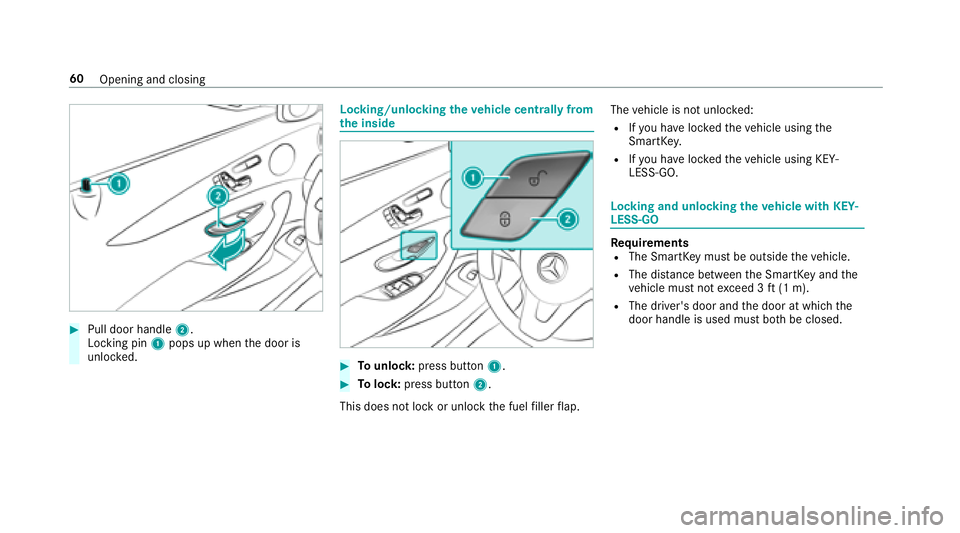
#Pull door handle2.
Locking pin 1pops up when the door is
unloc ked.
Locking/unlocking theve hicle centrally from
th e inside
#To unlock :press button 1.
#Tolock: press button 2.
This does not lock or unlock the fuel filler flap. The
vehicle is not unloc ked:
RIfyo u ha veloc kedth eve hicle using the
SmartK ey.
RIfyo u ha veloc kedth eve hicle using KEY‐
LESS-GO.
Locking and unlocking theve hicle with KEY‐
LESS-GO
Requ irementsRThe SmartK eymust be outside theve hicle.
RThe dis tance between the SmartK eyand the
ve hicle must not exceed 3 ft(1 m).
RThe driver's door and the door at which the
door handle is used must bo thbe closed.
60
Opening and closing
Page 63 of 486
#Tounlock theve hicle: touch the inner sur‐
fa ce of the door handle.
#To lock theve hicle: touch sensor sur face
1 or2.
#Co nvenience closing: touch recessed sen‐
sor surf ace2for an extended pe riod.
% For fur ther information on con venience clos‐
ing (
→pa ge 72).
If yo u open the trunk lid from outside, the trunk
lid is automatically unloc ked.
Problems with KEYLESS-GO
Problem
Possible causes/consequences and MSolutions
Yo u can no longe r lock or unlock the
ve hicle using KEYLESS-GO. Po
ssible causes are:
RKEYLESS-GO has been deactivated .
RThe SmartK eybattery is dischar ged or near lydischar ged.
RThere is inter fere nce from a po werful radio signal source.
Opening and closing 61
Page 64 of 486
ProblemPossible causes/consequences and MSolutions
RThe SmartKeyis malfunctioning.
#Activate KEYLESS-GO .
#Check the battery using the battery check lamp and replace if necessary .
#Use the mechanical keyto lock or unlock theve hicle .
#Ha ve theve hicle and SmartK eychecked at a qualified specialist workshop.
Switching the automatic locking feature
on/off
The vehicle is loc ked automatically when the
ignition is switched on and the wheels are turn‐
ing fast erthan walking pace.
#To deactivate: press and hold button 1for
appr oximately five seconds until an acoustic
signal sounds.
#To activate: press and hold button 2for
appr oximately five seconds until an acoustic
signal sounds.
Danger of being loc ked out when the function is
activated:
RIf th eve hicle is being tow star ted/pushed.
ROn a roller dynamome ter.
62
Opening and closing
Page 65 of 486
Unlocking/locking the driver's door using
th e emer gency key
%
Ifyo uwish tolock theve hicle entirely using
th e emer gency key,firs t press the button for
locking from the inside while the driver's
door is open. Then proceed tolock the driv‐
er's door using the emer gency key.
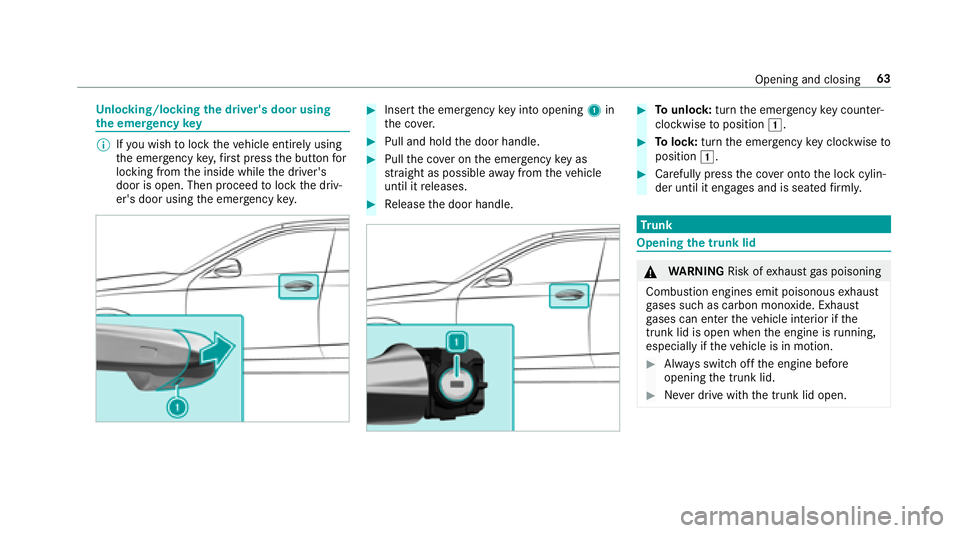
#Insert the emer gency keyin to opening 1in
th e co ver.
#Pull and hold the door handle.
#Pull the co ver on the emer gency keyas
st ra ight as possible away from theve hicle
until it releases.
#Re lease the door handle.
#To unlock :turn the emer gency keycounter -
clo ckwise toposition 1.
#Tolock: turnthe emer gency keyclo ckwise to
position 1.
#Carefully press the co ver onto the lock cylin‐
der until it engages and is seated firm ly.
Tr unk
Opening the trunk lid
&
WARNING Risk ofexhaust gas poisoning
Combustion engines emit poisonous exhaust
ga ses such as carbon monoxide. Exhaust
ga ses can enter theve hicle interior if the
trunk lid is open when the engine is running,
especially if theve hicle is in motion.
#Alw ays switch off the engine before
opening the trunk lid.
#Ne ver drive with the trunk lid open.
Opening and closing 63
Page 67 of 486

inthe closing area or may enter the closing
area during the closing process.
#Make sure that nobody is in the vicinity
of the closing area during the closing
process.
#Use one of thefo llowing options tostop
th e closing process:
RPress thep button on the
SmartK ey.
RPress or pull there mo teoperating
switch on the driver's door.
RPress the closing or locking button
on the trunk lid.
RPress theto p of thest ar on the
trunk lid.
Ve hicles with HANDS-FREE ACCESS: It is also
possible tostop the closing process bymoving
yo ur foot in a kicking motion under there ar
bumper.
Yo u ha vethefo llowing options toclose the trunk
lid:
#Pull the trunk lid down using the handle
re cess and push it closed.
#Ve hicles with trunk lid co nvenience clos‐
ing: Press and hold thep button on the
SmartK ey(with the SmartK eyinthe vicinity
of theve hicle).
#Ve hicles with trunk lid co nvenience clos‐
ing: Press closing button 1inthe trunk lid.
#Ve hicles with trunk lid co nvenience clos‐
ing and KEYLESS-GO: Press locking button
2 inthe trunk lid.
If a SmartK eyis de tected outside theve hicle,
th e trunk lid closes and theve hicle is loc ked.
#Ve hicles with trunk lid co nvenience clos‐
ing: Press trunk lid remo teoperating switch
1.
Opening and closing 65
Page 68 of 486

#Vehicles with HANDS-FREE ACCESS: Move
yo ur foot below the bumper (→page 66).
Au tomatic reve rsing function of the trunk lid
If an object restricts the trunk lid during the
automatic closing process, the trunk lid opens
again automaticall y.The automatic reve rsing
function is only an aid and is not a substitute for
yo ur attentiveness.
#When closing, make sure that no body parts
are in the closing area.
&
WARNING Risk of becoming trapped
despite there ve rsing function
The reve rsing function does not react:
Rto soft, light and thin objects, e.g. fingers.
Rove rth e last Óin (8 mm) of the closing
path.
In these situations in particular, there ve rsing
function cannot pr event someone being trap‐
ped.
#When closing, make surethat no body
parts are in the closing area.
#If someone is trapped, use one of the
fo llowing options:
RPress thep button on the
SmartK ey.
RPress there mo teoperating switch
on the driver's door.
RPress the closing or locking button
on the trunk lid.
RPress theto p of thest ar on the
trunk lid.
HANDS-FREE ACCESS function
With HANDS-FREE ACCESS you can open, close
or inter rupt trunk lid mo vement byper form ing a
kicking mo vement under there ar bumper.
The kicking mo vement triggers the opening or
closing process alternately.
Obser vethe no tes when opening (
→page 63)
and closing (→page 64)th e trunk lid.
66
Opening and closing