2018 MERCEDES-BENZ CLA COUPE radio
[x] Cancel search: radioPage 12 of 326

Starting (important safety notes)... 123
Starting problems .......................... 127
Starting the engine with the
SmartKey ....................................... 124
Starting via smartphone ................ 124
Starting with the Start/Sto pbut-
ton ................................................. 124
Switching off .................................. 141
Tow-starting (vehicle )..................... 284
Engine electronics
Problem (malfunction) ................... 127
Engine jump starting
see Jump starting (engine)
Engine oil
Adding ........................................... 259
Additives ........................................ 318
Checking the oill evel ..................... 258
Checking the oill evel using the
dipstick .......................................... 258
Displa ymessage ............................ 206
Filling capacity ............................... 318
Notesa boutoilgrade s................... 317
Notesono illevel/consumption .... 258
Temperature (on-board computer,
Mercedes-AMGv ehicles) ............... 188
Entering an address
see also Digital Operator's Man-
ual.................................................. 229
ESP
®(ElectronicS tability Pro-
gram)
Activating/deactivating (on-
board computer) ............................ 219
AMG menu (on-board computer) ... 188
Characteristics ................................. 65
Deactivating/activating (button
in Mercedes-AMGv ehicles) ............. 66
Deactivating/activating (except
Mercedes‑ AMG vehicles) ................. 65
Deactivating/activating (on-
board computer, except
Mercedes-AMGv ehicles) ............... 185
Displa ymessage ............................ 192
Function/note s................................ 64
Generaln otes .................................. 64
Important safety information ........... 64
Trailer stabilization ........................... 67
Warning lamp ................................. 221 ETS/4ETS (ElectronicT
raction Sys-
tem) ...................................................... 64
Exhaust
see Exhaus tpipe
Exhaustc heck................................... 144
Exhaustp ipe
Cleaning ......................................... 266
Ex terio
r lighting
Cleaning ......................................... 265
see Lights
Exterior mirrors
Adjusting ......................................... 96
Dipping (automatic) ......................... 97
Folding in when locking (on-board
computer) ...................................... 188
Folding in/out (automatically )......... 97
Folding in/out (electrically) ............. 97
Outofp osition (troubleshooting )..... 97
Setting ............................................. 97
Storing settings (memory func-
tion) ................................................. 99
Storing the parking position ............. 98
Eyeglassesc ompartment ................. 238
F
Favorites
Overview ........................................ 231
Filler cap
see Refueling
First-aidk it......................................... 270
Flat tire
MOExtended tire s.......................... 271
Preparing the vehicl e..................... 271
TIREFIT kit ...................................... 272
Floormats ........................................... 256
Frequencies
Mobil ephone ................................. 313
Two-way radio ................................ 313
Fuel
Additives ........................................ 317
Consumption statistics .................. 180
Displaying the current consump-
tion ................................................ 180
Displaying the rang e...................... 180
Driving tip s.................................... 144
E10 ................................................ 316
Fue lgauge ....................................... 33
10Index
Page 17 of 326
Warning lamp ................................. 224
Parking lamps
Switching on/off ........................... 101
Parking Pilot
Canceling ....................................... 167
Detecting parking spaces .............. 164
Display Message ............................2 08
Exiting aparking space .................. 166
Function/notes .............................1 64
Important safety notes .................. 164
Parking .......................................... 165
PASSENGERA IRBAG
Display message ............................ 200
Indicator lamps ................................ 41
Problem (malfunction) ................... 200
Pets in the vehicle ............................... 60
Phoneb ook
see also Digita lOperator's Man-
ua l..................................................2 29
Plastic trim (cleaning instruc-
tions) ..................................................2 66
Power washers .................................. 263
Power windows
see Side windows
Protection against theft
ATA (Anti-Theft Alarm system) ......... 68
Immobilize r...................................... 68
Protection of the environment
General notes .................................. 24
Pulling away
Automatic transmission ................. 125
General notes ................................ 125
Hill start assist ............................... 125
Q
QR codeMercedes-Benz Guide App ................. 1
Rescue card ..................................... 29
Qualifieds pecialist workshop ........... 28
R
RACESTART
Important safety notes .................. 158
RACES TART (Mercedes-AMG vehi-
cles) .................................................... 158 RACET
IMER (on-board computer,
Mercedes-AMG vehicles) .................. 189
Radio
Selecting astatio n......................... 182
see separate operating instructions
Radio mode
see also Digita lOperator's Man-
ua l..................................................2 29
Radio-wave reception/transmis-
sionint he vehicle
Declaratio nofconformity ................ 27
Rain closing feature (panorama
roof with power tilt/sliding panel) .... 87
Readingl amp..................................... 103
Rear compartment
Setting the ai rvents ......................1 20
Rear fog lamp
Display message ............................ 203
Replacing bulbs .............................1 06
Switching on/off ........................... 101
Rear lamps
see Lights
Rear seats
Folding the backres tforwards/
back ............................................... 240
Rear viewc amera
"Reverse parking" function ............ 169
Cleaning instructions ..................... 265
Display in the multimedias ystem .. 168
Function/notes .............................1 67
General notes ................................ 167
Switching on/off ........................... 168
Rear window defroster
Problem (malfunction) ................... 119
Switching on/off ........................... 119
Rear-vie wmirror
Anti-glare (manual ).......................... 96
Dipping (automatic) ......................... 97
Reflectiv esafety jacket .................... 269
Refrigerant (air-conditioning sys-
tem)
Important safety notes .................. 319
Refueling
Fuel gauge ....................................... 33
Important safety notes .................. 138
Refueling process. ......................... 139
see Fuel
Index15
Page 21 of 326
Checkingmanually ........................ 293
Dis play message ............................ 211
Maximum ...................................... .293
Not reached (TIREFIT) .................... 274
Notes ............................................. 292
Reached (TIREFIT) .......................... 274
Recommended ............................... 290
Tire pressure los swarning system
General notes ................................ 293
Important safety notes .................. 294
Restarting ...................................... 294
Tire pressure monitor
Checking the tire pressure elec-
tronically ........................................ 296
Function/notes .............................2 94
General notes ................................ 294
Important safety notes .................. 295
Radio type approval for the tire
pressure monitor ........................... 297
Restarting ...................................... 297
Warning lamp ................................. 228
Warning message .......................... 296
TIREFIT kit .......................................... 272
Important safety notes .................. 272
Storage location ............................ 271
Tire pressure not reached .............. 274
Tire pressure reached .................... 274
Tires
Aspect ratio (definition) ................. 307
Averag eweight of the vehicle
occupants (definition) .................... 305
Bar (definition) ............................... 305
Changing awheel .......................... 307
Characteristics .............................. 305
Checking ........................................ 287
Curb weight (definition) ................. 306
Definition of terms ......................... 305
Direction of rotatio n...................... 308
Displa ymessage ............................ 211
Distribution of the vehicl eoccu-
pants (definition) ............................ 307
DOT (Department of Transporta-
tion) (definition) ............................. 305
DOT, T
ire Identification Number
(TIN) ............................................... 305
GAW R(GrossA xle Weight Rating)
(definition) ..................................... 306
Generaln otes ................................ 312 GV
W( GrossV ehicleWeight) (def-
inition) ........................................... 306
GVWR (GrossV ehicleWeight Rat-
ing )(de finition) .............................. 306
Important safety notes .................. 287
Increased vehicl eweigh tdue to
optionale quipment (definition) ...... 306
Information on driving .................... 287
Kilopascal( kPa)(de finition) ........... 306
Labeling (overview) ........................ 302
Loadb earing index (definition) ...... 307
Loadi ndex ..................................... 304
Loadi ndex (definition) ................... 306
M+S tire s....................................... 289
Maximu mloadona tire (defini-
tion) ............................................... 306
Maximu mloaded vehicleweigh t
(definition) ..................................... 306
Maximu mpermissibl etire pres-
sure (definition) ............................. 306
Maximu mtire load ......................... 304
Maximu mtire load (definition) ....... 306
MOExtended tire s.......................... 289
Optionale quipmentweight (defi-
nition) ............................................ 307
PSI (pounds pe rsquare inch )(de f-
inition) ........................................... 307
Replacing ....................................... 307
Service life ..................................... 288
Sidewal l(de finition) ....................... 307
Speed rating (definition) ................ 306
Storing ........................................... 308
Structure and characteristics
(definition) ..................................... 305
Summer tire s................................. 289
Temperature .................................. 302
TIN (Tire Identification Number)
(definition) ..................................... 307
Tire bead (definition) ...................... 307
Tire pressure (definition) ................ 307
Tire pressures (recommended )...... 306
Tire size (data )............................... 312
Tire size designation, load-beari ng
ca
pacity, speed rating .................... 302
Tire tread. ...................................... 288
Tire tread( definition) ..................... 307
Totall oadlim it (definition) ............. 307
Tractio n......................................... 301
Index19
Page 22 of 326
Traction (definition)....................... 307
Tread wear .....................................3 01
Uniform Tire Quality Grading
Standard s...................................... 301
Uniform Tire Quality Grading
Standard s(definition) .................... 306
Weari ndicator (definition) ............. 307
Wheelr im (definition) .................... 306
see Flat tire
Top Tether ............................................ 57
Tow-starting
Emergency engine starting ............ 284
Important safety notes .................. 281
Installing the towing eye. ............... 282
Removing the towing eye. ..............282
Towing atrailer
ESP
®(ElectronicS tability Pro-
gram) ............................................... 67
Towing away
Important safety guidelines ........... 281
Installing the towing eye. ............... 282
Notes for 4MATIC vehicles ............ 284
Removing the towing eye. ..............282
Transporting the vehicle ................ 283
With both axle sonthe ground ....... 283
With front axle raised ..................... 282
Towing eye ......................................... 270
Traffic reports
see also Digita lOperator's Man-
ua l..................................................2 29
Transmission
see Automatic transmission
Transmission position display
(DIRECT SELEC Tlever) ......................1 30
Transporting the vehicle .................. 283
Trim pieces (cleaning instruc-
tions) ..................................................2 67
Trip computer (on-board com-
puter) ..................................................1 80
Trip odometer
Calling up ....................................... 180
Resetting (on-board computer) ...... 181
Trunk
Emergency release .......................... 81
Emergency release button ...............8 1
Important safety notes .................... 78 Opening (automaticall
yfrom out-
side) .................................................7 9
Opening (from outside the vehi-
cle, HANDS-F REE ACCESS) ...
........... 79
Opening automaticallyf rom
inside ............................................... 80
Opening/closing (manually from
outside) ............................................ 78
Trunk lid
Display message ............................2 15
Opening dimensions ......................3 20
Trunk load (maximum) ......................320
Turn signals
Display message ............................ 202
Replacing bulbs (front) ................... 106
Switching on/off ........................... 101
Two-way radio
Frequencies ................................... 313
Installatio n..................................... 313
Transmissiono utput (maximum ).... 313
Type identification plate
see Vehicle identification plate
U
UnlockingEmergency unlocking ....................... 77
From insid ethe vehicle (central
unlocking button) .............................7 6
Upshifti ndicator (on-boardc om-
puter, Mercedes-AMG vehicles) .......188
USB devices
Connecting to the MediaI nter-
face ............................................... 236
V
Vanity mirror (in the sun visor) ........244
Vehicle
Correct use ...................................... 28
Data acquisition ............................... 29
Display message ............................ 213
Equipment ....................................... 25
Individua lsettings .......................... 186
Limited Warranty .............................2 9
Loading .......................................... 298
Locking (in an emergency) ............... 77
Locking (SmartKey) .......................... 70
20Index
Page 33 of 326
Information on copyright
General information
Information on license for free and open-source
software used in your vehicl eand it selectronic
component sisavailable on th efollowin gweb-
site:
http://www.mercedes-benz.com/opensource
Registere dtrade marks
RBluetoot h®isar egistere dtrademark of Blue -
toot hSIGInc.
RDTS™ is aregistere dtrademark of DTS, Inc.
RDolby®and MLP ™are registere dtrademark s
of DOLB YLaboratories.
RBabySmart™, ES P®and PRE-SAFE®are reg-
istere dtrademark sofDaimler AG.
RHomeLink®isar egistere dtrademark of John -
son Controls.
RiPod®and iTunes®are registere dtrademark s
of Apple Inc.
RLogic7®is ar egistere dtrademark of Harman
International Industries .
RMicrosoft®and Windows media®are regis-
tered trademark sofMicrosoft Corporation .
RSIRIUS®isar egistere dtrademark of Sirius
XM Radio Inc.
RHD Radio™ is aregistere dtrademark of iBiq-
uit yD igital Corporation .
RGracenote®isar egistere dtrademark of
Gracenote, Inc.
RZAGA TSurvey®and relate dbrands are regis-
tered trademark sofZagat Survey, LLC.
Information on copyright31
Introduction
Z
Page 76 of 326
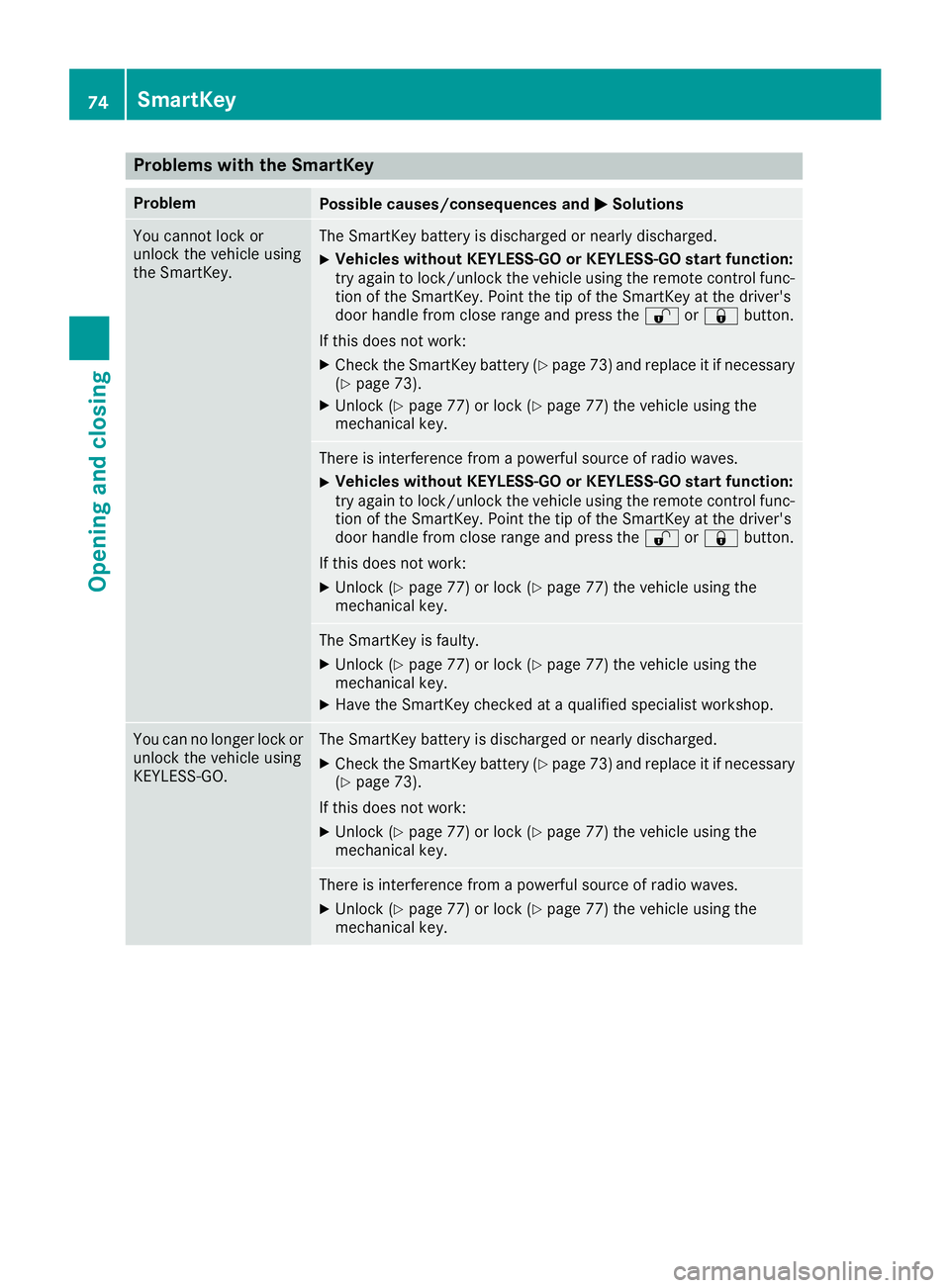
Problems with the SmartKey
ProblemPossible causes/consequences andMSolutions
You cannot lock or
unlock the vehicle using
the SmartKey.The SmartKey battery is discharged or nearly discharged.
XVehicles without KEYLESS-GO or KEYLESS-GO startf unction:
try again to lock/unlock the vehicle using the remote control func-
tion of the SmartKey. Point the tip of the SmartKey at the driver's
door handle from close range and press the %or& button.
If this does not work:
XCheck the SmartKey battery (Ypage 73) and replace it if necessary
(Ypage 73).
XUnlock (Ypage 77) or lock (Ypage 77) the vehicle using the
mechanical key.
There is interference from apowerful source of radio waves.
XVehicles without KEYLESS-GO or KEYLESS-GO startf unction:
try again to lock/unlock the vehicle using the remote control func-
tion of the SmartKey. Point the tip of the SmartKey at the driver's
door handle from close range and press the %or& button.
If this does not work:
XUnlock (Ypage 77) or lock (Ypage 77) the vehicle using the
mechanical key.
The SmartKey is faulty.
XUnlock (Ypage 77) or lock (Ypage 77) the vehicle using the
mechanical key.
XHave the SmartKey checked at aqualified specialist workshop.
You can no longer lock or
unlock the vehicle using
KEYLESS-GO.The SmartKey battery is discharged or nearly discharged.
XCheck the SmartKey battery (Ypage 73) and replace it if necessary
(Ypage 73).
If this does not work:
XUnlock (Ypage 77) or lock (Ypage 77) the vehicle using the
mechanical key.
There is interference from apowerful source of radio waves.
XUnlock (Ypage 77) or lock (Ypage 77) the vehicle using the
mechanical key.
74SmartKey
Opening and closing
Page 77 of 326
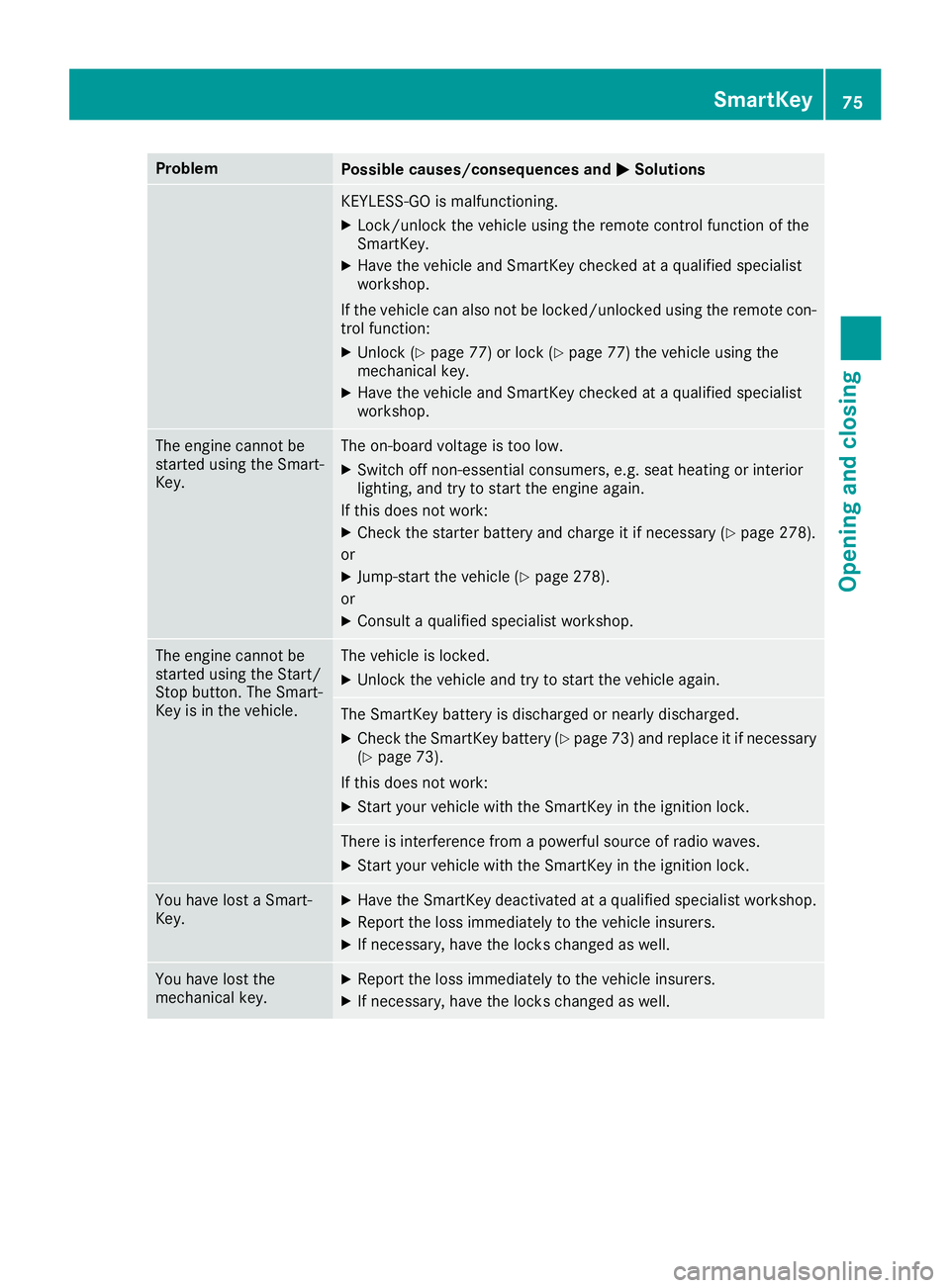
ProblemPossible causes/consequences andMSolutions
KEYLESS-GO is malfunctioning.
XLock/unlock the vehicle using the remote control function of the
SmartKey.
XHave the vehicle and SmartKey checked at aqualified specialist
workshop.
If the vehicle can also not be locked/unlocked using the remote con-
trol function:
XUnlock (Ypage 77) or lock (Ypage 77) the vehicle using the
mechanical key.
XHave the vehicle and SmartKey checked at aqualified specialist
workshop.
The engine cannot be
started using the Smart-
Key.The on-board voltage is too low.
XSwitch off non-essential consumers, e.g. seat heating or interior
lighting, and try to start the engine again.
If this does not work:
XCheck the starter battery and charge it if necessary (Ypage 278).
or
XJump-start the vehicle (Ypage 278).
or
XConsult aqualified specialist workshop.
The engine cannot be
started using the Start/
Stop button. The Smart-
Key is in the vehicle.The vehicle is locked.
XUnlock the vehicle and try to start the vehicle again.
The SmartKey battery is discharged or nearly discharged.
XCheck the SmartKey battery (Ypage 73) and replace it if necessary
(Ypage 73).
If this does not work:
XStart your vehicle with the SmartKey in the ignition lock.
There is interference from apowerful source of radio waves.
XStart your vehicle with the SmartKey in the ignition lock.
You have lost aSmart-
Key.XHave the SmartKey deactivated at aqualified specialist workshop.
XReport the loss immediately to the vehicle insurers.
XIf necessary, have the locks changed as well.
You have lost the
mechanical key.XReport the loss immediately to the vehicle insurers.
XIf necessary, have the locks changed as well.
SmartKey75
Opening and closing
Z
Page 124 of 326
!Do not warm up the engine with the vehicle
stationary. Drive off immediately.A void high
engine speeds and driving at full throttle until
the engine has reached its operating temper- ature.
Only shift the automatic transmission to the
desired drive position when the vehicle is sta-
tionary.
Where possible,a void spinning the drive
wheels when pulling awayons lippery roads.
You could otherwise damage the drive train.
!Mercedes-AMG vehicles: avoid full-load
operation and engine speeds greater than
5000 rpm when the engine is cold. This helps
to protect the engine and avoids uncomfort-
able driving.
Key positions
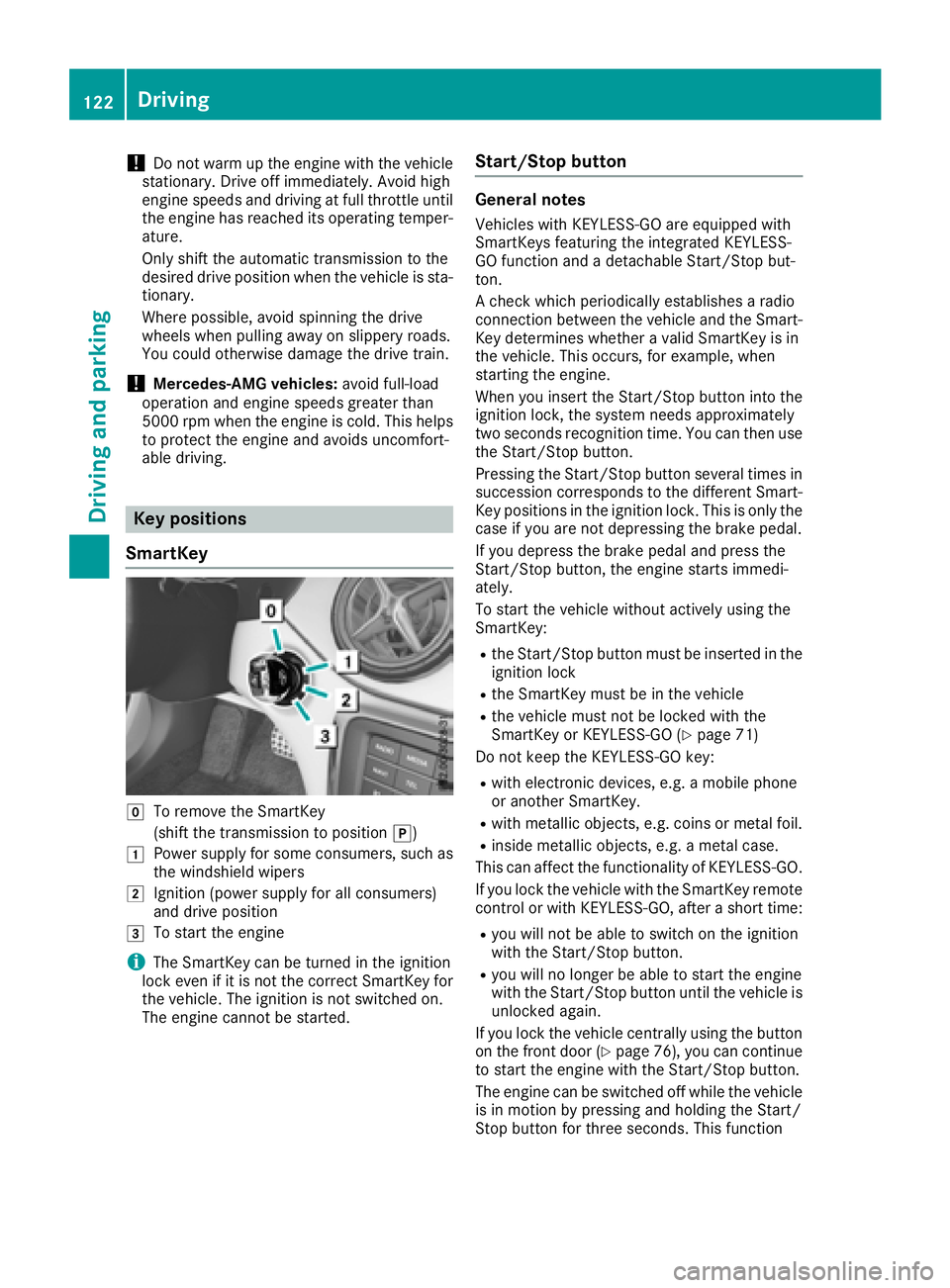
SmartKey
gTo remove the SmartKey
(shift the transmission to position j)
1Power supplyfor some consumers, such as
the windshieldw ipers
2Ignition (power supplyf or all consumers)
and drive position
3To start the engine
iThe SmartKey can be turned in the ignition
lock even if it is not the correct SmartKey for
the vehicle. The ignition is not switched on.
The engine cannot be started.
Start/Stop button
General notes
Vehicles with KEYLESS-GO are equipped with
SmartKeys featuring the integrated KEYLESS-
GO function and adetachable Start/Stop but-
ton.
Ac heck which periodically establishes aradio
connection between the vehicle and the Smart-
Key determines whether avalid SmartKey is in
the vehicle. This occurs, for example, when
starting the engine.
When you insert the Start/Stop button into the
ignition lock, the system needs approximately
two seconds recognition time. You can then use
the Start/Stop button.
Pressing the Start/Stop button several times in
succession corresponds to the different Smart-
Key positions in the ignition lock. This is only the
case if you are not depressing the brake pedal.
If you depress the brake pedal and press the
Start/Stop button, the engine starts immedi-
ately.
To start the vehicle without actively using the
SmartKey:
Rthe Start/Stop button must be inserted in the
ignition lock
Rthe SmartKey must be in the vehicle
Rthe vehicle must not be locked with the
SmartKey or KEYLESS-GO (Ypage 71)
Do not keep the KEYLESS-GO key:
Rwith electronic devices, e.g. amobile phone
or another SmartKey.
Rwith metallic objects, e.g. coins or metal foil.
Rinside metallic objects, e.g. ametal case.
This can affect the functionality of KEYLESS-GO.
If you lock the vehicle with the SmartKey remote
control or with KEYLESS-GO, after ashort time:
Ryou will not be able to switch on the ignition
with the Start/Stop button.
Ryou will no longer be able to start the engine
with the Start/Stop button until the vehicle is
unlocked again.
If you lock the vehicle centrally using the button
on the front door (
Ypage 76), you can continue
to start the engine with the Start/Stop button.
The engine can be switched off while the vehicle
is in motion by pressing and holding the Start/
Stop button for three seconds. This function
122Driving
Driving and parking