2018 MERCEDES-BENZ CLA COUPE Guide
[x] Cancel search: GuidePage 92 of 326
Correct driver's seat position
GWARNING
You coul dlose control of your vehicle if you do
th ef ollowingw hile driving:
Radjust thedriver'ss eat,head restraint,
steering wheel or mirrors
Rfasten th eseat belt
Thereisar iskofana ccident.
Adjust th edriver'ss eat,head restraint ,steer-
ing wheel and mirror and fasten your seat belt before starting th eengine.
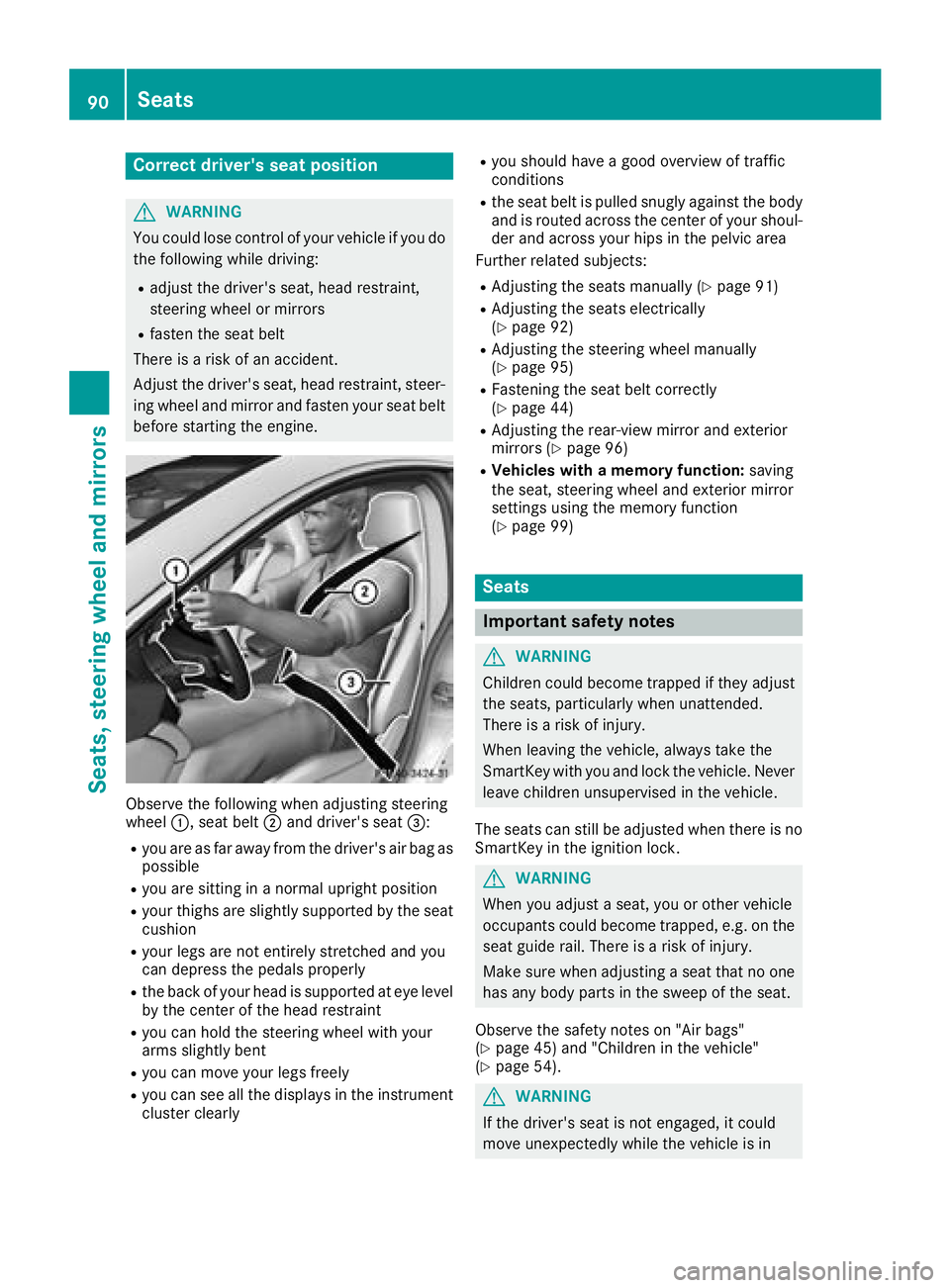
Observ ethe followingw hen adjusting steering
wheel :,seat belt ;and driver'ss eat=:
Ryou are as far away from th edriver'sa ir bag as
possible
Ryou are sittin ginanormalupright position
Ryour thighs are slightly supported by th eseat
cushion
Ryour legs are no tentirely stretched and you
can depress th epedals properly
Rtheb ack of your head is supported at eye level
by th ecente roft hehead restraint
Ryou can hold th esteering wheel withy our
arm sslightly bent
Ryou can mov eyour legs freely
Ryou can see all th edisplays in th einstrument
cluste rclearly
Ryou should have agood overview of traffic
conditions
Rth es eat belt is pulled snugly against th ebody
and is routed across th ecente rofy our shoul-
der and across your hips in th epelvic area
Further related subjects:
RAdjustin gthe seatsm anually (Ypage 91)
RAdjustin gthe seatse lectrically
(Ypage 92)
RAdjustin gthe steering wheel manually
(Ypage 95)
RFastenin gthe seat belt correctly
(Ypage 44)
RAdjustin gthe rear-view mirror and exterior
mirror s(Ypage 96)
RVehicles with amemory function: saving
th es eat,s teering wheel and exterior mirror
settings usingt hememory function
(
Ypage 99)
Seats
Important safety notes
GWARNING
Children coul dbecome trapped if they adjust
th es eats, particularly when unattended.
Thereisar iskofi njury.
When leaving th evehicle ,always tak ethe
SmartKey withy ou and lockthevehicle .Never
leave childre nunsupervised in th evehicle.
The seatsc an still be adjusted when there is no
SmartKey in th eignition lock.
GWARNING
When you adjust aseat,y ou or other vehicle
occupants coul dbecome trapped, e.g .onthe
seat guide rail. Thereisar iskofi njury.
Makes ure when adjusting aseat that no one
has any body part sinthesweep of th eseat.
Observ ethe safety note son"Air bags"
(
Ypage 45 )and "Children in th evehicle"
(Ypage 54).
GWARNING
If th edriver'ss eat is no tengaged,itc ould
mov eunexpectedly while th evehicle is in
90Seats
Seats, steerin gwheel and mirrors
Page 166 of 326

Parking Pilot
General notes
Parking Pilot is an electronic parking aid with
ultrasound. It measures the road on both sides
of the vehicle. Aparking symbol indicates asuit-
able parking space. Active steering intervention
and brake application can assist you during
parking and when exiting aparking space. Park-
ing Assist PARKTRONIC is also available
(
Ypage 161).
Important safety notes
Parking Pilot is only an aid. It is not areplace-
ment for your attention to your immediate sur-
roundings. You are always responsible for safe
maneuvering, parking and exiting aparking
space. Make sure that no persons, animals or
object sare in the maneuvering range.
When Parking Assist PARKTRONIC is deactiva-
ted, Parking Pilot is also unavailable.
GWARNING
While parking or pulling out of aparking
space, the vehicle swings out and can drive
onto areas of the oncomingl ane. This could
result in acollision with another road user.
There is arisk of an accident.
Pay attention to other road users. Stop the
vehicle if necessary or cancel the Parking Pilot
parking procedure.
!If unavoidable,y ou should drive over obsta-
cles such as curbs slowly and not at asharp
angle. Otherwise, you may damage the
wheels or tires.
Parking Pilot may also display spaces not suita-
ble for parking, e.g.:
Rwhere parking or stopping is prohibited
Rin front of driveways or entrances and exits
Ron unsuitable surfaces
Parking tips:
ROn narrow roads, drive as close to the parking
space as possible.
RParking spaces that are littered or overgrown
might be identified or measured incorrectly.
RParking spaces that are partially occupied by
trailer drawbars might not be identified as
such or be measured incorrectly.
RSnowfall or heavy rain may lead to aparking
space being measured inaccurately.
RPay attention to the warning messages of
Parking Pilot PARKTRONIC during the parking
procedure (
Ypage 162).
RYou can intervene to correct the steering pro-
cedure at any time. Parking Pilot will then be
canceled.
RWhen transporting aload that protrudes from
your vehicle, you must not use Parking Pilot.
RNever use Parking Pilot when snow chains are
mounted.
RMake sure that the tire pressures are always
correct.T his hasadirect influence on the
parking characteristics of the vehicle.
Use Parking Pilot for parking spaces that are:
Rthat are paralleloratr ight-angles to the direc-
tion of travel
Ron straight roads, not bends
Ron the same level as the road, e.g. not on the
pavement
Detecting parking spaces
Object slocated above the detection range of
Parking Pilot will not be detected when the park-
ing space is measured. These are not taken into
account when the parking procedure is calcula-
ted, e.g. overhanging loads, truck overhangs or
loading ramps. Parking Pilot may therefore
guide you into the parking space too early.
Parking Pilot does not assist you parking in
spaces perpendicular to the direction of travel if:
Rtwo parking spaces are located directly next
to one another
Rthe parking space is directly next to alow
obstacle such as alow curb
Ryou forward-park
Parking Pilot does not assist you parking in
spaces parallelorp erpendicular to the direction
of travel if:
Rthe parking space is on acurb
Rthe system reads the parking space as being
blocked, for example by foliage or grass pav-
ing blocks
Rthe area is too small for the vehicle to maneu-
ver into
Rthe parking space is bordered by an obstacle,
e.g. atree, apost or atrailer
For further information on the detection range
(
Ypage 161).
164Driving systems
Driving and parking
Page 170 of 326
for safe maneuvering and parking. Make sure
that there are no persons, animals or objects in
the maneuvering area while maneuvering and
parking in parking spaces.
Under the following circumstances, the rear
view camera willnot function, or wil lfunction in
al imited manner:
Rif the trunk lid is open
Rin heavy rain, snow or fog
Rat night or in very dark places
Rif the camera is exposedtov ery bright light
Rif the area is lit by fluorescent bulbs or LED
lighting (the display may flicker)
Rif there isasudden change in temperature,
e.g. when driving into aheated garage in win-
ter
Rif the camera lens is dirty or obstructed.
Observe the notes on cleaning
(
Ypag e265)
Rif the rear of you rvehicleisd amaged. In this
case, have the camera position and setting
checked at aqualified specialist workshop
The fieldofv ision and other functions of the rear
view camera may be restricted due to additional
accessories on the rear of the vehicle( e.g.
license plate holder, rear bicycle rack).
Activating/deactivating the rear view
camera
XTo activate: make sure that the SmartKey is
in position 2in the ignition lock.
XMake sure that the Activation byRgearfunction is selected in the multimedias ystem;
see the Digita lOperator's Manual.
XEngage reverse gear.
The area behind the vehicleiss hownwith
guide lines in the multimedias ystem display.
The image from the rear view camera is avail-
abl ethroughoutt he maneuvering process.
To deactivate: the rear view camera deacti-
vates if you shift the transmission to jor after
driving forwards ashort distance.
Messages in the multimedia system dis-
play
The rear view camera may show adistorted view
of obstacles, show them incorrectly or not at all.
The rear view camera does not show objects in
the following positions:
Rvery close to the rear bumper
Runder the rear bumper
Rin close range above the handl eonthe trunk
lid
!Objects not at ground levelm ay appear to
be further away than they actually are, e.g.:
Rthe bumper of aparked vehicle
Rthe drawbar of atrailer
Rthe bal lcoupling of atrailer tow hitch
Rthe rear section of an HGV
Ras lanted post
Use the guidelines only for orientation.
Approach objects no further than the bottom-
most guideline.
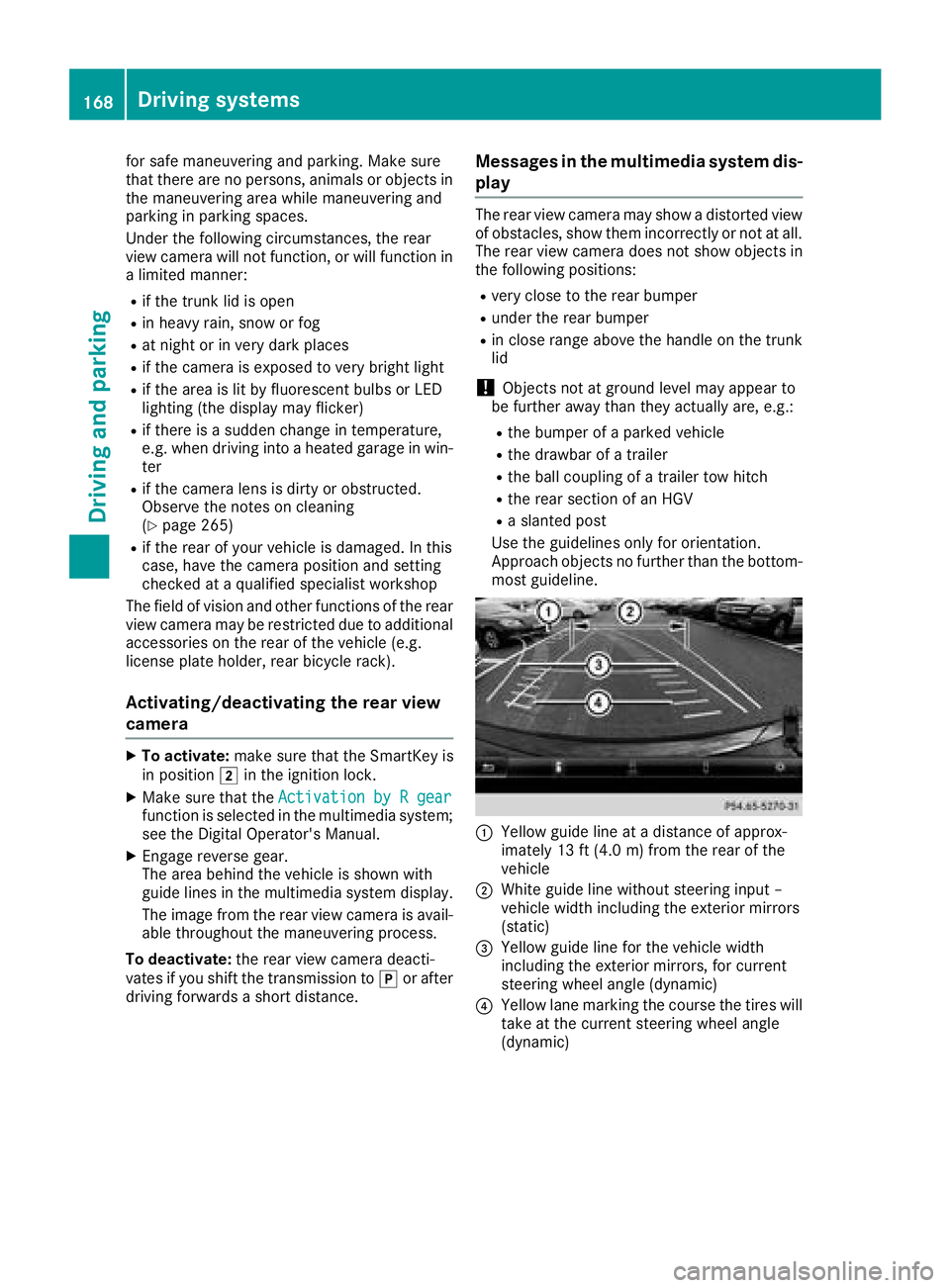
:Yellow guide line at adistance of approx-
imately 13 ft (4.0 m) from the rear of the
vehicle
;White guide line without steering input–
vehiclew idth including the exterior mirrors
(static)
=Yellow guide line for the vehiclew idth
including the exterior mirrors, for current
steering wheela ngle (dynamic)
?Yellow lane marking the course the tires will
take at the current steering wheela ngle
(dynamic)
168Driving systems
Driving and parking
Page 171 of 326
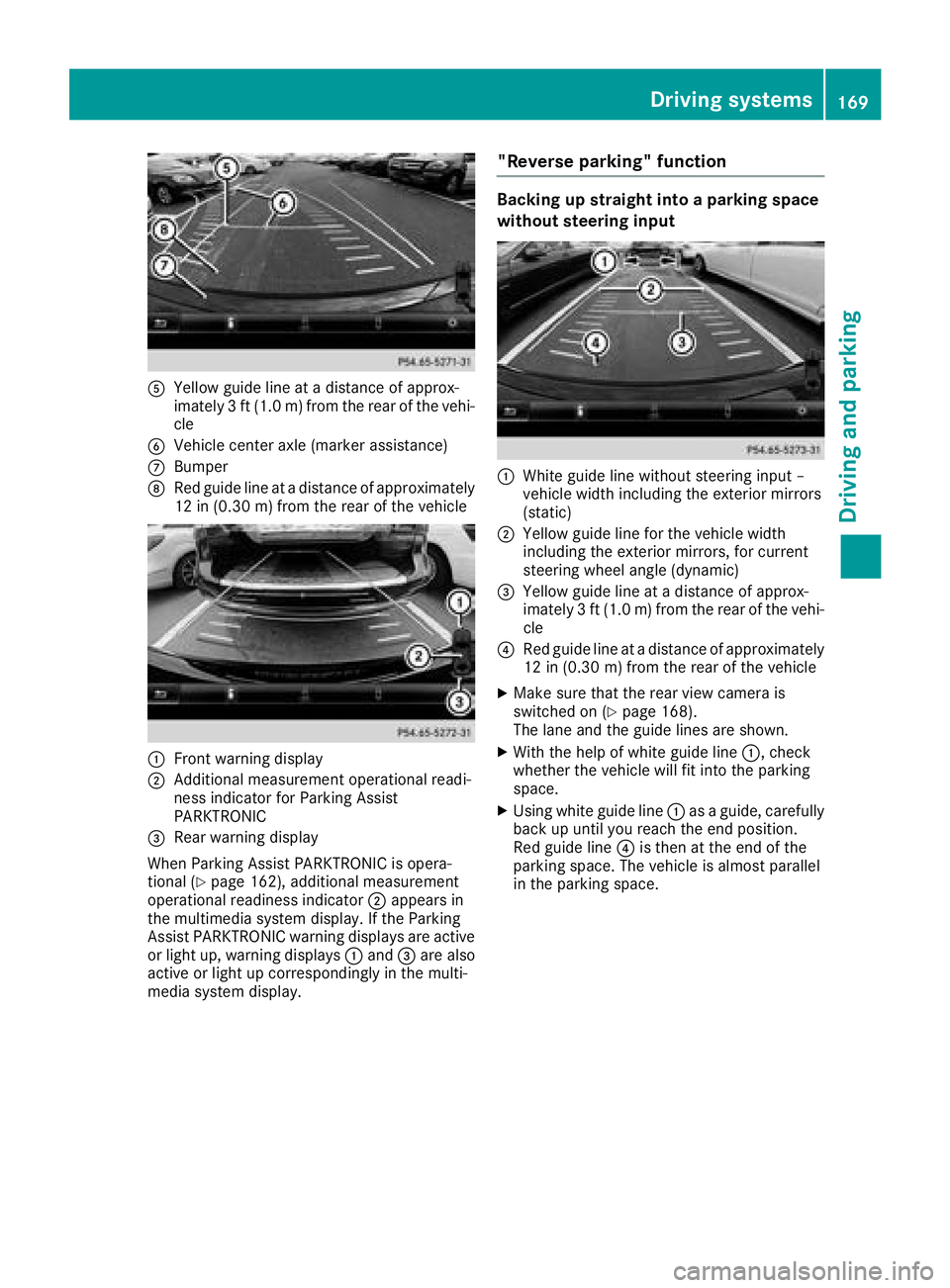
AYellow guide line atadistance of approx-
imately 3ft(1.0m)f rom the rear of the vehi-
cle
BVehicle center axle (marker assistance)
CBumper
DRed guide line at adistance of approximately
12 in (0.3 0m)from the rear of the vehicle
:Front warnin gdisplay
;Additional measurement operational readi-
ness indicator for Parking Assist
PARKTRONIC
=Rear warnin gdisplay
When Parking Assist PARKTRONIC is opera-
tional (
Ypage 162),a dditional measurement
operational readiness indicator ;appears in
the multimedia syste mdisplay. If the Parking
Assist PARKTRONIC warnin gdisplays are active
or light up, warnin gdisplays :and =are also
active or light up correspondingly in the multi-
media syste mdisplay.
"Reverse parking" function
Backing up straight into aparkin gspace
withou tsteering input
:Whiteg uide line without steeringi nput –
vehicle width including the exterior mirrors
(static)
;Yellow guide line for the vehicle width
including the exterior mirrors, for current
steeringw heel angle (dynamic)
=Yellow guide line at adistance of approx-
imately 3ft(1.0m )from the rear of the vehi-
cle
?Red guide line at adistance of approximately
12 in (0.30 m) from the rear of the vehicle
XMake sure that the rear view camer ais
switched on (Ypage 168).
The lane and the guide lines are shown.
XWith the help of white guide line :,check
whether the vehicle will fit int othe parking
space.
XUsingw hite guide line :asag uide, carefully
back up until you reach the end position.
Red guide line ?is the natthe end of the
parking space. The vehicle is almost parallel
in the parking space.
Driving systems169
Driving and parking
Z
Page 172 of 326
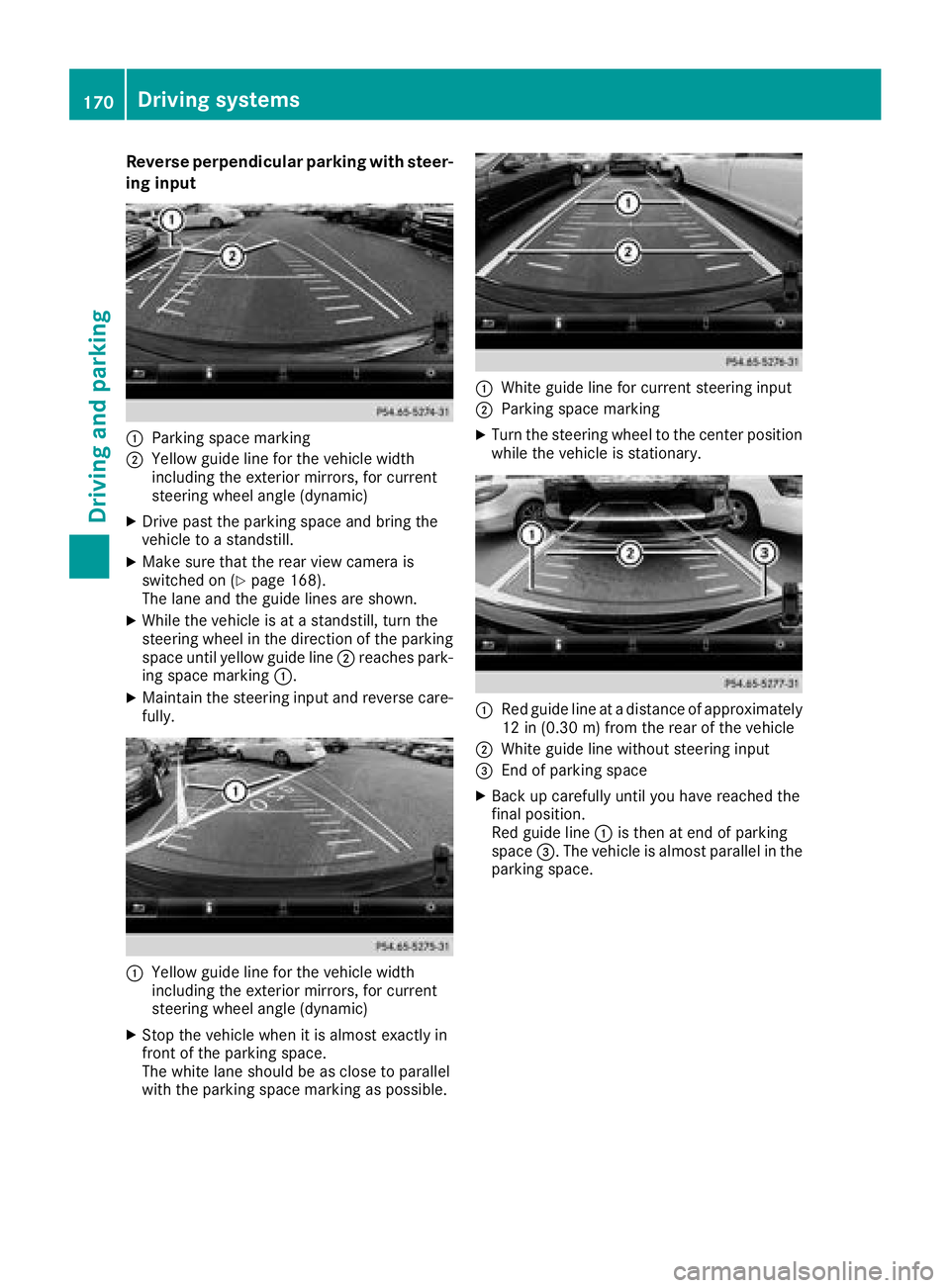
Reverse perpendicular parkingwiths teer-
in gi np ut
:Parking space marking
;Yellow guid elinef or the vehicle width
including the exterior mirrors, for current
steering wheel angle (dynamic)
XDrive past the parking space and bring the
vehicle to astandstill.
XMake sure that the rearv iewc amera is
switched on (Ypage 168).
The lane and the guid elines are shown.
XWhile the vehicle is at astandstill, turn the
steering wheel in the direction of the parking
space unti lyello wguide line;reaches park-
ing space marking :.
XMaintain the steering input and reverse care-
fully.
:Yellow guidelinef or the vehicle width
including the exterior mirrors, for current
steering wheel angle (dynamic)
XStop the vehicle whe nitisalmost exactly in
front of the parking space.
The white lane shoul dbeasclose to parallel
with the parking space marking as possible.
:White guid elinef or current steering input
;Parking space marking
XTurn the steering wheel to the center position
while the vehicle is stationary.
:Re dg uide line at adistance of approximately
12 in (0.30 m) fromthe rearofthe vehicle
;White guid elinew ithou tsteering input
=End of parking space
XBac kupcarefull yuntilyou have reache dthe
final position.
Re dg uide line:is thenate nd of parking
space =.The vehicl eisalmostp aralle linthe
parking space.
170Driving system s
Driving an dparking
Page 231 of 326
General notes
The multimedia system section in this Opera-
tor's Manualdescribes the basicp rinciples for
operation. More information can be found in the Digital Operator's Manual.
Important safety notes
GWARNING
If you operate information systems and com-
municatio nequipment integrated in the vehi-
cle when driving, you may be distracted from
the traffic situation. You could also lose con-
trol of the vehicle.T here isarisk of an acci-
dent.
Only operate this equipment when the traffic
situation permits. If you are not sure that this
is possible, park the vehicle paying attention
to traffic conditions and operate the equip-
ment when the vehicle is stationary.
You must observe the legalr equirements for the
country in which you are currently driving when
operating the multimedia system.
The multimedia system calculates the route to
the destination withoutt aking the following into
account, for example:
Rtraffic lights
Rstop and yield signs
Rparking or stopping restrictions
Rroad narrowing
Rother road and traffic rule sand regulations
The multimedia system may give incorrect nav-
igation recommendations if the actual street/
traffic situation does not correspond with the
digital map's data.
For example:
Rad iverted route
Rthe road layout or the direction of aone-way
street has been changed
For this reason, you must alwayso bserve road
and traffic rule sand regulations during your
journey. Roa dand traffic rule sand regulations
alwaysh ave priority over multimedia system
driving recommendations. Navigation announcements are intended to
direct you whiled
riving withoutdiverting your
attention from the road and driving.
Please alwaysu se this feature instead of con-
sulting the map display for directions. Looking
at the icons or map display can distract you from
traffic conditions and driving, and increase the
risk of an accident.
This equipment complies with FCC radiation
exposure limits set forth for uncontrolled equip-
ment and meets the FCC radiof requency (RF)
Exposure Guidelines in Supplement CtoOET65.
This equipment has very low levelsofRFe nergy
that is deemedtoc omply withoutmaximum
permissive exposure evaluation (MPE). How-
ever, it is recommended to insta
ll it atadistance
of at least 8inches (approx. 20 cm) betweent he
radiation source and aperson's body (not
including limbss uch as hands, wrists, feet and
legs).
GWARNING
Modifications to electronic components, their software as wellasw iring can impair their
function and/or the function of other net-
worked components. In particular, systems
relevant to safety could also be affected. As a
result, these may no longer function as inten-
ded and/or jeopardize the operating safety of
the vehicle.T here is an increasedr isk of an
accident and injury.
Never tamper with the wiring as wellase lec-
tronic components or their software .You
shoul dhave all work to electricala nd elec-
tronic equipment carried out at aqualified
specialist workshop.
Function restrictions
For safety reasons, some functions are restric-
ted or unavailable whilet he vehicle is in motion.
You willn otice this, for example, because either
you willn ot be abletos elect certain menu items
or am essag ewillappear to this effect.
Function restrictions229
Multimedia system
Z
Page 239 of 326
Loading guidelines
GWARNING
If objects, luggage or loads are not secured or
not secured sufficiently, they could slip, tip
over or be flun garounda nd thereb yhit vehicle
occupants. Thereisar isk of injury, particu-
larly in th eeventofs udden braking or asud-
den change in direction.
Always store object ssothatthe yc annot be
flun garound. Secure objects, luggage or
loads against slippingort ipping before the
journey.
GWARNING
Combustio nengine semit poisonous exhaust
gases such as carbon monoxide. Exhaust
gases can enter th evehicle interio rifthe
trunk lid is open when th eengine is running,
especially if th evehicle is in motion.T hereisa
risk of poisoning.
Always switch off th eengine before opening
th et runk lid. Never drivew ith thetrunk lid
open.
GWARNING
The exhaust tail pipe and tail pipe trim can
become veryh ot.Ifyou com eintoc ontact
with these partsoft hevehicle ,you could burn
yourself. Thereisar isk of injury.
Always be particularly careful aroundt he
exhaust tail pipe and th etail pipe trim. Allow
these component stocooldown before touch-
ing them.
The handlingc haracteristicsofaladen vehicle
are dependentont hedistribution of th eload
within th evehicle.
Observe th efollowing notes when loadinga nd
transporting aload:
RNever exceed th emaximum permissible
gross vehicle mass or th egross axle weight
rating for th evehicle (includingo ccupants).
The values are specified on th evehicle iden- tification plateont
heB-pillar of th edriver's
door.
RThe trunk is th epreferred place to carry
objects.
RPosition heavy loads as far forwards as pos-
sible and as low down in th etrunk as possible.
RThe load must not protrude above th eupper
edge of th eseat backrests.
RAlways place th eload against th erear or front
seat backrests .Makes ure that th eseat
backrests are securely locked int oplace.
RAlways place th eload behindu noccupied
seatsifp ossible.
RUse thecargo tie-down rings and th eparcel
net stot ransport loads and luggage.
RUse cargo tie-down rings and fastening mate-
rials appropriatef or theweight and sizeoft he
load.
RSecure th eload with sufficiently stronga nd
wear-resistant tie -downs.Pad sharpe dges for
protection.
Stowage areas
Stowage spaces
Important safety notes
GWARNING
If object sinthepassenge rcompartmenta re
stowed incorrectly, they can slide or be
thrown arounda nd hit vehicle occupants. In
addition,c upholders, open stowage spaces
and mobile phoneb racketscannot always
retain all object stheyc ontain .Thereisar isk
of injury, particularly in th eeventofs udden
braking or asudden change in direction.
RAlways stow object ssothatthe yc annot be
thrown aroundins uch situations.
RAlways makesure that objectsdonot pro-
trude fro mstowage spaces, parcel net sor
stowage nets.
RClose th elockable stowage spaces before
starting ajou rney.
RAlways stow and secure heavy, hard, poin-
ted ,sharp-edged, fragile or bulky object sin
th et runk.
Observe th eloadingg uidelines (
Ypage 237).
Stowage areas237
Stowage and features
Z
Page 241 of 326
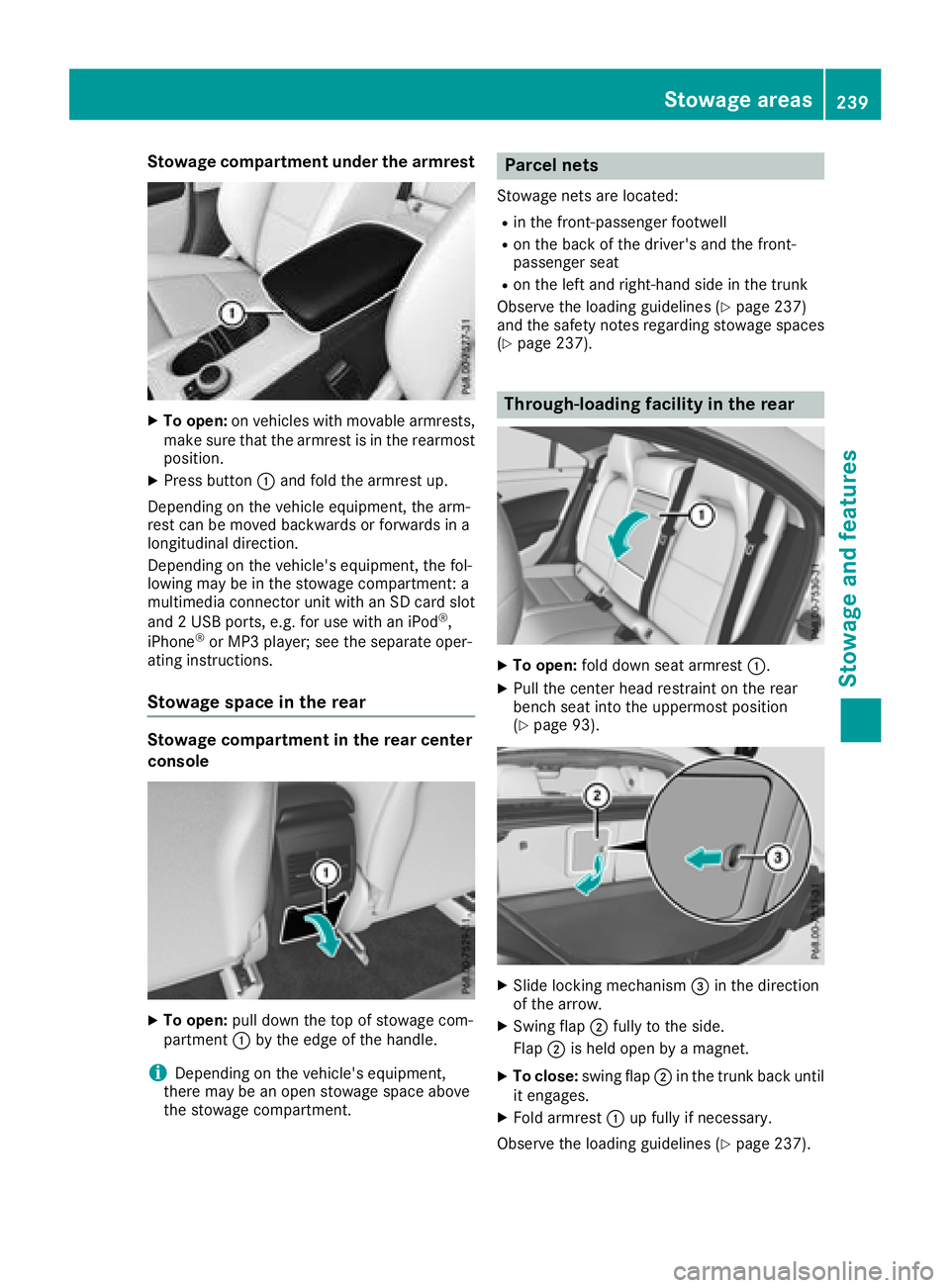
Stowage compartment under the armrest
XTo open:on vehicles with movable armrests,
make sure that the armrest is in the rearmost
position.
XPress button :and fold the armrest up.
Depending on the vehicle equipment, the arm-
rest can be moved backwards or forwards in a
longitudinal direction.
Depending on the vehicle's equipment, the fol-
lowing may be in the stowage compartment: a
multimedia connector unit with an SD card slot
and 2USB ports, e.g. for use with an iPod
®,
iPhone®or MP3 player; see the separate oper-
ating instructions.
Stowage space in the rear
Stowage compartment in the rear center
console
XTo open: pull down the top of stowage com-
partment :by the edge of the handle.
iDepending on the vehicle's equipment,
there may be an open stowage space above
the stowage compartment.
Parcel nets
Stowage nets are located:
Rin the front-passenger footwell
Ron the back of the driver's and the front-
passenger seat
Ron the left and right-hand side in the trunk
Observe the loading guidelines (
Ypage 237)
and the safety notes regarding stowage spaces
(
Ypage 237).
Through-loading facility in the rear
XTo open: fold down seat armrest :.
XPull the center head restraint on the rear
bench seat into the uppermost position
(
Ypage 93).
XSlide locking mechanism =in the direction
of the arrow.
XSwing flap ;fully to the side.
Flap ;is held open by amagnet.
XTo close: swing flap ;in the trunk back until
it engages.
XFold armrest :up fully if necessary.
Observe the loading guidelines (
Ypage 237).
Stowage areas239
Stowage and features
Z