2018 LINCOLN MKZ HYBRID engine
[x] Cancel search: enginePage 69 of 572

CHECKING MYKEY SYSTEM
STATUS
You can find information about yourprogrammed MyKeys by using theinformation display. See InformationDisplays (page 112).
MyKey Distance
Tracks the distance when drivers use aMyKey. The only way to delete theaccumulated distance is by using an adminkey to clear all MyKeys. If the distance doesnot accumulate as expected, then theintended user is not using the MyKey, or anadmin key user recently cleared and thenrecreated a MyKey.
Number of MyKeys
Indicates the number of MyKeysprogrammed to your vehicle. Use this featureto detect how many MyKeys you have foryour vehicle and determine when all MyKeyshave been deleted.
Number of Admin Keys
Indicates how many admin keys areprogrammed to your vehicle. Use this featureto determine how many admin keys you havefor your vehicle, and detect if an additionalMyKey has been programmed.
USING MYKEY WITH REMOTE
START SYSTEMS
MyKey is not compatible with nonFord-approved, aftermarket remote startsystems. If you choose to install a remotestart system, see an authorized dealer for aFord-approved remote start system.
MYKEY TROUBLESHOOTING
Potential causesCondition
· The key or transmitter used to start the vehicle does not have adminprivileges.I cannot create a MyKey.
· Vehicles with keyless start: Make sure you place the transmitter intothe backup position. See Starting a Gasoline Engine (page 169).
66
MKZ Hybrid (CC9) Hybrid Electric Vehicle (HEV), Canada/United States of America, enUSA, First Printing
MyKey™
Page 99 of 572

POWER WINDOWS
WARNINGS
Do not leave children unattended inyour vehicle and do not let them playwith the power windows. Failure to followthis instruction could result in personal injury.
When closing the power windows,verify they are free of obstruction andmake sure that children and pets are not inthe proximity of the window openings.
Note: You may hear a pulsing noise whenjust one of the windows is open. Lower theopposite window slightly to reduce thisnoise.
Press the switch to open the window.
Lift the switch to close the window.
One-Touch Down
Press the switch fully and release it. Pressagain or lift it to stop the window.
One-Touch Up
Lift the switch fully and release it. Press orlift it again to stop the window.
Resetting One-Touch Up
Start the engine.
1.Lift and hold the window switch until youfully close the door window. Continue tohold the switch for a few seconds afteryou close the window.
2. Release the window switch.
3. Press and hold the window switch untilyou fully open the door window.
4. Release the window switch.
5.Lift and hold the window switch until youfully close the window.
6. Test for correct window operation bycarrying out the one-touch down andone-touch up features.
Bounce-Back
The window will stop automatically whileclosing. It reverses some distance if thereis an obstacle in the way.
Overriding the Bounce-Back Feature
WARNING
When you override the bounce-backfeature the window will not reverse ifit detects an obstacle. Take care whenclosing the windows to avoid personal injuryor damage to your vehicle.
96
MKZ Hybrid (CC9) Hybrid Electric Vehicle (HEV), Canada/United States of America, enUSA, First Printing
Windows and MirrorsE146043
Page 112 of 572

Engine or Motor Coolant Temperature
Lights when the engine or motorcooling system is overheating.Stop your vehicle in a safe placeand have an authorized dealer check thesystem.
Engine Oil
It illuminates when you switch theignition on.
If it illuminates when the engine isrunning this indicates a malfunction. Stopyour vehicle as soon as it is safe to do soand switch the engine off. Check the engineoil level. If the oil level is sufficient, thisindicates a system malfunction. Have yourvehicle checked immediately.
See Engine Oil Check (page 303).
Fasten Seatbelt Warning Lamp
It illuminates and a chime soundsuntil you fasten the seatbelts.
Front Airbag
Lights when you start your vehicle.If it continues to flash or remainson, it indicates a malfunction. Havean authorized dealer check the system.
Grade Assist
Lights when you switch on thegrade assist function.
Heads Up Display (If Equipped)
A red beam of lights appears onthe windshield in certain instanceswhen using adaptive cruise controland/or the collision warning system. To makesure the display works, it will also appearmomentarily when you start your vehicle.
Headlamp High Beam Indicator
Lights when you switch on thehigh-beam headlamps. Flasheswhen you use the headlampflasher.
Hood Ajar
Lights when the ignition is on andthe hood is not completely closed.
Lane Keeping Aid (If Equipped)
Lights when you activate the lanekeeping system.
Low Fuel Level Warning Lamp
Lights when the fuel level is low orthe fuel tank is nearly empty. Refuel as soon as possible.
Low Tire Pressure Warning Lamp
It illuminates when your tirepressure is low. If the lamp remainson with the engine running orwhen driving, check your tire pressure assoon as possible.
109
MKZ Hybrid (CC9) Hybrid Electric Vehicle (HEV), Canada/United States of America, enUSA, First Printing
Instrument Cluster E71880 E67017 E144523 E156133 E159324 E144813
Page 113 of 572

It also illuminates momentarily when youswitch the ignition on to confirm the lamp isfunctional. If it does not illuminate when youswitch the ignition on, or begins to flash atany time, have the system checked by yourauthorized dealer.
Low Washer Fluid Level Warning Lamp
Lights when the windshield washerfluid is low.
Parking Lamps
Lights when you switch on theparking lamps.
Powertrain Fault
Lights when your vehicle detectsa powertrain fault. Contact anauthorized dealer as soon aspossible.
Note:If your vehicle detects certain faults,it will not allow you to operate theaccelerator pedal. If this happens, press thebrake pedal and release it. This will activatelimp home vehicle operation. In limp homevehicle operation, your vehicle willaccelerate in a controlled manner up to amaximum speed of 35 mph (56 km/h) on aflat surface. If you apply the brake pedal ormove the transmission to neutral (N) you canoverride your vehicle’s acceleration.
Ready to Drive
Lights when you switch on yourvehicle and it is ready to drive. Acorresponding message maydisplay stating ready to drive.
Service Engine Soon
If it illuminates when the engine isrunning this indicates amalfunction. The On BoardDiagnostics system has detected amalfunction of the vehicle emission controlsystem.
If it flashes, engine misfire may be occurring. Increased exhaust gas temperatures coulddamage the catalytic converter or othervehicle components. Drive in a moderatefashion (avoid heavy acceleration anddeceleration) and have your vehicleimmediately serviced.
It illuminates when you switch the ignitionon prior to engine start to check the bulb andto indicate whether your vehicle is ready forInspection and Maintenance (I/M) testing.
Normally, it illuminates until the engine iscranked and automatically turns off if nomalfunctions are present. However, if after15 seconds it flashes eight times, thisindicates that your vehicle is not ready forInspection and Maintenance (I/M) testing.
See Catalytic Converter (page 188).
110
MKZ Hybrid (CC9) Hybrid Electric Vehicle (HEV), Canada/United States of America, enUSA, First Printing
Instrument ClusterE178202 E144692
Page 116 of 572
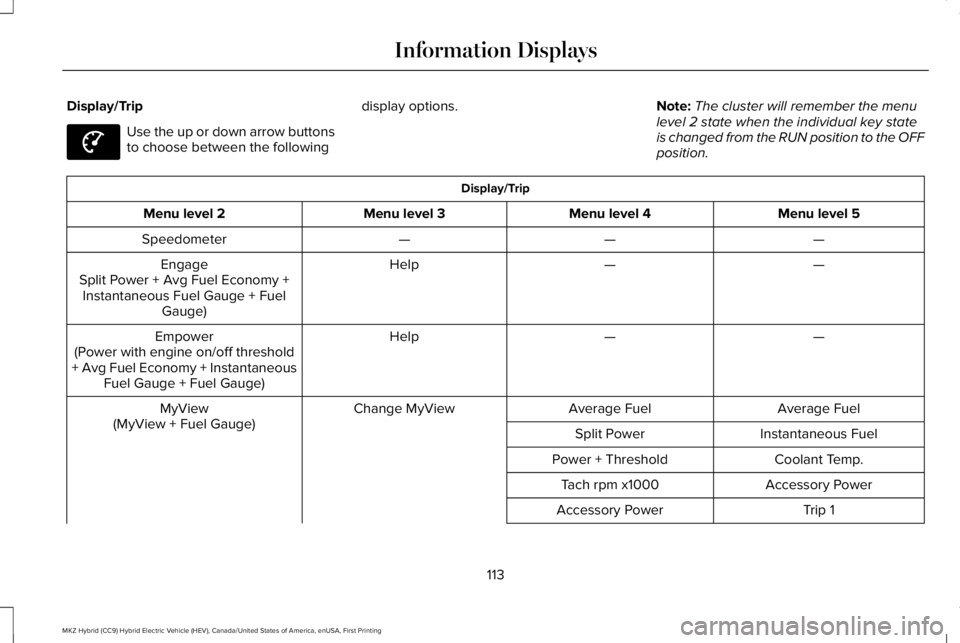
Display/Trip
Use the up or down arrow buttonsto choose between the following
display options.Note:The cluster will remember the menulevel 2 state when the individual key stateis changed from the RUN position to the OFFposition.
Display/Trip
Menu level 5Menu level 4Menu level 3Menu level 2
———Speedometer
——HelpEngageSplit Power + Avg Fuel Economy +Instantaneous Fuel Gauge + FuelGauge)
——HelpEmpower(Power with engine on/off threshold+ Avg Fuel Economy + InstantaneousFuel Gauge + Fuel Gauge)
Average FuelAverage FuelChange MyViewMyView(MyView + Fuel Gauge)Instantaneous FuelSplit Power
Coolant Temp.Power + Threshold
Accessory PowerTach rpm x1000
Trip 1Accessory Power
113
MKZ Hybrid (CC9) Hybrid Electric Vehicle (HEV), Canada/United States of America, enUSA, First Printing
Information DisplaysE144639
Page 118 of 572

Engage
Engage provides separate gauges for enginepower and high voltage battery power inkilowatts (kW). The engine power gauge fillis white and the high voltage battery powergauge fill is blue. You can also see aninstantaneous fuel economy gauge. Whenyour vehicle is operating on battery poweronly, you will see EV displayed and thegauges will appear in blue.
Note:Hold OK to reset average fueleconomy.
Empower
Empower provides a power demand gaugein kilowatts (kW) which includes an engineon or off threshold.
•When your vehicle is operating withbattery power only (below the threshold),you will see EV displayed and the gaugefill is blue.
•When your vehicle is operating with boththe engine and the high voltage batteryproviding power the gauge fill is white.
•When power demand surpasses theamber indicator, this level of demand andassociated fuel economy displays inamber.
•When the engine is on, reducing powerdemand to less than the threshold willallow the engine to turn off.
You can also see an instantaneous fueleconomy gauge.
Note:Hold OK to reset average fueleconomy.
MyView
You can choose what to display in this view.Selecting Change MyView in the optionsmenu allows you to scroll through twocolumns of content choices.
•Press the up or down arrow to viewcontent.
•Press OK to save your selected content
•You must select content in both columnsbefore you can save your new MyView.
Unique content available in MyView:
•Accessory Power— Indicates electricalpower demands from your vehicle’saccessory systems. Accessories usepower but do not contribute to propellingyour vehicle. The gauge separatelydisplays power demand in kilowatts (kW)for climate and other accessories.Climate includes the power being usedby high voltage climate controlcomponents such as the electric A/Ccompressor. Other includes all powerbeing used by the low voltageaccessories (cabin fans, headlights andheated seats).
•Coolant Temp – Indicates engine coolanttemperature. At normal operatingtemperature, the level indicator will bewhite and will be in the normal range(between H and C). If the engine coolanttemperature exceeds the normal range,the level indicator will change to red toindicate that the engine is overheating.Stop your vehicle as soon as safelypossible, turn your vehicle off and let theengine cool.
115
MKZ Hybrid (CC9) Hybrid Electric Vehicle (HEV), Canada/United States of America, enUSA, First Printing
Information Displays
Page 119 of 572

•Tach rpm x 1000 — When the gasolineengine is running, the tachometer gaugedisplays the engine speed in revolutionsper minute (RPM). When your vehicle isoperating on battery power only with theengine off, EV displays and thetachometer is greyed out.
Note:The trip data, and average fueleconomy cannot be reset in MyView.
Trip 1 & 2
Provides trip odometer, trip average fueleconomy and trip timer.
Distance traveled on battery power only withthe engine off is shown in blue next to totaltrip distance.
Information
In this mode, you can viewdifferent vehicle systeminformation and perform a systemcheck.
Information
Displays a number of different system tutorials. Use the up or down arrows to scrollthrough the tutorials. Then press OK to view.TutorialWarnings
Displays the associated driver alert graphic.Driver Alert
MyKeys (Number of MyKeys programmed)MyKey
MyKey Miles (km) (Distance traveled using a programmed MyKey)
Admin Keys (Number of admin keys)
All active warnings will display first if applicable. The system check menu may appeardifferent based upon equipment options and current vehicle status. Use the up or downarrow buttons to scroll through the list.
System Check
116
MKZ Hybrid (CC9) Hybrid Electric Vehicle (HEV), Canada/United States of America, enUSA, First Printing
Information DisplaysE144642
Page 121 of 572

Settings
—Hold OK to ResetTire Monitor
—On or OffAuto Engine OffVehicle
—On or OffEasy Entry / Exit
Right or Left Hand TrafficTraffic Set UpAdaptive HdlampsLighting
On or OffAuto Highbeam
On or OffDaytime Lights
Select time intervalAutolamp Delay
On or OffWelcome Lighting
On or OffAutolockLocks
On or OffAutounlock
On or OffAudibleFeedback
On or OffExterior Lights
On or OffMislock
All doors or Driver doorRemote Unlocking
On or OffAutofoldMirrors
Hold OK to InitializeNeutral Tow
118
MKZ Hybrid (CC9) Hybrid Electric Vehicle (HEV), Canada/United States of America, enUSA, First Printing
Information Displays