Page 108 of 615

The image of the approaching vehicle issmall and near the inboard edge of the mainmirror when it is at a distance. The imagebecomes larger and begins to moveoutboard across the main mirror as thevehicle approaches (A). The image willtransition from the main mirror and begin toappear in the blind spot mirror as the vehicleapproaches (B). The vehicle will transition toyour peripheral field of view as it leaves theblind spot mirror (C).
Blind Spot Monitor (If Equipped)
See Blind Spot Information System (page253).
INTERIOR MIRROR
WARNING: Do not adjust the mirrorwhen your vehicle is moving.
Note:Do not clean the housing or glass ofany mirror with harsh abrasives, fuel or otherpetroleum or ammonia-based cleaningproducts.
You can adjust the interior mirror to yourpreference. Some mirrors also have a secondpivot point. This lets you move the mirrorhead up or down and from side to side.
Auto-Dimming Mirror
Note:Do not block the sensors on the frontand back of the mirror. Mirror performancemay be affected. A rear center passengeror raised rear center head restraint may alsoblock light from reaching the sensor.
The mirror will dim automatically to reduceglare when bright lights are detected frombehind your vehicle. It will automaticallyreturn to normal reflection when you selectreverse gear to make sure you have a clearview when backing up.
TOLL READER
Installing the Toll Reader
Install the toll reader or radio-controlledequipment in the following locations on thewindshield.
105
Continental (CPL) Canada/United States of America, enUSA, Edition date: 201706, Second-Printing
Windows and MirrorsA
B
C
E138665
Page 112 of 615
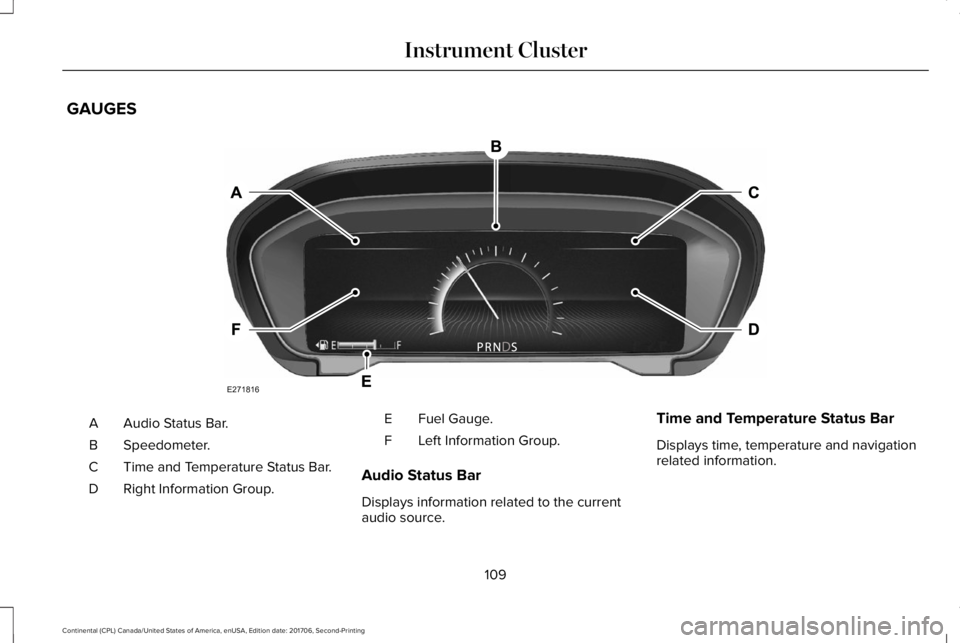
GAUGES
Audio Status Bar.A
Speedometer.B
Time and Temperature Status Bar.C
Right Information Group.D
Fuel Gauge.E
Left Information Group.F
Audio Status Bar
Displays information related to the currentaudio source.
Time and Temperature Status Bar
Displays time, temperature and navigationrelated information.
109
Continental (CPL) Canada/United States of America, enUSA, Edition date: 201706, Second-Printing
Instrument ClusterE271816
Page 113 of 615
Left/Right Information Group
Information that appears in the left and rightinformation group varies depending oncurrent gauge, on-demand and HUD (ifequipped) settings. See GeneralInformation (page 115).
Fuel Gauge
The fuel gauge indicates about how muchfuel is in the fuel tank.
The arrow adjacent to the fuel pump symbolindicates on which side of your vehicle thefuel filler door is located.
Note:The fuel gauge may vary slightly whenyour vehicle is moving or on a slope.
Low Fuel Reminder
A low fuel level reminder displays andsounds when the distance to empty reaches75 mi (120 km) for MyKey, and at 50 mi(80 km), 25 mi (40 km), 10 mi (20 km) and0 mi (0 km) for all vehicle keys.
Note:The low fuel reminder can appear atdifferent fuel gauge positions depending onfuel economy conditions. This variation isnormal.
WARNING LAMPS AND
INDICATORS
The following warning lamps and indicatorsalert you to a vehicle condition that maybecome serious. Some lamps illuminatewhen you start your vehicle to make surethey work. If any lamps remain on afterstarting your vehicle, refer to the respectivesystem warning lamp for further information.
Note:Some warning indicators appear inthe information display and function thesame as a warning lamp, but do not displaywhen you start your vehicle.
Adaptive Cruise Control (If Equipped)
The speed control system indicatorlight changes color to indicatewhat mode the system is in: SeeUsing Adaptive Cruise Control (page 238).
On (white light): Illuminates when theadaptive cruise control system is turned on.Turns off when the speed control system isturned off.
Engaged (green light): Illuminates when theadaptive cruise control system is engaged.Turns off when the speed control system isdisengaged.
Adaptive Steering (If Equipped)
The adaptive steering systemindicator illuminates if the systemdetects a fault during thecontinuous diagnostic checks.
Adaptive Steering Initialization (yellow,flashing): The adaptive steering systemdetects a difference between steering wheelangle and the desired road wheel angle. Thesteering wheel adjusts itself to correct thisdifference. This adjustment is part of normalsystem operation.
110
Continental (CPL) Canada/United States of America, enUSA, Edition date: 201706, Second-Printing
Instrument ClusterE144524 E223375
Page 116 of 615

Hood Ajar
Displays when the ignition is onand the hood is not completelyclosed.
Low Fuel Level
Illuminates when the fuel level islow or the fuel tank is nearlyempty. Refuel as soon as possible.
Low Tire Pressure Warning
It illuminates if the tire pressure inone or more tires is below thecorrect tire pressure.
See Tire Pressure Monitoring System (page359).
Low Beam Malfunction Warning Lamp
(If Equipped)
It illuminates when there is amalfunction with the low beamheadlamp bulb.
Low Washer Fluid
Illuminates when the windshieldwasher fluid is low.
Parking Lamps
Illuminates when you switch theparking lamps on.
Powertrain Fault
Illuminates when a powertrain oran AWD fault has been detected. Contact an authorized dealer.
Service Engine Soon
If it illuminates when the engine isrunning this indicates amalfunction. The On BoardDiagnostics system has detected amalfunction of the vehicle emission controlsystem.
If it flashes, engine misfire may be occurring. Increased exhaust gas temperatures coulddamage the catalytic converter or othervehicle components. Drive in a moderatefashion (avoid heavy acceleration anddeceleration) and have your vehicleimmediately serviced.
It illuminates when you switch the ignitionon prior to engine start to check the bulb andto indicate whether your vehicle is ready forInspection and Maintenance (I/M) testing.
Normally, it illuminates until the engine iscranked and automatically turns off if nomalfunctions are present. However, if after15 seconds it flashes eight times, thisindicates that your vehicle is not ready forInspection and Maintenance (I/M) testing.See Emission Law (page 190).
113
Continental (CPL) Canada/United States of America, enUSA, Edition date: 201706, Second-Printing
Instrument ClusterE159324 E181350 E132353
Page 120 of 615
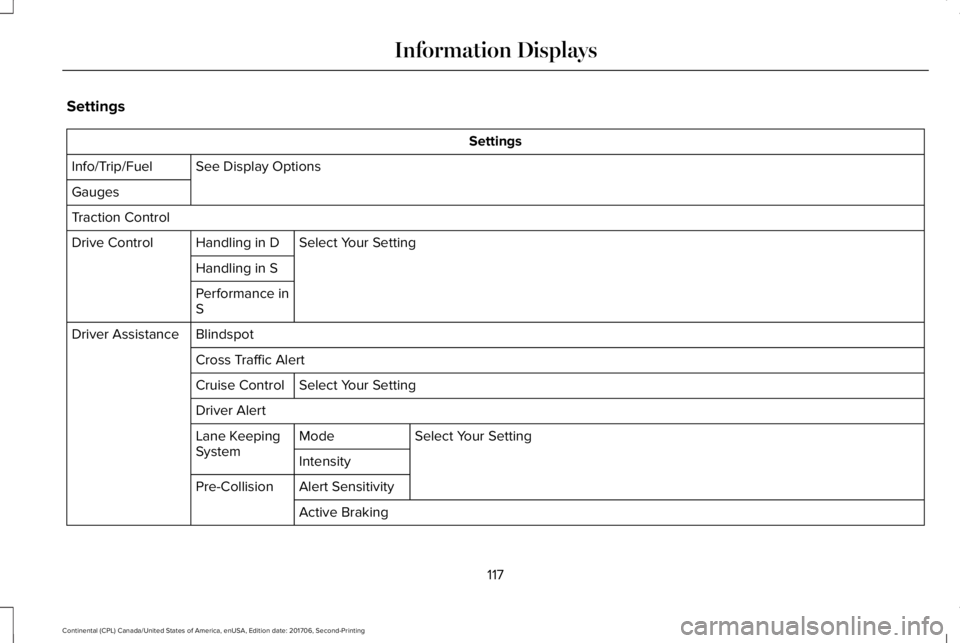
Settings
Settings
See Display OptionsInfo/Trip/Fuel
Gauges
Traction Control
Select Your SettingHandling in DDrive Control
Handling in S
Performance inS
BlindspotDriver Assistance
Cross Traffic Alert
Select Your SettingCruise Control
Driver Alert
Select Your SettingModeLane KeepingSystemIntensity
Alert SensitivityPre-Collision
Active Braking
117
Continental (CPL) Canada/United States of America, enUSA, Edition date: 201706, Second-Printing
Information Displays
Page 123 of 615
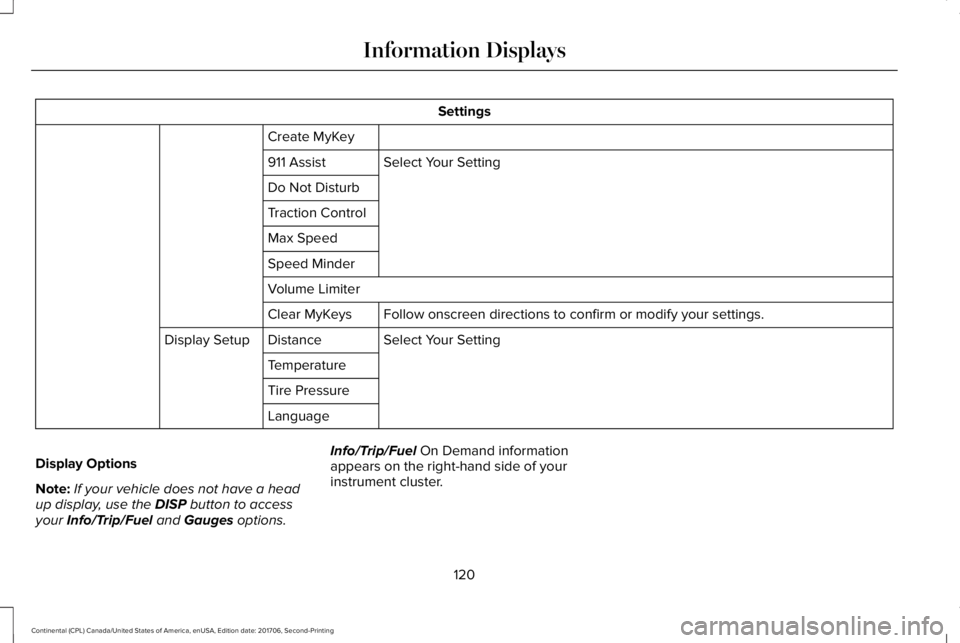
Settings
Create MyKey
Select Your Setting911 Assist
Do Not Disturb
Traction Control
Max Speed
Speed Minder
Volume Limiter
Follow onscreen directions to confirm or modify your settings.Clear MyKeys
Select Your SettingDistanceDisplay Setup
Temperature
Tire Pressure
Language
Display Options
Note:If your vehicle does not have a headup display, use the DISP button to accessyour Info/Trip/Fuel and Gauges options.
Info/Trip/Fuel On Demand informationappears on the right-hand side of yourinstrument cluster.
120
Continental (CPL) Canada/United States of America, enUSA, Edition date: 201706, Second-Printing
Information Displays
Page 124 of 615
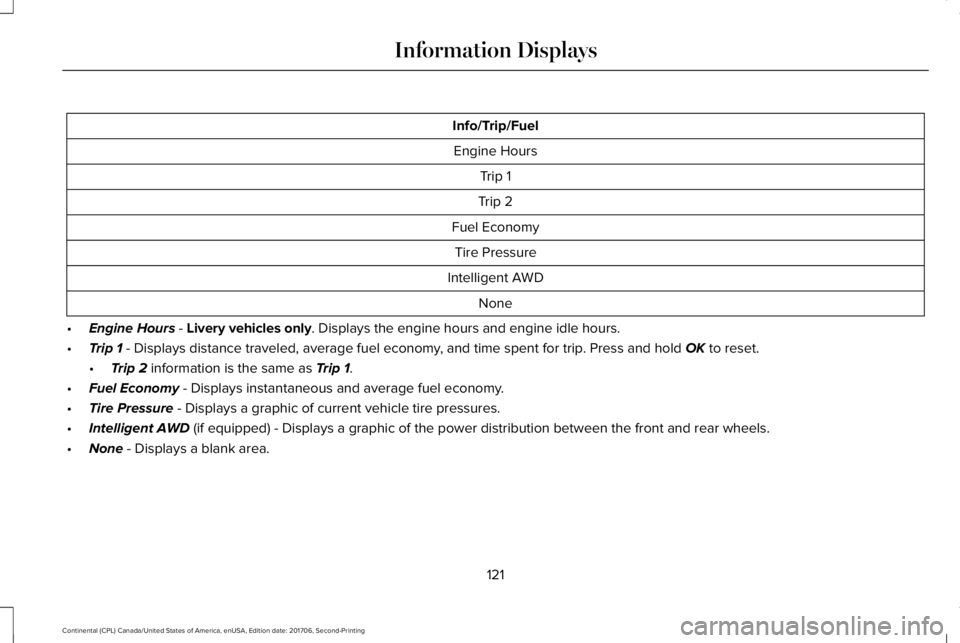
Info/Trip/Fuel
Engine Hours
Trip 1
Trip 2
Fuel Economy
Tire Pressure
Intelligent AWD
None
•Engine Hours - Livery vehicles only. Displays the engine hours and engine idle hours.
•Trip 1 - Displays distance traveled, average fuel economy, and time spent for trip. Press and hold OK to reset.
•Trip 2 information is the same as Trip 1.
•Fuel Economy - Displays instantaneous and average fuel economy.
•Tire Pressure - Displays a graphic of current vehicle tire pressures.
•Intelligent AWD (if equipped) - Displays a graphic of the power distribution between the front and rear wheels.
•None - Displays a blank area.
121
Continental (CPL) Canada/United States of America, enUSA, Edition date: 201706, Second-Printing
Information Displays
Page 125 of 615
Gauges
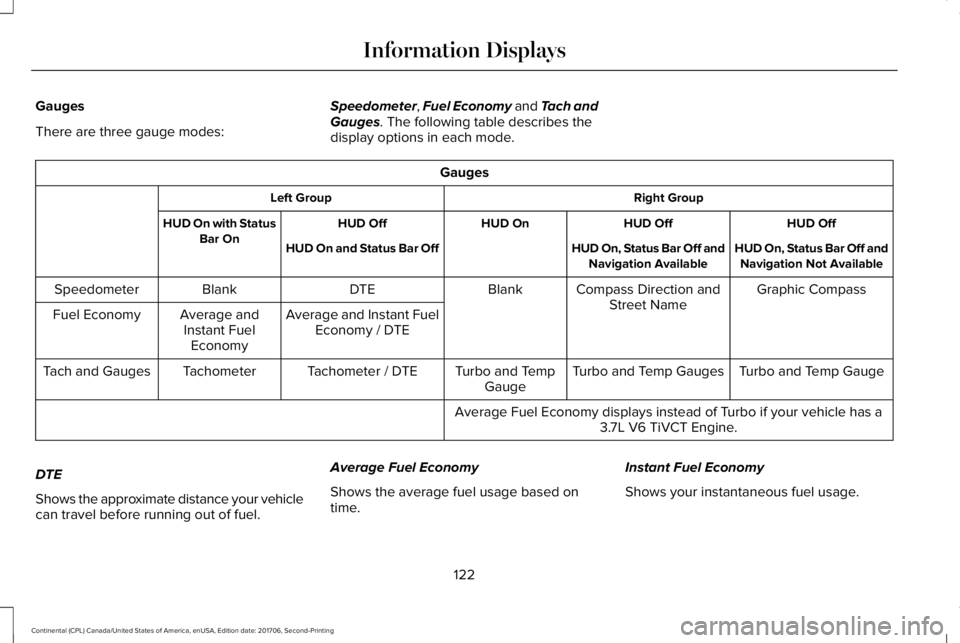
There are three gauge modes:
Speedometer, Fuel Economy and Tach andGauges. The following table describes thedisplay options in each mode.
Gauges
Right GroupLeft Group
HUD OffHUD OffHUD OnHUD OffHUD On with StatusBar OnHUD On, Status Bar Off andNavigation Not AvailableHUD On, Status Bar Off andNavigation AvailableHUD On and Status Bar Off
Graphic CompassCompass Direction andStreet NameBlankDTEBlankSpeedometer
Average and Instant FuelEconomy / DTEAverage andInstant FuelEconomy
Fuel Economy
Turbo and Temp GaugeTurbo and Temp GaugesTurbo and TempGaugeTachometer / DTETachometerTach and Gauges
Average Fuel Economy displays instead of Turbo if your vehicle has a3.7L V6 TiVCT Engine.
DTE
Shows the approximate distance your vehiclecan travel before running out of fuel.
Average Fuel Economy
Shows the average fuel usage based ontime.
Instant Fuel Economy
Shows your instantaneous fuel usage.
122
Continental (CPL) Canada/United States of America, enUSA, Edition date: 201706, Second-Printing
Information Displays