2018 LEXUS LS500 park
[x] Cancel search: parkPage 207 of 514

2074-5. Using the driving support systems
LS500_OM_OM50F54U_(U) 4
Driving • When driving near a TV tower, broad-
casting station, electric power plant, or
other location where strong radio waves
or electrical noise may be present
• When passing an oncoming vehicle on a
narrow road
• When driving close to objects such as
walls or poles on a median
• When passing an oncoming vehicle
around a sharp curve
• When passing a vehicle which is making
a left/right turn
• When being passed by a vehicle
approaching from the le ft or right side in
front of your vehicle
• When making a left/right turn while a
vehicle is approaching from the left or
right side in front of your vehicle • When passing an object on the side of the
road, such as a parked vehicle
• When passing an oncoming vehicle on a
S curve
• When there is an obje ct that may be mis-
taken for a pedestrian, such as a utility
pole, tree, or pole on the roadside or at
the entrance of a curve
• When there is a bicycle or motorcycle on
the roadside at the entrance of a curve
• If the preceding vehicle is a bicycle or
motorcycle ●
The system may operate the pedestrian
alert unnecessarily if it detects the follow-
ing:
• Pedestrians on a sidewalk
• Bicycles and motorcycles
• Patterns or paint on the road, a wall,
median, billboard, etc. that may be mis-
taken for a pedestrian or bicyclist ■
Situations in which the system may not
operate properly ●
In some situations, such as the following,
a vehicle or other object may not be
detected by the sensors, preventing the
system from operating properly:
• If an oncoming vehicle is approaching
your vehicle
• When approaching the side or front of a
vehicle
• If a preceding vehicle has a small rear
end, such as an unloaded truck
• If a preceding vehicle has a low rear end,
such as a low bed trailer
• If a vehicle ahead is carrying a load which
protrudes past its rear bumper
• If a vehicle ahead has extremely high
ground clearance
Page 208 of 514

208 4-5. Using the driving support systems
LS500_OM_OM50F54U_(U) • If a vehicle ahead is irregularly shaped,
such as a tractor or side car
• If the sun or other light is shining directly
on a vehicle or guardrail ahead
• If a vehicle cuts in front of your vehicle or
emerges from beside a vehicle
• If a vehicle ahead makes an abrupt
maneuver (such as sudden swerving,
acceleration or deceleration)
• When suddenly cutting behind a preced-
ing vehicle
• When a vehicle ahead is not directly in
front of your vehicle
• When driving in incl ement weather such
as heavy rain, fog, snow or a sandstorm
• When the vehicle is hit by water, snow,
dust, etc. from a vehicle ahead
• When driving through steam or smoke
• When driving in a place where the sur-
rounding brightness changes suddenly,
such as at the entrance or exit of a tunnel
• When a very bright light, such as the sun
or the headlights of oncoming traffic,
shines directly in to the camera sensor
• When driving in a lo cation where there
are many objects which reflect radar,
such as a tunnel or parking garage
• When driving at night or in a tunnel with
the headlights off
• When the surrounding area is dim, such
as at dawn or dusk, or while at night or in
a tunnel
• After the engine has started the vehicle
has not been driven for a certain amount
of time • While making a left/r ight turn and for a
few seconds after making a left/right turn
• While driving on a curve and for a few
seconds after driving on a curve
• If your vehicle is skidding
• If the front of the vehicle is raised or low-
ered
• If the wheels are misaligned
• If a wiper blade is blocking the camera
sensor
• The vehicle is wobbling.
• The vehicle is being driven at extremely
high speeds.
• When driving on a hill
• If a sensor is misaligned
• If the headlights are misaligned
• When approaching a guardrail at a wide
or narrow angle
• When a vehicle approaches your vehicle
from the front left or right side while your
vehicle is entering an intersection with
poor visibility
• When a vehicle approaches your vehicle
from the rear left or right side
• When a vehicle approaches the side of
your vehicle at a shallow angle
• When driving on a road with a grade that
changes sharply (sha rp incline/decline)●
In some situations, such as the following,
the sensors may not detect the lane lines
or a safe space the vehicle can be steered
into, preventing the active steering assist
from operating properly:
• When the white (yellow) lane lines are
difficult to see, such as when they are
faint, diverging/merging, or a shadow is
cast upon them
• When the lane is more wide or narrow
than normal
• When there is a light and dark pattern on
the road surface, such as due to road
repairs
• If the system determines that a collision
can be avoided by only using the brakes
Page 215 of 514
2154-5. Using the driving support systems
LS500_OM_OM50F54U_(U) 4
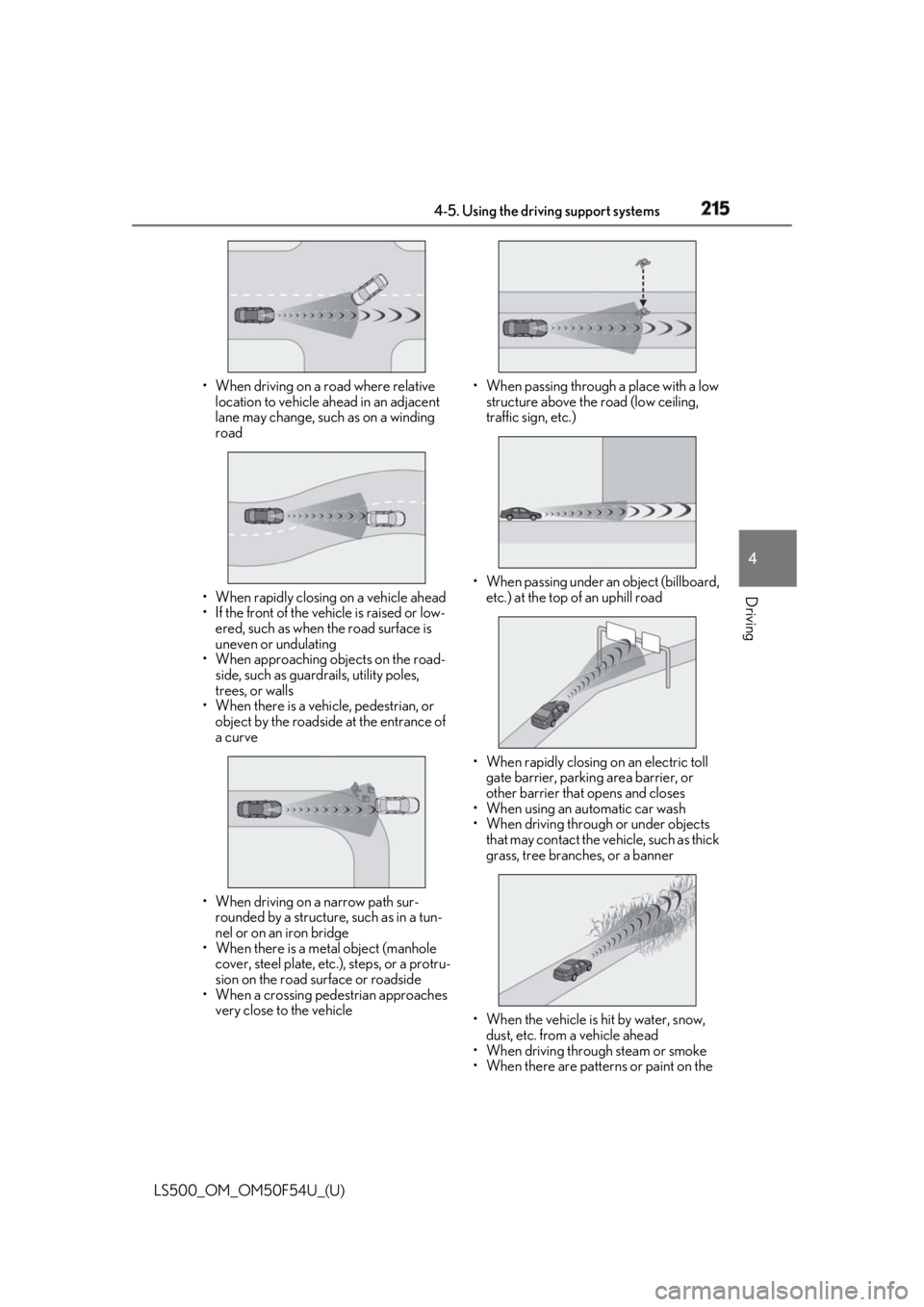
Driving • When driving on a road where relative
location to vehicle ahead in an adjacent
lane may change, such as on a winding
road
• When rapidly closing on a vehicle ahead
• If the front of the vehicle is raised or low-
ered, such as when the road surface is
uneven or undulating
• When approaching ob jects on the road-
side, such as guardr ails, utility poles,
trees, or walls
• When there is a vehicle, pedestrian, or
object by the roadside at the entrance of
a curve
• When driving on a narrow path sur-
rounded by a structure, such as in a tun-
nel or on an iron bridge
• When there is a metal object (manhole
cover, steel plate, etc.), steps, or a protru-
sion on the road surface or roadside
• When a crossing pedestrian approaches
very close to the vehicle • When passing through a place with a low
structure above the road (low ceiling,
traffic sign, etc.)
• When passing under an object (billboard,
etc.) at the top of an uphill road
• When rapidly closing on an electric toll
gate barrier, parking area barrier, or
other barrier that opens and closes
• When using an automatic car wash
• When driving through or under objects
that may contact the vehicle, such as thick
grass, tree branches, or a banner
• When the vehicle is hit by water, snow,
dust, etc. from a vehicle ahead
• When driving through steam or smoke
• When there are patterns or paint on the
Page 219 of 514

2194-5. Using the driving support systems
LS500_OM_OM50F54U_(U) 4
Driving ●
Setting for “PCS” and “CAUTION” in
( → P.76) of the multi-information dis-
play.●
A shift position other than P or R is
selected. ●
Your vehicle is approaching an intersec-
tion at approximately 9 mph (15 km/h) or
lower.●
A vehicle is approaching from the left or
right in front of your vehicle at a speed
between approximately 6 mph (10 km/h)
and 37 mph (60 km/h).●
There are no preceding vehicles ahead of
your vehicle.●
The accelerator pedal is not strongly
depressed.●
The brake pedal is not being strongly
depressed.■
Situations in which the system may
operate even though no vehicles are
approaching
In certain situations, such as the following,
the system may operate even though no
vehicles are approaching: ●
When approaching objects on the road-
side, such as guardrails, traffic signs, util-
ity poles, street lig hts, trees, or walls●
When driving near a TV tower, broad-
casting station, electric power plant, or
other location where strong radio waves
or electrical noise may be present●
When passing an object on the side of the
road, such as a parked vehicle●
When a vehicle or pedestrian is
approaching from the le ft or right in front
of your vehicle from far away
●
When a vehicle or pedestrian is moving
within a parking spot, et c. next to the lane
your vehicle is driving in
●
When a pedestrian or bicyclist is moving
on a sidewalk
●
When a vehicle or pedestrian is moving
away from your vehicle
●
When a vehicle approaching from the left
or right in front of your vehicle is deceler-
ating or stops
●
When a vehicle approaching from the left or right in front of your vehicle makes a
left/right turn immediat ely in front of your
vehicle ●
When a pedestrian is approaching your
vehicle ●
When an oncoming vehicle makes a
left/right turn ●
When your vehicle enters an intersection
before a vehicle approaching from the
left or right in front of your vehicle ●
When stopped at traffic light and a vehi-
cle approaches from the left or right in
front of your vehicle ●
When driving in a location where there
are objects which reflect radar, such as
vehicles, guardrails, walls, traffic signs,
etc. ●
When making a left/right turn in front of
an approaching vehicle
●
When passing an oncoming vehicle ●
When being overtaken by another vehi-
cle ●
When driving next to another vehicle or a
pedestrian ●
When a vehicle or pedestrian
approaches the side of your vehicle
Some objects, such as the following, may be
detected and cause the FCTA system to
operate:
●
Pedestrians
■
Situations in which the system may not
operate properly
In some situations, such as the following, a
vehicle may not be detected by a front side
radar sensor, preventing the system from
operating properly:
●
If the front end or side of an approaching
vehicle is small (sports cars, etc.)
Page 220 of 514

220 4-5. Using the driving support systems
LS500_OM_OM50F54U_(U) ●
If the front end of an approaching vehicle
is low (low-slung sports cars, etc.)●
If the ground clearance of an approach-
ing vehicle is extremely high●
If the shape of an approaching vehicle is
unusual (tractors, motorcycles with side-
cars, etc.)●
If a vehicle suddenly enters the detection
area on the left or ri ght in front of your
vehicle from a parking lot, etc.
●
If an approaching vehicle moves sud-
denly (sudden steering, acceleration,
deceleration, etc.)●
When driving in incl ement weather such
as heavy rain, fog, snow or a sandstorm●
After the engine has been started and the
vehicle has not been driven for a certain
amount of time●
When driving on a road with a grade that
changes sharply (sharp incline/decline)●
When driving around a sharp curve or on
an undulating road●
If a vehicle is approaching from the left or
right of the front of your vehicle diago-
nally●
When a vehicle is approaching from the
left or right in front of your vehicle from
far away
●
When there is an object between your
vehicle and an approaching vehicle
●
When driving in a lo cation where there
are objects which reflect radar, such as
guardrails, walls, vehicles, etc.
●
When a group of vehicles which are close
together approach
●
Immediately after the FCTA system has
been enabled ■
When the PCS warning light is flashing
and a message is displayed on the
multi-information display
The system may be te mporarily unavailable
or may be malfunctioning.
Page 249 of 514

2494-5. Using the driving support systems
LS500_OM_OM50F54U_(U) 4
Driving by using the paddle shift switch.●
Vehicle speed is at or above approxi-
mately 30 mph (50 km/h).
However, when a preceding vehicle is
detected, the dynamic radar cruise con-
trol with full-speed range can be set even
if the vehicle speed is below approxi-
mately 30 mph (50 km/h).■
Accelerating after setting the vehicle
speed
The vehicle can accelerate by operating the
accelerator pedal. After accelerating, the
set speed resumes. However, during vehi-
cle-to-vehicle distance control mode, the
vehicle speed may decrease below the set
speed in order to maintain the distance to
the preceding vehicle. ■
When the vehicle stops while follow-up
cruising●
Pressing the “+RES” switch while the
vehicle ahead stops w ill resume follow-up
cruising if the vehicle ahead starts off
within approximately 3 seconds after the
switch is pressed.●
If the vehicle ahead starts off within 3 sec-
onds after your vehicle stops, follow-up
cruising will be resumed.■
Automatic cancelation of vehi-
cle-to-vehicle distance control mode
Vehicle-to-vehicle dist ance control mode is
automatically canceled in the following situ-
ations. ●
Actual vehicle speed falls at or below
approximately 25 mph (40 km/h) when
there are no vehicles ahead.●
The preceding vehicle leaves the lane
when your vehicle is following at a vehicle
speed at or below approximately 25 mph
(40 km/h). Otherwise, the sensor cannot
properly detect the vehicle. (“CRUISE
NOT AVAILABLE No Preceding Vehi-
cles” is displayed on the multi-information
display.)
●
VSC is activated.
●
TRAC is activated for a period of time.
●
When the VSC or TRAC system is
turned off.
●
When snow mode is set. ●
The sensor cannot detect correctly
because it is covered in some way. ●
Pre-collision braking is activated. ●
The parking brake is operated. ●
The vehicle is stopped by system control
on a steep incline. ●
The following are detected when the
vehicle has been stopped by system con-
trol:
• The driver is not wearing a seat belt.
• The driver’s door is opened.
• The vehicle has been stopped for about 3
minutes.
If vehicle-to-vehicle distance control mode
is automatically canceled for any other rea-
son, there may be a malfunction in the sys-
tem. Contact your Lexus dealer. ■
Automatic cancelation of constant
speed control mode
Constant speed control mode is automati-
cally canceled in the following situations: ●
Actual vehicle speed is more than
approximately 10 mph (16 km/h) below
the set vehicle speed. ●
Actual vehicle speed falls below approxi-
mately 25 mph (40 km/h). ●
VSC is activated. ●
TRAC is activated for a period of time. ●
When the VSC or TRAC system is
turned off. ●
Pre-collision braking is activated.
If constant speed control mode is automati-
cally canceled for any other reason, there
may be a malfunction in the system. Con-
tact your Lexus dealer.
■
If “Radar Cruise Control Unavailable” is
shown on the multi-information display
The radar cruise control system cannot be
used temporarily. Use the system when it
becomes available again.
■
Brake system operation sound
When the brakes are operated in vehi-
cle-to-vehicle distance mode, a brake oper-
ating sound may be heard. This is not a
malfunction.
Page 255 of 514

2554-5. Using the driving support systems
LS500_OM_OM50F54U_(U) 4
Driving the farther away the vehicle will be detected, caus ing the outside rear view mirror indi-
cator to illuminate or flash.■
The Blind Spot Monitor is operational
when
The Blind Spot Monitor is operational when
all of the following conditions are met: ●
The Blind Spot Monitor is on.●
The shift position is in a position other
than R.●
The vehicle speed is greater than approx-
imately 10 mph (16 km/h).■
The Blind Spot Monitor will detect a
vehicle when
The Blind Spot Monitor will detect a vehicle
present in the detection area in the follow-
ing situations: ●
A vehicle in an adj acent lane overtakes
your vehicle.●
You overtake a vehicle in adjacent lane
slowly.●
Another vehicle enters the detection
area when it changes lanes.■
Conditions under wh ich the Blind Spot
Monitor will not detect a vehicle
The Blind Spot Monitor is not designed to
detect the following types of vehicles and/or
objects: ●
Small motorcycles, bicycles, pedestrians,
etc. *
●
Vehicles traveling in the opposite direc-
tion●
Guardrails, walls, signs, parked vehicles
and similar stationary objects *
●
Following vehicles th at are in the same
lane *
●
Vehicles traveling 2 lanes away from your
vehicle *
*
: Depending on the conditions, detection
of a vehicle and/or object may occur.
■
Conditions under wh ich the Blind Spot
Monitor may not fu nction correctly
●
The Blind Spot Monitor may not detect
vehicles correctly in the following situa- tions:
• When the sensor is misaligned due to a
strong impact to the sensor or its sur-
rounding area
• When mud, snow, ice, a sticker, etc. is
covering the sensor or surrounding area
on the rear bumper
• When driving on a road surface that is
wet with standing water during bad
weather, such as heavy rain, snow, or fog
• When multiple vehicles are approaching
with only a small gap between each vehi-
cle
• When the distance between your vehicle
and a following vehicle is short
• When there is a significant difference in
speed between your vehicle and the vehi-
cle that enters the detection area
• Vehicles which are being overtaken rap-
idly by your vehicle.
• When the difference in speed between
your vehicle and another vehicle is
changing
• When a vehicle enters a detection area
traveling at about the same speed as your
vehicle
• As your vehicle starts from a stop, a vehi-
cle remains in the detection area
• When driving up and down consecutive
steep inclines, such as hills, dips in the
road, etc.
• When driving on roads with sharp bends,
consecutive curves, or uneven surfaces
• When vehicle lanes are wide, or when
driving on the edge of a lane, and the
vehicle in an adjacent lane is far away
from your vehicle
• When an accessory (such as a bicycle
carrier) is installed to the rear of the vehi-
cle
• When there is a significant difference in
height between your vehicle and the
vehicle that enters the detection area
• Immediately after the Blind Spot Monitor
is turned on
●
Instances of the Blind Spot Monitor
unnecessarily detecting a vehicle and/or
object may increase in the following situ-
ations:
• When the sensor is misaligned due to a
strong impact to the sensor or its sur-
Page 256 of 514

256 4-5. Using the driving support systems
LS500_OM_OM50F54U_(U) rounding area
• When the distance between your vehicle
and a guardrail, wall, etc. that enters the
detection area is short
• When driving up an d down consecutive
steep inclines, such as hills, dips in the
road, etc.
• When vehicle lanes are narrow, or when
driving on the edge of a lane, and a vehi-
cle traveling in a lane other than the adja-
cent lanes enters the detection area
• When driving on roads with sharp bends,
consecutive curves, or uneven surfaces
• When the tires are slipping or spinning
• When the distance between your vehicle
and a following vehicle is short
• When an accessory (such as a bicycle
carrier) is installed to the rear of the vehi-
cle *
: If equipped
■
Intuitive parking assist (if
equipped)
Ultrasonic sensors are used to detect
static objects in the detection area
when driving at a low speed or backing
up. ( → P.257) ■
RCTA (Rear Cross Traffic Alert)
function (if equipped)
Radar sensors are used to detect
approaching vehicles in the detection
areas behind the vehicle when backing
up. ( → P.264) ■
RCD (Rear camera detection)
function (if equipped)
A rear camera sensor is used to detect
pedestrians in the detection area
behind the vehicle when backing up.
( → P.268)PKSA (Parking Support
Alert) *
The Parking Support Alert system
consists of the following functions
that operate when driving at a low
speed or backing up, such as when
parking. When the system deter-
mines that a collision with a
detected object, such as a wall, or
pedestrian is high, a warning oper-
ates to urge the driver to take eva-
sive action.
PKSA (Parking Support Alert)
system