2018 LEXUS LS500 park
[x] Cancel search: parkPage 65 of 514

652-1. Instrument cluster
LS500_OM_OM50F54U_(U) 2
Vehicle status information and indicators Warning lights inform the driver of mal-
functions in the indicated vehicle’s sys-
tems.
Warning lights (U.S.A.)
Brake system warning light *1
( → P.418)(red)
(Canada)
Brake system warning light *1
( → P.418)(yellow)
Brake system warning light *1
( → P.418)
High coolant temperature
warning light *2
( → P.418)
Charging system warning
light *2
( → P.419)
Low engine oil pressure warn-
ing light *2
( → P.419)
(U.S.A.) Malfunction indicator lamp *1
( → P.419)
(Canada) Malfunction indicator lamp *1
( → P.419)
SRS warning light *1
( → P.419)
Pop Up Hood warning light *1
( → P.420)
(U.S.A.) ABS warning light *1
( → P.420)
(Canada) ABS warning light *1
( → P.420)
Brake Override System warn-
ing light/Drive-Start Control
warning light *2
( → P.420) (red)
Electric power steering system
warning light *1
( → P.421)(yellow)
Electric power steering system
warning light *1
( → P.421)
Low fuel level warning light
( → P.421)
Driver’s and front passenger’s
seat belt reminder light
( → P.421)
Rear passengers’ seat belt
reminder lights *3
( → P.422)
Tire pressure warning light *1
( → P.422)(orange)
LTA indicator (if equipped)
( → P.422)
LKA indicator (if equipped)
( → P.422)(flashes)
Intuitive parking assist OFF indi-
cator *1
(if equipped) ( → P.423)
(flashes)
RCTA OFF indicator *1
(if
equipped) ( → P.423)
(flashes) RCD OFF indicator (if
equipped) ( → P.423)
(flashes)
PKSB OFF indicator *1
(if
equipped) ( → P.424)
(flashes or
illuminates)
PCS warning light *1
( → P.424)
Slip indicator *1
( → P.424)
(flashes)
(U.S.A.) Parking brake indicator
( → P.425)
Page 66 of 514
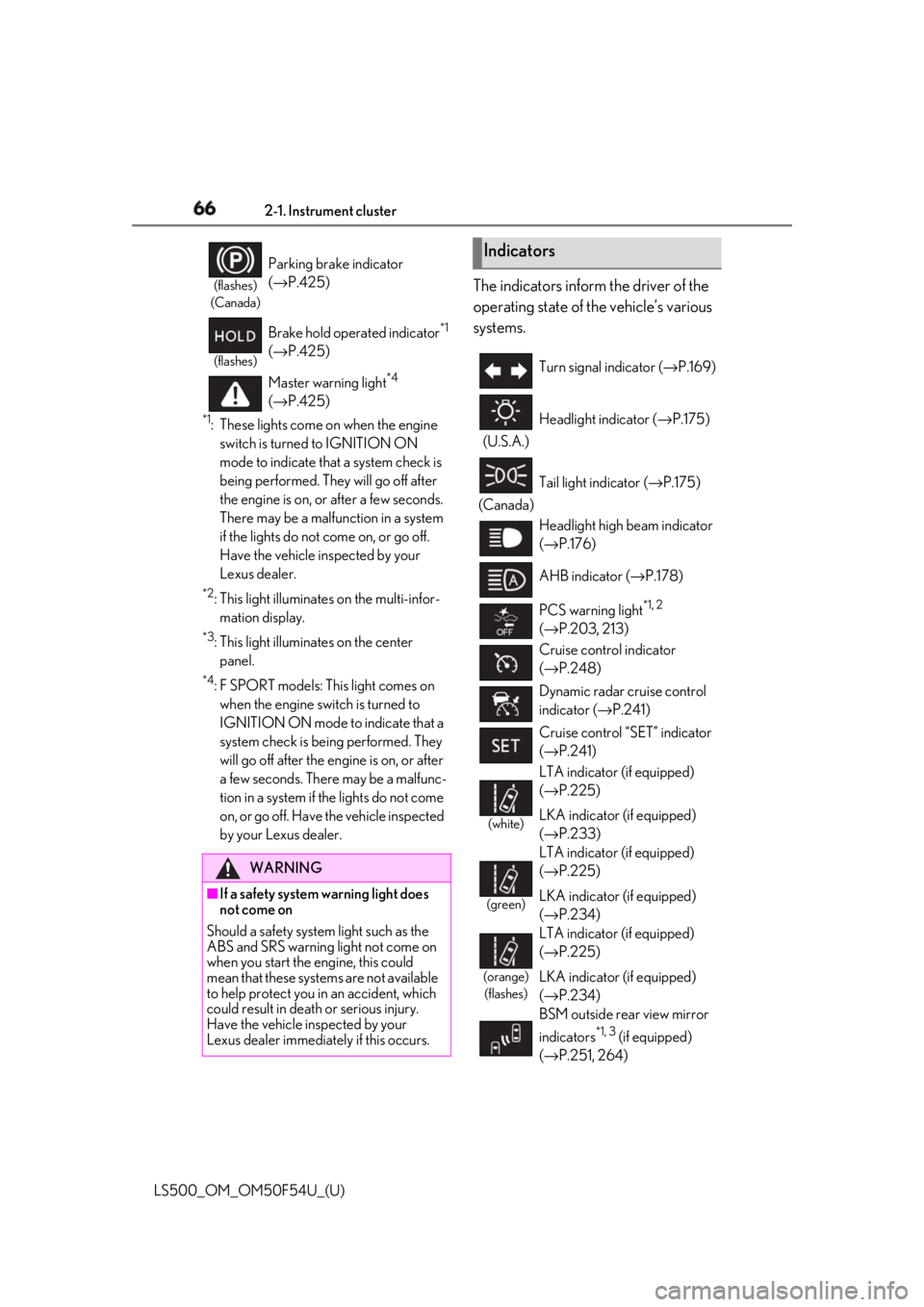
66 2-1. Instrument cluster
LS500_OM_OM50F54U_(U) *1
: These lights come on when the engine
switch is turned to IGNITION ON
mode to indicate that a system check is
being performed. They will go off after
the engine is on, or after a few seconds.
There may be a malfunction in a system
if the lights do not come on, or go off.
Have the vehicle inspected by your
Lexus dealer. *2
: This light illuminates on the multi-infor-
mation display. *3
: This light illuminates on the center
panel. *4
: F SPORT models: This light comes on
when the engine switch is turned to
IGNITION ON mode to indicate that a
system check is being performed. They
will go off after the en gine is on, or after
a few seconds. There may be a malfunc-
tion in a system if the lights do not come
on, or go off. Have the vehicle inspected
by your Lexus dealer. The indicators inform the driver of the
operating state of the vehicle’s various
systems.(flashes)
(Canada)
Parking brake indicator
( → P.425)(flashes)
Brake hold operated indicator *1
( → P.425)
Master warning light *4
( → P.425)
WARNING
■
If a safety system warning light does
not come on
Should a safety system light such as the
ABS and SRS warning light not come on
when you start the engine, this could
mean that these systems are not available
to help protect you in an accident, which
could result in death or serious injury.
Have the vehicle inspected by your
Lexus dealer immediately if this occurs. Indicators Turn signal indicator ( → P.169)
(U.S.A.) Headlight indicator ( → P.175)
(Canada) Tail light indicator ( → P.175)
Headlight high beam indicator
( → P.176)
AHB indicator ( → P.178)
PCS warning light *1, 2
( → P.203, 213)
Cruise control indicator
( → P.248)
Dynamic radar cruise control
indicator ( → P.241)
Cruise control “SET” indicator
( → P.241)
(white)LTA indicator (if equipped)
( → P.225)
LKA indicator (if equipped)
( → P.233)
(green) LTA indicator (if equipped)
( → P.225)
LKA indicator (if equipped)
( → P.234)
(orange)
(flashes) LTA indicator (if equipped)
( → P.225)
LKA indicator (if equipped)
( → P.234)
BSM outside rear view mirror
indicators *1, 3
(if equipped)
( → P.251, 264)
Page 67 of 514
672-1. Instrument cluster
LS500_OM_OM50F54U_(U) 2
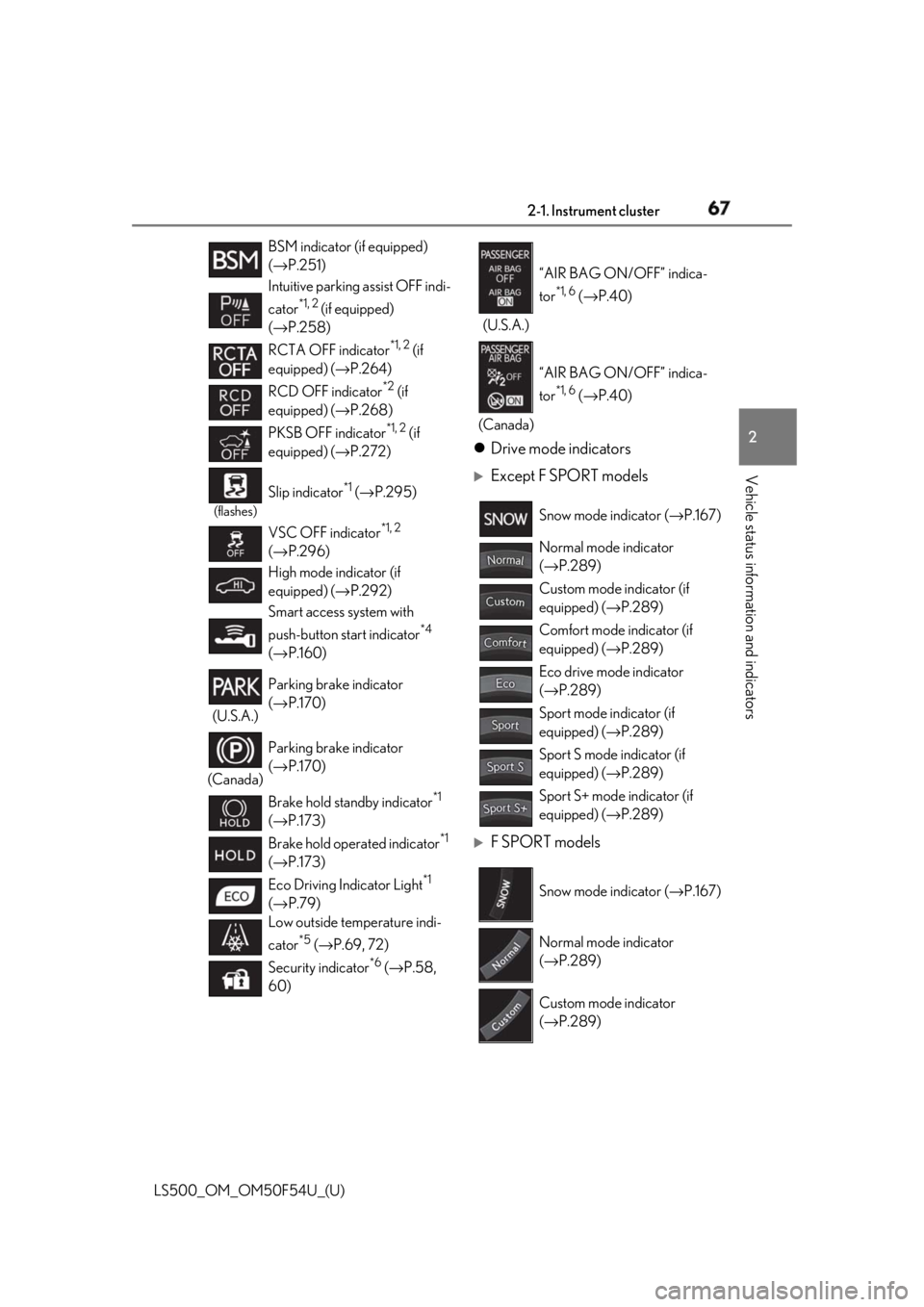
Vehicle status information and indicators Drive mode indicators
Except F SPORT models
F SPORT modelsBSM indicator (if equipped)
( → P.251)
Intuitive parking assist OFF indi-
cator *1, 2
(if equipped)
( → P.258)
RCTA OFF indicator *1, 2
(if
equipped) ( → P.264)
RCD OFF indicator *2
(if
equipped) ( → P.268)
PKSB OFF indicator *1, 2
(if
equipped) ( → P.272)(flashes)
Slip indicator *1
( → P.295)
VSC OFF indicator *1, 2
( → P.296)
High mode indicator (if
equipped) ( → P.292)
Smart access system with
push-button start indicator *4
( → P.160)
(U.S.A.) Parking brake indicator
( → P.170)
(Canada) Parking brake indicator
( → P.170)
Brake hold standby indicator *1
( → P.173)
Brake hold operated indicator *1
( → P.173)
Eco Driving Indicator Light *1
( → P.79)
Low outside temperature indi-
cator *5
( → P.69, 72)
Security indicator *6
( → P.58,
60) (U.S.A.) “AIR BAG ON/OFF” indica-
tor *1, 6
( → P.40)
(Canada) “AIR BAG ON/OFF” indica-
tor *1, 6
( → P.40)
Snow mode indicator ( → P.167)
Normal mode indicator
( → P.289)
Custom mode indicator (if
equipped) ( → P.289)
Comfort mode indicator (if
equipped) ( → P.289)
Eco drive mode indicator
( → P.289)
Sport mode indicator (if
equipped) ( → P.289)
Sport S mode indicator (if
equipped) ( → P.289)
Sport S+ mode indicator (if
equipped) ( → P.289)
Snow mode indicator ( → P.167)
Normal mode indicator
( → P.289)
Custom mode indicator
( → P.289)
Page 82 of 514

82 2-1. Instrument cluster
LS500_OM_OM50F54U_(U) Eco Driving Indicator Light Select to enable/disable the Eco Driving
Indicator Light.
Default setting Select to reset the meter display settings to
the default setting. ■
Vehicle functions and settings that
can be changed
→ P.468 ■
Suspension of the settings display●
Some settings cannot be changed while
driving. When changi ng settings, park
the vehicle in a safe place.●
If a warning message is displayed, opera-
tion of the settings display will be sus-
pended.
Displays suggestions to the driver in
the following situations. To select a
response to a displayed suggestion,
use the meter control switches. ■
Suggestion to turn off the head-
lights
If the headlights are left on for a certain
amount of time with the headlight
switch in after the engine switch
has been turned off, a suggestion mes-
sage will be displayed asking if you
wish to turn the headlights off.
To turn the headlight s off, select “Yes”.If a front door is opened after the engine
switch is turned off, this suggestion mes-
sage will not be displayed.
■
Customization
Some functions can be customized.
( → P.468)
WARNING■
Cautions during setting up the dis-
play
As the engine needs to be running
during setting up the display, ensure that
the vehicle is parked in a place with ade-
quate ventilation. In a closed area such as
a garage, exhaust gases including harm-
ful carbon monoxide (CO) may collect
and enter the vehicle. This may lead to
death or a serious health hazard.
NOTICE
■
During setting up the display
To prevent battery discharge, ensure that
the engine is running while setting up the
display features.
Suggestion function
Page 85 of 514

852-1. Instrument cluster
LS500_OM_OM50F54U_(U) 2
Vehicle status information and indicators ■
Enabling/disabling the head-up dis-
play
Press the HUD switch.
■
Changing settings of the head-up
display
The following settings can be changed
on of the multi-information display.
( → P.468)
Brightness and vertical position of
the head-up display Select to adjust the brightness or vertical
position of the head-up display.
Tachometer/Eco Driving Indicator Select to display the tachometer, Eco Driv-
ing Indicator or no content.
Display content Select to enable/dis able the following
items:
• Route guidance to destination/street
name
• Driving support system display *
• Compass (heading-up display)
• Audio system operation status *
: Make sure to enable this display when
using the driving support systems
Display angle Select to adjust the angle of the head-up
display. ■
Enabling/disabling of the head-up dis-
play
If the head-up display is disabled, it will
remain disabled when the engine switch is
turned off then back to IGNITION ON
mode. ■
Display brightness
The brightness of the head-up display can
be adjusted on of the multi-information
display. Also, it is automatically adjusted
according to the ambient brightness. ■
Head-up display automatic position
adjustment
If the display position is recorded into mem-
ory, the head-up display will be automati-
cally adjusted to th e desired position.
( → P.127) ■
When the battery is disconnected
The customize settings of the head-up dis-
play will be reset.Using the head-up display
WARNING■
Caution for changing settings of the
head-up display
As the engine needs to be running while
changing the settings of the head-up dis-
play, ensure that the vehicle is parked in a
place with adequate ventilation. In a
closed area such as a garage, exhaust
gases including harmful carbon monox-
ide (CO) may collect and enter the vehi-
cle. This may lead to death or a serious
health hazard.
NOTICE
■
When changing the settings of the
head-up display
To prevent battery discharge, ensure that
the engine is running while the changing
the settings of the head-up display.
Page 86 of 514

86 2-1. Instrument cluster
LS500_OM_OM50F54U_(U) Displays the operational status of the
following systems:
LTA (Lane Tracing Assist) (if
equipped) ( → P.221)
LKA (Lane-Keeping Assist) (if
equipped) ( → P.231)
Dynamic radar cruise control with
full-speed range ( → P.241)Details of content displayed on the
head-up display may differ from that dis-
played on the multi-information display. For
details, refer to the explanation of each sys-
tem.
Pop-up displays for the following sys-
tems will be displayed when necessary. ■
Driving support systems
Displays a warning/suggestion/advice
message or the operating state of a rel-
evant system.
PCS (Pre-Collision System)
( → P.200, 210)
FCTA (Front Cross Traffic Alert) (if
equipped) ( → P.218)
Intuitive parking assist (if equipped)
( → P.257)
Parking Support Brake function (for
static objects) (if equipped)
( → P.277)
Brake Override System ( → P.151)
Drive-Start Control ( → P.151)
Details of content displayed on the head-up display may differ from that dis-
played on the multi-information display. For
details, refer to the explanation of each sys-
tem. ■
/ icons
These icons are linked to the
multi-information display
: Master warning icon Displayed when a warn ing message is dis-
played on the multi-information display.
( → P.428)
: Information icon Displayed when a suggestion pop-up dis-
play ( → P.82) or advice pop-up display is
displayed on the multi-information display. ■
Warning message
Some warning messages are displayed
when necessary, according to certain
conditions. Details of content displayed on the
head-up display may differ from that dis-
played on the multi-information display. ■
Audio system operation status
Displayed when an audio remote con-
trol switch on the steering wheel is
operated. ■
Hands-free system status
Displayed when the hands-free system
is operated. ■
When a pop-up display is displayed
When a pop-up display is displayed, a cur-
rent display may no long er be displayed. In
this case, the display will return after the
pop-up display disappears.Driving support system display
area
Pop-up display
Page 95 of 514
953-1. Key information
LS500_OM_OM50F54U_(U) 3
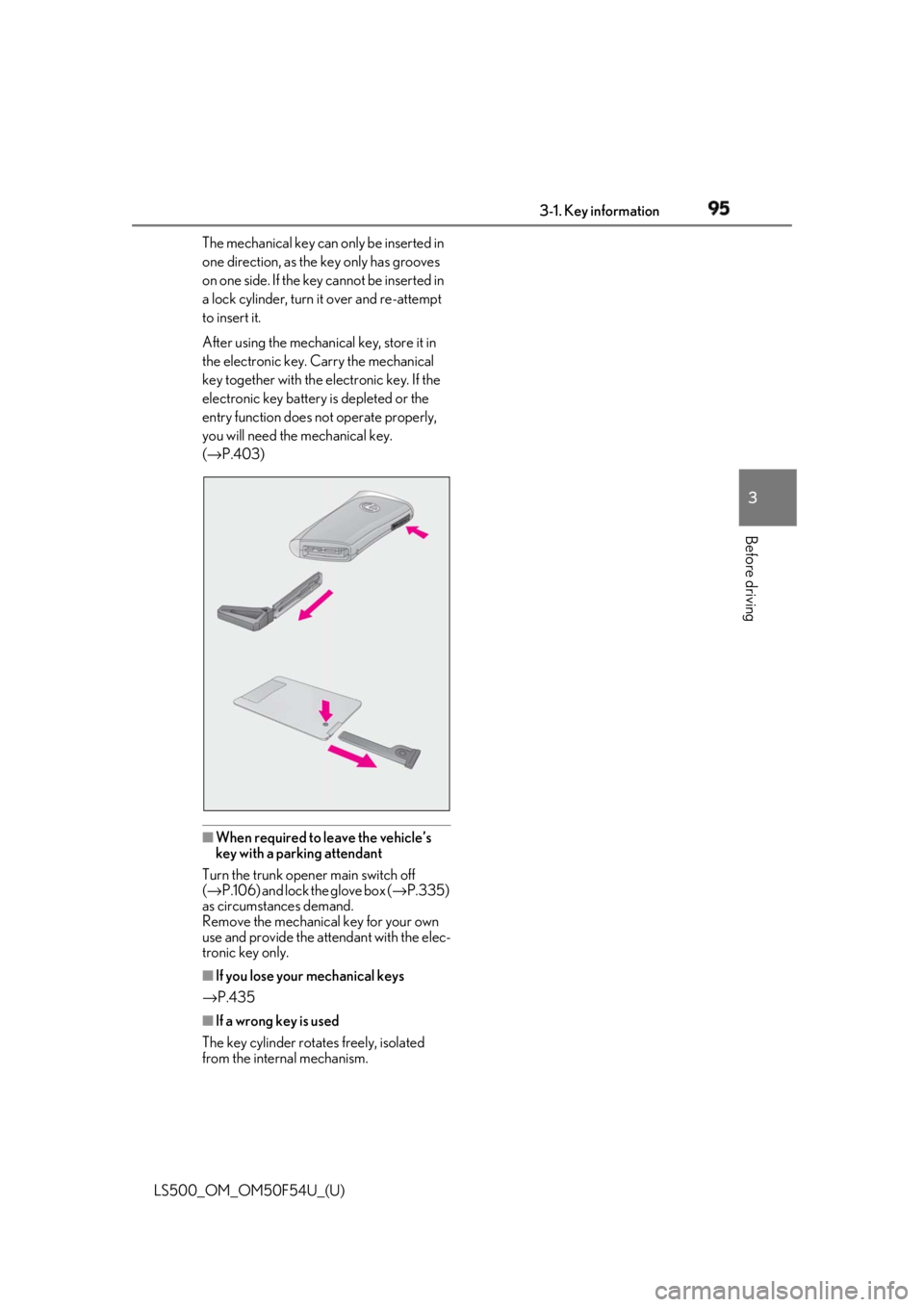
Before driving The mechanical key can only be inserted in
one direction, as the key only has grooves
on one side. If the key cannot be inserted in
a lock cylinder, turn it over and re-attempt
to insert it.
After using the mechanical key, store it in
the electronic key. Carry the mechanical
key together with the electronic key. If the
electronic key battery is depleted or the
entry function does not operate properly,
you will need the mechanical key.
( → P.403)
■
When required to leave the vehicle’s
key with a parking attendant
Turn the trunk opener main switch off
( → P.106) and lock the glove box ( → P.335)
as circumstances demand.
Remove the mechanical key for your own
use and provide the attendant with the elec-
tronic key only.
■
If you lose your mechanical keys
→ P.435
■
If a wrong key is used
The key cylinder rotates freely, isolated
from the internal mechanism.
Page 105 of 514

1053-2. Opening, closing and locking the doors and trunk
LS500_OM_OM50F54U_(U) 3
Before driving ■
Fall-down protection function (vehicles
with power trunk opener and closer)
While the trunk lid is opening automatically,
applying excessive force to it will stop the
opening operation to prevent the trunk lid
from rapidly falling down. ■
Jam protection function (vehicles with
power trunk opener and closer)
While the trunk lid is closing automatically,
the trunk lid will stop closing and open if
something gets caught. ■
Internal trunk release lever
The trunk lid can be opened by pulling the
glow-in-the-dark lever located on the inside
of the trunk lid to the side.
The lever will continue to glow for some
time after the trunk lid is closed.
■
Using the mechanical key
The trunk can be also opened using the
mechanical key. ( → P.436)
If the trunk is unlocked using the mechani-
cal key, the power trunk lid and trunk easy
closer will not be operational. To return
them to an operational state, fully close the
trunk lid by hand. ■
If the smart access system with
push-button start or the wireless remote
control does not operate properly
Use the mechanical key to unlock the trunk.
( → P.436)
Replace the key battery with a new one if it
is depleted. ( → P.403)
■
Situations in which the Hands Free
Power Trunk Lid may operate uninten-
tionally (if equipped)
In the following situations, the Hands Free
Power Trunk Lid may operate unintention-
ally.
To prevent unintentional operation, do not leave the electronic key in the trunk and
keep it out of the effective range (detection
area) or disable the Hands Free Power
Trunk Lid (kick sensor). ●
When a large amount of water is applied
to the rear bumper, such as when the
vehicle is being washed or in heavy rain ●
When dirt is wiped off the rear bumper ●
When a small animal or small object, such
as a ball, moves under the rear bumper ●
When an object is moved from under the
rear bumper ●
When snow, etc. is removed from under
the rear bumper ●
If someone is swinging their legs while sit-
ting on the rear bumper ●
If the legs or another part of someone’s
body contacts the rear bumper while
passing by the vehicle ●
When the vehicle is parked near an elec-
trical noise source which affects the sen-
sitivity of the Hands Free Power Trunk Lid,
such as a pay parking spot, gas station,
electrically heated road, or fluorescent
light ●
When the vehicle is near a TV tower,
electric power plant, radio station, large
display, airport or ot her facility that gen-
erates strong radio waves or electrical
noise ●
When the vehicle is parked in a place
where objects, such as grass, move near
the rear bumper ●
If luggage, etc. is set near the rear
bumper ●
If accessories or a vehicle cover is
installed/removed ne ar the rear bumper
●
When the vehicle is being towed
■
Situations in which the Hands Free
Power Trunk Lid may not operate prop-
erly (if equipped)
●
In the following situations, the Hands Free
Power Trunk Lid may not operate prop-
erly:
• If the rear bumper is strongly hit with a
foot or is touched for a while
Make sure not to touch the rear bumper