2018 LEXUS LS500 park
[x] Cancel search: parkPage 160 of 514

160 4-2. Driving procedures
LS500_OM_OM50F54U_(U) 4-2.Driving procedures
1 Press the parking brake switch to
check that the parking brake is set.
( → P.170)The parking brake indicator will come on.
2 Firmly depress the brake pedal. and a message will be displayed on
the multi-information display.
If it is not displayed, the engine cannot be
started.
3 Press the engine switch shortly and
firmly.When operating the engine switch, one
short, firm press is enough. It is not neces-
sary to press and hold the switch.
The engine will crank until it starts or for up
to 30 seconds, whichever is less.
Continue depressing the brake pedal until
the engine is completely started.
The engine can be started from any engine
switch mode. ■
Engine switch illumination
According to the situation, the engine
switch illumination operates as follows. ●
When a door is opened, or the engine
switch mode is changed from ACCES-
SORY or IGNITION ON mode to off,
the engine switch illumination slowly
blinks. ●
When depressing the brake pedal with
carrying the electronic key on your per-
son, the engine switch illumination rapidly
blinks. ●
When the engine sw itch is in ACCES-
SORY or IGNITION ON mode, the
engine switch illumination illuminates. ■
If the engine does not start ●
The engine immobilizer system may not
have been deactivated. ( → P.58)
Contact your Lexus dealer. ●
If a message related to start-up is shown
on the multi-information display, read the
message and follow the instructions. ■
If the battery is discharged
The engine cannot be started using the
smart access system with push-button start.
Refer to P.438 to restart the engine. ■
Electronic key battery depletion
→ P.92 ■
Conditions affecting operation
→ P.108 ■
Notes for the entry function
→ P.109
■
Steering lock function
●
After turning the engine switch off and
opening and closing the doors, the steer-
ing wheel will be lock ed due to the steer-
ing lock function. Operating the engine
switch again automatically cancels the
steering lock.
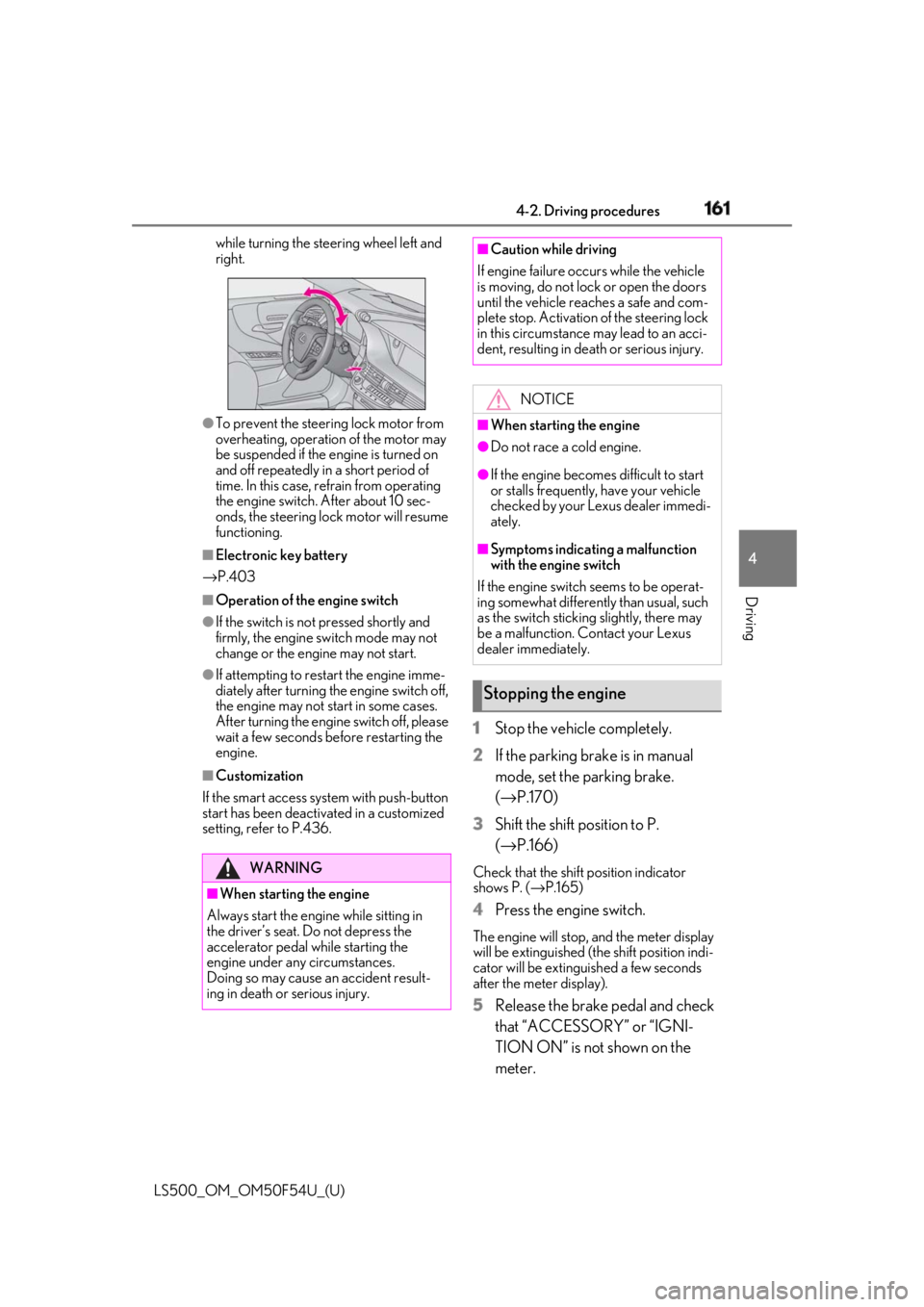
●
When the steering lock cannot be
released, “Push Engine Switch While
Turning Steering Whee l in Either Direc-
tion” will be displayed on the multi-infor-
mation display.
Press the engine switch shortly and firmly Engine (ignition) switch Performing the following opera-
tions when carryin g the electronic
key on your person starts the
engine or changes engine switch
modes.
Starting the engine
Page 161 of 514
1614-2. Driving procedures
LS500_OM_OM50F54U_(U) 4
Driving while turning the steering wheel left and
right.
●
To prevent the steering lock motor from
overheating, operation of the motor may
be suspended if the engine is turned on
and off repeatedly in a short period of
time. In this case, refrain from operating
the engine switch. After about 10 sec-
onds, the steering lock motor will resume
functioning.■
Electronic key battery
→ P.403■
Operation of the engine switch●
If the switch is not pressed shortly and
firmly, the engine switch mode may not
change or the engine may not start.●
If attempting to restart the engine imme-
diately after turning the engine switch off,
the engine may not start in some cases.
After turning the engine switch off, please
wait a few seconds before restarting the
engine.■
Customization
If the smart access sy stem with push-button
start has been deactivated in a customized
setting, refer to P.436. 1 Stop the vehicle completely.
2 If the parking brake is in manual
mode, set the parking brake.
( → P.170)
3 Shift the shift position to P.
( → P.166) Check that the shift position indicator
shows P. ( → P.165)
4 Press the engine switch. The engine will stop, and the meter display
will be extinguished (the shift position indi-
cator will be extinguished a few seconds
after the meter display).
5 Release the brake pedal and check
that “ACCESSORY” or “IGNI-
TION ON” is not shown on the
meter.WARNING
■
When starting the engine
Always start the engine while sitting in
the driver’s seat. Do not depress the
accelerator pedal while starting the
engine under any circumstances.
Doing so may cause an accident result-
ing in death or serious injury. ■
Caution while driving
If engine failure occurs while the vehicle
is moving, do not lock or open the doors
until the vehicle reaches a safe and com-
plete stop. Activation of the steering lock
in this circumstance may lead to an acci-
dent, resulting in death or serious injury.
NOTICE■
When starting the engine ●
Do not race a cold engine. ●
If the engine becomes difficult to start
or stalls frequently, have your vehicle
checked by your Lexus dealer immedi-
ately. ■
Symptoms indicating a malfunction
with the engine switch
If the engine switch seems to be operat-
ing somewhat differently than usual, such
as the switch sticking slightly, there may
be a malfunction. Contact your Lexus
dealer immediately.
Stopping the engine
Page 163 of 514
1634-2. Driving procedures
LS500_OM_OM50F54U_(U) 4
Driving ■
When the shift control system malfunc-
tions
When attempting to turn the engine switch
off while there is a malfunction in the shift
control system, the engine switch mode
may change to ACCESSORY mode. In this
case, ACCESSORY mode may be turned
off by applying the parking brake and press-
ing the engine switch again. If there is a mal-
function in the system, have the vehicle
inspected by your Lexus dealer immedi-
ately.
*1
: To improve fuel efficiency and reduce
noise, set the shift position in D for nor-
mal driving. You can choose gear range
suitable for your driving situation by
operating the paddle shift switches. *2
: Any gear range can be fixed when driv-
ing in M mode.
■
For the shift positions ●
When the engine switch is off or in
ACCESSORY mode, the shift position
cannot be changed.
●
When the engine swit ch is in IGNITION
ON mode, the shift position can only be
changed to N.
●
When the engine is running, the shift
position can be changed from P to D, N
or R.
●
The shift position can only be changed to
M directly from D.
In addition, if an attempt is made to change NOTICE■
To prevent battery discharge●
Do not leave the engine switch in
ACCESSORY or IGNITION ON
mode for long period s of time without
the engine running.●
If “ACCESSORY” or “IGNITION
ON” is displayed on the meter, the
engine switch is not off.
Exit the vehicle after turning the
engine switch off. Automatic transmission Select the shift position depending
on your purpose and situation.
Shift position purpose and func-
tions Shift posi-
tion Objective or function
P Parking the vehicle/starting
the engine
R Reversing
N Neutral
(Condition in which the
power is not transmitted)
D
Normal driving *1
M
M mode driving *2
( → P.168)
Page 165 of 514
1654-2. Driving procedures
LS500_OM_OM50F54U_(U) 4
Driving
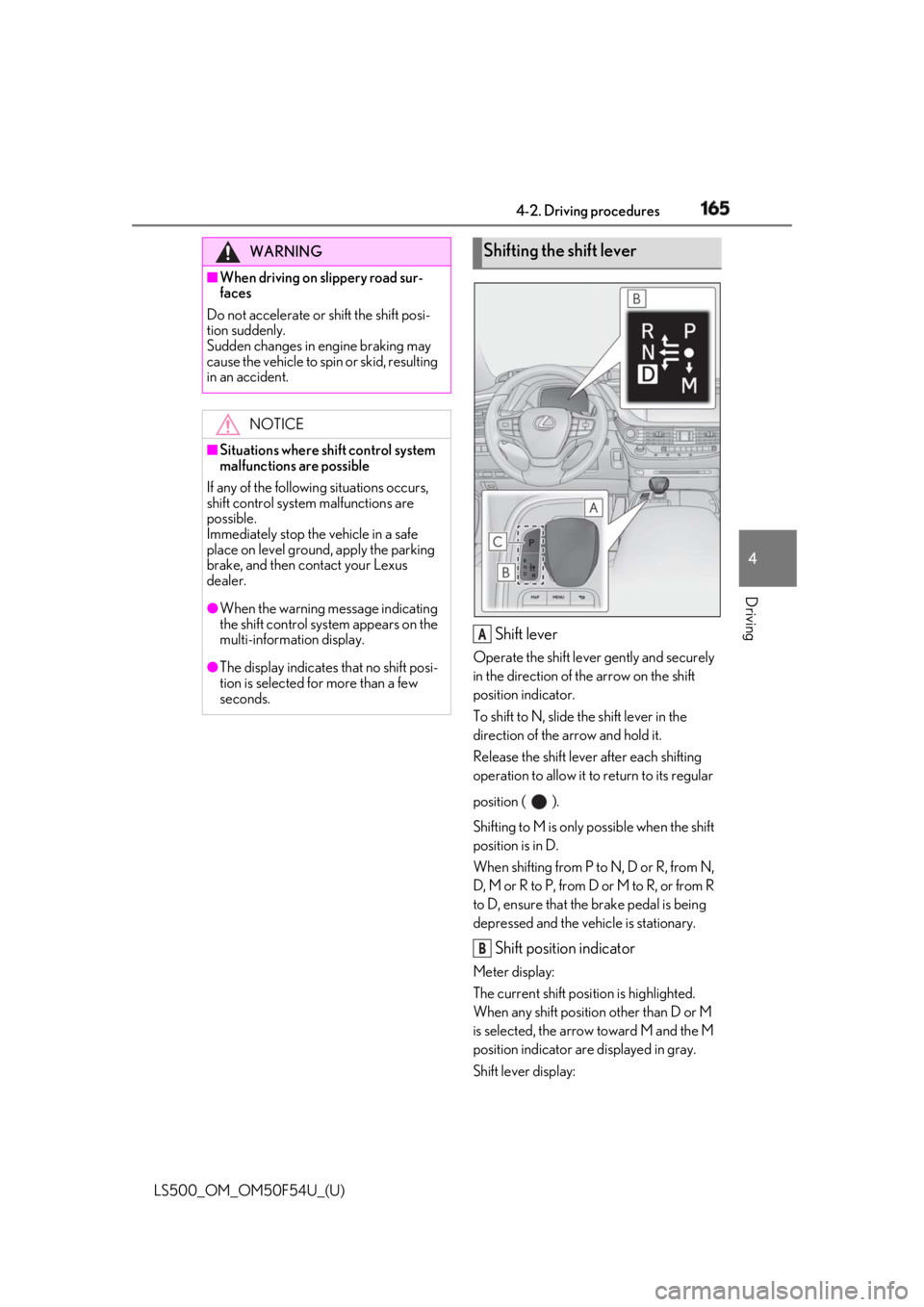
Shift lever Operate the shift lever gently and securely
in the direction of the arrow on the shift
position indicator.
To shift to N, slide the shift lever in the
direction of the arrow and hold it.
Release the shift lever after each shifting
operation to allow it to return to its regular
position ( ).
Shifting to M is only possible when the shift
position is in D.
When shifting from P to N, D or R, from N,
D, M or R to P, from D or M to R, or from R
to D, ensure that the brake pedal is being
depressed and the vehicle is stationary.
Shift position indicator Meter display:
The current shift position is highlighted.
When any shift position other than D or M
is selected, the arrow toward M and the M
position indicator are displayed in gray.
Shift lever display:WARNING■
When driving on slippery road sur-
faces
Do not accelerate or shift the shift posi-
tion suddenly.
Sudden changes in engine braking may
cause the vehicle to spin or skid, resulting
in an accident.
NOTICE■
Situations where sh ift control system
malfunctions are possible
If any of the following situations occurs,
shift control system malfunctions are
possible.
Immediately stop the vehicle in a safe
place on level ground, apply the parking
brake, and then contact your Lexus
dealer. ●
When the warning message indicating
the shift control syst em appears on the
multi-information display.●
The display indicates that no shift posi-
tion is selected for more than a few
seconds. Shifting the shift lever
A
B
Page 166 of 514

166 4-2. Driving procedures
LS500_OM_OM50F54U_(U) The current shift position is illuminated.
When selecting the shift position, make
sure that the shift position has been
changed to the desired position by check-
ing the shift position indicator provided on
the instrument cluster.
P position switch
■
When shifting the shift position to P
Fully stop the vehicle and set the park-
ing brake, and then press the P position
switch. When the shift position is changed to P, the
switch illuminates.
Check that the shift position indicator
shows P. ■
Shifting the shift position from P to
other positions
While depressing the brake pedal
firmly, operate the shift lever. If the
shift lever is operated without
depressing the brake pedal, the
buzzer will sound and the shifting
operation will be disabled.
When selecting the shift position,
make sure that the shift position has
been changed to the desired posi-
tion by checking the shift position
indicator provided on the instru-
ment cluster.
The shift position cannot be
changed from P to M directly. ■
Automatic P position selection function
In the following situations, the shift position
is automatically changed to P. ●
When pressing the engine switch with the
vehicle stopped while th e engine switch is
in IGNITION ON mode and the shift
position is in a position other than P (after
the shift position has changed to P, the
engine switch will turn off) *
●
When the vehicle is stopped after the
engine has been stopped in an emer-
gency while driving ●
When voltage of the battery drops while
the shift position is in a position other than
P *
: When the engine switch is pressed while
driving at extremely slow speeds, such
as immediately before stopping the vehi-
cle, the shift position may automatically
change to P. Make su re that the vehicle
is completely stopped before pressing
the engine switch.
■
If the shift position cannot be shifted
from P
There is a possibility th at the battery is dis-WARNING■
For the shift lever●
Do not remove the sh ift lever knob or
use anything but a genuine Lexus shift
lever knob. Also, do not hang anything
on the shift lever.
Doing so could prevent the shift lever
from returning to position, causing
unexpected accidents to occur when
the vehicle is in motion.●
In order to prevent the shift position
from accidentally being changed, do
not touch the shift lever when not using
them.
P position switch C
Page 170 of 514
170 4-2. Driving procedures
LS500_OM_OM50F54U_(U) ■
Customization
Some functions can be customized.
( → P.468)
■
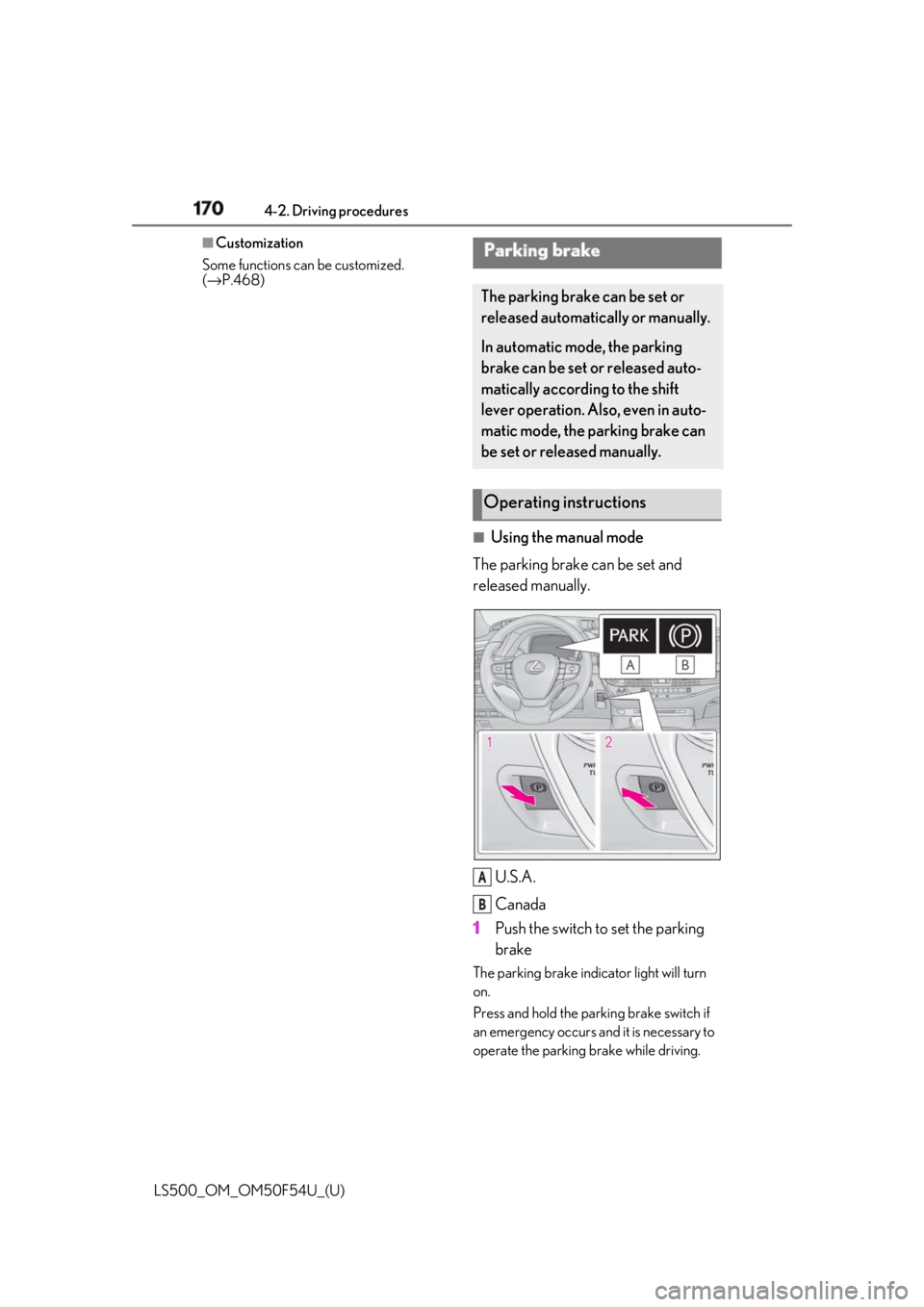
Using the manual mode
The parking brake can be set and
released manually.
U.S.A.
Canada
1 Push the switch to set the parking
brake The parking brake indi cator light will turn
on.
Press and hold the parking brake switch if
an emergency occurs and it is necessary to
operate the parking brake while driving.Parking brake The parking brake can be set or
released automatically or manually.
In automatic mode, the parking
brake can be set or released auto-
matically according to the shift
lever operation. Also, even in auto-
matic mode, the parking brake can
be set or released manually.
Operating instructions
A
B
Page 171 of 514
1714-2. Driving procedures
LS500_OM_OM50F54U_(U) 4
Driving 2 Pull the switch to release the park-
ing brake• Operate the parking brake switch while
depressing the brake pedal.
• Using the parking brake automatic
release function, the parking brake can
be released by depressing the accelera-
tor pedal. When using this function,
slowly depress the accelerator pedal.
Make sure that the pa rking brake indicator
light turn off.
If the parking brake indicator light
flashes, operate the switch again.
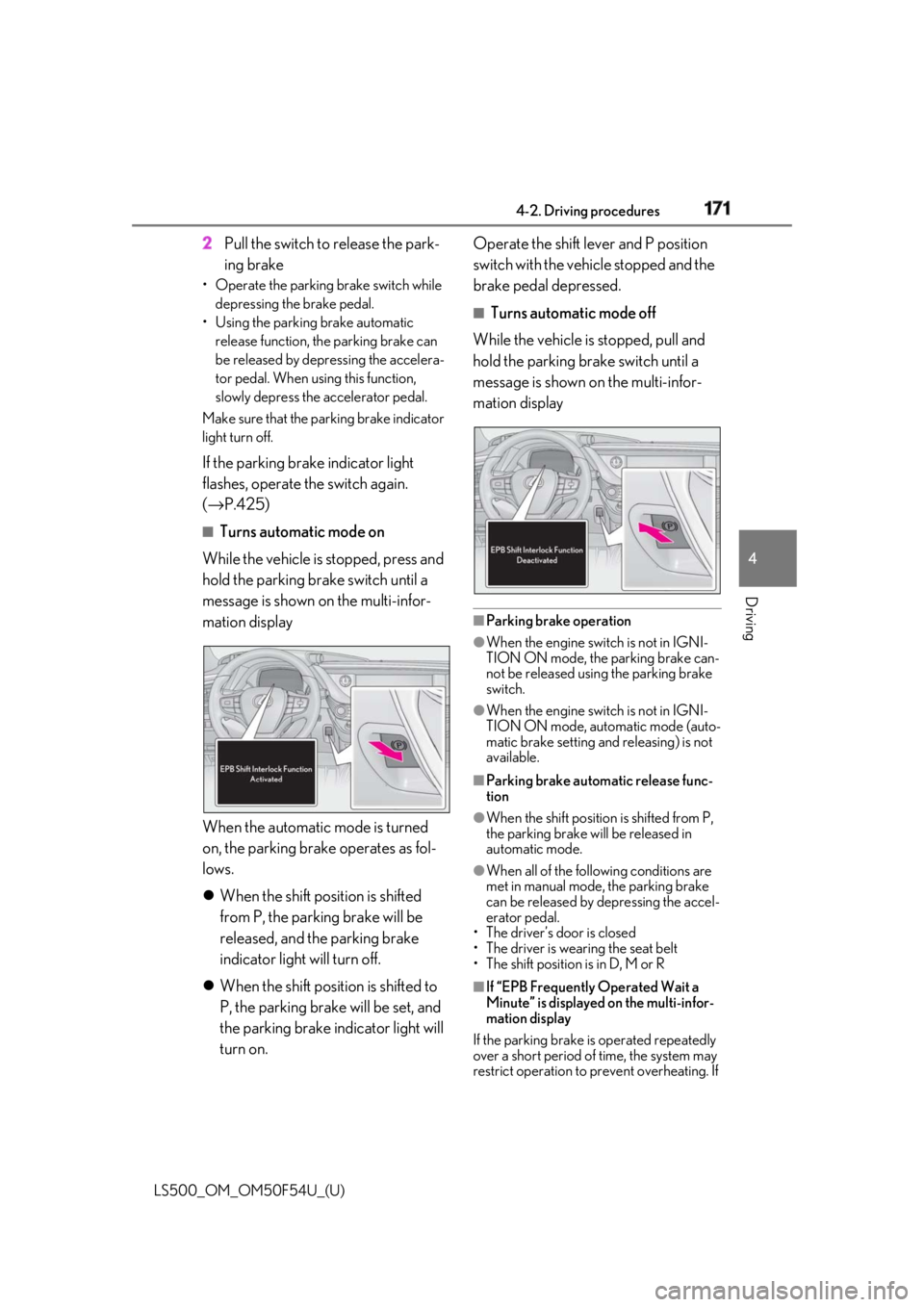
( → P.425) ■
Turns automatic mode on
While the vehicle is stopped, press and
hold the parking brake switch until a
message is shown on the multi-infor-
mation display
When the automatic mode is turned
on, the parking brake operates as fol-
lows.
When the shift position is shifted
from P, the parking brake will be
released, and the parking brake
indicator light will turn off.
When the shift position is shifted to
P, the parking brake will be set, and
the parking brake indicator light will
turn on. Operate the shift lever and P position
switch with the vehicle stopped and the
brake pedal depressed. ■
Turns automatic mode off
While the vehicle is stopped, pull and
hold the parking brake switch until a
message is shown on the multi-infor-
mation display
■
Parking brake operation ●
When the engine switch is not in IGNI-
TION ON mode, the parking brake can-
not be released using the parking brake
switch. ●
When the engine switch is not in IGNI-
TION ON mode, auto matic mode (auto-
matic brake setting an d releasing) is not
available. ■
Parking brake automatic release func-
tion ●
When the shift position is shifted from P,
the parking brake will be released in
automatic mode. ●
When all of the follo wing conditions are
met in manual mode, the parking brake
can be released by depressing the accel-
erator pedal.
• The driver’s door is closed
• The driver is wearing the seat belt
• The shift position is in D, M or R
■
If “EPB Frequently Operated Wait a
Minute” is displayed on the multi-infor-
mation display
If the parking brake is operated repeatedly
over a short period of time, the system may
restrict operation to prevent overheating. If
Page 172 of 514

172 4-2. Driving procedures
LS500_OM_OM50F54U_(U) this happens, refrain from operating the
parking brake. Normal operation will return
after about 1 minute. ■
If “EPB Activation Stopped Incom-
pletely” or “EPB unavailable” is dis-
played on the multi-information display
Operate the parking brake switch. If the
message does not disappear after operat-
ing the switch several times, the system may
be malfunctioning. Have the vehicle
inspected by your Lexus dealer. ■
Parking brake operation sound
When the parking brake operates, a motor
sound (whirring sound) may be heard. This
does not indicate a malfunction. ■
Parking brake operation●
Depending on the engine switch mode,
the parking brake indi cator light will turn
on and stay on as described below:
IGNITION ON mode: Comes on until
the parking brake is released.
Not in IGNITION ON mode: Stays on
for approximately 15 seconds. ●
When the engine switch is turned off with
the parking brake set, the parking brake
indicator light will stay on for about 15
seconds. This does not indicate a mal-
function.■
When the parking brake switch mal-
functions
Automatic mode (automatic brake setting
and releasing) will be turned on automati-
cally. ■
Parking the vehicle
→ P.150
■
Parking brake engaged warning buzzer
A buzzer will sound if the vehicle is driven
with the parking brake engaged. “EPB
Applied” is displayed on the multi-informa-
tion display. (with the vehicle reached a
speed of 3 mph [5 km/h])
■
If the brake system warning light comes
on
→ P.418
■
Usage in winter time
→ P.299 WARNING■
When parking the vehicle
Do not leave a child in the vehicle alone.
The parking brake may be released unin-
tentionally and there is the danger of the
vehicle moving that may lead to an acci-
dent resulting in death or serious injury.
NOTICE■
When parking the vehicle
Before you leave the vehicle, set the
parking brake, shift the shift position to P
and make sure that the vehicle does not
move. ■
When the system malfunctions
Stop the vehicle in a safe place and
check the warning messages. ■
When the parking brake cannot be
released due to a malfunction
Driving the vehicle with the parking
brake set will lead to brake components
overheating, which may affect braking
performance and increase brake wear.
Have the vehicle inspected by your
Lexus dealer immediately if this occurs.