2018 JEEP GRAND CHEROKEE battery
[x] Cancel search: batteryPage 267 of 368

These effects can be reduced by timely rota-
tion of tires. The benefits of rotation are
especially worthwhile with aggressive tread
designs such as those on On/Off-Road type
tires. Rotation will increase tread life, help to
maintain mud, snow, and wet traction levels,
and contribute to a smooth, quiet ride.
Refer to the “Maintenance Plan” for the
proper maintenance intervals. More frequent
rotation is permissible if desired. The reasons
for any rapid or unusual wear should be
corrected prior to rotation being performed.
NOTE:
The premium Tire Pressure Monitor System
will automatically locate the pressure values
displayed in the correct vehicle position fol-
lowing a tire rotation.
The suggested rotation method is the
“rearward-cross” shown in the following dia-
gram.
STORING THE VEHICLE
If the vehicle should remain stationary for
more than a month, observe the following
precautions:
• Park your vehicle in a covered, dry and
possibly airy location the windows open
slightly.
• Check that the Electric Park Brake is not
engaged.
• Disconnect the negative (-) terminal from
the battery post and be sure that the battery
is fully charged. During storage check bat-
tery charge quarterly.• If you do not disconnect the battery from
the electrical system, check the battery
charge every 30 days.
• Clean and protect the painted parts by
applying protective waxes.
• Clean and protect polished metal parts by
applying protective waxes.
• Apply talcum powder to the front and rear
wiper blades and leave raised from the
glass.
• Cover the vehicle with an appropriate cover
taking care not to damage the painted sur-
face by dragging across dirty surfaces. Do
not use plastic sheeting which will not allow
the evaporation of moisture present on the
surface of the vehicle.
• Inflate the tires at a pressure of +7.25 psi
(+0.5 bar) higher than recommended on
the tire placard and check it periodically.
• Do not drain the engine cooling system.
• Whenever you leave the vehicle is station-
ary for two weeks or more, run idle the
engine for approximately five minutes, with
the air conditioning system on and high fan
speed. This will ensure a proper lubrication
Tire Rotation
265
Page 268 of 368

of the system, thus minimizing the possi-
bility of damage to the compressor when
the vehicle is put back into operation.
NOTE:
When the vehicle has not been started or
driven for at least 30 days, an Extended Park
Start Procedure is required to start the ve-
hicle. Refer to “Starting The Engine” in
“Starting And Operating” for further
information.
CAUTION!
Before removal of the positive and nega-
tive terminals to the battery, wait at least a
minute with ignition switch in the OFF
position and close the driver’s door. When
reconnecting the positive and negative ter-
minals to the battery be sure the ignition
switch is in the OFF position and the
driver’s door is closed.
BODYWORK
Preserving The Bodywork
Washing
• Wash your vehicle regularly. Always wash
your vehicle in the shade using a mild car
wash soap, and rinse the panels completely
with clear water.
• Use a high quality cleaner wax to remove
road film, stains and to protect your paint
finish. Take care never to scratch the paint.
• Avoid using abrasive compounds and power
buffing that may diminish the gloss or thin
out the paint finish.
CAUTION!
• Do not use abrasive or strong cleaning
materials such as steel wool or scouring
powder that will scratch metal and
painted surfaces.
• Use of power washers exceeding
1,200 psi (8,274 kPa) can result in
damage or removal of paint and decals.
Special Care
• If you drive on salted or dusty roads or if you
drive near the ocean, hose off the undercar-
riage at least once a month.
• It is important that the drain holes in the
lower edges of the doors, rocker panels, and
trunk be kept clear and open.
• If you detect any stone chips or scratches in
the paint, touch them up immediately. The
cost of such repairs is considered the re-
sponsibility of the owner.
• If your vehicle is damaged due to a collision
or similar cause that destroys the paint and
protective coating, have your vehicle re-
paired as soon as possible. The cost of such
repairs is considered the responsibility of
the owner.
•
If you carry special cargo such as chemicals,
fertilizers, de-icer salt, etc., be sure that such
materials are well packaged and sealed.
•If a lot of driving is done on gravel roads,
consider mud or stone shields behind each
wheel.
• An authorized dealer has touch up paint to
match the color of your vehicle.
SERVICING AND MAINTENANCE
266
Page 292 of 368
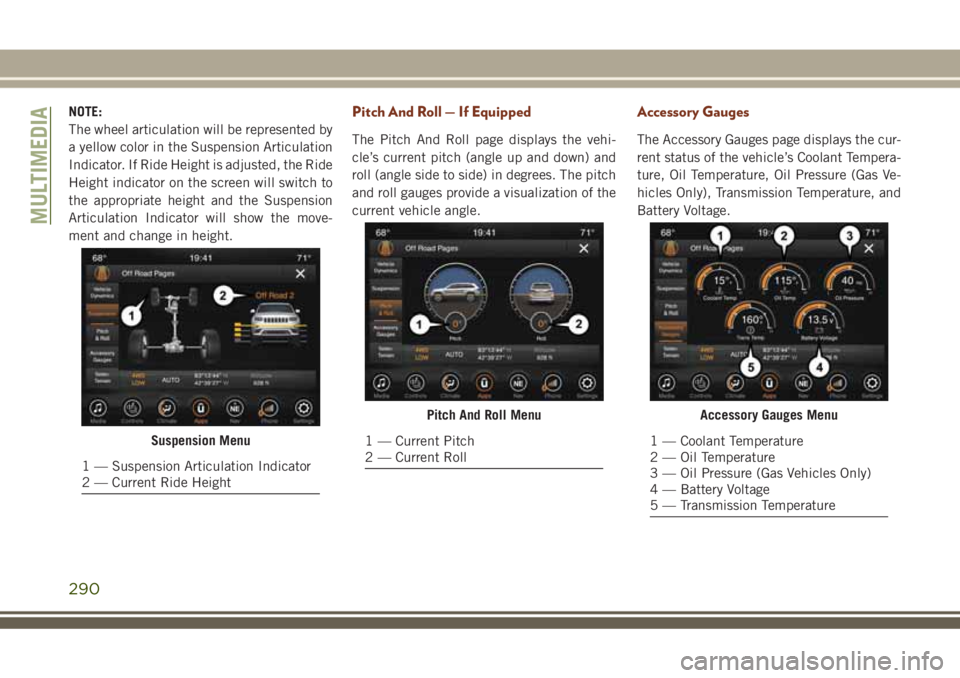
NOTE:
The wheel articulation will be represented by
a yellow color in the Suspension Articulation
Indicator. If Ride Height is adjusted, the Ride
Height indicator on the screen will switch to
the appropriate height and the Suspension
Articulation Indicator will show the move-
ment and change in height.Pitch And Roll — If Equipped
The Pitch And Roll page displays the vehi-
cle’s current pitch (angle up and down) and
roll (angle side to side) in degrees. The pitch
and roll gauges provide a visualization of the
current vehicle angle.
Accessory Gauges
The Accessory Gauges page displays the cur-
rent status of the vehicle’s Coolant Tempera-
ture, Oil Temperature, Oil Pressure (Gas Ve-
hicles Only), Transmission Temperature, and
Battery Voltage.
Suspension Menu
1 — Suspension Articulation Indicator
2 — Current Ride Height
Pitch And Roll Menu
1 — Current Pitch
2 — Current Roll
Accessory Gauges Menu
1 — Coolant Temperature
2 — Oil Temperature
3 — Oil Pressure (Gas Vehicles Only)
4 — Battery Voltage
5 — Transmission Temperature
MULTIMEDIA
290
Page 312 of 368
USB Port
• Connect your compatible device into the
USB Port using a USB cable. USB Memory
sticks with audio files can also be used.
Audio from the device can be played on the
vehicle’s sound system while providing
metadata (artist, track title, album, etc.)
information on the radio display.
• When connected, the compatible USB de-
vice can be controlled using the radio or
Steering Wheel Audio Controls to play, skip
to the next or previous track, browse, and
list the contents.
• The battery charges when plugged into the
USB port (if supported by the specific de-
vice).
• To route the USB cable out of the center
console, use the access cut out.NOTE:
When connecting your device for the first
time, the system may take several minutes to
read your music, depending on the number of
files. For example, the system will take ap-
proximately five minutes for every
1,000 songs loaded on the device. Also dur-
ing the reading process, the Shuffle and
Browse functions will be disabled. This pro-
cess is needed to ensure the full use of your
features and only happens the first time it is
connected. After the first time, the reading
process of your device will take considerably
less time unless changes are made or new
songs are added to the playlist.
Bluetooth Streaming Audio
If using a Bluetooth equipped device you may
also be able to stream music to your vehicle'ssound system. Your connected device must
be Bluetooth compatible and paired with
your system (see Uconnect Phone for pairing
instructions). You can access the music from
your connected Bluetooth device by pressing
the Bluetooth button on the touchscreen
while in Media mode.
UCONNECT REAR SEAT
ENTERTAINMENT (RSE)
SYSTEM — IF EQUIPPED
Your Rear Seat Entertainment System is de-
signed to give your family years of enjoyment.
You can play your favorite CDs, DVDs or
Blu-ray Discs, listen to audio over the wire-
less headphones, or plug and play a variety of
standard video games or audio devices.
MULTIMEDIA
310
Page 323 of 368

UCONNECT PHONE
Uconnect Phone (Bluetooth Hands Free Calling)
Uconnect 4 With 7–inch Display Radio Phone Menu
1 — Favorite Contacts
2 — Mobile Phone Battery Life
3 — Currently Paired Mobile Phone
4 — Siri
5 — Mute Microphone
6 — Transfer To/From Uconnect System
7 — Conference Call*
8 — Phone Settings
9 — Text Messaging**
10 — Direct Dial Pad11 — Recent Call Log
12 — Browse Phone Book Entries
13 — End Call
14 — Call/Redial/Hold
15 — Do Not Disturb
16 — Reply with Text Message
* — Conference call feature only available on GSM mobile de-
vices
** — Text messaging feature not available on all mobile phones
(requires Bluetooth MAP profile)
321
Page 324 of 368
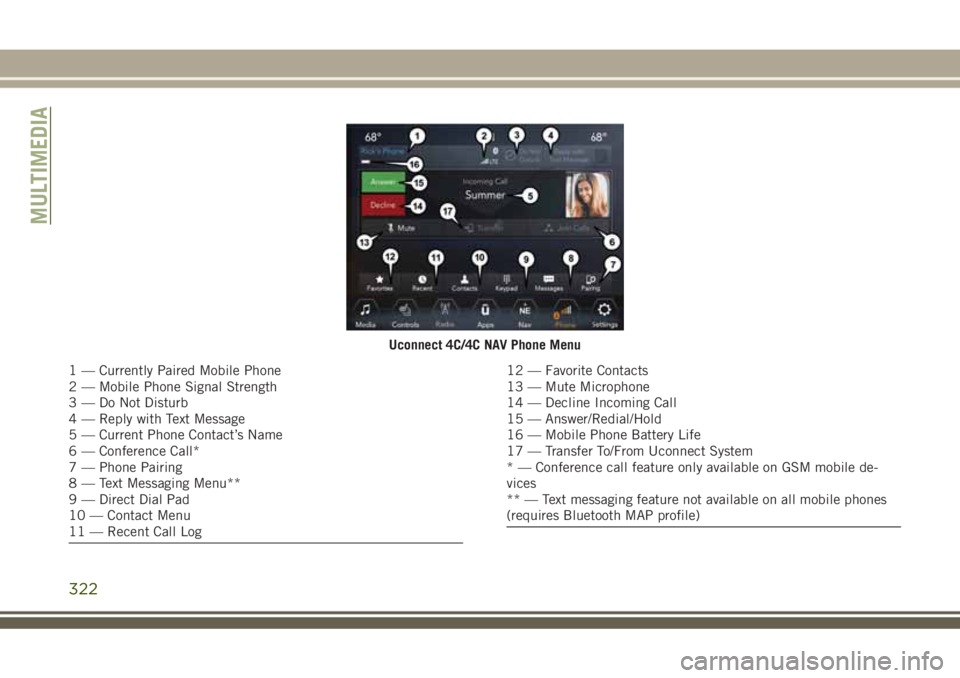
Uconnect 4C/4C NAV Phone Menu
1 — Currently Paired Mobile Phone
2 — Mobile Phone Signal Strength
3 — Do Not Disturb
4 — Reply with Text Message
5 — Current Phone Contact’s Name
6 — Conference Call*
7 — Phone Pairing
8 — Text Messaging Menu**
9 — Direct Dial Pad
10 — Contact Menu
11 — Recent Call Log12 — Favorite Contacts
13 — Mute Microphone
14 — Decline Incoming Call
15 — Answer/Redial/Hold
16 — Mobile Phone Battery Life
17 — Transfer To/From Uconnect System
* — Conference call feature only available on GSM mobile de-
vices
** — Text messaging feature not available on all mobile phones
(requires Bluetooth MAP profile)
MULTIMEDIA
322
Page 331 of 368
Helpful Tips And Common Questions To
Improve Bluetooth Performance With
Your Uconnect System
Mobile Phone won’t reconnect to system after
pairing:
• Set mobile phone to auto-connect or
trusted device in mobile phone Bluetooth
settings (Blackberry devices).
• Perform a factory reset on your mobile
phone. Refer to your mobile phone manu-
facturer or cellular provider for instruc-
tions.
• Many mobile phones do not automatically
reconnect after being restarted (hard re-
boot). Your mobile phone can still be con-
nected manually. Close all applications that
may be operating (refer to mobile phone
manufacturer’s instructions), and follow
“Pairing (Wirelessly Connecting) Your Mo-
bile Phone To The Uconnect System”.Mobile Phone won’t pair to system:
• Perform a hard reset in the mobile phone by
removing the battery (if removable — see
your mobile phone’s owner manual).
• Delete pairing history in mobile phone and
Uconnect system; usually found in phone’s
Bluetooth connection settings.
• Verify you are selecting “Uconnect” in the
discovered Bluetooth devices on your mo-
bile phone.
• If your vehicle system generates a pin code
the default is 0000.
Mobile Phonebook didn’t download:
• Check “Do not ask again,” then accept the
“phonebook download” request on your
mobile phone.
• Up to 5,000 contact names with four num-
bers per contact will transfer to the
Uconnect 4C/4C NAV system phonebook.Can’t make a conference call:
• CDMA (Code-Division Multiple Access) car-
riers do not support conference calling.
Refer to your mobile phone user’s manual
for further information.
Making calls while connected to AUX:
• Plugging in your mobile phone to AUX while
connected to Bluetooth will disable Hands-
Free Calling. Do not make calls while your
mobile phone is plugged into the AUX jack.
UCONNECT VOICE
RECOGNITION QUICK TIPS
Introducing Uconnect
Start using Uconnect Voice Recognition with
these helpful quick tips. It provides the key
Voice Commands and tips you need to know
to control your Uconnect 4, or Uconnect
4C/4C NAV system.
329
Page 359 of 368

Accessories..................283
Mopar...................283
Adaptive Cruise Control (ACC) (Cruise
Control)..................165
Off .................166, 168
On..................166, 168
Adding Fuel..............177, 179
Additives, Fuel................273
AirBag ....................110
Air Bag Operation............112
Air Bag Warning Light.........109
Driver Knee Air Bag...........112
Enhanced Accident Response. . . .116
Enhanced Accident Response. . . .228
Event Data Recorder (EDR)......228
Front Air Bag..............110
If Deployment Occurs.........116
Knee Impact Bolsters.........112
Maintaining Your Air Bag System . .117
Maintenance...............117
Redundant Air Bag Warning Light . .110
Side Air Bags..............112
Transporting Pets............130
Air Bag Light...........66, 109, 132
Air Conditioner Maintenance.......249Air Conditioner Refrigerant........249
Air Conditioner System...........249
Air Conditioning Filter.........48, 249
Air Conditioning, Operating Tips......48
Air Conditioning System...........47
Air Pressure
Tires....................256
Alarm
Arm The System...........18, 19
Disarm The System............18
Rearming The System..........19
Security Alarm..............69
Alarm (Security Alarm).........17, 19
Alarm System (Security Alarm).......17
Antifreeze (Engine Coolant). . . .278, 279
Anti-Lock Brake System (ABS).......80
Anti-Lock Warning Light
...........70
Arming System (Security Alarm)
......17
Assist, Hill Start................82
Audio Jack..................309
Auto Down Power Windows.........49
Automatic Door Locks............24
Automatic High Beams...........35
Automatic Temperature Control (ATC) . . .47
Automatic Transmission..........147Adding Fluid..............282
Fluid Type................282
Auto Up Power Windows...........49
Axle Lubrication...............282
Back-Up...................176
Back-Up Camera..............176
Battery..................67, 248
Charging System Light..........67
Belts, Seat..................131
Blind Spot Monitoring............92
Brake Assist System.............81
Brake Control System, Electronic.....81
Brake Fluid..................282
Brake System
Fluid Check...............282
Warning Light...............66
Brake/Transmission Interlock.......146
Break-In Recommendations, New
Vehicle...............143, 144
Bulb Replacement.............198
Bulbs, Light.................133
Camera....................176
Capacities, Fluid...........278, 279
INDEX
357