2018 Hyundai Elantra radio
[x] Cancel search: radioPage 2 of 526

F2Your HYUNDAI should not be modified in any way. Such
modifications may adversely affect the performance,
safety or durability of your HYUNDAI and may, in addi-
tion, violate conditions of the limited warranties covering
the vehicle. Certain modifications may also be in viola-
tion of regulations established by the U.S. Department
of Transportation and other federal or state agencies.
Your vehicle is equipped with electronic fuel injection
and other electronic components. It is possible for an
improperly installed/adjusted two-way radio or cellular
telephone to adversely affect electronic systems. For
this reason, we recommend that you carefully follow the
radio manufacturer’s instructions or consult your
HYUNDAI dealer for precautionary measures or special
instructions if you choose to install one of these devices.
CAUTION: MODIFICATIONS TO
YOUR HYUNDAI
TWO-WAY RADIO OR CELLULARTELEPHONE INSTALLATION
This manual includes information titled as DANGER,
WARNING, CAUTION and NOTICE.
These titles indicate the following:
SAFETY AND VEHICLE DAMAGE WARNING
DANGER indicates a hazardous situation which,
if not avoided, will result in death or serious
injury.
DANGER
WARNING indicates a hazardous situation which,
if not avoided, could result in death or serious
injury.
CAUTION indicates a hazardous situation which,
if not avoided, could result in minor or moderate
injury.
CAUTION
NOTICE indicates a situation which, if not avoided,
could result in vehicle damage.
NOTICE
WARNING
Page 66 of 526

2-49
Safety system of your vehicle
2
Always be sure that you and all vehicle
occupants are seated properly and wear-
ing the seat belt properly for the most
effective protection by the air bag and the
seat belt.
The OCS may not function properly if the
passenger takes actions which can affect
the classification system. These include:
Failing to sit in an upright position.
Leaning against the door or centerconsole.
Sitting towards the sides of the front of the seat.
Putting their legs on the dashboard or resting them on other locations which
reduce the passenger weight on the
front seat.
Wearing the seat belt improperly.
Reclining the seatback.
Wearing a thick cloth like ski wear or hip protection wear.
Putting an additional thick cushion on the seat.
Putting electrical devices (e.g. note- book, satellite radio) on the seat with
inverter charging.Condition and operation in the front passenger Occupant Classification
System
Condition detected by the
occupant classification system
Indicator/Warning lightDevices
"PASSENGER
AIR BAG OFF" indicator lightSRS
warning lightFront passenger
air bag
1. Adult *1OffOffActivated
2. Infant *2or child restraint
system with 12 months old *3*4 OnOffDeactivated
3. Unoccupied OnOffDeactivated
4. Malfunction in the systemOffOnActivated
*1The system judges a person of adult size as an adult. When a smaller adult sits in the front
passenger seat, the system may recognize him/her as a child depending on his/her physique
and posture.
*
2Do not allow children to ride in the front passenger seat. When a larger child who has out- grown a child restraint system sits in the front passenger seat, the system may recognize
him/her as an adult depending upon his/her physique or sitting position.
*
3Never install a child restraint system on the front passenger seat.
*4The PASSENGER AIR BAG "OFF" indicator may turn on or off when a child above 12 months
to 12 years old (with or without child restraint system) sits in the front passenger seat. This is
a normal condition.
Page 68 of 526

2-51
Safety system of your vehicle
2
ODH035900K
ODH035901K
ODH035902K
ODH035903K
Do not sit on the passenger
seat wearing heavily padded
clothes such as ski wear and
hip protector.
Do not use car seat acces-
sories such as thick blan-
kets and cushions which
cover up the car seat sur-
face.
Do not place electronic
devices such as laptops,
DVD player, or conductive
materials such as water bot-
tles on the passenger seat.
Do not use electronic
devices such as laptops and
satellite radios which use
inverter chargers.
If large quantity of liquid has
been spilled on the passen-
ger seat, the air bag warning
light may illuminate or mal-
function.
Therefore, make sure the
seat has been completely
dried before driving the vehi-
cle.
Do not place sharp objects on the front passenger seat. These may damage the occupant detection system, if they
puncture the seat cushion.
Do not place any items under the front passenger seat.
When changing or replacing the seat or seat cover, use original items only. The OCS has been developed based on
using original HYUNDAI car seats only. Altering or changing the authentic parts may result in system malfunction
and increase risk of injury when in collision. Any of the above could interfere with the proper operation of the OCS
sensor thereby increasing the risk of an injury in an accident.
(Continued)
Page 82 of 526

3-5
Convenient features of your vehicle
3
Remote key precautions
The remote key will not work if any of the
following occur:
The key is in the ignition switch.
You exceed the operating distance limit(about 90 feet [30 m]).
The remote key battery is weak.
Other vehicles or objects may be blocking the signal.
The weather is extremely cold.
The remote key is close to a radio transmitter such as a radio station or
an airport which can interfere with nor-
mal operation of the remote key.
When the remote key does not work cor-
rectly, open and close the door with the
mechanical key. If you have a problem
with the remote key contact an author-
ized HYUNDAI dealer.
If the remote key is in close proximity to
your mobile phone, the signal could be
blocked by your mobile phones normal
operational signals. This is especially
important when the phone is active such
as making and receiving calls, text mes-
saging, and/or sending/receiving emails.
Avoid placing the remote key and your
mobile phone in the same pants or jack-
et pocket and always try to maintain an
adequate distance between the two
devices.Information
This device complies with Part 15 of the
FCC rules.
Operation is subject to the following three
conditions:
1. This device may not cause harmful interference, and
2. This device must accept any interfer- ence received, including interference
that may cause undesired operation.
3. Changes or modifications not expressly approved by the party responsible for
compliance could void the user’s
authority to operate the device.
Keep the remote key away from elec-
tromagnetic materials that blocks
electromagnetic waves to the key sur-
face.
Battery replacement
If the remote key is not working properly,
try replacing the battery with a new one.
Battery Type: CR2032
To replace the battery:
1. Pry open the rear cover of the remote key.
2. Remove the old battery and insert the new battery. Make sure the battery
position is correct.
3. Reinstall the rear cover of the remote key.
NOTICE
i
OLMB043011
Page 86 of 526
3-9
Convenient features of your vehicle
3
Loss of a smart key
A maximum of two Smart Keys can be
registered to a single vehicle. If you hap-
pen to lose your smart key, you should
immediately take the vehicle and remain-
ing keys to your authorized HYUNDAI
dealer or tow the vehicle, if necessary.
Smart key precautions
The smart key will not work if any of the
following occur:
The smart key is close to a radio trans-mitter such as a radio station or an air-
port which can interfere with normal
operation of the transmitter.
The smart key is near a mobile two way radio system or a cellular phone.
Another vehicle’s smart key is being operated close to your vehicle.
When the smart key does not work cor-
rectly, open and close the door with the
mechanical key. If you have a problem
with the smart key, contact an authorized
HYUNDAI dealer.
If the smart key is in close proximity to
your mobile phone, the signal could be
blocked by your mobile phones normal
operational signals. This is especially
important when the phone is active such
as making and receiving calls, text mes-
saging, and/or sending/receiving emails. Avoid placing the smart key and your
mobile phone in the same pants or jack-
et pocket and always try to maintain an
adequate distance between the two
devices.
Information
This device complies with Part 15 of the
FCC rules.
Operation is subject to the following three
conditions:
1. This device may not cause harmful
interference, and
2. This device must accept any interfer- ence received, including interference
that may cause undesired operation.
3. Changes or modifications not expressly approved by the party responsible for
compliance could void the user 's
authority to operate the device.
Battery replacement
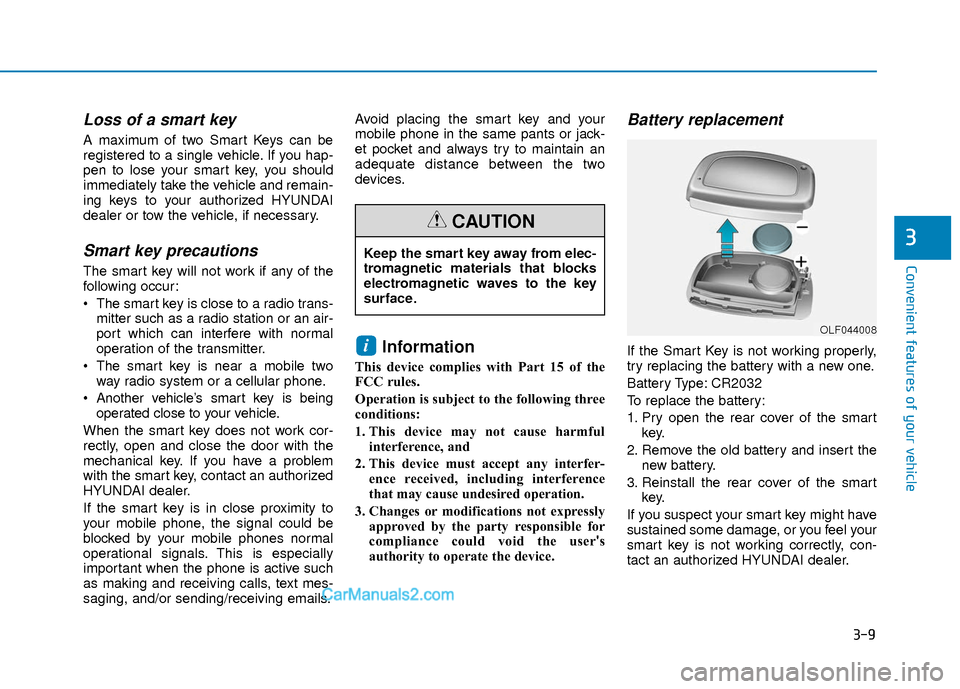
If the Smart Key is not working properly,
try replacing the battery with a new one.
Battery Type: CR2032
To replace the battery:
1. Pry open the rear cover of the smart key.
2. Remove the old battery and insert the new battery.
3. Reinstall the rear cover of the smart key.
If you suspect your smart key might have
sustained some damage, or you feel your
smart key is not working correctly, con-
tact an authorized HYUNDAI dealer.i
Keep the smart key away from elec-
tromagnetic materials that blocks
electromagnetic waves to the key
surface.
CAUTION
OLF044008
Page 101 of 526

3-24
Convenient features of your vehicle
If you need to recalibrate the compass:
1. Press and hold the button for morethan 9 seconds. When the compass
memory is cleared a "C" will appear in
the display.
2. Drive the vehicle in 2 complete circles at less than 5 mph (8 km/h).Integrated HomeLink®Wireless
Control System
The HomeLink®Wireless Control
System can replace up to three hand-
held radio-frequency (RF) transmitters
with a single built-in device. This innova-
tive feature will learn the radio frequency
codes of most current transmitters to
operate devices such as gate operators,
garage door openers, entry door locks,
security systems, even home lighting.
Both standard and rolling code-equipped
transmitters can be programmed by fol-
lowing the outlined procedures.
Additional HomeLink
®information can
be found at: www.homelink.com or by
calling 1-800-355-3515.
Retain the original transmitter of the RF
device you are programming for use in
other vehicles as well as for future
HomeLink
®programming. It is also sug-
gested that upon the sale of the vehicle,
the programmed HomeLink
®buttons be
erased for security purposes.
Before programming HomeLink®to
a garage door opener or gate oper-
ator, make sure people and objects
are out of the way of the device to
prevent potential harm or damage.
Do not use the HomeLink
®with any
garage door opener that lacks the
safety stop and reverse features
required by U.S. federal safety stan-
dards (this includes any garage
door opener model manufactured
before April 1, 1982). A garage door
that cannot detect an object - sig-
naling the door to stop and reverse
- does not meet current U.S. federal
safety standards. Using a garage
door opener without these features
increases the risk of serious injury
or death.
WARNING
Page 102 of 526
3-25
Convenient features of your vehicle
3
Programming HomeLink®
Please note the following:
When programming a garage dooropener, it is advised to park the vehicle
outside of the garage.
It is recommended that a new battery be placed in the hand-held transmitter
of the device being programmed to
HomeLink
®for quicker training and
accurate transmission of the radio-fre-
quency signal.
Some vehicles may require the ignition switch to be placed in the ACC (or
"Accessories") position for program-
ming and/or operation of HomeLink
®.
In the event that there are still pro- gramming difficulties or questions after
following the programming steps listed
below, contact HomeLink
®at:
www.homelink.com or by calling 1-
800-355-3515. Programming
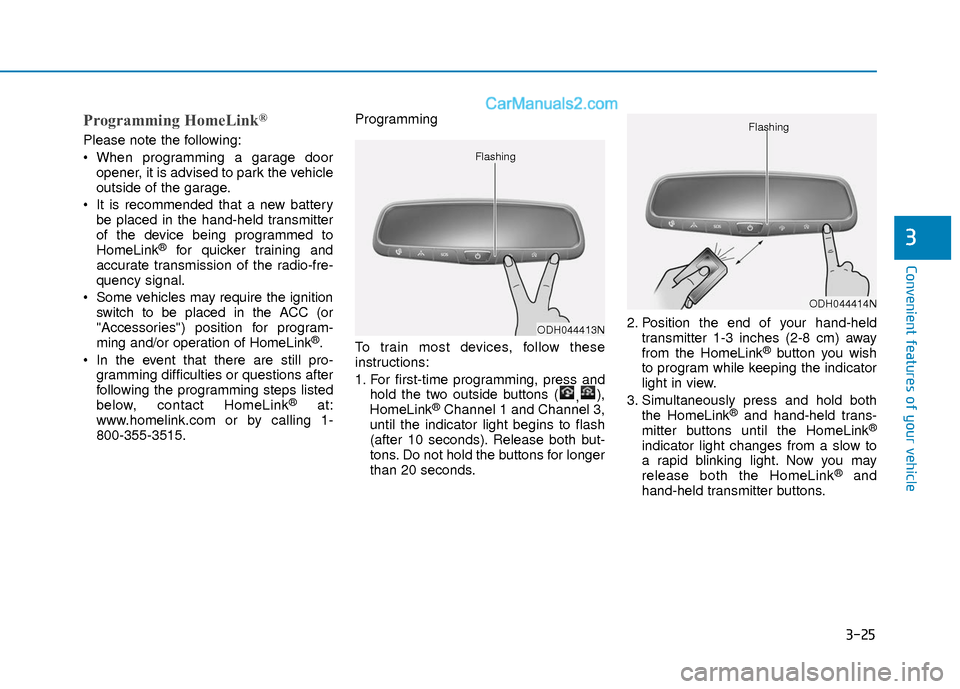
To train most devices, follow these
instructions:
1. For first-time programming, press and
hold the two outside buttons ( ,),
HomeLink®Channel 1 and Channel 3,
until the indicator light begins to flash
(after 10 seconds). Release both but-
tons. Do not hold the buttons for longer
than 20 seconds. 2. Position the end of your hand-held
transmitter 1-3 inches (2-8 cm) away
from the HomeLink
®button you wish
to program while keeping the indicator
light in view.
3. Simultaneously press and hold both the HomeLink
®and hand-held trans-
mitter buttons until the HomeLink®
indicator light changes from a slow to
a rapid blinking light. Now you may
release both the HomeLink
®and
hand-held transmitter buttons.
ODH044413N
Flashing
ODH044414N
Flashing
Page 107 of 526

3-30
Convenient features of your vehicle
To adjust the Zone setting:
1. Determine the desired Zone Numberbased upon your current location on
the Zone Map.
2. Press and hold the button for more than 3 but less than 6 seconds, the
current Zone Number will appear on
the display.
3. Pressing and holding the button again will cause the numbers to incre-
ment (Note: they will repeat …13, 14,
15, 1, 2, …). Releasing the button
when the desired Zone Number
appears on the display will set the new
Zone.
4. Within about 5 seconds the compass will start displaying a compass head-
ing again.
There are some conditions that can
cause changes to the vehicle magnets,
such as installing a ski rack or a CB
antenna. Body repair work on the vehicle
can also cause changes to the vehicle’s
magnetic field. In these situations, the
compass will need to be re-calibrated to
quickly correct these changes. If you need to recalibrate the compass:
1. Press and hold the button for more
than 6 seconds. When the compass
memory is cleared a "C" will appear in
the display.
2. Drive the vehicle in 2 complete circles at less than 5 mph (8 km/h).
Integrated HomeLink®Wireless
Control System
The HomeLink®Wireless Control System
can replace up to three hand-held radio-
frequency (RF) transmitters with a single
built-in device. This innovative feature will
learn the radio frequency codes of most
current transmitters to operate devices
such as gate operators, garage door
openers, entry door locks, security sys-
tems, even home lighting. Both standard
and rolling code-equipped transmitters
can be programmed by following the out-
lined procedures.
Additional HomeLink
®information can be
found at: www.homelink.com or by calling
1-800-355-3515.
Retain the original transmitter of the RF
device you are programming for use in
other vehicles as well as for future
HomeLink
®programming. It is also sug-
gested that upon the sale of the vehicle,
the programmed HomeLink
®buttons be
erased for security purposes.
Before programming HomeLink®to
a garage door opener or gate oper-
ator, make sure people and objects
are out of the way of the device to
prevent potential harm or damage.
Do not use the HomeLink
®with any
garage door opener that lacks the
safety stop and reverse features
required by U.S. federal safety stan-
dards (this includes any garage
door opener model manufactured
before April 1, 1982). A garage door
that cannot detect an object - sig-
naling the door to stop and reverse
- does not meet current U.S. federal
safety standards. Using a garage
door opener without these features
increases the risk of serious injury
or death.
WARNING