2018 FORD TRANSIT lock
[x] Cancel search: lockPage 77 of 521
•
You shift into any gear putting your
vehicle in motion.
• Your vehicle reaches a speed greater
than 5 mph (8 km/h).
Use the interior door unlock button or
switch the ignition off and use the key or
remote control to unlock the rear or sliding
door.
Autounlock
Autounlock unlocks all doors within 10
minutes of the end of a drive cycle, when
the driver door is opened and the ignition
is off.
Enabling or Disabling Autounlock
You can enable or disable autounlock in
the information display. See Information
Displays
(page 99).
One-Stage Unlocking
You can switch on this function using the
information display. See
Information
Displays (page 99).
If you have switched on this function, you
unlock all doors including the rear doors
and the sliding door.
You unlock all of the doors when you:
• Press the unlock button on the remote
control once.
• Press the interior unlock button once.
Two-Stage Unlocking
You unlock the front doors when you:
• Press the unlock button on the remote
control once.
• Press the interior unlock button once. You unlock the front doors and cargo area
when you:
•
Press the unlock button on the remote
control once.
• Press the unlock button on the remote
control twice within three seconds.
Zone Re-Locking
(If Equipped)
If you enable zone re-locking and open one
door, all other doors remain locked. See an
authorized dealer for further information.
The locks on van, bus or wagon have two
zones, cabin and cargo. For van, the cargo
area includes the rear doors and the sliding
door. For bus or wagon, the cargo area
includes the rear doors.
• Exit your vehicle and press the lock
button.
• Press the unlock button or the cargo
area unlock button once to open the
respective zone.
If you now open a door within the unlocked
zone, the other doors in that zone
automatically lock.
Configurable Unlocking
Configurable unlocking is set when you
purchase your vehicle. It allows you to
select which doors unlock when you press,
once or twice, the unlock button or the
cargo area unlock button on your remote
control. You cannot switch this feature
back on if you had it switched off. See an
authorized dealer for further information.
74
2018 Transit (TTH) Canada/United States of America, JK3J 19A321 AA enUSA, Edition date: 201705, Third-Printing- Doors and Locks
Page 78 of 521

PASSIVE ANTI-THEFT
SYSTEM (If Equipped)
Note: The system is not compatible with
non-Ford aftermarket remote start systems.
Use of these systems may result in vehicle
starting problems and a loss of security
protection.
Note: Metallic objects, electronic devices
or a second coded key on the same key
chain may cause vehicle starting problems
if they are too close to the key when starting
the engine. Prevent these objects from
touching the coded key while starting the
engine. Switch the ignition off, move all
objects on the key chain away from the
coded key and restart the engine if a
problem occurs.
Note: Do not leave a duplicate coded key
in the vehicle. Always take your keys and
lock all doors when leaving the vehicle.
SecuriLock®
The system is an engine immobilization
system. It is designed to help prevent the
engine from being started unless a
correctly coded key for your vehicle is used.
Using an incorrectly coded key may
prevent the engine from starting. A
message may appear in the information
display.
If you are unable to start the engine with a
correctly coded key, a malfunction has
happened and a message may appear in
the information display.
Automatic Arming
The engine immobilization system arms
immediately after you switch the ignition
off. Automatic Disarming
Switching the ignition on with a correctly
coded key disarms the engine
immobilization system.
Replacement Keys
The integrated keyhead transmitter
functions as a programmed ignition key
that operates all the locks and starts your
vehicle, as well as a remote control.
If your keys are lost or stolen and you do
not have a spare correctly coded key, you
will need to have your vehicle towed to an
authorized dealer. You need to erase the
coded keys from your vehicle and program
new coded keys.
Store an extra correctly coded key away
from the vehicle in a safe place to help
prevent any inconveniences. See an
authorized dealer to purchase additional
spare or replacement keys.
Programming a Spare Integrated
Keyhead Transmitter
You can program your own integrated
keyhead transmitter or standard
SecuriLock coded keys to your vehicle. This
procedure will program both the engine
immobilizer keycode and the remote entry
portion of the remote control to your
vehicle
Only use integrated keyhead transmitters
or standard SecuriLock keys.
You must have two previously
programmed correctly coded keys and the
new unprogrammed key readily accessible.
See an authorized dealer to have the spare
key programmed if two previously
programmed correctly coded keys are not
available.
Read and understand the entire procedure
before you begin.
1.
Insert the first previously programmed
correctly coded key into the ignition.
75
2018 Transit (TTH) Canada/United States of America, JK3J 19A321 AA enUSA, Edition date: 201705, Third-Printing- Security
Page 79 of 521

2.
Switch the ignition from off to on. Keep
the ignition on for at least three
seconds, but no more than 10 seconds.
3. Switch the ignition off and remove the
first correctly coded key from the
ignition.
4. After three seconds but within 10 seconds of switching the ignition off,
insert the second previously correctly
coded key into the ignition.
5. Switch the ignition from off to on. Keep
the ignition on for at least three
seconds, but no more than 10 seconds.
6. Switch the ignition off and remove the
second previously programmed
correctly coded key from the ignition.
7. After three seconds but within 10 seconds of switching the ignition off
and removing the previously
programmed correctly coded key,
insert the new unprogrammed key into
the ignition.
8. Switch the ignition from off to on. Keep
the ignition on for at least six seconds.
9. Remove the newly programmed correctly coded key from the ignition.
If the key has been successfully
programmed it will start the engine and
operate the remote entry system (if the
new key is an integrated keyhead
transmitter).
If the key was not successfully
programmed, wait 10 seconds and repeat
Steps 1 through 8. If you are still
unsuccessful, take your vehicle to an
authorized dealer.
Note: You can program a maximum of eight
coded keys to your vehicle. All eight can be
integrated keyhead transmitters. ANTI-THEFT ALARM
Alarm System
The perimeter alarm is a deterrent against
unauthorized access to your vehicle
through the doors, luggage compartment
and the hood.
Triggering the Alarm
Once armed, the alarm is triggered in any
of the following ways:
•
If someone opens a door, cargo area
or the hood without a valid key or
remote control.
• If you switch the ignition on without a
valid key.
If the alarm is triggered, the horn will sound
for 30 seconds and the hazard warning
flasher will flash for five minutes.
Any further attempts to perform one of the
above will trigger the alarm again.
Arming the Alarm
To arm the alarm, lock your vehicle. See
Doors and Locks (page 70).
Disarming the Alarm
Disarm and silence the alarm by unlocking
the doors with the key and switching the
ignition on with a correctly coded key
within 12 seconds, or by unlocking the
doors or the cargo area with the remote
control.
76
2018 Transit (TTH) Canada/United States of America, JK3J 19A321 AA enUSA, Edition date: 201705, Third-Printing- Security
Page 80 of 521

USING POWER RUNNING
BOARDS
WARNING: In extreme climates,
excessive ice buildup may occur, causing
the running boards not to deploy. Make
sure that the running boards have
deployed, and have finished moving before
attempting to step on them. The running
boards will resume normal function once
the blockage is cleared. WARNING:
Switch off the running
boards before jacking or placing any object
under your vehicle. Never place your hand
between the extended running board and
your vehicle. A moving running board may
cause injury.
Note: Do not use the power running boards,
front and rear hinge assemblies, running
board motors or the running board
underbody mounts to lift your vehicle when
jacking. Always use proper jacking points.
Note: The power running boards may
operate more slowly in cool temperatures.
Note: The running board mechanism may
trap debris such as mud, dirt, snow, ice and
salt. This may cause unwanted noise. If this
happens, manually set the power running
boards to the deployed position. Then wash
the system in particular the front and rear
hinge arms with a high-pressure car wash
wand.
Note: If you drive off when the power
running boards are deployed the engine may
stop.
Note: In the event of a malfunction you can
stow the power running boards manually. Automatic Power Deploy
The power running board extends when
you open the door.
Automatic Power Stow
When you close the door, the power
running board returns to the stowed
position after a two-second delay.
Manual Power Deploy
You can manually operate the power
running boards in the information display.
See
General Information (page 99).
77
2018 Transit (TTH) Canada/United States of America, JK3J 19A321 AA enUSA, Edition date: 201705, Third-Printing- Power Running BoardsE171469 E171470
Page 82 of 521

Insert the lug wrench into the guide hole
and turn the handle clockwise until the
running board is in the stowed position.
Resetting the System
You can reset the system by opening and
closing the sliding door.
79
2018 Transit (TTH) Canada/United States of America, JK3J 19A321 AA enUSA, Edition date: 201705, Third-Printing- Power Running BoardsE171471
Page 83 of 521
ADJUSTING THE STEERING
WHEEL
WARNING: Do not adjust the
steering wheel when your vehicle is
moving.
Note: Make sure that you are sitting in the
correct position. See Sitting in the Correct
Position
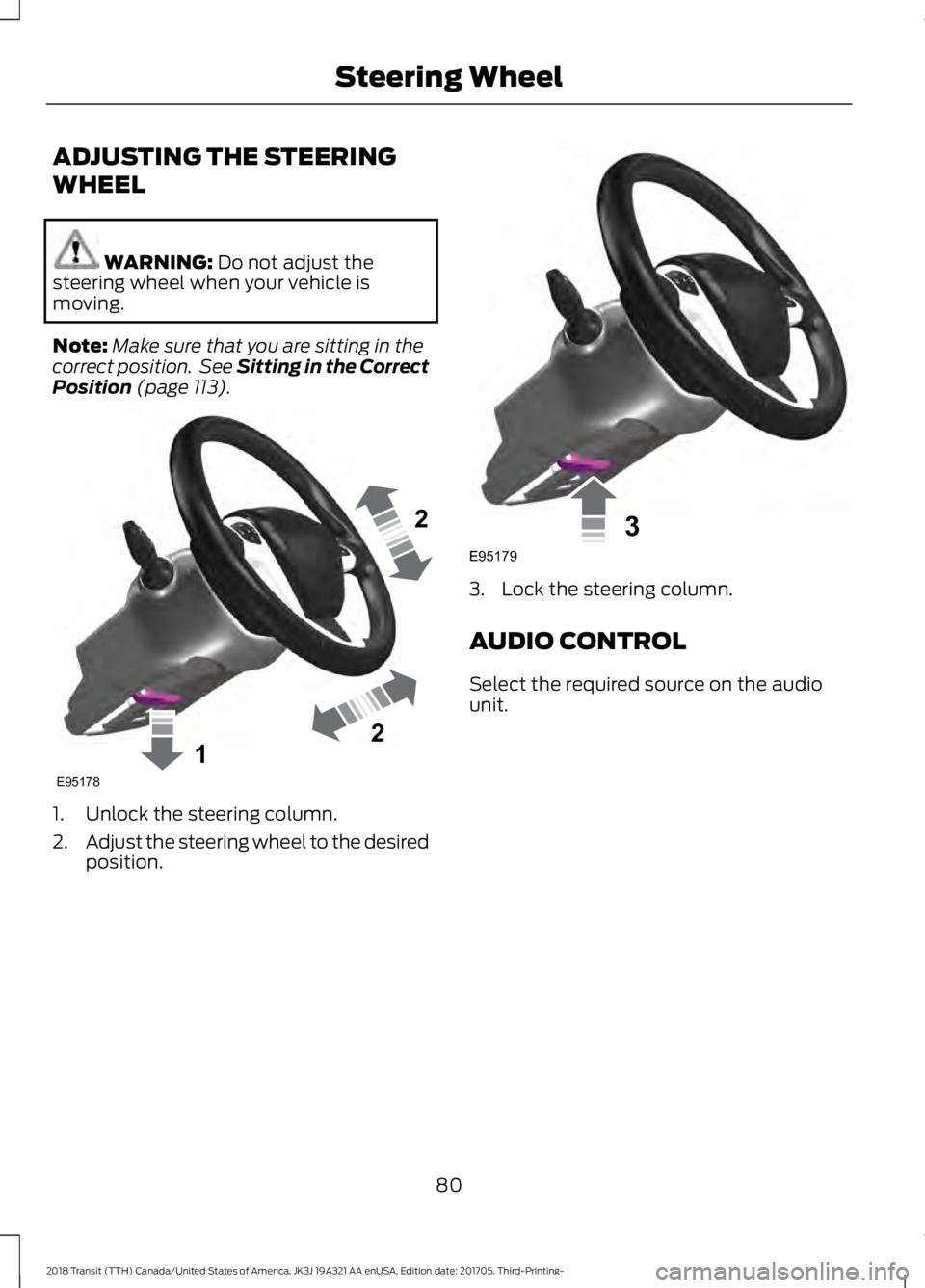
(page 113). 1. Unlock the steering column.
2.
Adjust the steering wheel to the desired
position. 3. Lock the steering column.
AUDIO CONTROL
Select the required source on the audio
unit.
80
2018 Transit (TTH) Canada/United States of America, JK3J 19A321 AA enUSA, Edition date: 201705, Third-Printing- Steering Wheel122E95178 3E95179
Page 91 of 521
INTERIOR LAMPS
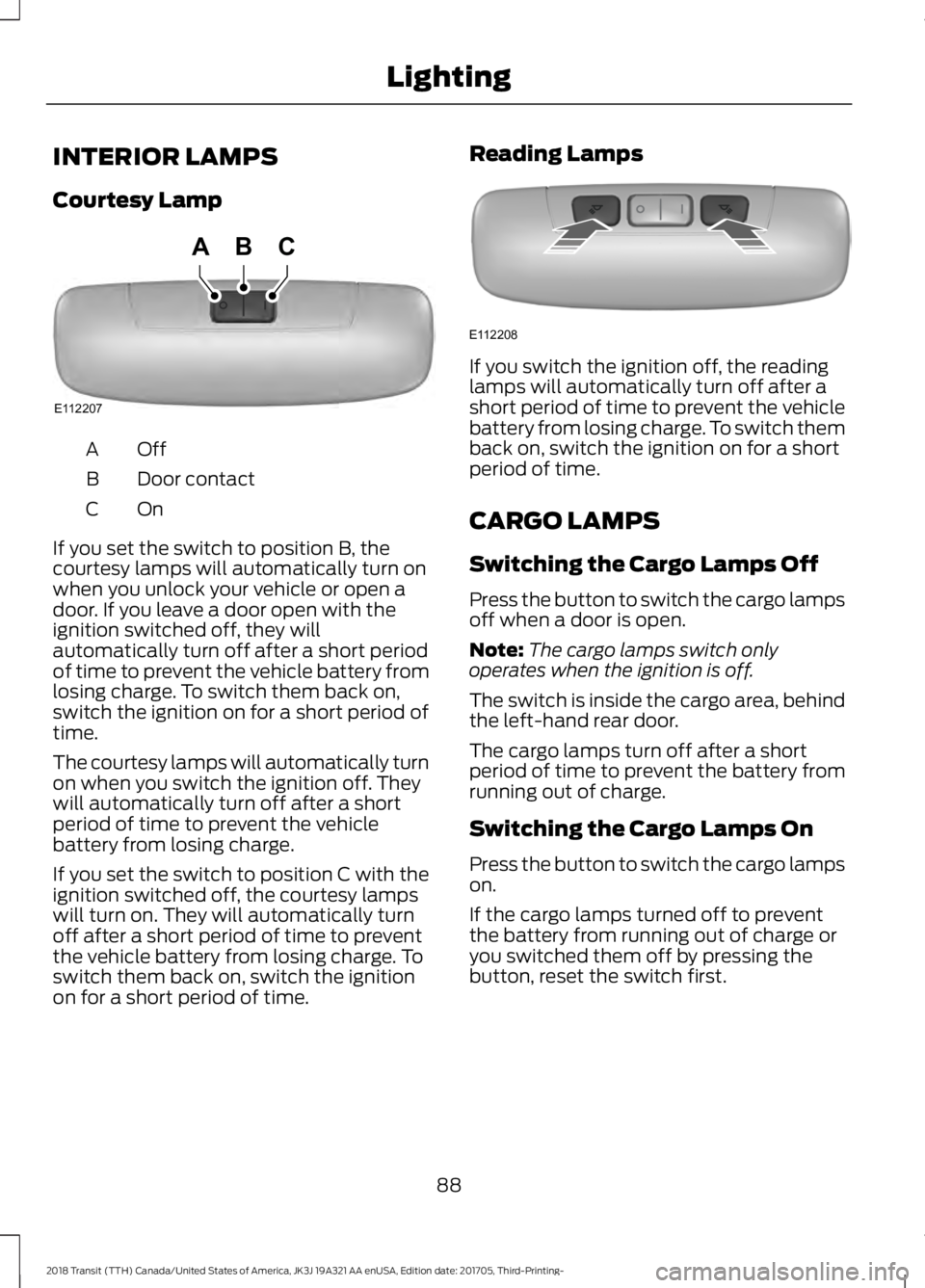
Courtesy Lamp
OffA
Door contact
B
OnC
If you set the switch to position B, the
courtesy lamps will automatically turn on
when you unlock your vehicle or open a
door. If you leave a door open with the
ignition switched off, they will
automatically turn off after a short period
of time to prevent the vehicle battery from
losing charge. To switch them back on,
switch the ignition on for a short period of
time.
The courtesy lamps will automatically turn
on when you switch the ignition off. They
will automatically turn off after a short
period of time to prevent the vehicle
battery from losing charge.
If you set the switch to position C with the
ignition switched off, the courtesy lamps
will turn on. They will automatically turn
off after a short period of time to prevent
the vehicle battery from losing charge. To
switch them back on, switch the ignition
on for a short period of time. Reading Lamps If you switch the ignition off, the reading
lamps will automatically turn off after a
short period of time to prevent the vehicle
battery from losing charge. To switch them
back on, switch the ignition on for a short
period of time.
CARGO LAMPS
Switching the Cargo Lamps Off
Press the button to switch the cargo lamps
off when a door is open.
Note:
The cargo lamps switch only
operates when the ignition is off.
The switch is inside the cargo area, behind
the left-hand rear door.
The cargo lamps turn off after a short
period of time to prevent the battery from
running out of charge.
Switching the Cargo Lamps On
Press the button to switch the cargo lamps
on.
If the cargo lamps turned off to prevent
the battery from running out of charge or
you switched them off by pressing the
button, reset the switch first.
88
2018 Transit (TTH) Canada/United States of America, JK3J 19A321 AA enUSA, Edition date: 201705, Third-Printing- LightingE112207
BCA E112208
Page 92 of 521
Resetting the Switch
To reset the switch, do one of the
following:
•
Lock or unlock a door.
• Open or close a front door.
• Switch the ignition on then off.
Press the button to switch the cargo lamps
on.
89
2018 Transit (TTH) Canada/United States of America, JK3J 19A321 AA enUSA, Edition date: 201705, Third-Printing- Lighting