Page 64 of 521

Integrated Keyhead Transmitter
1. Twist a thin coin in the slot of the
transmitter near the key ring to remove
the battery cover.
2. Remove the old battery. 3. Insert the new battery. Refer to the
instructions inside the transmitter for
the correct orientation of the battery.
Press the battery down to make sure
it is fully in the housing.
4. Reinstall the battery housing cover onto the transmitter.
Locating Your Vehicle
Press the lock button on the remote
control twice within three seconds. The
horn sounds and the direction indicators
flash. Note:
If locking was not successful, any
door is open, or if the hood is open on
vehicles with an alarm or remote start then
the horn sounds but the direction indicators
do not flash.
Switching the Panic Alarm On and
Off Press the button on the remote
control to switch the panic alarm
on. Press the button again or
switch the ignition on to switch the panic
alarm off.
We recommend you do not use this
method to locate your vehicle.
Note: The panic alarm only operates when
the ignition is off.
REMOTE CONTROL - VEHICLES
WITH: PASSIVE ANTI-THEFT
SYSTEM (PATS)
Integrated Keyhead Transmitter (If
Equipped) Use the key blade to start your vehicle and
unlock or lock the driver door from outside
your vehicle.
61
2018 Transit (TTH) Canada/United States of America, JK3J 19A321 AA enUSA, Edition date: 201705, Third-Printing- Keys and Remote ControlsE138619 E138620 E138624 E177585
Page 65 of 521

Note:
Your vehicle keys came with a
security label that provides important key
cut information. Keep the label in a safe
place for future reference.
Programming a New Remote
Control
To program a new remote control, See
Passive Anti-Theft System (page 75).
Changing the Remote Control
Battery
The remote control uses one coin-type
three-volt lithium battery CR2032 or
equivalent.
Note: Refer to local regulations when
disposing of remote control batteries.
Note: Do not wipe off any grease on the
battery terminals or on the back surface of
the circuit board.
Note: Replacing the battery does not erase
the programmed remote control from your
vehicle. The remote control should operate
normally. Integrated Keyhead Transmitter
1. Twist a thin coin in the slot of the
transmitter near the key ring to remove
the battery cover.
2. Remove the old battery. 3. Insert the new battery. Refer to the
instructions inside the transmitter for
the correct orientation of the battery.
Press the battery down to make sure
it is fully in the housing.
4. Reinstall the battery housing cover onto the transmitter.
Locating Your Vehicle
Press the lock button on the remote
control twice within three seconds. The
horn sounds and the direction indicators
flash.
62
2018 Transit (TTH) Canada/United States of America, JK3J 19A321 AA enUSA, Edition date: 201705, Third-Printing- Keys and Remote ControlsE138615 E138619 E138620
Page 66 of 521
Note:
If locking was not successful, any
door is open, or if the hood is open on
vehicles with an alarm or remote start then
the horn sounds but the direction indicators
do not flash.
Switching the Panic Alarm On and
Off Press the button on the remote
control to switch the panic alarm
on. Press the button again or
switch the ignition on to switch the panic
alarm off.
We recommend you do not use this
method to locate your vehicle.
Note: The panic alarm only operates when
the ignition is off.
REPLACING A LOST KEY OR
REMOTE CONTROL
You can purchase replacement keys or
remote controls from an authorized dealer.
Authorized dealers can program remote
controls for your vehicle. See Remote
Control (page 61).
To re-program the passive anti-theft
system see an authorized dealer.
63
2018 Transit (TTH) Canada/United States of America, JK3J 19A321 AA enUSA, Edition date: 201705, Third-Printing- Keys and Remote ControlsE138624
Page 71 of 521

USING MYKEY WITH REMOTE
START SYSTEMS
MyKey is not compatible with non
Ford-approved, aftermarket remote start
systems. If you choose to install a remote
start system, see an authorized dealer for
a Ford-approved remote start system.
MYKEY TROUBLESHOOTING Potential Causes
Condition
I cannot create a MyKey. •The key or transmitter used to start the
vehicle does not have admin privileges.
• The key or transmitter used to start the
vehicle is the only admin key (there always
has to be at least one admin key).
• Vehicles with keyless start: The keyless
start transmitter is not placed in the backup
position. See Passive Anti-Theft System
(page 75).
• SecuriLock passive anti-theft system is
disabled or in unlimited mode.
• The key or transmitter used to start your
vehicle does not have admin privileges.
• No MyKeys are created. See
Creating a
MyKey (page 65).
I cannot program the configurable
settings.
•The key or transmitter used to start your
vehicle does not have admin privileges.
• No MyKeys are created. See
Creating a
MyKey (page 65).
I cannot clear the MyKeys.
Purchase a new key from an authorized dealer.
I lost the only admin key.
68
2018 Transit (TTH) Canada/United States of America, JK3J 19A321 AA enUSA, Edition date: 201705, Third-Printing- MyKey
™
(If Equipped)
Page 73 of 521

LOCKING AND UNLOCKING
Locking
Locking With the Key
Turn the top of the key toward the rear of
your vehicle.
Locking With the Remote Control
Press the button once. The
direction indicators will flash.
Press the button again within
three seconds to confirm that all the doors
are closed. The horn sounds and the
direction indicators flash.
Note: You can lock the driver door with the
key. Use the key when the remote control
is not functioning.
Note: Make sure you have locked your
vehicle before leaving it unattended.
Note: Do not leave the keys in your vehicle.
Unlocking
Unlocking With the Key
Turn the top of the key toward the front of
your vehicle.
Unlocking With the Remote Control Press the button once. The
direction indicators will flash.
Note: You can unlock the driver door with
the key. Use the key when the remote
control is not functioning.
Note: When you leave your vehicle
unattended for several weeks, the remote
control turns off.
Note: Unlock your vehicle and start the
engine using the key. Unlocking and starting
your vehicle once enables the remote
control. Unlocking the Rear Cargo Doors Press the button.
Reprogramming the Unlocking
Function
Note: When you press the unlock button,
either all the doors are unlocked or only the
driver and passenger doors are unlocked.
You can reprogram the unlocking function
so that all doors are unlocked.
Press and hold the unlock and lock buttons
on the remote control simultaneously for
at least four seconds with the ignition off.
The direction indicators flash twice to
confirm the change.
To return to the original unlocking function,
repeat the process.
You can also change between the
unlocking modes using the information
display. See General Information (page
99).
Locking and Unlocking the Doors
From Inside Lock.
A
Unlock.
B
70
2018 Transit (TTH) Canada/United States of America, JK3J 19A321 AA enUSA, Edition date: 201705, Third-Printing- Doors and Locks E148829
A
B
Page 74 of 521
Opening and Closing the Sliding
Door
Opening the Sliding Door
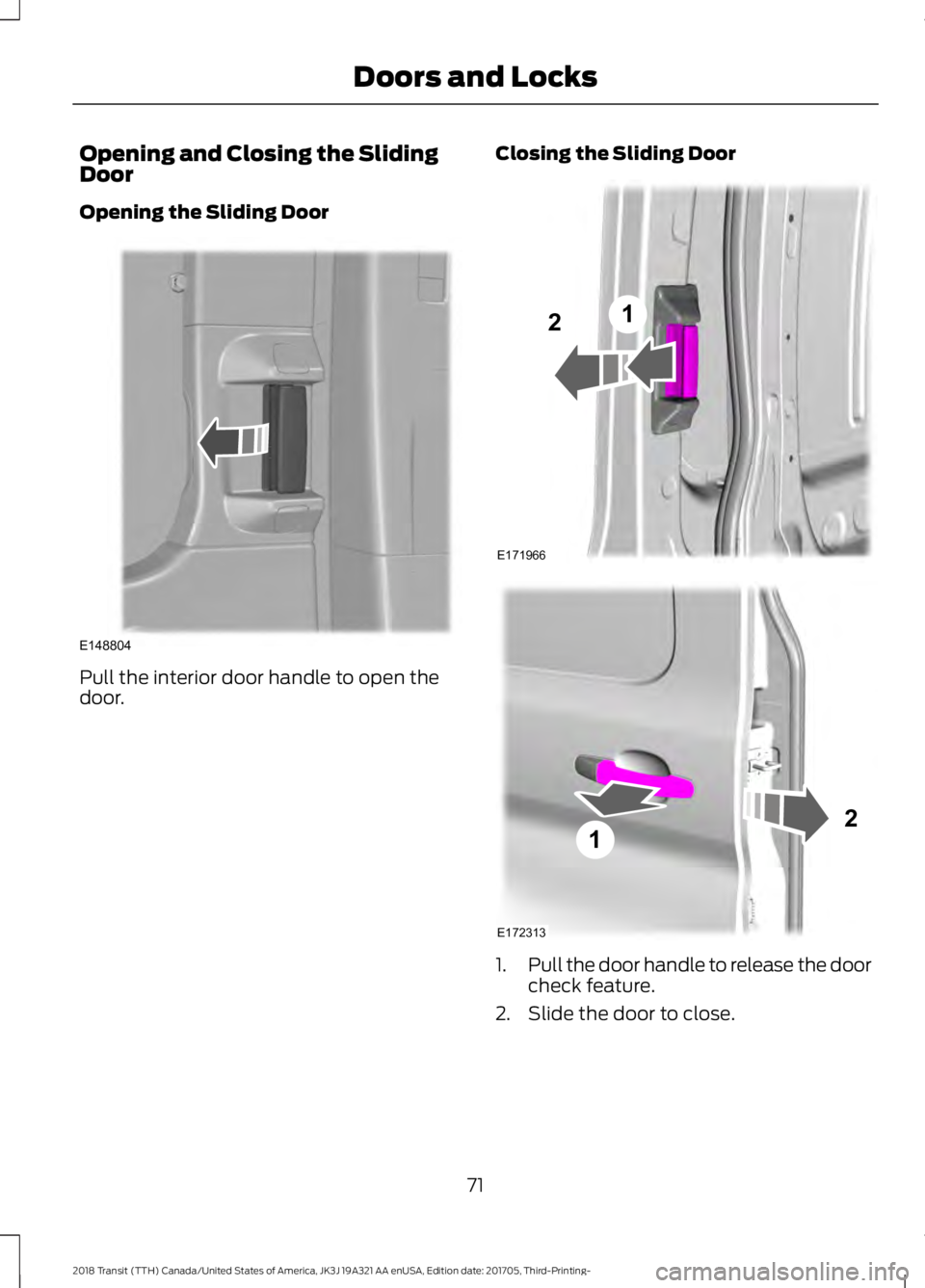
Pull the interior door handle to open the
door.
Closing the Sliding Door
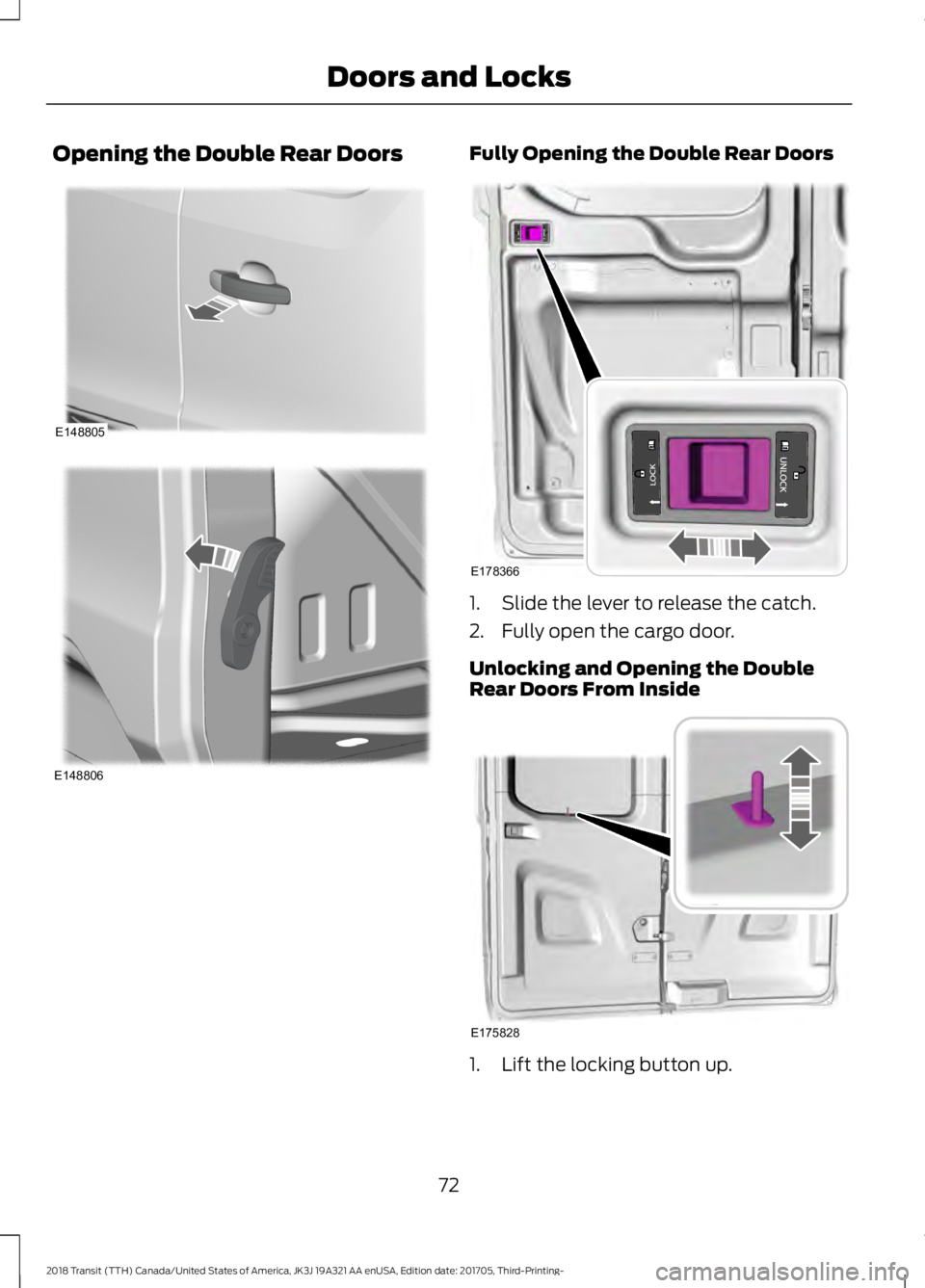
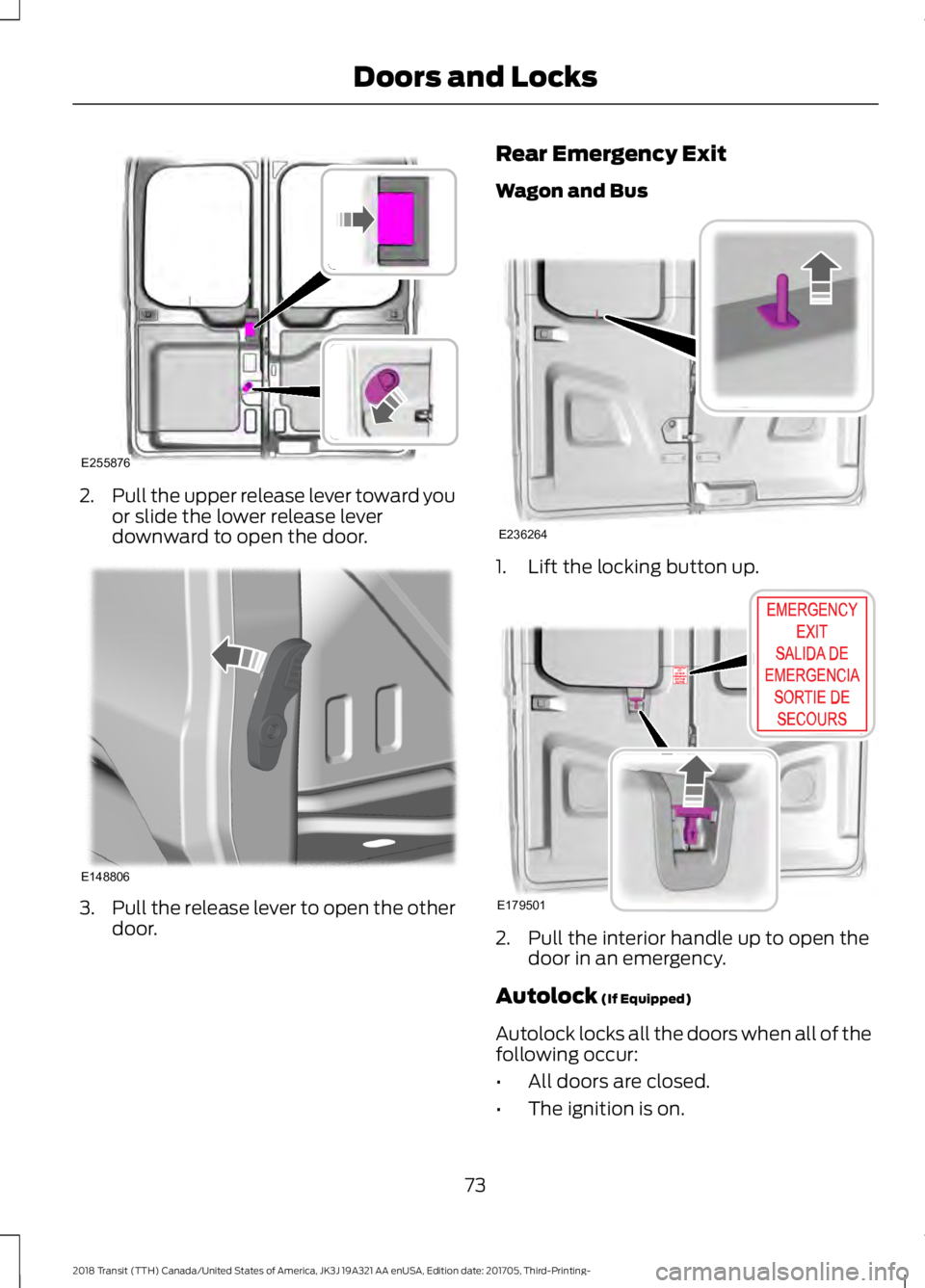
1.
Pull the door handle to release the door
check feature.
2. Slide the door to close.
71
2018 Transit (TTH) Canada/United States of America, JK3J 19A321 AA enUSA, Edition date: 201705, Third-Printing- Doors and LocksE148804 E171966
12 E172313
12
Page 75 of 521
Opening the Double Rear Doors Fully Opening the Double Rear Doors
1. Slide the lever to release the catch.
2. Fully open the cargo door.
Unlocking and Opening the Double
Rear Doors From Inside
1. Lift the locking button up.
72
2018 Transit (TTH) Canada/United States of America, JK3J 19A321 AA enUSA, Edition date: 201705, Third-Printing- Doors and LocksE148805 E148806 E178366 E175828
Page 76 of 521
2.
Pull the upper release lever toward you
or slide the lower release lever
downward to open the door. 3.
Pull the release lever to open the other
door. Rear Emergency Exit
Wagon and Bus
1. Lift the locking button up.
2. Pull the interior handle up to open the
door in an emergency.
Autolock (If Equipped)
Autolock locks all the doors when all of the
following occur:
• All doors are closed.
• The ignition is on.
73
2018 Transit (TTH) Canada/United States of America, JK3J 19A321 AA enUSA, Edition date: 201705, Third-Printing- Doors and LocksE255876 E148806 E236264 E179501