2018 FORD FOCUS radio
[x] Cancel search: radioPage 4 of 473

Introduction
About This Manual...........................................7
Symbols Glossary.............................................7
Data Recording..................................................9
California Proposition 65..............................11
Perchlorate.........................................................11
Ford Credit..........................................................11
Replacement PartsRecommendation.......................................12
Special Notices................................................12
Mobile CommunicationsEquipment.....................................................13
Export Unique Options..................................13
Environment
Protecting the Environment........................15
Child Safety
General Information.......................................16
Installing Child Restraints.............................17
Booster Seats..................................................24
Child Restraint Positioning.........................26
Child Safety Locks..........................................27
Seatbelts
Principle of Operation..................................29
Fastening the Seatbelts..............................30
Seatbelt Height Adjustment......................32
Seatbelt Warning Lamp and IndicatorChime..............................................................32
Seatbelt Reminder.........................................33
Child Restraint and SeatbeltMaintenance................................................35
Seatbelt Extension........................................35
Personal Safety System™
Personal Safety System™..........................37
Supplementary RestraintsSystem
Principle of Operation..................................38
Driver and Passenger Airbags...................39
Front Passenger Sensing System............40
Side Airbags.....................................................43
Driver Knee Airbag.........................................44
Safety Canopy™............................................44
Crash Sensors and Airbag Indicator.......45
Airbag Disposal..............................................46
Keys and Remote Controls
General Information on RadioFrequencies..................................................47
Remote Control - Vehicles With: KeylessEntry................................................................47
Remote Control - Vehicles With:Integrated Key Transmitter....................50
Remote Control - Vehicles With: KeylessEntry with Remote Start..........................51
Replacing a Lost Key or RemoteControl...........................................................54
MyKey™
Principle of Operation..................................55
Creating a MyKey...........................................56
Clearing All MyKeys.......................................57
Checking MyKey System Status..............58
Using MyKey With Remote StartSystems.........................................................58
MyKey Troubleshooting...............................58
Doors and Locks
Locking and Unlocking................................60
Manual Liftgate..............................................64
Keyless Entry...................................................65
Interior Luggage Compartment Release- 4-Door.........................................................66
Security
Passive Anti-Theft System........................68
12018 Focus (CDH) Canada/United States of America, JM5J 19A321 AA enUSA, Edition date: 201706, Second PrintingTable of Contents
Page 8 of 473

Changing a Road Wheel...........................263
Driving at High Speed................................266
Lug Nuts..........................................................267
Capacities and Specific-ations
Engine Specifications - 1.0LEcoBoost™...............................................268
Engine Specifications - 2.0L...................269
Motorcraft Parts - 1.0L EcoBoost™......270
Motorcraft Parts - 2.0L................................271
Vehicle Identification Number.................272
Vehicle Certification Label........................273
Transmission Code Designation.............273
Capacities and Specifications - 1.0LEcoBoost™................................................274
Capacities and Specifications -2.0L................................................................277
Audio System
General Information....................................281
Audio Unit - Vehicles With: SYNC.........282
Audio Unit - Vehicles With: Sony AudioSystem........................................................285
Audio Unit - Vehicles With: SatelliteRadio............................................................289
Digital Radio...................................................291
Satellite Radio..............................................294
USB Port.........................................................296
Media Hub......................................................296
SYNC™
General Information...................................297
Using Voice Recognition...........................299
Using SYNC™ With Your Phone.............301
SYNC™ Applications and Services.......313
Using SYNC™ With Your MediaPlayer............................................................318
SYNC™ Troubleshooting..........................327
SYNC™ 3
General Information...................................335
Home Screen................................................346
Using Voice Recognition............................347
Entertainment...............................................353
Phone...............................................................363
Navigation......................................................368
Apps..................................................................376
Settings...........................................................379
SYNC™ 3 Troubleshooting......................393
Accessories
Accessories...................................................405
Ford Protect
Ford Protect...................................................407
Scheduled Maintenance
General Maintenance Information.......409
Normal Scheduled Maintenance...........412
Special Operating Conditions ScheduledMaintenance..............................................414
Scheduled Maintenance Record.............417
Appendices
Electromagnetic Compatibility...............427
End User License Agreement.................429
Type Approvals............................................455
52018 Focus (CDH) Canada/United States of America, JM5J 19A321 AA enUSA, Edition date: 201706, Second PrintingTable of Contents
Page 16 of 473

On Board Diagnostics Data LinkConnector
WARNING
Do not connect wireless plug-indevices to the data link connector.Unauthorized third parties could gainaccess to vehicle data and impair theperformance of safety related systems.Only allow repair facilities that follow ourservice and repair instructions to connecttheir equipment to the data link connector.
Your vehicle has an OBD Data LinkConnector (DLC) that is used inconjunction with a diagnostic scan tool forvehicle diagnostics, repairs andreprogramming services. Installing anaftermarket device that uses the DLCduring normal driving for purposes such asremote insurance company monitoring,transmission of vehicle data to otherdevices or entities, or altering theperformance of the vehicle, may causeinterference with or even damage tovehicle systems. We do not recommendor endorse the use of aftermarket plug-indevices unless approved by Ford. Thevehicle Warranty will not cover damagecaused by an aftermarket plug-in device.
MOBILE COMMUNICATIONS
EQUIPMENT
WARNING
Driving while distracted can result inloss of vehicle control, crash andinjury. We strongly recommend thatyou use extreme caution when using anydevice that may take your focus off theroad. Your primary responsibility is the safeoperation of your vehicle. We recommendagainst the use of any hand-held devicewhile driving and encourage the use ofvoice-operated systems when possible.Make sure you are aware of all applicablelocal laws that may affect the use ofelectronic devices while driving.
Using mobile communications equipmentis becoming increasingly important in theconduct of business and personal affairs.However, you must not compromise yourown or others’ safety when using suchequipment. Mobile communications canenhance personal safety and security whenappropriately used, particularly inemergency situations. Safety must beparamount when using mobilecommunications equipment to avoidnegating these benefits. Mobilecommunication equipment includes, butis not limited to, cellular phones, pagers,portable email devices, text messagingdevices and portable two-way radios.
EXPORT UNIQUE OPTIONS
For your particular global region, yourvehicle may be equipped with features andoptions that are different from the featuresand options that are described in thisOwner’s Manual. A market uniquesupplement may be supplied thatcomplements this book. By referring to themarket unique supplement, if provided,you can properly identify those features,
132018 Focus (CDH) Canada/United States of America, JM5J 19A321 AA enUSA, Edition date: 201706, Second PrintingIntroduction
Page 50 of 473

GENERAL INFORMATION ON
RADIO FREQUENCIES
This device complies with Part 15 of theFCC Rules and with Licence exempt RSSStandards of Industry Canada. Operationis subject to the following two conditions:
•This device may not cause harmfulinterference, and
•This device must accept anyinterference received, includinginterference that may cause undesiredoperation.
WARNING
Changes or modifications notexpressively approved by the partyresponsible for compliance couldvoid the user's authority to operate theequipment. The term "IC:" before the radiocertification number only signifies thatIndustry Canada technical specificationswere met.
The typical operating range for yourtransmitter is approximately 33 ft (10 m).Vehicles with the remote start feature willhave a greater range. One of the followingcould cause a decrease in operating range:
•Weather conditions.
•Nearby radio towers.
•Structures around the vehicle.
•Other vehicles parked next to yourvehicle.
Other short distance radio transmissions,for example amateur radios, medicalequipment, wireless headphones, remotecontrols and alarm systems can also usethe radio frequency used by your remotecontrol. If the frequencies are jammed, youwill not be able to use your remote control.You can lock and unlock the doors with thekey.
Note:Make sure to lock your vehicle beforeleaving it unattended.
Note:If you are in range, the remote controlwill operate if you press any buttonunintentionally.
Note:The remote control contains sensitiveelectrical components. Exposure to moistureor impact may cause permanent damage.
REMOTE CONTROL - VEHICLES
WITH: KEYLESS ENTRY
Intelligent Access Key
472018 Focus (CDH) Canada/United States of America, JM5J 19A321 AA enUSA, Edition date: 201706, Second PrintingKeys and Remote ControlsE162192
Page 57 of 473

1.Press the lock button to lock all thedoors.
2.Press the remote start button twice.The direction indicators flash twice.
The horn sounds if the system fails to start,unless quiet start is on. Quiet start runs theblower fan at a slower speed to reducenoise. You can switch it on or off using theinformation display. See GeneralInformation (page 92).
The power windows do not work duringremote start and the radio does not turnon automatically.
The parking lamps remain on and yourvehicle runs for 5, 10 or 15 minutes,depending on the setting.
Note:If you remote start your vehicle withan intelligent access transmitter, you mustpress the push button ignition switch on theinstrument panel once while applying thebrake pedal before driving your vehicle.
Extending the Engine Running Time
To extend the engine running time durationof your vehicle during remote start, repeatsteps 1 and 2 while the engine is running.If the duration is set to 10 minutes, theduration extends by another 10 minutes.For example, if your vehicle had beenrunning from the first remote start for 5minutes, your vehicle continues to run nowfor a total of 20 minutes. You can extendthe engine running time duration to amaximum of 30 minutes.
Wait at least five seconds before remotestarting after a vehicle shutdown.
Turning Your Vehicle Off After RemoteStarting
Press the button once. Theparking lamps turn off.
You may have to be closer to your vehiclethan when starting due to ground reflectionand the added noise of the running vehicle.
You can turn the remote start system onor off using the information display. SeeGeneral Information (page 92).
REPLACING A LOST KEY OR
REMOTE CONTROL
You can purchase replacement keys orremote controls from an authorized dealer.Authorized dealers can program remotecontrols for your vehicle. See PassiveAnti-Theft System (page 68).
To re-program the passive anti-theftsystem see an authorized dealer.
542018 Focus (CDH) Canada/United States of America, JM5J 19A321 AA enUSA, Edition date: 201706, Second PrintingKeys and Remote ControlsE138625
Page 58 of 473
PRINCIPLE OF OPERATION
MyKey allows you to program keys withrestricted driving modes to promote gooddriving habits. All but one of the keys canbe activated with these restricted modes.
Any keys that remain unprogrammed arereferred to as administrator keys or adminkeys. They can be used to:
•Create a MyKey.
•Program configurable MyKey settings.
•Clear all MyKey features.
When you have created a MyKey, you canaccess the following information by usingthe information display to determine:
•How many admin keys and MyKeys areprogrammed to your vehicle.
•The total distance your vehicle traveledwith a MyKey.
Note:Switch the ignition on to use thesystem.
Note:All MyKeys are programmed to thesame settings. You cannot program themindividually.
Note:For vehicles equipped with apush-button start, when both a MyKey andan admin key are present, the admin key willbe recognized by the vehicle when you startthe vehicle.
Non-configurable Settings
The following settings cannot be changedby an admin key user:
•Safety belt reminder. You cannotdisable this feature. The audio systemwill mute when the front seatpassengers’ safety belts are notfastened.
•Early low fuel warning. The low-fuelwarning activates earlier, giving MyKeyusers more time to refuel.
•Driver assist features, if equipped onyour vehicle, are forced on: parking aidand Blind Spot Information System(BLIS) with cross traffic alert.
•Satellite radio adult contentrestrictions, if equipped on your vehicle.
•Pre-collision assist and Lane Departurewarning switches on every ignitioncycle, but can be switched off by theMyKey user.
Configurable Settings
With an admin key, you can configurecertain MyKey settings when you firstcreate a MyKey and before you recycle thekey or restart the engine. You can alsochange the settings afterward with anadmin key.
•A vehicle speed limit can be set.Warnings will be shown in the displayfollowed by an audible tone when yourvehicle reaches the set speed. Youcannot override the set speed by fullydepressing the accelerator pedal or bysetting cruise control.
WARNING
Do not set MyKey maximum speedlimit to a limit that will prevent thedriver from maintaining a safe speedconsidering posted speed limits andprevailing road conditions. The driver isalways responsible to drive in accordancewith local laws and prevailing conditions.Failure to do so could result in accident orinjury.
552018 Focus (CDH) Canada/United States of America, JM5J 19A321 AA enUSA, Edition date: 201706, Second PrintingMyKey™
Page 75 of 473

Volume down.C
Seek down or previous.D
Seek, Next or Previous
Press the seek button to:
•Tune the radio to the next or previousstored preset.
•Play the next or the previous track.
Press and hold the seek button to:
•Tune the radio to the next station upor down the frequency band.
•Seek through a track.
VOICE CONTROL
Press the button to select or deselect voicecontrol. See Using Voice Recognition(page 347).
CRUISE CONTROL
See Principle of Operation (page 162).
INFORMATION DISPLAY
CONTROL
See General Information (page 92).
722018 Focus (CDH) Canada/United States of America, JM5J 19A321 AA enUSA, Edition date: 201706, Second PrintingSteering WheelE186744 E144500 E188902
Page 122 of 473
GENERAL INFORMATION
WARNINGS
Extended idling at high enginespeeds can produce very hightemperatures in the engine andexhaust system, creating the risk of fire orother damage.
Do not park, idle or drive your vehicleon dry grass or other dry groundcover. The emission system heats upthe engine compartment and exhaustsystem, creating the risk of fire.
Do not start the engine in a closedgarage or in other enclosed areas.Exhaust fumes can be toxic. Alwaysopen the garage door before you start theengine.
Exhaust leaks may result in entry ofharmful and potentially lethal fumesinto the passenger compartment. Ifyou smell exhaust fumes inside yourvehicle, have your vehicle inspectedimmediately. Do not drive if you smellexhaust fumes.
If you disconnect the battery, your vehiclemay exhibit some unusual drivingcharacteristics for approximately 5 mi(8 km) after you reconnect it. This isbecause the engine management systemmust realign itself with the engine. Youcan disregard any unusual drivingcharacteristics during this period.
The powertrain control system meets allCanadian interference-causing equipmentstandard requirements regulating theimpulse electrical field or radio noise.
When you start the engine, avoid pressingthe accelerator pedal before and duringoperation. Only use the accelerator pedalwhen you have difficulty starting theengine.
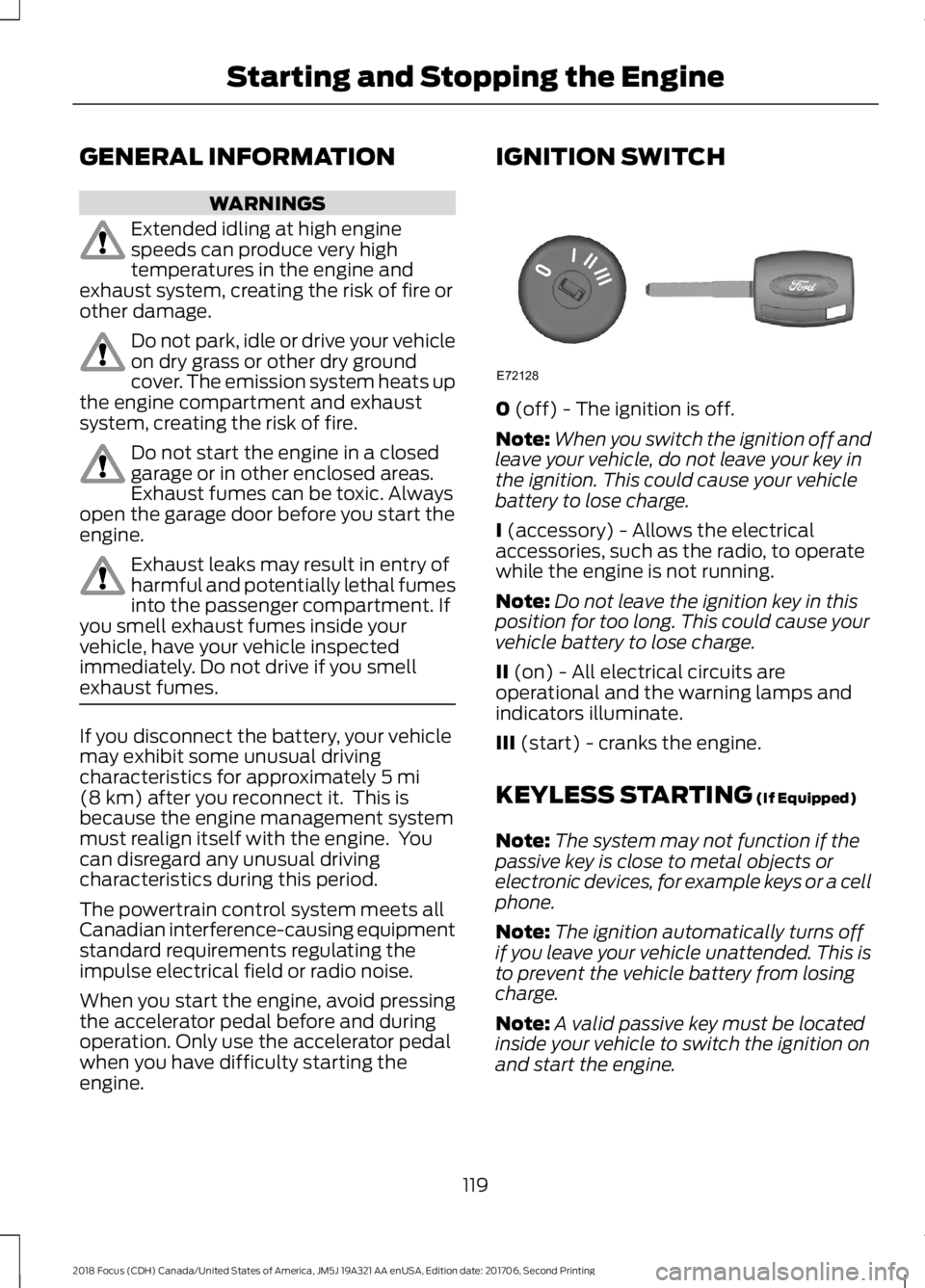
IGNITION SWITCH
0 (off) - The ignition is off.
Note:When you switch the ignition off andleave your vehicle, do not leave your key inthe ignition. This could cause your vehiclebattery to lose charge.
I (accessory) - Allows the electricalaccessories, such as the radio, to operatewhile the engine is not running.
Note:Do not leave the ignition key in thisposition for too long. This could cause yourvehicle battery to lose charge.
II (on) - All electrical circuits areoperational and the warning lamps andindicators illuminate.
III (start) - cranks the engine.
KEYLESS STARTING (If Equipped)
Note:The system may not function if thepassive key is close to metal objects orelectronic devices, for example keys or a cellphone.
Note:The ignition automatically turns offif you leave your vehicle unattended. This isto prevent the vehicle battery from losingcharge.
Note:A valid passive key must be locatedinside your vehicle to switch the ignition onand start the engine.
1192018 Focus (CDH) Canada/United States of America, JM5J 19A321 AA enUSA, Edition date: 201706, Second PrintingStarting and Stopping the EngineE72128