2018 FORD FOCUS fuel consumption
[x] Cancel search: fuel consumptionPage 6 of 473

Unique Driving Character-istics
Auto-Start-Stop............................................127
Fuel and Refueling
Safety Precautions.......................................129
Fuel Quality - Gasoline...............................129
Fuel Filler Funnel Location........................130
Running Out of Fuel....................................130
Refueling..........................................................132
Fuel Consumption........................................134
Engine Emission Control
Emission Law.................................................136
Catalytic Converter.......................................137
Transmission
Manual Transmission - 6-Speed ManualTransmission (MMT6)...........................140
Manual Transmission - 5-Speed ManualTransmission (MTX-75)..........................141
Automatic Transmission............................142
Brakes
General Information....................................147
Hints on Driving With Anti-LockBrakes...........................................................148
Parking Brake.................................................148
Hill Start Assist..............................................148
Traction Control
Principle of Operation................................150
Using Traction Control...............................150
Stability Control
Principle of Operation..................................151
Using Stability Control................................152
Parking Aids
Principle of Operation.................................153
Rear Parking Aid............................................153
Front Parking Aid..........................................154
Active Park Assist.........................................155
Rear View Camera.......................................159
Cruise Control
Principle of Operation.................................162
Using Cruise Control....................................162
Driving Aids
Driver Alert......................................................164
Lane Keeping System.................................165
Blind Spot Information System..............169
Cross Traffic Alert...........................................171
Eco Mode.........................................................173
Steering............................................................174
Load Carrying
Rear Under Floor Storage..........................176
Luggage Covers.............................................176
Load Limit........................................................176
Towing
Towing a Trailer.............................................182
Transporting the Vehicle............................182
Towing the Vehicle on Four Wheels -Manual Transmission..............................182
Towing the Vehicle on Four Wheels - 1.0LEcoBoost™, AutomaticTransmission..............................................183
Towing the Vehicle on Four Wheels -2.0L, Automatic Transmission............183
Driving Hints
Breaking-In.....................................................186
Economical Driving......................................186
Cold Weather Precautions........................186
Driving Through Water...............................186
Floor Mats........................................................187
32018 Focus (CDH) Canada/United States of America, JM5J 19A321 AA enUSA, Edition date: 201706, Second PrintingTable of Contents
Page 98 of 473

Settings
Always On or User Selectable.Traction Ctrl
Always On or User Selectable.ESC
Always On or User Selectable.911 Assist
xx MPH (xx km/h) or Off.Max Speed
xx MPH (xx km/h) or Off.Speed Warning
Volume Limiter
Always On or User Selectable.Do Not Disturb
Hold OK to Clear All MyKeysClear MyKeys
Navigation infoDisplay
Choose your applicable setting.Language
On or Off.Vehicle Graphic
Choose your applicable setting.Distance
Choose your applicable setting.Temperature
System Check
Active warnings appear first. The systemcheck menu may appear different basedupon equipment options and currentvehicle status. Use the up and down arrowbuttons to scroll through the list. SeeInformation Messages (page 96).
TRIP COMPUTER
Resetting the Trip Computer
Press and hold OK on the current screento reset the respective trip, distance, timeand average fuel consumption information.
All Values
Indicates all the respective trip, distance,time and average fuel consumptioninformation.
Average Fuel Consumption
Indicates the average fuel consumptionsince the function was last reset.
Instantaneous Fuel (If Equipped)
Indicates the current fuel consumption.
Distance to Empty
Indicates the approximate distance yourvehicle will travel on the fuel remaining inthe tank. Changes in driving pattern maycause the value to vary.
Outside Air Temperature
Shows the outside air temperature.
Trip Odometer
Registers the distance traveled ofindividual journeys.
952018 Focus (CDH) Canada/United States of America, JM5J 19A321 AA enUSA, Edition date: 201706, Second PrintingInformation Displays
Page 130 of 473
AUTO-START-STOP (If Equipped)
The system reduces fuel consumption andCO2 emissions by shutting down theengine when your vehicle is idling, forexample at traffic lights.
WARNINGS
Always fully apply the parking brake.Make sure you shift into park (P) forvehicles with an automatictransmission. Switch the ignition off andremove the key whenever you leave yourvehicle.
Before opening the hood orperforming any maintenance, fullyapply the parking brake, shift intopark (P) or neutral (N) and switch theignition off.
Always switch the ignition off beforeleaving the vehicle. If the ignition isswitched on an automatic restartmay occur at any time.
The system may require the engineto automatically restart when theauto-start-stop indicator illuminatesgreen or flashes amber. Failure to followthis instruction could result in personalinjury.
Note:The Auto-Start-Stop indicatorilluminates green when the engine shutsdown. See Warning Lamps and Indicators(page 87). It flashes amber with a messagewhen the driver needs to shift to neutral orpress a pedal. See Information Messages(page 96). If it illuminates grey, the systemis not available.
Using Auto-Start-Stop with aManual Transmission
To Stop the Engine
1.Stop your vehicle.
2.Shift into neutral.
3.Release the clutch and acceleratorpedal.
To Re-Start the Engine
Press the clutch pedal
Note:To obtain maximum benefit from thesystem, move the transmission selectorlever to neutral and release the clutch pedalduring any stop of longer than threeseconds.
Note:Auto-Start-Stop also comes withstall recovery. If you fully press the clutchpedal after stalling the engine, the engineautomatically restarts.
Using Auto-Start-Stop with anAutomatic Transmission
To Stop the Engine
1.Stop your vehicle in drive (D).
2.Release the accelerator pedal.
3.Maintain pressure on the brake pedal.
Note:If your vehicle is in an engine offAuto-Start-Stop state and you move thetransmission to reverse (R) while the brakepedal is not pressed, a message will appearon your instrument cluster. Press the brakepedal within 60 seconds or you will need toshift to park (P). A manual restart will berequired.
Note:If the Shift to P, Restart Enginemessage appears and the amberAuto-Start-Stop indicator flashes,automatic restart is not available. You mustrestart your vehicle manually.
1272018 Focus (CDH) Canada/United States of America, JM5J 19A321 AA enUSA, Edition date: 201706, Second PrintingUnique Driving Characteristics
Page 137 of 473
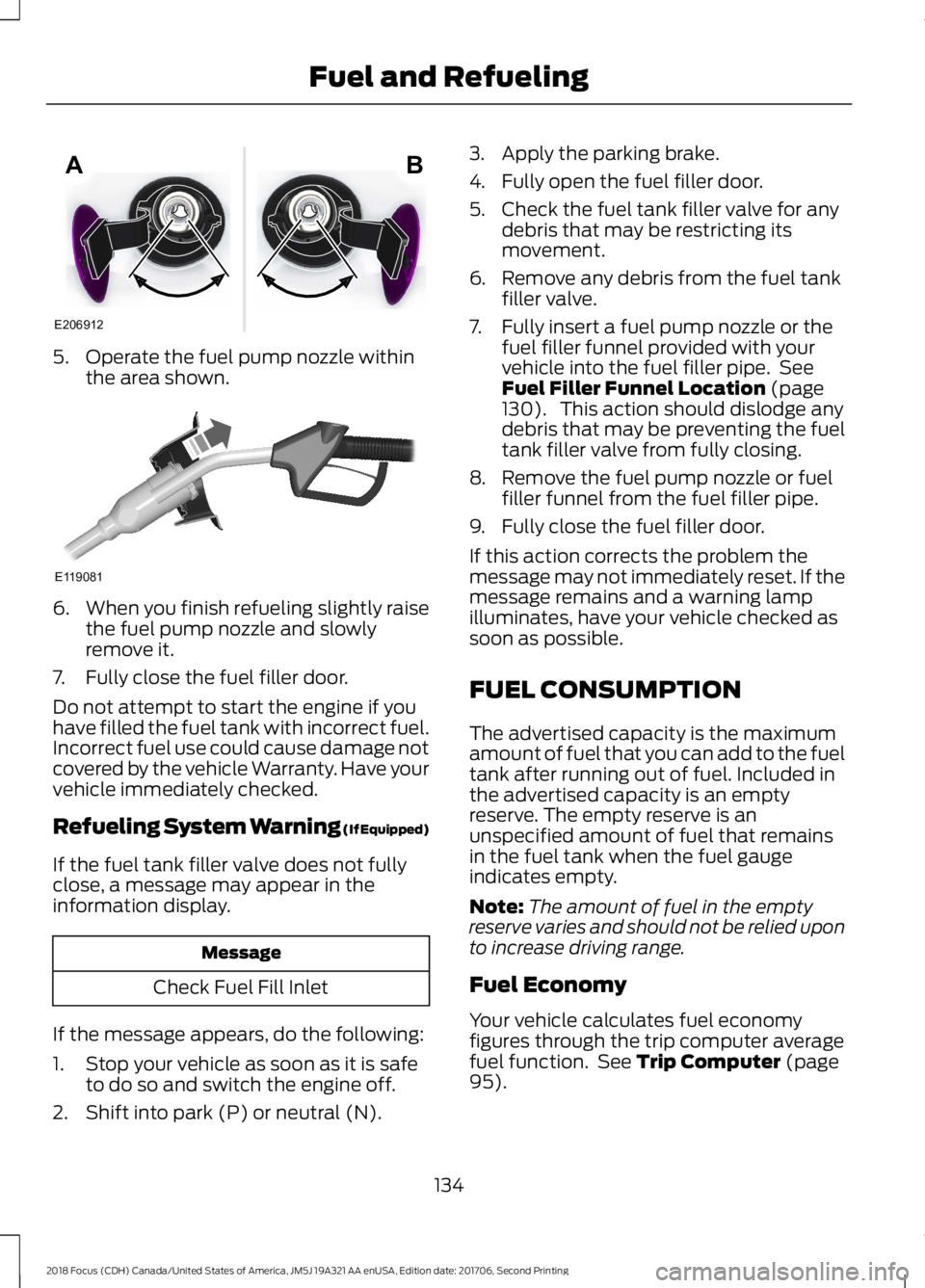
5.Operate the fuel pump nozzle withinthe area shown.
6.When you finish refueling slightly raisethe fuel pump nozzle and slowlyremove it.
7.Fully close the fuel filler door.
Do not attempt to start the engine if youhave filled the fuel tank with incorrect fuel.Incorrect fuel use could cause damage notcovered by the vehicle Warranty. Have yourvehicle immediately checked.
Refueling System Warning (If Equipped)
If the fuel tank filler valve does not fullyclose, a message may appear in theinformation display.
Message
Check Fuel Fill Inlet
If the message appears, do the following:
1.Stop your vehicle as soon as it is safeto do so and switch the engine off.
2.Shift into park (P) or neutral (N).
3.Apply the parking brake.
4.Fully open the fuel filler door.
5.Check the fuel tank filler valve for anydebris that may be restricting itsmovement.
6.Remove any debris from the fuel tankfiller valve.
7.Fully insert a fuel pump nozzle or thefuel filler funnel provided with yourvehicle into the fuel filler pipe. SeeFuel Filler Funnel Location (page130). This action should dislodge anydebris that may be preventing the fueltank filler valve from fully closing.
8.Remove the fuel pump nozzle or fuelfiller funnel from the fuel filler pipe.
9.Fully close the fuel filler door.
If this action corrects the problem themessage may not immediately reset. If themessage remains and a warning lampilluminates, have your vehicle checked assoon as possible.
FUEL CONSUMPTION
The advertised capacity is the maximumamount of fuel that you can add to the fueltank after running out of fuel. Included inthe advertised capacity is an emptyreserve. The empty reserve is anunspecified amount of fuel that remainsin the fuel tank when the fuel gaugeindicates empty.
Note:The amount of fuel in the emptyreserve varies and should not be relied uponto increase driving range.
Fuel Economy
Your vehicle calculates fuel economyfigures through the trip computer averagefuel function. See Trip Computer (page95).
1342018 Focus (CDH) Canada/United States of America, JM5J 19A321 AA enUSA, Edition date: 201706, Second PrintingFuel and RefuelingE206912AB E119081
Page 139 of 473

EMISSION LAW
WARNING
Do not remove or alter the originalequipment floor covering orinsulation between it and the metalfloor of the vehicle. The floor covering andinsulation protect occupants of the vehiclefrom the engine and exhaust system heatand noise. On vehicles with no originalequipment floor covering insulation, do notcarry passengers in a manner that permitsprolonged skin contact with the metalfloor. Failure to follow these instructionsmay result in fire or personal injury.
U.S. federal laws and certain state lawsprohibit removing or rendering inoperativeemission control system components.Similar federal or provincial laws mayapply in Canada. We do not approve of anyvehicle modification without firstdetermining applicable laws.
Tampering with emissionscontrol systems includingrelated sensors or the DieselExhaust Fluid system can result in reducedengine power and the illumination of theservice engine soon light.
Tampering With a Noise ControlSystem
Federal laws prohibit the following acts:
•Removal or rendering inoperative byany person other than for purposes ofmaintenance.
•Repair or replacement of any device orelement of the design incorporated intoa new vehicle for the purpose of noisecontrol prior to its sale or delivery tothe ultimate purchaser or while it is inuse.
•The use of the vehicle after any personremoves or renders inoperative anydevice or element of the design.
The U.S. Environmental Protection Agencymay presume to constitute tampering asfollows:
•Removal of hood blanket, fender apronabsorbers, fender apron barriers,underbody noise shields or acousticallyabsorptive material.
•Tampering or rendering inoperative theengine speed governor, to allow enginespeed to exceed manufacturerspecifications.
If the engine does not start, runs rough,experiences a decrease in engineperformance, experiences excess fuelconsumption or produces excessiveexhaust smoke, check for the following:
•A plugged or disconnected air inletsystem hose.
•A plugged engine air filter element.
•Water in the fuel filter and waterseparator.
•A clogged fuel filter.
•Contaminated fuel.
•Air in the fuel system, due to looseconnections.
•An open or pinched sensor hose.
•Incorrect engine oil level.
1362018 Focus (CDH) Canada/United States of America, JM5J 19A321 AA enUSA, Edition date: 201706, Second PrintingEngine Emission Control
Page 176 of 473

Note:Keep the sensors free from snow, iceand large accumulations of dirt.
Note:Do not cover the sensors with bumperstickers, repair compound or other objects.
Note:Blocked sensors could affect systemperformance.
If the sensors are blocked, a message mayappear in the information display whenyou shift into reverse (R). SeeInformation Messages (page 96).
System Limitations
The system may not correctly operatewhen any of the following occur:
•The sensors are blocked.
•Adjacently parked vehicles or objectsare obstructing the sensors.
•Vehicles approach at speeds greaterthan 37 mph (60 km/h).
•The vehicle speed is greater than 7 mph(12 km/h).
•You reverse out of an angled parkingspace.
System Errors
If the system detects a fault a messagedisplays. See Information Messages(page 96).
Switching the System Off and On
You can temporarily switch the system offusing the information display. SeeInformation Messages (page 96). Whenyou switch system off, a message displays.See Information Messages (page 96).
Note:The system turns on each time youswitch the ignition on and you shift intoreverse (R). If you temporarily switch thesystem off, it turns on the next time youswitch the ignition on.
Note:The system may not correctly operatewhen towing a trailer. For vehicles with atrailer tow module and tow bar approvedby us, the system turns off when you attacha trailer. For vehicles with an aftermarkettrailer tow module or tow bar, werecommend that you switch the system offwhen you attach a trailer.
To permanently switch the system off,contact an authorized dealer.
ECO MODE
This system assists you in driving moreefficiently by constantly monitoringcharacteristics of gear changing,anticipation of traffic conditions andspeeds while driving.
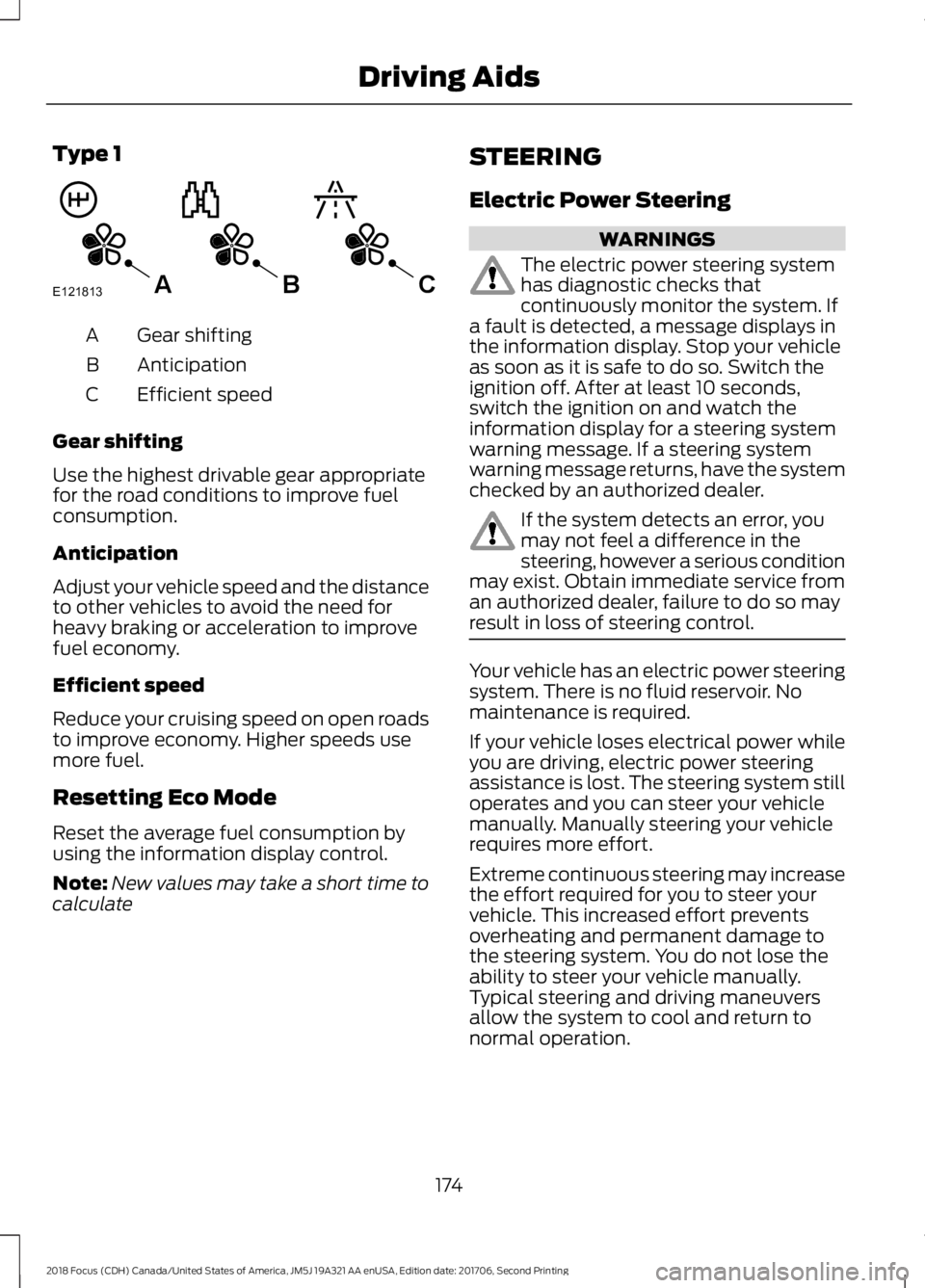
The value of these characteristics isrepresented by petals shown in the display,with five petals being the most efficient.The more efficiently you drive, the betterthe rating, and the better your vehicle'soverall fuel economy.
Note:These efficiency values do not resultin a defined fuel consumption figure. It mightvary as it is not only related to these drivinghabits, but also influenced by many otherfactors such as short trips and cold starts.
Note:Frequent short trips, where the enginedoes not fully warm up, will also increasefuel consumption
The system is accessed using theinformation display control. See GeneralInformation (page 92).
1732018 Focus (CDH) Canada/United States of America, JM5J 19A321 AA enUSA, Edition date: 201706, Second PrintingDriving Aids
Page 177 of 473
Type 1
Gear shiftingA
AnticipationB
Efficient speedC
Gear shifting
Use the highest drivable gear appropriatefor the road conditions to improve fuelconsumption.
Anticipation
Adjust your vehicle speed and the distanceto other vehicles to avoid the need forheavy braking or acceleration to improvefuel economy.
Efficient speed
Reduce your cruising speed on open roadsto improve economy. Higher speeds usemore fuel.
Resetting Eco Mode
Reset the average fuel consumption byusing the information display control.
Note:New values may take a short time tocalculate
STEERING
Electric Power Steering
WARNINGS
The electric power steering systemhas diagnostic checks thatcontinuously monitor the system. Ifa fault is detected, a message displays inthe information display. Stop your vehicleas soon as it is safe to do so. Switch theignition off. After at least 10 seconds,switch the ignition on and watch theinformation display for a steering systemwarning message. If a steering systemwarning message returns, have the systemchecked by an authorized dealer.
If the system detects an error, youmay not feel a difference in thesteering, however a serious conditionmay exist. Obtain immediate service froman authorized dealer, failure to do so mayresult in loss of steering control.
Your vehicle has an electric power steeringsystem. There is no fluid reservoir. Nomaintenance is required.
If your vehicle loses electrical power whileyou are driving, electric power steeringassistance is lost. The steering system stilloperates and you can steer your vehiclemanually. Manually steering your vehiclerequires more effort.
Extreme continuous steering may increasethe effort required for you to steer yourvehicle. This increased effort preventsoverheating and permanent damage tothe steering system. You do not lose theability to steer your vehicle manually.Typical steering and driving maneuversallow the system to cool and return tonormal operation.
1742018 Focus (CDH) Canada/United States of America, JM5J 19A321 AA enUSA, Edition date: 201706, Second PrintingDriving AidsE121813CBA
Page 319 of 473
To Access Using Voice Commands
Press the voice button then when prompted say:
Action and DescriptionMenu Item
Say the name of the application after the tone.The app should start. When an app is running through SYNC, youcan press the voice button and speak commands specific to theapp, for example "Play Playlist Road Trip".
mobile (apps |applications)
Use this command to discover the available voice commands.help
SYNC Mobile App Voice Commands
The following voice commands are always available:
Action and DescriptionMenu Item
SYNC prompts you to say the name of anapp to start it on SYNC.mobile (apps | applications)
SYNC lists all of the currently availablemobile apps.list [mobile] (apps | applications)
Searches your connected mobile device forSYNC-compatible mobile apps.find [new] [mobile] (apps | applications)
help
You can say the name of a mobile app at any time to start the mobile app on SYNC.
App Permissions
App permissions are organized by groups.You can grant these group permissionsindividually. You can change a permissiongroup status any time when not driving, byusing the settings menu.
When you launch an app using SYNC, thesystem may ask you to grant certainpermissions, for example:
•To allow your vehicle to provide vehicleinformation to the app such as, but notlimited to: Fuel level, fuel economy, fuelconsumption, engine speed, rainsensor, odometer, VIN, externaltemperature, gear position, tirepressure, and head lamp status.
•To allow your vehicle to provide drivingcharacteristic information such as, butnot limited to: MyKey, seat belt status,engine revolutions per minute, gearposition, braking events, steering wheelangle, and accelerator pedal position.
3162018 Focus (CDH) Canada/United States of America, JM5J 19A321 AA enUSA, Edition date: 201706, Second PrintingSYNC™