2018 FORD FOCUS traction control
[x] Cancel search: traction controlPage 6 of 473

Unique Driving Character-istics
Auto-Start-Stop............................................127
Fuel and Refueling
Safety Precautions.......................................129
Fuel Quality - Gasoline...............................129
Fuel Filler Funnel Location........................130
Running Out of Fuel....................................130
Refueling..........................................................132
Fuel Consumption........................................134
Engine Emission Control
Emission Law.................................................136
Catalytic Converter.......................................137
Transmission
Manual Transmission - 6-Speed ManualTransmission (MMT6)...........................140
Manual Transmission - 5-Speed ManualTransmission (MTX-75)..........................141
Automatic Transmission............................142
Brakes
General Information....................................147
Hints on Driving With Anti-LockBrakes...........................................................148
Parking Brake.................................................148
Hill Start Assist..............................................148
Traction Control
Principle of Operation................................150
Using Traction Control...............................150
Stability Control
Principle of Operation..................................151
Using Stability Control................................152
Parking Aids
Principle of Operation.................................153
Rear Parking Aid............................................153
Front Parking Aid..........................................154
Active Park Assist.........................................155
Rear View Camera.......................................159
Cruise Control
Principle of Operation.................................162
Using Cruise Control....................................162
Driving Aids
Driver Alert......................................................164
Lane Keeping System.................................165
Blind Spot Information System..............169
Cross Traffic Alert...........................................171
Eco Mode.........................................................173
Steering............................................................174
Load Carrying
Rear Under Floor Storage..........................176
Luggage Covers.............................................176
Load Limit........................................................176
Towing
Towing a Trailer.............................................182
Transporting the Vehicle............................182
Towing the Vehicle on Four Wheels -Manual Transmission..............................182
Towing the Vehicle on Four Wheels - 1.0LEcoBoost™, AutomaticTransmission..............................................183
Towing the Vehicle on Four Wheels -2.0L, Automatic Transmission............183
Driving Hints
Breaking-In.....................................................186
Economical Driving......................................186
Cold Weather Precautions........................186
Driving Through Water...............................186
Floor Mats........................................................187
32018 Focus (CDH) Canada/United States of America, JM5J 19A321 AA enUSA, Edition date: 201706, Second PrintingTable of Contents
Page 59 of 473
•Various vehicle speed minders can beset. Once you select a speed, it will beshown in the display, followed by anaudible tone when the preselectedvehicle speed is exceeded.
•Audio system maximum volume of45%. A message will be shown in thedisplay when you attempt to exceedthe limited volume. Also, thespeed-sensitive or compensatedautomatic volume control will bedisabled.
•Always on setting. When this isselected, you will not be able to turnoff AdvanceTrac or traction control,E911 or Emergency Assist, or the Do NotDisturb feature (if your vehicle isequipped with these features).
CREATING A MYKEY
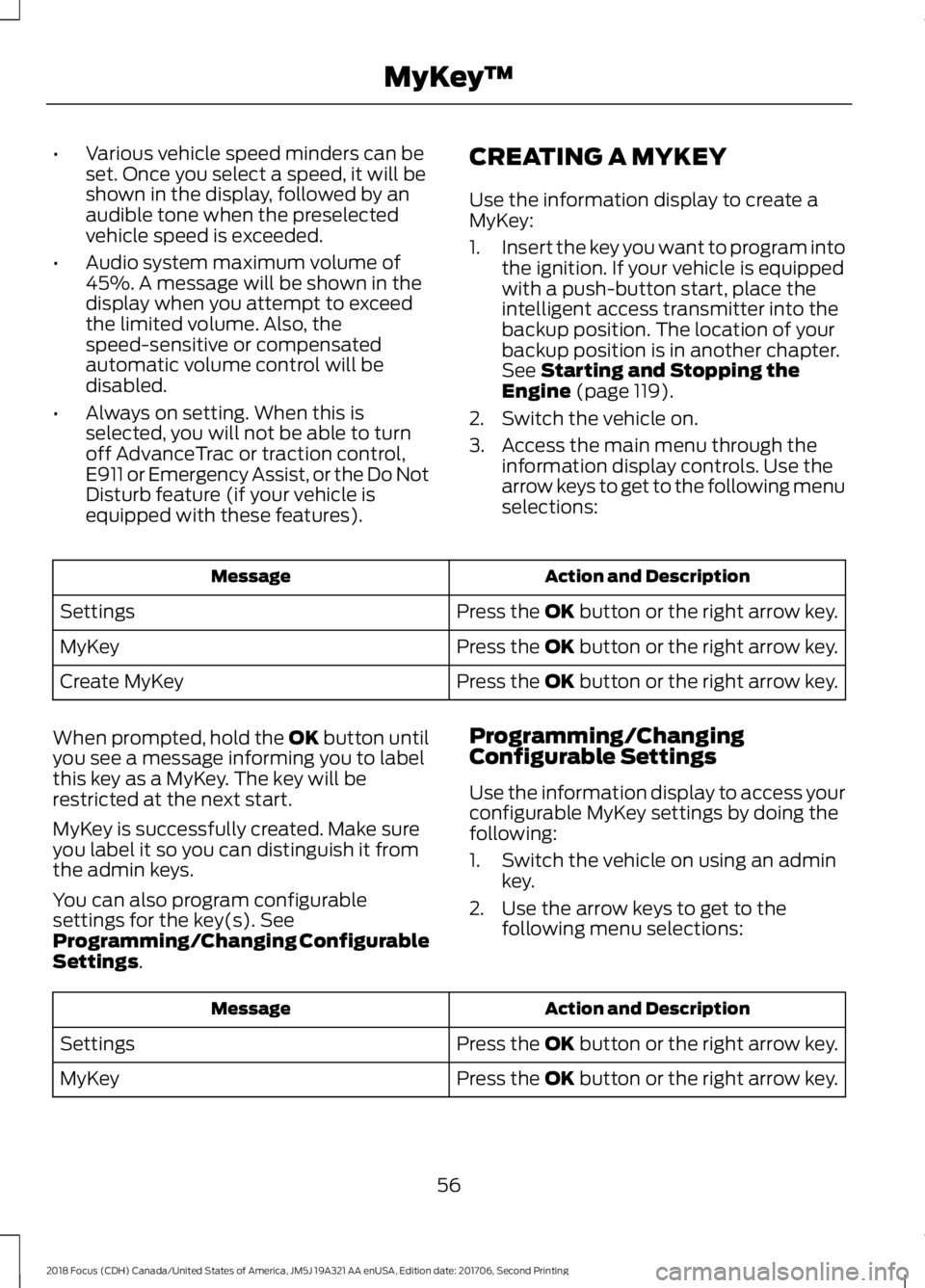
Use the information display to create aMyKey:
1.Insert the key you want to program intothe ignition. If your vehicle is equippedwith a push-button start, place theintelligent access transmitter into thebackup position. The location of yourbackup position is in another chapter.See Starting and Stopping theEngine (page 119).
2.Switch the vehicle on.
3.Access the main menu through theinformation display controls. Use thearrow keys to get to the following menuselections:
Action and DescriptionMessage
Press the OK button or the right arrow key.Settings
Press the OK button or the right arrow key.MyKey
Press the OK button or the right arrow key.Create MyKey
When prompted, hold the OK button untilyou see a message informing you to labelthis key as a MyKey. The key will berestricted at the next start.
MyKey is successfully created. Make sureyou label it so you can distinguish it fromthe admin keys.
You can also program configurablesettings for the key(s). SeeProgramming/Changing ConfigurableSettings.
Programming/ChangingConfigurable Settings
Use the information display to access yourconfigurable MyKey settings by doing thefollowing:
1.Switch the vehicle on using an adminkey.
2.Use the arrow keys to get to thefollowing menu selections:
Action and DescriptionMessage
Press the OK button or the right arrow key.Settings
Press the OK button or the right arrow key.MyKey
562018 Focus (CDH) Canada/United States of America, JM5J 19A321 AA enUSA, Edition date: 201706, Second PrintingMyKey™
Page 93 of 473

Low Tire Pressure Warning Lamp
(If Equipped)
It illuminates if the tire pressurein one or more tires is below thecorrect tire pressure.
See Tire Pressure Monitoring System(page 260).
Low Washer Fluid Level WarningLamp
It illuminates when the washerfluid is low.
Message Center Indicator
It illuminates when a newmessage is stored in theinformation display.
The indicator is red or amber dependingon the severity of the condition and itremains on until the condition is resolved.
See Information Messages (page 96).
Oil Pressure Warning Lamp
WARNING
If it illuminates when you are drivingdo not continue your journey, even ifthe oil level is correct. Have yourvehicle checked.
If it illuminates when the engineis running this indicates amalfunction. Stop your vehicleas soon as it is safe to do so and switch theengine off. Check the engine oil level. Ifthe oil level is sufficient, this indicates asystem malfunction. Have your vehicleimmediately checked.
See Engine Oil Check (page 215).
Stability Control and TractionControl Indicator
Flashes during operation.
If it does not illuminate when youswitch the ignition on, or remainson when the engine is running, thisindicates a malfunction. Have your vehiclechecked as soon as possible.
Note:The system automatically turns offif there is a malfunction.
See Stability Control (page 151). SeeTraction Control (page 150).
Stability Control and TractionControl Off Warning Lamp
It illuminates when you switchthe system off.
AUDIBLE WARNINGS AND
INDICATORS
Key in Ignition Warning Chime
Sounds when you open the driver's doorand you have left the key in the ignition.
Keyless Warning Alert (If Equipped)
Sounds the horn twice when you exit yourvehicle with the intelligent access key, afterthe last door is closed and your keylessvehicle is in RUN, indicating your vehicle isstill on.
Headlamps On Warning Chime
Sounds when you remove the key from theignition and open the driver's door and youhave left the headlamps or parking lampson.
902018 Focus (CDH) Canada/United States of America, JM5J 19A321 AA enUSA, Edition date: 201706, Second PrintingInstrument Cluster E132353 E138639 E130458
Page 96 of 473

Trip 1 and 21
Anticipation
Speed
Ford EcoMode
Inst Fuel Econ
Distance to E
Trip Timer
Outside Temp.
Option to select for navigation display.
1 See Trip Computer (page 95).
Information
Driver Alert
MyKey
MyKey Info
System Check
Settings
Traction CtrlDriver Assist
Blindspot
Collision Warn
Cross Traffic
AdaptiveCruise Control
Normal
Driver Alert
Hill Start Assist
Tire Monitor
932018 Focus (CDH) Canada/United States of America, JM5J 19A321 AA enUSA, Edition date: 201706, Second PrintingInformation Displays
Page 106 of 473
ActionMessage
If the warning message remains on after you have checkedthe tire pressures, the system has detected a fault thatrequires service. Have your vehicle checked as soon aspossible.
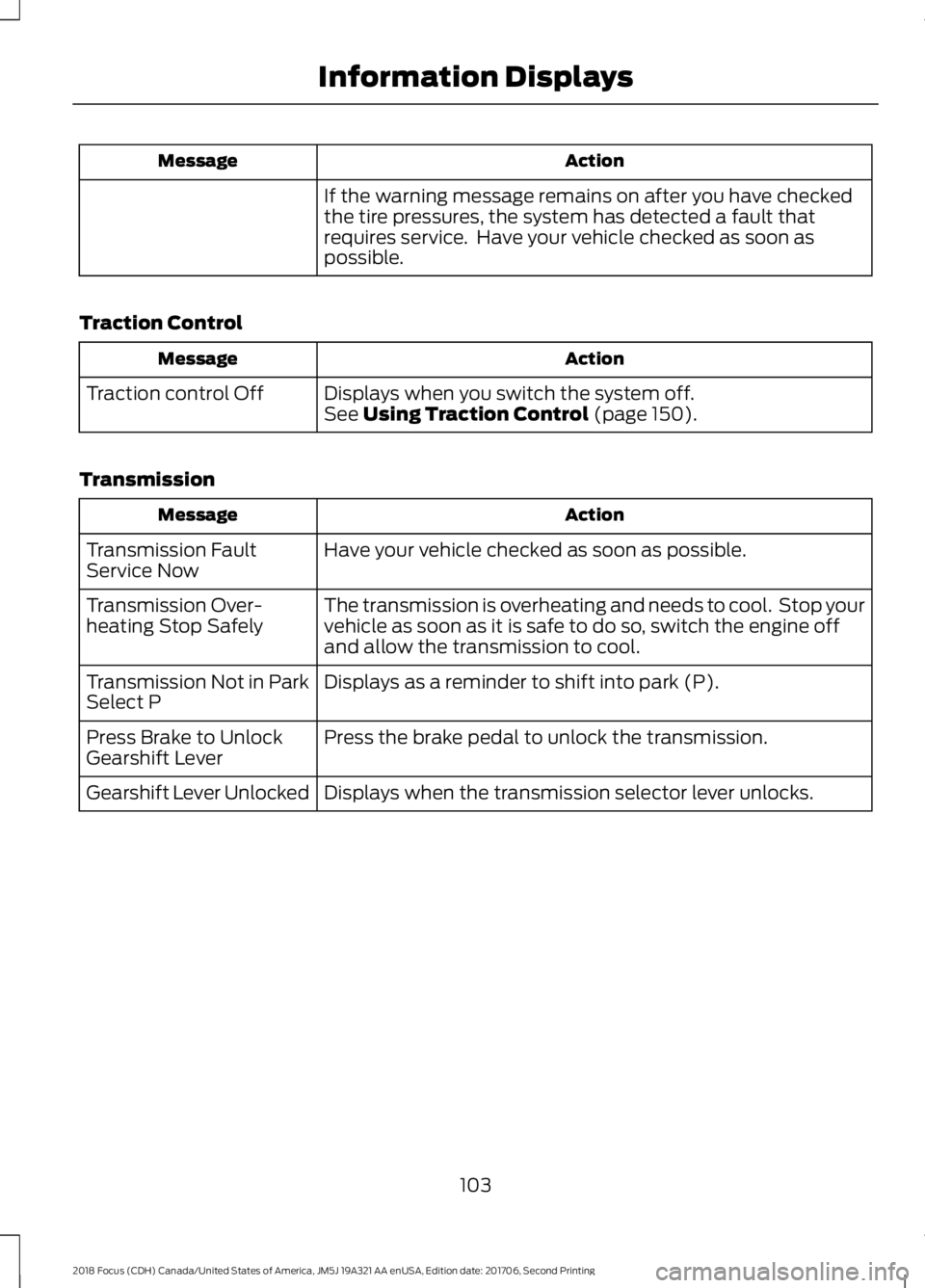
Traction Control
ActionMessage
Displays when you switch the system off.Traction control OffSee Using Traction Control (page 150).
Transmission
ActionMessage
Have your vehicle checked as soon as possible.Transmission FaultService Now
The transmission is overheating and needs to cool. Stop yourvehicle as soon as it is safe to do so, switch the engine offand allow the transmission to cool.
Transmission Over-heating Stop Safely
Displays as a reminder to shift into park (P).Transmission Not in ParkSelect P
Press the brake pedal to unlock the transmission.Press Brake to UnlockGearshift Lever
Displays when the transmission selector lever unlocks.Gearshift Lever Unlocked
1032018 Focus (CDH) Canada/United States of America, JM5J 19A321 AA enUSA, Edition date: 201706, Second PrintingInformation Displays
Page 153 of 473
PRINCIPLE OF OPERATION
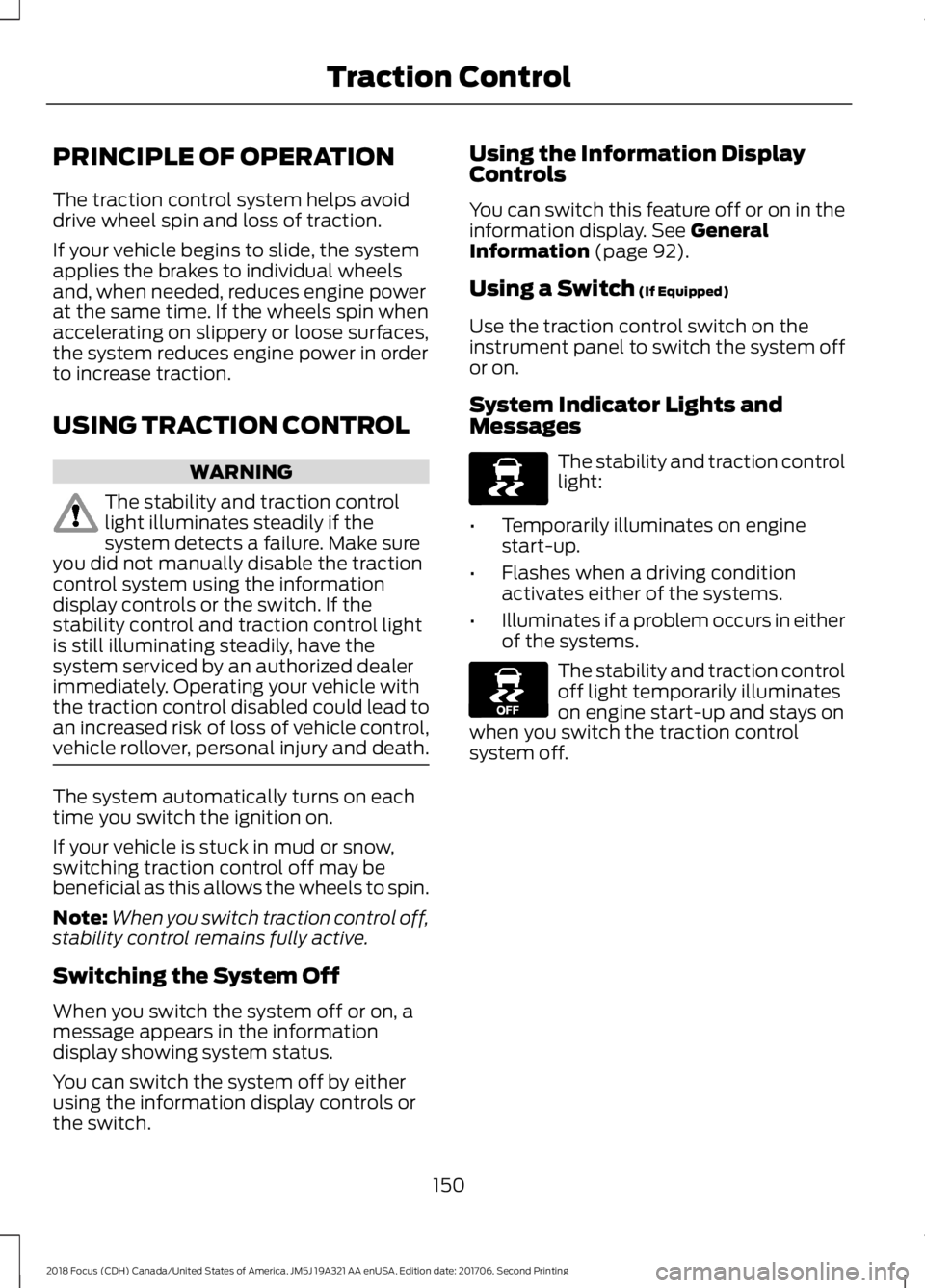
The traction control system helps avoiddrive wheel spin and loss of traction.
If your vehicle begins to slide, the systemapplies the brakes to individual wheelsand, when needed, reduces engine powerat the same time. If the wheels spin whenaccelerating on slippery or loose surfaces,the system reduces engine power in orderto increase traction.
USING TRACTION CONTROL
WARNING
The stability and traction controllight illuminates steadily if thesystem detects a failure. Make sureyou did not manually disable the tractioncontrol system using the informationdisplay controls or the switch. If thestability control and traction control lightis still illuminating steadily, have thesystem serviced by an authorized dealerimmediately. Operating your vehicle withthe traction control disabled could lead toan increased risk of loss of vehicle control,vehicle rollover, personal injury and death.
The system automatically turns on eachtime you switch the ignition on.
If your vehicle is stuck in mud or snow,switching traction control off may bebeneficial as this allows the wheels to spin.
Note:When you switch traction control off,stability control remains fully active.
Switching the System Off
When you switch the system off or on, amessage appears in the informationdisplay showing system status.
You can switch the system off by eitherusing the information display controls orthe switch.
Using the Information DisplayControls
You can switch this feature off or on in theinformation display. See GeneralInformation (page 92).
Using a Switch (If Equipped)
Use the traction control switch on theinstrument panel to switch the system offor on.
System Indicator Lights andMessages
The stability and traction controllight:
•Temporarily illuminates on enginestart-up.
•Flashes when a driving conditionactivates either of the systems.
•Illuminates if a problem occurs in eitherof the systems.
The stability and traction controloff light temporarily illuminateson engine start-up and stays onwhen you switch the traction controlsystem off.
1502018 Focus (CDH) Canada/United States of America, JM5J 19A321 AA enUSA, Edition date: 201706, Second PrintingTraction ControlE138639 E130458
Page 154 of 473

PRINCIPLE OF OPERATION
WARNINGS
Vehicle modifications involvingbraking system, aftermarket roofracks, suspension, steering system,tire construction and wheel and tire sizemay change the handling characteristicsof your vehicle and may adversely affectthe performance of the electronic stabilitycontrol system. In addition, installing anystereo loudspeakers may interfere withand adversely affect the electronic stabilitycontrol system. Install any aftermarketstereo loudspeaker as far as possible fromthe front center console, the tunnel, andthe front seats in order to minimize the riskof interfering with the electronic stabilitycontrol sensors. Reducing theeffectiveness of the electronic stabilitycontrol system could lead to an increasedrisk of loss of vehicle control, vehiclerollover, personal injury and death.
Remember that even advancedtechnology cannot defy the laws ofphysics. It’s always possible to losecontrol of a vehicle due to inappropriatedriver input for the conditions. Aggressivedriving on any road condition can causeyou to lose control of your vehicleincreasing the risk of personal injury orproperty damage. Activation of theelectronic stability control system is anindication that at least some of the tireshave exceeded their ability to grip the road;this could reduce the operator’s ability tocontrol the vehicle potentially resulting ina loss of vehicle control, vehicle rollover,personal injury and death. If your electronicstability control system activates, SLOWDOWN.
The system automatically turns on eachtime you switch the ignition on.
If a fault occurs in either the stabilitycontrol or the traction control system, youmay experience the following conditions:
•The stability and traction control lightilluminates steadily.
•The stability control and tractioncontrol systems do not enhance yourvehicle's ability to maintain traction ofthe wheels.
If a driving condition activates either thestability control or the traction controlsystem you may experience the followingconditions:
•The stability and traction control lightflashes.
•Your vehicle slows down.
•Reduced engine power.
•A vibration in the brake pedal.
•The brake pedal is stiffer than usual.
•If the driving condition is severe andyour foot is not on the brake, the brakepedal may move as the system applieshigher brake force.
The stability control system has severalfeatures built into it to help you maintaincontrol of your vehicle:
Electronic Stability Control
The system enhances your vehicle’s abilityto prevent skids or lateral slides byapplying brakes to one or more of thewheels individually and, if necessary,reducing engine power.
Traction Control
The system enhances your vehicle’s abilityto maintain traction of the wheels bydetecting and controlling wheel spin. SeeUsing Traction Control (page 150).
1512018 Focus (CDH) Canada/United States of America, JM5J 19A321 AA enUSA, Edition date: 201706, Second PrintingStability Control
Page 155 of 473
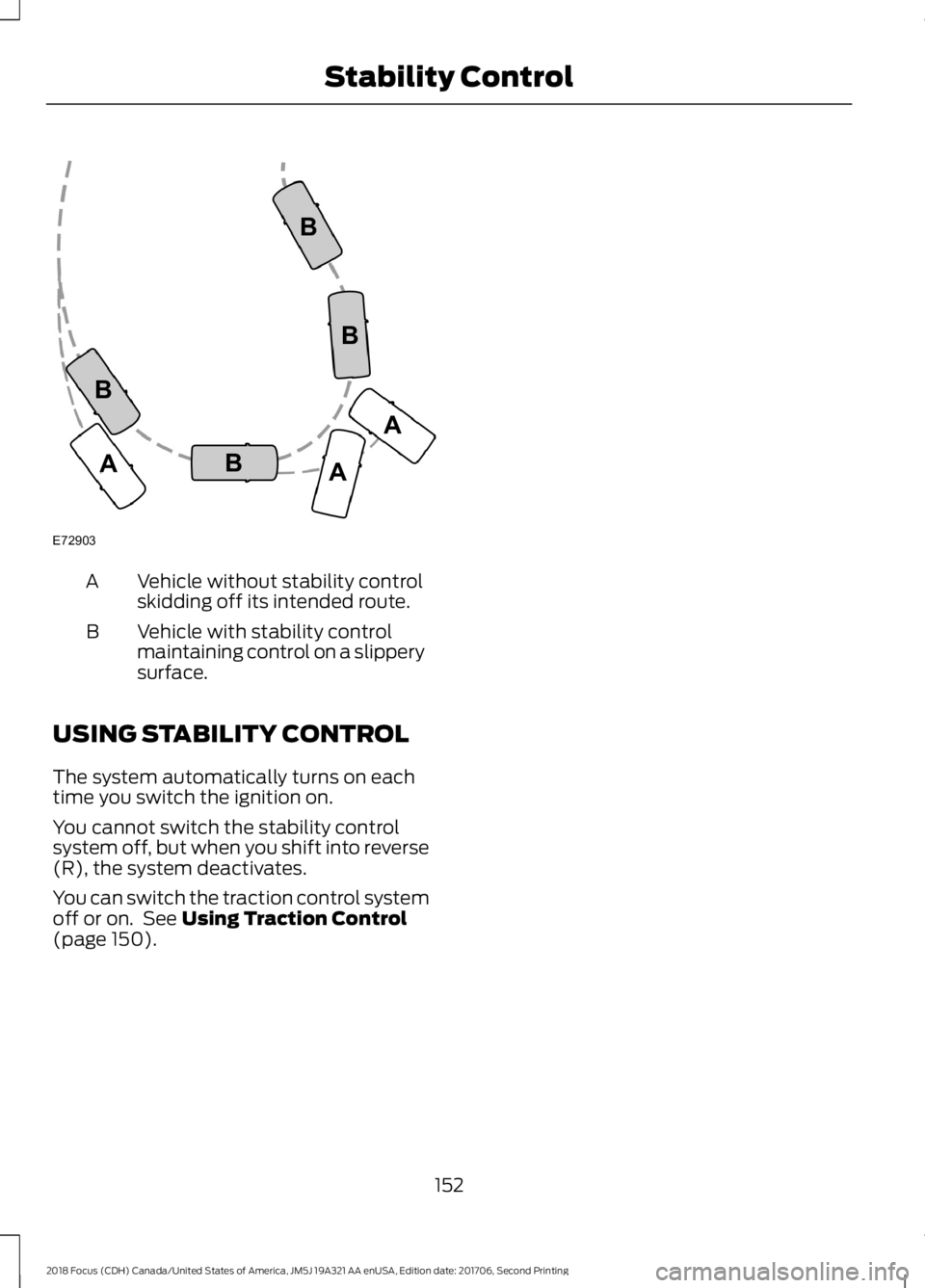
Vehicle without stability controlskidding off its intended route.A
Vehicle with stability controlmaintaining control on a slipperysurface.
B
USING STABILITY CONTROL
The system automatically turns on eachtime you switch the ignition on.
You cannot switch the stability controlsystem off, but when you shift into reverse(R), the system deactivates.
You can switch the traction control systemoff or on. See Using Traction Control(page 150).
1522018 Focus (CDH) Canada/United States of America, JM5J 19A321 AA enUSA, Edition date: 201706, Second PrintingStability ControlE72903AAABBBB