2018 FORD FOCUS manual radio set
[x] Cancel search: manual radio setPage 289 of 473
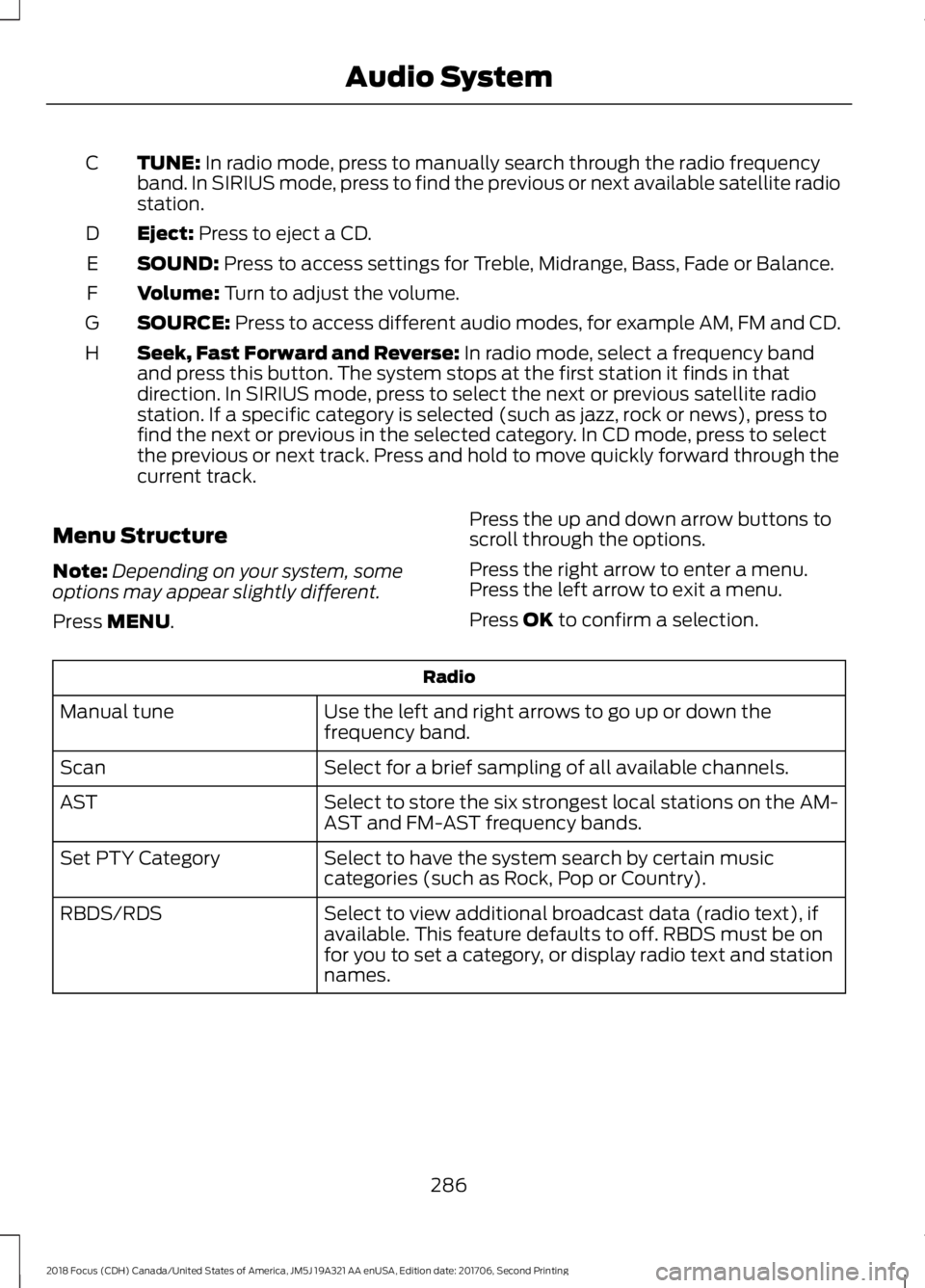
TUNE: In radio mode, press to manually search through the radio frequencyband. In SIRIUS mode, press to find the previous or next available satellite radiostation.
C
Eject: Press to eject a CD.D
SOUND: Press to access settings for Treble, Midrange, Bass, Fade or Balance.E
Volume: Turn to adjust the volume.F
SOURCE: Press to access different audio modes, for example AM, FM and CD.G
Seek, Fast Forward and Reverse: In radio mode, select a frequency bandand press this button. The system stops at the first station it finds in thatdirection. In SIRIUS mode, press to select the next or previous satellite radiostation. If a specific category is selected (such as jazz, rock or news), press tofind the next or previous in the selected category. In CD mode, press to selectthe previous or next track. Press and hold to move quickly forward through thecurrent track.
H
Menu Structure
Note:Depending on your system, someoptions may appear slightly different.
Press MENU.
Press the up and down arrow buttons toscroll through the options.
Press the right arrow to enter a menu.Press the left arrow to exit a menu.
Press OK to confirm a selection.
Radio
Use the left and right arrows to go up or down thefrequency band.Manual tune
Select for a brief sampling of all available channels.Scan
Select to store the six strongest local stations on the AM-AST and FM-AST frequency bands.AST
Select to have the system search by certain musiccategories (such as Rock, Pop or Country).Set PTY Category
Select to view additional broadcast data (radio text), ifavailable. This feature defaults to off. RBDS must be onfor you to set a category, or display radio text and stationnames.
RBDS/RDS
2862018 Focus (CDH) Canada/United States of America, JM5J 19A321 AA enUSA, Edition date: 201706, Second PrintingAudio System
Page 305 of 473
Other features, such as text messagingusing Bluetooth and automatic phonebookdownload, are phone-dependent features.To check your phone's compatibility, seeyour phone's manual and visitwww.SYNCMyRide.com,www.SYNCMyRide.ca orwww.syncmaroute.ca.
Pairing a Phone for the First Time
Wirelessly pairing your phone with SYNCallows you to make and receive hands-freecalls.
Note:SYNC can support downloading upto approximately 4000 entries perBluetooth-enabled cellular phone.
Note:Make sure to switch on the ignitionand the radio. Shift the transmission intopark (P) for automatic transmission or firstgear for manual transmission.
Using the Audio System
Note:To scroll through the menus, pressthe up and down arrows on your audiosystem.
1.Make sure to switch on your phone'sBluetooth feature before starting thesearch. See your device's manual ifnecessary.
2.Press the PHONE button. When theaudio display indicates there is nopaired phone, select the option to add.
3.When a message to begin pairingappears in the audio display, search forSYNC on your phone to start the pairingprocess.
4.When prompted on your cell phone’sdisplay, confirm that the PIN providedby SYNC matches the PIN displayedon your cell phone. Your phone is nowpaired and the display indicates thatthe pairing was successful. If you areprompted to enter a PIN on your device,enter the PIN displayed on the screen.The display indicates when the pairingis successful.
Depending on your phone's capability andyour market, the system may prompt youwith questions, such as setting the currentphone as the primary phone (the phoneSYNC automatically tries to connect withfirst upon vehicle start-up) anddownloading your phonebook.
Using Voice Commands
Make sure to switch on yourphone's Bluetooth featurebefore starting the search. Seeyour device's manual if necessary.
Press the voice and when promptedsay:
Action and Descrip-tionVoice Command
Follow the instruc-tions on the audiodisplay.
(pair ([Bluetooth]device | phone |Bluetooth audio) |add phone)
You can say any of the voice commandsthat appear within open and close bracketsthat are separated by |. For example,where; (what's | what is) appears you say;what's or what is.
The commands that have [ ] around theword means that the word is optional.
3022018 Focus (CDH) Canada/United States of America, JM5J 19A321 AA enUSA, Edition date: 201706, Second PrintingSYNC™E142599
Page 306 of 473
Depending on your phone's capability andyour market, the system may prompt youwith questions, such as setting the currentphone as the primary phone (the phoneSYNC automatically tries to connect withfirst upon vehicle start-up) anddownloading your phonebook.
Pairing Subsequent Phones
Note:Make sure to switch on the ignitionand the radio. Shift the transmission intopark (P) for automatic transmission or firstgear for manual transmission.
Note:To scroll through the menus, pressthe up and down arrows on your audiosystem.
1.Make sure to switch on your phone'sBluetooth feature before starting thesearch. See your device's manual ifnecessary.
2.Press the PHONE button.
3.Select the option for BluetoothDevices.
4.Press the OK button.
5.Select the option to add. This startsthe pairing process.
6.When a message to begin pairingappears in the audio display, search forSYNC on your device.
7.When prompted on your cell phone’sdisplay, confirm that the PIN providedby SYNC matches the PIN displayedon your cell phone. Your phone is nowpaired and the display indicates thatthe pairing was successful. If you areprompted to enter a PIN on your device,enter the PIN displayed on the screen.The display indicates when the pairingis successful.
SYNC may prompt you with more cellphone options. Your cell phone may alsoprompt you to give SYNC permission toaccess information. For more informationon your cell phone’s capability, see yourcell phone’s manual and visit the website.
Phone Voice Commands
Press the voice button. Whenprompted, say any of thefollowing:
Voice Command
(phone | Blackberry | iPhone)
Then say any of the following:
call (___)
call ___ at home
call ___ ((in|at) [the] office | at work)
call ___ on (cell | mobile)
call ___ on other
1dial [[a] number]
2([go to] privacy | transfer to phone| privacy on)
2(hold call [on] | place call on hold)
2join (calls | call)
2mute call [on]
2(mute call off | un-mute call)
(turn ringer on | silent mode off)
(turn ringer off | silent mode [on])
3032018 Focus (CDH) Canada/United States of America, JM5J 19A321 AA enUSA, Edition date: 201706, Second PrintingSYNC™E142599
Page 464 of 473

Clearing All MyKeys........................................57Climate Control............................................104Clutch Fluid Check - ManualTransmission................................................221Cold Weather Precautions........................186Coolant CheckSee: Engine Coolant Check.............................217Crash Sensors and Airbag Indicator........45Creating a MyKey...........................................56Programming/Changing ConfigurableSettings...............................................................56Cross Traffic Alert...........................................171Blocked Sensors..................................................172Switching the System Off and On................173System Errors........................................................173System Lights, Messages and AudibleAlerts...................................................................172System Limitations.............................................173Using the Cross Traffic Alert System............171Cruise Control..................................................72Principle of Operation.......................................162Cruise controlSee: Using Cruise Control................................162Customer Assistance..................................193
D
Data Recording..................................................9Event Data Recording..........................................10Service Data Recording........................................9Daytime Running Lamps.............................78Type 1 - Conventional(Non-Configurable)........................................78Type 2 - Configurable..........................................78Digital Radio...................................................291HD Radio Reception and StationTroubleshooting............................................292Direction Indicators.......................................80Doors and Locks............................................60Drive Belt Routing - 1.0LEcoBoost™.................................................235Drive Belt Routing - 2.0L...........................235Driver Alert......................................................164Principle of Operation.......................................164Using Driver Alert................................................164Driver and Passenger Airbags...................39Children and Airbags..........................................40
Proper Driver and Front Passenger SeatingAdjustment........................................................39Driver Knee Airbag.........................................44Driving Aids.....................................................164Driving at High Speed................................266Driving Hints...................................................186Driving Through Water...............................186DRLSee: Daytime Running Lamps.........................78
E
Eco Mode.........................................................173Resetting Eco Mode...........................................174Type 1.......................................................................174Economical Driving......................................186Electromagnetic Compatibility...............427Emission Law.................................................136Noise Emissions Warranty, ProhibitedTampering Acts and Maintenance..........137Tampering With a Noise ControlSystem...............................................................136End User License Agreement.................429VEHICLE SOFTWARE END USER LICENSEAGREEMENT (EULA) .................................429Engine Block Heater....................................125Using the Engine Block Heater......................126Engine Coolant Check.................................217Adding Coolant....................................................217Coolant Change..................................................219Engine Coolant TemperatureManagement..................................................220Fail-Safe Cooling................................................219Recycled Coolant................................................218Severe Climates..................................................219Engine Cooling Fan......................................216Engine Emission Control............................136Engine ImmobilizerSee: Passive Anti-Theft System....................68Engine Oil Check...........................................215Adding Engine Oil...............................................215Engine Oil Dipstick - 1.0LEcoBoost™..................................................215Engine Oil Dipstick - 2.0L...........................215Engine Specifications - 1.0LEcoBoost™.................................................268Engine Specifications - 2.0L...................269
4612018 Focus (CDH) Canada/United States of America, JM5J 19A321 AA enUSA, Edition date: 201706, Second PrintingIndex