2018 FORD FOCUS mirror controls
[x] Cancel search: mirror controlsPage 85 of 473
POWER WINDOWS
WARNINGS
Do not leave children unattended inyour vehicle and do not let them playwith the power windows. Failure tofollow this instruction could result inpersonal injury.
When closing the power windows,verify they are free of obstruction andmake sure that children and pets arenot in the proximity of the windowopenings.
Press the control to open thewindow. Lift the control to closethe window.
To reduce wind noise or pulsing noise whenjust one window is open, slightly open theopposite window.
One-Touch Open (If Equipped)
Fully press the control and release it. Pressagain or lift it to stop the window.
One-Touch Close (If Equipped)
Fully lift the control and release it. Pressagain or lift it to stop the window.
Rear Window Lock
Press the control to lock orunlock the rear window controls.It illuminates when you lock therear window controls.
Bounce-Back (If Equipped)
The window stops and reverses if it detectsan obstruction.
Overriding Bounce-Back
WARNING
If you override bounce-back, thewindow does not reverse if it detectsan obstacle. Take care when closingthe windows to avoid personal injury ordamage to your vehicle.
Proceed as follows to override thisprotection feature when there is aresistance, for example in winter:
1.Close the window twice until it reachesthe point of resistance and let itreverse.
2.Close the window a third time to thepoint of resistance. You disabled thebounce-back feature and you can nowclose the window manually. Thewindow goes past the point ofresistance and you can fully close it.
Note:If the window does not close, haveyour vehicle checked as soon as possible.
Resetting Bounce-Back
WARNING
Bounce-back is off until you reset thememory. Take care when closing thewindows to avoid personal injury ordamage to your vehicle.
If you have disconnected the battery, youmust reset the bounce-back memoryseparately for each window.
1.Lift and hold the switch until thewindow is fully closed.
2.Release the switch.
3.Lift and hold the switch again for a fewseconds.
4.Release the switch.
5.Lift and hold the switch again for a fewseconds.
822018 Focus (CDH) Canada/United States of America, JM5J 19A321 AA enUSA, Edition date: 201706, Second PrintingWindows and Mirrors
Page 86 of 473
6.Release the switch.
7.Press and hold the switch until thewindow is fully open.
8.Lift and hold the switch until thewindow is fully closed.
9.Release the switch.
10.Open the window and then try toclose it using one-touch close.
Note:Repeat the procedure if the windowdoes not close when you use one-touch.
Accessory Delay
You can use the window controls forseveral minutes after switching off theignition or until opening either front door.
EXTERIOR MIRRORS
Power Exterior Mirrors
WARNING
Do not adjust the mirrors when yourvehicle is moving.
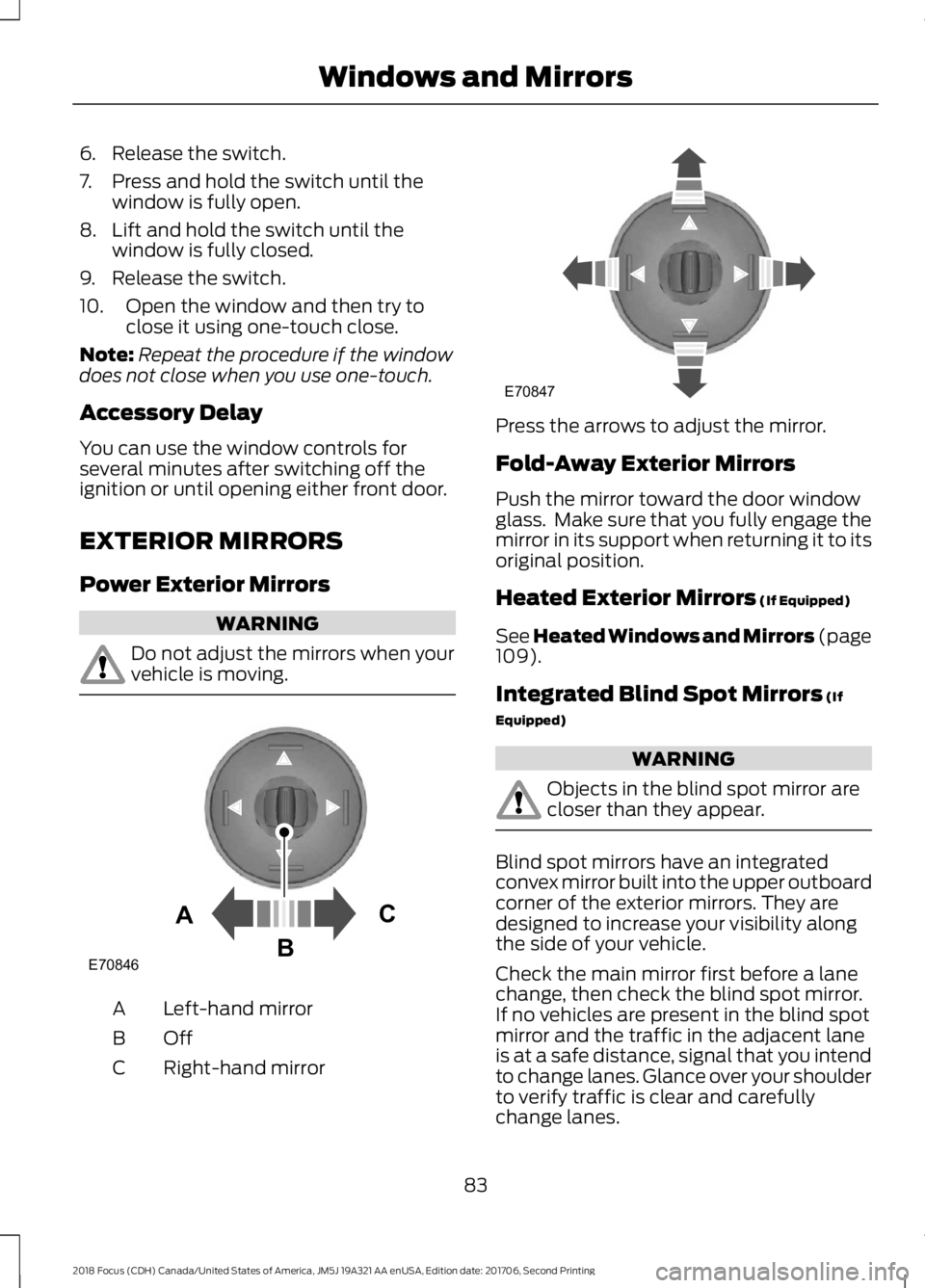
Left-hand mirrorA
OffB
Right-hand mirrorC
Press the arrows to adjust the mirror.
Fold-Away Exterior Mirrors
Push the mirror toward the door windowglass. Make sure that you fully engage themirror in its support when returning it to itsoriginal position.
Heated Exterior Mirrors (If Equipped)
See Heated Windows and Mirrors (page109).
Integrated Blind Spot Mirrors (If
Equipped)
WARNING
Objects in the blind spot mirror arecloser than they appear.
Blind spot mirrors have an integratedconvex mirror built into the upper outboardcorner of the exterior mirrors. They aredesigned to increase your visibility alongthe side of your vehicle.
Check the main mirror first before a lanechange, then check the blind spot mirror.If no vehicles are present in the blind spotmirror and the traffic in the adjacent laneis at a safe distance, signal that you intendto change lanes. Glance over your shoulderto verify traffic is clear and carefullychange lanes.
832018 Focus (CDH) Canada/United States of America, JM5J 19A321 AA enUSA, Edition date: 201706, Second PrintingWindows and MirrorsE70846ACB E70847
Page 107 of 473
MANUAL CLIMATE CONTROL
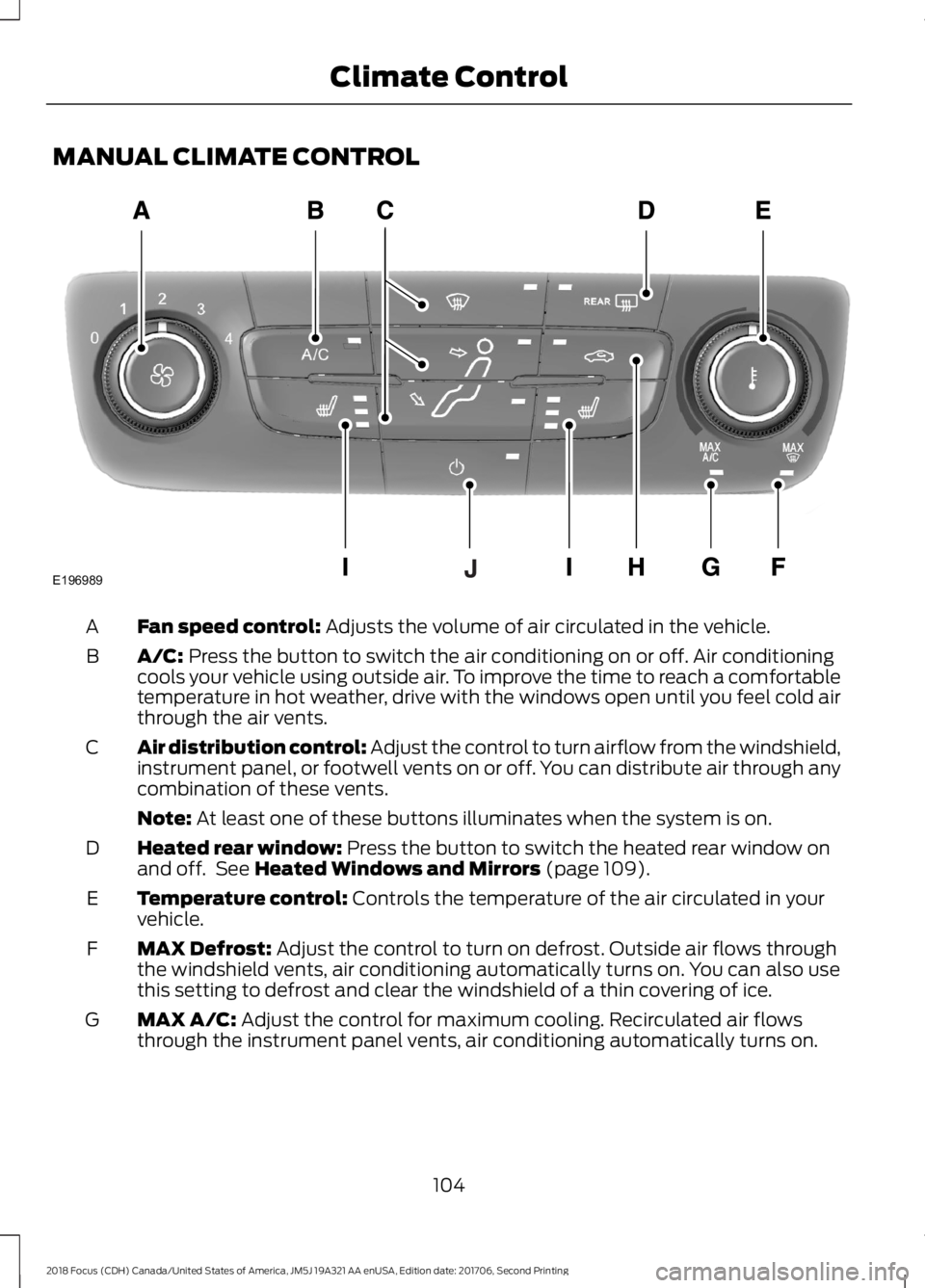
Fan speed control: Adjusts the volume of air circulated in the vehicle.A
A/C: Press the button to switch the air conditioning on or off. Air conditioningcools your vehicle using outside air. To improve the time to reach a comfortabletemperature in hot weather, drive with the windows open until you feel cold airthrough the air vents.
B
Air distribution control: Adjust the control to turn airflow from the windshield,instrument panel, or footwell vents on or off. You can distribute air through anycombination of these vents.
C
Note: At least one of these buttons illuminates when the system is on.
Heated rear window: Press the button to switch the heated rear window onand off. See Heated Windows and Mirrors (page 109).D
Temperature control: Controls the temperature of the air circulated in yourvehicle.E
MAX Defrost: Adjust the control to turn on defrost. Outside air flows throughthe windshield vents, air conditioning automatically turns on. You can also usethis setting to defrost and clear the windshield of a thin covering of ice.
F
MAX A/C: Adjust the control for maximum cooling. Recirculated air flowsthrough the instrument panel vents, air conditioning automatically turns on.G
1042018 Focus (CDH) Canada/United States of America, JM5J 19A321 AA enUSA, Edition date: 201706, Second PrintingClimate ControlE196989
Page 113 of 473
Replace the filter at regular intervals.
For additional cabin air filter information,or to replace the filter, see an authorizeddealer.
REMOTE START
The climate control system adjusts thecabin temperature during remote start.
You cannot adjust the system duringremote start operation. Switch on theignition to return the system to its previoussettings. You can now make adjustments.You need to switch on certainvehicle-dependent features, such as:
•Heated seats.
•Heated mirrors.
•Heated rear window.
•Heated steering wheel.
You can adjust the settings using theinformation display controls. SeeInformation Displays (page 92).
Automatic Settings
You can set the climate control to operatein AUTO mode through the informationdisplay setting: Remote Start > ClimateControl > Heater-A/C > Auto. The climatecontrol system automatically sets theinterior temperature to 72°F (22°C).
In hot weather, the system is set to 72°F(22°C). Cooled seats are set to high (ifavailable, and selected to AUTO in theinformation display).
In cold weather, the system is set to 72°F(22°C). The rear defroster and heatedmirrors automatically turn on.
Last Settings
You can set the climate control to operateusing the last climate control settingsthrough the information display setting:Remote Start > Climate Control >Heater–A/C > Last Settings. The climatecontrol system automatically uses thesettings last selected before you turnedoff the vehicle.
Heated and Cooled Devices
Heated devices typically switch on duringcold weather, and cooled devices duringhot weather.
1102018 Focus (CDH) Canada/United States of America, JM5J 19A321 AA enUSA, Edition date: 201706, Second PrintingClimate Control
Page 466 of 473
Tilting Head Restraints .....................................112Heated Seats..................................................116Heated Steering Wheel................................73Heated Windows and Mirrors..................109Heated Exterior Mirrors....................................109Heated Rear Window.......................................109HeatingSee: Climate Control.........................................104Hill Start Assist..............................................148Switching the System On and Off...............149Using Hill Start Assist.......................................149Hints on Controlling the InteriorClimate..........................................................107Cooling the Interior Quickly............................108General Hints........................................................107Heating the Interior Quickly............................107Recommended Settings for Cooling .........108Recommended Settings for Heating..........108Side Window Defogging in ColdWeather............................................................109Hints on Driving With Anti-LockBrakes............................................................148Home Screen................................................346Hood LockSee: Opening and Closing the Hood............211
I
Ignition Switch................................................119In California (U.S. Only).............................194Information Display Control.......................72Information Displays.....................................92General Information............................................92Information Messages.................................96Installing Child Restraints.............................17Child Restraints......................................................17Using Lap and Shoulder Belts..........................18Using Lower Anchors and Tethers forChildren (LATCH)............................................20Using Tether Straps.............................................22Instrument Cluster........................................86Instrument Lighting Dimmer......................77Interior Lamps.................................................80Front Interior Lamps (If Equipped)...............80Interior Luggage Compartment Release- 4-Door..........................................................66Interior Mirror...................................................84Introduction.........................................................7
J
Jump Starting the Vehicle.........................190Connecting the Jumper Cables....................190Jump Starting........................................................191Preparing Your Vehicle.....................................190Removing the Jumper Cables.........................191
K
Keyless Entry....................................................65SECURICODE™ KEYLESS ENTRYKEYPAD..............................................................65Keyless Starting.............................................119Failure to Start.....................................................120Fast Restart............................................................121Starting Your Vehicle.........................................120Stopping the Engine When Your Vehicle isMoving.................................................................121Stopping the Engine When Your Vehicle isStationary..........................................................121Switching the Ignition On to AccessoryMode..................................................................120Keys and Remote Controls.........................47
L
Lane Keeping System.................................165Switching the System On and Off...............166Lighting Control..............................................76Headlamp Flasher................................................77High Beams............................................................76Parking Lamps.......................................................76Lighting...............................................................76General Information............................................76Load Carrying.................................................176Load Limit........................................................176Special Loading Instructions for Owners ofPick-up Trucks and Utility-typeVehicles..............................................................181Vehicle Loading - with and without aTrailer..................................................................176Locking and Unlocking................................60Activating Intelligent Access.............................61Autolock...................................................................62Autounlock.............................................................63Battery Saver.........................................................63Disabled Intelligent Access Keys....................62
4632018 Focus (CDH) Canada/United States of America, JM5J 19A321 AA enUSA, Edition date: 201706, Second PrintingIndex