2018 FORD FOCUS key
[x] Cancel search: keyPage 4 of 473

Introduction
About This Manual...........................................7
Symbols Glossary.............................................7
Data Recording..................................................9
California Proposition 65..............................11
Perchlorate.........................................................11
Ford Credit..........................................................11
Replacement PartsRecommendation.......................................12
Special Notices................................................12
Mobile CommunicationsEquipment.....................................................13
Export Unique Options..................................13
Environment
Protecting the Environment........................15
Child Safety
General Information.......................................16
Installing Child Restraints.............................17
Booster Seats..................................................24
Child Restraint Positioning.........................26
Child Safety Locks..........................................27
Seatbelts
Principle of Operation..................................29
Fastening the Seatbelts..............................30
Seatbelt Height Adjustment......................32
Seatbelt Warning Lamp and IndicatorChime..............................................................32
Seatbelt Reminder.........................................33
Child Restraint and SeatbeltMaintenance................................................35
Seatbelt Extension........................................35
Personal Safety System™
Personal Safety System™..........................37
Supplementary RestraintsSystem
Principle of Operation..................................38
Driver and Passenger Airbags...................39
Front Passenger Sensing System............40
Side Airbags.....................................................43
Driver Knee Airbag.........................................44
Safety Canopy™............................................44
Crash Sensors and Airbag Indicator.......45
Airbag Disposal..............................................46
Keys and Remote Controls
General Information on RadioFrequencies..................................................47
Remote Control - Vehicles With: KeylessEntry................................................................47
Remote Control - Vehicles With:Integrated Key Transmitter....................50
Remote Control - Vehicles With: KeylessEntry with Remote Start..........................51
Replacing a Lost Key or RemoteControl...........................................................54
MyKey™
Principle of Operation..................................55
Creating a MyKey...........................................56
Clearing All MyKeys.......................................57
Checking MyKey System Status..............58
Using MyKey With Remote StartSystems.........................................................58
MyKey Troubleshooting...............................58
Doors and Locks
Locking and Unlocking................................60
Manual Liftgate..............................................64
Keyless Entry...................................................65
Interior Luggage Compartment Release- 4-Door.........................................................66
Security
Passive Anti-Theft System........................68
12018 Focus (CDH) Canada/United States of America, JM5J 19A321 AA enUSA, Edition date: 201706, Second PrintingTable of Contents
Page 5 of 473

Anti-Theft Alarm............................................70
Steering Wheel
Adjusting the Steering Wheel.....................71
Audio Control....................................................71
Voice Control....................................................72
Cruise Control..................................................72
Information Display Control.......................72
Heated Steering Wheel................................73
Wipers and Washers
Windshield Wipers.........................................74
Windshield Washers......................................74
Rear Window Wiper and Washers...........75
Lighting
General Information......................................76
Lighting Control..............................................76
Autolamps.........................................................77
Instrument Lighting Dimmer......................77
Headlamp Exit Delay....................................78
Daytime Running Lamps.............................78
Automatic High Beam Control..................79
Front Fog Lamps............................................80
Direction Indicators.......................................80
Interior Lamps.................................................80
Ambient Lighting.............................................81
Windows and Mirrors
Power Windows..............................................82
Exterior Mirrors................................................83
Interior Mirror...................................................84
Sun Visors.........................................................84
Moonroof..........................................................85
Instrument Cluster
Gauges...............................................................86
Warning Lamps and Indicators.................87
Audible Warnings and Indicators............90
Information Displays
General Information......................................92
Trip Computer.................................................95
Information Messages.................................96
Climate Control
Manual Climate Control............................104
Automatic Climate Control......................105
Hints on Controlling the InteriorClimate.........................................................107
Heated Windows and Mirrors..................109
Cabin Air Filter...............................................109
Remote Start..................................................110
Seats
Sitting in the Correct Position....................111
Head Restraints...............................................111
Manual Seats..................................................113
Power Seats.....................................................113
Rear Seats........................................................114
Heated Seats..................................................116
Auxiliary Power Points
Auxiliary Power Points.................................117
Storage Compartments
Center Console...............................................118
Overhead Console........................................118
Starting and Stopping theEngine
General Information.....................................119
Ignition Switch................................................119
Keyless Starting.............................................119
Starting a Gasoline Engine........................122
Engine Block Heater....................................125
22018 Focus (CDH) Canada/United States of America, JM5J 19A321 AA enUSA, Edition date: 201706, Second PrintingTable of Contents
Page 37 of 473
ThenIf
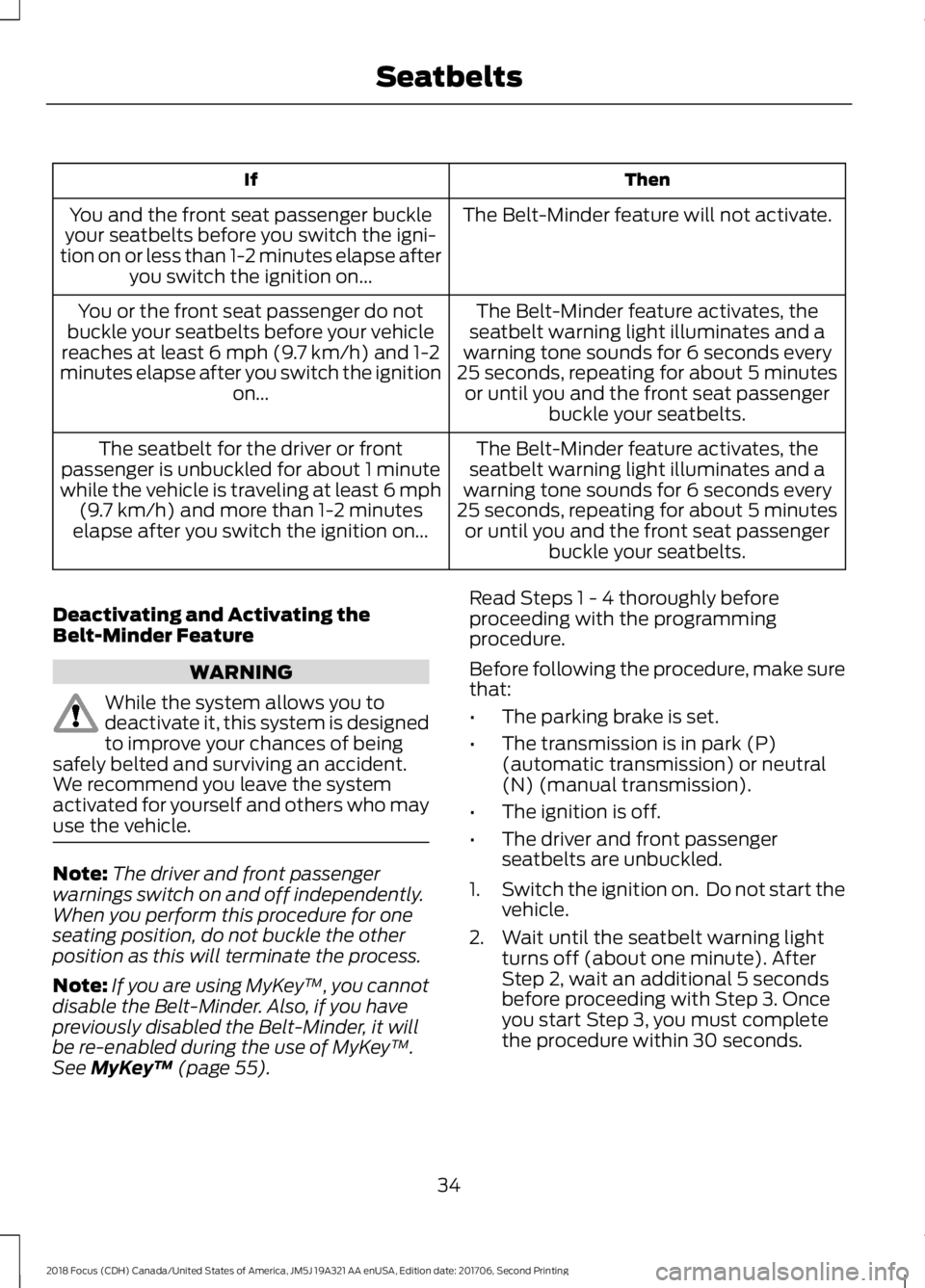
The Belt-Minder feature will not activate.You and the front seat passenger buckleyour seatbelts before you switch the igni-tion on or less than 1-2 minutes elapse afteryou switch the ignition on...
The Belt-Minder feature activates, theseatbelt warning light illuminates and awarning tone sounds for 6 seconds every25 seconds, repeating for about 5 minutesor until you and the front seat passengerbuckle your seatbelts.
You or the front seat passenger do notbuckle your seatbelts before your vehiclereaches at least 6 mph (9.7 km/h) and 1-2minutes elapse after you switch the ignitionon...
The Belt-Minder feature activates, theseatbelt warning light illuminates and awarning tone sounds for 6 seconds every25 seconds, repeating for about 5 minutesor until you and the front seat passengerbuckle your seatbelts.
The seatbelt for the driver or frontpassenger is unbuckled for about 1 minutewhile the vehicle is traveling at least 6 mph(9.7 km/h) and more than 1-2 minuteselapse after you switch the ignition on...
Deactivating and Activating theBelt-Minder Feature
WARNING
While the system allows you todeactivate it, this system is designedto improve your chances of beingsafely belted and surviving an accident.We recommend you leave the systemactivated for yourself and others who mayuse the vehicle.
Note:The driver and front passengerwarnings switch on and off independently.When you perform this procedure for oneseating position, do not buckle the otherposition as this will terminate the process.
Note:If you are using MyKey™, you cannotdisable the Belt-Minder. Also, if you havepreviously disabled the Belt-Minder, it willbe re-enabled during the use of MyKey™.See MyKey™ (page 55).
Read Steps 1 - 4 thoroughly beforeproceeding with the programmingprocedure.
Before following the procedure, make surethat:
•The parking brake is set.
•The transmission is in park (P)(automatic transmission) or neutral(N) (manual transmission).
•The ignition is off.
•The driver and front passengerseatbelts are unbuckled.
1.Switch the ignition on. Do not start thevehicle.
2.Wait until the seatbelt warning lightturns off (about one minute). AfterStep 2, wait an additional 5 secondsbefore proceeding with Step 3. Onceyou start Step 3, you must completethe procedure within 30 seconds.
342018 Focus (CDH) Canada/United States of America, JM5J 19A321 AA enUSA, Edition date: 201706, Second PrintingSeatbelts
Page 50 of 473

GENERAL INFORMATION ON
RADIO FREQUENCIES
This device complies with Part 15 of theFCC Rules and with Licence exempt RSSStandards of Industry Canada. Operationis subject to the following two conditions:
•This device may not cause harmfulinterference, and
•This device must accept anyinterference received, includinginterference that may cause undesiredoperation.
WARNING
Changes or modifications notexpressively approved by the partyresponsible for compliance couldvoid the user's authority to operate theequipment. The term "IC:" before the radiocertification number only signifies thatIndustry Canada technical specificationswere met.
The typical operating range for yourtransmitter is approximately 33 ft (10 m).Vehicles with the remote start feature willhave a greater range. One of the followingcould cause a decrease in operating range:
•Weather conditions.
•Nearby radio towers.
•Structures around the vehicle.
•Other vehicles parked next to yourvehicle.
Other short distance radio transmissions,for example amateur radios, medicalequipment, wireless headphones, remotecontrols and alarm systems can also usethe radio frequency used by your remotecontrol. If the frequencies are jammed, youwill not be able to use your remote control.You can lock and unlock the doors with thekey.
Note:Make sure to lock your vehicle beforeleaving it unattended.
Note:If you are in range, the remote controlwill operate if you press any buttonunintentionally.
Note:The remote control contains sensitiveelectrical components. Exposure to moistureor impact may cause permanent damage.
REMOTE CONTROL - VEHICLES
WITH: KEYLESS ENTRY
Intelligent Access Key
472018 Focus (CDH) Canada/United States of America, JM5J 19A321 AA enUSA, Edition date: 201706, Second PrintingKeys and Remote ControlsE162192
Page 51 of 473
Key Blade
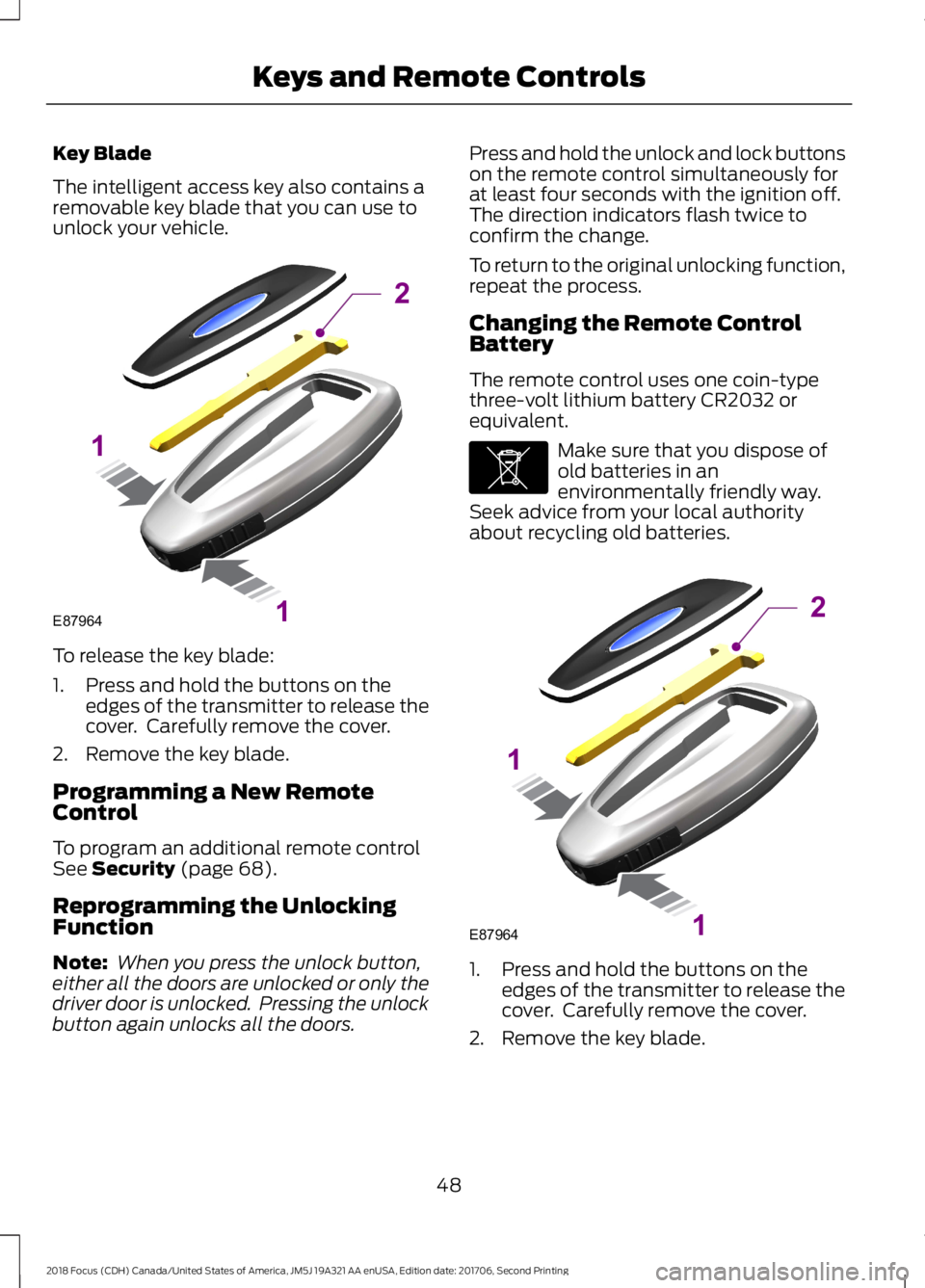
The intelligent access key also contains aremovable key blade that you can use tounlock your vehicle.
To release the key blade:
1.Press and hold the buttons on theedges of the transmitter to release thecover. Carefully remove the cover.
2.Remove the key blade.
Programming a New RemoteControl
To program an additional remote controlSee Security (page 68).
Reprogramming the UnlockingFunction
Note: When you press the unlock button,either all the doors are unlocked or only thedriver door is unlocked. Pressing the unlockbutton again unlocks all the doors.
Press and hold the unlock and lock buttonson the remote control simultaneously forat least four seconds with the ignition off.The direction indicators flash twice toconfirm the change.
To return to the original unlocking function,repeat the process.
Changing the Remote ControlBattery
The remote control uses one coin-typethree-volt lithium battery CR2032 orequivalent.
Make sure that you dispose ofold batteries in anenvironmentally friendly way.Seek advice from your local authorityabout recycling old batteries.
1.Press and hold the buttons on theedges of the transmitter to release thecover. Carefully remove the cover.
2.Remove the key blade.
482018 Focus (CDH) Canada/United States of America, JM5J 19A321 AA enUSA, Edition date: 201706, Second PrintingKeys and Remote ControlsE87964211 E107998 E87964211
Page 52 of 473

3.Use a suitable tool, for example ascrewdriver, to carefully separate thetwo halves of the remote control.
4.Twist the screwdriver in the positionshown to separate the two halves ofthe remote control.
Note:Do not touch the battery contacts orthe printed circuit board with thescrewdriver.
5.Carefully remove the battery with thescrewdriver.
6.Install a new battery with the + facingdownward.
7.Assemble the two halves of the remotecontrol.
8.Reinstall the key blade.
Note:Do not wipe off any grease on thebattery terminals or on the back surface ofthe circuit board.
Note:Replacing the battery does not deletethe transmitter from the vehicle.
The transmitter should operate normally.
Locating Your Vehicle
Press the lock button on the key twicewithin three seconds. The horn may soundand the direction indicators flash.
The horn may sound twice and thedirection indicators do not flash if:
•Locking was not successful.
•Any door or the liftgate is open.
•The hood is open on vehicles with ananti-theft alarm or remote start.
492018 Focus (CDH) Canada/United States of America, JM5J 19A321 AA enUSA, Edition date: 201706, Second PrintingKeys and Remote ControlsE1053623 E1191904 E1258605
Page 53 of 473

REMOTE CONTROL - VEHICLES
WITH: INTEGRATED KEY
TRANSMITTER
Integrated Keyhead Transmitter (If
Equipped)
Use the key blade to start your vehicle andunlock or lock the driver door from outsideyour vehicle. The buttons on the keyoperate the remote control.
Note: Your vehicle keys came with asecurity label that provides important keycut information. Keep the label in a safeplace for future reference.
Programming a New RemoteControl
To program an additional remote controlSee Security (page 68).
Reprogramming the UnlockingFunction
Note: When you press the unlock button,either all the doors are unlocked or only thedriver door is unlocked. Pressing the unlockbutton again unlocks all the doors.
Press and hold the unlock and lock buttonson the remote control simultaneously forat least four seconds with the ignition off.The direction indicators flash twice toconfirm the change.
To return to the original unlocking function,repeat the process.
Changing the Remote ControlBattery
The remote control uses one coin-typethree-volt lithium battery CR2032 orequivalent.
Make sure that you dispose ofold batteries in anenvironmentally friendly way.Seek advice from your local authorityabout recycling old batteries.
1.Twist a thin coin in the slot of thetransmitter near the key ring to removethe battery cover.
2.Remove the old battery.
502018 Focus (CDH) Canada/United States of America, JM5J 19A321 AA enUSA, Edition date: 201706, Second PrintingKeys and Remote ControlsE142585 E138615 E107998 E138619
Page 54 of 473

3.Insert the new battery. Refer to thesymbols inside the transmitter for thecorrect orientation of the battery.Press the battery down to make sureit is fully in the housing.
4.Reinstall the battery housing coveronto the transmitter.
Note:Do not wipe off any grease on thebattery terminals or on the back surface ofthe circuit board.
Note:Replacing the battery does not erasethe programmed key from your vehicle.
Locating Your Vehicle
Press the lock button on the key twicewithin three seconds. The horn sounds andthe direction indicators flash. Werecommend you use this method to locateyour vehicle, rather than using the panicalarm.
The horn sounds twice and the directionindicators do not flash if:
•Locking was not successful.
•Any door or the liftgate is open.
•The hood is open on vehicles with ananti-theft alarm or remote start.
Sounding the Panic Alarm (If Equipped)
Press the button to sound thepanic alarm. Press the buttonagain or switch the ignition on tosilence it.
Note:The panic alarm only operates whenthe ignition is off.
REMOTE CONTROL - VEHICLES
WITH: KEYLESS ENTRY WITH
REMOTE START
Intelligent Access Key (If Equipped)
The intelligent access key operates thepower locks and the remote start system.The key must be in your vehicle to switchon the push-button start system.
Key Blade
The intelligent access key also contains aremovable key blade that you can use tounlock your vehicle.
Slide the release on the back of thetransmitter, then pull the blade out.
512018 Focus (CDH) Canada/United States of America, JM5J 19A321 AA enUSA, Edition date: 201706, Second PrintingKeys and Remote ControlsE138620 E138624 E138616 E142431