2018 FORD FOCUS wheel
[x] Cancel search: wheelPage 265 of 473

Customer action requiredPossible causeLow tire pressurewarning light
Make sure tires are at the proper pres-sure. See Inflating your tires in thischapter. After inflating your tires to themanufacturer’s recommended pressureas shown on the Tire Label (located onthe edge of driver’s door or the B-Pillar),the vehicle must be driven for at leasttwo minutes over 20 mph (32 km/h)before the light turns off.
Tire(s) under-inflatedSolid warning light
Repair the damaged road wheel and tireassembly and reinstall it on the vehicleto restore system function. For adescription on how the system functions,see When your temporary spare tireis installed in this section.
Spare tire in use
If the tires are properly inflated and thespare tire is not in use but the lightremains on, contact your authorizeddealer as soon as possible.
TPMS malfunction
Repair the damaged road wheel and tireassembly and reinstall it on the vehicleto restore system function. For adescription on how the system functions,see When your temporary spare tireis installed in this section.
Spare tire in useFlashing warninglight
If the tires are properly inflated and thespare tire is not in use but the lightremains on, contact your authorizeddealer as soon as possible.
TPMS malfunction
When Inflating Your Tires
When putting air into your tires (such as ata gas station or in your garage), the tirepressure monitoring system may notrespond immediately to the air added toyour tires.
It may take up to two minutes of drivingover 20 mph (32 km/h) for the light to turnoff after you have filled your tires to therecommended inflation pressure.
2622018 Focus (CDH) Canada/United States of America, JM5J 19A321 AA enUSA, Edition date: 201706, Second PrintingWheels and Tires
Page 266 of 473
How Temperature Affects Your TirePressure
The tire pressure monitoring systemmonitors tire pressure in each pneumatictire. While driving in a normal manner, atypical passenger tire inflation pressuremay increase about 2–4 psi (14–28 kPa)from a cold start situation. If the vehicle isstationary overnight with the outsidetemperature significantly lower than thedaytime temperature, the tire pressure maydecrease about 3 psi (21 kPa) for a drop of30°F (17°C) in ambient temperature. Thislower pressure value may be detected bythe tire pressure monitoring system asbeing significantly lower than therecommended inflation pressure andactivate the system warning light for lowtire pressure. If the low tire pressurewarning light is on, visually check each tireto verify that no tire is flat. If one or moretires are flat, repair as necessary. Checkthe air pressure in the road tires. If any tireis under-inflated, carefully drive the vehicleto the nearest location where air can beadded to the tires. Inflate all the tires tothe recommended inflation pressure.
CHANGING A ROAD WHEEL
WARNINGS
Do not use tire sealants as they maydamage the tire pressure monitoringsystem.
If the tire pressure monitor sensorbecomes damaged it may notfunction.
Note:The tire pressure monitoring systemindicator light will illuminate when the sparetire is in use. To restore the full function ofthe monitoring system, all road wheelsequipped with tire pressure monitoringsensors must be mounted on this vehicle.
If you get a flat tire while driving, do notapply the brake heavily. Instead, graduallydecrease your speed. Hold the steeringwheel firmly and slowly move to a safeplace on the side of the road.
Have a flat serviced by an authorizeddealer in order to prevent damage to thesystem sensors See Tire PressureMonitoring System (page 260). Replacethe spare tire with a road tire as soon aspossible. During repairing or replacing ofthe flat tire, have the authorized dealerinspect the system sensor for damage.
Dissimilar Spare Wheel and TireAssembly Information
WARNING
Failure to follow these guidelinescould result in an increased risk ofloss of vehicle control, injury or death.
If you have a dissimilar spare wheel andtire, then it is intended for temporary useonly. This means that if you need to use it,you should replace it as soon as possiblewith a road wheel and tire assembly thatis the same size and type as the road tiresand wheels that were originally providedby Ford. If the dissimilar spare tire or wheelis damaged, it should be replaced ratherthan repaired.
A dissimilar spare wheel and tire assemblyis defined as a spare wheel and tireassembly that is different in brand, size orappearance from the road tires and wheelsand can be one of three types:
1.T-type mini-spare: This spare tirebegins with the letter T for tire size andmay have Temporary Use Only molded inthe sidewall.
2.Full-size dissimilar spare with labelon wheel: This spare tire has a label onthe wheel that states: THIS WHEEL ANDTIRE ASSEMBLY FOR TEMPORARY USEONLY
2632018 Focus (CDH) Canada/United States of America, JM5J 19A321 AA enUSA, Edition date: 201706, Second PrintingWheels and Tires
Page 267 of 473
When driving with one of the dissimilarspare tires listed above, do not:
•Exceed 50 mph (80 km/h).
•Load the vehicle beyond maximumvehicle load rating listed on the SafetyCompliance Label.
•Tow a trailer.
•Use snow chains on the end of thevehicle with the dissimilar spare tire.
•Use more than one dissimilar spare tireat a time.
•Use commercial car washingequipment.
•Try to repair the dissimilar spare tire.
Use of one of the dissimilar spare tireslisted above at any one wheel location canlead to impairment of the following:
•Handling, stability and brakingperformance.
•Comfort and noise.
•Ground clearance and parking at curbs.
•Winter weather driving capability.
•Wet weather driving capability.
•All-wheel driving capability.
3.Full-size dissimilar spare withoutlabel on wheel
When driving with the full-size dissimilarspare wheel and tire assembly, do not:
•Exceed 70 mph (113 km/h).
•Use more than one dissimilar sparewheel and tire assembly at a time.
•Use commercial car washingequipment.
•Use snow chains on the end of thevehicle with the dissimilar spare wheeland tire assembly.
The usage of a full-size dissimilar sparewheel and tire assembly can lead toimpairment of the following:
•Handling, stability and brakingperformance.
•Comfort and noise.
•Ground clearance and parking at curbs.
•Winter weather driving capability.
•Wet weather driving capability.
•All-wheel driving capability.
When driving with the full-size dissimilarspare wheel and tire assembly, additionalcaution should be given to:
•Towing a trailer.
•Driving vehicles equipped with acamper body.
•Driving vehicles with a load on thecargo rack.
Drive cautiously when using a full-sizedissimilar spare wheel and tire assemblyand seek service as soon as possible.
Tire Change Procedure
WARNINGS
Do not get under a vehicle that is onlysupported by a vehicle jack.
When you install a wheel, alwaysremove any corrosion, dirt or foreignmaterials present on the mountingsurfaces of the wheel or the surface of thewheel hub, brake drum or brake disc thatcontacts the wheel. Make sure to secureany fasteners that attach the rotor to thehub so they do not interfere with themounting surfaces of the wheel. Installingwheels without correct metal-to-metalcontact at the wheel mounting surfacescan cause the wheel nuts to loosen andthe wheel to come off while your vehicleis in motion, resulting in loss of vehiclecontrol, personal injury or death.
2642018 Focus (CDH) Canada/United States of America, JM5J 19A321 AA enUSA, Edition date: 201706, Second PrintingWheels and Tires
Page 268 of 473

WARNINGS
Make sure there is no grease or oil onthe threads or the surface betweenthe wheel lugs and nuts. This cancause the lug nuts to loosen while driving.
When one of the front wheels is offthe ground, the transmission alonewill not prevent the vehicle frommoving or slipping off the jack, even if thetransmission is in park (P).
To help prevent your vehicle frommoving when changing a wheel, shiftthe transmission into park (P), setthe parking brake and use an appropriateblock or wheel chock to secure the wheeldiagonally opposite to the wheel beingchanged. For example, when changing thefront left wheel, place an appropriate blockor wheel chock on the right rear wheel.
Do not attempt to change a tire onthe side of the vehicle close tomoving traffic. Pull far enough off theroad to avoid the danger of being hit whenoperating the jack or changing the wheel.
Always use the jack provided asoriginal equipment with your vehicle.If using a jack other than the oneprovided, make sure the jack capacity isadequate for the vehicle weight, includingany vehicle cargo or modifications. If youare unsure if the jack capacity is adequate,contact the authorized dealer.
Make sure all passengers are out ofyour vehicle.
1.Park on a level surface, set the parkingbrake and activate the hazard flashers.
2.Place the transmission in park (P)(automatic transmission) or neutral(N) (manual transmission) and turnthe engine off.
3.Remove the carpeted wheel cover.
4.Remove the spare tire bolt securing thespare tire by turning itcounterclockwise.
5.Remove the spare tire from the sparetire compartment
6.Remove the retaining bolt securing thejack by turning it counterclockwise.
7.Remove the jack.
8.Block the diagonally opposite wheel.
9.Loosen each wheel lug nut one-halfturn counterclockwise, but do notremove them until the wheel is raisedoff the ground.
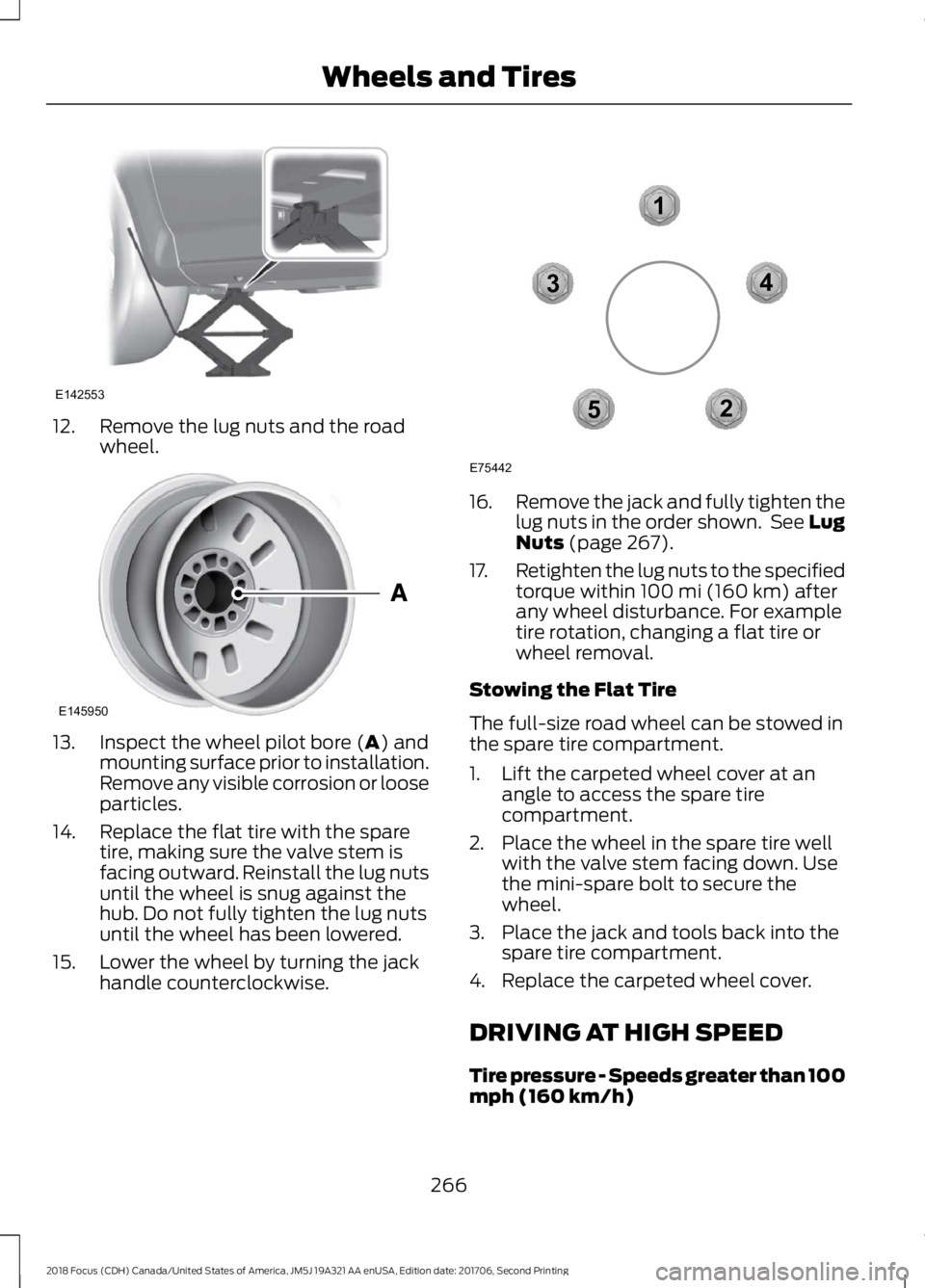
10.The vehicle jacking points are shownhere, and are depicted on the warninglabel on the jack.Note: Jack at thespecified locations to avoid damageto the vehicle.
11.Indentations in the sills show thelocation of the jacking points.
2652018 Focus (CDH) Canada/United States of America, JM5J 19A321 AA enUSA, Edition date: 201706, Second PrintingWheels and TiresE142551 E145908
Page 269 of 473
12.Remove the lug nuts and the roadwheel.
13.Inspect the wheel pilot bore (A) andmounting surface prior to installation.Remove any visible corrosion or looseparticles.
14.Replace the flat tire with the sparetire, making sure the valve stem isfacing outward. Reinstall the lug nutsuntil the wheel is snug against thehub. Do not fully tighten the lug nutsuntil the wheel has been lowered.
15.Lower the wheel by turning the jackhandle counterclockwise.
16.Remove the jack and fully tighten thelug nuts in the order shown. See LugNuts (page 267).
17.Retighten the lug nuts to the specifiedtorque within 100 mi (160 km) afterany wheel disturbance. For exampletire rotation, changing a flat tire orwheel removal.
Stowing the Flat Tire
The full-size road wheel can be stowed inthe spare tire compartment.
1.Lift the carpeted wheel cover at anangle to access the spare tirecompartment.
2.Place the wheel in the spare tire wellwith the valve stem facing down. Usethe mini-spare bolt to secure thewheel.
3.Place the jack and tools back into thespare tire compartment.
4.Replace the carpeted wheel cover.
DRIVING AT HIGH SPEED
Tire pressure - Speeds greater than 100mph (160 km/h)
2662018 Focus (CDH) Canada/United States of America, JM5J 19A321 AA enUSA, Edition date: 201706, Second PrintingWheels and TiresE142553 E145950 12345E75442
Page 270 of 473
WARNING
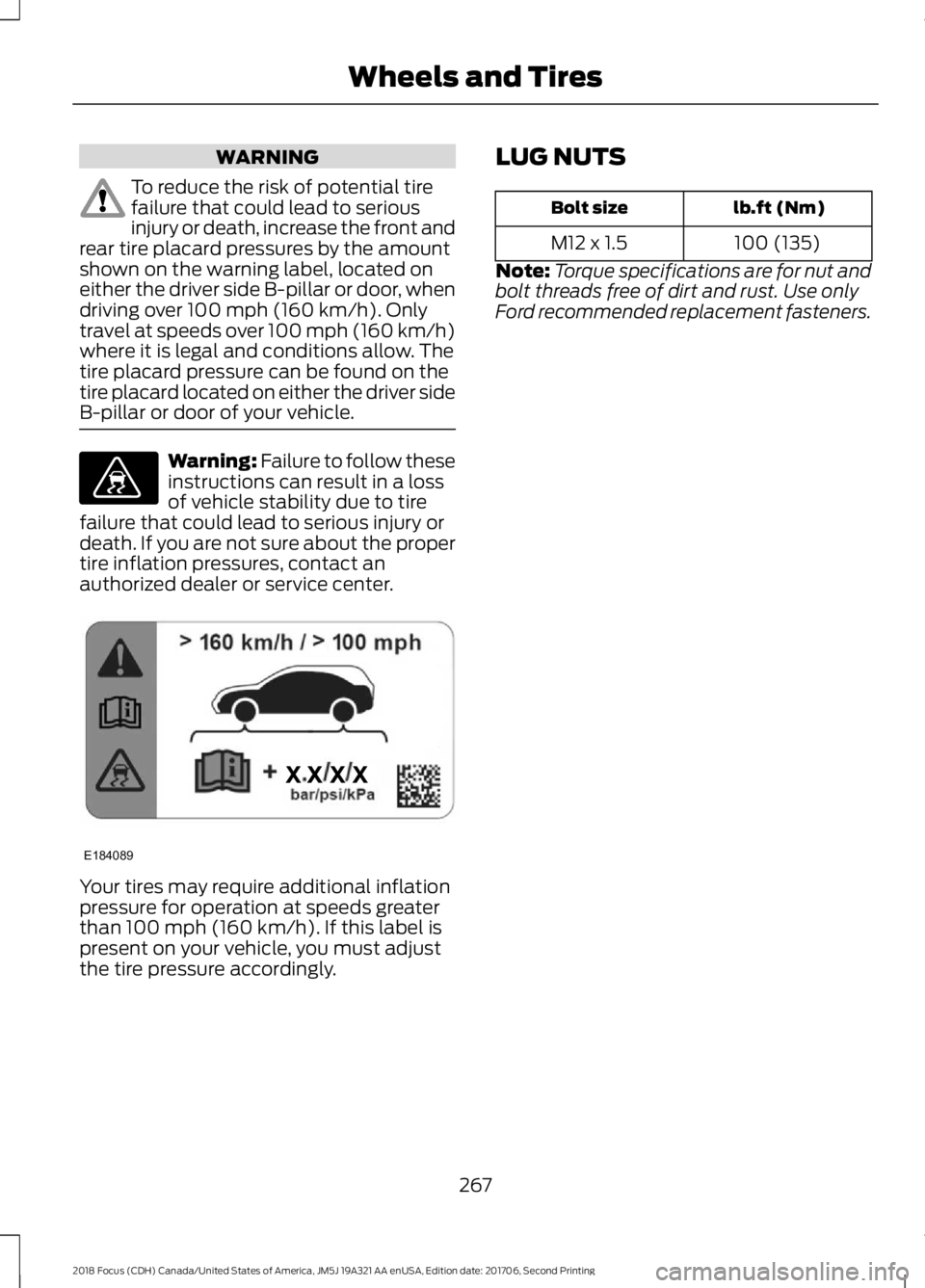
To reduce the risk of potential tirefailure that could lead to seriousinjury or death, increase the front andrear tire placard pressures by the amountshown on the warning label, located oneither the driver side B-pillar or door, whendriving over 100 mph (160 km/h). Onlytravel at speeds over 100 mph (160 km/h)where it is legal and conditions allow. Thetire placard pressure can be found on thetire placard located on either the driver sideB-pillar or door of your vehicle.
Warning: Failure to follow theseinstructions can result in a lossof vehicle stability due to tirefailure that could lead to serious injury ordeath. If you are not sure about the propertire inflation pressures, contact anauthorized dealer or service center.
Your tires may require additional inflationpressure for operation at speeds greaterthan 100 mph (160 km/h). If this label ispresent on your vehicle, you must adjustthe tire pressure accordingly.
LUG NUTS
lb.ft (Nm)Bolt size
100 (135)M12 x 1.5
Note:Torque specifications are for nut andbolt threads free of dirt and rust. Use onlyFord recommended replacement fasteners.
2672018 Focus (CDH) Canada/United States of America, JM5J 19A321 AA enUSA, Edition date: 201706, Second PrintingWheels and TiresE176077 E184089
Page 302 of 473
System data cannot be accessed withoutspecial equipment and access to thevehicle's SYNC module. Ford MotorCompany and Ford of Canada will notaccess the system data for any purposeother than as described absent consent, acourt order, or where required by lawenforcement, other governmentauthorities, or other third parties actingwith lawful authority. Other parties mayseek to access the informationindependently of Ford Motor Company andFord of Canada. For further privacyinformation, see the section on 911 Assist.See SYNC™ Applications and Services(page 313).
USING VOICE RECOGNITION
This system helps you control manyfeatures using voice commands. Thisallows you to keep your hands on thewheel and focus on what is around you.
Initiating a Voice Session
Press the voice button. A list ofavailable voice commandsappears in the display.
Global Voice Commands
These voice commands are alwaysavailable. You can say them at any time.
Global voice commands
This command ends the voice session. Youcan also cancel a session by holding thevoice button for two or more seconds.
(cancel | exit)
This command provides you with hints,examples and instructions.help
This command restarts the voice sessionfrom the initial starting point.(main menu | start again)
You can say any of the voice commands that appear within open and close brackets thatare separated by |. For example, where; (cancel | exit) appears you say; cancel or exit.
Helpful Hints
•Make sure the interior of your vehicle isas quiet as possible. Wind noise fromopen windows and road vibrations mayprevent the system from correctlyrecognizing spoken commands.
•Before giving a voice command, waitfor the system announcement to finish,followed by a single tone. Anycommand spoken before this does notregister with the system.
•Speak naturally, without long pausesbetween words.
•You can interrupt the system at anytime while it is speaking by pressing thevoice button. You can cancel a voicesession by pressing and holding thevoice button.
2992018 Focus (CDH) Canada/United States of America, JM5J 19A321 AA enUSA, Edition date: 201706, Second PrintingSYNC™E142599
Page 308 of 473
Voice Command
You can state the name ofthe desired device, such as“My iPhone”,“My Galaxy”or“My iPod”. SYNC mayask you to confirm the typeof device (Phone, USB, orBluetooth Audio).
(connect |device) ___
Making Calls
Press the voice button. Whenprompted, say:
Voice Command
call [[a] name]
SYNC prompts you to saythe numbers that you wishto dial. After you say thenumbers, the systemconfirms it. You can thensay:
dial [[a]number]
When the system has stated thenumber, you say any of the following:
Voice Command
This initiates the call.(dial | send)
This erases the spokendigits.(delete |correct)
To end the call, press the end call button
on the steering wheel or select the end calloption in the audio display.
Receiving Calls
Accepting calls
When receiving a call, you can answer thecall by pressing the accept call button onthe steering wheel or use the screen.
To use the screen to accept a callselect:
Menu Item
Accept
Rejecting Calls
When receiving a call, you can reject thecall by pressing the reject call button onthe steering wheel or use the screen.
To use the screen to reject a call select:
Menu Item
Reject
Ignore the call by doing nothing.
Phone Options during an ActiveCall
During an active call, you have more menufeatures that become available, such asputting a call on hold or joining calls.
To access this menu, choose one of theoptions available at the bottom of theaudio display or select More to choosefrom the following options:
3052018 Focus (CDH) Canada/United States of America, JM5J 19A321 AA enUSA, Edition date: 201706, Second PrintingSYNC™E142599