2018 FORD FOCUS service reset
[x] Cancel search: service resetPage 7 of 473

Roadside Emergencies
Roadside Assistance..................................188
Hazard Flashers............................................189
Fuel Shutoff...................................................189
Jump Starting the Vehicle.........................190
Post-Crash Alert System...........................192
Customer Assistance
Getting the Services You Need................193
In California (U.S. Only).............................194
The Better Business Bureau (BBB) AutoLine Program (U.S. Only)......................195
Utilizing the Mediation/ArbitrationProgram (Canada Only)........................196
Getting Assistance Outside the U.S. andCanada........................................................196
Ordering Additional Owner'sLiterature......................................................197
Reporting Safety Defects (U.S.Only).............................................................198
Reporting Safety Defects (CanadaOnly).............................................................198
Fuses
Fuse Specification Chart..........................200
Changing a Fuse..........................................209
Maintenance
General Information.....................................211
Opening and Closing the Hood................211
Under Hood Overview - 1.0LEcoBoost™.................................................213
Under Hood Overview - 2.0L....................214
Engine Oil Dipstick - 1.0LEcoBoost™.................................................215
Engine Oil Dipstick - 2.0L...........................215
Engine Oil Check...........................................215
Oil Change Indicator Reset.......................216
Engine Cooling Fan......................................216
Engine Coolant Check.................................217
Automatic Transmission FluidCheck.............................................................221
Brake Fluid Check.........................................221
Clutch Fluid Check - ManualTransmission..............................................221
Washer Fluid Check.....................................222
Changing the 12V Battery..........................222
Checking the Wiper Blades......................223
Changing the Front Wiper Blades.........223
Changing the Rear Wiper Blades...........224
Adjusting the Headlamps.........................225
Removing a Headlamp..............................226
Changing a Bulb...........................................227
Bulb Specification Chart...........................232
Changing the Engine Air Filter.................234
Drive Belt Routing - 1.0LEcoBoost™................................................235
Drive Belt Routing - 2.0L...........................235
Vehicle Care
General Information...................................236
Cleaning Products.......................................236
Cleaning the Exterior...................................237
Waxing.............................................................238
Cleaning the Engine....................................238
Cleaning the Windows and WiperBlades..........................................................239
Cleaning the Interior...................................239
Cleaning the Instrument Panel andInstrument Cluster Lens.......................240
Cleaning Leather Seats.............................240
Repairing Minor Paint Damage...............241
Cleaning the Wheels...................................241
Vehicle Storage.............................................241
Body Styling Kits..........................................243
Wheels and Tires
Tire Care..........................................................244
Using Snow Chains.....................................259
Tire Pressure Monitoring System..........260
42018 Focus (CDH) Canada/United States of America, JM5J 19A321 AA enUSA, Edition date: 201706, Second PrintingTable of Contents
Page 99 of 473
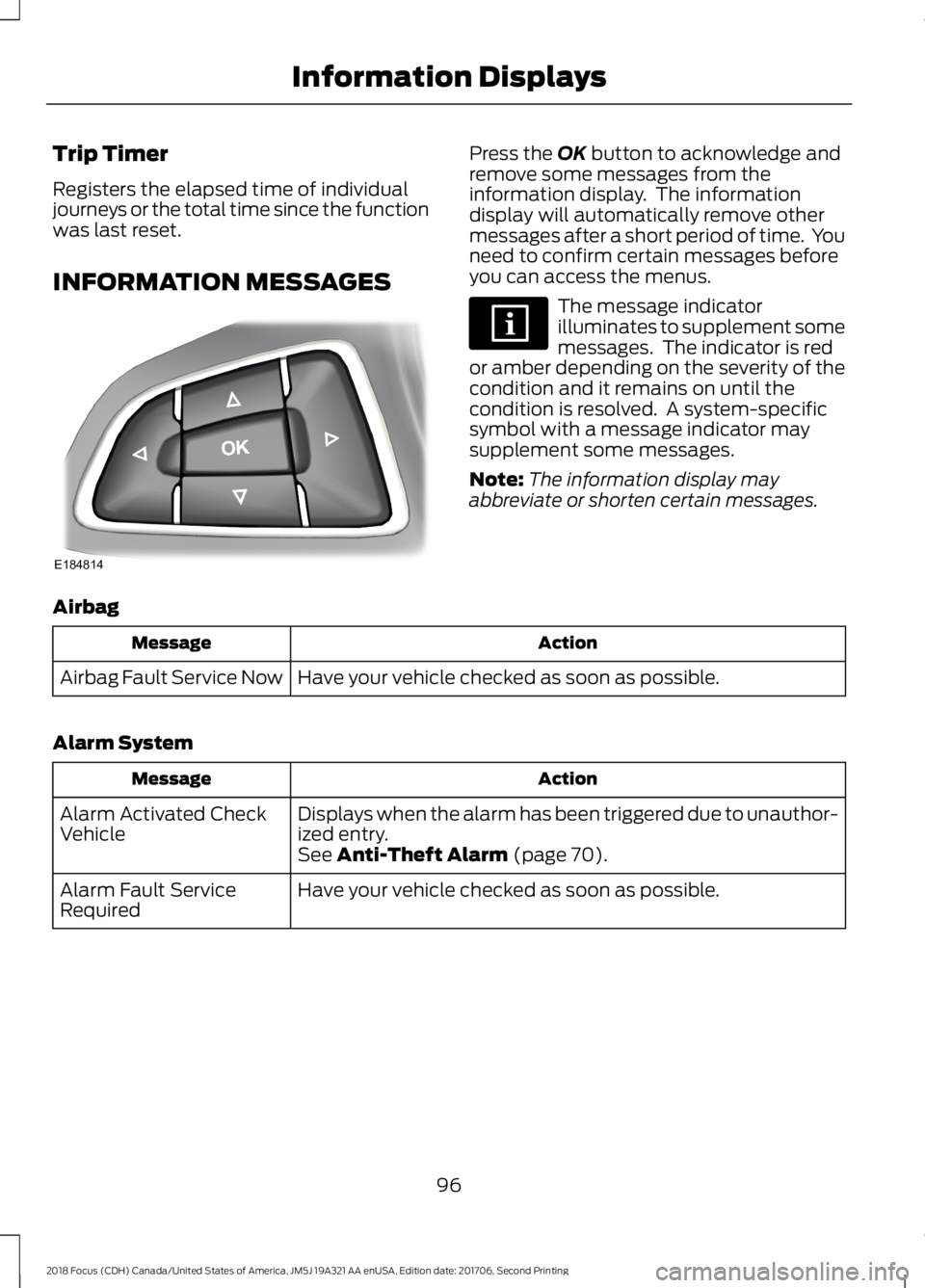
Trip Timer
Registers the elapsed time of individualjourneys or the total time since the functionwas last reset.
INFORMATION MESSAGES
Press the OK button to acknowledge andremove some messages from theinformation display. The informationdisplay will automatically remove othermessages after a short period of time. Youneed to confirm certain messages beforeyou can access the menus.
The message indicatorilluminates to supplement somemessages. The indicator is redor amber depending on the severity of thecondition and it remains on until thecondition is resolved. A system-specificsymbol with a message indicator maysupplement some messages.
Note:The information display mayabbreviate or shorten certain messages.
Airbag
ActionMessage
Have your vehicle checked as soon as possible.Airbag Fault Service Now
Alarm System
ActionMessage
Displays when the alarm has been triggered due to unauthor-ized entry.Alarm Activated CheckVehicleSee Anti-Theft Alarm (page 70).
Have your vehicle checked as soon as possible.Alarm Fault ServiceRequired
962018 Focus (CDH) Canada/United States of America, JM5J 19A321 AA enUSA, Edition date: 201706, Second PrintingInformation DisplaysE184814
Page 103 of 473
Lighting
ActionMessage
Displays if a brake lamp bulb fails.Brake Lamp Bulb Fault
Displays if a low beam bulb fails.Low Beam Bulb Fault
Displays if an electrical malfunction occurs with the headlampsystem. Have your vehicle checked as soon as possible.Headlamp Fault ServiceRequired
Maintenance
ActionMessage
Displays when the engine oil life is depleted and your vehiclerequires an oil change.Oil Change Required
Displays if the brake fluid level is low or if there is a brakesystem fault.Brake Fluid Level LowService NowSee Brake Fluid Check (page 221).Have your vehicle immediately checked.
MyKey
ActionMessage
Displays when MyKey is active.MyKey Active DriveSafelySee MyKey™ (page 55).
Displays when a MyKey is in use and your vehicle speedapproaches a preset speed limit.MyKey Vehicle Near TopSpeed
Displays when a MyKey is in use and the MyKey speed limitis reached.MyKey Vehicle at TopSpeed
Displays when a MyKey is in use and the MyKey speed limitis reached.MyKey Check SpeedDrive Safely
Displays when a MyKey is in use and seatbelt reminder isactivated.MyKey Buckle Up toUnmute Audio
Displays when a MyKey is in use and the user tries to switchthe parking aid system off.MyKey Park Aid Cannotbe Deactivated
Displays when a MyKey is in use and the user tries to switchthe stability control system off.MyKey ESC Cannot beDeactivated
1002018 Focus (CDH) Canada/United States of America, JM5J 19A321 AA enUSA, Edition date: 201706, Second PrintingInformation Displays
Page 177 of 473
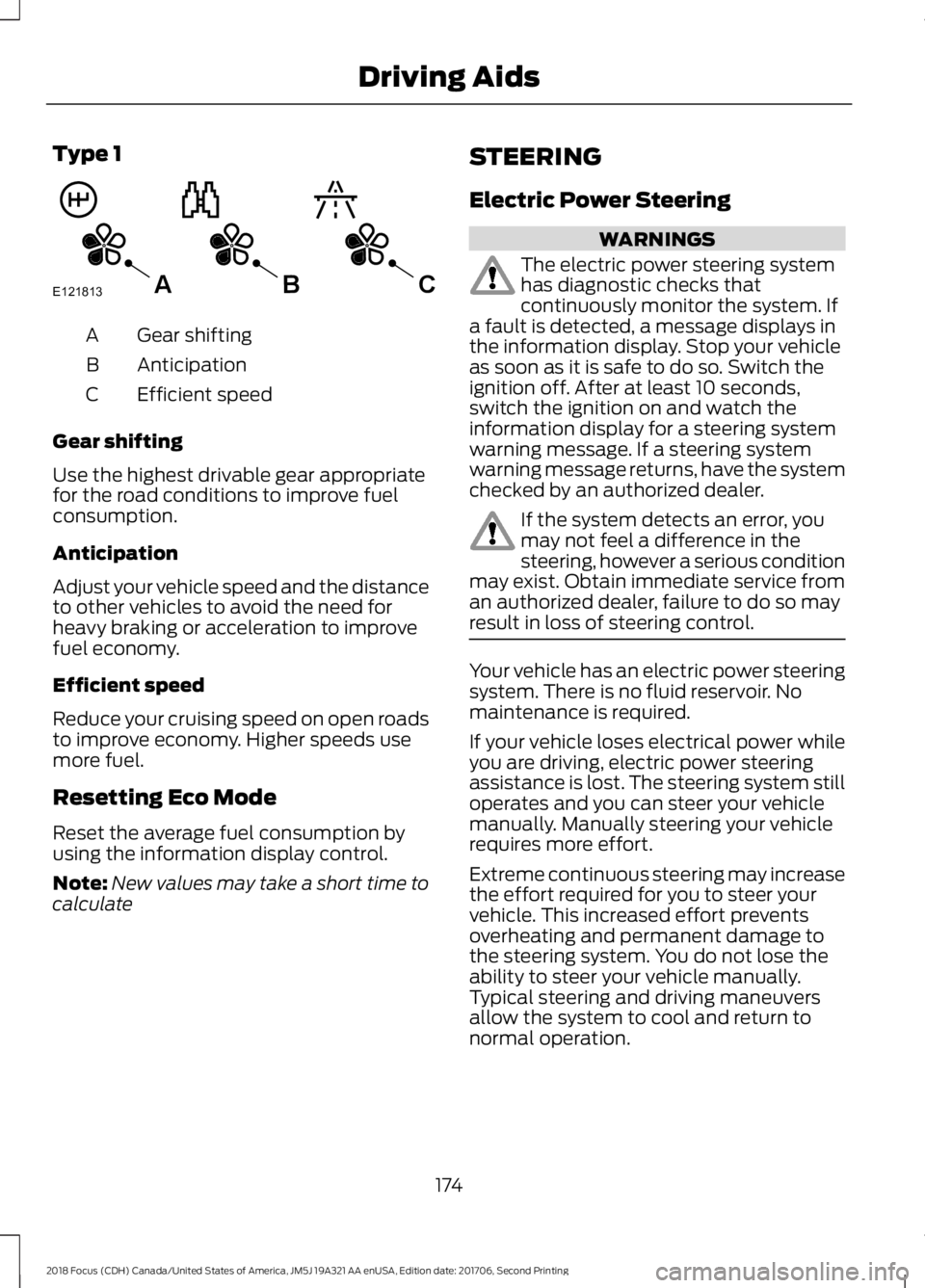
Type 1
Gear shiftingA
AnticipationB
Efficient speedC
Gear shifting
Use the highest drivable gear appropriatefor the road conditions to improve fuelconsumption.
Anticipation
Adjust your vehicle speed and the distanceto other vehicles to avoid the need forheavy braking or acceleration to improvefuel economy.
Efficient speed
Reduce your cruising speed on open roadsto improve economy. Higher speeds usemore fuel.
Resetting Eco Mode
Reset the average fuel consumption byusing the information display control.
Note:New values may take a short time tocalculate
STEERING
Electric Power Steering
WARNINGS
The electric power steering systemhas diagnostic checks thatcontinuously monitor the system. Ifa fault is detected, a message displays inthe information display. Stop your vehicleas soon as it is safe to do so. Switch theignition off. After at least 10 seconds,switch the ignition on and watch theinformation display for a steering systemwarning message. If a steering systemwarning message returns, have the systemchecked by an authorized dealer.
If the system detects an error, youmay not feel a difference in thesteering, however a serious conditionmay exist. Obtain immediate service froman authorized dealer, failure to do so mayresult in loss of steering control.
Your vehicle has an electric power steeringsystem. There is no fluid reservoir. Nomaintenance is required.
If your vehicle loses electrical power whileyou are driving, electric power steeringassistance is lost. The steering system stilloperates and you can steer your vehiclemanually. Manually steering your vehiclerequires more effort.
Extreme continuous steering may increasethe effort required for you to steer yourvehicle. This increased effort preventsoverheating and permanent damage tothe steering system. You do not lose theability to steer your vehicle manually.Typical steering and driving maneuversallow the system to cool and return tonormal operation.
1742018 Focus (CDH) Canada/United States of America, JM5J 19A321 AA enUSA, Edition date: 201706, Second PrintingDriving AidsE121813CBA
Page 296 of 473
In order to provide the best possibleexperience, use the contact form to reportany station issues found while listening toa station broadcasting with HD Radio
technology. Independent entities own andoperate each station. These stations areresponsible for ensuring all audio streamsand data fields are accurate.
Potential station issues
ActionCauseIssues
No action required. This is abroadcast issue.This is poor time alignmentby the radio broadcaster.Echo, stutter, skip or repeatin audio.Increase or decrease inaudio volume.
No action required. Thereception issue may clear upas you continue to drive.
The radio is shifting betweenanalog and digital audio.Sound fading or blending inand out.
No action required. This isnormal behavior. Wait untilthe audio is available.
The digital multicast is notavailable until the HD Radiobroadcast is decoded. Oncedecoded, the audio is avail-able.
There is an audio mutedelay when selecting HD2 orHD3, multicast preset orDirect Tune.
No action required. Thestation is not available inyour current location.
The previously storedmulticast preset or directtune is not available in yourcurrent reception area.
Cannot access HD2 or HD3multicast channel whenrecalling a preset or from adirect tune.
Fill out the station issueform at website listed
below.*
Data service issue by theradio broadcaster.Text information does notmatch currently playingaudio.
Fill out the station issueform at website listed
below.*
Data service issue by theradio broadcaster.There is no text informationshown for currently selectedfrequency.
No action required. This isnormal behavior.Pressing Scan disablesHD2-HD7 channel search.HD2-HD7 stations not foundwhen Scan is pressed.
* http://www.ibiquity.com/automotive/report_radio_station_experiences
2932018 Focus (CDH) Canada/United States of America, JM5J 19A321 AA enUSA, Edition date: 201706, Second PrintingAudio System
Page 298 of 473

SIRIUS satellite radio is asubscription-based satellite radio servicethat broadcasts a variety of music, sports,news, weather, traffic and entertainmentprogramming. Your factory-installedSIRIUS satellite radio system includeshardware and a limited subscription term,which begins on the date of sale or leaseof your vehicle. See an authorized dealerfor availability.
For more information on extendedsubscription terms (a service fee isrequired), the online media player and acomplete list of SIRIUS satellite radiochannels, and other features, please visitwww.siriusxm.com in the United States,www.siriusxm.ca in Canada, or call SIRIUSat 1-888-539-7474.
Satellite Radio Electronic SerialNumber (ESN)
You need your ESN to activate, modify ortrack your satellite radio account. When insatellite radio mode, tune to channel 0.
Troubleshooting
ActionConditionMessage
No action required. Thismessage should disappearshortly.
Radio requires more thantwo seconds to produceaudio for the selectedchannel.
Acquiring…
If this message does notclear shortly, or with an igni-tion key cycle, your receivermay have a fault. See anauthorized dealer for service.
There is an internal moduleor system failure present.Satellite antenna fault
SIRIUS system failure
Tune to another channel orchoose another preset.The channel is no longeravailable.Invalid Channel
Contact SIRIUS at 1-888-539-7474 to subscribe tothe channel, or tune toanother channel.
Your subscription does notinclude this channel.Unsubscribed Channel
The signal is blocked. Whenyou move into an open area,the signal should return.
The signal is lost from theSIRIUS satellite or SIRIUStower to your vehicleantenna.
No Signal
No action required. Theprocess may take up tothree minutes.
Update of channelprogramming in progress.Updating…
2952018 Focus (CDH) Canada/United States of America, JM5J 19A321 AA enUSA, Edition date: 201706, Second PrintingAudio System
Page 301 of 473

Sunday, 10:30am-7:30pm EST.
In the United States, call 1-800-392-3673.
In Canada, call 1-800-565-3673.
Times are subject to change due toholidays.
SYNC Owner Account
Why do I need a SYNC owner account?
•Essential for keeping up with the latestsoftware downloads available forSYNC.
•Access to customer support for anyquestions you may have.
Driving Restrictions
For your safety, certain features arespeed-dependent and restricted when yourvehicle is traveling over 3 mph (5 km/h).
Safety Information
WARNING
Driving while distracted can result inloss of vehicle control, crash andinjury. We strongly recommend thatyou use extreme caution when using anydevice that may take your focus off theroad. Your primary responsibility is the safeoperation of your vehicle. We recommendagainst the use of any hand-held devicewhile driving and encourage the use ofvoice-operated systems when possible.Make sure you are aware of all applicablelocal laws that may affect the use ofelectronic devices while driving.
When using SYNC:
•Do not operate playing devices if thepower cords or cables are broken, splitor damaged. Place cords and cablesout of the way, so they do not interferewith the operation of pedals, seats,compartments or safe driving abilities.
•Do not leave playing devices in yourvehicle during extreme conditions as itcould cause them damage. See yourdevice's manual for further information.
•Do not attempt to service or repair thesystem. See an authorized dealer.
Privacy Information
When a cellular phone is connected toSYNC, the system creates a profile withinyour vehicle that is linked to that cellularphone. This profile is created in order tooffer you more cellular features and tooperate more efficiently. Among otherthings, this profile may contain data aboutyour cellular phone book, text messages(read and unread), and call history,including history of calls when your cellularphone was not connected to the system.In addition, if you connect a media device,the system creates and retains an index ofsupported media content. The system alsorecords a short development log ofapproximately 10 minutes of all recentsystem activity. The log profile and othersystem data may be used to improve thesystem and help diagnose any problemsthat may occur.
The cellular profile, media device index,and development log will remain in thevehicle unless you delete them and aregenerally accessible only in the vehiclewhen the cellular phone or media playeris connected. If you no longer plan to usethe system or the vehicle, we recommendyou perform a Master Reset to erase allstored information.
2982018 Focus (CDH) Canada/United States of America, JM5J 19A321 AA enUSA, Edition date: 201706, Second PrintingSYNC™
Page 343 of 473
•SOUND: Press to access the Soundmenu where you can adjust sound andother audio settings.
•1-6: Press and hold to store or press toselect an AM, FM or SIRIUS memorypreset. See Audio System (page 281).
•DISP: Switch the display on or off. Youcan also touch the screen to switch thedisplay back on.
•Temperature, fan and climatecontrol buttons: Control thetemperature, fan speed or settings ofthe climate control system. SeeClimate Control (page 104).
911 Assist
WARNINGS
Unless the 911 Assist setting is set onbefore a crash, the system will notdial for help which could delayresponse time, potentially increasing therisk of serious injury or death after a crash.
Do not wait for 911 Assist to make anemergency call if you can do ityourself. Dial emergency servicesimmediately to avoid delayed responsetime which could increase the risk ofserious injury or death after a crash. If youdo not hear 911 Assist within five secondsof the crash, the system or phone may bedamaged or non-functional.
Always place your phone in a securelocation in your vehicle so it does notbecome a projectile or get damagedin a crash. Failure to do so may causeserious injury to someone or damage thephone which could prevent 911 Assist fromworking properly.
Note:The SYNC 911 Assist feature must beset on before the incident.
Note:The SYNC 911 Assist feature onlyoperates in the U.S., Canada or in a territoryin which 911 is the emergency number.
Note:Before setting this feature on, makesure that you read the 911 Assist PrivacyNotice later in this section for importantinformation.
Note:If any user sets 911 Assist to on or off,that setting applies for all paired phones. If911 Assist is switched off and the phone isconnected to SYNC, an icon displays on thestatus bar.
Note:Every phone operates differently.While SYNC 911 Assist works with mostcellular phones, some may have troubleusing this feature.
If a crash deploys an airbag (excludingknee airbags and rear inflatable safetybelts [if equipped]) or activates the fuelpump shut-off, your SYNC-equippedvehicle may be able to contact emergencyservices by dialing 911 through a paired andconnected Bluetooth-enabled phone. Youcan learn more about the 911 Assistfeature, by visiting:
Website
www.owner.ford.comwww.syncmyride.cawww.syncmaroute.ca
For important information about airbagdeployment and the fuel pump shut-offplease see the Supplementary Restrainsand Roadside Emergencies sections ofyour owner manual.
To switch 911 Assist on and off please viewthe settings information. See Settings(page 379).
To make sure that 911 Assist workscorrectly:
•SYNC must be powered and workingproperly at the time of the incident andthroughout feature activation and use.
•The 911 Assist feature must be set onbefore the incident.
3402018 Focus (CDH) Canada/United States of America, JM5J 19A321 AA enUSA, Edition date: 201706, Second PrintingSYNC™ 3