2018 FORD FOCUS wheel
[x] Cancel search: wheelPage 317 of 473
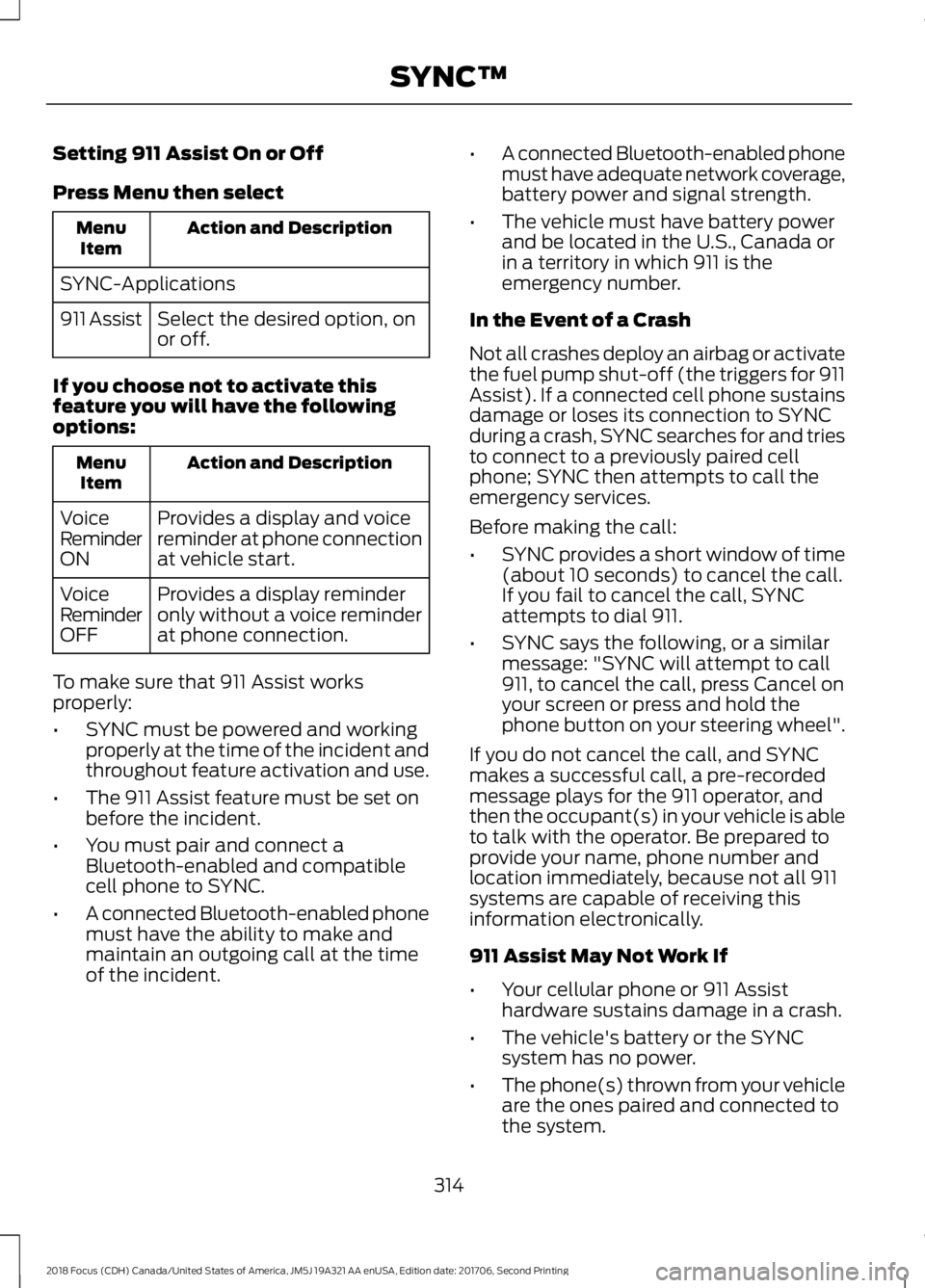
Setting 911 Assist On or Off
Press Menu then select
Action and DescriptionMenuItem
SYNC-Applications
Select the desired option, onor off.911 Assist
If you choose not to activate thisfeature you will have the followingoptions:
Action and DescriptionMenuItem
Provides a display and voicereminder at phone connectionat vehicle start.
VoiceReminderON
Provides a display reminderonly without a voice reminderat phone connection.
VoiceReminderOFF
To make sure that 911 Assist worksproperly:
•SYNC must be powered and workingproperly at the time of the incident andthroughout feature activation and use.
•The 911 Assist feature must be set onbefore the incident.
•You must pair and connect aBluetooth-enabled and compatiblecell phone to SYNC.
•A connected Bluetooth-enabled phonemust have the ability to make andmaintain an outgoing call at the timeof the incident.
•A connected Bluetooth-enabled phonemust have adequate network coverage,battery power and signal strength.
•The vehicle must have battery powerand be located in the U.S., Canada orin a territory in which 911 is theemergency number.
In the Event of a Crash
Not all crashes deploy an airbag or activatethe fuel pump shut-off (the triggers for 911Assist). If a connected cell phone sustainsdamage or loses its connection to SYNCduring a crash, SYNC searches for and triesto connect to a previously paired cellphone; SYNC then attempts to call theemergency services.
Before making the call:
•SYNC provides a short window of time(about 10 seconds) to cancel the call.If you fail to cancel the call, SYNCattempts to dial 911.
•SYNC says the following, or a similarmessage: "SYNC will attempt to call911, to cancel the call, press Cancel onyour screen or press and hold thephone button on your steering wheel".
If you do not cancel the call, and SYNCmakes a successful call, a pre-recordedmessage plays for the 911 operator, andthen the occupant(s) in your vehicle is ableto talk with the operator. Be prepared toprovide your name, phone number andlocation immediately, because not all 911systems are capable of receiving thisinformation electronically.
911 Assist May Not Work If
•Your cellular phone or 911 Assisthardware sustains damage in a crash.
•The vehicle's battery or the SYNCsystem has no power.
•The phone(s) thrown from your vehicleare the ones paired and connected tothe system.
3142018 Focus (CDH) Canada/United States of America, JM5J 19A321 AA enUSA, Edition date: 201706, Second PrintingSYNC™
Page 318 of 473
911 Assist Privacy Notice
When you switch on 911 Assist, it maydisclose to emergency services that yourvehicle has been in a crash involving thedeployment of an airbag or activation ofthe fuel pump shut-off. Certain versions orupdates to 911 Assist may also be capableof electronically or verbally disclosing to911 operators your vehicle location or otherdetails about your vehicle or crash to assist911 operators to provide the mostappropriate emergency services. If you donot want to disclose this information, donot switch the feature on.
SYNC Mobile Apps
The system enables voice and steeringwheel control of SYNC AppLink enabledsmartphone apps. When an app is runningthrough AppLink, you can control mainfeatures of the app through voicecommands and steering wheel controls.
Note:You must pair and connect yoursmartphone to SYNC to access AppLink.
Note:iPhone users need to connect thephone to the USB port.
Note:Android users need to connect thephone to SYNC using Bluetooth.
Note:For information on available apps,supported smartphone devices andtroubleshooting tips please visit the Fordwebsite.
Availability of SYNC AppLink enabled Appswill vary by region.
Note:Make sure you have an active accountfor the app that you have downloaded.Some apps work automatically with nosetup. Other apps want you to configureyour personal settings and personalize yourexperience by creating stations or favorites.We recommend you do this at home oroutside of your vehicle.
Note:AppLink is not available if yourvehicle is equipped with the MyFordTouchsystem.
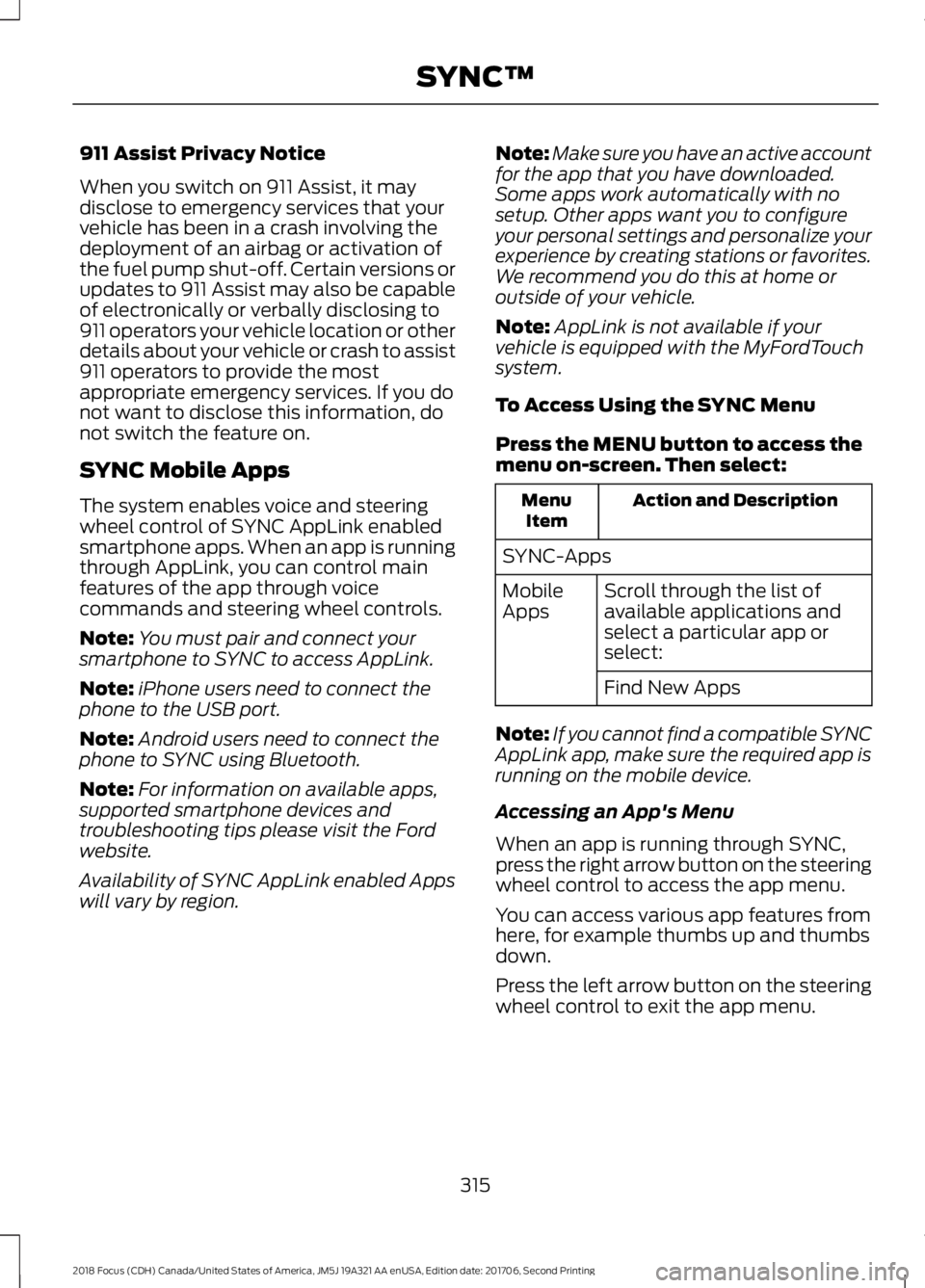
To Access Using the SYNC Menu
Press the MENU button to access themenu on-screen. Then select:
Action and DescriptionMenuItem
SYNC-Apps
Scroll through the list ofavailable applications andselect a particular app orselect:
MobileApps
Find New Apps
Note:If you cannot find a compatible SYNCAppLink app, make sure the required app isrunning on the mobile device.
Accessing an App's Menu
When an app is running through SYNC,press the right arrow button on the steeringwheel control to access the app menu.
You can access various app features fromhere, for example thumbs up and thumbsdown.
Press the left arrow button on the steeringwheel control to exit the app menu.
3152018 Focus (CDH) Canada/United States of America, JM5J 19A321 AA enUSA, Edition date: 201706, Second PrintingSYNC™
Page 319 of 473
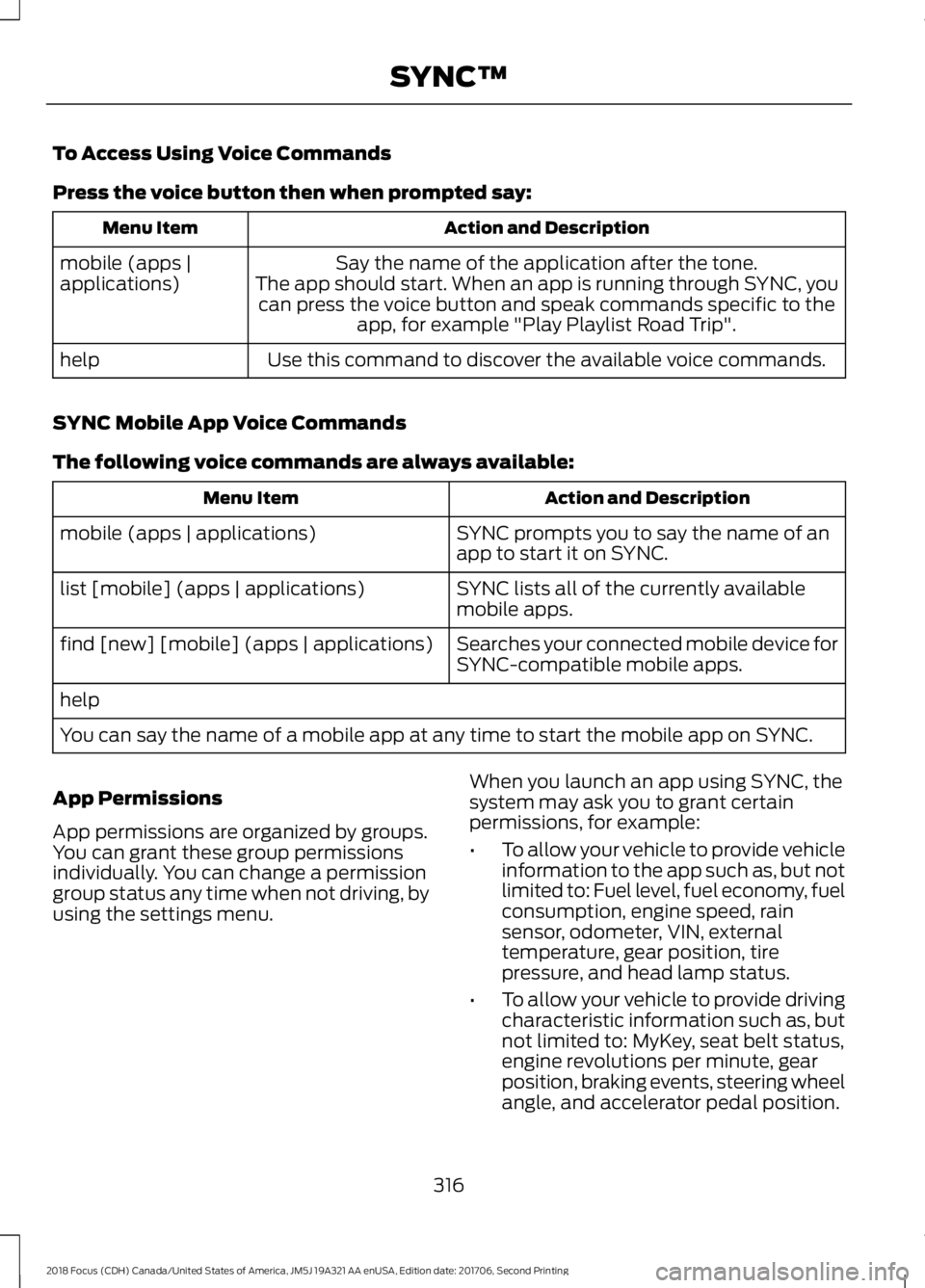
To Access Using Voice Commands
Press the voice button then when prompted say:
Action and DescriptionMenu Item
Say the name of the application after the tone.The app should start. When an app is running through SYNC, youcan press the voice button and speak commands specific to theapp, for example "Play Playlist Road Trip".
mobile (apps |applications)
Use this command to discover the available voice commands.help
SYNC Mobile App Voice Commands
The following voice commands are always available:
Action and DescriptionMenu Item
SYNC prompts you to say the name of anapp to start it on SYNC.mobile (apps | applications)
SYNC lists all of the currently availablemobile apps.list [mobile] (apps | applications)
Searches your connected mobile device forSYNC-compatible mobile apps.find [new] [mobile] (apps | applications)
help
You can say the name of a mobile app at any time to start the mobile app on SYNC.
App Permissions
App permissions are organized by groups.You can grant these group permissionsindividually. You can change a permissiongroup status any time when not driving, byusing the settings menu.
When you launch an app using SYNC, thesystem may ask you to grant certainpermissions, for example:
•To allow your vehicle to provide vehicleinformation to the app such as, but notlimited to: Fuel level, fuel economy, fuelconsumption, engine speed, rainsensor, odometer, VIN, externaltemperature, gear position, tirepressure, and head lamp status.
•To allow your vehicle to provide drivingcharacteristic information such as, butnot limited to: MyKey, seat belt status,engine revolutions per minute, gearposition, braking events, steering wheelangle, and accelerator pedal position.
3162018 Focus (CDH) Canada/United States of America, JM5J 19A321 AA enUSA, Edition date: 201706, Second PrintingSYNC™
Page 342 of 473

Cleaning the Touchscreen
You can remove fingerprints with a dry,clean, soft cloth.
If dirt or fingerprints are still on the screen,apply a small amount of alcohol to thecloth and try to clean it again.
Note: Do not use detergent or any type ofsolvent to clean the touchscreen.
Note:Do not pour or spray alcohol onto thetouchscreen.
Using Voice Recognition
Using voice commands allows you to keepyour hands on the wheel and eyes on theroad. The system provides feedbackthrough audible tones, prompts, questionsand spoken confirmations depending onthe situation and the chosen level ofinteraction (voice settings).
The system also asks short questions(confirmation prompts) when it is not sureof your request or when there are multiplepossible responses to your request.
When using voice commands, words andicons may appear in the status barindicating the status of the voice commandsession. See Using Voice Recognition(page 347).
Using the Steering Wheel Controls
Depending on your vehicle and optionpackage, you can use different controls onyour steering wheel to interact with thetouchscreen system in different ways.
VOL: Control the volume of audio output.
Mute: Mute the audio output.
Voice: Press to start a voice session. Pressagain to stop the voice prompt andimmediately begin speaking. Press andhold to end a voice session.
SEEK NEXT:
•While in radio mode, press to seekbetween memory presets.
•While in USB, Bluetooth Audio or CDmode, press to seek between songs orpress and hold to fast seek.
SEEK PREVIOUS:
•While in radio mode, press to seekbetween memory presets.
•While in USB, Bluetooth Audio or CDmode, press to seek between songs orpress and hold to fast seek.
PHONE ACCEPT: Press to answer a callor switch between calls.
PHONE REJECT: Press to end a call orreject an incoming call.
Note:On some models,SEEK NEXT maybe combined with PHONE REJECT andSEEK PREVIOUS may be combined withPHONE ACCEPT.
M:Touch the control repeatedly to switchbetween media sources (modes).
See Steering Wheel (page 71).
Using Your Bezel Controls
Depending on your vehicle and optionpackage, you may also have these controlson your instrument panel:
•Power: Switch the audio system onand off.
•VOL: Control the volume of playingaudio.
•Seek and Tune: se as you normallywould in audio modes.
•Eject: Eject a CD from the audiosystem.
•SOURCE or MEDIA: Press repeatedlyto advance through available mediamodes.
3392018 Focus (CDH) Canada/United States of America, JM5J 19A321 AA enUSA, Edition date: 201706, Second PrintingSYNC™ 3
Page 344 of 473
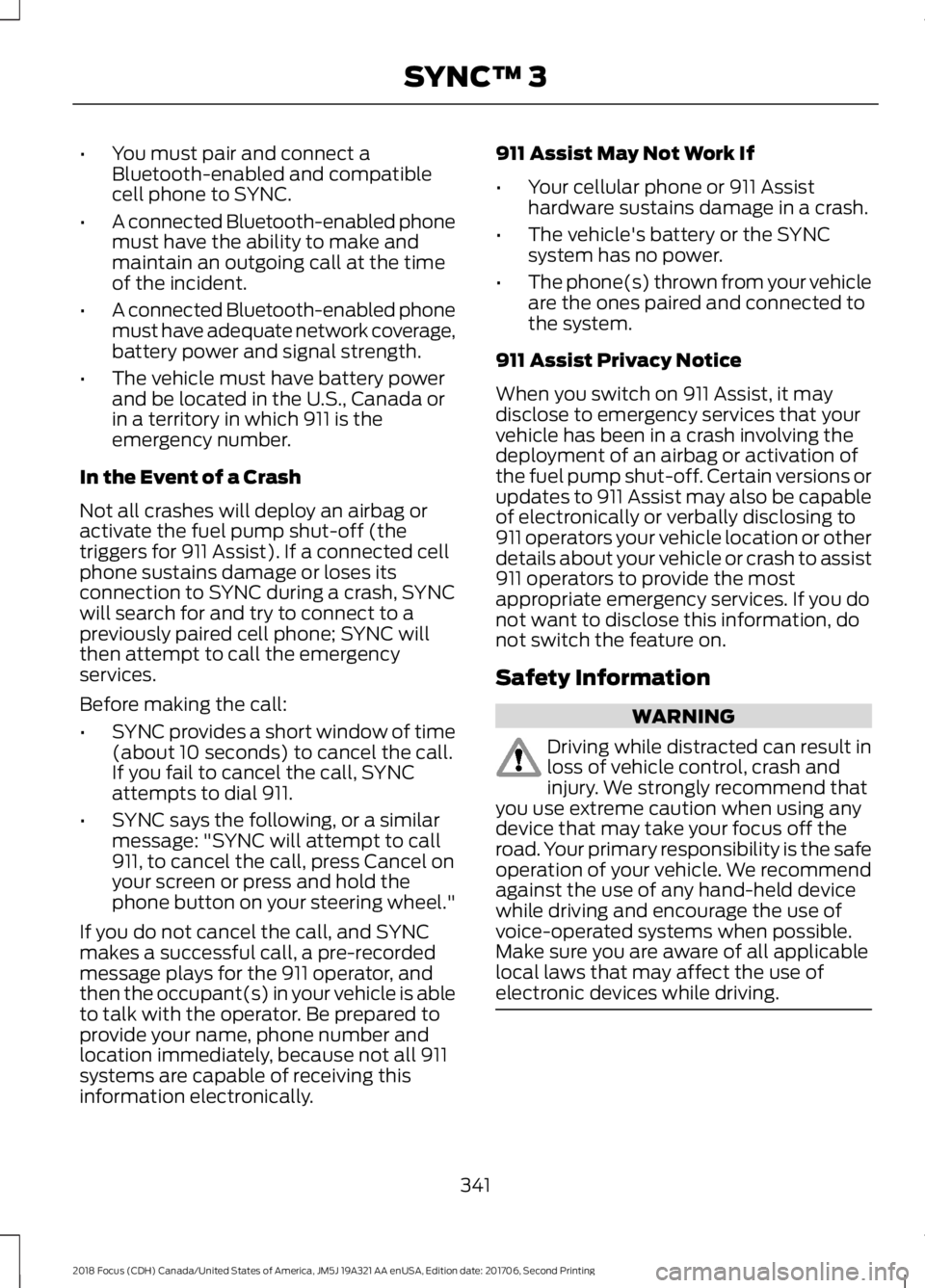
•You must pair and connect aBluetooth-enabled and compatiblecell phone to SYNC.
•A connected Bluetooth-enabled phonemust have the ability to make andmaintain an outgoing call at the timeof the incident.
•A connected Bluetooth-enabled phonemust have adequate network coverage,battery power and signal strength.
•The vehicle must have battery powerand be located in the U.S., Canada orin a territory in which 911 is theemergency number.
In the Event of a Crash
Not all crashes will deploy an airbag oractivate the fuel pump shut-off (thetriggers for 911 Assist). If a connected cellphone sustains damage or loses itsconnection to SYNC during a crash, SYNCwill search for and try to connect to apreviously paired cell phone; SYNC willthen attempt to call the emergencyservices.
Before making the call:
•SYNC provides a short window of time(about 10 seconds) to cancel the call.If you fail to cancel the call, SYNCattempts to dial 911.
•SYNC says the following, or a similarmessage: "SYNC will attempt to call911, to cancel the call, press Cancel onyour screen or press and hold thephone button on your steering wheel."
If you do not cancel the call, and SYNCmakes a successful call, a pre-recordedmessage plays for the 911 operator, andthen the occupant(s) in your vehicle is ableto talk with the operator. Be prepared toprovide your name, phone number andlocation immediately, because not all 911systems are capable of receiving thisinformation electronically.
911 Assist May Not Work If
•Your cellular phone or 911 Assisthardware sustains damage in a crash.
•The vehicle's battery or the SYNCsystem has no power.
•The phone(s) thrown from your vehicleare the ones paired and connected tothe system.
911 Assist Privacy Notice
When you switch on 911 Assist, it maydisclose to emergency services that yourvehicle has been in a crash involving thedeployment of an airbag or activation ofthe fuel pump shut-off. Certain versions orupdates to 911 Assist may also be capableof electronically or verbally disclosing to911 operators your vehicle location or otherdetails about your vehicle or crash to assist911 operators to provide the mostappropriate emergency services. If you donot want to disclose this information, donot switch the feature on.
Safety Information
WARNING
Driving while distracted can result inloss of vehicle control, crash andinjury. We strongly recommend thatyou use extreme caution when using anydevice that may take your focus off theroad. Your primary responsibility is the safeoperation of your vehicle. We recommendagainst the use of any hand-held devicewhile driving and encourage the use ofvoice-operated systems when possible.Make sure you are aware of all applicablelocal laws that may affect the use ofelectronic devices while driving.
3412018 Focus (CDH) Canada/United States of America, JM5J 19A321 AA enUSA, Edition date: 201706, Second PrintingSYNC™ 3
Page 350 of 473
Home screen displayTileItem
If your vehicle does not have navigation, this space contains theaudio information.
* If equipped.
You can touch any of the feature displaysto access that feature.
Anytime you select the home button, thesystem returns you to this screen.
USING VOICE RECOGNITION
The SYNC 3 system allows you to use voicecommands, to control features like audioand phone. By using voice commands, youcan keep your hands on the wheel and youreyes on the road.
You can access each feature controlled bySYNC 3 through a variety of commands.
To activate the SYNC 3 voicecommands push the voicebutton on the steering wheel andwait for the prompt.
___ is a dynamic listing, meaning that it canbe the name of anything, such as artist, thename of contact or number. The contextand the description of the command tellyou what to say for this dynamic option.
There are some commands that work forevery feature, these commands are:
Action and DescriptionVoice Command
Brings you to the main menu.Main Menu
Returns you to the previous screen.Go back
Ends the voice session.Cancel
Gives you a list of possible voice commands.List of Commands
You can name any feature and the system gives a list ofcommands available for the feature. For example, you couldsay:
___ List of Commands
Phone List of Commands
Navigation List of Commands
You can use this command to view the next page of options onany screen where multiple pages of choices are given.Next Page
You can use this command to view the previous page of optionson any screen where multiple pages of choices are given.Previous Page
Gives you available commands you can use on the currentscreen.Help
3472018 Focus (CDH) Canada/United States of America, JM5J 19A321 AA enUSA, Edition date: 201706, Second PrintingSYNC™ 3E142599
Page 368 of 473
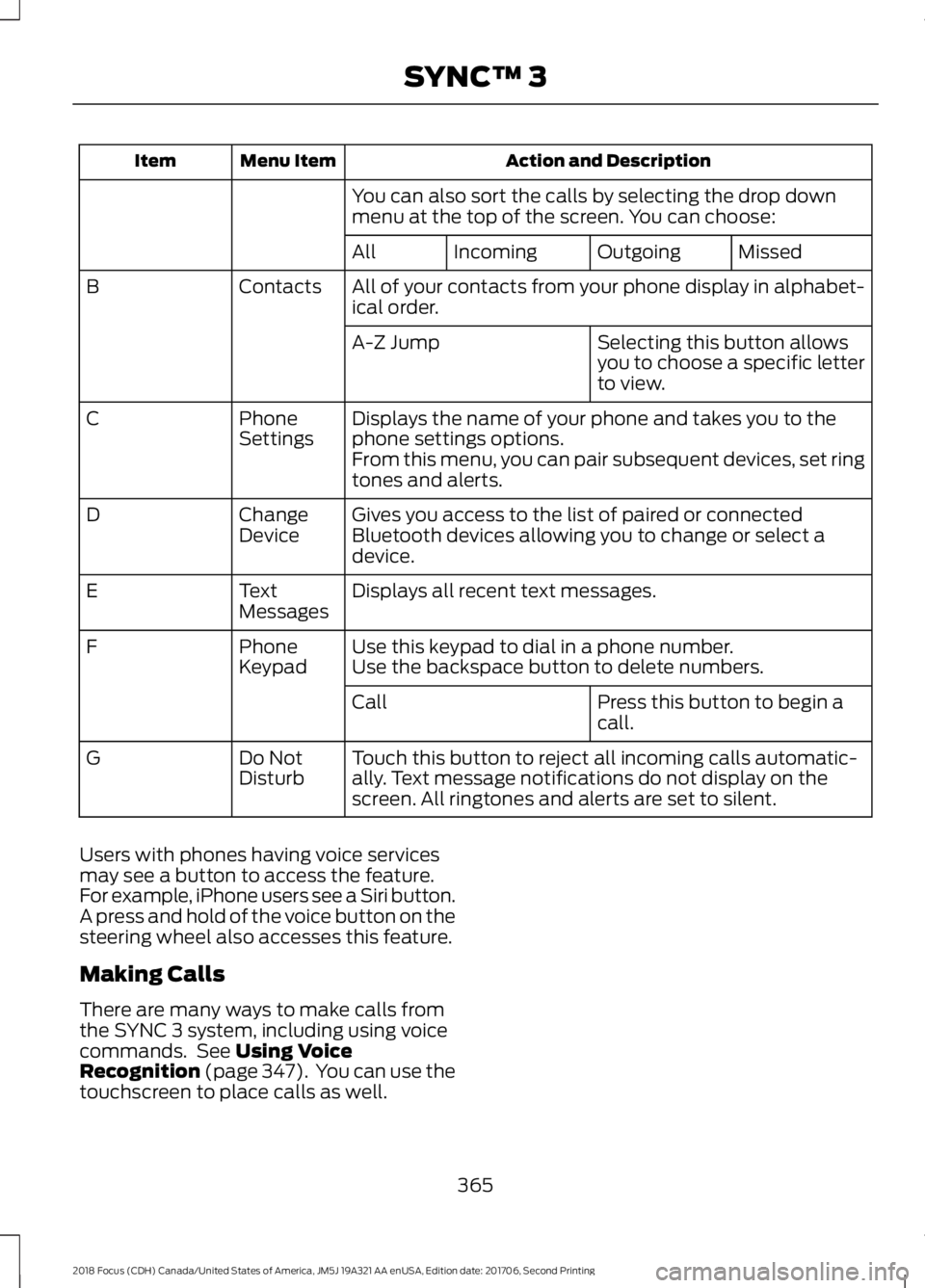
Action and DescriptionMenu ItemItem
You can also sort the calls by selecting the drop downmenu at the top of the screen. You can choose:
MissedOutgoingIncomingAll
All of your contacts from your phone display in alphabet-ical order.ContactsB
Selecting this button allowsyou to choose a specific letterto view.
A-Z Jump
Displays the name of your phone and takes you to thephone settings options.PhoneSettingsC
From this menu, you can pair subsequent devices, set ringtones and alerts.
Gives you access to the list of paired or connectedBluetooth devices allowing you to change or select adevice.
ChangeDeviceD
Displays all recent text messages.TextMessagesE
Use this keypad to dial in a phone number.PhoneKeypadFUse the backspace button to delete numbers.
Press this button to begin acall.Call
Touch this button to reject all incoming calls automatic-ally. Text message notifications do not display on thescreen. All ringtones and alerts are set to silent.
Do NotDisturbG
Users with phones having voice servicesmay see a button to access the feature.For example, iPhone users see a Siri button.A press and hold of the voice button on thesteering wheel also accesses this feature.
Making Calls
There are many ways to make calls fromthe SYNC 3 system, including using voicecommands. See Using VoiceRecognition (page 347). You can use thetouchscreen to place calls as well.
3652018 Focus (CDH) Canada/United States of America, JM5J 19A321 AA enUSA, Edition date: 201706, Second PrintingSYNC™ 3
Page 369 of 473
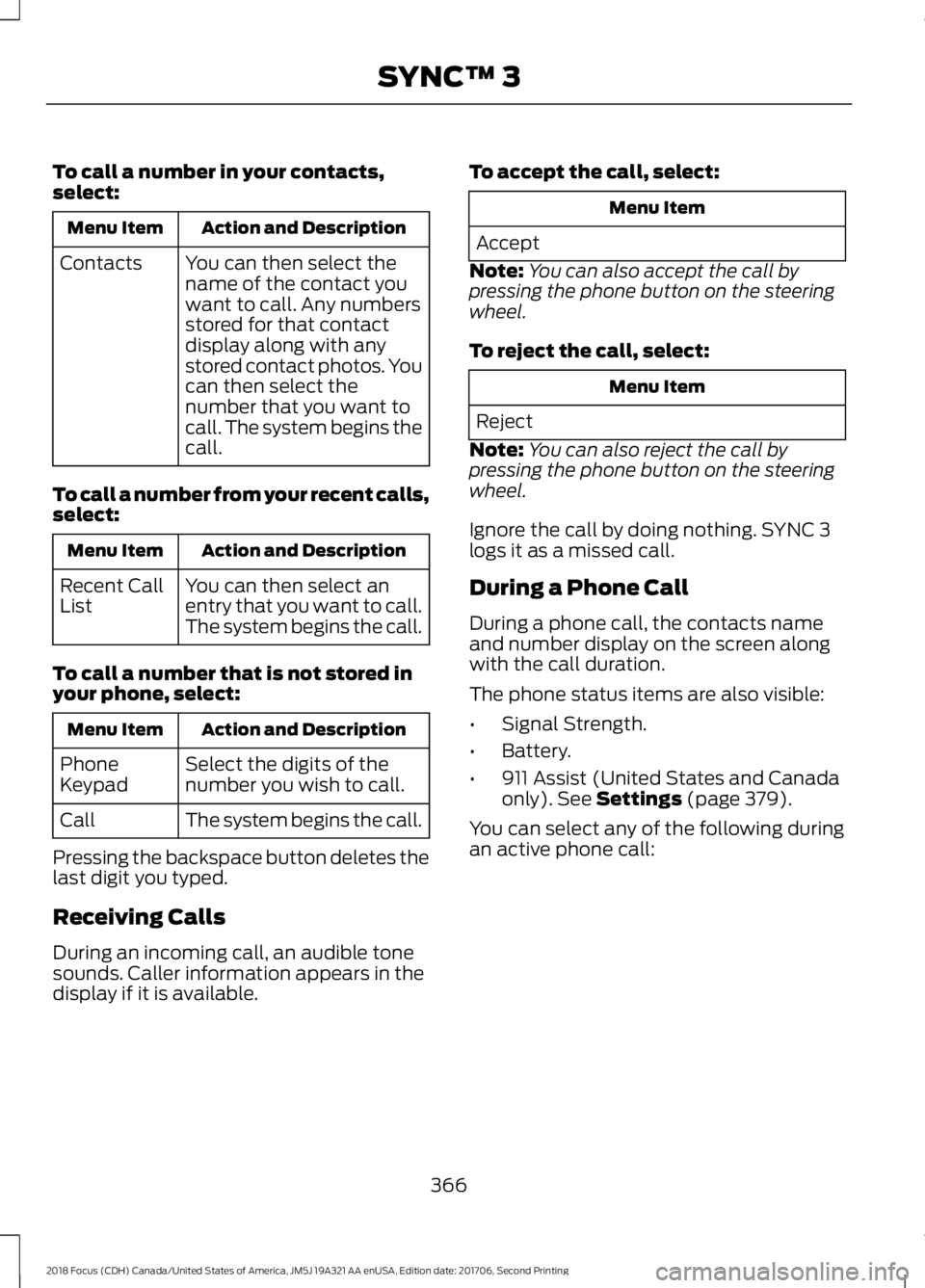
To call a number in your contacts,select:
Action and DescriptionMenu Item
You can then select thename of the contact youwant to call. Any numbersstored for that contactdisplay along with anystored contact photos. Youcan then select thenumber that you want tocall. The system begins thecall.
Contacts
To call a number from your recent calls,select:
Action and DescriptionMenu Item
You can then select anentry that you want to call.The system begins the call.
Recent CallList
To call a number that is not stored inyour phone, select:
Action and DescriptionMenu Item
Select the digits of thenumber you wish to call.PhoneKeypad
The system begins the call.Call
Pressing the backspace button deletes thelast digit you typed.
Receiving Calls
During an incoming call, an audible tonesounds. Caller information appears in thedisplay if it is available.
To accept the call, select:
Menu Item
Accept
Note:You can also accept the call bypressing the phone button on the steeringwheel.
To reject the call, select:
Menu Item
Reject
Note:You can also reject the call bypressing the phone button on the steeringwheel.
Ignore the call by doing nothing. SYNC 3logs it as a missed call.
During a Phone Call
During a phone call, the contacts nameand number display on the screen alongwith the call duration.
The phone status items are also visible:
•Signal Strength.
•Battery.
•911 Assist (United States and Canadaonly). See Settings (page 379).
You can select any of the following duringan active phone call:
3662018 Focus (CDH) Canada/United States of America, JM5J 19A321 AA enUSA, Edition date: 201706, Second PrintingSYNC™ 3