Page 428 of 696
WARNING!
ALWAYS obey traffic laws and pay attention to the
road. ALWAYS drive safely with your hands on the
steering wheel. You have full responsibility and as-
sume all risks related to the use of the features and
applications in this vehicle. Only use the features and
applications when it is safe to do so. Failure to do so
may result in an accident involving serious injury or
death.
NOTE:
• Your vehicle may be transmitting data as authorized by
the subscriber.
• The SOS and ASSIST buttons will only function if you
are connected to an operable LTE (voice/data) or 4G
(data) network. Other Uconnect services will only be
operable if your SiriusXM Guardian service is active and
you are connected to an operable LTE (voice/data) or 4G
(data) network. ASSIST Call
The ASSIST Button is used to automatically connect you to
any one of the following support centers:
•
Roadside Assistance – If you get a flat tire, or need a tow,
just push the ASSIST button and you’ll be connected to
someone who can help. Roadside Assistance will know
what vehicle you’re driving and its location. Additional
fees may apply for roadside assistance.
• SiriusXM Guardian Customer Care – In-vehicle support
for SiriusXM Guardian.
• Vehicle Customer Care – Total support for all other
vehicle issues.
SOS Call
1. Push the SOS Call button on the Rearview Mirror.
NOTE: In case the SOS Call button is pushed in error, there
will be a ten second delay before the SOS Call system
initiates a call to a SOS operator. To cancel the SOS Call
connection, push the SOS call button on the Rearview
Mirror or press the cancellation button on the Device
Screen. Termination of the SOS Call will turn off the green
LED light on the Rearview Mirror.
426 IN CASE OF EMERGENCY
Page 429 of 696
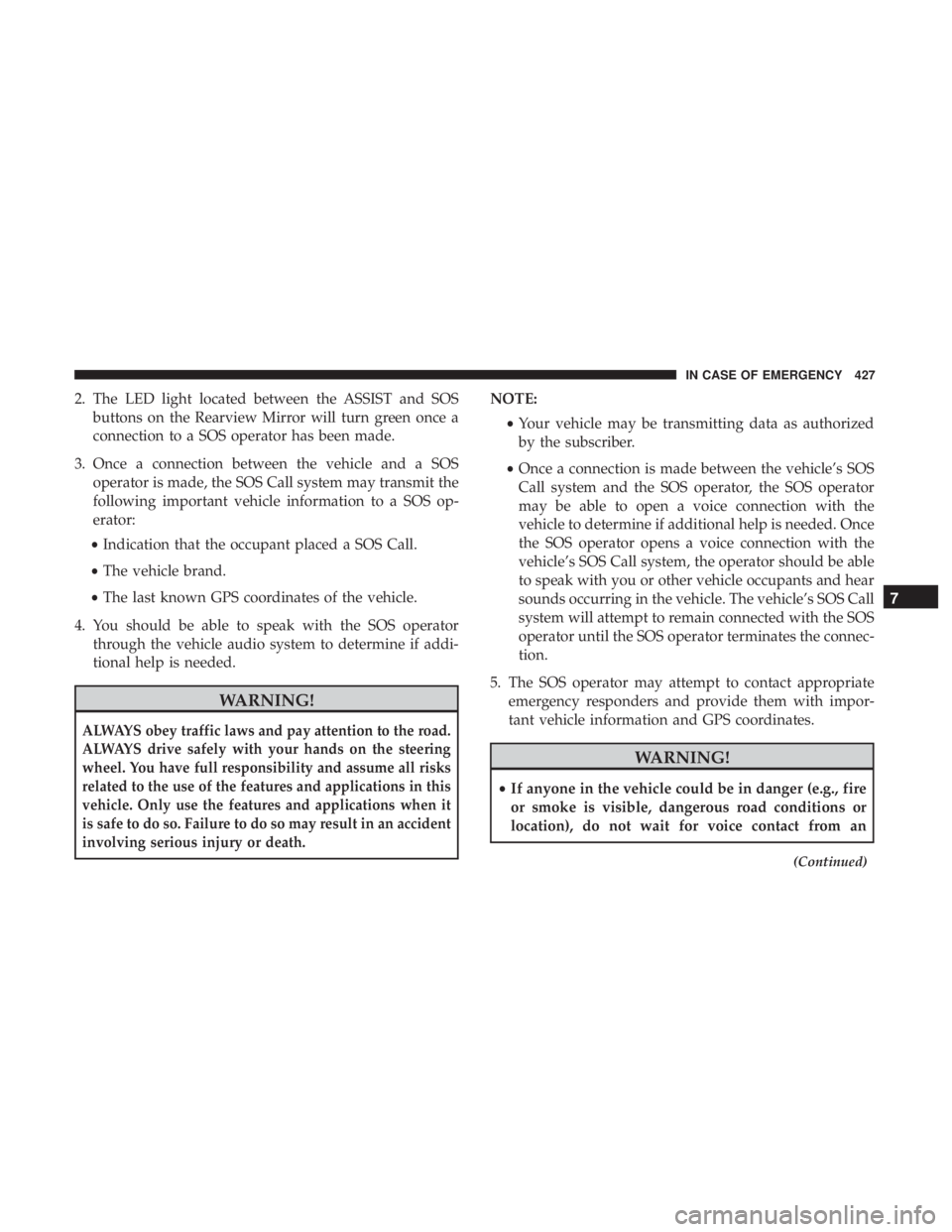
2. The LED light located between the ASSIST and SOSbuttons on the Rearview Mirror will turn green once a
connection to a SOS operator has been made.
3. Once a connection between the vehicle and a SOS operator is made, the SOS Call system may transmit the
following important vehicle information to a SOS op-
erator:
• Indication that the occupant placed a SOS Call.
• The vehicle brand.
• The last known GPS coordinates of the vehicle.
4. You should be able to speak with the SOS operator through the vehicle audio system to determine if addi-
tional help is needed.
WARNING!
ALWAYS obey traffic laws and pay attention to the road.
ALWAYS drive safely with your hands on the steering
wheel. You have full responsibility and assume all risks
related to the use of the features and applications in this
vehicle. Only use the features and applications when it
is safe to do so. Failure to do so may result in an accident
involving serious injury or death.
NOTE:
•Your vehicle may be transmitting data as authorized
by the subscriber.
• Once a connection is made between the vehicle’s SOS
Call system and the SOS operator, the SOS operator
may be able to open a voice connection with the
vehicle to determine if additional help is needed. Once
the SOS operator opens a voice connection with the
vehicle’s SOS Call system, the operator should be able
to speak with you or other vehicle occupants and hear
sounds occurring in the vehicle. The vehicle’s SOS Call
system will attempt to remain connected with the SOS
operator until the SOS operator terminates the connec-
tion.
5. The SOS operator may attempt to contact appropriate emergency responders and provide them with impor-
tant vehicle information and GPS coordinates.
WARNING!
•If anyone in the vehicle could be in danger (e.g., fire
or smoke is visible, dangerous road conditions or
location), do not wait for voice contact from an
(Continued)
7
IN CASE OF EMERGENCY 427
Page 431 of 696
WARNING!
•Ignoring the Rearview Mirror light could mean you
will not have SOS Call services. If the Rearview
Mirror light is illuminated, have your authorized
dealer service the SOS Call system immediately.
• The Occupant Restraint Control module turns on the
air bag Warning Light on the instrument panel if a
malfunction in any part of the system is detected. If
the Air Bag Warning Light is illuminated, have your
authorized dealer service the Occupant Restraint
Control system immediately.
Even if the SOS Call system is fully functional, factors
beyond FCA US LLC’s control may prevent or stop the SOS
Call system operation. These include, but are not limited
to, the following factors:
• Delayed accessories mode is active.
• The ignition is in the OFF position.
• The vehicle’s electrical systems are not intact.
• The SOS Call system software and/or hardware are
damaged during a crash. •
The vehicle battery loses power or becomes discon-
nected during a vehicle crash.
• LTE (voice/data) or 4G (data) network and/or Global
Positioning Satellite signals are unavailable or ob-
structed.
• Equipment malfunction at the SOS operator facility.
• Operator error by the SOS operator.
• LTE (voice/data) or 4G (data) network congestion.
• Weather.
• Buildings, structures, geographic terrain, or tunnels.
WARNING!
ALWAYS obey traffic laws and pay attention to the
road. ALWAYS drive safely with your hands on the
steering wheel. You have full responsibility and as-
sume all risks related to the use of the features and
applications in this vehicle. Only use the features and
applications when it is safe to do so. Failure to do so
may result in an accident involving serious injury or
death.
7
IN CASE OF EMERGENCY 429
Page 447 of 696
Cavity Cartridge FuseBlade FuseDescription
F90 – – Not Used
F91 –15 Amp Blue Front Ventilated Seats/Heated Steering Wheel
F92 – 5 Amp Tan Security Gateway
F93 – – Not Used
F94 40 Amp Green –ESC Motor Pump
F95A –10 Amp Red USB Charge Port — ACC RUN
F95B –10 Amp Red Selectable Fuse Location
F96 –10 Amp Red Occupant Restraint Controller (ORC) (Airbag)
F97 –10 Amp Red Occupant Restraint Controller (ORC) (Airbag)
F98 –15 Amp Blue Left HID Headlamp
F99 30 Amp Pink –Trailer Tow Module - If Equipped
F100A –10 Amp Red AHLM
F100B –10 Amp Red Rear Camera/LBSS/RBSS/CVPM/Humidity
Sensor/In Vehicle Temperature Sensor
Circuit Breakers
CB1 25 Amp Power Seats (Driver)
CB2 25 Amp * Power Seats (Pass)
CB3 25 Amp FRT PWR Window W/O Door Nodes + RR PWR
Window Lockout
* 30A mini fuse is substituted for 25A Circuit Breaker.
7
IN CASE OF EMERGENCY 445
Page 461 of 696
9. Remove the speed limit label sticker from the PortableAir Compressor and place it on the
center of the steering wheel.
10. Return the Portable Air Compressor to the foam tray and secure it with the strap. Store the foam tray in the
cargo area.
WARNING!
•Do not lift or carry the Portable Air Compressor by
the hose.
• Always stow the Portable Air Compressor only in the
provided place.
• The metal end fitting from Power Plug may get hot
after use, so it should be handled carefully.
• Keep the Portable Air Compressor away from open
flames or heat source.
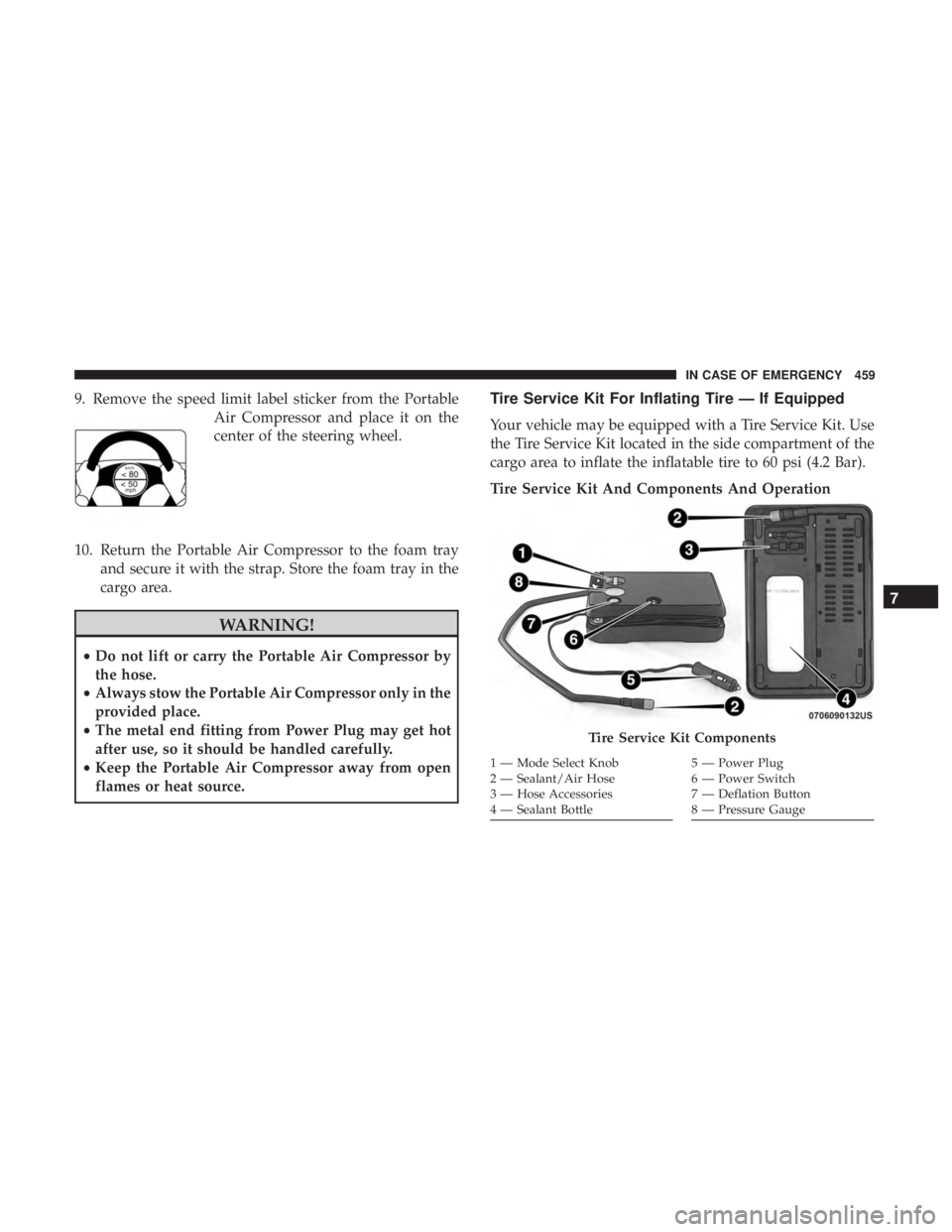
Tire Service Kit For Inflating Tire — If Equipped
Your vehicle may be equipped with a Tire Service Kit. Use
the Tire Service Kit located in the side compartment of the
cargo area to inflate the inflatable tire to 60 psi (4.2 Bar).
Tire Service Kit And Components And Operation
Tire Service Kit Components
1 — Mode Select Knob
2 — Sealant/Air Hose
3 — Hose Accessories
4 — Sealant Bottle5 — Power Plug
6 — Power Switch
7 — Deflation Button
8 — Pressure Gauge
7
IN CASE OF EMERGENCY 459
Page 465 of 696
9. Inflate the tire to 60 psi (4.2 Bar) recommended as perthe label on the wheel or if the vehicle
equipped with the inflatable spare
tire pressure indicated on the Tire
and Loading information label lo-
cated on the driver-side door open-
ing.
NOTE: If the tire is over inflated, use the deflation button
to reduce the tire air pressure.
10. After the tire reaches the recommended pressure, lower the vehicle with the jack as
described in the Jack Instructions
section in this manual. 11. Remove the speed limit label sticker from the Tire
Service Kit and place it on the center
of the steering wheel.
12. Return the Tire Service Kit to the foam tray and secure it with the strap. Store the foam tray in the cargo area.
Return Inflatable Spare Tire
To return Inflatable Spare Tire to its storage location.
1. Return the Jack.
2. Deflate the spare tire. Use the Tire Service Kit or PortableAir Compressor and push the deflation button to do this
step. Refer to “Tire Service Kit” or “Portable Air Com-
pressor” if equipped in this section for additional infor-
mation. The inflatable spare tire will return to its origi-
nal shape.
7
IN CASE OF EMERGENCY 463
Page 473 of 696
2. Remove the speed limit label from the Tire Service Kitand place sticker on the steering
wheel.
3. Immediately disconnect the Sealant Hose from the valve stem, reinstall the cap on the fitting at the end of the
hose, and place the Tire Service Kit in the vehicle storage
location. Proceed to “Drive Vehicle.”
Drive Vehicle:
Immediately after injecting sealant and inflating the tire, drive the vehicle 5 miles (8 km) or 10
minutes to ensure distribution of the
Tire Service Kit Sealant within the tire.
Do not exceed 50 mph (80 km/h).WARNING!
Tire Service Kit is not a permanent flat tire repair. Have
the tire inspected and repaired or replaced after using
Tire Service Kit. Do not exceed 50 mph (80 km/h) until
the tire is repaired or replaced. Failure to follow this
warning can result in injuries that are serious or fatal
to you, your passengers, and others around you. Have
the tire checked as soon as possible at your authorized
dealer.
After Driving:
Pull over to a safe location. Refer to “Whenever You Stop
To Use Tire Service Kit” in this section before continuing.
1. Uncoil the Sealant Hose, and then remove the cap from the fitting at the end of the hose.
2. Place the Tire Service Kit flat on the ground next to the deflated tire.
7
IN CASE OF EMERGENCY 471
Page 475 of 696
2. Disconnect the Tire Service Kit from the valve stem,reinstall the cap on the valve stem and unplug from 12
Volt outlet.
3. Place the Tire Service Kit in its proper storage area in the vehicle.
4. Have the tire inspected and repaired or replaced at the earliest opportunity at an authorized dealer or tire
service center.
5. Remove the Speed Limit sticker from the steering wheel after the tire has been repaired.
6. Replace the Sealant Bottle at an authorized dealer as soon as possible. Refer to “Sealant Bottle Replacement”.
NOTE: When having the tire serviced, advise the autho-
rized dealer or service center that the tire has been sealed
using the Tire Service Kit. Sealant Bottle Replacement:
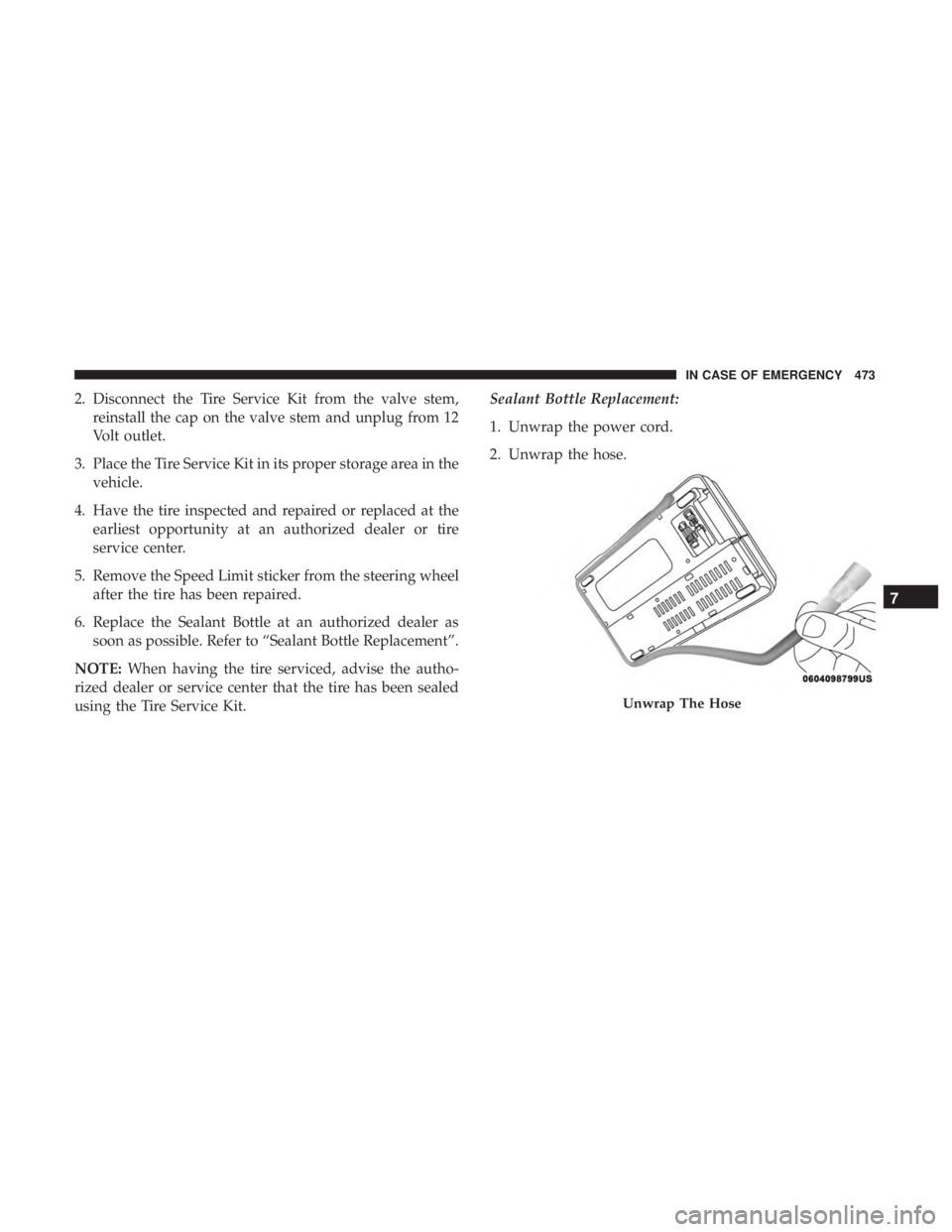
1. Unwrap the power cord.
2. Unwrap the hose.
Unwrap The Hose
7
IN CASE OF EMERGENCY 473