2018 CHEVROLET CITY EXPRESS tire
[x] Cancel search: tirePage 10 of 74
Chevrolet City Express Infotainment System (GMNA-Localizing-U.S./Canada-
11683801) - 2018 - crc - 7/12/17
Radio 9
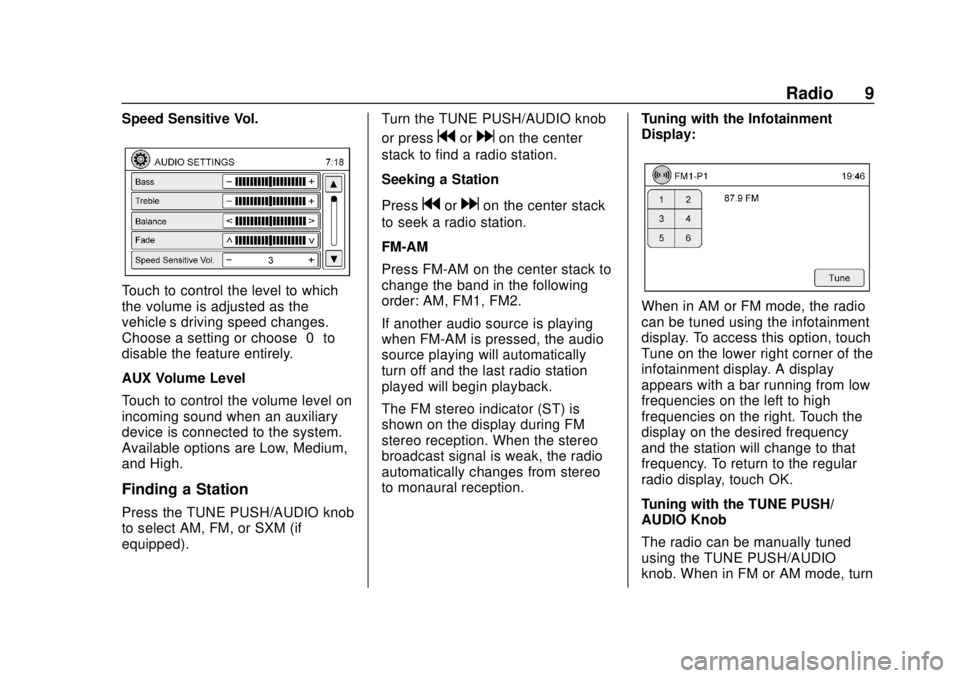
Speed Sensitive Vol.
Touch to control the level to which
the volume is adjusted as the
vehicle’s driving speed changes.
Choose a setting or choose“0”to
disable the feature entirely.
AUX Volume Level
Touch to control the volume level on
incoming sound when an auxiliary
device is connected to the system.
Available options are Low, Medium,
and High.
Finding a Station
Press the TUNE PUSH/AUDIO knob
to select AM, FM, or SXM (if
equipped). Turn the TUNE PUSH/AUDIO knob
or press
gordon the center
stack to find a radio station.
Seeking a Station
Press
gordon the center stack
to seek a radio station.
FM-AM
Press FM-AM on the center stack to
change the band in the following
order: AM, FM1, FM2.
If another audio source is playing
when FM-AM is pressed, the audio
source playing will automatically
turn off and the last radio station
played will begin playback.
The FM stereo indicator (ST) is
shown on the display during FM
stereo reception. When the stereo
broadcast signal is weak, the radio
automatically changes from stereo
to monaural reception. Tuning with the Infotainment
Display:
When in AM or FM mode, the radio
can be tuned using the infotainment
display. To access this option, touch
Tune on the lower right corner of the
infotainment display. A display
appears with a bar running from low
frequencies on the left to high
frequencies on the right. Touch the
display on the desired frequency
and the station will change to that
frequency. To return to the regular
radio display, touch OK.
Tuning with the TUNE PUSH/
AUDIO Knob
The radio can be manually tuned
using the TUNE PUSH/AUDIO
knob. When in FM or AM mode, turn
Page 27 of 74
Chevrolet City Express Infotainment System (GMNA-Localizing-U.S./Canada-
11683801) - 2018 - crc - 7/12/17
26 Navigation
recognized by the system,
coordinates corresponding to the
marker’s position will be displayed.
Returning to the Current Vehicle
Location
The basic map view displays the
current location of the vehicle. The
current location can be displayed
again even after the map is moved,
or after the Menu is displayed.
Press MAP or BACK on the center
stack and the current location
displays on the map.
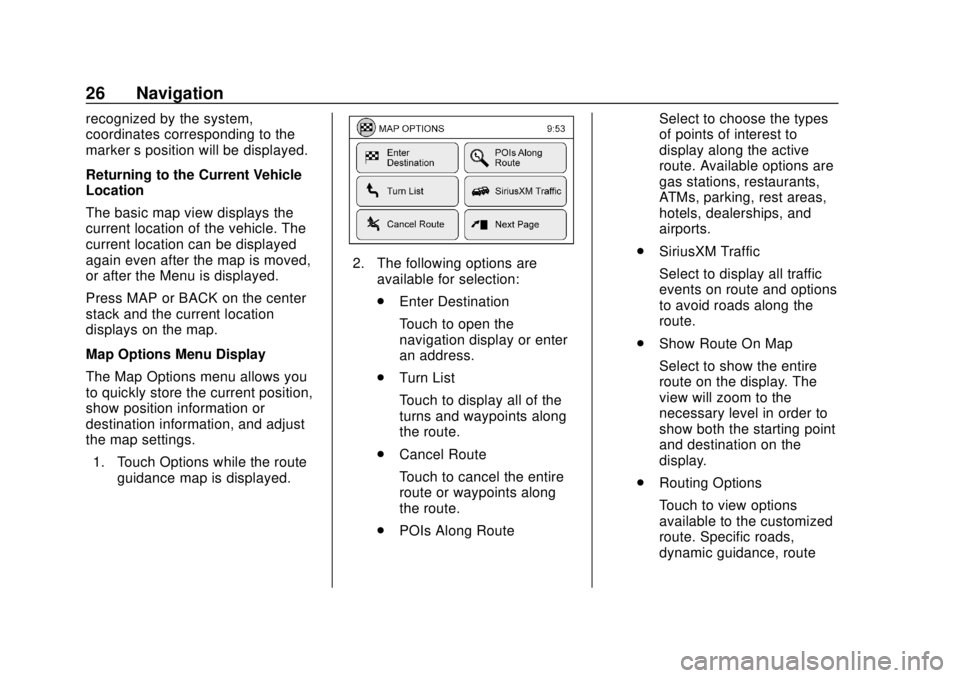
Map Options Menu Display
The Map Options menu allows you
to quickly store the current position,
show position information or
destination information, and adjust
the map settings. 1. Touch Options while the route guidance map is displayed.
2. The following options areavailable for selection:
.Enter Destination
Touch to open the
navigation display or enter
an address.
. Turn List
Touch to display all of the
turns and waypoints along
the route.
. Cancel Route
Touch to cancel the entire
route or waypoints along
the route.
. POIs Along Route Select to choose the types
of points of interest to
display along the active
route. Available options are
gas stations, restaurants,
ATMs, parking, rest areas,
hotels, dealerships, and
airports.
. SiriusXM Traffic
Select to display all traffic
events on route and options
to avoid roads along the
route.
. Show Route On Map
Select to show the entire
route on the display. The
view will zoom to the
necessary level in order to
show both the starting point
and destination on the
display.
. Routing Options
Touch to view options
available to the customized
route. Specific roads,
dynamic guidance, route
Page 50 of 74

Chevrolet City Express Infotainment System (GMNA-Localizing-U.S./Canada-
11683801) - 2018 - crc - 7/12/17
Navigation 49
.The vehicle is driving on slippery
road surfaces such as sand,
gravel, or snow.
. The vehicle is traveling on
winding roads or long straight
roads.
. The vehicle is approaching a tall
building or a large vehicle.
. The surface streets run parallel
to a freeway.
. The vehicle has been transferred
by a vehicle carrier or a ferry.
. The current position calibration
is set incorrectly.
. The vehicle is traveling at high
speed.
. The vehicle changes directions
more than once, or the vehicle is
turning on a turn table in a
parking lot.
. The vehicle is entering and/or
exiting a parking lot, garage, or a
lot with a roof.
. The GPS signal is not received.
. A roof carrier is installed on the
vehicle. .
Tire chains have been installed.
. The tires are replaced or worn.
. The tire pressure for the tires is
incorrect.
. This is the first navigation use
after the map data is updated.
. The 12-volt battery is
disconnected for several days.
. The vehicle is driving in heavy
traffic where driving is at low
speeds, and the vehicle is
stopped and started repeatedly.
Problems with Route
Guidance
.
The navigation system may not
calculate a route if the current
vehicle location is too far away
from the destination. In this
case, divide your trip by
selecting one or two
intermediate destinations.
. To reach the destination, refer to
the map view. Always follow
actual roads and regulations and
drive safely. .
The suggested route may not be
the shortest, nor are other
circumstances such as traffic
jams considered unless the
SiriusXM Traffic is active.
. Because of the differences in
road conditions and
circumstances between the time
you use this system and the time
the information was produced for
the map data, there may be
discrepancies in roads and
regulations. In such cases,
follow the actual information
available.
. During route calculation, the
map will not scroll, however the
vehicle icon will move with the
actual vehicle’s movement.
. In some cases, after the
calculation is complete, the
calculated route may not be
immediately displayed.
. It may take more time to finish
drawing a route if the map is
being scrolled at the same time.
Page 66 of 74

Chevrolet City Express Infotainment System (GMNA-Localizing-U.S./Canada-
11683801) - 2018 - crc - 7/12/17
Bluetooth Phone/Devices 65
Dial :This command allows a
phone number to be dialed by
entering the digits one at a time.
Redial : This command dials the
last number used on the cell phone.
Using the “Dial”or“Call”
Command
To call a number:
1. Press
Von the center stack.
The system responds “Please
say a command,” followed by
a tone.
2. Say “Dial”or“Call.”
3. Say the entire number without pausing, followed by “Dial.”
Once connected, the person called
will be heard through the audio
speakers. To call using a name tag:
1. Press
Von the center stack.
The system responds “Please
say a command,” followed by
a tone.
2. Say “Dial”or“Call” and then
say the name tag. For
example, “Call John at Work.”
Once connected, the person called
will be heard through the audio
speakers.
Using the “Digit Dial” Command
This allows a phone number to be
dialed by entering the digits one at
a time.
1. Press
Von the center stack.
The system responds “Please
say a command,” followed by
a tone.
2. Say “Dial.” 3. Say each digit, one at a time,
to dial. After each digit is
entered, the system repeats
back the digit it heard followed
by a tone. After the last digit
has been entered, say “Dial.”
If an unwanted number is repeated
back, say “Clear”to clear the last
number.
Once connected, the person called
will be heard through the audio
speakers.
Using the “Redial”Command
1. Press
Von the center stack.
The system responds “Please
say a command,” followed by
a tone.
2. After the tone, say “Redial.”
The system dials the last
number called from the
connected cell phone.
Once connected, the person called
will be heard through the audio
speakers.
Page 70 of 74

Chevrolet City Express Infotainment System (GMNA-Localizing-U.S./Canada-
11683801) - 2018 - crc - 7/12/17
Trademarks and License Agreements 69
exclusions, so to that extent the
above exclusion may not apply
to you.
Disclaimer of Liability
ITS LICENSORS (INCLUDING
THEIR LICENSORS AND
SUPPLIERS) SHALL NOT BE
LIABLE TO YOU: IN RESPECT OF
ANY CLAIM, DEMAND OR
ACTION, IRRESPECTIVE OF THE
NATURE OF THE CAUSE OF THE
CLAIM, DEMAND OR ACTION
ALLEGING ANY LOSS, INJURY
OR DAMAGES, DIRECT OR
INDIRECT, WHICH MAY RESULT
FROM THE USE OR POSSESSION
OF THE INFORMATION; OR FOR
ANY LOSS OF PROFIT, REVENUE,
CONTRACTS OR SAVINGS, OR
ANY OTHER DIRECT, INDIRECT,
INCIDENTAL, SPECIAL OR
CONSEQUENTIAL DAMAGES
ARISING OUT OF YOUR USE OF
OR INABILITY TO USE THIS
INFORMATION, ANY DEFECT IN
THE INFORMATION, OR THE
BREACH OF THESE TERMS OR
CONDITIONS, WHETHER IN AN
ACTION IN CONTRACT OR TORTOR BASED ON A WARRANTY,
EVEN IF ITS LICENSORS HAVE
BEEN ADVISED OF THE
POSSIBILITY OF SUCH
DAMAGES. Some States,
Territories and Countries do not
allow certain liability exclusions or
damages limitations, so to that
extent the above may not apply
to you.
Export Control
Export anywhere of any part of the
Data or any direct product thereof
except in compliance with, and with
all licenses and approvals required
under, applicable export laws, rules
and regulations, including but not
limited to the laws, rules and
regulations administered by the
Office of Foreign Assets Control of
the U.S. Department of Commerce
and the Bureau of Industry and
Security of the U.S. Department of
Commerce. To the extent that any
such export laws, rules or
regulations prohibit HERE from
complying with any of its obligations
hereunder to deliver or distribute
Data, such failure shall be excused
and shall not constitute a breach of
this Agreement.
Entire Agreement
These terms and conditions
constitute the entire agreement
between Its licensors, including their
licensors and suppliers) and you
pertaining to the subject matter
hereof, and supersedes in their
entirety any and all written or oral
agreements previously existing
between us with respect to such
subject matter.