2018 AUDI A6 steering wheel
[x] Cancel search: steering wheelPage 69 of 266

a co ,...,
N
" N ,...,
0 0 <.,;) '
face, the supplemental driver's airbag can
not provide as much protection in an acci
dent . Always make sure that the steering
wheel is aligned with your chest .
- Always hold the steering wheel with your
hands at the 9 o'clock and 3 o'clock posi
tions to reduce the risk of personal injury if
the driver's airbag deploys.
- Never hold the steering wheel at the 12 o'clock position or with your hands inside
the steering wheel rim or on the steering
wheel hub. Holding the steering wheel the
wrong way can cause serious injuries to the hands, arms and head if the driver's airbag
deploys.
Power steering wheel position adjustment
Applies to: veh icles with power steering wheel adjustment
The steering wheel position can be adjusted elec
trically up and down and forward and back.
Fig. 76 Switch for adjusting the steering whee l pos itio n
.,. To adjust the height, press the switch up/down.
The steering column will continue moving as
long as you are pressing the switch .
.,. To move the steering wheel forward or back,
press the switch forward/back. The steering
column will continue moving as long as you are
pressing the switch.
The steering wheel can also be adjusted when the ignition is switched off .
In vehicles with memory fun ction*, the steering
column settings are stored together with the
seat position.
Driving
A WARNING
Improper use of steering wheel adjustment
and improper seating position can cause seri
ous personal injury.
- Adjust the steering wheel column only when
the vehicle is not moving to prevent loss of
vehicle control.
- Adjust the driver's seat or steering wheel so
that there is a minimum of 10 in (25 cm) between your chest and the steering wheel
¢ page 126, fig. 138. If you cannot main
tain this minimum distance, the airbag sys
tem cannot protect you properly.
- If physical limitations prevent you from sit
ting 10 in (25 cm) or more from the steer
ing wheel, check with your authorized Audi
dealer to see if adaptive equipment is avail
able.
- If the steering wheel is aligned with your
face, the supplemental driver's airbag can not provide as much protection in an acci
dent. Always make sure that the steering
wheel is aligned with your chest.
- Always hold the steering wheel with your
hands at the 9 o'clock and 3 o'clock posi
tions to reduce the risk of personal injury if
the driver's airbag deploys .
- Never hold the steering wheel at the 12
o'clock position or with your hands inside
the steering wheel rim or on the steering
wheel hub. Holding the steering wheel the
wrong way can cause serious injuries to the
hands, arms and head if the driver's airbag
deploys.
Easy seat entry
Applies to: vehicles with power stee ring wheel adjus tment
Easy seat entry makes it easier to enter and exit
the vehicle by adjusting the steering column au
tomatically.
.,. In the Infotainment system, select the ICARI
function button > (Car)* Systems control but
ton
> Vehicle settings > Seats > Driver's seat >
Easy seat entry > On.
When easy seat entry is switched on, the steering
column goes back up into the park position when
.,.
67
Page 73 of 266

a co .... N
" N .... 0 0 \.J '
tachometer also moves into the
READ Y posi
t ion
ll .
~ The eng ine starts aga in when you take your
foot off the brake pedal. The ind icator light
turns off.
Additional inf ormation
The engine stops in the P, N and D se lector lever
positions.
I f you select the R pos ition dur ing a stop phase,
the engine will start again .
Shift to P q uickl y to p revent t he engine from
starti ng u ninten tiona lly w hen s hift ing t hrough R .
You can determ ine for yourself if the eng ine will
stop or not by reducing or increas ing the amount
of force you use to press the bra ke pedal. For ex
ample, if you only lig htly press on t he b rake ped
a l in stop-and -go traff ic or w hen tu rning, the en
gine will not switch
off when the vehicle is sta
tionary . As soon as yo u press the brake down
harder, the eng ine will switch off.
(D Tips
-Press the b rake pedal during a Stop p hase
to keep the ve hicle from rolling.
-The ignition wi ll tu rn off if you press the
I START E NGINE STOP ! button during a stop
phase . The need le in the tachomete r moves
i nto the
OFF position.
General information
App lies to: ve hicles with Start/Stop system
The standard Start/Stop mode can be canceled
for various system-related reasons.
Engine does not switch off
B efore and d urin g e ach stop phase , the system
checks if certa in con ditions have been me t. If the
@j indicator light appears in the instrument cl us
ter disp lay, the engine will not be stopped, for
examp le in the fo llow ing s ituations:
ll Ma rket -specific
Driving
-The engine has not reached the minim um re
quired temperature for Sta rt/Stop mode.
-The interior temperature selec ted by the cli -
mate control system has not been reached .
-The outside tempe ra ture is ex tremely high/low.
-The winds hield is bei ng defros ted® .
-The parking system * is sw itched on .
-The vehicle battery charge level is too low .
-The steering wheel is tu rned at a sharp angle o r
is moving.
-After engaging the reverse gear.
-On sharp inclines .
Engine automatically restarts
The standard Start/S top mode w ill be can celed
dur ing a stop phase in the followi ng si tuatio ns.
T he eng ine restarts wi thout any action by the
driver .
-The vehi cle ro lls, fo r example whi le on a slope .
-The inte rior tempe rature d iffers from t he tem-
pe ra ture selected in the A/C system.
-The winds hield is bei ng defrosted® .
-The brake peda l is pressed severa l times in a
row .
-The vehicle battery charge level is too low.
-Power consumption is high.
T he eng ine can turn off aga in when the cond i
tions for Start/Stop mode are met.
Ignition is switched off automatically
T o p reve nt the vehicle battery from dra ining, the
i gni tion will switc h off
automaticall y under the
f o llow ing co nditions:
-The vehicle has already been dr iven .
-The Start/Stop system has stopped the engine .
-The driver's door is opened .
-The driver's safety belt is unbuckled.
-The brake peda l is not pressed .
-The vehicle is stat ion ary.
In this case, the activated low beam is replaced
by the pa rk ing light. The par kin g lights wi ll
swi tch off afte r approx imately 30 m inutes o r
whe n you lock t he ve hicle.
71
Page 75 of 266

a co .... N
" N .... 0 0 \,;J '
Requirement: the driver's door must be closed,
the driver's safety belt must be latched and the
parking brake must be set.
.,. To start driving and release the parking brake
automatically, press the accelerator pedal as
usual.
In addition to releasing the parking brake auto
matically, other convenience and safety functions
are available when you start driving
¢page 74,
Starting to drive.
Preventing the automatic parking brake
release
The vehicle could begin rolling unintentionally,
depending on the hill or if towing a trailer.
.,. To prevent the parking brake from releasing au
tomatically, pull and hold
the(®) switch and
press the accelerator pedal. The parking brake
remains set and prevents the vehicle from roll
ing backward.
.,. You can release the C®l switch again once you
are sure that you are giving enough driving
force to the wheels by pressing the accelerator pedal.
Emergency braking function
You can use the emergency braking function in an
emergency situation, or if the standard brake op
eration malfunctions or is disabled.
.,. Pull and hold the®) switch.
.,. As soon as you release the (®) switch or acceler-
ate, the braking stops.
Pulling and holding the
C®) switch while driving
the vehicle activates the emergency braking func
tion. The vehicle is braked at all four wheels by
activating the hydraulic brake system. The brak ing effect is similar to heavy
braking¢&_ .
To reduce the risk of activating the emergency
braking by mistake, a warning tone (buzzer)
sounds when
the®> switch is pulled. Emergency
braking stops as soon as
the®) switch is released
or the accelerator pedal is pressed.
Parking
.,. Press the brake pedal to stop the vehicle.
Driving
.,. Pull the®> switch to set the parking brake .
.,. Place the selector lever in the P position.
.,. Turn the engine off¢&_ .
.,. Turn the steering wheel when parking on in
clines so that the wheels will roll into the curb
if the vehicle starts moving.
A WARNING
-
- Do not press the accelerator pedal inadver
tently if a gear is selected when the vehicle
is stationary and the engine is running. Oth
erwise, the vehicle will start to move imme
diately and this could result in an accident.
- Emergency braking should only be used in
an emergency, when the normal brake pedal
has failed or the brake pedal is obstructed.
During emergency braking, your vehicle will
brake similar to heavy braking. ESC and the
associated components (ABS, ASR, EDL)
cannot overcome the laws of physics . In cor
ners and when road or weather conditions
are bad, a full brake application can cause
the vehicle to skid or the rear end to swerve,
which
increases the risk of an accident.
- If the power supply fails , you cannot set the
parking brake if it is released . In this case,
park the vehicle on level ground and secure
it by placing the selector lever in the P posi
tion. See an authorized Audi dealer or au
thorized Audi Service Facility for assistance.
- If you leave the vehicle, switch the ignition
off and take the vehicle key with you. This
applies particularly when children remain in
the vehicle. Otherwise children could start
the engine, release the parking brake or op
erate electrical equipment such as power
windows, which increases the risk of an acci
dent.
- No one should remain in the vehicle when it
is locked - especially children . Locked doors
make it more difficult for emergency work
ers to get into the vehicle, which puts lives
at risk.
(D Tips
When stopping at a traffic signal or stopping
in city traffic, you can set the parking brake
manually . The vehicle does not have to be
73
Page 80 of 266

Driving
On vehicles with a cruise control system*
¢ page 84, hill descent control is also activated
when the speed is set.
A WARNING
Hill descent control cannot overcome physical
limitations, so it may not be able to maintain
a constant speed under all condit ions. Always
be ready to apply the brakes.
Shifting manually (tiptronic mode)
The tiptronic mode allows the driver to shift the
gears manually.
)
r
Fig. 84 Center console : sh ifting manual ly w ith the se lector
l ever
F ig. 85 Stee ring wheel: shifting manually w ith t he s hift
paddles*
Shifting with the selector lever
You can shift into tiptronic mode while stationary
and while driv ing .
"To shift into tiptronic mode, push the selector
lever from the 0/5 sett ing to the right. As soon
as the transmission switches over, the
M selec
tor lever position will appear in the instrument
cluster disp lay.
.. To sh ift up a gear, tap the se lector lever for
ward
0 ¢ fig. 84.
78
" To shift down a gear, tap the selector lever back
o.
Shifting with the shift paddles*
You can operate the shift paddles in the 0/5 or M
selector lever positions.
" To shift up a gear, tap the shift paddle 0
¢ fig . 85 .
"T o shift down a gear, tap the 0 shift paddle.
The transmission automatically shifts up or down before cr itical engine speed is reached .
The transmission only allows manual shifting
when the engine speed is w ithin the permitted
range.
Kick-down
Kick-down enables maximum acceleration.
When you press the accelerator pedal down be
yond the resistance point, the automatic trans
mission downshifts into a lower gear, depending
on vehicle speed and engine RPM . It shifts up in
to the next higher gear once the maximum speci
fied engine RPM is reached.
A WARNING
Please note that the whee ls could spin on
slick or slippery roads when kick-down is ac
tive .
Launch control program
Applies to: vehicles with S tronic
-
The launch control program provides the best
possible acceleration when starting from a stop .
Requirement: the engine must be at operating
temperature and the steering wheel must not be
turned.
.. Deactivate the Start/Stop system* ¢ page 72.
The LED in the
l(A) ~l button turns on .
" Switch the electronic stabilization control (ESC)
sport mode
on ¢ page 120. The fl indicator
light turns on.
" Pull the selecto r lever bac k out of the 0/5 posi
tion brief ly to select the S position or select the
..,.
Page 97 of 266

a co .... N
" N .... 0 0 \.J '
The sensors can be displaced by impacts or
damage to the bumper, whee l housing and
underbody. Pre sense can be impaired by this.
Have an authorized Audi dealer or authorized
Audi Service Facility check their function .
(D Tips
- Certain pre sense front functions switch off
when sport mode is switched off or when
driving in reverse .
- The pre sense functions may not be availa
ble if there is a malfunction in the ESC sys
tem or the airbag control module.
- The pre sense front/plus functions are not
available if there is a malfunction in the
adaptive cruise control* system
~ page 93.
- The pre sense rear/plus functions are not
available if there is a malfunction in the side
assist* system
~ page 93 .
Audi active lane assist
Description
Applies to: veh icles with Audi active lane assist
Active lane assist detects lane marker lines with
in the limits of the system using a camera in the
windshield. If you are approaching a detected lane marker line and it appears likely that you
will leave the lane, the system will warn you with
corrective steering . You can override this steering
at any time . If you pass over a line, the steer ing
wheel will v ibrate lightly. In order for this warn
ing vibration to occur, it must first be sw itched
on in the Infotainment system. Active lane assist
is ready for operation when the lane marker line
is detected on at least one side of the vehicle.
The system is designed for driving on express
ways and highways and therefore only activates
at speeds above approximately 40 mph (65 km/
h).
Applies to: vehicles with s ide assist
If you activate a turn signal when active lane as
sist is ready and it classifies a lane change as crit
ical because of vehicles traveling alongside you or
approaching you, there will be noticeable correc-
Assistance systems
tive steering shortly before you leave the lane.
This will attempt to keep your vehicle in the lane.
Applies to: vehicles w it h out side ass ist
The system will not warn you before crossing a
lane marker line if you have activated the turn
s ignal. In this case, it assumes that you are
changing lanes intentionally.
Applies to: veh icles w it h adaptive cruise contro l
The corrective steering is targeted based on the
driving situation. In addition to the lane marker
lines , the system can also take into account other
objects such as guard rails . If they are detected in
close proximity to the vehicle, active lane assist
helps prevent the vehicle from driving too close
to them. There is also passing ass istance. The
system does not provide any corrective steering if
it detects that you are passing another vehicle.
A WARNING ~ -
-The system warns the driver that the vehicle
is leaving the lane using corrective steering.
The driver is always responsible for keeping
the vehicle within the lane.
- The system can help you keep the vehicle in
the lane, but it does not drive by itself. Al
ways keep your hands on the steering
wheel.
- Corrective steering may not occur in certain
situations, such as during heavy braking.
- There may be cases where the camera does
not recognize all lane marker lines. Correc
tive steering can only take place on the side
of the vehicle where lane marker lines are
detected.
- Other road structures or objects could possi
b ly be identified unintentionally as lane
marker lines. As a result, corrective steering
may be unexpected or may not occur.
- The camera view can be restricted, for ex
ample by vehicles driving ahead or by ra in,
snow, heavy spray or light shining into the
camera. This can result in active lane assist
not detecting the lane marker lines or de
tecting them incorrectly .
95
Page 98 of 266
Assistance systems
-Under certain conditions such as ruts in the
road, a banked roadway or crosswinds, the
corrective steering alone may not be enough
to keep the vehicle in the middle of the lane.
- For safety reasons, active lane assist must
not be used when there are poor road and/
or weather conditions such as slippery
roads, fog, gravel, heavy rain, snow and the
potential for hydroplaning. Using active lane
assist under these conditions may increase
the risk of a crash.
Switching on/off
A pplies to: ve hicles w ith Audi active lane assist
-;g
9 ::i 00 CD
Fig. 99 Turn signa l lever: button for active lane assist
Fig. 100 Windshield: camera window for active lane assist
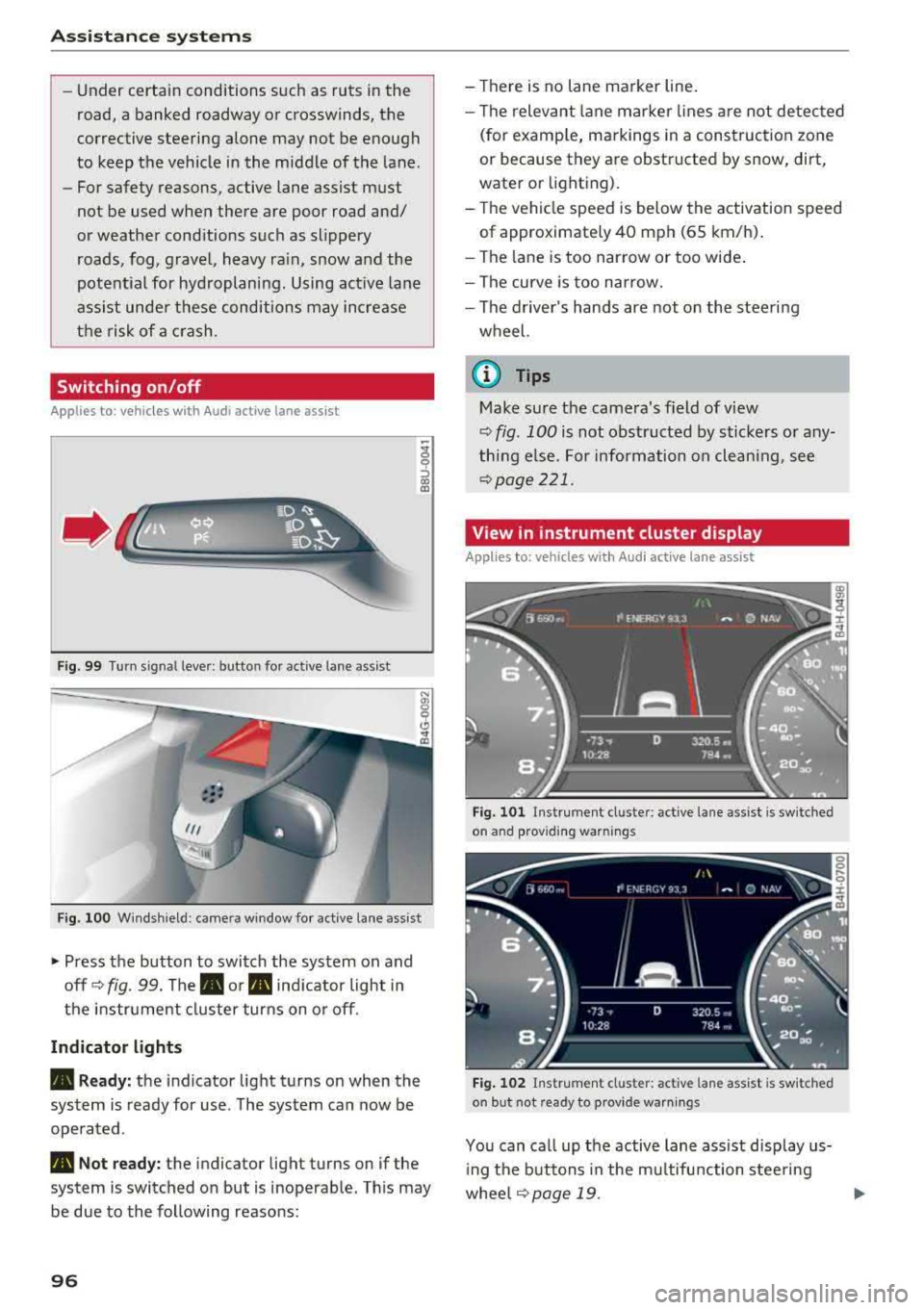
• Press the button to switch the system on and
off ¢
fig. 99. The. or. indicator light in
the instrument cluster turns on or off.
Indicator lights
• Ready: the indicator light turns on when the
system is ready for use . The system can now be
operated .
• Not ready: the indicator light turns on if the
system is switched on but is inoperable. This may
be due to the following reasons:
96
-Th ere is no lane marker line.
-The relevant lan e marker lines are not detected
(for example, markings in a construction zone
or because they are obstructed by snow, dirt,
water or lighting).
-Th e vehicle speed is below the activation speed
of approximate ly 40 mph (65 km/h).
-The lane is too narrow or too wide.
-The curve is too narrow.
-The driver's hands are not on the steering
wheel.
@ Tips
Make sure the camera's field of view
¢ fig. 100 is not obstructed by stickers or any
thing else. For information on cleaning, see
¢page 221.
View in instrument cluster display
Appl ies to: vehicles wi th Aud i ac tive la ne ass ist
Fig. 101 Instrument cl uste r: active lane assist is sw itched
on and providing warnings
Fig. 102 Instrument cluster: active lane assist is switched
on but not ready to provide warnings
You can call up the active lane assist display us
ing the buttons in the multifunction steering
wheel
¢page 19. Ill>
Page 99 of 266

a co .... N
" N .... 0 0 \.J '
disp lay *.
White line(s) Active lane assist is activated and ready to provide warnings .
Red line(s) Active lane assist warns yo u
(left or right) before leaving a lane
c> fig. 101. In addit ion, the
steering wheel vibra tes light ly.
Gray line(s) Active lane ass ist is activ ated,
b ut not ready to give warning
c> fig . 102 .
Messages in the instrument cluster display
If t he ac tive lane ass ist switches off automat ic al
l y, the indicator lig ht in the display turns off and
one of the following messages appears :
Audi active lane assis t: Currently unavailabl e.
No camera view
This message appea rs if the came ra is u nable to
detect t he lines. This co uld happen if:
- The camera field of v iew
c> page 96, fig . 100 is
dirty or covered in ice. C lea n this area on the
wi ndsh ield .
- The camera field of v iew is fogged over . Wait
u nt il the fog has cleared before sw itch ing the
active lane assist on again .
- T he system has been unab le to detect the lanes
fo r an extended pe riod of time due to road con
dit ions. Sw itch act ive lane assist bac k on when
t h e lines are mo re visible .
Audi active lane a ssist : Currently unavailable
T here is a temporary active lane assist malf unc
tion . Try sw itching the act ive lane assist on aga in
l a ter.
Audi active lane as sist : System fault!
D rive to an autho rized Aud i de aler o r a uth o rized
Aud i Service Facility immediately to have t he
malfunction corrected.
Audi active lane as sist: Please take over steering
T his message appea rs if you are not steering by
yourself . If t his is t he case, active lane assist does
n ot swi tch off, but it is "no t ready " to prov ide a
war ning. The system c an help you keep t he ve hi-
A ss istance systems
cle in the lane . Howeve r, you are responsible for
driving the ve hicle and m ust steer it yourse lf .
A WARNING
--
Note that messages may be de layed or not
d isplayed o n ve hicles w ith accessories mount
ed on the steering wheel, such as a steer ing
whee l spinne r knob . Always keep your hands
on the steering wheel.
Adjusting the vibration warning
App lies to: veh icles w it h Audi act ive lane ass ist
.,. Select: the I CAR ! funct io n button > (Car) * Sys
tem s
contro l butto n > Driver as sistance > Audi
activ e lane assi st.
Vibration warning
You can switch the add it io nal vibration warn ing
i n t he steer ing whee l on or off .
(D Tips
Your settings are automatically stored and as
s igned to the remote co ntro l key being used .
97
Page 104 of 266

Assistance systems
that are between approximately 32 ft (10 m) and
295
ft (90 m) in front of the vehicle and within
the detection zone. Within the limits of the sys
tem
c:> page 102, a pedestrian or wild animal de
tected when the low beams are switched on is
highlighted in yellow
c:> fig. 108. Animal recogni
tion is not active within highly developed areas.
The system only detects large wild animals such
as deer.
(D Tips
If another display such as navigation replaces
the image from the night vision assist
the~--,
symbol appears in a tab c:>fig. 109. You can
access night vision assist using the multifunc
tion steering wheel buttons
c:> page 20.
Pedestrian and wild animal warning
Applies to: vehicles with night vision assist
Fig . 110 Inst rument cluster :® pedestrian warning, ®
wild animal warning
Fig. 111 In strument cl uster: ® pedestrian warning/ @
w ild an imal warning, when the night vision assist image is
n ot selected in the instrument cl uster display
Image in the instrument cluster/head-up
display*
If there are pedestrians or wild animals in an
area in front of your vehicle that is classified as
102
critical, the system will direct your attention to
this :
- Pedestrians or wild animals are highlighted in
red and the corresponding
symbol . or.
turns on c:>fig. 110.
- There is also an audible signal.
The area classified as critical is based on the vehi
cle speed and the steering wheel angle. Pedes
trian and wild animal warning encourages you to pay more attention.
If the night vision assist image is replaced by an
other display (such as the on-board computer),
the
red . or. indicator light c:> fig. 111 will
appear if there is a pedestrian or wild animal
warning.
If the head-up display* is switched on and the
night vision assist content is activated, .
or.
will appear in the head-up display*.
Marking light*
To direct the driver's attention to a pedestrian,
the headlights can flash on the pedestrian three
times in a row when there is a pedestrian warn
ing.
This occurs at speeds above approximately
35 mph (60 km/h) if you are outside of illuminat
ed areas and no detected vehicles are shown. The
high beam assistant* controls the marking light*
c:> page 39, High beam assistant.
The marking light is not used for wild animals .
General information
Applies to: vehicles with night vision assist
Fig. 112 Fro nt of the vehicl e: night vision assist camera