2018 AUDI A3 SEDAN infotainment
[x] Cancel search: infotainmentPage 70 of 404

Warm and cold
Warm and cold Climate control system
Description
The climate control system circulates , warms or
coo ls, and removes humid ity from the air in the
veh icle interior . It is the most effective when the
windows and panorama g lass roof* or power top*
are closed. If there is a build-up of heat inside
the vehicle, ventilation can help to speed up the
coo ling process.
Pollutant filter
The pollutant filter removes pollutants such as
dust and po llen from the air.
Key recognition
Various sett ings are stored and ass igned to the
remote control key being used.
These settings are different when the power top* is open or closed .
Presetting
Several functions can be preset in the Infotain
ment system.
Select in the Infotainment system:
IMENU ! but
ton
> Vehicle > left control button > Air condi
tioning
A WARNING
Poor visibility can lead to accidents.
- For safer driving, keep all windows free of
ice, snow and fog.
- Become familiar with the correct use and
function of the climate control system as
quickly as poss ible, espec ia lly with the de
frosting and defogging functions.
- When the temperature is below freezing, only use the windsh ield washer system after
68
the windshield has been warmed by the cli
mate control system. The washer fluid could
freeze on the windshie ld and impair visib ili
ty .
@ Note
-If you suspect that the climate contro l sys
tem is damaged, switch the system off to
prevent further damage and have it checked
by an authorized Aud i dealer or authorized
Audi Serv ice Facility.
- Repa irs to the Aud i climate control system
require special technical knowledge and
special tools . See an authorized Aud i dealer
o r authorized Aud i Serv ice Facility .
@ For the sake of the environment
-To save fuel, turn off the climate control
system cooling mode by press ing the A/C
button. This w ill also reduce emissions . The
climate control system is off when the LED
in the button turns off.
- In vehicl es w ith the efficie ncy prog ram*,
yo u can find other consumpt ion information
and more economy tips ¢ page 19.
© Tips
- To prevent int erference with the heat ing
and cooling output and to prevent the win
dows from fogging over, the air intake in
front of the windshie ld must be free of ice,
snow or leaves.
- Condensation from the cooling system* can
drip and form a pudd le of water under the
vehicle . This is normal and does not mean
there is a leak.
- Th e energy management system may tem
porarily switc h off certain functions, such as
the seat heating* or rear window defogger.
These systems are ava ilable again as soon
as the energy supply has been restored.
Page 72 of 404

Warm and cold
driver 's side is transferred to the front passeng
er's side. This applies a temperature change to
the front passenger 's side .
8/r Blower
Using the regu lator 8f?, you ca n manually adjust
the vo lume of a ir generated by the blower to your
p reference . The blowe r shou ld always run at a
low setting to prevent the windows from fogging
and to ensure a continuous exchange of air inside
t he vehicle . To h ave the blower regu lated au to
mat ically , press the AUTO button.
~/ :01 ~ Air distribution
The air distribution can adjusted with t he but
tons. To have the air distribution regulated auto matica lly, press the AU TO button.
The round air vents in t he cockpit are adjustable
q page 71 .
To keep the front s ide windows from fogging up
in damp weathe r, we recommend opening the
side air vents and tilting them to the side .
Foot vents are located under the front seats and
adjustab le vents o n the end of t he center console
t o heat the re ar of the vehicle .
3fx Defrosting
The windshield and s ide windows are defrosted
or cleared of condensation as qu ickly as possible .
The max imum amo unt of air flows ma inly from
the vents below the w indshield. Recircu lation
mode switches off. The temper ature s hou ld be
set at +72°F (22°() or higher. The temperat ure is
controlled automatica lly. In the
;Ix setting, the
A/C cooling mode switches on a utomatically , de
pending on the outside air temperature.
The A UTO button switches the defroster off.
~ Recirculation mode
The recircu lation mode can be turned on manua l
ly or automat ica lly*.
- Swi tc h ing man ua l rec irculat ion mode on and
off: press
t h e ~ button .
70
-Automatic * reci rcu lat ion mode : auto recircula
tion needs to be activated in the Infotainment
system. Se lect in the Infotainment system:
I MENU I button > Veh icle > left control button >
Air cond itioning > Aut o recircul ation
The air
quality sensor that is designed for d iesel and
gasoline exhaust automatically sw itches the re
circulation mode on or off depending on the level of pollutants in the o utside air.
In rec irculat ion mode, the air inside the vehicle is
c ir culated and filte red . T his prevents the unfil
te red air outs ide t he ve hicle from enteri ng the
vehicle inte rior. Switching rec irculat io n mode on
whe n driving throug h a tu nnel o r whe n sitting in
traffic is recommended
q & .
Pressing the~ button, A UTO o r the ;Ix button
switches recirculation mode off .
T he system switches to recirculation mode when
driv ing in reverse when the engine is cold .
SP. Rear window defogger
If the rear window defogger is act ivated when
the ignit ion is swi tched on, the battery manage
ment determines based on the battery charge if
i t is possible to turn on . Otherwise, the rear w in
dow defogger funct ions w it h the eng ine runni ng
and switches off automat ically after approxi
mately 1 0 - 20 m inutes, depending on the out
s ide temperat ure.
To p reve nt the rear window defogger from
switching off automat ica lly, press and hold the
!fP. button for more tha n two seconds. This re
mai ns sto red up to approxim ate ly lS m in utes af
te r turning off the ignition.
J Seat heating*
P ressing the J button switches the seat heat ing
o n at t he hi ghest sett ing (level 3) . The L EDs ind i
c a te the temperat ure level. To reduce the tem
per atu re , press t he button again . T o swi tc h t he
seat heating off, press the bu tton repeatedly un
ti l the LED turns off .
After approximate ly 10 m inu tes, the sea t heat ing
a utomat ic all y switches from leve l 3 to leve l 2.
..,_
Page 99 of 404
LL co ..... N
" N ..... 0 N > co
Faci lity immedi ately to have t he m alfunc tion cor
rected .
IIJII Battery temperature too low . Vehicle
cannot be started. See owner's manual
Th e outside tempe rature is too low . The vehicle
can no longe r st art at tempe ra tur es below - 18 °F
(- 28 °C). Con ta ct an a utho riz e d Audi d ealer o r au
thor ized A udi Se rvice Fac ility.
POWER LIMIT Warning! Limited performance
If t he indicator lig ht turns on and th is message
appears , th ere may be a n engine co ntro l ma l
f u nction. The
[3B* in d icator light in t he instr u
men t clus ter also tur ns on . The engine ou tput is
r educed . Dr ive to a n au thor ized Audi dealer or
a uthor ized Audi Se rvice Facili ty i mme diate ly to
ha ve the m alfunct ion co rre cted.
II e-tron mode: EV currently unavailable
This message appea rs whe n the 1.,,..1 button is
p ressed and the con ditions for elect ric d rive
mode a re not met.
Ill Vehicle sound: malfunction! Pedestrians
cannot hear vehicle . Please contact Service
The vehicle sou nd is no longer f unctio ning. D rive
e xtremely care fully, since ot he rs may not hea r
your veh icle. Dr ive to an author ized Audi dealer
or author ized Audi Se rvice Facility immed iate ly to
have the ma lf u nction corrected .
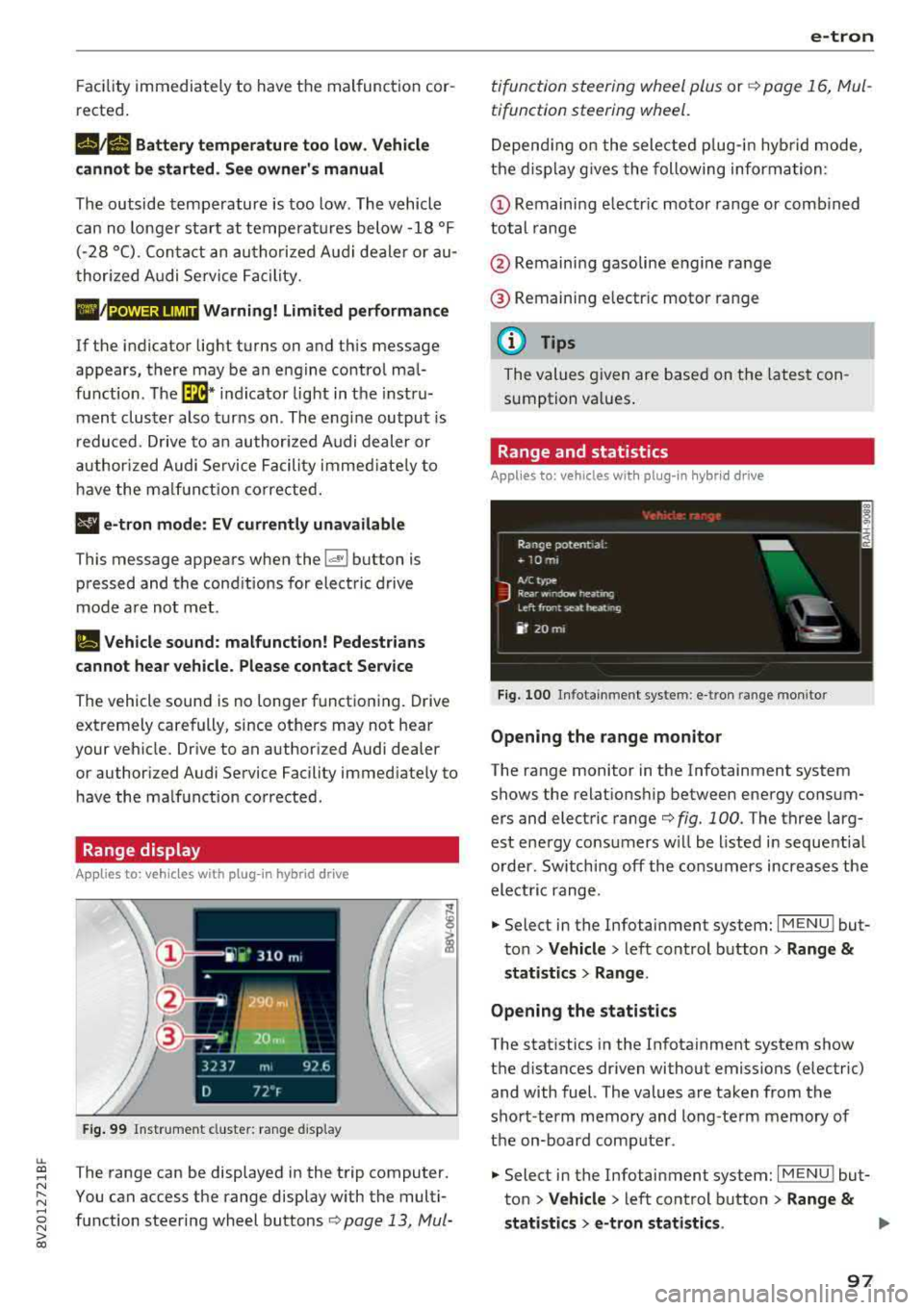
Range display
Applies to: ve hicles with plug-in hybrid drive
Fig. 99 Instr ume nt cluste r: ra nge disp lay
The range can be disp layed in the trip computer .
You can access t he range disp lay w ith the multi
fu nction steeri ng wheel buttons
c:;> page 13 , Mui-
e-tron
ti function s teeri ng whee l plus or r:::;> page 1 6, M ul
tifunction steering wheel.
D epen ding on t he sele cte d plug -in hy brid mo de,
t he disp la y g ives the foll owing informa tion:
(D Remaini ng e lec tric m otor range or comb ined
total range
@ Remaini ng gasoline eng ine range
® R emaini ng e lectr ic moto r ra nge
(D Tips
The va lues given are b ase d on t he lates t con
sum ption va lues .
Range and statistics
Applies to: vehicles with plug-in hybrid drive
Fig. 100 In fotainmen t system : e -tro n range mo nitor
Opening the range monitor
The range monitor in the Infotainment system
shows the relat ions hip between ene rgy co nsum
ers and elect ric range
c:;> fig. 100 . The three larg
est ene rgy consu mers w ill be l ist ed in sequent ia l
o rder. Sw itching off the cons umers increases the
elect ric range .
.. Select in the Infotai nment system: I MENU ! but
t o n
> Vehicle > left con trol button > Range &
statist ics > Range .
Opening the statistics
The stat istics in the In fotainment system show
t h e d ista nces dr iven without emissions (electric)
and with fuel. The values are taken from the
sho rt-term memory and long-te rm m emory of
the on-board comp ute r.
.. Select in the Infotai nment system: I MENU ! but
ton
> Vehicle > left con trol b utton > Range &
statistics > e-tron statistics . IJ,,
97
Page 102 of 404

e-tron
Driving situations Conditions Vehicle behavior
-Intentionally take your foot off of The gasoline engine turns off automati-
the gas pedal to allow for pro- cally and disengages when you release the longed coasting. accelerator pedal completely. The veh icle
Driving on highways glides without being propelled
.
- Reduce the vehicle speed by re-Fuel consumption can be reduced by
and expressways
leasing the accelerator pedal and coasting.
not by braking.
- Use the "S" selector lever position A sporty driving style increases fue l con-
and tiptron ic mode sparingly.
sumption.
- Do not run the gasoline engine to The temperature of the gasoline engine
warm the engine while the vehicle rises very s lowly and the fuel consump-
is parked tion increases considerably.
- Use the rear window/exterior This conserves the energy in the high-volt-
Driving in cold weath- mirror defogger and the seat heat-
age battery so that it is availab le to run
ing sparing ly. the vehicle in electric mode.
er
- Park the vehicle in a garage over-This reduces exposure of the high-voltage
n ight battery to cold temperatures. The re-
quired temperature range for the high-
voltage battery will then be reached more quickly after you start dr iving.
Energy flow display
Applies to : vehicles with plug-in hybrid drive
Fig. 102 Inst rument duster: energy flow display
An energy flow display can be shown in the in
strument cluster display/Infotainment system
1>.
The image is animated in the Infota inment sys
tem
1> .
l l Not available in all Infota inme nt syste ms.
100
Fig. 103 Infota inment system•: energy flow disp lay
Display of energy flow indicator in the
instrument cluster display
.,. Open the first Veh icle tab (tr ip compute r) using
the
l q 1> I button on the multifunction steering
wheel.
.,. Applies to: vehicles with Audi virtual cockpit: on
the multifunction steering wheel, select: left
control button
> Energy flow.
Page 103 of 404

LL co .... N
" N
~ Applies to: vehicles with analog instrument cluster: open the
Energy flo w ind icator disp lay
by turning the left thumbwhee l on the mult i
function steering wheel.
Component Color
(D Gasoline engine Orange
Gray
@ High-voltage battery Green
Green
(animated in the
Infota inment sys-
tern
al)
Gray
(§) Motion arrow Green
Orange
Green -orange
@ Motion arrow Green
a) Not avail ab le in all Infot ainmen t systems.
The power currently available in the electric drive
sys tem is displayed when you open the energy
flow disp lay.
The bars are filled in with different colors based
on the power
status @~ fig. 102:
- White : electric power currently availab le
- Green: electric power currently being used
The more ba rs that are filled in the E-max section
@ , the longe r the maximum power can be utiliz
ed . The bars turn off in the E-max section when
the maximum power can no longer be utilized.
When the elec tric dr ive power is greatly red uced,
the drive mode will automatically switch to using
the gasoline engine.
The availability of power is genera lly restr icted
under the fo llow ing cond itions:
- The temperature of the high-voltage battery is
very co ld or very hot.
- The high-voltage battery charge level is low.
.... 0 N ii'i l) Not availab le in al l Infota inment system s.
e-tron
Image in the Infota inment display1
)
~ In the Infotainment system, select: I MENU I
button > Veh icl e > left control button >Audi
d rive select .
M eaning
The gasoline engine is running
The gasoline engine is off
High-voltage battery charge level
The high-voltage battery is charging
The vehicle is not in drive ready mode
E lectric driv ing
Driving w ith the gasoline engine
Driving with the gasoline engine and electric mo-
tor (boost)
Recuperation
The power availability is not v is ible if the
111 ind i
cator light turns on.
(0 Tips
High power availability is necessary, for exam
ple, when need ing to acce lerate q uickly wh ile
i n e lectric driving mode to pass another vehi
cle.
Vehicle tool kit and tire mobility kit
Applies to: vehicles wit h plug -in hybr id drive
F ig. 104 Lu ggage compartment: veh icle tool kit and tire
mob ility k it
101
Page 112 of 404

e-tron
@ Tips
-The device runs a self test after power has
been restored to the control unit.
- You can activate a PIN for the control unit
¢page 115.
-The vehicle cannot be started if a charging
connector is connected .
Before charging
Applies to: vehicles w ith p lug- in hy brid drive
Fig. 117 Radiator grille: opening the charging unit cover
lll
~;:::;::.::.=;;.;;;:;;: --------- !
Fig. 118 Radiator grille: charging port cap
.. Unlock the veh icle if necessary¢ page 31 .
.. Make sure that the selector lever is in the P po
sition and drive ready mode is switched off
¢page 94 .
.. Turn the lock until it is vertical to open the cov
er on the charging
unit ¢ fig. 117.
.. Slide the cover carefully to the side if necessa
ry .
.. Remove the lock on the charging port
¢fig. 118.
.. Insert power plug @ or© into the socket
¢page 106, fig. 109 .
ll Not availab le in a ll Infotainment systems.
110
.. Plug the vehicle charging connector ©
¢ page 106, fig. 109 into the vehicle charging
port
¢ fig. 118. The charging process starts au
tomatically if no charging timer is set.
(D Tips
Remove ice and snow from the cover using a
hand brush and solvent-free deicing spray.
Charging
Applies to: vehicles wit h pl ug -in hybrid drive
You can switch between the immediate charging
@ and charging timer
timer was set . Press the desired button to do this
¢page 109, fig. 116.
You have different charging options:
Immediate charging
To start the charging process immediately, press
the
button @¢ page 109, fig. 116 . The LED in
the button turns on.
Setting the charging timer
You can delay the charging time with the charg
ing timer in the Infotainment system
1>. You can
set two different timers .
.. If a timer was already set, press the button @
i:!.> page 109, fig. 116. The LED in the button
turns on.
.. To set a charging timer, select: I MENU ! button >
Vehicle > left control button > Charge > right
control button
> Program timer.
.. Select Individual timer or Repeat timer.
.. Set the departure time, the date or day of the
week .
.. You can specify a preferred charging t ime with
the charging timer, for example if you would
like to use the off-peak rate.
.. You can activate the auxiliary air conditioning
with the charging timer while charging by se lecting
Air conditioning with the control knob. ..,_
Page 113 of 404

u. 00 .-< N l' N .-< 0 N > 00
A./ appears in the box. This activation is sepa
rate from the Infotainment system settings in
the climate control menu
¢ page 116.
~ Press the I BACKI button.
~ To activate the desired timer, confirm the set
ting with the control knob.
A,/ appears in the
box .
Power save mode
Power save mode is automatically switched on
when the control unit has not been operated for
more than one minute. The
LEO @¢ page 109,
fig. 115 stays on. All other displays turn off.
~ To switch power save mode on or off, press the
~ button @¢page 109, fig. 115.
Power save mode ends automatically when the
vehicle charging connector is plugged into the ve
hicle.
The high-voltage battery is charging when the
LED@ blinks.
(D Tips
-Auxiliary climate control is powered electri
cally if you select climate control using the
charging timer. This may also be used in
confined spaces such as garages.
- Using the auxiliary air conditioning while
charging can also reduce the charge level of
the high-voltage battery.
- The high-voltage battery also charges in
power save mode.
- If the charging process is in progress, it will
not be interrupted when power save mode
switches on.
- The charging process can be interrupted at
any time. Press the active button on the ve
hicle to do this
¢page 109, fig. 116.
-The climate control output while charging
depends on the capacity of the electrical
connection. Additional information on cli
mate control can be found under
¢page 116.
e-tron
Setting the charging power level
App lies to : veh icles w it h pl ug-in hybr id drive
The control unit automatically recognizes the
voltage and the available current strength. You
can set whether you would like to charge with the
full or half of the charging power.
~ Press the I OKI@ ¢ page 109, fig. 115 button
on the control unit.
~ Enter the PIN if necessary.
~ POWER and SET PIN appear in the display
field.
~ Select POWER with the arrow button @.
~ Press the I OK I button @.
~ The charging power display appears. The cur
rent set value (50% or 100%) is marked with a
frame.
~ If necessary, change the setting using the ar
row button © to move downward or upward.
~ Press the I OK I button @.
(D Tips
- If a household socket is used for the charg
ing process, the charging power level is au
tomatically set to 100%. If multiple electri
cal consumers are connected to a circuit
'
the charging power may be limited to 50%
when charging with a household socket in
order to relieve the load on the electrical in
stallation.
- If an industrial socket is used for the charg
ing process, the charging power level is au
tomatically set to 50%. To receive the maxi
mum charging power, the value must be set
to 100% .
- A selected value remains set until the power
cable is connected again.
111
Page 116 of 404

e-tron
LED on the vehicle@ Meaning Solution
Have the power supply or power
supply system inspected. Check
No power supply was recognized the status display on the control
On even though the charging cable is unit
c> table on page 112. See an
Yellow plugged
in. authorized Audi dealer or author-
ized Audi Service Facility for ass is-
tance if necessary.
Flashes The se
lector lever in not in the P Move the selector lever into the P
position. position.
C heck if the charging connector is
inserted correct ly
c> page 110. Re-
Th e charging connector cou ld not move the charging connector and
On be correctly
locked in the vehicle insert it into the charging port
charging port . again. See an authorized Audi
dealer or author ized Audi Service
Red Facility for assistance
if necessary.
Fault in the charging system. The
high -vo ltage battery cannot be
See an author ized Audi dealer or
charged.
Flashes authorized Audi Service Fac ility for
Or: the outside temperature is too
assistance if necessary.
low. The high-voltage battery
could not be fully cha rged .
(D Tips -Current capacity of the charging connector.
The operation statuses indicated by the LED
@ on the vehicle are also displayed in the in
strument cluster display/Infotainment sys
tem.
Charging time
A pp lies to: ve hicles w ith plug -in hybr id drive
The length of the charging process using the Audi
e- tron charging system can vary based on the fol
lowing factors:
- Sockets be ing used (household or industr ial
sockets).
- System voltage and current strength specific to
a country.
- The value set for the charg ing power leve l on
the control unit (50% o r 100%).
- Fluctuations in the system voltage .
- Temperature outside the vehicle.
- Temperature of the high-voltage battery .
- Adjustments to the climate control inside the
vehicle.
114
- Ignition is on/off .
Example charging times
Connection Charging time at
100% charge
Household socket approximately 10
(100 V, 10 A) hours
H ouseho ld socket approximately 8.2
(110 V, 10 A)
hours
H ousehold socket approx imately 5.2
(220 V, 8 A) hours
Household socket approximately 3
.8
(230 V, 10 A) hours
I ndustria l socket (200 V, approximately 2.3
16 A) hours
Industrial socket (220 V, approximately 2.3 16 A) hours
I ndustria l socket (230 V, approximately 2.3
16 A) hours
I ndustria l socket (240 V, approximately 2.3
16 A) hours