Page 220 of 594

LOADING AND STORAGE
* Option/accessory.
218
Passenger compartment interior
Overview of the passenger compartment's inte- rior and storage locations.
Front seat
Storage compartment in the door panel and by the steering wheel, glovebox and sun visors.
Storage spaces with cup holder, ashtray *, electrical
socket and cigarette lighter *, mesh pocket *, as well as
an AUX/USB socket in the tunnel console.
Rear seat
Storage compartment and ashtray * in the door panel,
cup holder * in the centre seat backrest, storage pocket *
on the front seat backrest and also electrical sockets and cigarette lighter * in the tunnel console.
WARNING
Keep loose objects such as mobile phones, cameras, remote controls for accessories, etc.in the glove compartment or other compart-ments. Otherwise they may injure people inthe car in the event of sudden braking or acollision.
Related information
• Tunnel console (p. 219)
• Using the glovebox (p. 225)
• Sun visors (p. 226)
• Electrical sockets (p. 220)
• Emptying ashtrays
* (p. 224)
Page 274 of 594

DRIVER SUPPORT
* Option/accessory.
272
Speed-dependent steering force Speed related power steering causes the steer- ing wheel force to increase with the speed of thecar in order to give the driver enhanced sensitiv-ity.
On motorways the steering feels firmer. When parking and at low speed steering is light andrequires only a slight effort.
NOTE
In certain situations the power steering may become too hot and then needs to be tempo-rarily cooled - during this time the powersteering operates with reduced power andturning the steering wheel may then be per-ceived to be slightly heavier. In parallel with the temporarily reduced steer- ing assistance, the driver display shows amessage.
Change the steering force level *To select the steering force level, go to the "Drive modes" section and see the description at thealternative INDIVIDUAL under the heading"Selectable drive modes". For the car models without a drive mode control with its INDIVIDUAL option, the selection ofsteering force is instead made via the centre dis-play's top view and the following search path:
SettingsMy CarDrive ModesSteering force
Selection of steering force is not accessible while turning is in progress.
Related information
•Drive modes
* (p. 400)
Roll Stability Control Roll Stability Control (RSC) is a stabiliser sys- tem that minimises the risk of overturning, forexample during sudden evasive manoeuvres or ifthe car skids.
The RSC system registers if and how much the car's lateral inclination changes. This informationis used to calculate the risk of the car overturn-ing. If the car is at risk, its electronic stability con-trol system engages, the engine torque isreduced and one or more wheels are braked untilthe car has regained its stability.
WARNING
Under normal driving conditions, the RSC sys- tem improves the car's road safety, but thismust not be taken as a reason to increasespeed. Always follow the normal precautionsfor safe driving.
Related information
• Electronic stability control (p. 273)
• Safety (p. 56)
Page 280 of 594

DRIVER SUPPORT
* Option/accessory.
278
Activating and starting the speed limiter
The speed limiter function (Speed Limiter - SL) must first be selected and activated in order tobe able to regulate the speed.
Activate the speed limiter
NOTE: The illustration is schematic - details may vary depending on car model.
–Press ◀ (1) or ▶ (3) to browse to the sym-
bol/function
(4).
> The symbol is shown and the speed lim- iter can then be activated.
Start the speed limiterThe lowest maximum speed that can be stored is 30 km/h (20 mph).
–With the symbol/function displayed,
press the steering wheel button
(2).
> The speed limiter starts and the current speed is stored as the maximum speed.
Related information
• Speed limiter
* (p. 277)
• Managing speed for the speed limiter (p. 278)
• Deactivating/reactivating the speed limiter(p. 279)
• Switching off the speed limiter (p. 280)
Managing speed for the speed limiter
The speed limiter (Speed Limiter - SL) can be set to different speeds.
NOTE: The illustration is schematic - details may vary depending on car model.
–Change the stored maximum speed with short or long presses on the steering wheel button
(1) or - (3):
• Use
short presses to adjust +/- 5 km/h
(+/- 5 mph) with each press.
• Hold the button depressed
to adjust
+/- 1 km/h (+/- 1 mph) and release
when the driver display's marking (4)/(6) is at the desired speed .
> The speed set after the last press is stored in the memory.
Page 281 of 594

DRIVER SUPPORT
}}
* Option/accessory.279
Related information
•Speed limiter
* (p. 277)
• Activating and starting the speed limiter (p. 278)
• Deactivating/reactivating the speed limiter(p. 279)
• Switching off the speed limiter (p. 280)
Deactivating/reactivating the speed limiter
The speed limiter (Speed Limiter - SL) can be temporarily deactivated so that it is set in thestandby mode and can be reactivated later.
NOTE: The illustration is schematic - details may vary depending on car model.
Deactivate the speed limiter and set it
in standby mode
–Press the steering wheel button (2).
> The speed limit markings and symbols in the driver display change colour from WHITE to GREY - the speed limiter is nowtemporarily deactivated and the driver canexceed the maximum speed setting.
Reactivating the speed limiter from standby mode
–Press the steering wheel button (1).
> The driver display's speed limit markings change colour from GREY to WHITE - the car's speed is then limited again by thelast stored maximum speed.
or
–Press the steering wheel button (2).
> The speed limiter indicators and symbols in the driver display change colour from GREY to WHITE — the car will now applyits current speed as the maximum speed.
Temporary increase in speed with the accelerator pedal
The speed limiter can also be temporarily overrid- den with the accelerator pedal without the speedlimiter being set in standby mode - e.g. to be ableto quickly accelerate the car out of a situation. Inwhich case, proceed as follows:
1. Fully depress the accelerator pedal and release it so that acceleration is interrupted when the desired speed has been reached.
> In this case, the speed limiter is still acti-vated and the driver display's symbol is therefore WHITE.
2. Fully release the accelerator pedal when the temporary acceleration is finished.
> The car is then braked automaticallybelow the last stored maximum speed.
Page 282 of 594
||
DRIVER SUPPORT
* Option/accessory.
280
Related information
• Speed limiter
* (p. 277)
• Activating and starting the speed limiter (p. 278)
• Managing speed for the speed limiter(p. 278)
• Switching off the speed limiter (p. 280)
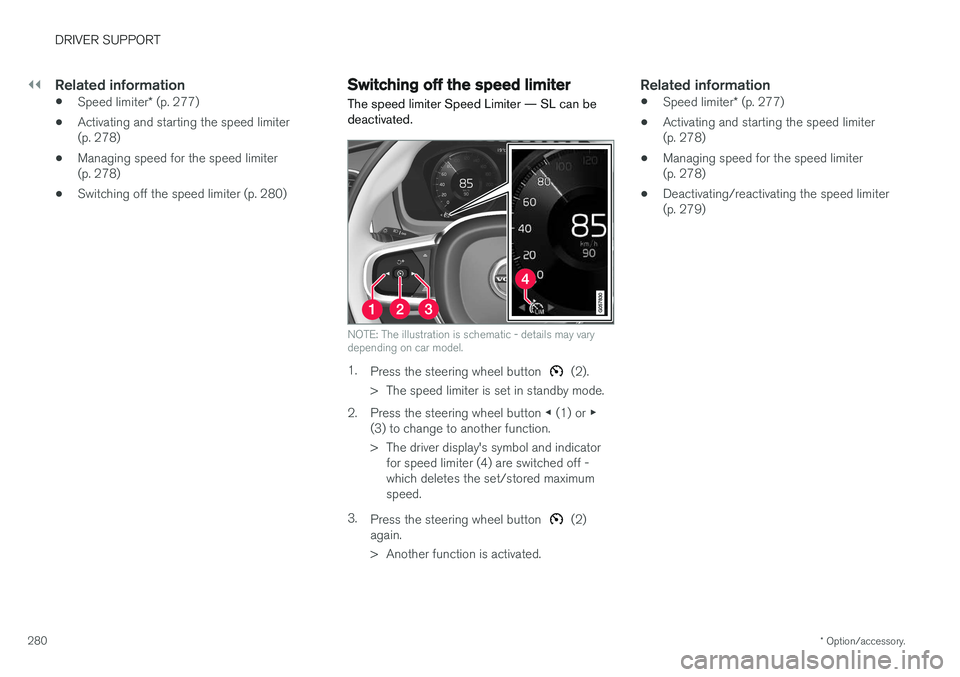
Switching off the speed limiter
The speed limiter Speed Limiter — SL can be deactivated.
NOTE: The illustration is schematic - details may vary depending on car model.
1. Press the steering wheel button (2).
> The speed limiter is set in standby mode.
2. Press the steering wheel button ◀ (1) or ▶
(3) to change to another function.
> The driver display's symbol and indicator for speed limiter (4) are switched off - which deletes the set/stored maximumspeed.
3. Press the steering wheel button
(2)
again.
> Another function is activated.
Related information
• Speed limiter
* (p. 277)
• Activating and starting the speed limiter (p. 278)
• Managing speed for the speed limiter(p. 278)
• Deactivating/reactivating the speed limiter(p. 279)
Page 284 of 594
||
DRIVER SUPPORT
* Option/accessory.
282
Related information
• Speed limiter
* (p. 277)
• Activating/deactivating the automatic speed limiter (p. 282)
• Changing the tolerance for the Automaticspeed limiter (p. 283)
• Road Sign Information
* (p. 348)
• Limitations of Road Sign Information
*
(p. 352)
Activating/deactivating the automatic speed limiter
The automatic speed limiter function (Automatic Speed Limiter - ASL) can be activated anddeactivated as a supplement to the speed limiter(Speed Limiter - SL).
The function is activated/deac- tivated in function view in thecentre display.
Activating the automatic speed limiter1. Tap on the Speed Sign Assist button in
function view.
> ASL is set in standby mode, a green indi- cator appears on the button, and the driver display shows a sign symbol in thecentre of the speedometer.
2. Press the steering wheel button
.
> ASL is activated with the car
Page 285 of 594

DRIVER SUPPORT
* Option/accessory.283
Changing the tolerance for the Automatic speed limiter
The speed limiter function (Automatic Speed Limiter - ASL) can be set for different tolerancelevels.
It is possible to increase/decrease the signed speed limit. If, for example, the car follows asigned speed limit of 70 km/h (43 mph) thedriver can instead choose to allow the car tomaintain 75 km/h (47 mph).
Buttons and symbols for functions.
–Press the steering wheel button (1)
until 70 km/h (43 mph) in the centre of the speedometer (4) changes to 75 km/h(47 mph).
> After which, the car uses the selected tol- erance 5 km/h (4 mph) as long as signs passed are showing 70 km/h (43 mph). The tolerance is followed until a road sign with a lower or higher speed is passed -then the car follows the new signedspeed limit instead and the tolerance isdeleted from the memory. If the Road Sign Information * function is
activated, the signed speed limit will then be shown with a RED indicator on thespeedometer. The tolerance is adjusted in the same way as thespeed setting is in the speed limiter.
NOTE
The maximum selectable tolerance is +/- 10 km/h (5 mph).
Related information
•
Automatic speed limiter
* (p. 281)
• Activating/deactivating the automatic speed limiter (p. 282)
• Road Sign Information
* (p. 348)
• Managing speed for the speed limiter(p. 278)
Page 287 of 594

DRIVER SUPPORT
}}
285
–With the symbol/function displayed,
press the steering wheel button
(2).
> Cruise Control starts and the current speed becomes the stored speed.
NOTE
Cruise Control cannot be enabled at speeds below 30 km/h (20 mph).
Related information
• Cruise control (p. 284)
• Managing speed for the Cruise control (p. 285)
• Deactivating/reactivating the cruise control(p. 286)
• Deactivating Cruise Control (p. 287)
Managing speed for the Cruise control The cruise control (Cruise Control - CC) can be set to different speeds.
NOTE: The illustration is schematic - details may vary depending on car model.
–Change the stored speed with short or long presses on steering wheel button
(1) or
- (3):
• Use
short presses to adjust +/- 5 km/h
(+/- 5 mph) with each press.
• Hold the button depressed
to adjust
+/- 1 km/h (+/- 1 mph) and release
when the driver display's marking (4)/(6) is at the desired speed .
> The speed set after the last press is stored in the memory. If the driver increases the car