2017 VOLVO V90 seats
[x] Cancel search: seatsPage 124 of 594

INSTRUMENTS AND CONTROLS
* Option/accessory.
122
Adjusting the power front seat *
Set to desired sitting position using the control on the front seat's seating section.
Change the lumbar support by pressing the button upward/downward/forward/back.
Raise/lower the seat cushion front edge by adjusting the control up/down.
Raise/lower the seat by means of adjusting the control up/down.
Move the seat forward/backward by adjust- ing the control forward/backward.
Change the backrest rake by adjusting the control forward/backward.
Only one movement (forward/back/up/down)can be made at a time. The backrests of the front seats cannot be low- ered fully forward.
Related information
• Power front seat
* (p. 121)
• Using the memory function in the power front seat
* (p. 122)
• Multi-functional front seat
* (p. 123)
• Seatbelt (p. 59)
Using the memory function in the power front seat
*
The memory function stores settings for the seat, door mirrors, and head-up display *.
It is possible to store two different settings with the memory function. The memory function key- pad is located either on one front door or both *.
Button M for storing settings.
Memory button
Memory button
Store setting1. Adjust seat, door mirrors and head-up display
to the desired position.
2. Push the M button and release. The light
indicator in the button illuminates.
Page 125 of 594

INSTRUMENTS AND CONTROLS
}}
* Option/accessory.123
3.
Within three seconds, depress the 1 or 2
button.
> When the position has been stored in the selected memory button an acoustic sig- nal sounds and the light indicator in the M
button extinguishes.
If none of the memory buttons is depressedwithin three seconds then the M button extin-
guishes and no storing takes place. The seat must be adjusted again before a new memory can be set.
Using a stored settingA stored setting can be used with the front dooreither open or closed:
Open front door
–Depress one of the memory buttons 1 or 2
with a short press. Seat, door mirrors and head-up display move and then stop at thepositions stored in the selected memory but-ton.
Closed front door
–Hold one of the memory buttons 1 or 2
depressed until seat, door mirrors and head- up display stop in the positions that arestored in the selected memory button.
If the memory button is released, the movementof the seat, door mirrors and head-up display willbe stopped.
WARNING
Risk of crushing! Make sure that children do not play with the keypad. Check that there areno objects in front of, behind or under theseat during adjustment. Make sure that noneof the passengers in the rear seat is in dangerof becoming trapped.
Related information
• Power front seat
* (p. 121)
• Adjusting the power front seat
* (p. 122)
Multi-functional front seat *
Enhance the seating comfort using the multi- function control.
Multi-function control, located on the side of the seat's seating section.
The multi-function control can, in some variants, be used to adjust the lumbar support *, side sup-
port *, cushion length and massage settings *. Set-
tings made with the multi-function control areshown in the centre display *. Certain function
selections can also be made directly in the centre display.
Centre displayThe driver and the passenger seat settings thatare made with the multi-function control areshown in the centre display. If the settings foronly one of the front seats are shown in the cen-tre display, the settings are positioned centred in
Page 126 of 594

||
INSTRUMENTS AND CONTROLS
* Option/accessory.
124 the screen. When it is possible to show setting options for both the front seats, the driver's set-ting options are shown in the upper half and thepassenger's in the lower half. To stop showing the seat settings view in the centre display, press the home button, which islocated under the centre display.
Related information
•
Power front seat
* (p. 121)
• Adjusting functions in the multi-functional front seat
* (p. 124)
• Activating/deactivating heating of the seats
*
(p. 203)
Adjusting functions in the multi- functional front seat *
Both the multi-function control on the seat and the centre display can be used in order tochange the settings. The range of settings is shown in the centre display *.
Multi-function control, located on the side of the seat's seating section.
To activate the multi-function control, turn the control upwards/downward.
Adjusting massage settings * in the
front seat
The front seat has massage in the backrest. Themassage is performed by air cushions that canmassage with different settings.
View for massage in the centre display.
1. Activate the multi-function control by turning the control upward/downward. The seat set- tings view will be shown on the centre dis-play.
2. Select
Massage in the seat settings view.
Page 129 of 594

INSTRUMENTS AND CONTROLS
}}
* Option/accessory.127
View for extension of the cushion in the centre display.
1. Activate the multi-function control by turning
the control upward/downward. The seat set- tings view will be shown on the centre dis-play.
2. Select
Cushion extension in the seat set-
tings view.
• Press the front seat button in order to extend the seat cushion.
• Press the rear seat button in order toretract the seat cushion.
Related information
•
Multi-functional front seat
* (p. 123)
• Managing messages saved from the driverdisplay and centre display (p. 110)
Adjusting the passenger seat from the driver's seat
*
The front passenger seat can be adjusted from the driver's seat.
Activating the functionThe function can be activated in two ways via the centre display:
Via the function view
Press the Adjust passenger
seat button to activate.
Via settings
1. Press Settings in the top view.
2. Press
My CarSeats.
3. Select
Adjust Passenger Seat From
Driver Position to activate.
Adjust passenger seatFrom activation of the function, the driver must adjust the passenger seat within 10 seconds. Ifno adjustment is made within this time the func-tion is deactivated. The driver adjusts the passenger seat using the controls on the driver's seat:
Page 130 of 594

||
INSTRUMENTS AND CONTROLS
* Option/accessory.
128
Move the passenger seat forward/backward by adjusting the control forward/backward.
Change the passenger seat's backrest rake by adjusting the control forward/backward.
Related information
• Power front seat
* (p. 121)
• Adjusting the power front seat
* (p. 122)
• Seatbelt (p. 59)
Rear seat
The car has 5 seats. The second seat row is divided into two parts, with one or two passen-ger seats respectively.
Related information
• Lowering the backrests in the rear seat (p. 130)
• Adjusting the head restraints in the rear seat(p. 128)
• Activating/deactivating heating of the seats
*
(p. 203)
Adjusting the head restraints in the rear seat Adjust the centre seat head restraint according to the height of the passenger. Fold down the outer seat head restraints * to improve rearward
visibility.
Adjusting the head restraint, centre
seat
The centre seat's head restraint must be adjusted according to the passenger's height sothat, if possible, the whole of the back of thehead is covered. Slide it up manually as required.
Page 131 of 594

INSTRUMENTS AND CONTROLS
* Option/accessory.129
To lower the head restraint, the button (see illus- tration) must be depressed while the restraint iscarefully moved down.
WARNING
The centre seat head restraint must be in its lowest position when the centre seat is notused. When the centre seat is used, the headrestraint must be correctly adjusted to theheight of the passenger so that it covers thewhole of the back of the head if possible.
Electrical lowering of the rear seat's outer head restraints *
The outer head restraints can be lowered in two ways via the centre display:
Via the function view
Press the Headrest fold but-
ton to activate/deactivate low- ering.
Via settings
The car's electrical system must be in the ignition position II.
1. Press
Settings in the top view.
2. Press
My CarSeats. 3.
Select
Fold Headrest On Second Row
Seats to lower the rear outer head
restraints.
WARNING
Do not lower the outer head restraints if there are passengers in any of the outer seats.
Move the head restraint back manually until a click is heard.
WARNING
The head restraints must be in locked posi- tion after being raised.
Related information
• Rear seat (p. 128)
• Lowering the backrests in the rear seat (p. 130)
Page 132 of 594

INSTRUMENTS AND CONTROLS
* Option/accessory.
130
Lowering the backrests in the rear seat
The rear seat's backrest is divided into two parts. The two parts can be lowered forwardindividually.
WARNING
Adjust the seat and fix it before driving away. Take care when adjusting the seat. Uncontrol-led or careless adjustment can lead to trap-ping injuries.
IMPORTANT
There must be no objects on the rear seat when the backrest is to be folded down. Theseat belts must not be connected either. Oth-erwise there is a risk of damaging the rearseat upholstery.
IMPORTANT
The integrated booster cushions * on the
outer seats must be lowered before lowering the seat. The armrest * for the centre seat must be
raised before lowering the seat. If the car has private locking, the tailgate must be closed before lowering the seat.
NOTE
The front seats may need to be pushed for- wards, and/or the backrests adjustedupwards, in order that the rear backrests canbe fully folded forward.
Lowering the backrest
Car with electronic folding
If the car is equipped with electronic folding of the rear seat * there are buttons located in the
cargo area. The backrests can also be lowered manually.
WARNING
Pay attention that people are not at risk of being trapped during the automatic folding ofthe rear seat. Since this takes place automati-cally on the press of a button, no one must beon or too close to the rear seat.
For electronically controlled folding of backrests:
1. Ensure that there are no occupants or objects in the rear seat.
2. Lower the centre seat's head restraint man- ually.
3. Hold the button for folding depressed. The buttons are marked L and R for left and right backrest section respectively.
4. The backrests are lowered automatically to horizontal position. The head restraints arealso lowered automatically.
To facilitate folding of the rear seat, the car mustbe stationary and the tailgate open. To lower the backrest manually:
Page 147 of 594
INSTRUMENTS AND CONTROLS
}}
145
Passenger compartment lighting
The passenger compartment lighting is acti- vated/deactivated with the buttons in the over-head controls above the front seats and the rearseat.
All lighting in the passenger compartment can be switched on and off manually within 30 minutesfrom when:
• the car has been switched off and its electri- cal system is in ignition position
0
• the car has been unlocked but it has not been started.
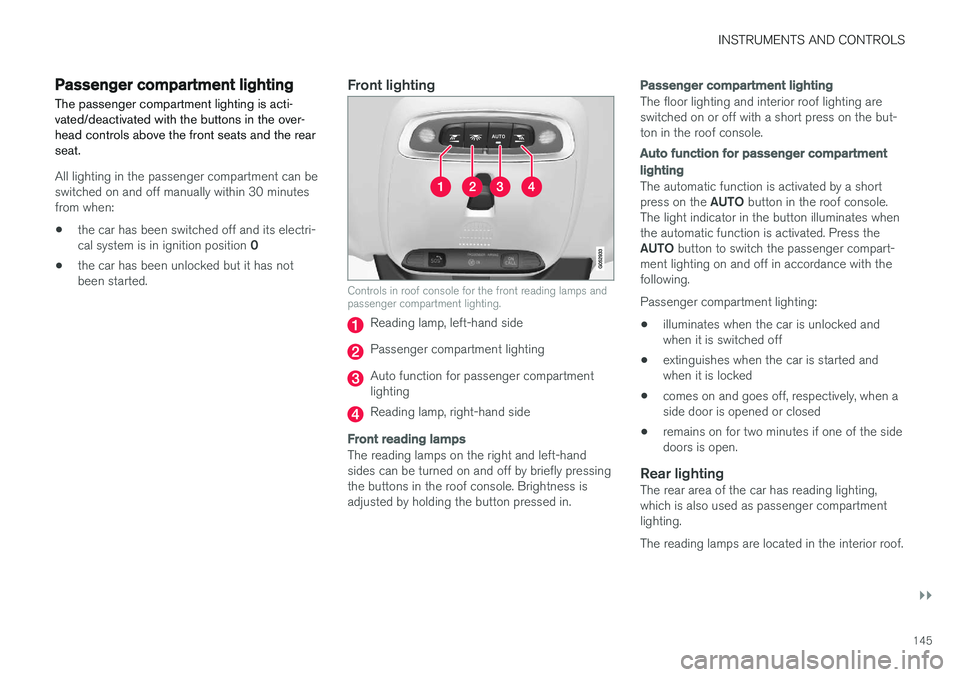
Front lighting
Controls in roof console for the front reading lamps and passenger compartment lighting.
Reading lamp, left-hand side
Passenger compartment lighting
Auto function for passenger compartment lighting
Reading lamp, right-hand side
Front reading lamps
The reading lamps on the right and left-hand sides can be turned on and off by briefly pressingthe buttons in the roof console. Brightness isadjusted by holding the button pressed in.
Passenger compartment lighting
The floor lighting and interior roof lighting are switched on or off with a short press on the but-ton in the roof console.
Auto function for passenger compartment lighting
The automatic function is activated by a short press on the
AUTO button in the roof console.
The light indicator in the button illuminates when the automatic function is activated. Press the AUTO button to switch the passenger compart-
ment lighting on and off in accordance with the following. Passenger compartment lighting: • illuminates when the car is unlocked and when it is switched off
• extinguishes when the car is started andwhen it is locked
• comes on and goes off, respectively, when aside door is opened or closed
• remains on for two minutes if one of the sidedoors is open.
Rear lightingThe rear area of the car has reading lighting,which is also used as passenger compartmentlighting. The reading lamps are located in the interior roof.