Page 279 of 588
2795-5. Playing an audio CD and MP3/WMA/AAC discs
5
Multimedia
NOTICE
■Discs and adapters that cannot be used
Do not use the following types of CDs.
Also, do not use 3 in. (8 cm) CD adapters, Dual Discs or printable discs.
Doing so may damage the CD player and/or the CD insert/eject function.
● Discs that have a diameter that is not 4.7 in. (12 cm).
● Low-quality or deformed discs.
● Discs with a transparent or translucent recording area.
● Discs that have tape, stickers or CD-R labels attached to them, or that
have had the label peeled off.
■ Player precautions
Failure to follow the precautions below may result in damage to the discs or
the player itself.
● Do not insert anything other than discs into the disc slot.
● Do not apply oil to the player.
● Store discs away from direct sunlight.
● Never try to disassemble any part of the player.
Page 281 of 588

2815-6. Using an external device
5
Multimedia
■About iPod
●“Made for iPod” and “Made for iPhone” mean that an electronic accessory
has been designed to connect specifically to iPod or iPhone respectively,
and has been certified by the developer to meet Apple performance stan-
dards.
● Apple is not responsible for the operation of this device or its compliance
with safety and regulatory standards. Please note that the use of this acces-
sory with iPod or iPhone may affect wireless performance.
● iPhone, iPod, iPod classic, iPod nano, and iPod touch are trademarks of
Apple Inc., registered in the U.S. and other countries. Lightning is a trade-
mark of Apple Inc.
■ iPod cover art
●Depending on the iPod and songs in the iPod, iPod cover art may be dis-
played.
● This function can be changed to on/off. ( →P. 265)
● It may take time to display iPod cover art, and the iPod may not be operated
while the cover art display is in process.
● Only iPod cover art that is saved in JPEG format can be displayed.
■ iPod functions
●When an iPod is connected and the audio source is changed to iPod mode,
the iPod will resume play from the same point in which it was last used.
● Depending on the iPod that is connected to the system, certain functions
may not be available. If a function is unavailable due to a malfunction (as
opposed to a system specification), disconnecting the device and recon-
necting it may resolve the problem.
● While connected to the system, the iPod cannot be operated with its own
controls. It is necessary to use the controls of the vehicle’s multimedia sys-
tem instead.
● When the battery level of an iPod is very low, the iPod may not operate. If
so, charge the iPod before use.
● Compatible models ( →P. 283)
Page 338 of 588

3385-11. Bluetooth®
Bluetooth®
■When using the Bluetooth® audio system
● In the following conditions, the system may not function.
• If the portable audio player is turned off
• If the portable audio player is not connected
• If the portable audio player’s battery is low
● There may be a delay if a cellular phone connection is made during
Bluetooth
® audio play.
● Depending on the type of portable audio player that is connected to the \
sys-
tem, operation may differ slightly and certain functions may not be available.
■ When using the hands-free system
●The multimedia system is muted when making a call.
● If both parties speak at the same time, it may be difficult to hear.
● If the received call volume is overly loud, an echo may be heard.
If the Bluetooth
® phone is too close to the system, quality of the sound may
deteriorate and connection status may deteriorate.
● In the following circumstances, it may be difficult to hear the other party:
• When driving on unpaved roads
• When driving at high speeds
• If a window is open
• If the air conditioning is blowing directly on the microphone
• If there is interference from the network of the cellular phone
■ Conditions under which the system will not operate
● If using a cellular phone that does not support Bluetooth
®
●If the cellular phone is turned off
● If you are outside of cellular phone service coverage
● If the cellular phone is not connected
● If the cellular phone’s battery is low
● When outgoing calls are controlled, due to heavy traffic on telephone lines,
etc.
● When the cellular phone itself cannot be used
● When transferring contact data from the cellular phone
Page 345 of 588
345
6Interior features
6-1. Using the air conditioning system
Manual air conditioning system............................. 346
Automatic air conditioning system............................. 353
Seat heaters/ seat ventilators ................ 360
6-2. Using the interior lights Interior lights list ................ 363• Personal/interior lightsmain switch ................... 364
• Personal/interior
lights ............................. 364
• Cargo lamp main switch ............................ 365 6-3. Using the storage features
List of storage features ..... 366• Glove box...................... 368
• Console box (front separated type seat) ..... 369
• Card holder ................... 370
• Map holder (front bench type seat) ........... 372
• Pen holder .................... 373
• Tissue pocket................ 374
• Overhead console......... 375
• Cup holders .................. 376
• Bottle holders ................ 378
• Auxiliary boxes (front bench type seat) ........... 379
• Storage box .................. 381
Luggage compartment features ........................... 383
6-4. Using the other interior features Other interior features ....... 384• Sun visors ..................... 384
• Vanity mirrors................ 384
• Clock ............................. 385
• Outside temperature display........................... 386
• Power outlets ................ 387
• Armrest ......................... 389
• Assist grips ................... 390
Garage door opener.......... 391
Compass ........................... 397
Page 360 of 588
3606-1. Using the air conditioning system
Seat heaters∗/seat ventilators∗
Turns the seat heater onHi
Mid
Lo
Off
The level indicator lights come on.
Press the “ ∧” on the button to up
and “ ∨” to down, and off.
■
Seat heater
Turns the seat heater on Hi
Mid
Lo
Off
The level indicator lights come on.
Pressing the button changes
modes in the following:
Hi→Mid →Lo→Off
∗: If equipped
The seat heaters and ventilators heat the seats and maintain
good airflow by blowing air from the seats.
Seat heaters
1
2
3
4
Seat ventilators
1
2
3
4
Page 361 of 588

3616-1. Using the air conditioning system
6
Interior features
■Seat ventilators
Blows air from the seat Hi
Mid
Lo
Off
The level indicator lights come on.
Pressing the button changes
modes in the following:
Hi→Mid →Lo→Off
■The seat heaters/seat ventilators can be used when
The engine switch is in the “ON” position.
■ Passenger seat ventilator timer (vehicles with seat ventilators)
●The ventilator operates on for 5 minutes after the button is pressed.
● When the passenger is not detected, the automatically turns off the ventila-
tor after 5 minutes.
■ When not in use
Turn the seat heaters or seat ventilators off by pressing the button. The indi-
cator light turns off.
1
2
3
4
CAUTION
■Burns
● Use caution when seating the following persons in a seat with the seat
heater on to avoid the possibility of burns:
• Babies, small children, the elderly, the sick and the physically chal-
lenged
• Persons with sensitive skin
• Persons who are fatigued
• Persons who have taken alcohol or drugs that induce sleep (sleeping drugs, cold remedies, etc.)
● Do not cover the seat with anything when using the seat heater.
Using the seat heater with a blanket or cushion increases the temperature
of the seat and may lead to overheating.
● Do not use seat heater more than necessary. Doing so may cause minor
burns or overheating.
Page 363 of 588
3636-2. Using the interior lights
6
Interior features
Interior lights list
Outer foot lights (if equipped)
Personal/interior lights
(→ P. 364)
Engine switch light (if
equipped) Foot well lighting (if equipped)
Cargo lamp (
→P. 365)1
2
3
4
5
Page 364 of 588
3646-2. Using the interior lights
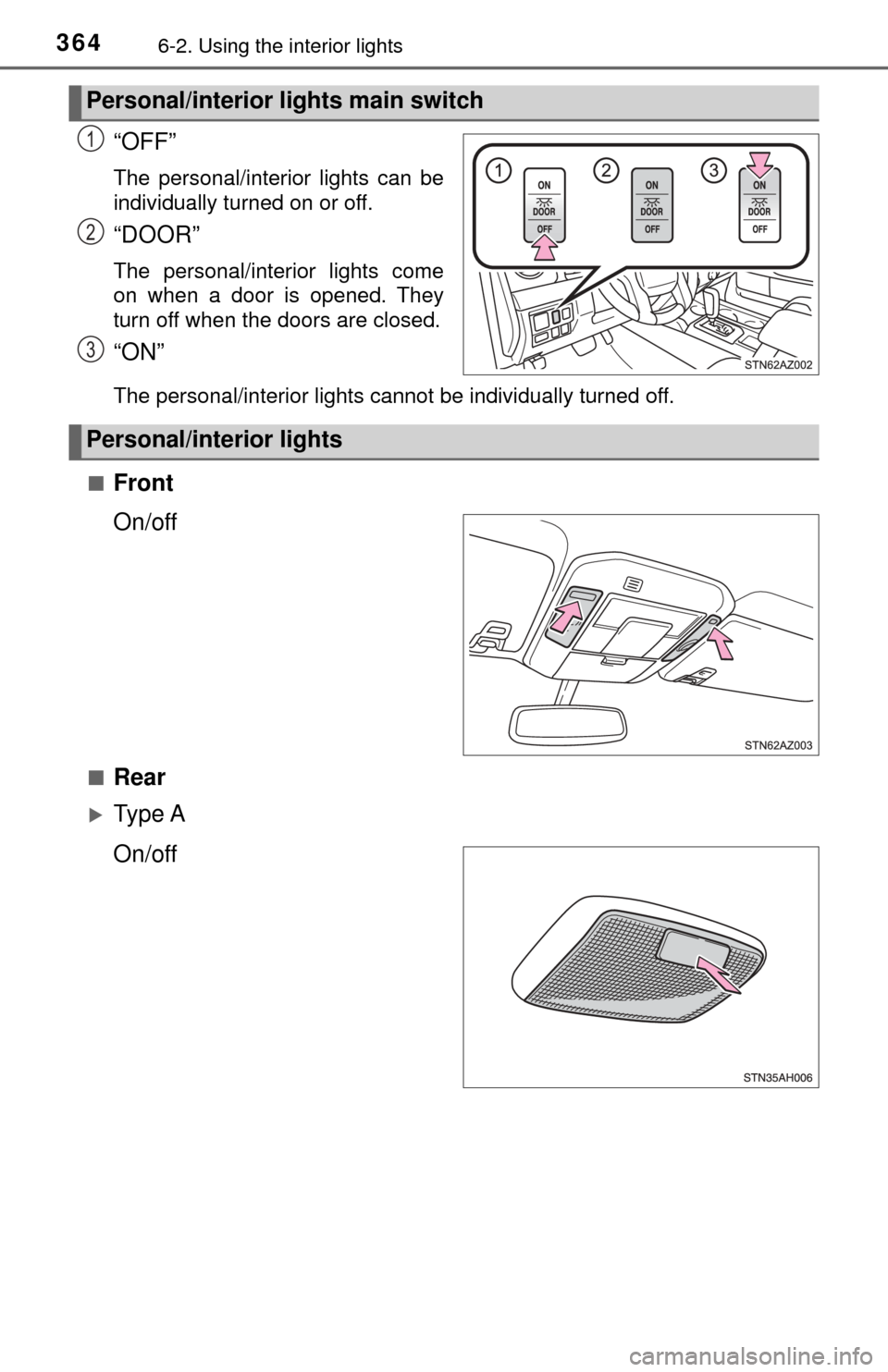
“OFF”
The personal/interior lights can be
individually turned on or off.
“DOOR”
The personal/interior lights come
on when a door is opened. They
turn off when the doors are closed.
“ON”
The personal/interior lights cannot be individually turned off.
■
Front
On/off
■Rear
Ty p e A
On/off
Personal/interior lights main switch
1
2
3
Personal/interior lights