Page 365 of 588
3656-2. Using the interior lights
6
Interior features
Ty p e B
On/off
“OFF”
The cargo lamp can be individually
turned on or off.
“DOOR”
The cargo lamp comes on when a
door is opened. They turn off when
the doors are closed.
“ON”
The cargo lamp cannot be individually turned off.
■Illuminated entry system
The lights automatically turn on/off according to the engine switch position,
whether the doors are locked/unlocked, and whether the doors are opened/
closed.
■ To prevent battery discharge
If the following lights remain on when the door is not fully closed and the main
switch is in the “DOOR” position, the lights will go off automatically after 20
minutes:
●Personal lights
● Interior lights
● Cargo lamp
■ Customization that can be co nfigured at Toyota dealer
Settings (e.g. the time elapsed before lights turn off) can be changed.
(Customizable features: →P. 543)
Cargo lamp main switch
1
2
3
Page 368 of 588
3686-3. Using the storage features
Open (pull the lever up)
Lock
Unlock
CAUTION
■Items that should not be left in the storage spaces
Do not leave glasses, lighters or spray cans in the storage spaces, as this
may result in the following when cabin temperature becomes high:
● Glasses may be deformed by heat or cracked if they come into contact
with other stored items.
● Lighters or spray cans may explode. If they come into contact with other
stored items, the lighter may catch fire or the spray can may release gas,
causing a fire hazard.
■ When driving or when the storag e compartments are not in use
Keep the lids closed.
In the event of sudden braking or sudden swerving, an accident may occur
due to an occupant being struck by an open lid or the items stored inside.
Glove box
1
2
3
Page 384 of 588
3846-4. Using the other interior features
Other interior features
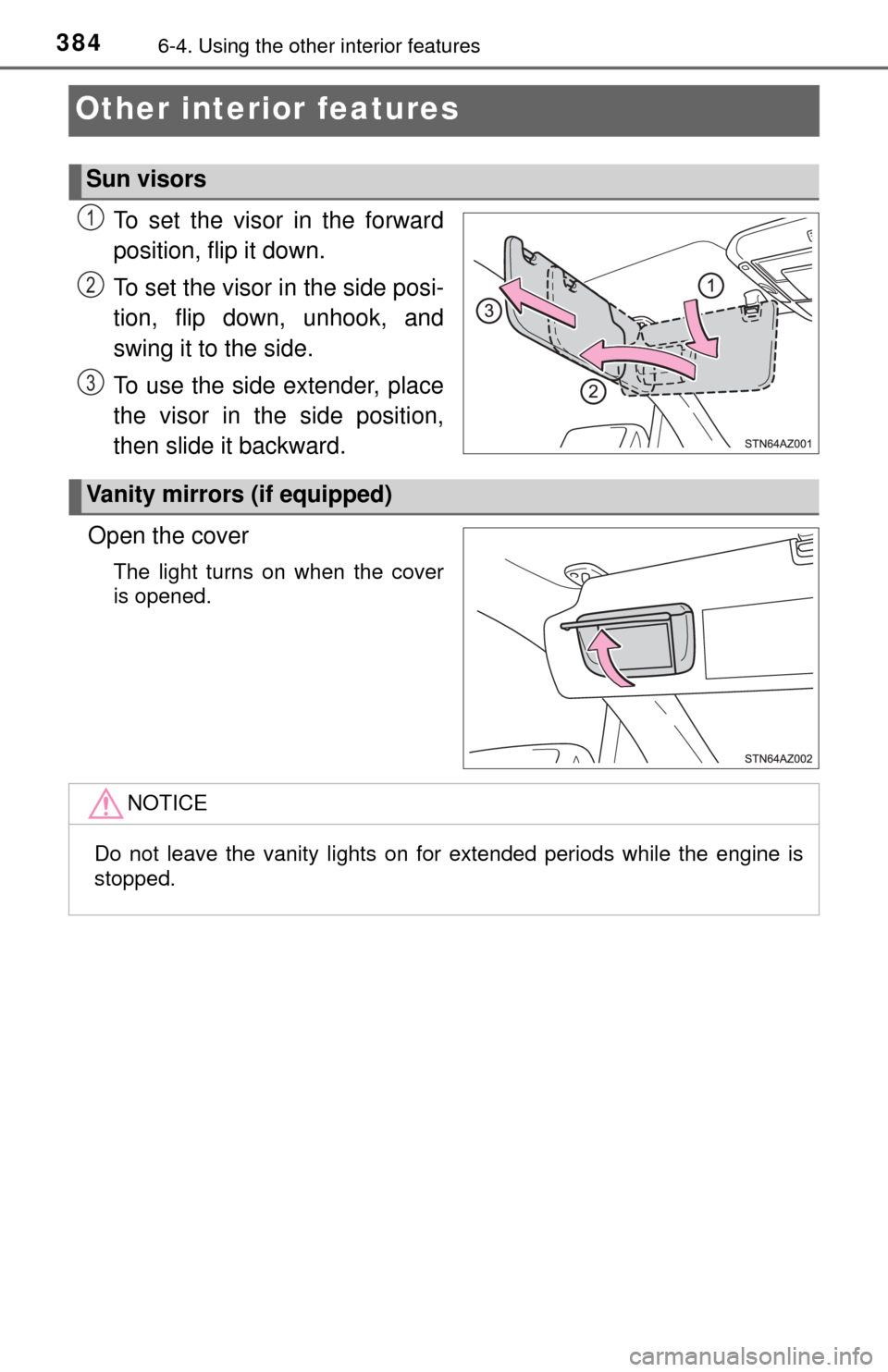
To set the visor in the forward
position, flip it down.
To set the visor in the side posi-
tion, flip down, unhook, and
swing it to the side.
To use the side extender, place
the visor in the side position,
then slide it backward.
Open the cover
The light turns on when the cover
is opened.
Sun visors
1
2
3
Vanity mirrors (if equipped)
NOTICE
Do not leave the vanity lights on for extended periods while the engine is
stopped.
Page 391 of 588
3916-4. Using the other interior features
6
Interior features
Garage door opener∗
The garage door opener (HomeLink® Universal Transceiver) is manu-
factured under license from HomeLink®.
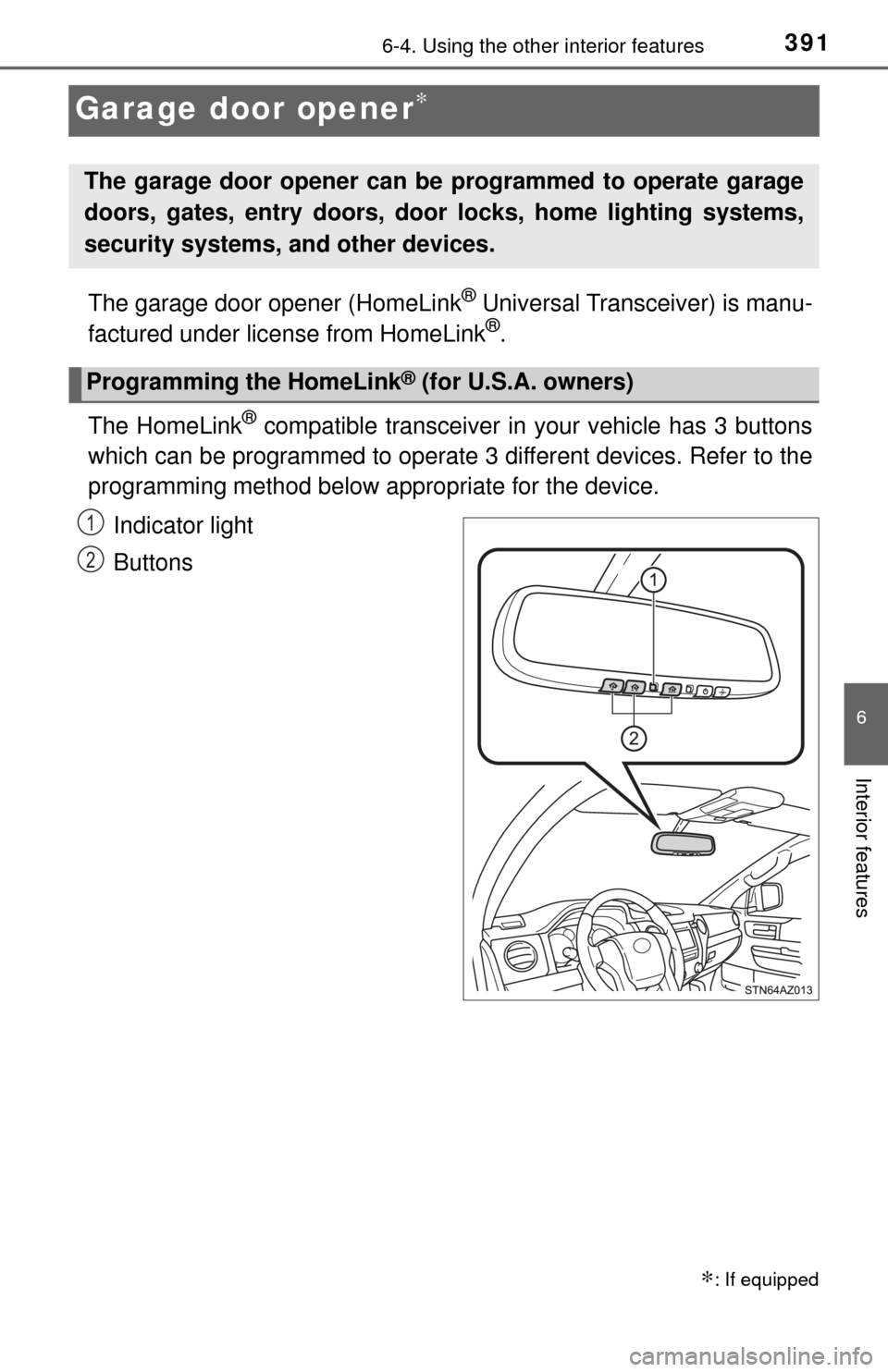
The HomeLink
® compatible transceiver in your vehicle has 3 buttons
which can be programmed to operate 3 different devices. Refer to the
programming method below appropriate for the device.
Indicator light
Buttons
∗: If equipped
The garage door opener can be programmed to operate garage
doors, gates, entry doors, door locks, home lighting systems,
security systems, and other devices.
Programming the HomeLink® (for U.S.A. owners)
1
2
Page 392 of 588
3926-4. Using the other interior features
■Programming HomeLink®
Point the remote control
transmitter for the device 1 to
3 in. (25 to 75 mm) from the
HomeLink
® buttons.
Keep the HomeLink® indicator
light in view while programming.
Press and hold one of the
HomeLink® buttons and the
transmitter button. When the
HomeLink
® indicator light
changes from a slow to a
rapid flash, you can release
both buttons.
If the HomeLink® indicator light
comes on but does not flash, or
flashes rapidly for 2 seconds
and remains lit, the HomeLink
®
button is already programmed.
Use the other buttons or follow
the “Reprogramming a
HomeLink
® button” instructions.
( →P. 395)
1
2
Page 393 of 588

3936-4. Using the other interior features
6
Interior features
Test the HomeLink® opera-
tion by pressing the newly
programmed button.
If a HomeLink® button has been
programmed for a garage door,
check to see if the garage door
opens and closes. If the garage
door does not operate, see if
your garage transmitter is of the
rolling code type. Press and
hold the programmed Home-
Link
® button. The remote control
transmitter is of the rolling code
type if the HomeLink
® indicator
light flashes rapidly for
2 seconds and then remains lit.
If your transmitter is the rolling
code type, proceed to the head-
ing “Programming a rolling code
system”.
Repeat the steps above to program another device for any of the
remaining HomeLink® buttons.
■Programming a rolling code sys tem (for U.S.A. owners)
If your device is rolling code eq uipped, follow the steps under the
heading “Programming HomeLink
®” before proceeding with the
steps listed below.
Locate the training button on the ceiling mounted garage door
opener motor. The exact location and color of the button may
vary by brand of garage door opener motor.
Refer to the operation manual supplied with the garage door opener for
the location of the training button.
Press the training button.
Following this step, you have 30 seconds in which to initiate step
below.
3
4
1
2
3
Page 394 of 588

3946-4. Using the other interior features
Press and hold the vehicle’s programmed HomeLink® button for
2 seconds and release it. Repea t this step once again. The
garage door may open.
If the garage door opens, the programming process is complete. If the
door does not open, press and release the button a third time. This third
press and release will complete the programming process by opening
the garage door.
The ceiling mounted garage door opener motor should now recognize
the HomeLink
® signal and operate the garage door.
Repeat the steps above to program another rolling code system
for any of the remaining HomeLink® buttons.
■Programming an entry gate (for U.S.A. owners)/Programming a
devices in the Canadian market
Place the remote control transmitter 1 to 3 in. (25 to 75 mm)
away from the HomeLink
® buttons.
Keep the HomeLink® indicator light in view while programming.
Press and hold the selected HomeLink® button.
Repeatedly press and release (cyc le) the remote control trans-
mitter for 2 seconds each until step is completed.
When the HomeLink
® indicator light starts to flash rapidly,
release the buttons.
Test the HomeLink
® operation by pressing the newly pro-
grammed button. Check to see if the gate/device operates cor-
rectly.
Repeat the steps above to program another device for any of the
remaining HomeLink
® buttons.
■Programming other devices
To program other devices such as home security systems, home
door locks and lighting, contact your Toyota dealer for assistance.
■Reprogramming a button
The individual HomeLink
® buttons cannot be erased but can be
reprogrammed. To reprogram a button, follow the “Reprogramming
a HomeLink
® button” instructions.
3
4
1
2
3
4
4
5
6
Page 395 of 588
3956-4. Using the other interior features
6
Interior features
Press the appropriate HomeLink® button. The HomeLink® indicator
light should come on.
The HomeLink® compatible transceiver in your vehicle continues to send a
signal for up to 20 seconds as long as the button is pressed.
Press and hold the desired HomeLink® button. After 20 seconds, the
HomeLink® indicator light will start flashing slowly. Keep pressing the
HomeLink® button and press and hold the transmitter button until the
HomeLink® indicator light changes from a slow to a rapid flash.
Release the buttons.
Press and hold the 2 outside but-
tons for 10 seconds until the indi-
cator light flashes.
If you sell your vehicle, be sure to
erase the programs stored in the
HomeLink
® memory.
Operating HomeLink®
Reprogramming a HomeLink® button
Erasing the entire HomeLink® memory (all three programs)