Page 236 of 588
2364-5. Using the driving support systems
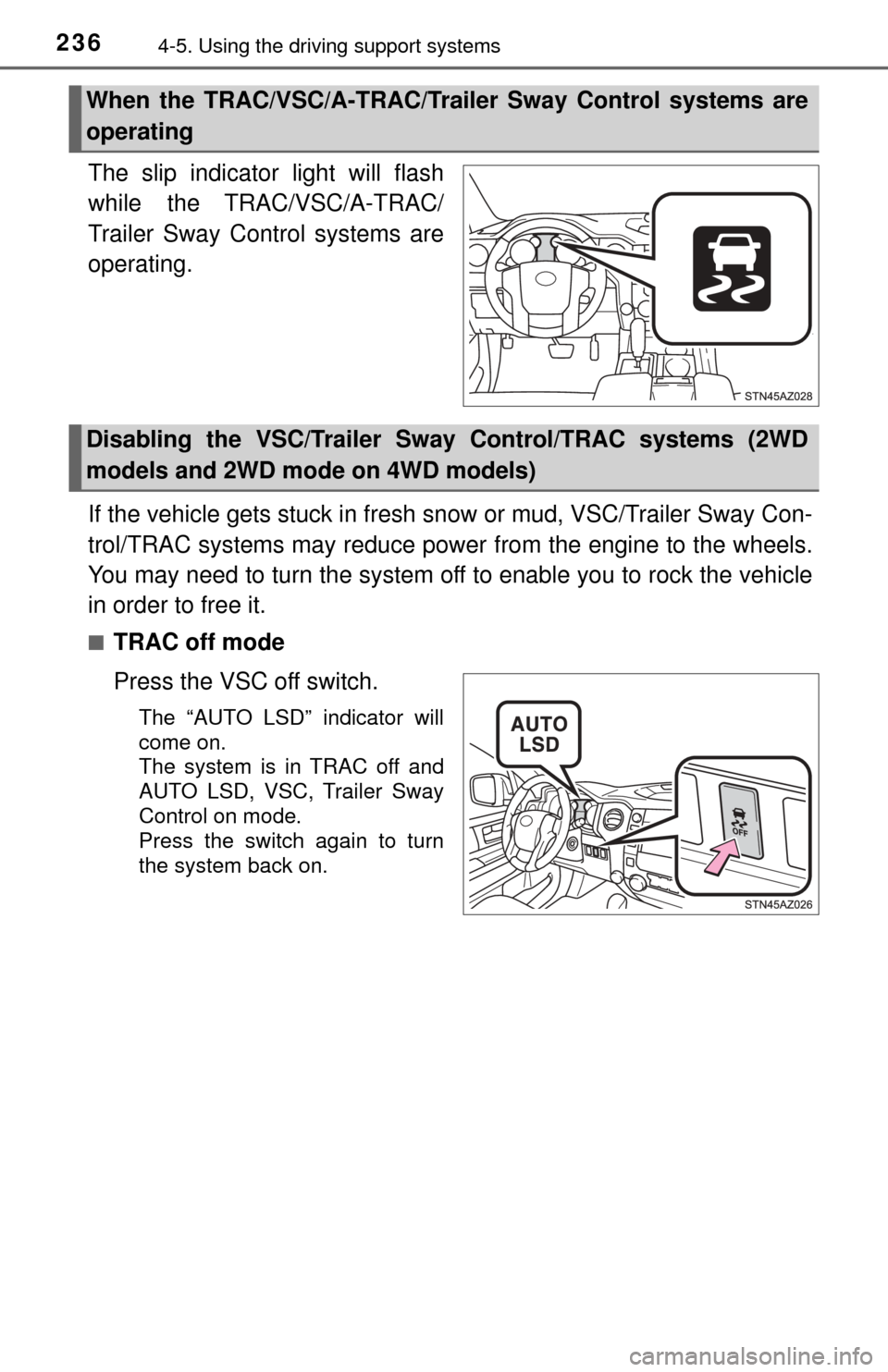
The slip indicator light will flash
while the TRAC/VSC/A-TRAC/
Trailer Sway Control systems are
operating.
If the vehicle gets stuck in fresh snow or mud, VSC/Trailer Sway Con-
trol/TRAC systems may reduce power from the engine to the wheels.
You may need to turn the system off to enable you to rock the vehicle
in order to free it.
■TRAC off mode
Press the VSC off switch.
The “AUTO LSD” indicator will
come on.
The system is in TRAC off and
AUTO LSD, VSC, Trailer Sway
Control on mode.
Press the switch again to turn
the system back on.
When the TRAC/VSC/A-TRAC/Trailer Sway Control systems are
operating
Disabling the VSC/Trailer Sw ay Control/TRAC systems (2WD
models and 2WD mode on 4WD models)
Page 239 of 588

2394-5. Using the driving support systems
4
Driving
If the vehicle gets stuck in fresh snow or mud, A-TRAC system may
reduce power from the engine to the wheels. You may need to turn
the system off to enable you to rock the vehicle in order to free it.Stop the vehicle completely,
and press the VSC off switch
for more than 3 seconds.
The “TRACTION CONTROL
OFF” will be shown on the dis-
play.
Press the switch again to turn
the system back on.
■When the “TRAC OFF” indicator light comes on or the message is dis-
played on the multi-information disp lay showing that “TRACTION CON-
TROL OFF” has been disabled even if the VSC off switch has not been
pressed
TRAC cannot be operated. Contact your Toyota dealer.
■ Sounds and vibrations caused by the ABS, brake assist, VSC, TRAC, A-
TRAC and Trailer Sway Control systems
●A sound may be heard from the engine compartment when the brake pedal
is depressed repeatedly, when the engine is started or just after the vehicle
begins to move. This sound does not indicate that a malfunction has
occurred in any of these systems.
● Any of the following conditions may occur when the above systems are
operating. None of these indicates that a malfunction has occurred.
• Vibrations may be felt through the vehicle body and steering.
• A motor sound may be heard after the vehicle comes to a stop.
• The brake pedal may pulsate slightly after the ABS is activated.
• The brake pedal may move down slightly after the ABS is activated.
Disabling the A-TRAC system (4L mode on 4WD models)
Page 241 of 588

2414-5. Using the driving support systems
4
Driving
CAUTION
■When the VSC and Trailer Sway Control are activated
The slip indicator light flashes. Always drive carefully. Reckless driving may
cause an accident. Exercise particular care when the indicator light flashes.
■ When the TRAC/VSC/A-TRAC/Trailer Sway Control systems are turned
off
Be especially careful and drive at a speed appropriate to the road condi-
tions. As these are the systems to help ensure vehicle stability and driving
force, do not turn the TRAC/VSC/A-TRAC/Trailer Sway Control systems off
unless necessary.
■ Replacing tires
Make sure that all tires are of the specified size, brand, tread pattern and
total load capacity. In addition, make sure that the tires are inflated to the
recommended tire inflation pressure level.
The ABS, TRAC, A-TRAC, VSC and Trailer Sway Control systems will not
function correctly if different tires are installed on the vehicle.
Contact your Toyota dealer for further information when replacing tires or
wheels.
■ Handling of tires and the suspension
Using tires with any kind of problem or modifying the suspension will affect
the driving assist systems, and may cause a system to malfunction.
■ Trailer Sway Control precaution
The Trailer Sway Control system is not able to reduce trailer sway in all situ-
ations. Depending on many factors such as the conditions of the vehicle,
trailer, road surface, and driving environment, the Trailer Sway Control sys-
tem may not be effective. Refer to your trailer owner’s manual for informa-
tion on how to tow your trailer properly.
■ If trailer sway occurs
Observe the following precautions.
Failure to do so may cause death or serious injury.
● Firmly grip the steering wheel. Steer straight ahead.
Do not try to control trailer swaying by turning the steering wheel.
● Begin releasing the accelerator pedal immediately but very gradually to
reduce speed.
Do not increase speed. Do not apply vehicle brakes.
If you make no extreme correction with the steering or brakes, your vehicle
and trailer should stabilize. ( →P. 178)
Page 245 of 588
2454-6. Driving tips
4
Driving
Winter driving tips
●Use fluids that are appropriate to the prevailing outside tempera-
tures. • Engine oil
• Engine coolant
• Washer fluid
● Have a service technician ins pect the condition of the battery.
● Have the vehicle fitted with four snow tires or purchase a set of tire
chains for the rear tires.
Ensure that all tires are the same size and brand, and that chains match
the size of the tires.
Perform the following accordin g to the driving conditions:
● Do not try to forcibly open a window or move a wiper that is frozen.
Pour warm water over the frozen area to melt the ice. Wipe away
the water immediately to prevent it from freezing.
● To ensure proper operation of the climate control system fan,
remove any snow that has accumulated on the air inlet vents in
front of the windshield.
● Check for and remove any excess ice or snow that may have accu-
mulated on the exterior lights, vehicle’s roof, chassis, around the
tires or on the brakes.
● Remove any snow or mud from the bottom of your shoes before
getting in the vehicle.
Accelerate the vehicle slowly, keep a safe distance between you and
the vehicle ahead, and drive at a reduced speed suitable to road con-
ditions.
Carry out the necessary preparations and inspections before
driving the vehicle in winter. Al ways drive the vehicle in a man-
ner appropriate to the prevailing weather conditions.
Preparation for winter
Before driving the vehicle
When driving the vehicle
Page 259 of 588

2595-1. Basic Operations
5
Multimedia
By touching the screen with your finger, you can control the Audio
system, hands-free system, etc.
■Drag*
Touch the screen with your finger and move the screen to the
desired position.
●Scrolling the lists
● Using scroll bar in lists
■Flick*
Touch the screen with your finger and then quickly move the
screen.
●Scrolling the main screen page
● Returning to the menu screen from the sub-menu screen (screen
one level below)
*: The above operations may not be performed on all screens.
■When using the touch screen
●If the screen is cold, the display may be dark, or the system may seem to be
operating slightly slower than normal.
● The screen may seem dark and hard to see when viewed through sun-
glasses. Change your angle of viewing, adjust the display on the “Display
Settings” screen ( →P. 266) or remove your sunglasses.
■ Using cellular phones
Interference may be heard through the multimedia system's speakers if a cel-
lular phone is being used inside or close to the vehicle while the multimedia
system is operating.
Operating the touch screen
Page 260 of 588
2605-1. Basic Operations
CAUTION
■Laser product
THIS PRODUCT IS A CLASS I LASER PRODUCT. USE OF CONTROLS
OR ADJUSTMENTS OR PERFORMANCE OF PROCEDURES OTHER
THAN THOSE SPECIFIED HEREIN MAY RESULT IN HAZARDOUS
RADIATION EXPOSURE. DO NOT OPEN COVERS AND DO NOT
REPAIR BY YOURSELF. REFER SERVICING TO QUALIFIED
PERSONNEL.
NOTICE
■To avoid damaging the touch screen
● To prevent damaging the screen, lightly touch the screen buttons with your
finger.
● Do not use objects other than your finger to touch the screen.
● Wipe off fingerprints using a glass cleaning cloth. Do not use chemical
cleaners to clean the screen, as they may damage the touch screen.
■ To prevent battery discharge
Do not leave the multimedia system on longer than necessary when the
engine is off.
■ To avoid damaging the multimedia system
Take care not to spill drinks or other fluids on the multimedia system.
Page 266 of 588
2665-2. Setup
Display settings
Press the “SETUP” button.
Select “Display” on the “Setup” screen.Adjust general screen con-
trast/brightness
Adjust camera screen con-
trast/brightness
Changes to day mode.
Select “General” or “Camera” on the “Display Settings” screen.
Adjust the display as desired by selecting “+” or “-”.
When the headlights are tur ned on, the screen dims.
However, the screen can be switch ed to day mode by selecting “Day
Mode”.
The screen will stay in day mode when the headlights are turned on until
“Day Mode” is selected again.
Settings are available for adjusting the contrast and brightness
of the screen.
Screen for display settings
1
2
1
2
3
Adjusting the screen contrast/brightness
Day mode
1
2
Page 270 of 588
2705-3. Using the audio system
List screen operation
: Select to scroll to the nextor previous page.
: If appears to the right of titles, the complete titles are
too long for the display. Select
this button to scroll the title.
Turn the “TUNE·SCROLL” knob
to move the cursor box to select a
desired item from the list, and
press the “TUNE·SCROLL” knob
to play it. The track that is being
played is highlighted.
To return to the top screen, select “Now Playing” on the list screen.
When a list style screen is displayed, use the appropriate but-
tons to scroll through the list.
How to scroll