Page 81 of 672
81
SIENNA_OM_OM08007U_(U)
Instrument cluster2
2. Instrument clusterWarning lights and indicators .......................... 82
Gauges and meters ............ 87
Multi-information display (with monochrome
display) ............................. 90
Multi-information display (with color display) ............ 93
Fuel consumption information ...................... 100
Page 83 of 672
SIENNA_OM_OM08007U_(U)
832. Instrument cluster
2
Instrument cluster
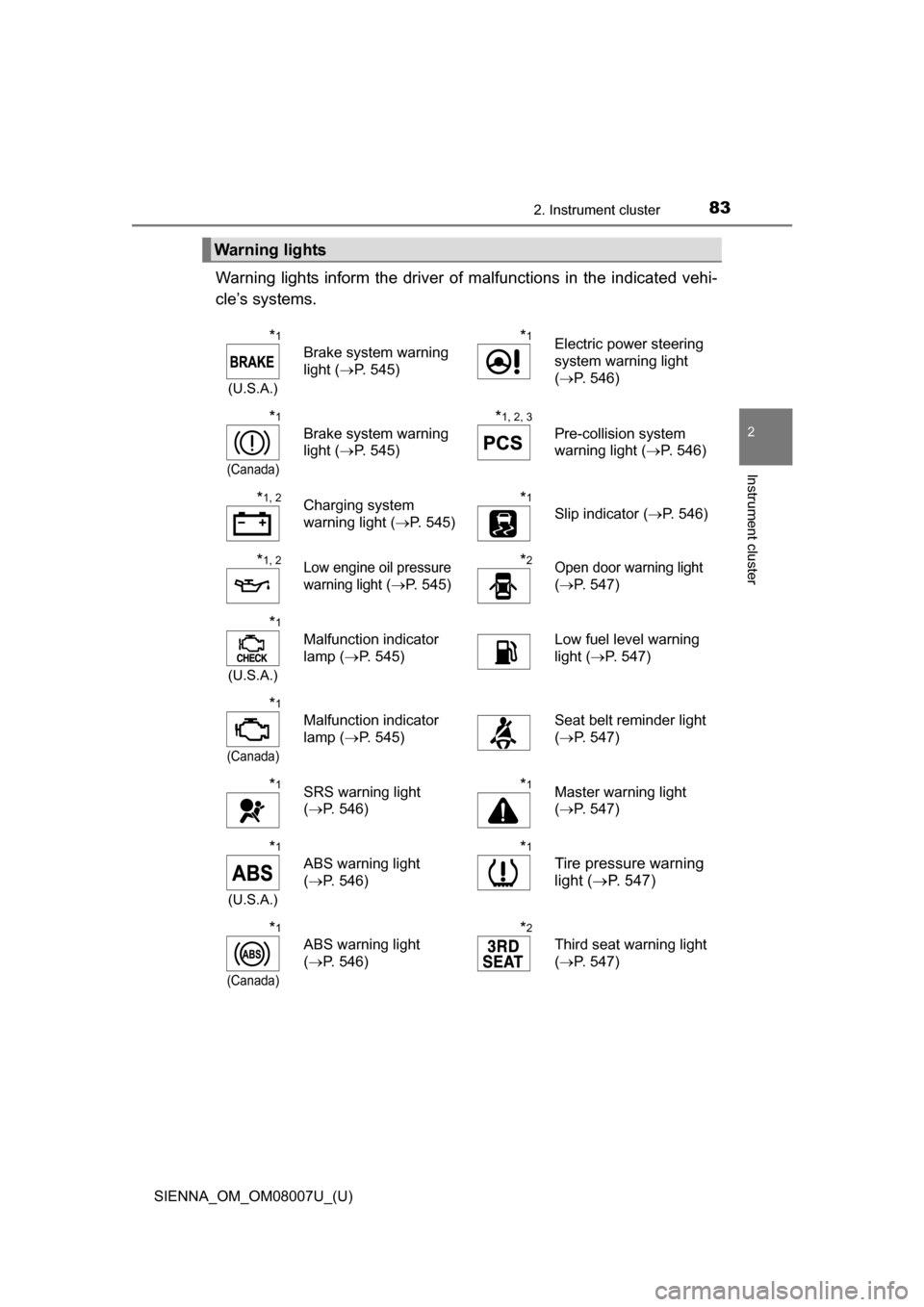
Warning lights inform the driver of malfunctions in the indicated vehi-
cle’s systems.
Warning lights
*1
(U.S.A.)
Brake system warning
light ( P. 545)
*1Electric power steering
system warning light
(P. 546)
*1
(Canada)
Brake system warning
light ( P. 545)
*1, 2, 3
Pre-collision system
warning light ( P. 546)
*1, 2Charging system
warning light (P. 545)*1
Slip indicator ( P. 546)
*1, 2Low engine oil pressure
warning light
(P. 545)
*2Open door warning light
( P. 547)
*1
(U.S.A.)
Malfunction indicator
lamp ( P. 545) Low fuel level warning
light (
P. 547)
*1
(Canada)
Malfunction indicator
lamp ( P. 545) Seat belt reminder light
(
P. 547)
*1SRS warning light
(P. 546)*1Master warning light
(P. 547)
*1
(U.S.A.)
ABS warning light
(P. 546)
*1
Tire pressure warning
light ( P. 547)
*1
(Canada)
ABS warning light
(P. 546)
*2
Third seat warning light
(P. 547)
Page 88 of 672

88
SIENNA_OM_OM08007U_(U)
2. Instrument cluster
Tachometer
Displays the engine speed in revolutions per minute
Multi-information display
Presents the driver with a variety of driving-related data (P. 90, 93)
Speedometer
Displays the vehicle speed
Fuel gauge
Displays the quantity of fuel remaining in the tank
Odometer/trip meter display change button
Outside temperature
P. 8 9
Odometer and trip meter display
Odometer:
Displays the total distance that the vehicle has been driven
Trip meter:
Displays the distance the vehicle has been driven since the meter was last
reset. Trip meters “A” and “B” can be used to record and display different
distances independently.
Shift position and range
P. 234
Meter panel lights control button
P. 8 9
Engine coolant temperature gauge
Displays the engine coolant temperature
Pressing this button switches
among the odometer, trip meter
“A” and trip meter “B” displays.
When the trip meter is displayed,
pressing and holding the button
will reset the trip meter.
Changing the trip meter display
1
2
3
4
5
6
7
8
9
10
Page 90 of 672
90
SIENNA_OM_OM08007U_(U)
2. Instrument cluster
Multi-infor mation display
(with monochrome display)
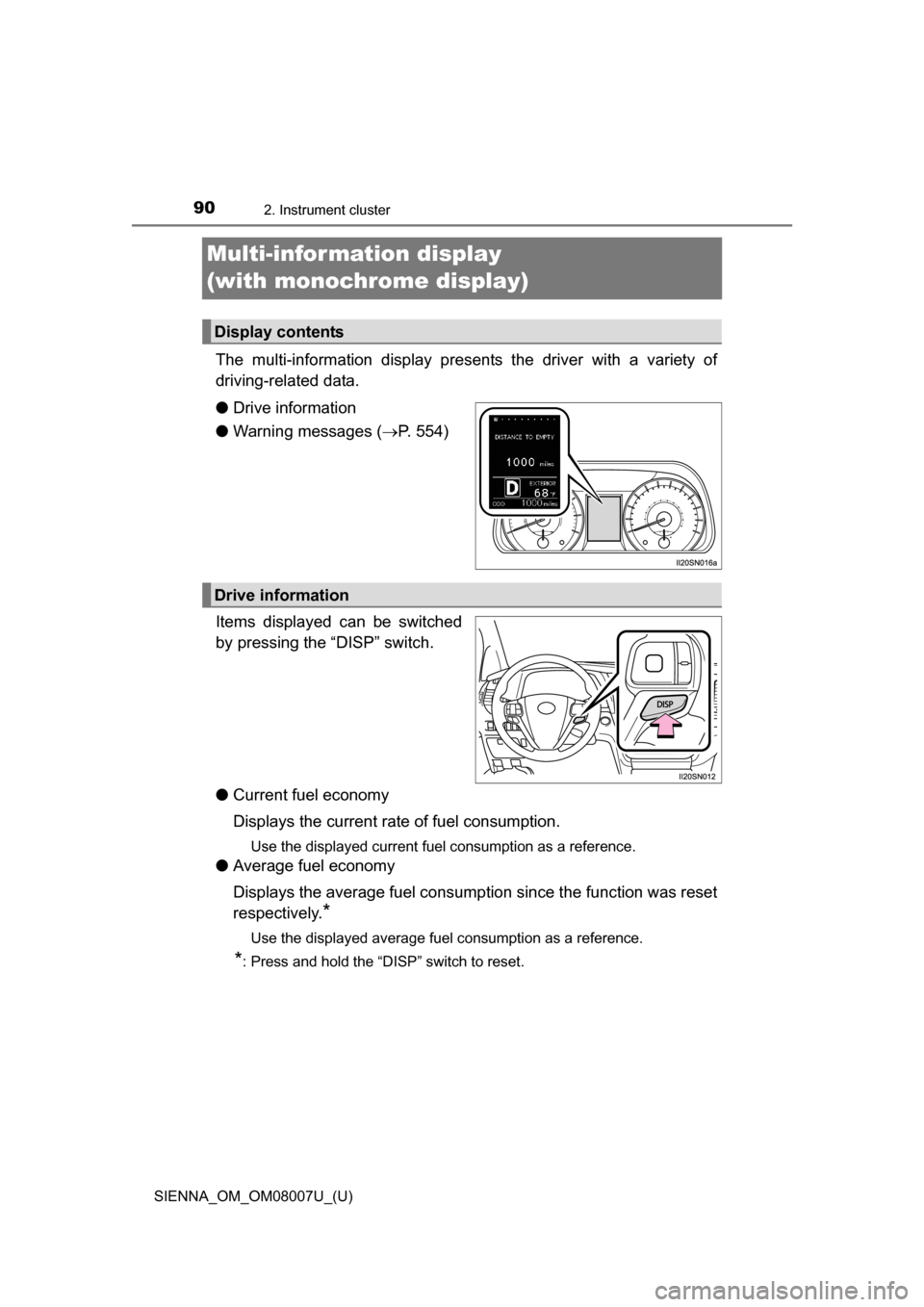
The multi-information display presents the driver with a variety of
driving-related data.
●Drive information
● Warning messages ( P. 554)
Items displayed can be switched
by pressing the “DISP” switch.
● Current fuel economy
Displays the current rate of fuel consumption.
Use the displayed current fuel consumption as a reference.
●Average fuel economy
Displays the average fuel consumption since the function was reset
respectively.
*
Use the displayed average fuel consumption as a reference.
*: Press and hold the “DISP” switch to reset.
Display contents
Drive information
Page 91 of 672
SIENNA_OM_OM08007U_(U)
912. Instrument cluster
2
Instrument cluster
●Distance
Displays the estimated maximum distance that can be driven with
the quantity of fuel remaining and t he distance driven after the func-
tion was reset respectively.
• This distance is computed based on your average fuel consumption. As a result, the actual distance that can be driven may differ from that dis-
played.
• When only a small amount of fuel is added to the tank, the display may not be updated.
When refueling, turn the engine switch off. If the vehicle is refueled with-
out turning the engine switch off, the display may not be updated.
● Setting
The settings of the following items can be changed, refer to P. 624
• Eco Driving Indicator Light
Select to activate/deactivate th e Eco Driving Indicator Light.
( P. 86)
• Language
Select to change the language on the display.
•Units
Select to change the units for m easure of the fuel consumption
and outside temperature.
● Power mode ( P. 234)
Use the power mode.
● Display off
A blank screen is displayed.
Page 95 of 672
SIENNA_OM_OM08007U_(U)
952. Instrument cluster
2
Instrument cluster
●Average fuel economy*1, 2
Displays the average fuel consum ption since the function was
reset.
*3
● Tank average fuel economy*1, 2
Displays the average fuel consumption since the vehicle was refu-
eled.
● Trip average fuel economy
*1, 2
Displays the average fuel co nsumption since the engine was
started.
● Current fuel economy
*1, 2
Displays the current rate of fuel consumption.
● Distance to empty
*1
Displays the estimated maximum distance that can be driven with
the quantity of fuel remaining.
• This distance is computed based on your average fuel consump-
tion. As a result, the actual distance that can be driven may differ
from that displayed.
• When only a small amount of fuel is added to the tank, the dis- play may not be updated.
When refueling, turn the engine switch off. If the vehicle is refu-
eled without turning the engine switch off, the display may not be
updated.
● Trip distance
*1
Displays the driving distance after the engine was started.
● Distance
*1
Displays the driving distance since the function was reset.*3
●Trip elapsed time*1
Displays the elapsed time since the function was reset.*3
●Elapsed time*1
Displays the elapsed time since the engine was started.
● Trip average speed
*1
Displays the average vehicle spe ed since the function was reset.*3
●Average speed*1
Displays the average vehicle speed since the engine was started.
Drive information
Page 96 of 672
96
SIENNA_OM_OM08007U_(U)
2. Instrument cluster
●AWD control (if equipped)
Displays the torque distribution between the front and rear axles of
the AWD control system
● Digital speedometer
*1
●Display off
A blank screen is displayed.
*1: Can be registered to Drive information 1 through 3. ( P. 97)
*2: Use the displayed fuel consumption as a reference.
*3: Resetting procedures:
• Select a function to be reset using the meter control switches and then press and hold to reset.
• If there is more than one function that can be reset, check boxes will be displayed next to those functions.
Page 97 of 672
SIENNA_OM_OM08007U_(U)
972. Instrument cluster
2
Instrument cluster
The settings of the following items can be changed, refer to P. 624
●Language
Select to change the language on the display.
● Units
Select to change the unit for meas ure of the fuel consumption and
outside temperature.
● Eco Driving Indicator Light
Select to activate/deactivate th e Eco Driving Indicator Light.
(
P. 8 6 )
● switch settings
You can register 1 screen as the top screen. To register, press and
hold while the desired screen is displayed.
● Drive information 1 through 3
Select to select up to 2 items that will be displayed on a Drive infor-
mation screen, up to 3 Drive information screens can be set.
● Pop-up display
Select to set the following pop-up displays, which may appear in
some situations, on/off.
• Route guidance display of the navigation system-linked system
(if equipped)
• Incoming call display of the hands-free phone system
• Cruise control operation display
• Instrument panel brightness adjustment display
• Shift position display
● Accent color
Select to change the accent colors on the screen, such as the cur-
sor color.
Settings display