2017 TOYOTA SIENNA fuel
[x] Cancel search: fuelPage 100 of 672
100
SIENNA_OM_OM08007U_(U)
2. Instrument cluster
Fuel consumption information
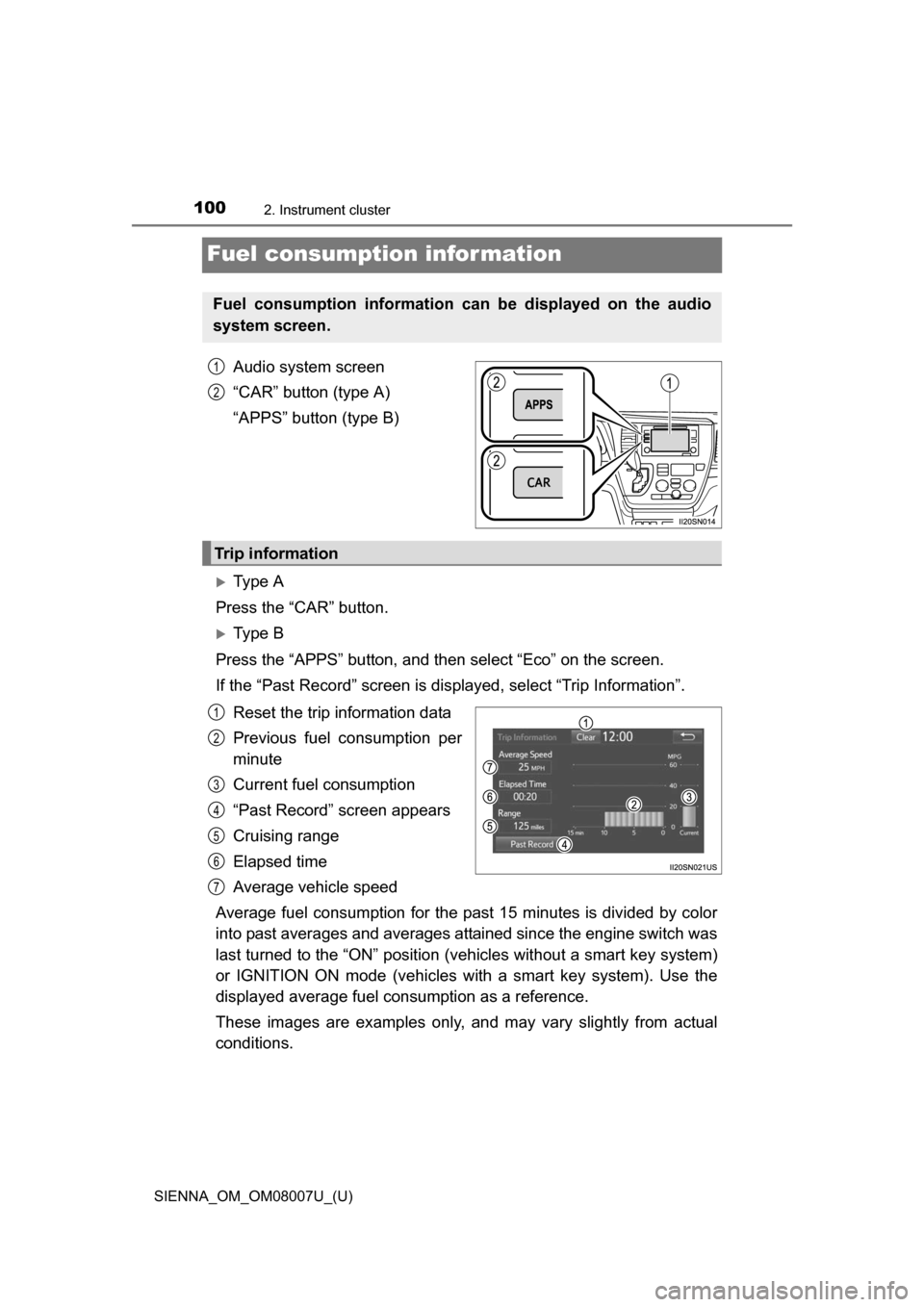
Audio system screen
“CAR” button (type A)
“APPS” button (type B)
Ty p e A
Press the “CAR” button.
Ty p e B
Press the “APPS” button, and t hen select “Eco” on the screen.
If the “Past Record” screen is displayed, select “Trip Information”.
Reset the trip information data
Previous fuel consumption per
minute
Current fuel consumption
“Past Record” screen appears
Cruising range
Elapsed time
Average vehicle speed
Average fuel consumption for the past 15 minutes is divided by color
into past averages and averages attained since the engine switch was
last turned to the “ON” position (v ehicles without a smart key system)
or IGNITION ON mode (vehicles wi th a smart key system). Use the
displayed average fuel co nsumption as a reference.
These images are examples only, an d may vary slightly from actual
conditions.
Fuel consumption information can be displayed on the audio
system screen.
1
2
Trip information
1
2
3
4
5
6
7
Page 101 of 672
SIENNA_OM_OM08007U_(U)
1012. Instrument cluster
2
Instrument cluster
Ty p e A
Press the “CAR” button.
Ty p e B
Press the “APPS” button, and t hen select “Eco” on the screen.
If the “Trip Information” screen is displayed, select “Past Record”.
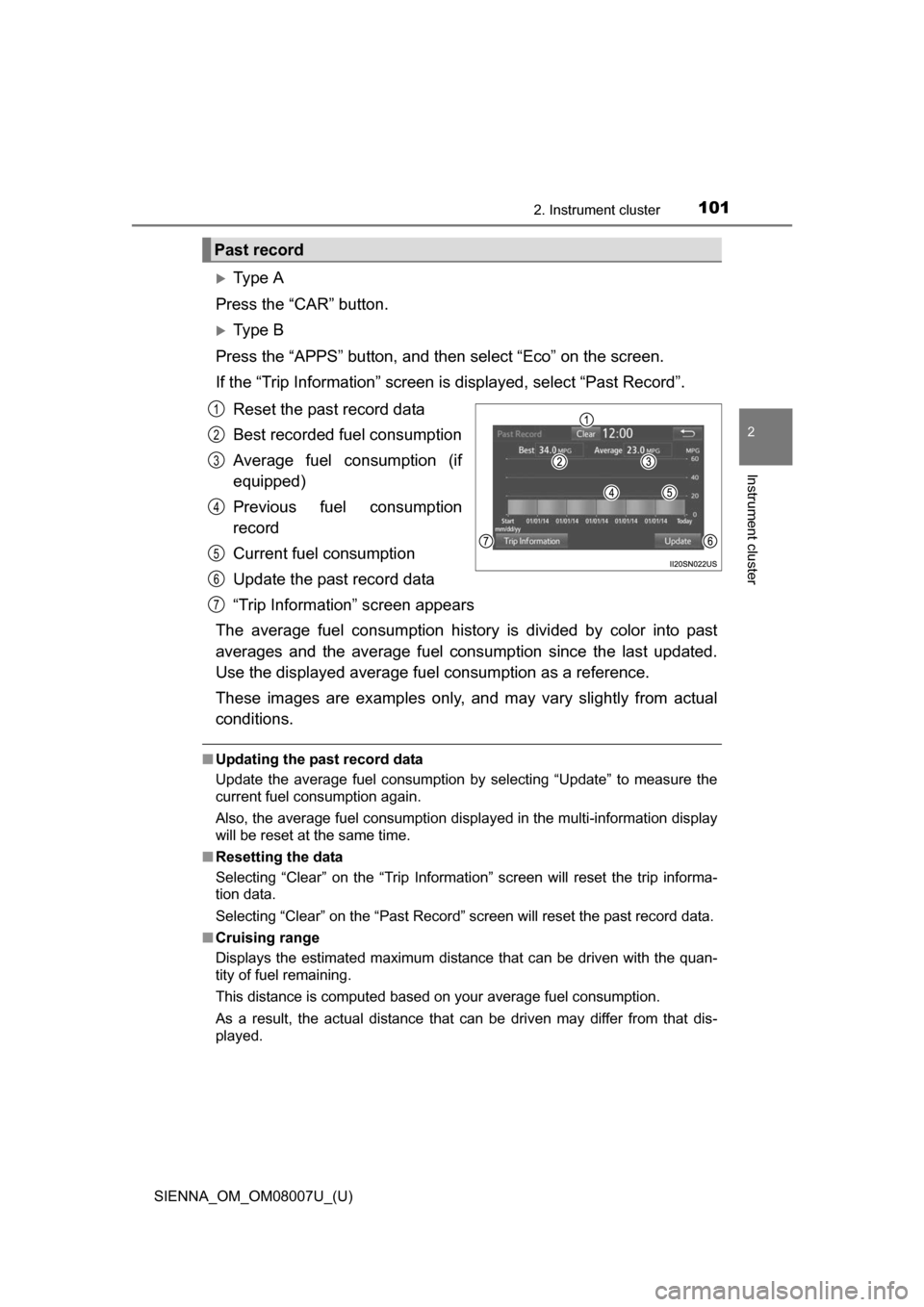
Reset the past record data
Best recorded fuel consumption
Average fuel consumption (if
equipped)
Previous fuel consumption
record
Current fuel consumption
Update the past record data
“Trip Information” screen appears
The average fuel consumption history is divided by color into past
averages and the average fuel cons umption since the last updated.
Use the displayed average fuel consumption as a reference.
These images are examples only, an d may vary slightly from actual
conditions.
■ Updating the past record data
Update the average fuel consumption by selecting “Update” to measure the
current fuel consumption again.
Also, the average fuel consumption displa yed in the multi-information display
will be reset at the same time.
■ Resetting the data
Selecting “Clear” on the “Trip Information” screen will reset the trip informa-
tion data.
Selecting “Clear” on the “Past Record” screen will reset the past record data.
■ Cruising range
Displays the estimated maximum distance that can be driven with the quan-
tity of fuel remaining.
This distance is computed based on your average fuel consumption.
As a result, the actual distance that can be driven may differ from that dis-
played.
Past record
1
2
3
4
5
6
7
Page 126 of 672
126
SIENNA_OM_OM08007U_(U)
3-2. Opening, closing and locking the doors
■Power sliding doors
●If the power sliding door outside handle is pulled while the power sliding
door is opening or closing, the door will reverse the operation direction.
● During opening operation:
Stroking the power sliding door handle forward will reverse the direction and
start closing.
Stroking the handle backward will continue opening.
During closing operation:
Stroking the power sliding door handle backward will reverse the direction
and start opening.
Stroking the handle forward will continue closing.
● The power sliding doors can be opened/closed manually when the power
sliding door function is canceled with the main switch.
● A buzzer sounds if you put the shift lever out of P with the engine switch in
the “ON” position (vehicles without a smart key system) or IGNITION ON
mode (vehicles with a smart key system) and the sliding door not completely
closed.
● Vehicles with AUTO ACCESS SEAT: If the AUTO ACCESS SEAT has not
been locked in place after being stowed, the right-hand sliding door will not
close and a beep will sound twice.
For details, refer to “AUTO A CCESS SEAT OWNER’S MANUAL”.
● In an emergency, power slide door operation can be stopped by any of the
following:
• Pulling the outside handle three consecutive times
• During opening operation, sliding the inside handle forward three consec-
utive times
• During closing operation, sliding the inside handle backward three con- secutive times
• Pressing the power sliding door switch three consecutive times
• Pressing the power sliding door button on wireless remote control three consecutive times ( P. 124)
After stopping, power sliding door brake function will be activated ( P. 127)
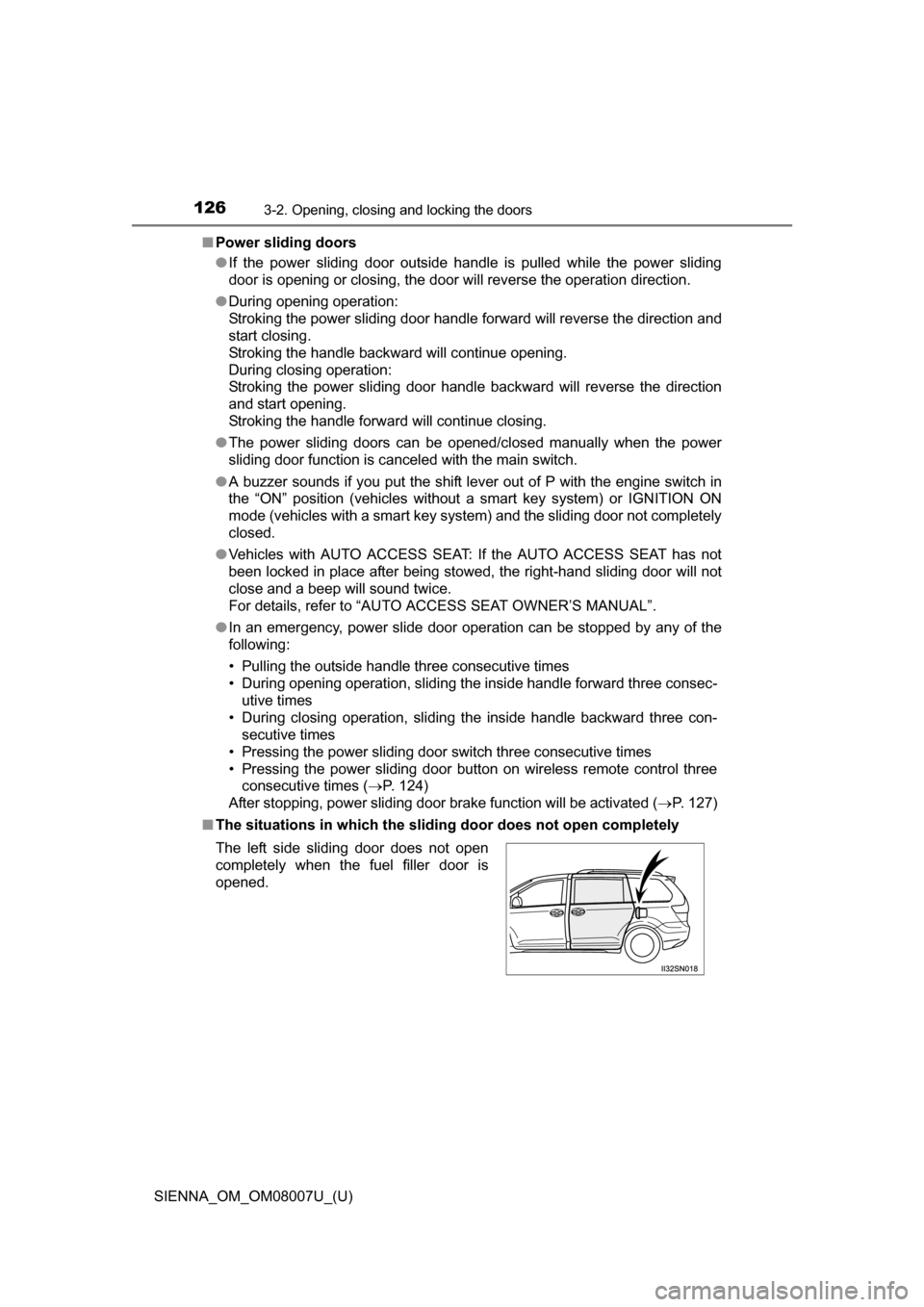
■ The situations in which the sliding door does not open completely
The left side sliding door does not open
completely when the fuel filler door is
opened.
Page 132 of 672

132
SIENNA_OM_OM08007U_(U)
3-2. Opening, closing and locking the doors
NOTICE
■Sliding door
■ To prevent damage to your vehicle
●Vehicles with the power sliding door:
• Do not apply excessive force when the sliding door is operating.
• Do not place your hand or foot near door hinges or rollers when the slid-
ing door is operating.
• Avoid forcibly opening the left side sliding door fully when the fuel filler door is opened. Otherwise, the fuel filler door may be damaged.
• Take care not to damage the sensors (installed on the front edge of the power sliding door) with a knife or other sharp object.
● Make sure there is nothing in the doorway before closing.
● Do not close the sliding door by applying the brakes. Doing so could cause
the sliding door to be damaged.
Make sure magazines are not bent or
protruding from the sliding door pockets.
Do not insert anything too big so that the
shape of the sliding door pockets is dis-
torted. Such objects may obstruct the
opening/closing of the sliding doors,
damage the sliding door pockets or the
vehicle body, and may result in a mal-
function.
Page 193 of 672
193
SIENNA_OM_OM08007U_(U)
4Driving
4-1. Before drivingDriving the vehicle ............. 194
Cargo and luggage ........... 203
Vehicle load limits ............. 209
Trailer towing (with towing package) ..... 210
Dinghy towing ................... 224
4-2. Driving procedures Engine (ignition) switch (vehicles without a
smart key system) ........... 225
Engine (ignition) switch (vehicles with a smart
key system) ..................... 228
Automatic transaxle........... 233
Turn signal lever................ 240
Parking brake .................... 241 4-3. Operating the lights
and wipers
Headlight switch ................ 242
Automatic High Beam ....... 247
Fog light switch ................. 252
Windshield wipers and washer ............................ 253
Rear window wiper and washer ............................ 257
4-4. Refueling Opening the fuel tank cap .................................. 259
4-5. Using the driving support systems
Cruise control .................... 262
Dynamic radar cruise control ............................. 266
Intuitive parking assist....... 279
Rear view monitor system ............................ 287
Driving assist systems ...... 297
PCS (Pre-Collision System) ........................... 302
BSM (Blind Spot Monitor) ........................... 309
• T he Blind Spot Monitor
function ......................... 312
• The Rear Cross Traffic Alert function ................. 314
4-6. Driving tips Winter driving tips ............. 317
Page 196 of 672
196
SIENNA_OM_OM08007U_(U)
4-1. Before driving
■Operating your vehicle in a foreign country
Comply with the relevant vehicle registration laws and confirm the availability
of the correct fuel. ( P. 602)
WARNING
Observe the following precautions.
Failure to do so may result in death or serious injury.
■When starting the vehicle
Always keep your foot on the brake pedal while stopped with the engine
running. This prevents the vehicle from creeping.
■ When driving the vehicle
●Do not drive if you are unfamiliar with the location of the brake and accel-
erator pedals to avoid depressing the wrong pedal.
• Accidentally depressing the accelerator pedal instead of the brake
pedal will result in sudden acceleration that may lead to an accident.
• When backing up, you may twist your body around, leading to a diffi- culty in operating the pedals. Make sure to operate the pedals properly.
• Make sure to keep a correct driving posture even when moving the
vehicle only slightly. This allows you to depress the brake and accelera-
tor pedals properly.
• Depress the brake pedal using your right foot. Depressing the brake
pedal using your left foot may delay response in an emergency, result-
ing in an accident.
● Do not drive the vehicle over or stop the vehicle near flammable materials.
The exhaust system and exhaust gases can be extremely hot. These hot
parts may cause a fire if there is any flammable material nearby.
Page 210 of 672
210
SIENNA_OM_OM08007U_(U)
4-1. Before driving
Trailer towing (with towing package)
Contact your Toyota dealer for further information about additional
requirements such as a towing kit, etc.
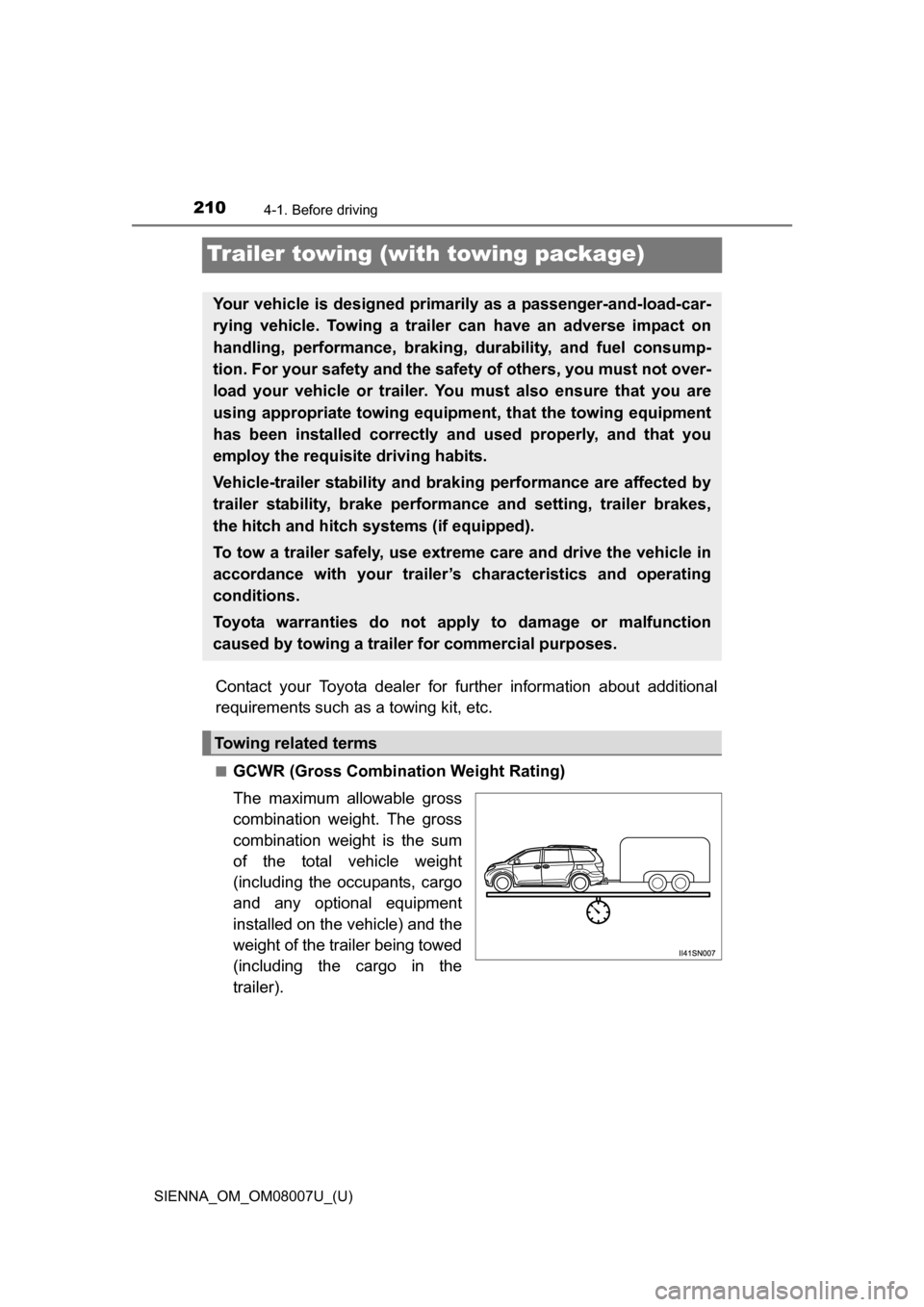
■GCWR (Gross Combination Weight Rating)
The maximum allowable gross
combination weight. The gross
combination weight is the sum
of the total vehicle weight
(including the occupants, cargo
and any optional equipment
installed on the vehicle) and the
weight of the trailer being towed
(including the cargo in the
trailer).
Your vehicle is designed primarily as a passenger-and-load-car-
rying vehicle. Towing a trailer can have an adverse impact on
handling, performance, braking, durability, and fuel consump-
tion. For your safety and the safe ty of others, you must not over-
load your vehicle or trailer. You must also ensure that you are
using appropriate towing equipmen t, that the towing equipment
has been installed correctly a nd used properly, and that you
employ the requisite driving habits.
Vehicle-trailer stability and braking performance are affected by
trailer stability, brake performance and setting, trailer brakes,
the hitch and hitch systems (if equipped).
To tow a trailer safely, use extreme care and drive the vehicle in
accordance with your trailer’s characteristics and operating
conditions.
Toyota warranties do not apply to damage or malfunction
caused by towing a trailer for commercial purposes.
Towing related terms
Page 245 of 672

SIENNA_OM_OM08007U_(U)
2454-3. Operating the lights and wipers
4
Driving
■Daytime running light system (if equipped)
●Bulb type: To make your vehicle more visible to other drivers during daytime
driving, the daytime running lights turn on automatically whenever the
engine is started and the parking brake is released with the headlight switch
off or in the “AUTO” position. (illuminate dimmer than the headlights) Day-
time running lights are not designed for use at night.
For the U.S.A.: Daytime running lights can be turned off by operating the
headlight switch.
LED type: To make your vehicle more visible to other drivers during daytime
driving, the daytime running lights turn on automatically whenever the
engine is started and the parking brake is released with the headlight
switch off. Daytime running lights are not designed for use at night.
For the U.S.A.: Daytime running lights can be turned off by operating the
headlight switch.
● Compared to turning on the headlights, the daytime running light system
offers greater durability and consumes less electricity, so it can help improve
fuel economy.
■ Headlight control sensor
The sensor may not function properly if an
object is placed on the sensor, or anything
that blocks the sensor is affixed to the
windshield.
Doing so interferes with the sensor
detecting the level of ambient light and
may cause the automatic headlight sys-
tem to malfunction.