2017 TOYOTA SIENNA lock
[x] Cancel search: lockPage 246 of 672

246
SIENNA_OM_OM08007U_(U)
4-3. Operating the lights and wipers
■Automatic light off system
Vehicles without a smart key system
● When the headlights are on: The headlights and tail lights turn off 30 sec-
onds after a door is opened and closed if the engine switch is turned to the
“ACC” or “LOCK” position. (The lights turn off immediately if on the
key is pressed after all the doors are locked.)
● When only the tail lights are on: The tail lights turn off automatically if the
engine switch is turned to the “ACC” or “LOCK” position and the driver’s
door is opened.
To turn the lights on again, turn the engine switch to the “ON” position, or turn
the light switch off once and then back to the
or .
Vehicles with a smart key system
● When the headlights are on: The headlights and tail lights turn off 30 sec-
onds after a door is opened and closed if the engine switch is turned to
ACCESSORY mode or turned off. (The lights turn off immediately if
on the key is pressed after all the doors are locked.)
● When only the tail lights are on: The tail lights turn off automatically if the
engine switch is turned to ACCESSORY mode or turned off and the driver’s
door is opened.
To turn the lights on again, turn the engine switch to IGNITION ON mode, or
turn the light switch off and then back to or .
■ Light reminder buzzer
Vehicles without a smart key system
A buzzer sounds when the engine switch is turned to the “LOCK” position, the
key is removed and the driver’s door is opened while the lights are turned on.
Vehicles with a smart key system
A buzzer sounds when the engine switch is turned off and the driver’s door is
opened while the lights are turned on.
■ Customization
Settings (e.g. light sensor sensitivity) can be changed.
(Customizable features: P. 631)
NOTICE
■To prevent battery discharge
Do not leave the lights on longer than necessary when the engine is not
running.
Page 250 of 672

250
SIENNA_OM_OM08007U_(U)
4-3. Operating the lights and wipers
●In the situations below, the system may not be able to correctly detect the
surrounding brightness levels, and may flash or expose nearby pedestrians
to the high beam. Therefore, you should consider turning the high beam on
or off manually rather than relying on the Automatic High Beam system.
• In bad weather (rain, snow, fog, sandstorms etc.)
• The windshield is obscured by fog, mist, ice, dirt etc.
• The windshield is cracked or damaged.
• The camera sensor is deformed or dirty.
• Surrounding brightness levels are equal to those of headlights, tail lights
or fog lights.
• Vehicles ahead have headlights that are either switched off, dirty, are changing color, or are not aimed properly.
• When driving through an area of in termittently changing brightness and
darkness
• When frequently and repeatedly driving ascending/descending roads, or roads with rough, bumpy or uneven surfaces (such as stone-paved
roads, gravel tracks etc.)
• When frequently and repeatedly taking curves or driving on a winding road
• There is a highly reflective object ahead of the vehicle, such as a sign or a mirror.
• The vehicle’s headlights are damaged or dirty.
• The vehicle is lifting or tilting, due to a flat tire, a trailer being towed etc.
• The high beam and low beam are repeatedly being switched between in an abnormal manner.
• The driver believes that the high beam may be causing problems or dis- tress to other drivers or pedestrians nearby.
■ When the warning message is shown on the multi-information display
P. 562
■ Temporary lowering sensor sensitivity
The sensitivity of the sensor can be temporarily lowered.
To lower the sensitivity, push and hold on the inside rear view mirror for
15 to 20 seconds, and release. The indicator light on the inside rear view mir-
ror will flash to indicate that the sensitivity has been lowered.
When the engine switch is turned to the “LOCK” position (vehicles without a
smart key system) or turned off (vehicles with a smart key system), the sensi-
tivity will be returned to its normal level.
■ Customization
The Automatic High Beam can be turned off.
(Customizable features: P. 631)
Page 255 of 672

SIENNA_OM_OM08007U_(U)
2554-3. Operating the lights and wipers
4
Driving
The sensor sensitivity can be adjusted when “AUTO” is selected.Increases the sensitivity
Decreases the sensitivity
Washer/wiper dual operation
The wipers will automatically
operate a couple of times after
the washer squirts.
■The windshield wipers and washer can be operated when
The engine switch is in the “ON” position (vehicles without a smart key sys-
tem) or IGNITION ON mode (vehicles with a smart key system).
■ Raindrop sensor (vehicles with ra in-sensing windshield wipers)
● If the wiper switch is turned to “AUTO” position while the engine switch is in
IGNITION ON mode, the wiper will operate once to show that “AUTO” mode
is activated.
● If the temperature of the raindrop sensor is 185°F (85°C) or higher, or 14°F
(-10°C) or lower, automatic operation may not occur. In this case, operate
the wipers in any mode other than “AUTO”.
■ If no windshield washer fluid sprays
Check that the washer nozzles are not blocked if there is washer fluid in the
windshield washer fluid reservoir.
6
7
8
●The raindrop sensor judges the amount
of raindrops.
Page 256 of 672

256
SIENNA_OM_OM08007U_(U)
4-3. Operating the lights and wipers
WARNING
■Caution regarding the use of windshield wipers in “AUTO” mode
The windshield wipers may operate unexpectedly if the sensor is touched or
the windshield is subject to vibration in “AUTO” mode. Take care that your
fingers etc. do not become caught in the windshield wipers.
■ Caution regarding the use of washer fluid
When it is cold, do not use the washer fluid until the windshield becomes
warm. The fluid may freeze on the windshield and cause low visibility. This
may lead to an accident, resulting in death or serious injury.
NOTICE
■When the windshield is dry
Do not use the wipers, as they may damage the windshield.
■ When the washer fluid tank is empty
Do not operate the switch continually as the washer fluid pump may over-
heat.
■ When a nozzle becomes blocked
In this case, contact your Toyota dealer.
Do not try to clear it with a pin or other object. The nozzle will be damaged.
Page 257 of 672
257
SIENNA_OM_OM08007U_(U)
4-3. Operating the lights and wipers
4
Driving
Rear window wiper and washer
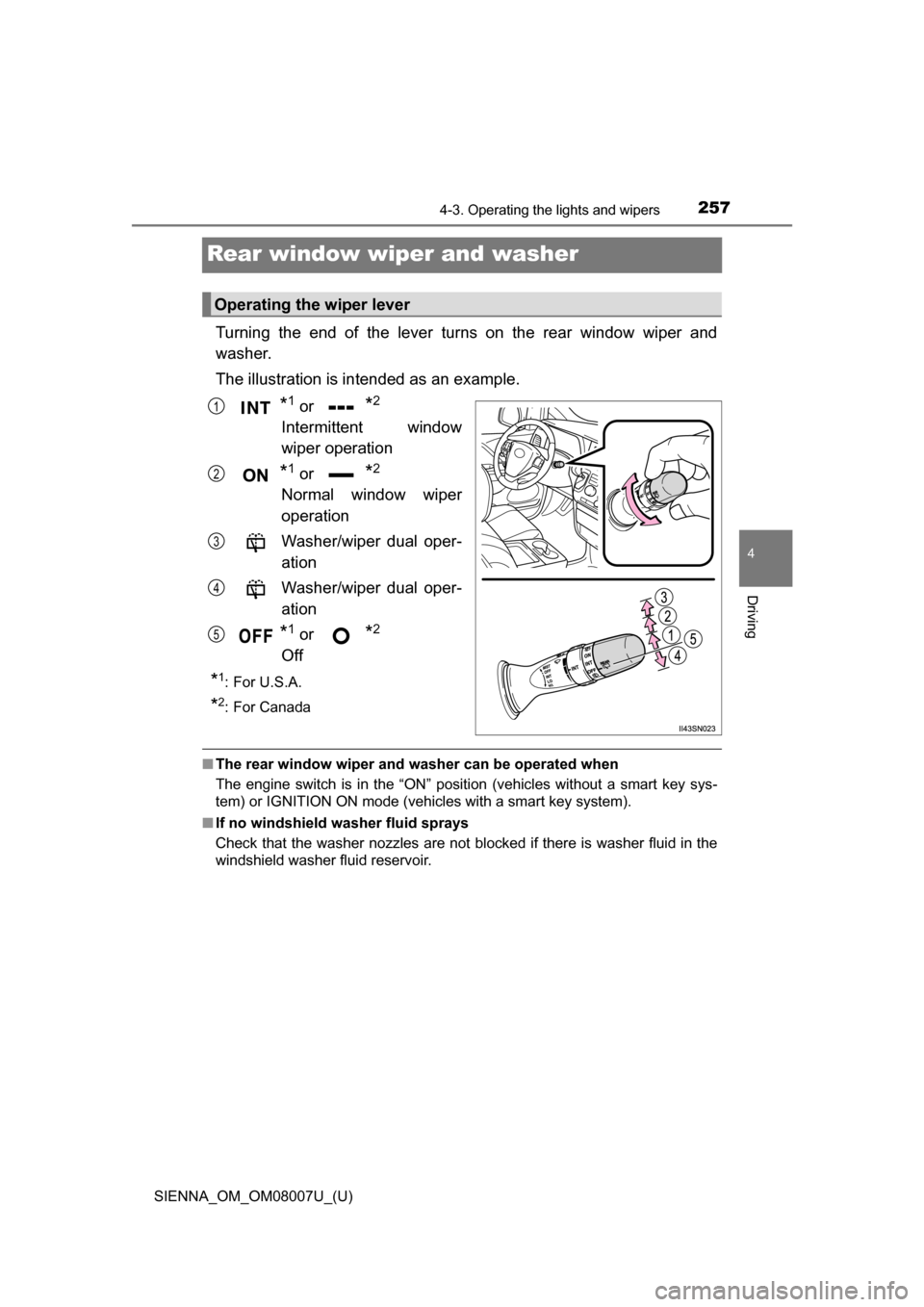
Turning the end of the lever turns on the rear window wiper and
washer.
The illustration is intended as an example.
*1 or *2
Intermittent window
wiper operation
*1 or *2
Normal window wiper
operation
Washer/wiper dual oper-
ation
Washer/wiper dual oper-
ation
*1 or *2
Off
*1:For U.S.A.
*2: For Canada
■ The rear window wiper and w asher can be operated when
The engine switch is in the “ON” position (vehicles without a smart key sys-
tem) or IGNITION ON mode (vehicles with a smart key system).
■ If no windshield washer fluid sprays
Check that the washer nozzles are not blocked if there is washer fluid in the
windshield washer fluid reservoir.
Operating the wiper lever
1
2
3
4
5
Page 258 of 672
258
SIENNA_OM_OM08007U_(U)
4-3. Operating the lights and wipers
NOTICE
■When the rear window is dry
Do not use the wiper, as it may damage the rear window.
■ When the washer fluid tank is empty
Do not operate the switch continually as the washer fluid pump may over-
heat.
■ When a nozzle becomes blocked
In this case, contact your Toyota dealer.
Do not try to clear it with a pin or other object. The nozzle will be damaged.
Page 259 of 672
259
SIENNA_OM_OM08007U_(U)
4-4. Refueling
4
Driving
Opening the fuel tank cap
●Close all the doors and windows, and turn the engine switch to the
“LOCK” position (vehicles without a smart key system) or off (vehi-
cles with a smart key system).
● Confirm the type of fuel.
■Fuel type
P. 609
■ Fuel tank opening for unleaded gasoline
To help prevent incorrect fueling, your vehicle has a fuel tank opening that
only accommodates the special nozzle on unleaded fuel pumps.
Perform the following steps to open the fuel tank cap:
Before refueling the vehicle
WARNING
■When refueling the vehicle
Observe the following precautions while refueling the vehicle. Failure to do
so may result in death or serious injury.
●After exiting the vehicle and before opening the fuel door, touch an
unpainted metal surface to discharge any static electricity. It is important to
discharge static electricity before refueling because sparks resulting from
static electricity can cause fuel vapors to ignite while refueling.
● Always hold the grips on the fuel tank cap and turn it slowly to remove it.
A whooshing sound may be heard when the fuel tank cap is loosened.
Wait until the sound cannot be heard before fully removing the cap.
In hot weather, pressurized fuel may spray out of the filler neck and cause
injury.
● Do not allow anyone that has not discharged static electricity from their
body to come close to an open fuel tank.
● Do not inhale vaporized fuel.
Fuel contains substances that are harmful if inhaled.
● Do not smoke while refueling the vehicle.
Doing so may cause the fuel to ignite and cause a fire.
● Do not return to the vehicle or touch any person or object that is statically
charged.
This may cause static electricity to build up, resulting in a possible ignition
hazard.
Page 297 of 672
297
SIENNA_OM_OM08007U_(U)
4-5. Using the driving support systems
4
Driving
Driving assist systems
◆ABS (Anti-lock Brake System)
Helps to prevent wheel lock when the brakes are applied suddenly,
or if the brakes are applied while driving on a slippery road surface
◆Brake assist
Generates an increased level of braking force after the brake pedal
is depressed when the system detects a panic stop situation
◆VSC (Vehicle Stability Control)
Helps the driver to control skidding when swerving suddenly or
turning on slippery road surfaces
◆TRAC (Traction Control)
Helps to maintain drive power and prevent the drive wheels from
spinning when starting the vehicle or accelerating on slippery roads
◆Hill-start assist control (if equipped)
Helps to prevent the vehicle from rolling backward when starting on
an incline or slippery slope
◆EPS (Electric Power Steering)
Employs an electric motor to redu ce the amount of effort needed to
turn the steering wheel
◆Active Torque Control 4WD (AWD models only)
Automatically switches from front-wheel drive to AWD (All-Wheel
Drive) according to driving condit ions, helping to ensure reliable
handling and stability. Examples of conditions where the system will
switch to AWD are when cornering, going uphill, starting off or
accelerating, and when the road surface is slippery due to snow or
rain etc.
To help enhance driving safety and performance, the following
systems operate automatically in response to various driving
situations. Be aware, however, that these systems are supple-
mentary and should not be relied upon too heavily when operat-
ing the vehicle.