Page 281 of 741

RAV4_OM_OM0R005U_(U)
2814-5. Using the driving support systems
4
Driving
*1: 4 sensor type
*2: The images may differ from that shown in the illustrations. ( →P. 278)
*3: Multi-information display
*4: Navigation system or multimedia system screen
■
Buzzer operation and distance to an obstacle
A buzzer sounds when t he sensors are operating.
● The buzzer sounds faster as the vehicle approac hes an obstacle.
When the vehicle comes within the following distance of the
obstacle, the buzzer so unds continuously.
• Front corner sensors: A pproximately 1.0 ft. (30 cm)
• Front center sensors: Ap proximately 1.0 ft. (30 cm)
• Rear corner sensors: Approximately 1.0 ft. (30 cm)
• Rear center sensors: Approximately 1.1 ft. (35 cm)
● When 2 or more obstacles ar e detected simultaneously, the
buzzer system responds to the nearest obstacle. If one or both
come within the above distanc es, the beep will repeat a long
tone, followed by fast beeps.
Approximately 3.3 ft. (100 cm)
Approximately 4.9 ft. (150 cm)
Approximately 1.8 ft. (55 cm)
Approximately 1.6 ft. (50 cm)
The diagram shows the detection
range of the sensors. Note that the
sensors may not be able to detect
obstacles that are extremely close
to the vehicle.
The range of the sensors may
change depending on the shape of
the object etc.
*: If equipped
Detection range of the sensors
1
2
3
4
Page 285 of 741
RAV4_OM_OM0R005U_(U)
2854-5. Using the driving support systems
4
Driving
WARNING
■When using intuitive parking assist
Observe the following precautions.
Failing to do so may result in the vehicle being unable to be driven safely
and possibly cause an accident.
● Do not use the sensor at speeds in excess of 6 mph (10 km/h).
● The sensors’ detection areas and reaction times are limited. When mov-
ing, check the areas surrounding the vehicle (especially the sides of the
vehicle) for safety, and drive slowly, using the brake to control the vehicle’s
speed.
● Do not install accessories within the sensors’ detection areas.
NOTICE
■ When using intuitive parking assist
In the following situations, the system may not function correctly due t\
o a
sensor malfunction etc. Have the vehicle checked by your Toyota dealer.
● If the area around a sensor collides with something, or is subjected to
strong impact.
● If the bumper collides with something.
4 sensor type
● The rear corner and center indicators flash, and a beep sounds when no
obstacles are detected.
● If the rear corner and center indicators show continuously without a beep.
● If a indicator error occurs, first check the sensor.
If the error occurs even when there is no ice, snow or mud on the sensor, it
is likely that the sensor is malfunctioning.
8 sensor type
● The intuitive parking assist operation display flashes, and a beep sounds
when no obstacles are detected.
● If the display shows continuously without a beep.
● If a display error occurs, first check the sensor.
If the error occurs even when there is no ice, snow or mud on the sensor, it
is likely that the sensor is malfunctioning.
■ Notes when washing the vehicle
Do not apply intensive bursts of water or steam to the sensor area.
Doing so may result in the sensor malfunctioning.
Page 286 of 741
286
RAV4_OM_OM0R005U_(U)
4-5. Using the driving support systems
Rear view monitor system∗
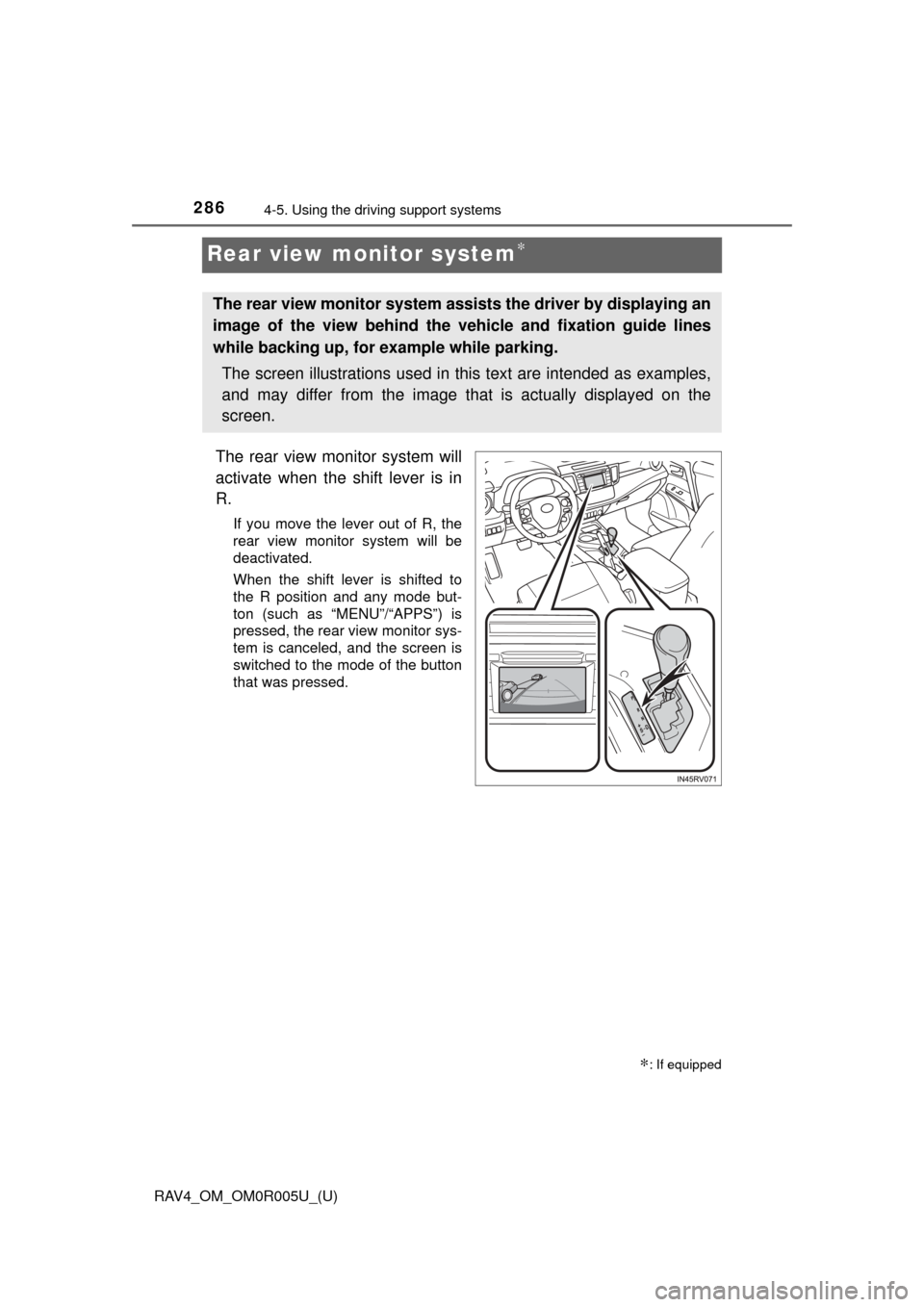
The rear view monitor system will
activate when the shift lever is in
R.
If you move the lever out of R, the
rear view monitor system will be
deactivated.
When the shift lever is shifted to
the R position and any mode but-
ton (such as “MENU”/“APPS”) is
pressed, the rear view monitor sys-
tem is canceled, and the screen is
switched to the mode of the button
that was pressed.
∗: If equipped
The rear view monitor system assists the driver by displaying an
image of the view behind the vehicle and fixation guide lines
while backing up, for example while parking.
The screen illustrations used in this text are intended as examples,
and may differ from the image that is actually displayed on the
screen.
Page 291 of 741
RAV4_OM_OM0R005U_(U)
2914-5. Using the driving support systems
4
Driving
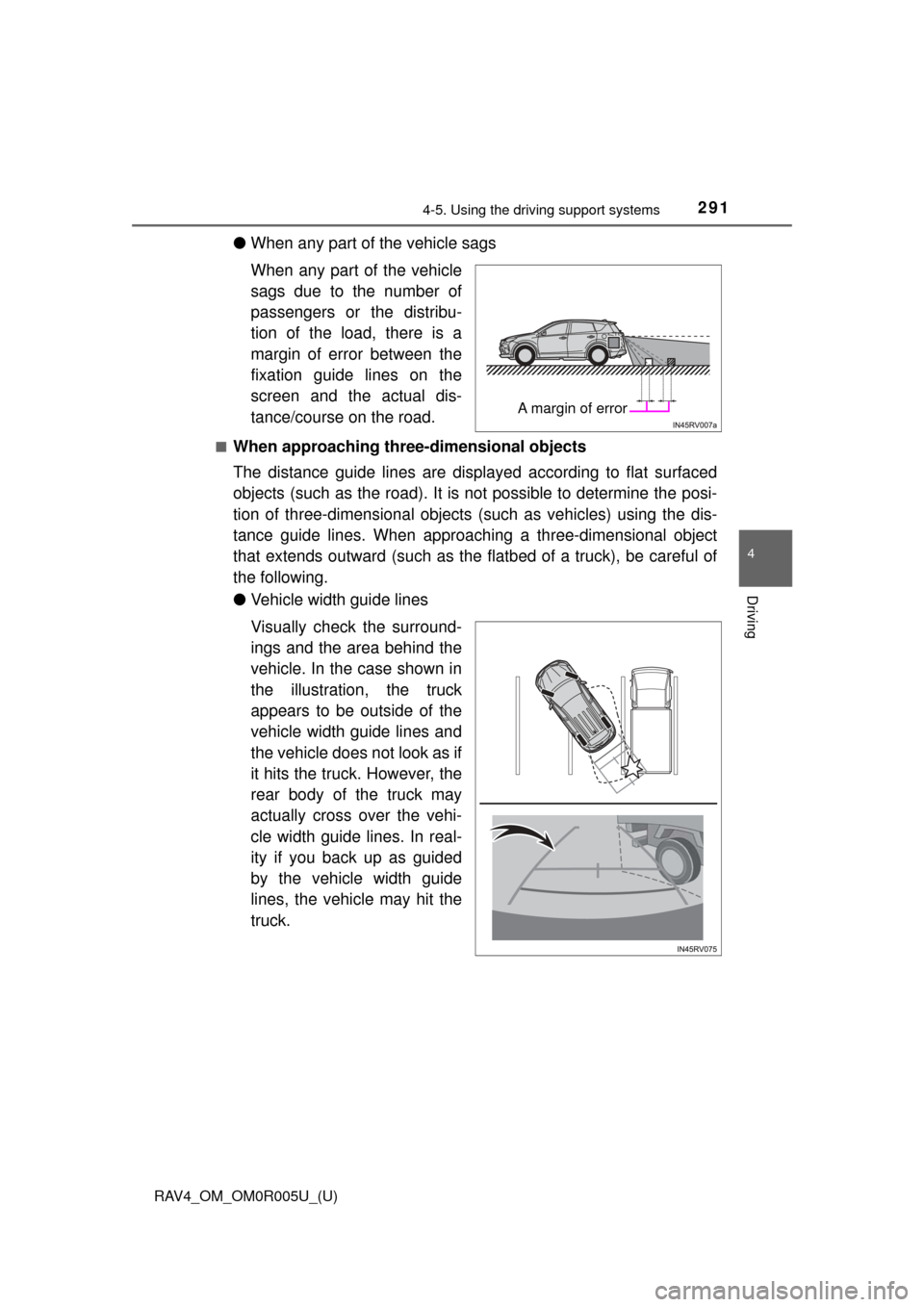
●When any part of the vehicle sags
When any part of the vehicle
sags due to the number of
passengers or the distribu-
tion of the load, there is a
margin of error between the
fixation guide lines on the
screen and the actual dis-
tance/course on the road.
■When approaching thre e-dimensional objects
The distance guide lines are displayed according to flat surfaced
objects (such as the road). It is not possible to determine the posi-
tion of three-dimensional objects (such as vehicles) using the dis-
tance guide lines. When approaching a three-dimensional object
that extends outward (such as the flatbed of a truck), be careful of
the following.
● Vehicle width guide lines
Visually check the surround-
ings and the area behind the
vehicle. In the case shown in
the illustration , the truck
appears to be outside of the
vehicle width guide lines and
the vehicle does not look as if
it hits the truck. However, the
rear body of the truck may
actually cross over the vehi-
cle width guide lines. In real-
ity if you back up as guided
by the vehicle width guide
lines, the vehicle may hit the
truck.
A margin of error
Page 295 of 741
RAV4_OM_OM0R005U_(U)
2954-5. Using the driving support systems
4
Driving
NOTICE
■How to use the camera
● The rear view monitor system may not operate properly in the following
cases.
• If the back of the vehicle is hit, the position and mounting angle of the
camera may change.
• As the camera has a water proof construction, do not detach, disassem- ble or modify it. This may cause incorrect operation.
• When cleaning the camera lens, flush the camera with a large quantity of water and wipe it with a soft and wet cloth. Strongly rubbing the cam-
era lens may cause the camera lens to be scratched and unable to
transmit a clear image.
• Do not allow organic solvent, car wax, window cleaner or glass coat to adhere to the camera. If this happens, wipe it off as soon as possible.
• If the temperature changes rapidly, such as when hot water is poured on the vehicle in cold weather, the system may not operate normally.
• When washing the vehicle, do not apply intensive bursts of water to the
camera or camera area. Doing so may result in the camera malfunc-
tioning.
● Do not expose the camera to strong impact as this could cause a malfunc-
tion. If this happens, have the vehicle inspected by your Toyota dealer as
soon as possible.
Page 302 of 741
302
RAV4_OM_OM0R005U_(U)
4-5. Using the driving support systems
■The Blind Spot Monitor function is operational when
●The Blind Spot Monitor system is set to on
● Vehicle speed is greater than approximately 10 mph (16 km/h).
■ The Blind Spot Monitor function will detect a vehicle when
●A vehicle in an adjacent lane overtakes your vehicle.
● Another vehicle enters the detection area when it changes lanes.
■ Conditions under which the Blind Spot Monitor function will not detect a
vehicle
The Blind Spot Monitor function is not designed to detect the following types
of vehicles and/or objects:
● Small motorcycles, bicycles, pedestrians, etc.
*
●Vehicles traveling in the opposite direction
● Guardrails, walls, signs, parked vehi cles and similar stationary objects
*
●Following vehicles that are in the same lane*
●Vehicles driving 2 lanes across from your vehicle*
*
: Depending on conditions, detection of a vehicle and/or object may occur.
Page 305 of 741
RAV4_OM_OM0R005U_(U)
3054-5. Using the driving support systems
4
Driving
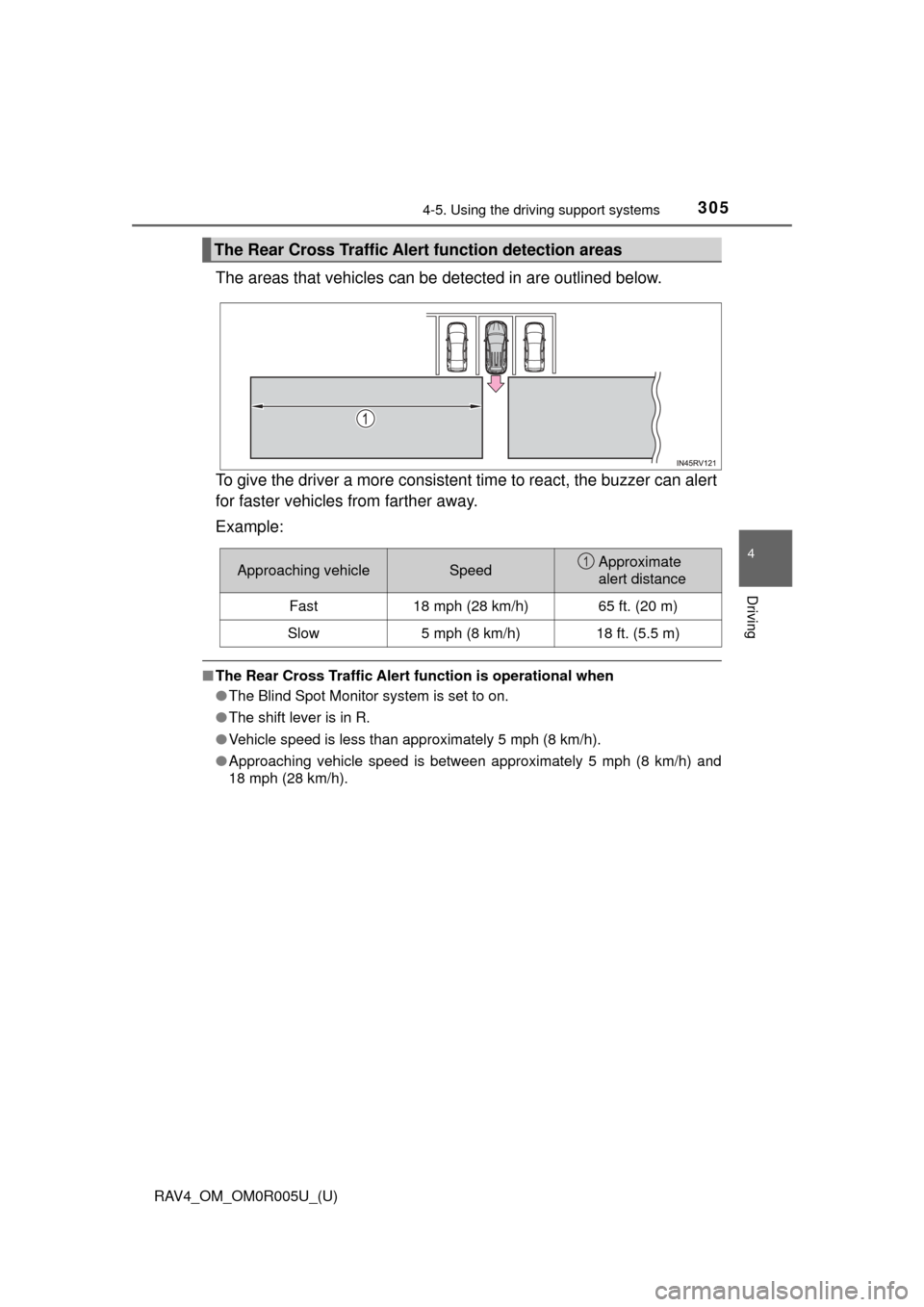
The areas that vehicles can be detected in are outlined below.
To give the driver a more consistent time to react, the buzzer can alert
for faster vehicles from farther away.
Example:
■ The Rear Cross Traffic Alert function is operational when
● The Blind Spot Monitor system is set to on.
● The shift lever is in R.
● Vehicle speed is less than approximately 5 mph (8 km/h).
● Approaching vehicle speed is between approximately 5 mph (8 km/h) and
18 mph (28 km/h).
The Rear Cross Traffic Aler t function detection areas
Approaching vehicleSpeedApproximate
alert distance
Fast18 mph (28 km/h)65 ft. (20 m)
Slow5 mph (8 km/h)18 ft. (5.5 m)
1
Page 310 of 741

310
RAV4_OM_OM0R005U_(U)
4-5. Using the driving support systems
■Turning off the TRAC/VSC/Trailer Sway Control systems
To turn the TRAC/VSC/Trailer Sway Control systems off, press and hold
for more than 3 seconds while the vehicle is stopped.
“Traction Control Turned Off” will be shown and the VSC OFF indicator light
will come on.
*
Press again to turn the systems back on.
*: On vehicles with pre-collision system, pre-collision brake assist and pre-
collision braking will also be disabled. The PCS warning light will come on
and the message will be shown on the multi-information display. ( →P. 239)
■ When the “AUTO LSD” indicator light flashes even if the VSC OFF
switch has not been pressed (2WD models)
TRAC, AUTO LSD and hill-start assist control cannot be operated. Contact
your Toyota dealer.
■ When the message is displayed on th e multi-information display show-
ing that TRAC has been disabled even if the VSC OFF switch has not
been pressed (AWD models)
TRAC and hill-start assist control cannot be operated. Contact your Toyota
dealer.
■ Sounds and vibrations caused by the ABS, brake assist, VSC/Trailer
Sway Control, TRAC and hill-start assist control systems
● A sound may be heard from the engine compartment when the brake pedal
is depressed repeatedly, when the engine is started or just after the vehicle
begins to move. This sound does not indicate that a malfunction has
occurred in any of these systems.
● Any of the following conditions may occur when the above systems are
operating. None of these indicates that a malfunction has occurred.
• Vibrations may be felt through the vehicle body and steering.
• A motor sound may be heard after the vehicle comes to a stop.
• The brake pedal may pulsate slightly after the ABS is activated.
• The brake pedal may move down slightly after the ABS is activated.
■ EPS operation sound
When the steering wheel is operated, a motor sound (whirring sound) may be
heard. This does not indicate a malfunction.
■ Automatic reactivation of TRAC an d VSC/Trailer Sway Control systems
After turning the TRAC and VSC/Trailer Sway Control systems off, the sys-
tems will be automatically re-enabled in the following situations:
● When the engine switch is turned to the “LOCK” position (vehicles without
smart key system) or off (vehicles with smart key system).
● If only the TRAC system is turned off, the TRAC will turn on when vehicle
speed increases.
If both the TRAC and VSC/Trailer Sway Control systems are turned off,
automatic re-enabling will not occur when vehicle speed increases.