Page 366 of 741

365
RAV4_OM_OM0R005U_(U)
5-6. Using Bluetooth® devices
5
Audio system
Register a Bluetooth® device
Press the “SETUP” button and select “Bluetooth*” using the
“TUNE•SCROLL” knob.
Press the knob and select “BT pairing” using the knob.
A passkey will be displayed.
SSP (Secure Simple Pairing) incompatible Bluetooth
® devices:
Input the passkey into the device.
SSP (Secure Simple Pairin g) compatible Bluetooth
® devices:
Select “Yes” to register the device. Depending on the type of
device, it may register automatically.
If a Bluetooth
® device has both music player and cellular phone func-
tions, both functions will be register ed at the same time. When delet-
ing the device, both functions will be deleted at the same time.
If the off-hook switch is presse d and the “PHONE” mode is entered
when no phones have been registered, the registration screen will be
automatically displayed.
*: Bluetooth is a registered trademark of Bluetooth SIG, Inc.
Before using the Bluetooth® audio/phone, it is necessary to reg-
ister a Bluetooth® device in the system. Follow the procedure
below to register (pair) a device:
How to register a Bluetooth® device
1
2
3
Page 367 of 741
366
RAV4_OM_OM0R005U_(U)
5-7. “SETUP” menu
Using the “SETUP” menu (“Bluetooth*”
menu)
∗
■Functions and operation proceduresPress the “SETUP” button and select “Bluetooth
*” using the
“TUNE•SCROLL” knob.
Press the knob and select one of the following functions using
the knob.
● Registering a Bluetooth
® device
“BT pairing”
● Listing the registered cellular phones
“List phone”
● Listing the registered portable players
“List audio”
● Changing the passkey
“Passkey”
● Setting automatic connection of the device on or off
“BT power”
● Displaying the device status
“Bluetooth
* info”
● Setting the automatic connection confirmation display to on or off
“Display setting”
● Initialization
“Initialize”
*: Bluetooth is a registered trademark of Bluetooth SIG, Inc.
∗: If equipped
Registering a Bluetooth® device in the system allows the system
to function. The following functi ons can be used for registered
devices:
1
2
Page 372 of 741

371
RAV4_OM_OM0R005U_(U)
5-7. “SETUP” menu
5
Audio system
Using the “SETUP” menu (“PHONE” menu)∗
■Functions and operation procedures
To enter the menu for each function, press the “SETUP” button and
follow the steps below using the “TUNE•SCROLL” knob:
●Adding a new phone number
1. “PHONE” → 2. “Phonebook” → 3. “Add contacts”
● Setting speed dials
1. “PHONE” → 2. “Phonebook” → 3. “Add SD”
● Deleting call histories
1. “PHONE” → 2. “Phonebook” → 3. “Delete call history”
● Deleting a registered phone number
1. “PHONE” → 2. “Phonebook” → 3. “Delete contacts”
● Deleting another cellular phone’s phonebook
1. “PHONE” → 2. “Phonebook” → 3. “Delete other PB”
● Setting call volume
1. “PHONE” → 2. “HF sound setting” → 3. “Call volume”
● Setting ring tone volume
1. “PHONE” → 2. “HF sound setting” → 3. “Ringtone volume”
● Setting ring tone
1. “PHONE” → 2. “HF sound setting” → 3. “Ringtone”
● Transferring call histories
1. “PHONE” → 2. “Transfer histories”
● Setting automatic transferring of the phonebook
1. “PHONE” → 2. “Auto transfer”
∗: If equipped
Page 381 of 741
380
RAV4_OM_OM0R005U_(U)
5-9. Bluetooth® Phone
Select “Dial by number” using the “TUNE•SCROLL” knob.
Enter the phone number and press the off-hook switch.
Select “All calls”, “Missed calls”, “Incoming calls” or “Outgoing calls”
using the “TUNE•SCROLL” knob.
Select a desired number using th e knob and press the off-hook
switch.
The following operations can be performed:
● Registering a number as a speed dial
Press (Add S. Dial) and then press the desired preset button
(from [1] to [5]).
● Deleting the selected number
Press (DELETE) and press (YES).
Dialing by entering the number
Dialing from call histories
1
2
1
2
Page 383 of 741
382
RAV4_OM_OM0R005U_(U)
5-9. Bluetooth® Phone
Speaking on the phone
A call can be transferred between the cellular phone and system while
dialing, receiving a call, or during a call. Use one of the following
methods:
a. Operate the cellular phone.
Refer to the manual that comes with the cellular phone for the operation
of the phone.
b. Press the (HNDSET).*
*
: This operation can be performed only when transferring a call from the cellular phone to the system during a call.
Press (MUTE).
Press (0-9) and use the “TUNE •SCROLL” knob to input the
desired digits. • To send the input digits press (SEND).
• When finished, press (EXIT) to return to the previous screen.
To decrease the volume: Turn the “PWR•VOL” knob counterclock-
wise.
To increase the volume: Turn the “PWR•VOL” knob clockwise.
Transferring a call
Muting your voice
Inputting digits
Setting call volume
Page 385 of 741
384
RAV4_OM_OM0R005U_(U)
5-10. Bluetooth®
Bluetooth®
■Conditions affecting operation
The Bluetooth
® audio/phone may not operate normally in the fol-
lowing situations:
● The portable player does not support Bluetooth
®
●The cellular phone is located outside the service area
● The Bluetooth
® device is switched off
● The Bluetooth
® device has a low battery
● The Bluetooth
® device is not connected to the system
● The Bluetooth
® device is behind the seat or in the glove box or
console box, or metal material covers or touches the device
■When transferring ownership of the vehicle
Be sure to initialize th e system to prevent pe rsonal data from being
improperly accessed. ( →P. 370)
■About Bluetooth®
Bluetooth is a registered trade-
mark of Bluetooth SIG, Inc.
Page 388 of 741

RAV4_OM_OM0R005U_(U)
3875-10. Bluetooth®
5
Audio system
WARNING
■While driving
Do not operate the portable audio player, cellular phone or connect a device
to the Bluetooth
® system.
■ Caution regarding interfer ence with electronic devices
● Your audio unit is fitted with Bluetooth
® antennas. People with implantable
cardiac pacemakers, cardiac resynchronization therapy-pacemakers or
implantable cardioverter defibrillators should maintain a reasonable dis-
tance between themselves and the Bluetooth
® antennas. The radio waves
may affect the operation of such devices.
● Before using Bluetooth
® devices, users of any electrical medical device
other than implantable cardiac pacemakers, cardiac resynchronization
therapy-pacemakers or implantable cardioverter defibrillators should con\
-
sult the manufacturer of the device for information about its operation
under the influence of radio waves. Radio waves could have unexpected
effects on the operation of such medical devices.
NOTICE
■ When leaving the vehicle
Do not leave your portable audio player or cellular phone in the vehicle. The
inside of the vehicle may become hot, causing damage to the portable
audio player or cellular phone.
Page 391 of 741
390
RAV4_OM_OM0R005U_(U)
5-12. Basic Operations
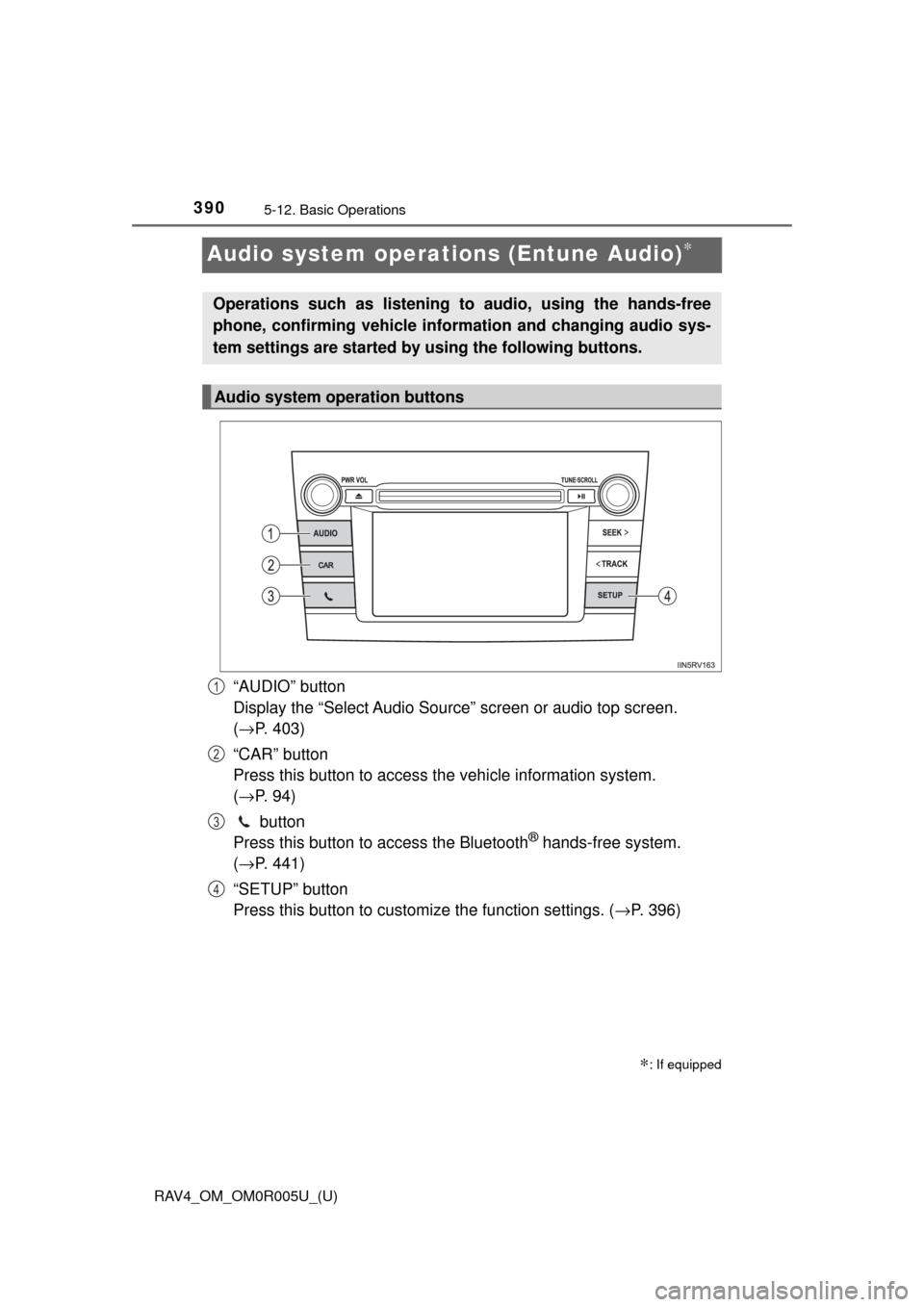
Audio system operations (Entune Audio)∗
“AUDIO” button
Display the “Select Audio Source” screen or audio top screen.
(→ P. 403)
“CAR” button
Press this button to access th e vehicle information system.
( → P. 94)
button
Press this button to access the Bluetooth
® hands-free system.
( → P. 441)
“SETUP” button
Press this button to customize the function settings. ( →P. 396)
∗: If equipped
Operations such as listening to audio, using the hands-free
phone, confirming vehicle inform ation and changing audio sys-
tem settings are started by using the following buttons.
Audio system operation buttons
1
2
3
4